1998 LINCOLN MARK VIII display
[x] Cancel search: displayPage 29 of 170

CHECK AIR RIDE SYSTEM. Displayed when the air suspension
system is not operating properly. If this message is displayed while
driving, pull off the road as soon as safely possible. The message may
also be displayed if the vehicle is loaded beyond the recommended
maximum payload. This is a normal condition if the vehicle is overloaded.
To correct this condition:
1. Remove or redistribute the payload per the recommended maximum
requirements.
2. Turn the ignition switch from ON to OFF to ON again.
If the message reappears:
1. Turn the air suspension switch (located in the trunk) OFF.
2. Contact your dealer for service as soon as safely possible.
For more information, refer toAir suspensionin theDrivingchapter.
CHANGE OIL SOON/OIL CHANGE REQUIRED. Displayed when the
engine oil life remaining is 5 percent or less. When oil life left is between
5% and 0%, the CHANGE OIL SOON message will be displayed. When oil
life left reaches 0%, the OIL CHANGE REQUIRED message will be
displayed.
An oil change is required whenever indicated by the message center.
USE ONLY RECOMMENDED ENGINE OILS.
To reset the oil monitoring system to 100% (or your personalized oil
reset percentage) after each oil change:
1. Press the VEHICLE SETTINGS
control until the OIL CHANGE
RESET display appears.
VEHICLE
SETTINGDRIVER
SETTINGTRIP
ODO RANGE
FUELECONOMY
Instrumentation
30
Page 30 of 170

2. Press the RESET switch and hold
it down for five seconds while the
display counts down to trigger an oil
change reset.
3. After a successful reset, the
message center will display OIL
LIFE RESET TO 100% (if you have
established a personalized oil reset
percentage, the display will instead
show that percentage).
To ensure accurate oil life
indicators, perform this reset
procedure only after an oil change.
GEAR DISPLAY DATA ERR. Displayed when the data used to provide
the redundant gear selection display on the instrument cluster is missing
or invalid. In this case, the instrument cluster redundant gear selection
display is turned off. The driver should use the mechanical position
indication on the center console gear selector as temporary indication. If
this warning stays on, contact your dealer as soon as safely possible.
Function/status error messages
A function/status error message may be displayed by the message center
instead of a warning or requested function if the information is not
currently available because of:
²improper operation of sensor systems
²the vehicle network communication between electronic modules
Error messages have two formats:
²DATA ERROR or DATA ERR. These messages indicate improper
operation of the vehicle network communication between electronics
modules. Contact your dealer as soon as safely possible if these
messages occur on a regular basis.
²SENSOR OPEN or SENSOR SHORT. These messages indicate
improper operation of vehicle sensor systems or vehicle
wiring/connectors between the sensors and the message center.
Contact your dealer as soon as safely possible if these messages occur
on a regular basis.
RESET
N
S W
E DATE
TIMESYSTEM
CHECK
Instrumentation
31
Page 34 of 170

Automatic operation
Press AUTOMATIC and select the desired temperature. The selected
temperature and the word AUTO will appear in the display window. The
EATC system will either heat or cool to achieve the selected
temperature. The system will automatically determine fan speed, airflow
location and if fresh outside air or recirculated air is required. Fan speed
remains automatic unless the fan speed thumbwheel is turned.
When in AUTOMATIC and weather conditions require heat, air will be
sent to the floor. However, if the engine is not warm enough to provide
heat, the fan will be at a low speed and the air will be directed to the
windshield. In 3ó minutes or less, the fan speed will start to increase
and the airflow location will change to the floor area.
If unusual conditions exist (i.e.-window fogging, etc.), the manual
override controls allow you to select airflow locations and the fan control
allows you to adjust fan speed as necessary.
Temperature selection
The display window indicates the
selected temperature, function
(AUTO or one of the override
controls) and manual control of fan
speed (
) if automatic fan speed is
not desired.
To control the temperature, select
any temperature between 18ÉC
(65ÉF) and 29ÉC (85ÉF) by pressing
the blue (cooler) or red (warmer)
buttons.
For continuous maximum cooling, push the blue button until 16ÉC
(60ÉF) is shown in the display window. The EATC will continue
maximum cooling (disregarding the displayed temperature) until a
warmer temperature is selected by pressing the red button.
˚F
AUTO
VENTPNL • FLRMAX A/C
OUTSIDE TEMP
Controls and features
35
Page 35 of 170
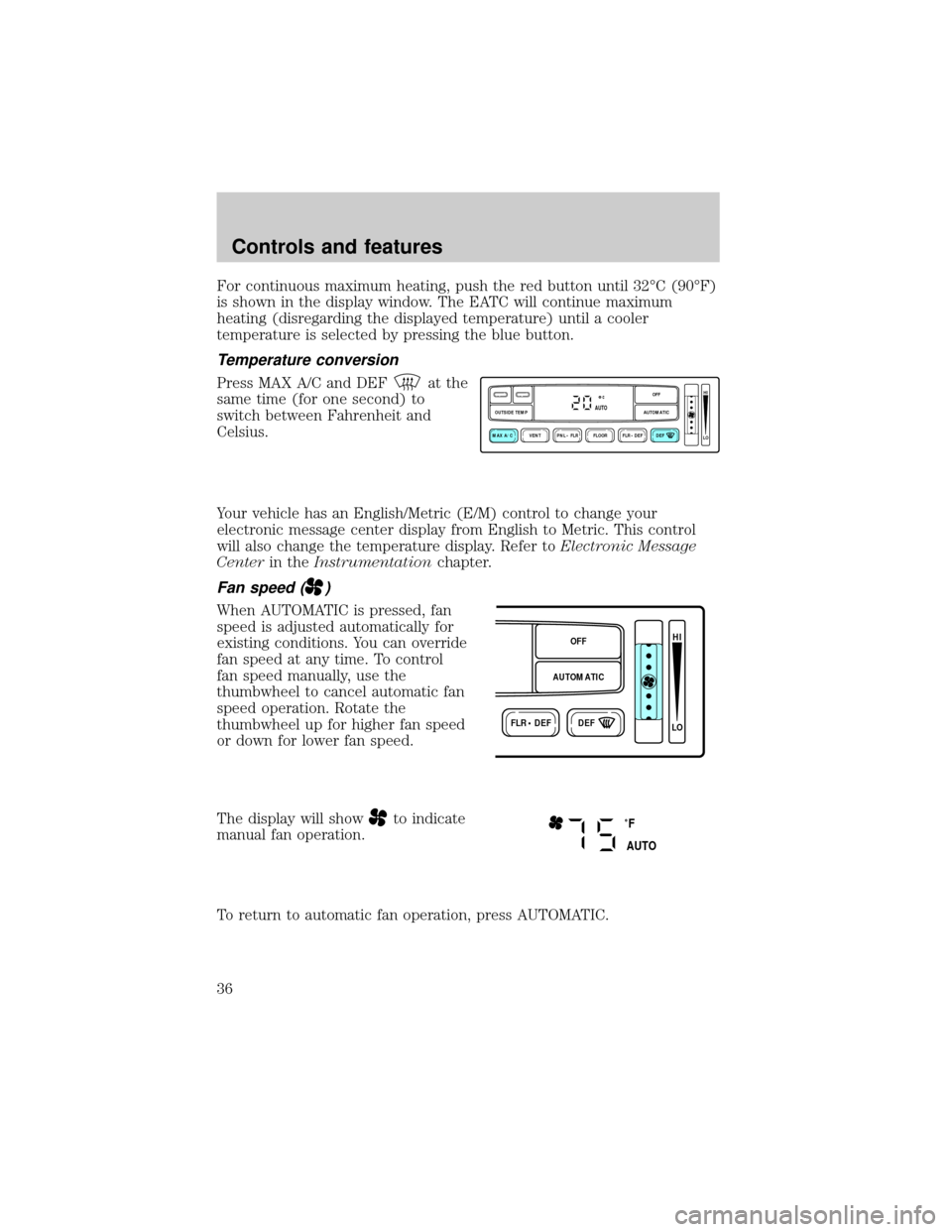
For continuous maximum heating, push the red button until 32ÉC (90ÉF)
is shown in the display window. The EATC will continue maximum
heating (disregarding the displayed temperature) until a cooler
temperature is selected by pressing the blue button.
Temperature conversion
Press MAX A/C and DEFat the
same time (for one second) to
switch between Fahrenheit and
Celsius.
Your vehicle has an English/Metric (E/M) control to change your
electronic message center display from English to Metric. This control
will also change the temperature display. Refer toElectronic Message
Centerin theInstrumentationchapter.
Fan speed ()
When AUTOMATIC is pressed, fan
speed is adjusted automatically for
existing conditions. You can override
fan speed at any time. To control
fan speed manually, use the
thumbwheel to cancel automatic fan
speed operation. Rotate the
thumbwheel up for higher fan speed
or down for lower fan speed.
The display will show
to indicate
manual fan operation.
To return to automatic fan operation, press AUTOMATIC.
VENT PNL • FLR FLOOR FLR • DEF DEF
HI
LO
MAX A/C
OUTSIDE TEMP AUTOMATICOFFAUTO
FLR • DEFDEF
HI
LO
AUTOMATICOFF
˚F
AUTO
Controls and features
36
Page 36 of 170

Manual override controls
The override controls are located at
the bottom of the EATC and allow
you to determine where airflow is
directed. To return to full automatic
control, press AUTOMATIC.
The air conditioning compressor will operate in all modes except FLOOR
and VENT. It will also operate only when required when AUTOMATIC
has been selected. However, the air conditioning will only function if the
outside temperature is about 10ÉC (50ÉF) or above.
Since the air conditioner removes considerable moisture from the air
during operation, it is normal if clear water drips on the ground under
the air conditioner drain while the system is working and even after you
have stopped the vehicle.
Under normal conditions, your vehicle's climate control system should be
left in any position other than MAX A/C or OFF when the vehicle is
parked. This allows the vehicle to ªbreatheº through the outside air inlet
duct.
²MAX A/C-Uses recirculated air to cool the vehicle. The temperature
will display 16ÉC (60ÉF). To exit, press AUTOMATIC or any other
override controls. MAX A/C is noisier than normal A/C but more
economical and will cool the inside of the vehicle faster. Airflow is
from the instrument panel registers. This mode can also be used to
prevent undesirable odors from entering the vehicle.
²VENT-Distributes outside air through the instrument panel registers.
However, the air cannot be cooled below the outside temperature
because the air conditioning does not operate in this mode.
²PNL²FLR-Distributes outside air through the instrument panel
registers and the floor ducts. Heating and air conditioning capabilities
are provided in this mode. The air will be heated or cooled based on
the temperature selection. For added customer comfort, the air
distributed through the floor ducts will be slightly warmer than the air
sent to the instrument panel registers.
VENT PNL • FLR FLOOR FLR • DEF DEF
HI
LO
MAX A/C
OUTSIDE TEMP AUTOMATICOFFFAUTO
Controls and features
37
Page 37 of 170

²FLOOR-Allows for maximum heating by distributing outside air
through the floor ducts. However, the air cannot be cooled below the
outside temperature because the air conditioning does not operate in
this mode.
²FLR²DEF-Distributes outside air through the windshield defroster
ducts and the floor ducts. Heating and air conditioning capabilities are
provided in this mode. The air will be heated or cooled based on the
temperature selection. For added customer comfort, the air
distributed through the floor ducts will be slightly warmer than the air
sent to the windshield defroster ducts. If the temperature is about
10ÉC (50ÉF) or higher, the air conditioner will automatically
dehumidify the air to prevent fogging.
²DEF
-Distributes outside air through the windshield defroster
ducts. It can be used to clear ice or fog from the windshield. If the
outside air temperature is about 10ÉC (50ÉF) or higher, the air
conditioner will automatically dehumidify the air to prevent fogging.
²OFF-Outside air is shut out and the fan will not operate. For short
periods of time only, use this mode to prevent undesirable odors from
entering the vehicle.
Displaying outside temperature
Press OUTSIDE TEMP to display
the outside air temperature. It will
be displayed for four seconds.
If a manual override function is selected while the outside temperature is
displayed, the new function will be displayed for four seconds after it is
changed, then the outside temperature will return to the window along
with the override selection.
The outside temperature reading is most accurate when the vehicle is
moving. Higher readings may be obtained when the vehicle is not
VENTPNL • FLRMAX A/C
OUTSIDE TEMP
Controls and features
38
Page 56 of 170

Auto save
Any change made by the driver to one or more of the above Personality
Memory settings will be updated and saved automatically. The display,
DRIVER 1 (or DRIVER 2) SETTING SAVED, will appear on the Message
Center for five seconds as a confirmation of the update to Personality
Memory.
If the driver does not use the remote entry transmitter or keyless entry
keypad to unlock the doors when entering the vehicle, or does not select
the Memory 1 or Memory 2, then any change to the Personality Memory
settings will not be automatically saved. Instead, the driver will be
prompted by the Message Center: ªIDENTIFY DRIVER TO SAVE.º Press
SELECT (located on the right side of the instrument cluster) to identify
yourself; otherwise, the new setting (and any subsequent changes) will
not be saved.
Turning Personality off
The Personality Memory feature can be turned off using the Memory
OFF control on the driver's door. The amber indicator will be lit when
the feature is turned off. Selecting either Memory 1 or Memory 2 will
turn on the Personality Memory feature and recall the saved settings.
When Personality is off, the vehicle will function normally. When
Personality is off and the driver tries to make a setting change, there will
be no prompts on the Message Center asking which driver to save the
setting to.
CENTER CONSOLE
Your vehicle is equipped with a variety of console features. These
include:
²utility compartment
²cupholders
²ashtray and lighter
²rear ashtray
Use only soft cups in the cupholder. Hard objects can injure you
in a collision.
Controls and features
57
Page 110 of 170

Fuse/Relay
LocationFuse Amp
RatingDescription
5 10A Day/Night Sensor, Cluster (Oil Pressure,
Brake Warning, Speed Control), I/P
Warning Indicator Display, Steering
Column/Ignition/Lighting Module (Logic
Input)
6 10A Starter Motor Relay
7 15A Steering Column/Ignition/Lighting Module
(Left Turn Lamps)
8 Ð Not Used
9 10A Blower Motor Relay, Electronic Automatic
Temperature Control Module
10 30A Windshield Wipers
11 10A Coil Drivers, Radio Noise Capacitors, PCM
Relay
12 10A Passenger's Power and Heated Seats
13 15A Steering Column/Ignition/Lighting Module
(Right Turn Lamps)
14 30A Cigar Lighter, Cellular Phone, Power Point
15 10A Air Bag Diagnostic Monitor
16 20A Moonroof
17 10A Instrument Cluster (Charging Indicator)
18 Ð Not Used
19 10A Steering Column/Ignition/Lighting Module
(Left Low-Beam Headlamp)
20 10A Message Center, Instrument Cluster,
Electronic Automatic Temperature Control
Module
21 10A EVAC/Fill Connector, Anti-Lock Brake
Control Module
22 Ð Not Used
23 Ð Not Used
24 Ð Not Used
Roadside emergencies
111