Page 1035 of 1681
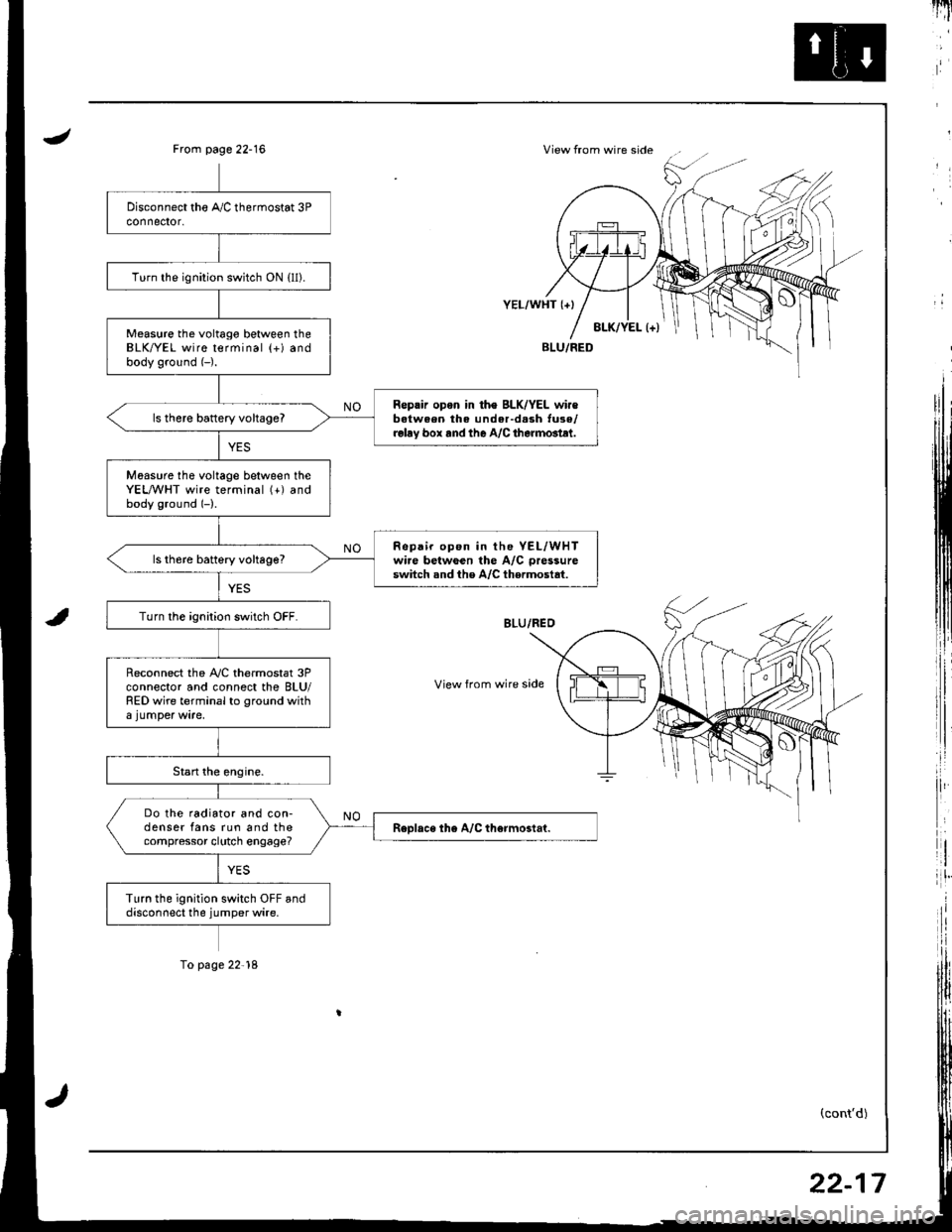
JView from wire sideFrom page 22-16
i,:,
il
rlt'
8LK/YEL l+)
YEL/WHT {+}
View from wire side
BLU/FED
(cont'd)
Turn the ignition switch ON {ll).
Measure the voltago between theBLK/YEL wire terminal (+) andbody ground (-).
Reprir opon in th€ BLK/YEL wir€batween the under-d.sh tuse/relay box rnd the A/C therm6tlt.
ls there battery vohageT
Moasure tho voltage between theYEL,A/VHT wire terminal (+) andbody ground (-).
Repair op6n in the YEL/WHTwire betwGen the A/C pressure
switch snd the A/C thermostat.ls th6re battery voltage?
Turn the ignition switch OFF.
Reconnect the A,/C thermostat 3Pconnector and connect the BLU/RED wire terminal to ground with
Do the radiator and con-denser fans run and thecompressor clutch engage?
Turn the ignition switch OFF anddisconnect the jumper wire.
To page 22'18
22-17
Page 1036 of 1681
Troubleshootang
A/C System (cont'd)
8
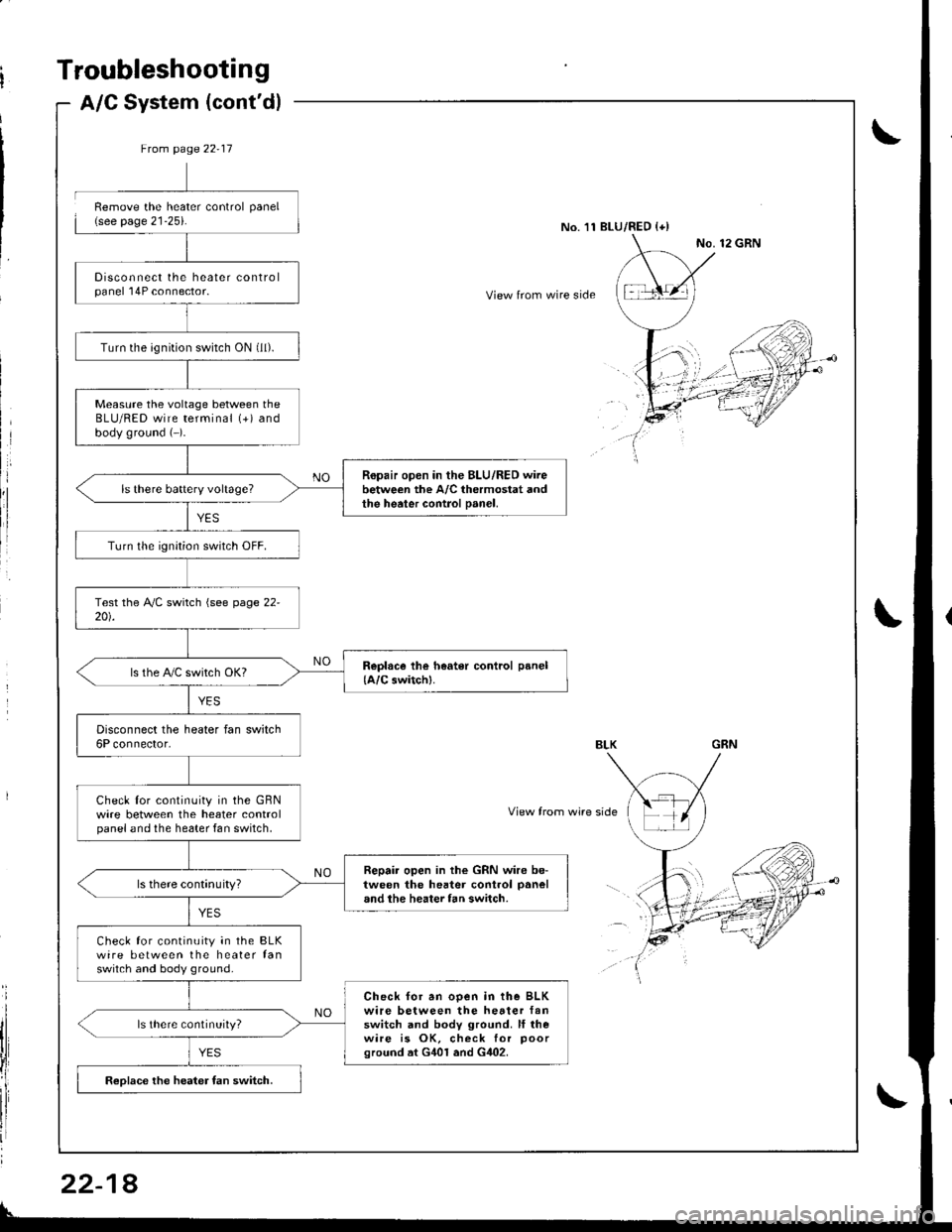
Ftom page 22-17
Disconnect the heater controlpanel 'l4P connector.
Turn the ignition switch ON (ll).
Measure the voltage between theBLU/RED wire terminal (+) andbody ground (-).
Ropair open in the BLU/RED wirebetween the A/C thermostat andthe heater control Danel,
Turn lhe ignition switch OFF.
ls the PVC switch OKI
Disconnect the heater fan switch6P connector.
Check lor continuity in the GBNwire between the heater controlpanel and the he6ter fan switch,
Repair open in the GRN wire be-tween the hester control panel
and the heater fan switch.
Check for continuity in the BLKwire between the heater fanswitch and body ground.
Check for an ooen in the BLKwire between the hetter fanswitch and body ground. ll rhewire is OK, check for poorground at G401 and G402.
ls there continuity?
Reolace the heater fan switch.
Remove the heater control panel(see page 21-25).No.'11 BLU/RED {+)
View from wire side
View from wire side
22-1
Page 1037 of 1681
A/G Thermostat
I
I
a
a
a
t)
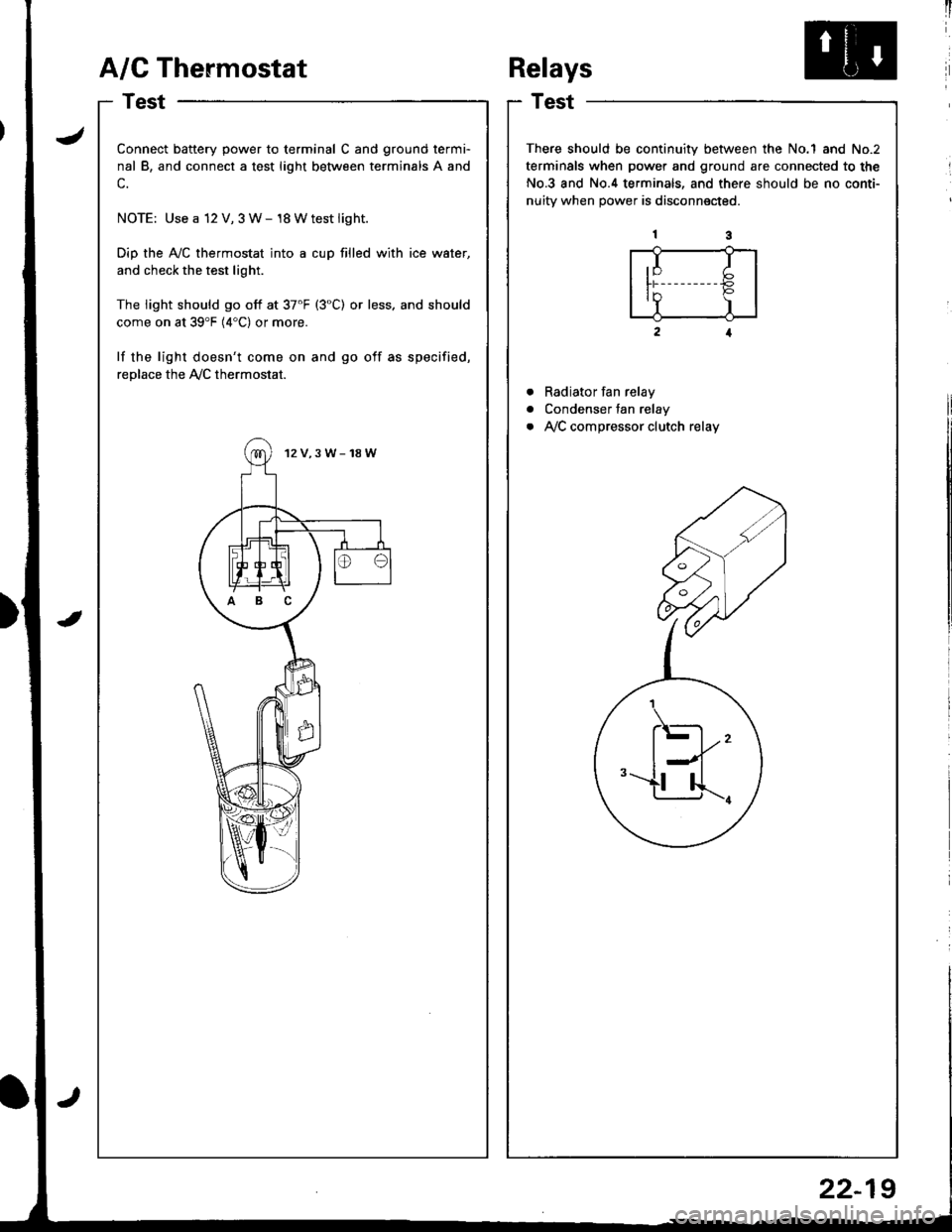
Connect battery power to terminal C and ground termi-
nal B, and connect a test light between terminals A and
c.
NOTE: Use a 12 V, 3 W- 18 Wtest light.
Dip the Ay'C thermostat into a cup filled with ice water,
and check the test light.
The light should go off at 37'F (3"C) or less. and should
come on at 39'F (4"C) or more.
lf the light doesn't come on and go off as specified,
replace the Ay'C thermostat.
12V,3W-18W
ABC
Relays
Test
There should be continuity between the No.1 and No.2
terminals when power and ground are connected to the
No.3 and No.4 terminals, and there should be no conti-
nuitv when Dower is disconnected.
Radiator fan relay
Condenser fan relay
Ay'C compressor clutch relay
,I I
ln P'Y )
.\-
l--l''-u...r.
22-19
Page 1041 of 1681
J
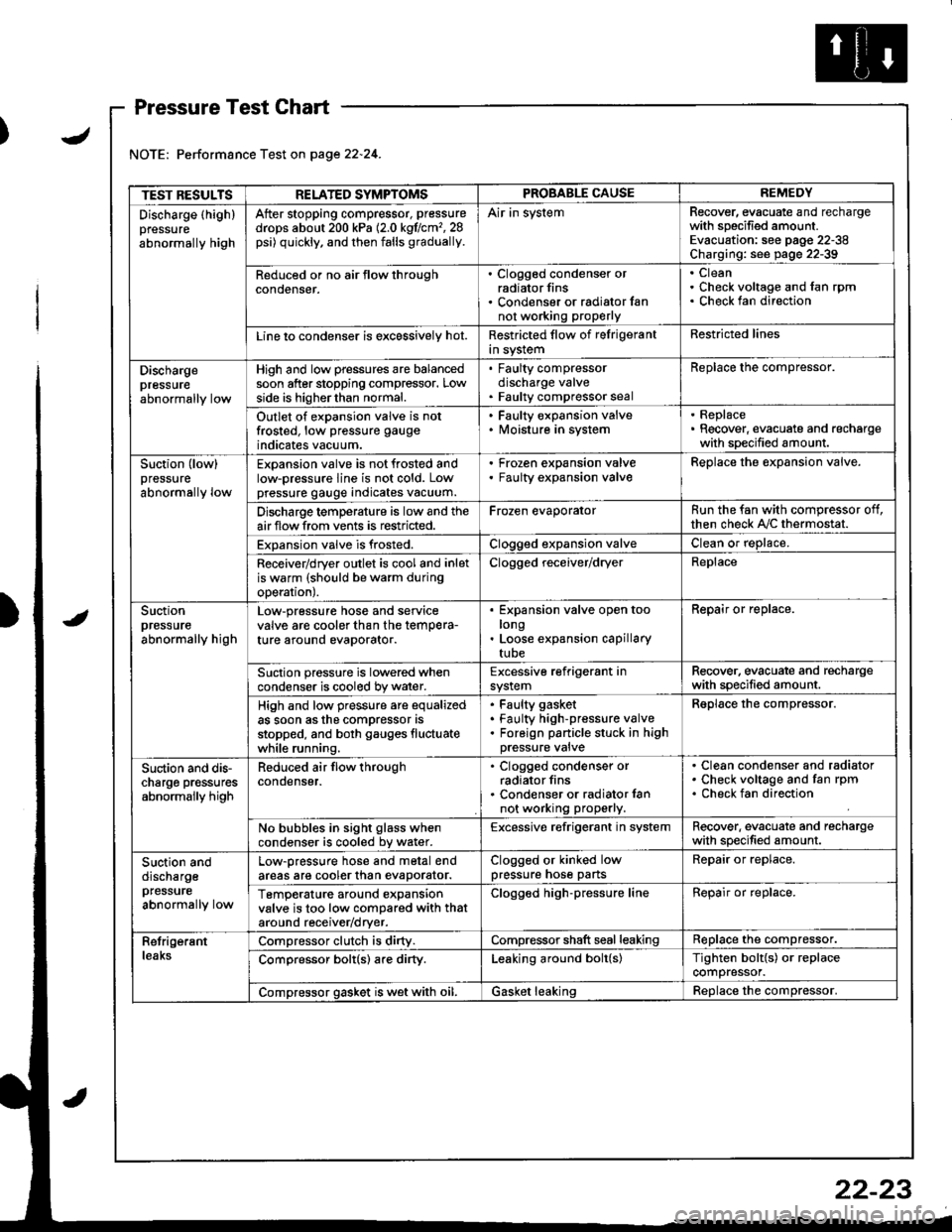
Pressure Test Chart
Performance Test on page 22.24.
TEST RESULTSRELATED SYMPTOMSPROBABLE CAUSEREMEDY
Discharge (highlpressure
abnormally high
After stopping compressor, pressure
drops about 200 kPa (2.0 kgflcm',28psi) quickly, and then falls gradually.
Air in systemRecover, evacuate and rechargewith specified amount.Evacuation: see pag€ 22-38Charging: see page 22-39
Reduced or no air tlow throughconoenser.
. Clogged condenser orradiator fins. Condenser or radialor fannot working proPerly
CleanCheck voltage and fan rpmCheck fan direction
Line lo condenser is excessively hot.Restricted flow of felrigerantin systemRestricted lines
Dischargepressureabnormally low
High and low pressures are balancedsoon after stopping compressor. Lowside is higherthan normal.
. Faulty compressordischarge valve. Faulty compressor seal
Replace the compressor.
Outlet of expansion valve is notfrosted, low pressure gauge
indicates vacuum.
. Faulty expansion valve. lvloisture in system
. Replace. Recover, evacuate and rechargewith specified amount.
Suction (low)pressure
abnormally low
Expansion valve is not frosted andlow-pressure line is not cold. Lowpressure gauge indicates vacuum.
Frozen expansion valveFaulty expansion valveReplace the expansion valve.
Discharge temperature is low and theairflow from vents is restricted.Frozen evaporatorRun the fan with compressor off,then check A,/C thermostat.
Expansion valve is frosted.Clogged expansion valveClean or replace.
Receiver/dryer outlet is cool and inletis warm (should be warm duringoperal|onJ.
Clogged receiver/dryerReplace
Suctionpressureabnormally high
Low-pressure hose and seryicevalve are cooler than the temPera-ture around evaporator.
Expansion valve open toolongLoose expansion capillarytube
Repair or replace.
Suction pressure is lowered whencondenser is cooled by water.Excessive refrigerant insystemRecover. evacuate and rechargewith specified amount.
High and low pressure are equalizedas soon asthe compressor asstopped, and both gauges fluctuatewhile running.
Faulty gasket
Faulty high-pressure valveForeign panicle stuck in highpressure valve
Reolace the comDressor.
Suction and dis-charge pr€ssuresabnormally high
Reduced air flow throughcondenser.
. Clogged condenser orradiator fins. Condenser or radiator lannot working properly.
Clean condenser and radiatorCheck voltage and fan rpmCheck fan direction
No bubbles in sight glass whencondenser is cooled bv water.Excessive refrigerant in systemRecover. evacuate and rechargewith specified amount.
Suction anddischargepfessure
abnormally low
Low-pressure hose and metal endareas are cooler than evaDorator.Clogged or kinked lowpressure hose partsRepair or replace.
TemP€rature around expansionvalve is too low compared with thataround receiv€r/dryer.
Clogged high-pressure lineRepair or replace.
RetrigerantleaksCompressor clutch is dirty.Compressor shaft seal leakingReplace the compressor.
Comoressor bolt(s) are dirty.Leaking around bolt(s)Tighten bolt{s) or replacecompressor.
Compressor gasket is wet with oil.Gasket leakingReolace the comoressor.
22-23
Page 1044 of 1681
Evaporator
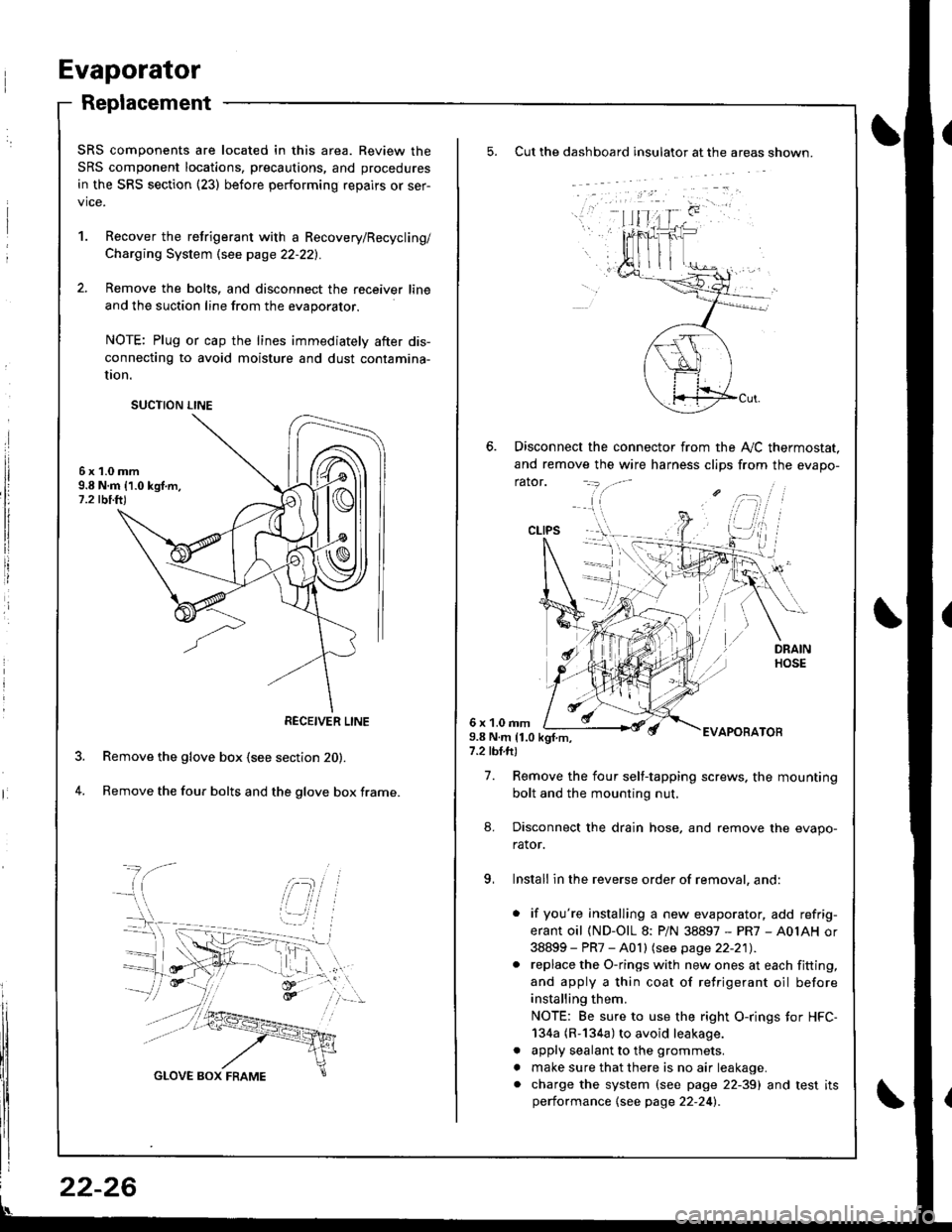
Replacement
Cut the dashboard insulato. at the areas shown.
Disconnect the connector from the A,,/C thermostat.
and remove the wire harness clips from the evapo-
rator.
6 x 1.0 rnm9.8 N.m 11.0 kgf.m,7.2 tbl.ft)
EVAPOBATOB
7. Remove the four self-tapping screws. the mounting
bolt and the mounting nut.
8. Disconnect the drain hose, and remove the evapo-
rator.
9, Install in the reverse order of removal, and:
. if you're installing a new evaporator, add refrig-
erant oil (ND-OlL 8: PiN 38897 - PR7 - A0IAH or
38899 - PR7 - A0 I I lsee page 22-21) .. replace the O-rings with new ones at each fitting,
and apply a thin coat of refrigerant oil before
installing them.
NOTE: Be sure to use the right O-rings tor HFC-
134a (R-134a) to avoid leakage.
. apply sealant to the grommets.
. make sure that there is no air leakage.. charge the system (see page 22-39) and test itsperformance {see page 22-24l.
CLIPS
SRS components are located in this area. Review the
SRS component locations, precautions, and procedures
in the SRS section {23) before performing repairs or ser-
vice.
1. Recover the retrigerant with a Recovery/Recycling/
Charging System \see page 22-221.
2. Remove the bolts, and disconnect the receiver line
and the suction line from the evaporator.
NOTE: Plug or cap the lines immediately after dis-
connecting to avoid moisture and dust contamina-
UOn.
6x1.0mm9.8 N.m 11.0 kgf.m,1.2 tbi.ft)
Remove the glove box (see section 20).
Remove the four bolts and the glove box frame.4.
SUCTION LINE
RECEIVER LINE
22-26
Page 1045 of 1681
J
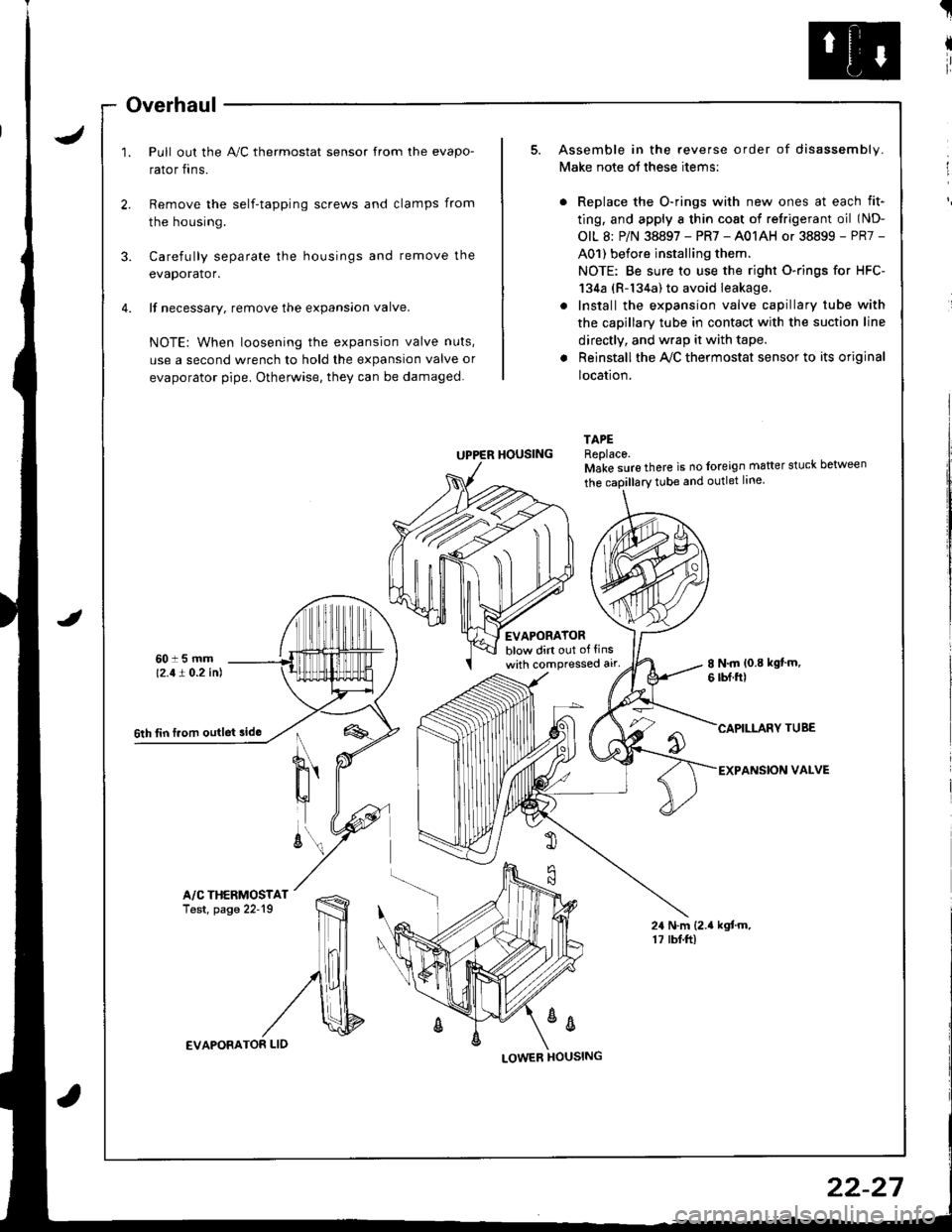
Overhaul
Pull out the A,/C thermostat sensor from the evapo-
rator fins.
t
I
ir
I
Remove the self-tapping screws and clamps from
the housing.
3. Carefully separate the housings and remove the
evaporator.
4. lf necessary. remove the expansion valve.
NOTE: When loosening the expansion valve nuts,
use a second wrench to hold the expansion valve or
evaporator pipe. Otherwise, they can be damaged.
Assemble in the reverse order of disassembly.
Make note ot these items:
Replace the O-rings with new ones at each fit-
ting, and apply a thin cost of retrigerant oil (ND-
OIL 8: P/N 38897 - PR7 - A01AH or 38899 - PR7 -
A01) before installing them.
NOTE: Be sure to use the right O-rings for HFC-
134a (R-134a) to avoid leakage.
Install the expansion valve capillary tube with
the capillary tube in contact with the suction line
directly, and wrap it with tape.
Reinstall the Ay'C thermostat sensor to its original
location.
TAPEReplace.Make sure there is no foreign matter stuck between
tEVAPORATORblow dirt out of tinswith compressed alr'8 N.m {0.8 kgt'm.6 rbf.ftl
CAPILLARY TUBE
EXPANSION VALVE
24 N.m (2.{ kgtm.17 rbf.ftl
UPPER HOUSING
%
6th tin f.om outlet sido
A/C THERMOSTATTest, page 22'19
EVAPORATOR LID
22-27
Page 1103 of 1681
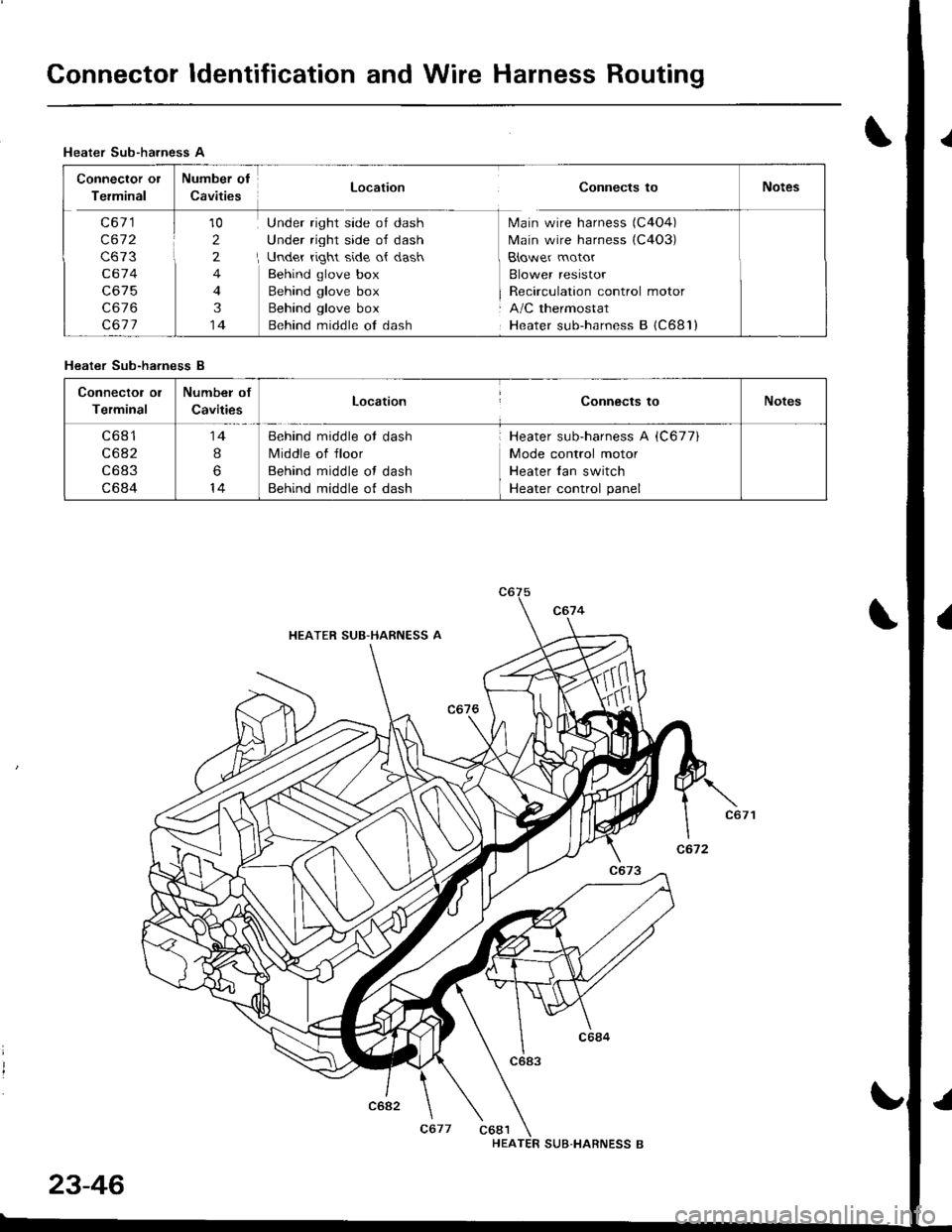
Connector ldentification and Wire Harness Routing
Heater Sub-harness A
Connector or Number of-::'- --. - .-' -:-".: -- Location Connects toI etmtnal uavtt|esNotes
C67'1 J 10 Under right side of dash Main wire harness (C4O4)
C672 i 2 Under right side of dash Main wire harness (C4O3)
C673 t, 2 I Under right side ot dash B{ower motor
C674 4 Behind glove box Blower resistor
C675 4 Behind glove box I Recirculation control motor
C676 3 Behind glove box i A/C thermostat
C677 14 Behind middle ol dash Heater sub-harness B {C681)
Connector ol
Terminal
Number of
CavitiesLocationConnects toNotes
c681
c682
c683
c684
14
I
6
14
Behind middle ot dash
Middle of floor
Behind middle ot dash
Behind middle of dash
Heater sub-harness A iC677)
Mode control motor
Heater {an switch
Heater control panel
Heater Sub-ha.ness B
HEATER SUB-HARNESS A
I
C677 C681HEA
23-46
SUB.HARNESS B
I
Page 1176 of 1681
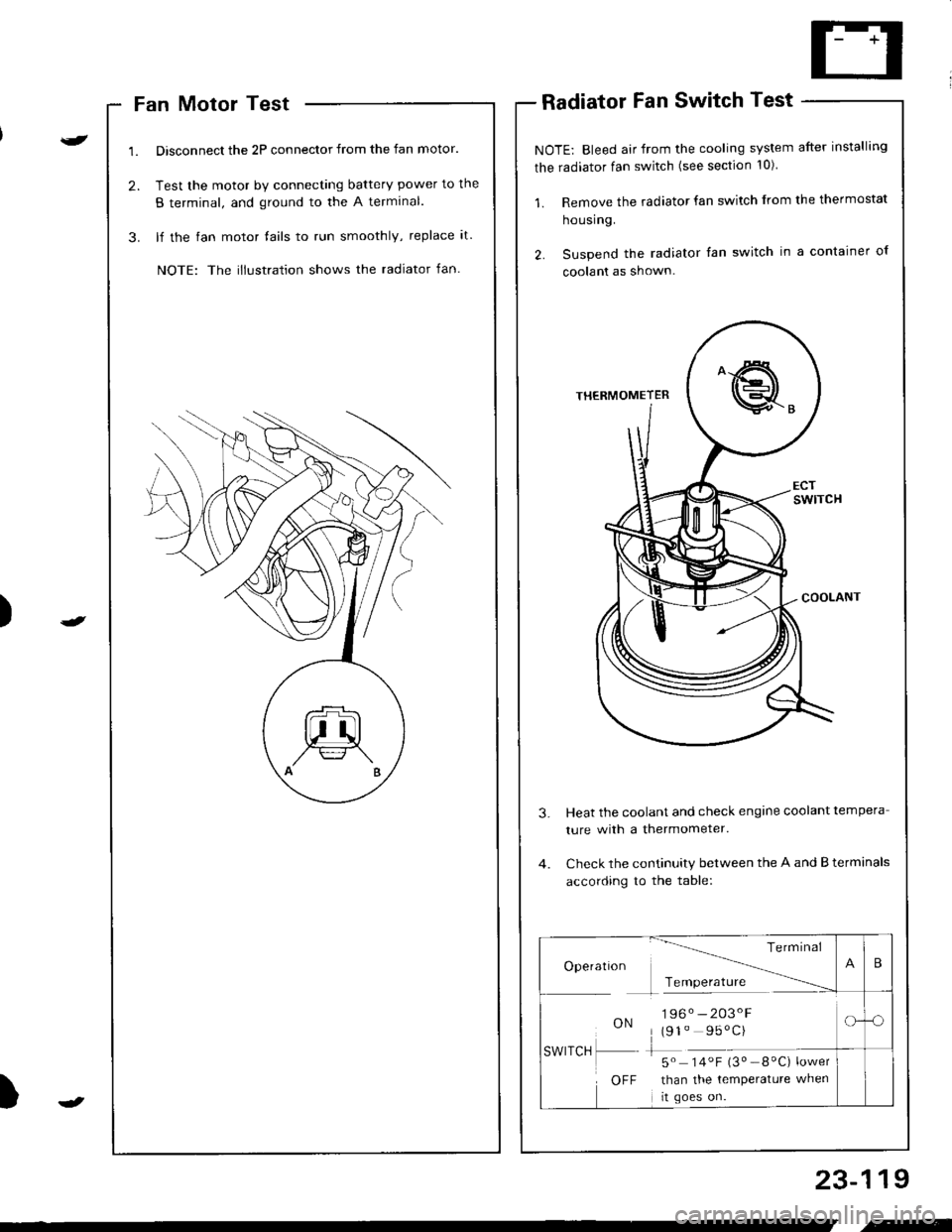
)
Fan Motor Test
Disconnect the 2P connector from the fan motor.
Test the motor by connecting battery power to the
B terminal, and ground to the A termlnal.
lf the fan motor fails to run smoothly, replace it.
NOTE: The illustration shows the radiator fan.
Radiator Fan Switch Test
NOTE: Bleed air from the cooling system after installing
the radiator fan switch (see section 10)
1. Remove the radiator fan switch from the thermostat
housing.
2. Suspend the radiator fan switch in a container ol
coolanl as shown.
Heat the coolant and check engine coolant tempera
ture with a thermometer.
Check the continuity between the A and B terminals
according to the table:
23-119
Te rm Inal
Operatlon -------\
Tcmoerature ------
ON196. -203'F
(91" 95'C)
-5" 14.F i3" _8"C) ;*,*
than the temperature when
rt goes on.
SWITCH
OFF
B
-o
.-