1998 HONDA CIVIC COUPE manual transmission
[x] Cancel search: manual transmissionPage 1 of 251
 to navigate through\
this reference.
For a printed owners manual, click on authorized manuals or")
1998 Civic Coupe Online Reference Owner's Manual
Use these links (and links throughout this manual) to navigate through\
this reference.
For a printed owner's manual, click on authorized manuals or go to www.h\
elminc.com.
Contents
Introduction ........................................................................\
........................ .........................................
i
A Few Words About Safety........................................................................\
.........................................ii
Driver and Passenger Safety ........................................................................\
......................................3
Proper use and care of your vehicle's seat belts, and Supplemental Restr\
aint System.
Instruments and Controls........................................................................\
.........................................49
Instrume nt panel indicator and gauge, and how to use dashboard and steering colu\
mn controls.
Comfort and Convenience Features ........................................................................\
...................... 85
How to operate the climate control system, the audio system, and other c\
onvenience features.
Before Driving........................................................................\
......................................................... 107
What gasoline to use, how to break-in your new vehicle, and how to load luggage and other cargo.
Driving ........................................................................\
..................................................................... 119
The proper way to start the engine, shift the transmission, and park, pl\
us towing a trailer.
Maintenance........................................................................\
.............................................................141
The Maintenance Schedule shows you when you need to take you r vehicle to the dealer.
Appearance Care........................................................................\
......................................................199
Tips on cleaning and protecting your vehicle. Things to look for if your\
vehicle ever needs body repairs.
Taking Care of the Unexpected........................................................................\
..............................205
This section covers several problems motorists sometimes experience, an d how to handle them.
Technical Information........................................................................\
.............................................229
ID numbers, dimensions, capacities, and technical information.
Warranty and Customer Relations (U.S. and Canada)................................................................243
A summary of the warranties covering your new Acura, and how to contact \
us.
Authorized Manuals (U.S. only)........................................................................\
..............................249
How to order manuals and other technical literature.
Index........................................................................\
............................................................................. I
A summary of information you need when you pull up to the fuel pump. Service Information Summary Owner's Identification
Page 121 of 251
Driving
This section gives you tips on starting the engine under various
conditions, and how to operate the 5-speed manual and automatic
transmissions. It also includes impor-
tant information on parking your
vehicle, and the braking system. Preparing to Drive......................... 120
Starting the Engine........................ 121 Starting in Cold Weatherat High Altitude ..................... 121
5-speed Manual Transmission..... 122 Recommended Shift Points...... 122
Maximum Allowable Speeds.... 123
Automatic Transmission............... 124 Shift Lever Position Indicator.. 124
Shift Lever Positions................. 125
Maximum Allowable Speeds.... 127
Shift Lock Release..................... 128
Continuously Variable Transmission (CVT)............. 129
Parking............................................ 133 Parking Tips............................... 133
The Braking System...................... 134 Brake Wear Indicators.............. 134Brake System Design................ 135
Anti-lock Brakes........................ 135
Important SafetyReminders.......................... 136
ABS Indicator......................... 137
Driving in Bad Weather................ 138
Towing a Trailer............................ 139
DrivingMain Menu s t
Page 123 of 251
Starting the Engine
1. Apply the parking brake.
2. In cold weather, turn off all electrical accessories to reduce
the drain on the battery.
3. Manual Transmission:
Push the clutch pedal down all the
way. START (III) does not
function unless the clutch pedal is
depressed.
Automatic Transmission (Including
CVT):
Make sure the shift lever is in Park. Press on the brake pedal.
4. Without touching the accelerator
pedal, turn the ignition key to the
START (III) position. If the enginedoes not start right away, do not
hold the key in START (III) for
more than 15 seconds at a time.
Pause for at least 10 seconds
before trying again.
5. If the engine does not start within
15 seconds, or starts but stalls
right away, repeat step 4 with the accelerator pedal pressed half-way
down. If the engine starts, release
pressure on the accelerator pedal so the engine does not race.
6. If the engine still does not start, press the accelerator pedal all the
way down and hold it there while starting in order to clear flooding.
As before, keep the ignition key in the START (III) position for no
more than 15 seconds. Return to step 5 if the engine does not start.
If it starts, lift your foot off theaccelerator pedal so the enginedoes not race.
Starting in Cold Weather at High
Altitud
e (Above 8,000 feet/
2,40
0 meters)
An engine is harder to start in cold
weather. The thinner air found athigh altitude above 8,000 feet (2,400 meters) adds to the problem.
Use the following procedure:
1. Turn off all electrical accessories to reduce the drain on the battery.
2. Push the accelerator pedal half- way to the floor and hold it there
while starting the engine. Do not
hold the ignition key in START(III) for more than 15 seconds.
When the engine starts, release the accelerator pedal gradually as
th
e
engine speeds up and smooths
out.
3. I
f the engine fails to start in step 2,
push the accelerator pedal to the
floor and hold it there while you
try to start the engine for no more
than 15 seconds. If the engine does not start, return to step 2.
DrivingMain Menu Table of Contents s t
Page 124 of 251
5-speed Manual Transmission
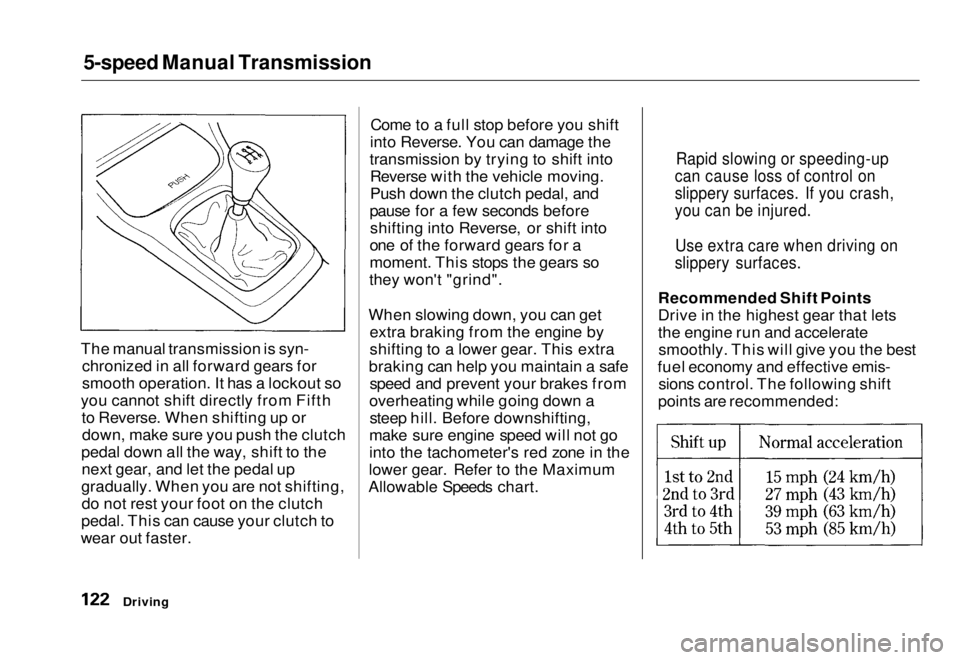
The manual transmission is syn- chronized in all forward gears for
smooth operation. It has a lockout so
you cannot shift directly from Fifth to Reverse. When shifting up ordown, make sure you push the clutch
pedal down all the way, shift to the next gear, and let the pedal up
gradually. When you are not shifting, do not rest your foot on the clutch
pedal. This can cause your clutch to
wear out faster. Come to a full stop before you shift
into Reverse. You can damage the
transmission by trying to shift into Reverse with the vehicle moving.
Push down the clutch pedal, and
pause for a few seconds before shifting into Reverse, or shift into
one of the forward gears for a
moment. This stops the gears so
they won't "grind".
When slowing down, you can get extra braking from the engine by
shifting to a lower gear. This extra
braking can help you maintain a safe speed and prevent your brakes from
overheating while going down a steep hill. Before downshifting,
make sure engine speed will not go
into the tachometer's red zone in the
lower gear. Refer to the Maximum
Allowable Speeds chart. Recommended Shift Points
Drive in the highest gear that lets
the engine run and accelerate
smoothly. This will give you the best
fuel economy and effective emis- sions control. The following shift
points are recommended:
Driving
Rapid slowing or speeding-up
can cause loss of control on
slippery surfaces. If you crash,
you can be injured.
Use extra care when driving on
slippery surfaces.Main Menu Table of Contents s t
Page 125 of 251
5-speed Manual Transmission
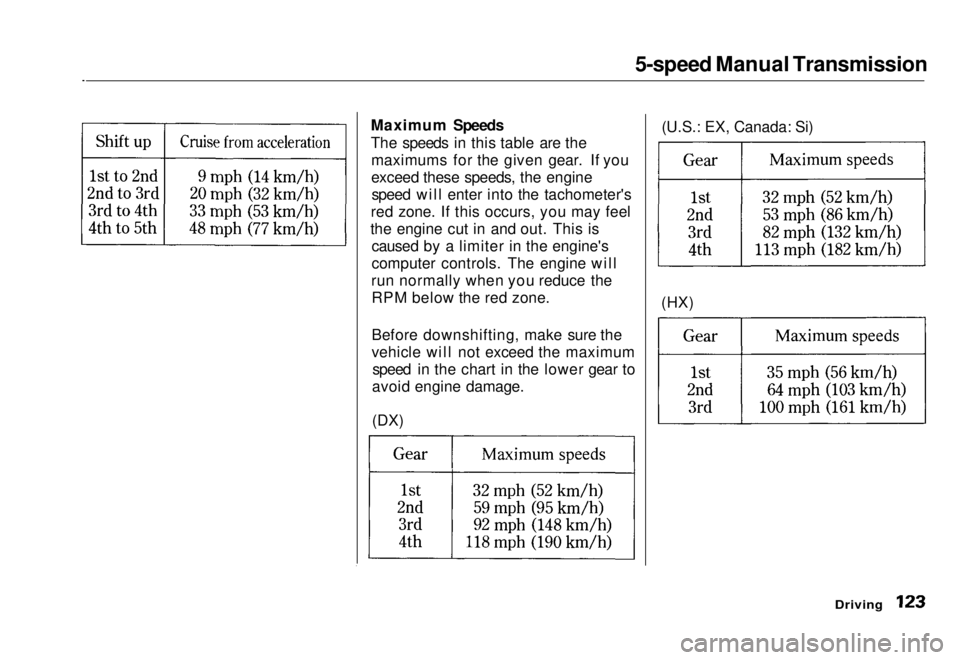
Maximum Speeds
The speeds in this table are the maximums for the given gear. If you
exceed these speeds, the enginespeed will enter into the tachometer's
red zone. If this occurs, you may feel
the engine cut in and out. This is caused by a limiter in the engine's
computer controls. The engine will
run normally when you reduce the RPM below the red zone.
Before downshifting, make sure the
vehicle will not exceed the maximum speed in the chart in the lower gear to
avoid engine damage.
(DX) (HX)(U.S.: EX, Canada: Si)
DrivingMain Menu Table of Contents s t
Page 135 of 251
Parking
Always use the parking brake when you park your vehicle. The indicator on the instrument panel shows that
the parking brake is not fully
released; it does not indicate that the
parking brake is firmly set. Make sure the parking brake is set firmly
or your vehicle may roll if it is
parked on an incline.
If your vehicle has an automatic
transmission, set the parking brake
before you put the transmission in Park. This keeps the vehicle from
moving and putting pressure on the
parking mechanism in the
transmission — making it easier to move the shift lever out of Park
when you want to drive away. If the vehicle is facing uphill, turn
the front wheels away from the curb.
If you have a manual transmission,
put it in first gear.
If the vehicle is facing downhill, turn
the front wheels toward the curb. If
you have a manual transmission, put it in reverse gear.
Make sure the parking brake is fully
released before driving away.
Driving with the parking brake
partially set can overheat or damage
the rear brakes. Parking Tips Make sure the moonroof and the
windows are closed. Turn off the lights.
Place any packages, valuables, etc.,
in the trunk or take them with you. Lock the doors with the key or the
remote transmitter. Never park over dry leaves, tall
grass, or other flammable materials. The three way catalytic
converter gets very hot, and could
cause these materials to catch on
fire.
DrivingMain Menu Table of Contents s t
Page 142 of 251
Maintenance
This section explains why it is important to keep your vehicle well
maintained and to follow basic
maintenance safety precautions.
This section also includes Maintenance Schedules for normaldriving and severe driving conditions,
a Maintenance Record, and instruc-
tions for simple maintenance tasks
you may want to take care of yourself.
If you have the skills and tools to per-
form more complex maintenance tasks on your Honda, you may want
to purchase the Service Manual. See
page 219 for information on how to obtain a copy, or see your Honda
dealer.
Maintenance Safety....................... 142
Important Safety Precautions.. 143
Maintenance Schedule.................. 144
Maintenance Record..................... 151
Owner Maintenance Checks........ 153
Fluid Locations............................... 154
Engine Oil....................................... 155 Adding Oil................................... 155Recommended Oil..................... 155Synthetic Oil............................... 156
Additives..................................... 156
Changing the Oil and Filter...... 157
Cooling System.............................. 159
Adding Engine Coolant............. 159Replacing Engine Coolant........ 161
Windshield Washers..................... 164
Transmission Fluid........................ 164
Automatic
Transmission.......................... 164
5-speed Manual
Transmission.......................... 166
Brake and Clutch Fluid................. 166
Brake System............................. 167Clutch System............................ 167
Power Steering............................... 168
Air Cleaner Element...................... 169 Spark Plugs..................................... 171
Replacement............................... 171
Specifications............................. 172
Battery............................................ 173
Wiper Blades.................................. 175
Air Conditioning System............... 177 Drive Belts...................................... 178
Timing Belt..................................... 178
Tires................................................ 179 Inflation....................................... 179
Recommended Tire Pressures
for Normal Driving............ 180
Inspection................................... 181
Maintenance............................... 181
Tire Rotation.............................. 182
Replacing Tires and Wheels ....
183
Wheels an d
Tires....................... 184
Winter Driving........................... 184 Snow Tires.............................. 184
Tire Chains............................. 185
Lights.............................................. 186 Headlight Aiming...................... 188
Replacing Bulbs......................... 189
Storing Your Vehicle..................... 197
MaintenanceMain Menu s t
Page 155 of 251
Fluid Locations
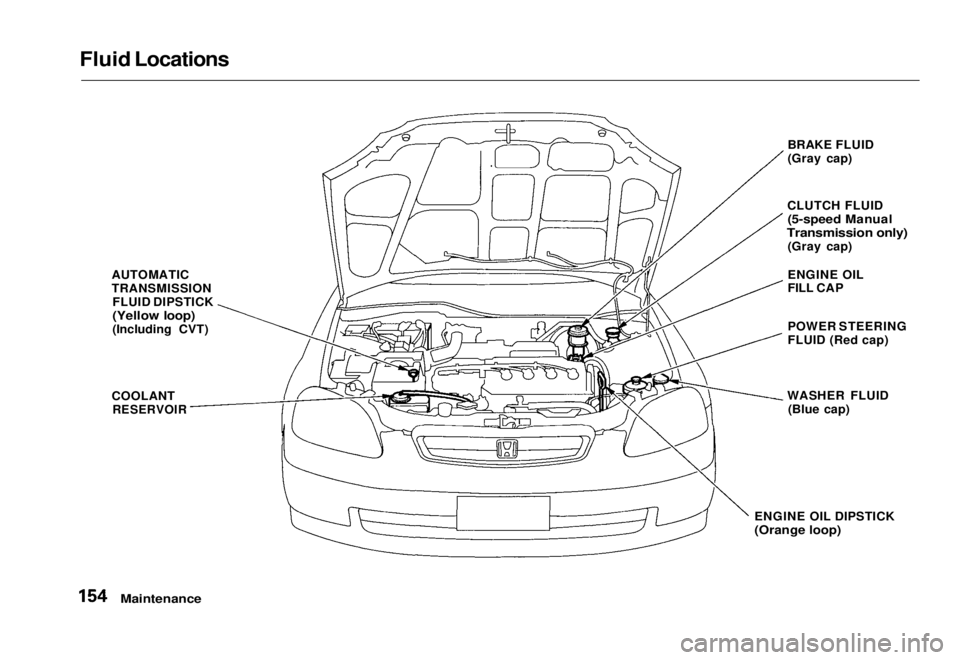
AUTOMATIC
TRANSMISSIONFLUID DIPSTICK
(Yellow loop)
(Including CVT)
COOLANT
RESERVOIR
BRAKE FLUID
(Gray cap)
CLUTCH FLUID
(5-speed Manual
Transmission only)
(Gray cap)
ENGINE OIL
FILL CAP
POWER STEERING
FLUID (Red cap)
WASHER FLUID (Blue cap)
ENGINE OIL DIPSTICK
(Orange loop)
MaintenanceMain Menu Table of Contents s t