1998 HONDA CIVIC COUPE ignition
[x] Cancel search: ignitionPage 81 of 251
Moonroof, Mirrors
Moonroof
On EX model in the U.S., and Si model
in Canada
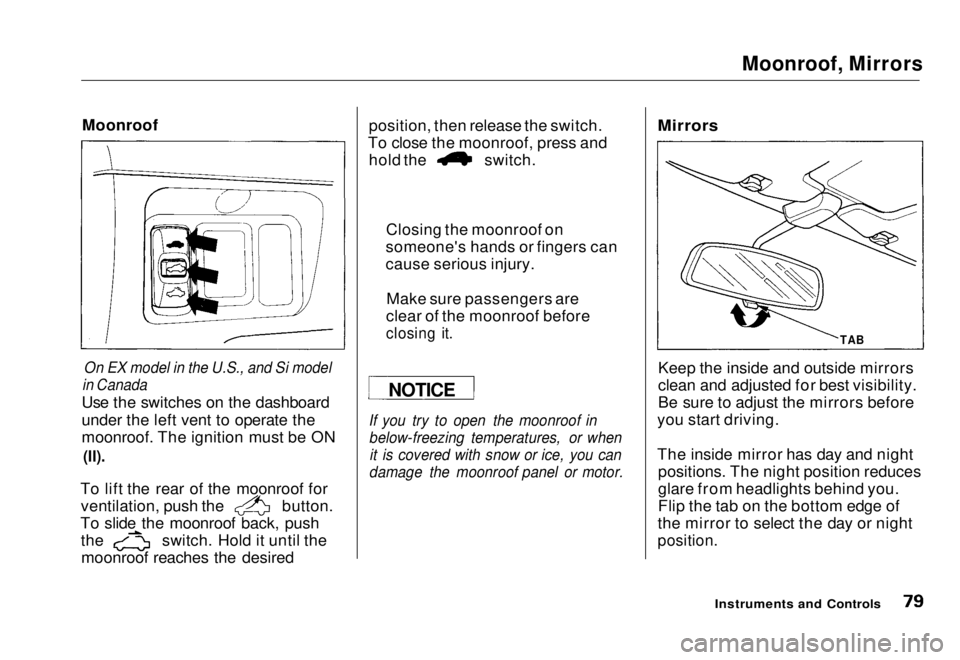
Use the switches on the dashboard
under the left vent to operate the
moonroof. The ignition must be ON
(II).
To lift the rear of the moonroof for ventilation, push the button.
To slide the moonroof back, push the switch. Hold it until the
moonroof reaches the desired position, then release the switch.
To close the moonroof, press and hold the switch.
If you try to open the moonroof in below-freezing temperatures, or whenit is covered with snow or ice, you can
damage the moonroof panel or motor.
Mirrors
Keep the inside and outside mirrors
clean and adjusted for best visibility.
Be sure to adjust the mirrors before
you start driving.
The inside mirror has day and night positions. The night position reduces
glare from headlights behind you.
Flip the tab on the bottom edge of
the mirror to select the day or night
position.
Instruments and Controls
NOTICE
Closing the moonroof on
someone's hands or fingers can
cause serious injury.
Make sure passengers are
clear of the moonroof before
closing it.
TABMain Menu Table of Contents s t
Page 82 of 251
Mirrors, Parking Brake
Adjusting the Power Mirrors
On HX and EX models in the U.S., and Si
model in Canada
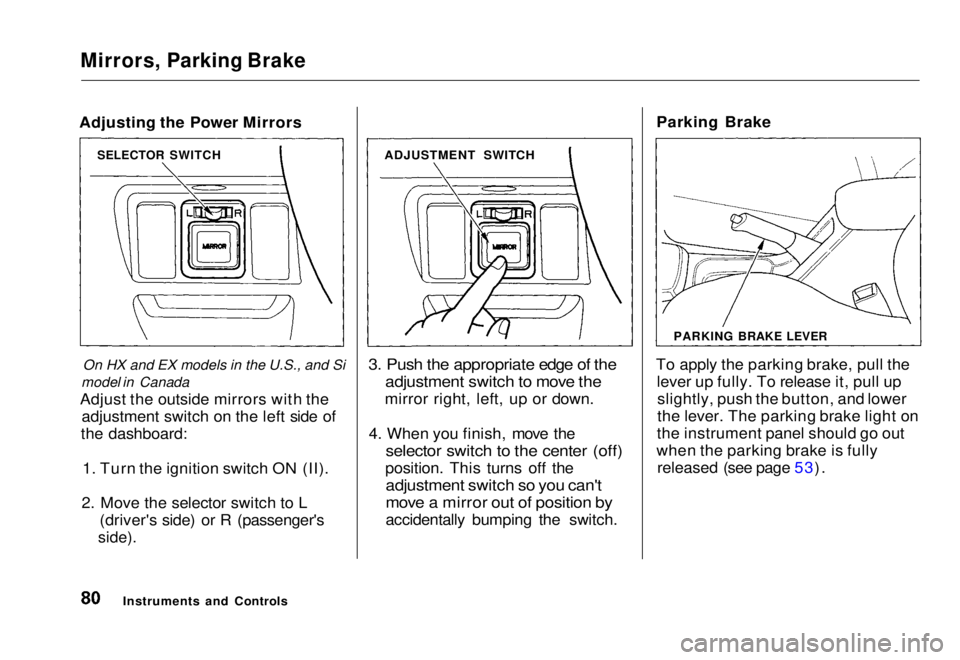
Adjust the outside mirrors with the adjustment switch on the left side of
the dashboard:
1. Turn the ignition switch ON (II).
2. Move the selector switch to L (driver's side) or R (passenger's
side).
3. Push the appropriate edge of the
adjustment switch to move the
mirror right, left, up or down.
4. When you finish, move the
selector switch to the center (off)
position. This turns off the
adjustment switch so you can't
move a mirror out of position by
accidentally bumping the switch. Parking Brake
To apply the parking brake, pull the lever up fully. To release it, pull upslightly, push the button, and lower
the lever. The parking brake light on
the instrument panel should go out
when the parking brake is fully released (see page 53).
Instruments and Controls
SELECTOR SWITCH
ADJUSTMENT SWITCH
PARKING BRAKE LEVERMain Menu Table of Contents s t
Page 85 of 251
Accessory Power Socket, Ashtrays
Accessory Power Socket
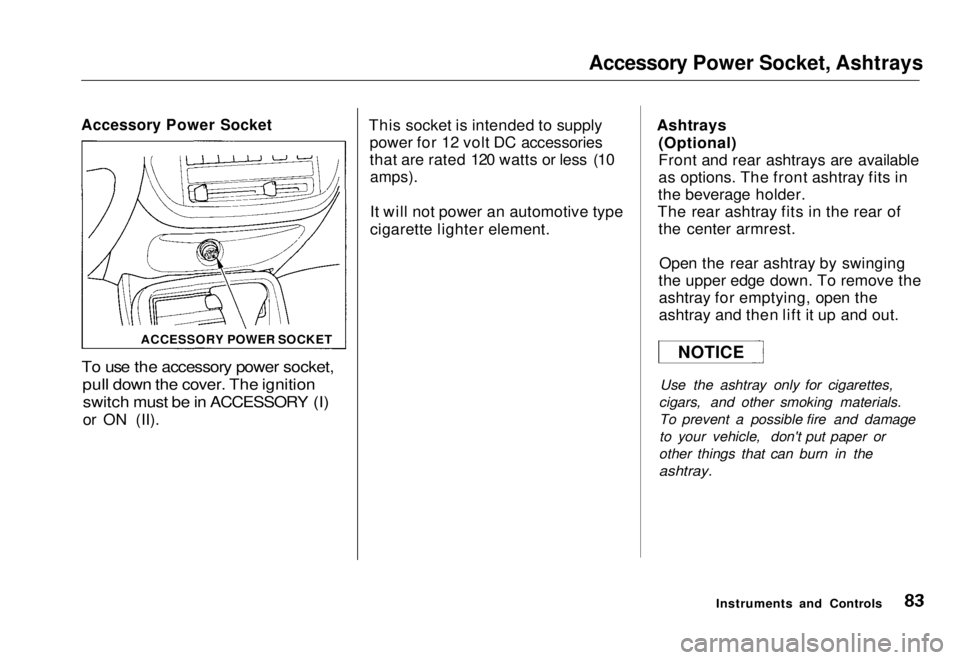
To use the accessory power socket,
pull down the cover. The ignition
switch must be in ACCESSORY (I)
or ON (II). This socket is intended to supply
power for 12 volt DC accessories
that are rated 120 watts or less (10
amps).
It will not power an automotive type
cigarette lighter element. Ashtrays
(Optional)
Front and rear ashtrays are available
as options. The front ashtray fits in
the beverage holder.
The rear ashtray fits in the rear of the center armrest.
Open the rear ashtray by swinging
the upper edge down. To remove the ashtray for emptying, open the
ashtray and then lift it up and out.
Use the ashtray only for cigarettes,
cigars, and other smoking materials. To prevent a possible fire and damage
to your vehicle, don't put paper or
other things that can burn in the
ashtray.
Instruments and Controls
ACCESSORY POWER SOCKET
NOTICEMain Menu Table of Contents s t
Page 96 of 251
Audio System
AM/FM Stereo Audio System
Your Honda's audio system provides clear reception on both AM and FM
bands, while the preset buttons allow
you to easily select your favorite stations.
A cassette player, CD player or CD changer is available as optional
equipment. The cassette player is
standard on the Si model in Canada.
Operating the Radio
The ignition switch must be in
ACCESSORY (I) or ON (II) to operate the audio system. Turn the
system on by pressing the PWR/
VOL knob or the AM/FM button.
Adjust the volume by turning the
knob.
The band and frequency that the radio was last tuned to is displayed.
To change bands, press the AM/FM button. On the FM band, ST will bedisplayed if the station is broadcast-
ing in stereo. Stereo reproduction on
AM is not available.
You can use any of three methods to find radio stations on the selected
band: TUNE, SEEK, or the Preset
buttons.
TUNE — Use the TUNE/SEEK bar to tune the radio to a desired frequency. Press the right side ( )
to tune to a higher frequency, or the left side ( ) to tune to a lower
frequency. The frequency numbers
will start to change rapidly. Release the bar when the display reaches thedesired frequency. To change the
frequency in small increments, press and release the TUNE/SEEK bar
quickly.
SEEK — The SEEK function searches the band for a station with
a strong signal. To activate it, press
the TUNE/SEEK bar until you hear a beep, then release it. Depending on
which side of the bar you press, the system scans upward or downward
from the current frequency. It stops
when it finds a station with a strong
signal.
Preset — You can store the fre- quencies of your favorite radio
stations in the six preset buttons.
Each button will store one frequency
on the AM band, and two on the FM
band.
Comfort and Convenience FeaturesMain Menu Table of Contents s t
Page 101 of 251
Audio System
Digital Clock
The audio system also displays the time. The ignition switch must be in
ACCESSORY (I) or ON (II).
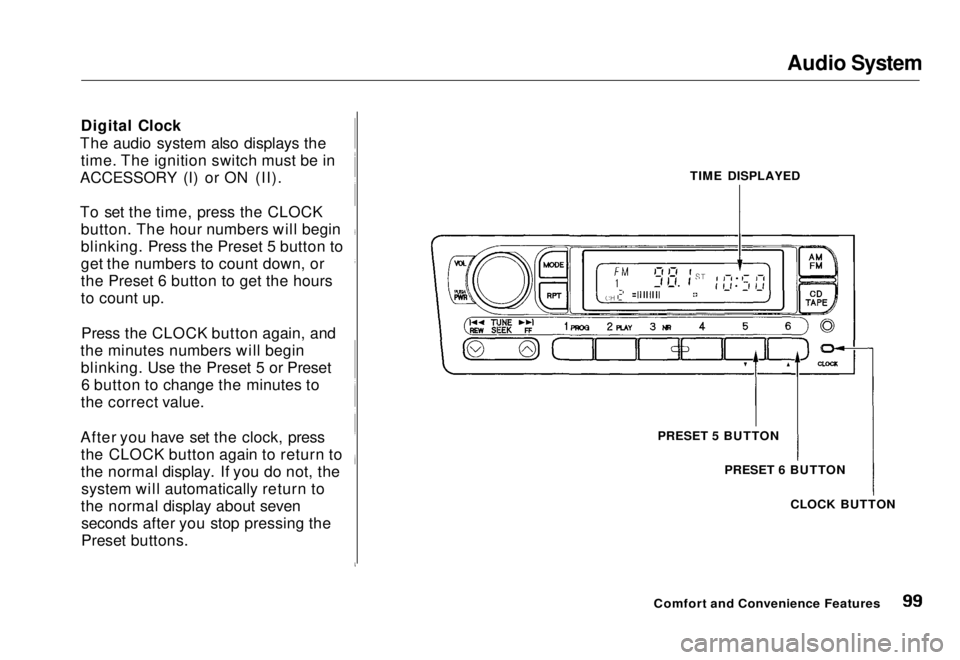
To set the time, press the CLOCK button. The hour numbers will begin
blinking. Press the Preset 5 button to
get the numbers to count down, or
the Preset 6 button to get the hours
to count up.
Press the CLOCK button again, and
the minutes numbers will begin blinking. Use the Preset 5 or Preset6 button to change the minutes to
the correct value.
After you have set the clock, press the CLOCK button again to return to
the normal display. If you do not, thesystem will automatically return to
the normal display about seven seconds after you stop pressing the
Preset buttons. TIME DISPLAYED
PRESET 5 BUTTON PRESET 6 BUTTON
CLOCK BUTTON
Comfort and Convenience FeaturesMain Menu Table of Contents s t
Page 102 of 251
Audio System
Operating the Cassette Player
Standard on Si model in Canada
The cassette system features Dolby
B* noise reduction, automatic
sensing of chromium-dioxide (CrO2)
tape, and autoreverse for continuous
play.
* Dolby noise reduction manufactured under
license from Dolby Laboratories Licensing Corpo-
ration. "DOLBY" and the double-D symbol
are trademarks of Dolby Laboratories
Licensing Corporation.
Make sure the tape opening on the
cassette is facing to the right, then
insert the cassette most of the way
into the slot. The system will pull it
in the rest of the way, and begin to
play.
The tape direction indicator will light to show you which side of the
cassette is playing. The
indicates
the side you inserted facing upward
is now playing. If you want to play the other side, press the PROG
button.
Dolby B noise reduction turns on
when you insert a cassette. If the tape was not recorded with Dolby Bnoise reduction, turn it off by
pressing the NR button.
When the system reaches the end of the tape, it will automatically reversedirection and play the other side. If
you want to remove the cassette
from the drive, press the EJECT
button.
If you turn the system off while a
tape is playing, either with the PWR/
VOL knob or by turning off the ignition, the cassette will remain in
the drive. When you turn the system
back on, the tape will begin playing
where it left off.
To switch to the radio or optional CD changer while listening to a tape, press the AM/FM or CD/TAPE
button. To change back to the cassette player, press the CD/TAPE
button.
Tape Search Functions
With a cassette playing, you can use the FF, REW, TMS, or REPEAT
function to find a desired program.FF/REW — Fast Forward and
Rewind mov e
the tape rapidly. Press
and release the REW side of the
TUNE/SEEK bar to rewind the tape, or the FF side to fast forward. Press
the PLAY button to take the system
out of rewind or fast forward. If the system reaches the end of the tape
while in fast forward or rewind, it automatically stops that function,
reverses direction, and begins to play.
Comfort and Convenience FeaturesMain Menu Table of Contents s t
Page 105 of 251
Audio System
Operating the Optional CD
Player/Changer
A Compact Disc changer is available through your dealer. It holds up to six discs, providing several hours of
continuous entertainment. You
operate the CD changer with the
same controls used for the radio.
Your dealer also has an accessory in- dash single CD player available that
is operated by the radio controls. To
operate this unit, use the instructions (except for those relating to multiple
discs) in this section.
To operate the CD player or changer, the ignition must be in ACCESSORY (I) or ON (II). CD Player
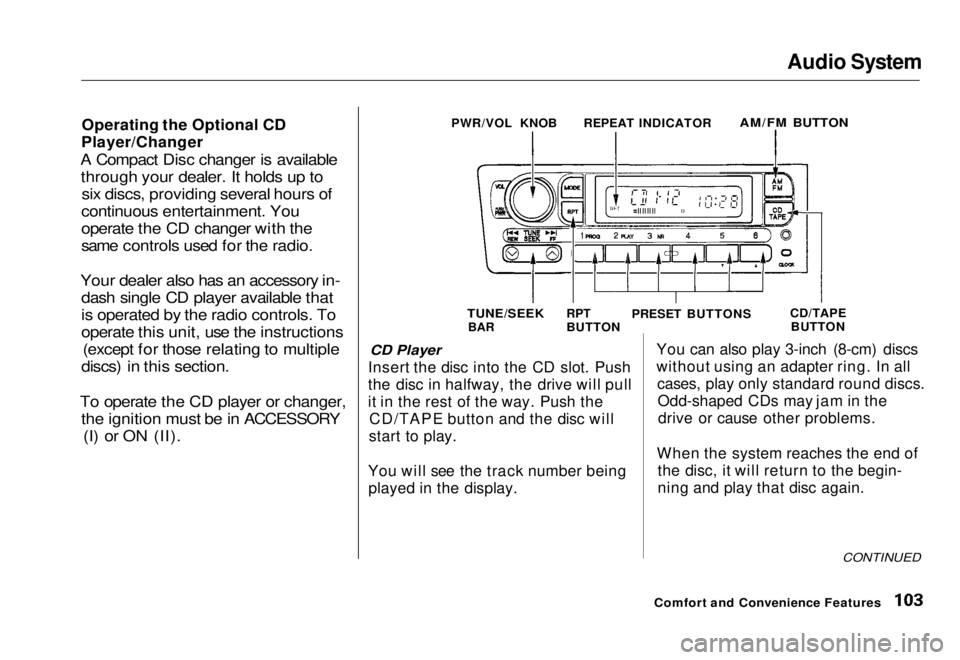
Insert the disc into the CD slot. Push
the disc in halfway, the drive will pull
it in the rest of the way. Push the CD/TAPE button and the disc will
start to play.
You will see the track number being played in the display. You can also play 3-inch (8-cm) discs
without using an adapter ring. In all
cases, play only standard round discs.Odd-shaped CDs may jam in thedrive or cause other problems.
When the system reaches the end of the disc, it will return to the begin-
ning and play that disc again.
CONTINUED
Comfort and Convenience Features
PWR/VOL KNOB
REPEAT INDICATOR
AM/FM BUTTON
TUNE/SEEK
BAR RPT
BUTTON
PRESET BUTTONS
CD/TAPE
BUTTONMain Menu Table of Contents s t
Page 106 of 251
Audio System
Press the EJECT button to remove
the disc from the player.
If you eject the disc, but do not
remove it from the slot, the system
will automatically reload the discafter 15 seconds and put the CD
player in pause mode. To begin
playing the disc, press the CD button.
CD Changer
Using the instructions that came
with the changer, load the desired CDs in the magazine, and load the
magazine in the changer. Play only
standard round discs. Odd-shaped CDs may jam in the drive or cause
other problems.
Press the CD/TAPE button. You will see "CD" in the display. The system
will start to play the first track of the
first disc. When that disc ends, the next disc in the magazine is loaded
and played. After the last disc
finishes, the system returns to disc 1. To select a different disc, press the
appropriate preset button (1 — 6). If
you select an empty slot in the magazine, the changer will, after
finding that slot empty, try to load the CD in the next slot. This
continues until it finds a CD to load
and play.
CD Player and Changer
You can use the TUNE/SEEK bar to select tracks within a disc. If you
press and release the TUNE/SEEK
bar, the system will move to the
beginning of a track. Press the side to move to the beginning
of the next track, and the side
to move to the beginning of the
current track.
If you press and hold the TUNE/
SEEK bar, you will hear a beep and
the system will continue to move across tracks. Release the bar when
you think it has reached the desired place on the disc. REPEAT - When you activate the
Repeat feature by pressing the RPT
button, the system continuously
replays the current track. You will see RPT in the display as a reminder.
Press the RPT button again to turn itoff.
To take the system out of CD mode, press the AM/EM button or insert acassette in the player. If a tape is
already in the cassette player, press
the CD/TAPE button. When you
return to CD mode, play will contin-
ue at the same point that it left off.
If you turn the system off while a CD
is playing, either with the PWR/VOL
knob or the ignition switch, play will continue at the same point when you
turn it back on.
Comfort and Convenience FeaturesMain Menu Table of Contents s t