1998 CHEVROLET CORVETTE radio controls
[x] Cancel search: radio controlsPage 105 of 378
Downloaded from www.Manualslib.com manuals search engine Interior Lamps
Instrument Panel Brightness Control
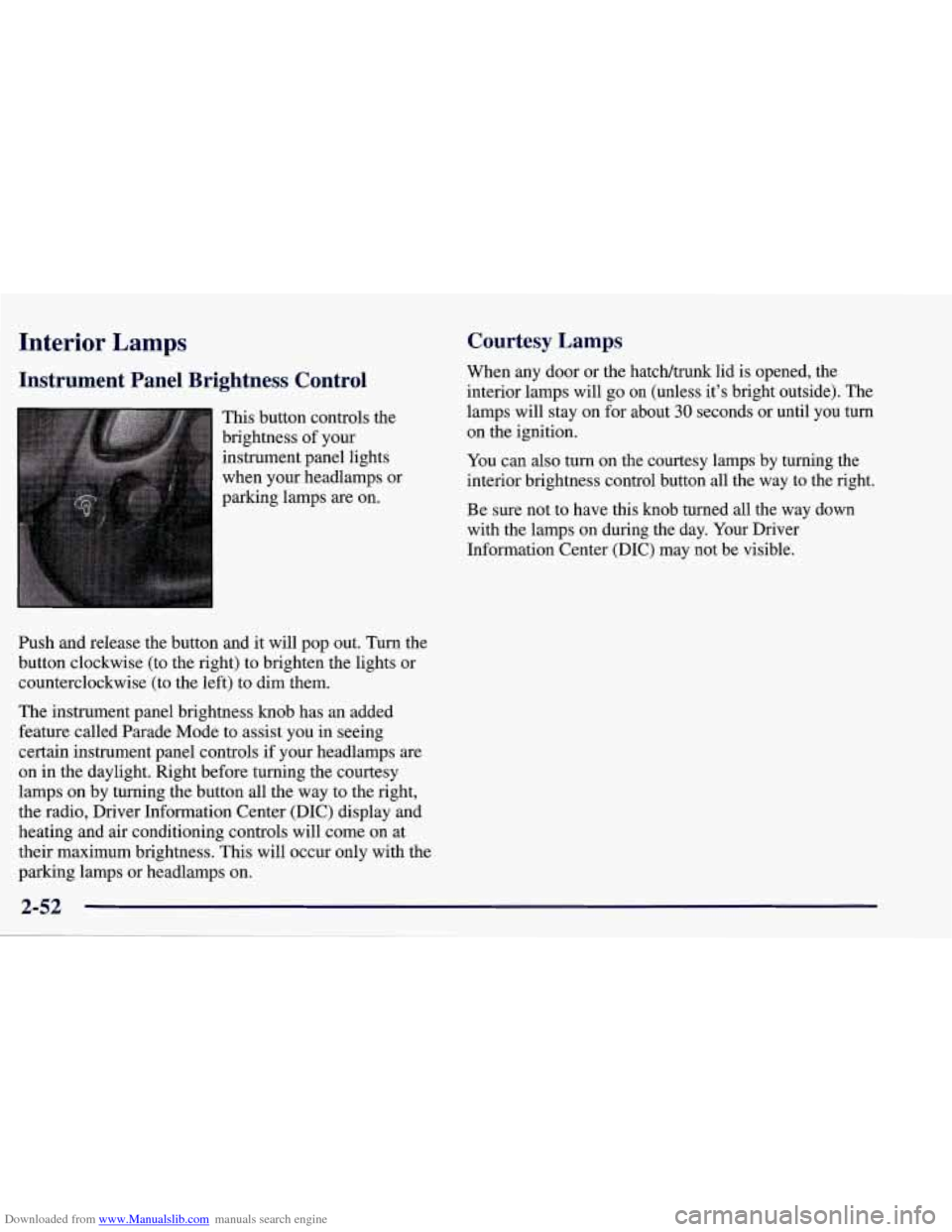
This button controls the
brightness of your
instrument panel lights
when your headlamps or
parking lamps
are on.
Ish and release the button and it will pop out. Turn the
button clockwise (to the right) to brighten the lights or
counterclockwise (to the left) to dim them.
The instrument panel brightness knob has an added
feature called Parade Mode to assist you in seeing
certain instrument panel controls if your headlamps
are
on in the daylight. Right before turning the courtesy
lamps on by turning the button all the way to the right,
the radio, Driver Information Center (DIC) display and
heating and air conditioning controls will come on at
their maximum brightness. This will occur only with the
parking lamps or headlamps on.
Courtesy Lamps
When any door or the hatch/trunk lid is opened, the
interior lamps will go
on (unless it’s bright outside). The
lamps will stay on for about
30 seconds or until you turn
on the ignition.
You can
also turn on the courtesy lamps by turning the
interior brightness control button all the way to the right.
Be sure not to have this knob turned all the way down
with the lamps on during the day. Your Driver
Information Center
(DIC) may not be visible.
2-52
Page 160 of 378
Downloaded from www.Manualslib.com manuals search engine Section 3 Comfort Controls and Audio Systems
In this section, you’ll find out how to operate the comfort control and audio systems offered with your vehicle. Be
sure to read about the particular systems supplied with your vehicle.
3-2
3-2
3-4
3-9
3- 10
3-11 3-11
3- 12 3-12
3-12
3-17 Comfort Controls
Manual
Comfort Controls
Automatic Electronic Dual Climate Control
System (If Equipped)
Sensors
Air Conditioning
Heating
Defogging and Defrosting
Audio Systems Setting the Clock for
All Systems
AM-FM Stereo with Cassette Tape Player and
Automatic Tone Control
CD Adapter Kits
3- 17
3-2 1
3-25
3 -27
3-27
3-28
3-29
3-29
3-29
3-30 AM-FM Stereo with Compact Disc Player and
Automatic Tone Control
(If Equipped)
Trunk Mounted CD Changer Theft-Deterrent Feature
Understanding Radio Reception
Tips About Your Audio System
Care of Your Cassette Tape Player
Care of Your Compact Discs
Care
of Your Compact Disc Player
Power Mast Antenna (Option)
Integrated Windshield and Rear Window
Antennas (Option)
3-1
Page 174 of 378
Downloaded from www.Manualslib.com manuals search engine FADE: Press this knob lightly so it extends. Turn the
knob to the right to adjust the sound to the front
speakers and to the left for the rear speakers. The middle
position balances the sound between the speakers.
Push these knobs back into their stored positions when
you’re not using them.
Playing a Cassette Tape
Your tape player is built to work best with tapes that are
30 to 45 minutes long on each side. Tapes longer than
that are
so thin they may not work well in this player. If
a tape is inserted when the ignition is on but the radio is
off, the tape
will begin playing. A tape symbol is shown
in the center of the graphic display whenever a tape is
inserted. When
a tape is active, the tape symbol will be
accompanied by a direction arrow.
While the tape is playing, use the VOL, AUTO TONE,
BAL, FADE, BASS and TREB controls just as you do
for the radio. Other controls may have different
functions when a tape is inserted. The display will show
the tape symbol and an arrow to show which side of the
tape is playing.
If you hear nothing or hear just a garbled sound, it may
not be in squarely. Press EJECT to remove the tape and
start over.
The player is able to detect a tight or broken tape, and
will eject the tape. The radio will go back to playing the
last station selected.
The player automatically senses the cassette for metal or
Cr02 and sets the pre-emphasis. Anytime a tape is
inserted, the top side is selected to play first.
PREV (1): Press this button or the left SEEK arrow to
go to the previous selection on the tape if the current
selection has been playing for less than eight seconds.
If
the PREV button is pressed and the current selection has
been playing for more than eight seconds, it will
go to
the beginning of the current selection. Your tape must
have at least three seconds of silence between each
selection for PREV or SEEK to work. The tape direction
arrow blinks during PREV or SEEK operation. The
sound will mute during PREV or SEEK operation. Press
this button or one of the SEEK arrows again to return to
normal play.
3-15
Page 310 of 378
Downloaded from www.Manualslib.com manuals search engine Fuse
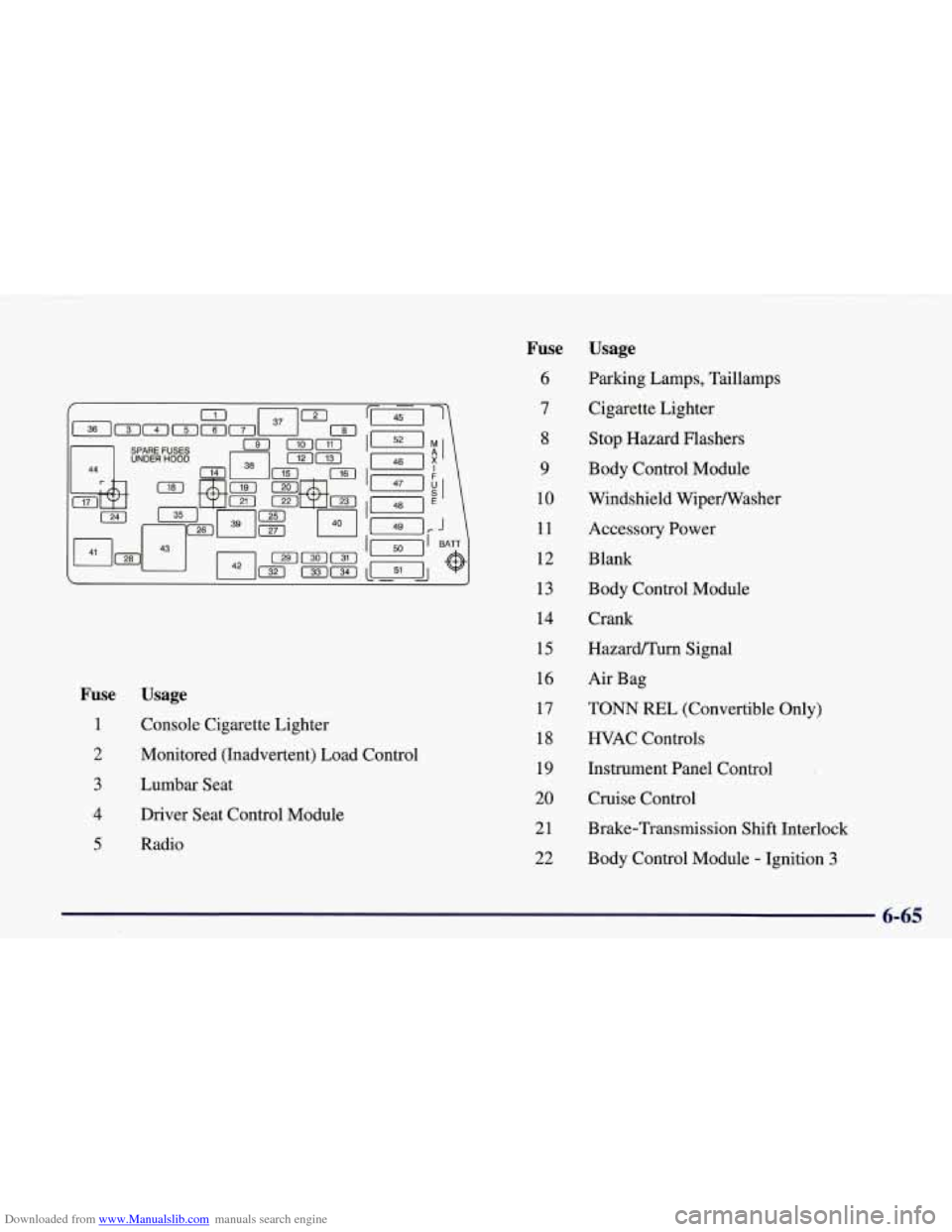
1
2
3
4
5
Usage
Console Cigarette Lighter
Monitored (Inadvertent) Load Control
Lumbar Seat
Driver Seat Control Module
Radio
Fuse
6
7
8
9
10
11
12
13
14
15
16
17
18
19
20
21
22 Usage
Parking Lamps,
Taillamps
Cigarette Lighter
Stop Hazard Flashers
Body Control Module
Windshield Wipermasher
Accessory Power
Blank
Body Control Module
Crank
HazardPTurn Signal
Air Bag
TONN REL (Convertible Only)
HVAC Controls
Instrument Panel Control
Cruise Control
Brake-Transmission Shift Interlock
Body Control Module
- Ignition 3
6-65
Page 311 of 378
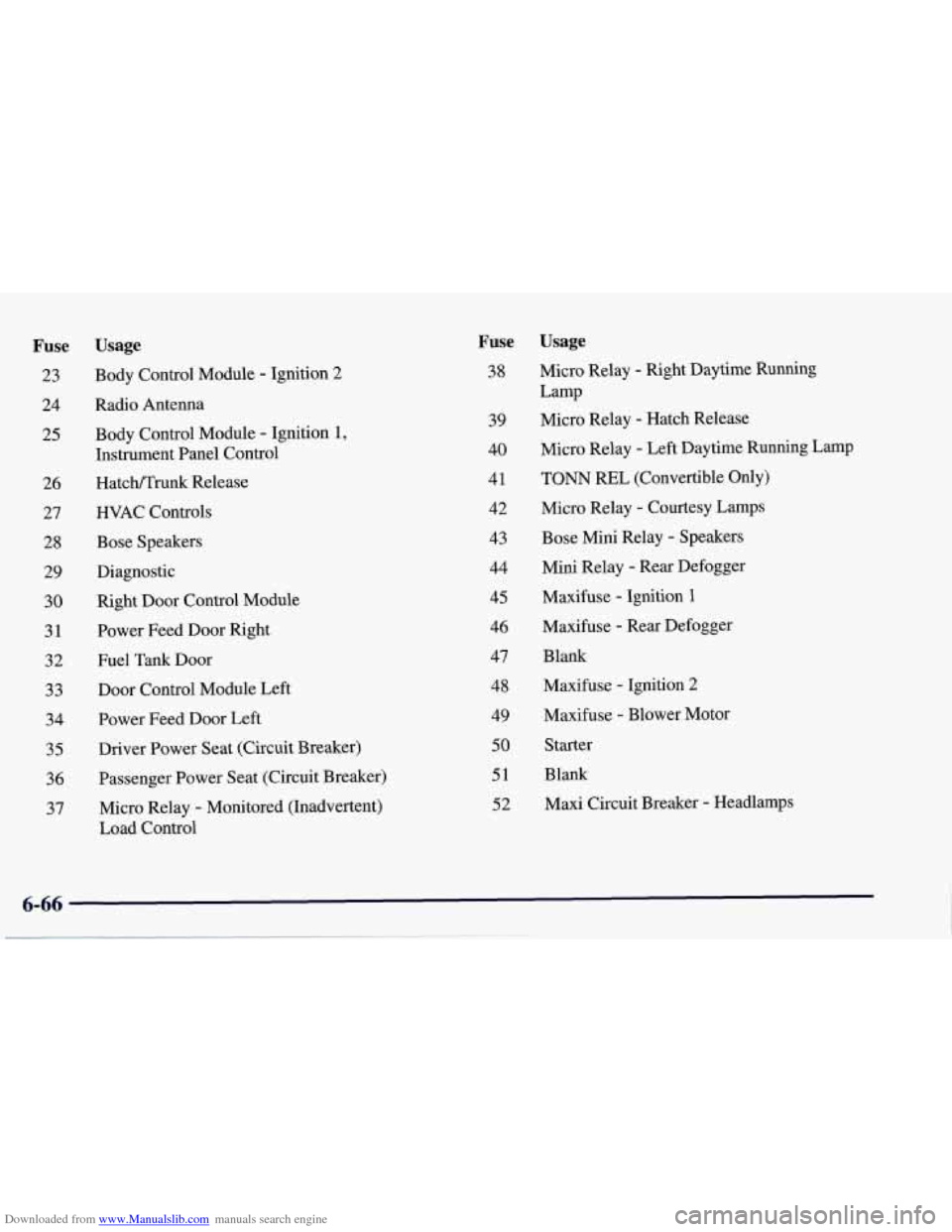
Downloaded from www.Manualslib.com manuals search engine Fuse
23
24
25
26 27 28 29 30 31 32
33
34
35
36 37
Usage
Body Control Module - Ignition 2
Radio Antenna
Body Control Module
- Ignition 1,
Instrument Panel Control
Hatcmrurik Release
HVAC Controls
Bose Speakers
Diagnostic
Right Door Control Module
Power Feed Door Right
Fuel Tank Door
Door Control Module Left Power Feed Door Left
Driver Power Seat (Circuit Breaker)
Passenger Power Seat (Circuit Breaker)
Micro Relay
- Monitored (Inadvertent)
Load Control
Fuse
38
39
40
41
42
43
44
45 46 47 48
49
50
51
52
Usage
Micro Relay - Right Daytime Running
Lamp
Micro Relay
- Hatch Release
Micro Relay
- Left Daytime Running Lamp
TONN REL (Convertible Only)
Micro Relay
- Courtesy Lamps
Bose Mini Relay
- Speakers
Mini Relay
- Rear Defogger
Maxifuse
- Ignition 1
Maxifuse - Rear Defogger
Blank Maxifuse
- Ignition 2
Maxifuse
- Blower Motor
Starter
Blank
Maxi Circuit Breaker
- Headlamps
Page 364 of 378
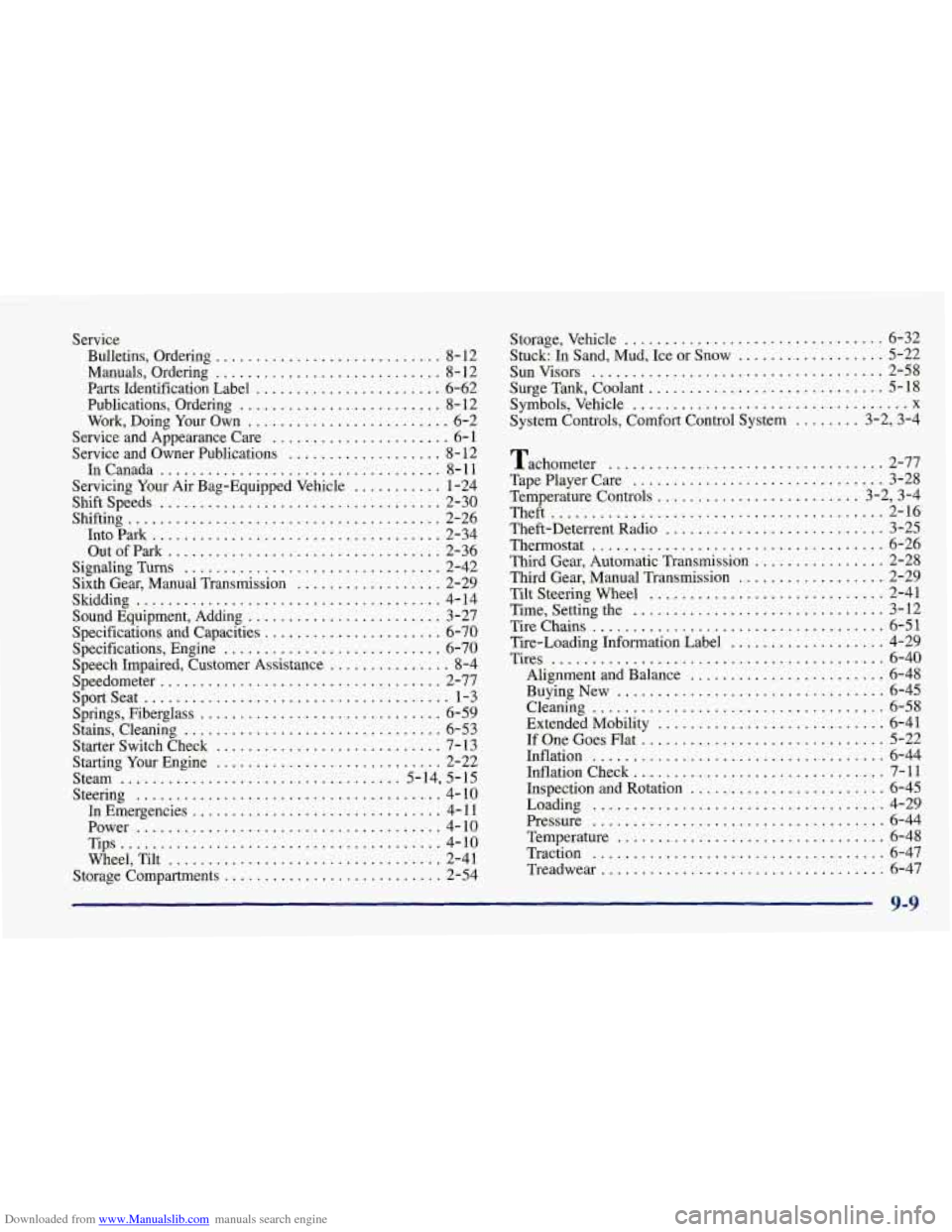
Downloaded from www.Manualslib.com manuals search engine Service Bulletins. Ordering
............................ 8-12
Manuals. Ordering
............................ 8- 12
Parts Identification Label
....................... 6-62
Publications. Ordering
......................... 8- 12
Work. Doing Your Own
......................... 6-2
Service and Appearance Care
...................... 6-1
Service and Owner Publications
................... 8-12
InCanada
................................... 8-11
Servicing Your Air Bag-Equipped Vehicle
........... 1-24
Shiftspeeds
................................... 2-30
Shifting
....................................... 2-26
IntoPark
.................................... 2-34
Out
of Park .................................. 2-36
Signaling Turns
................................ 2-42
Sixth Gear, Manual Transmission
.................. 2-29
Skidding
...................................... 4-14
Sound Equipment, Adding
........................ 3-27
Specifications and Capacities
...................... 6-70
Specifications, Engine
........................... 6-70
Speech Impaired, Customer Assistance
............... 8-4
Sportseat
...................................... l-3
Springs, Fiberglass .............................. 6-59
Stains, Cleaning
................................ 6-53
Starter Switch Check
............................ 7- 13
Starting Your Engine
............................ 2-22
Steering
...................................... 4-10
In Emergencies
............................... 4- 11
Power ...................................... 4-10
Tips
........................................ 4-10
Wheel, Tilt
.................................. 2-41
Storage Compartments
........................... 2-54
Speedometer
................................... 2-77
Steam
................................... 5-14, 5-15 Storage.
Vehicle
................................ 6-32
Stuck: In Sand. Mud. Ice or Snow
.................. 5-22
Sunvisors
.................................... 2-58
Surge Tank. Coolant
............................. 5-18
Symbols. Vehicle
.................................. x
System Controls. Comfort Control System
........ 3-2. 3-4
Tachometer
.................................. 2-77
TapePlayerCare
............................... 3-28
Temperature Controls
..... ................... 3-2. 3-4
Theft ......................................... 2-16
Theft-Deterrent Radio
........................... 3-25
Thermostat
.................................... 6-26
Third Gear, Automatic Transmission
................ 2-28
Third Gear, Manual Transmission
.................. 2-29
Tilt Steering Wheel
............................. 2-41
Time, Setting the
............................... 3-12
Tirechains
.................................... 6-51
Tire-Loading Information Label
................... 4-29
Tires
......................................... 6-40
Alignment and Balance
........................ 6-48
Buying New
................................. 6-45
Cleaning
.................................... 6-58
Extended Mobility
............................ 6-41
If One Goes Flat .............................. 5-22
Inflation
.................................... 6-44
Inflation Check
............................... 7-11
Inspection and Rotation
........................ 6-45
Loading
.................................... 4-29
Pressure
.................................... 6-44
Temperature
................................. 6-48
Traction
.................................... 6-47
Treadwe
ar ................................... 6-47
9-9