1998 CHEVROLET CORVETTE engine oil
[x] Cancel search: engine oilPage 144 of 378
Downloaded from www.Manualslib.com manuals search engine 3 TRIP
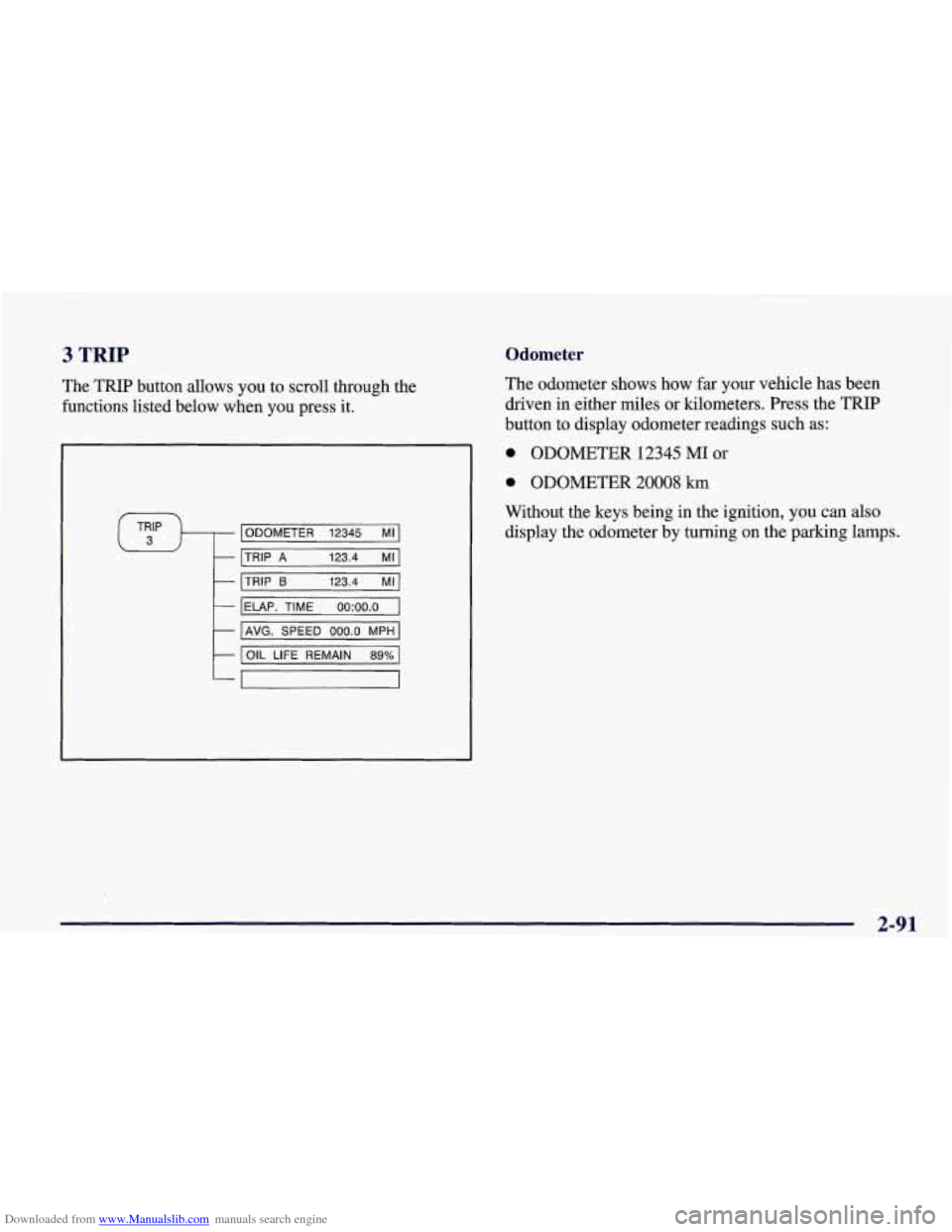
The TRIP button allows you to scroll through the
functions listed below when you press it.
ODOMETER 12345 MI
TRIP
A 123.4 MI
TRIP 6 123.4 MI
IELAP. TIME oo:oo.o I
I AVG. SPEED 000.0 MPH I
I OIL LIFE REMAIN 89% 1
Odometer
The odometer shows how far your vehicle has been
driven in either miles or kilometers. Press the TRIP
button to display odometer readings such
as:
0 ODOMETER 12345 MI or
0 ODOMETER 20008 km
Without the keys being in the ignition, you can also display the odometer by turning on the parking lamps.
2-91
Page 146 of 378
Downloaded from www.Manualslib.com manuals search engine Average Speed
Press the
TRIP button until the average speed is
displayed, such as:
AVERAGE SPEED 62 MPH or
AVERAGE SPEED 100 km/h
Press reset in this mode to start calculating the average
speed. Press and hold RESET to clear.
Engine Oil Life
Press the TRIP button until the engine oil life is
displayed, such as
OIL LIFE REMAIN 89%.
This is an estimate of the engine oil’s remaining useful
life. It will show 99% when the system is reset after an oil change.
It will alert you to change your oil on a
schedule consistent with your driving conditions.
When the remaining oil life is low, the system will alert
you with the message CHANGE
OIL SOON.
When the oil life is down to zero, ‘you will receive the
message
CHANGE OIL NOW.
To reset the OIL LEE reminder after an oil change:
1. With the ignition on, press the TRIP button so the
OIL LIFE percentage is displayed.
2. Press RESET and hold for two seconds. The word
RESET
will appear, then OIL LIFE 99%.
Remember, you must reset the
OIL LIFE yourself after
each oil change. It will not reset itself. Also, be careful
not to reset the
OIL LIFE accidentally at any time other
than when the oil has just been changed. It can’t be reset
accurately until the next oil change.
The DIC does not replace the need to maintain your
vehicle as recommended in the Maintenance Schedule in
this manual. Also, the oil change reminder will not
detect dusty conditions or engine malfunctions that may
affect the oil.
If you drive in dusty areas, change your oil
after every
3,000 miles (5 000 km) or three months,
whichever occurs first, unless the DIC instructs you to
do
so sooner. Also, the oil change reminder does not
measure how much oil you have in your engine,
so be
sure to check your oil level often. See “Engine Oil” in
the Index.
2-93
Page 151 of 378
Downloaded from www.Manualslib.com manuals search engine ABS ACTIVE (Anti-Lock Brake System Active) - :
When your anti-lock system is adjusting brake pressure
to help avoid a braking skid, the ABS ACTIVE message
will be displayed.
Slippery road conditions may exist if this message is
displayed,
so adjust your driving accordingly. The
message will stay on for a few seconds after the system
stops adjusting brake pressure.
SERVICE ABS (Anti-Lock Brake System) - : If the
SERVICE ABS message is displayed when you
are
driving, stop as soon as possible and turn the ignition
off. Then start the engine again to reset the system. If
the message stays on, or comes back on again while you
are driving, your vehicle is in need of service. If the
regular brake system warning light isn’t on, you still
have brakes, but don’t have anti-lock brakes. If the
regular brake system light is also on, you don’t have
anti-lock brakes and there is a problem with your
brakes.
See “Brake System Warning Light” earlier in
this section.
If the SERVICE ABS message is being displayed, your
traction control system and the optional active handling system will also be disabled. The driver information
center will scroll three messages SERVICE ABS,
SERVICE TRACTION SYS. and SERVICE ACTIVE
HNDLG and the instrument cluster car icon will be illuminated.
The driver can acknowledge these messages
by pressing the reset button three times. When the
service message is displayed the computer controlled
systems will not assist the driver and you should have
the system repaired as soon as possible. Adjust your
driving accordingly.
SERVICE COLUMN LOCK: The system that
controls the locking and unlocking of the steering
column may not work properly. Have the vehicle towed
to a dealer for service.
LOW OIL PRESSURE: You will hear four chimes and
the CHECK GAGES telltale will come on when this
message is displayed.
To acknowledge the warning,
press the RESET button. After you press the
RESET
button, a message will be displayed and you will hear a
chime every minute until the vehicle is serviced.
If you
do not press RESET, the message will remain on the
digital display until the vehicle is serviced.
Low oil pressure may be the result of a combination of
low oil level and abrupt changes in the vehicle’s
direction. When this warning
is displayed, you should
not operate the engine at high
RPM or make fast abrupt
moves. When convenient, you should check the oil
level. See “Engine Oil” in the Index.
Page 152 of 378
Downloaded from www.Manualslib.com manuals search engine LOW OIL LEVEL: Press RESET to acknowledge that
you have read the message and to remove it from the
display. The message will reappear every
10 minutes
until this condition changes.
You will hear two chimes when this message is
displayed. If this message appears after starting your
engine, your engine oil level may be too low. You may
need to add oil. See “Engine Overheating” in the Index.
REDUCED ENGINE POWER: You will hear chimes
continuously when this message is displayed. To
acknowledge that you have read the message and to
remove it from the display, press RESET. The message
will reappear every
15 seconds until this
condition changes.
If the Driver Information Center displays the
REDUCED ENGINE POWER message and the
CHECK ENGINE light comes on, a noticeable
reduction in the vehicle’s performance may occur.
If the
REDUCED ENGINE POWER message is displayed but
there is no reduction
in performance, proceed to your
destination. The performance may be reduced the next
time the vehicle is driven. The
vehicle may be driven at a reduced speed while the
REDUCED ENGINE POWER message is displayed,
but acceleration and speed may be reduced. Anytime the
CHECK ENGINE light stays on, the vehicle should be
taken to an authorized Chevrolet dealer as soon as
possible for diagnosis and repair.
Also, refer to “Malfunction Indicator Lamp” (Check
Engine Light) in the Index.
If the REDUCED ENGINE
POWER message is displayed in combination with the
COOLANT OVER TEMP message, see “Engine
Overheating” in the Index.
SERVICE VEHICLE SOON: If this message appears
on the DIC, there may be an electrical or another system
problem with your vehicle. Have your vehicle checked
by your dealer if this message keeps appearing.
CHARGE SYSTEM FAULT Press RESET to
acknowledge that you have read the message and to
remove it from the display. The message will reappear
every
10 minutes until this condition changes. You will
hear two chimes when this message is displayed.
2-99
Page 155 of 378
Downloaded from www.Manualslib.com manuals search engine If the engine coolant exceeds 255 “F (124”C), this
message is displayed. If you have been operating your
vehicle under normal driving conditions, you should
pull off from
the road, stop your vehicle and turn off the
engine as soon as possible. You can monitor the coolant
temperature with the GAGES button on the DIC or the
engine coolant gage on the instrument panel cluster. See
“Engine Overheating” in the Index.
HIGH OIL TEMPERATURE REDUCE ENGINE
RPM: You will hear four chimes when this message is
displayed. To acknowledge the warning, press the
RESET button. After you press the RESET button, a
message will be displayed and you will hear a chime
every minute until this condition changes. If you do not
press RESET, the message will remain on the digital
display until the condition changes.
If the engine oil temperature exceeds
320°F (1 60” C),
this message is displayed. You should check the engine
coolant temperature and engine oil level. If your engine
is too hot, see “Engine Overheating’’ in the Index. Your
vehicle may need service,
so see your dealer. You can
monitor the oil temperature with the GAGES button on
the DIC.
HIGH TRANS TEMP: You will hear four chimes
when this message is displayed. To acknowledge this
warning, press the RESET button. After you press the
RESET button, the message will be displayed every
10 minutes until the condition changes. If you do not
press RESET, the message remains on the display until
the condition changes.
If the transmission fluid temperature rises above 263°F
(128°C) or rises rapidly, this message is displayed. The
transmission may shift gears or apply the torque
converter clutch to reduce the fluid temperature. Driving
aggressively or driving on long hills can cause the
transmission fluid temperature to be higher than normal.
If this message appears, you may continue to drive at a
slower speed. You should also monitor the transmission
fluid temperature and allow it to cool to at least 230°F
(1 10°C). The transmission fluid temperature can be
monitored with the GAGES button on the DIC. See
“Automatic Transmission Fluid” in the Index. You
should also check the engine coolant temperature.
If it is
also hot, see “Engine Overheating” in the Index.
If the HIGH TRANS TEMP message is displayed
during normal vehicle operation on flat roads, your
vehicle may need service. See your dealer for an
inspection.
2-102
Page 159 of 378
Downloaded from www.Manualslib.com manuals search engine Other Messages
Here are more messages that you can receive on your
Driver Information Center. To acknowledge a message
and read another message that may have come on at the
same time, press the RESET button.
0
0
0
0
0
0
0
0
BRAKE BEFORE SHIFT
(Automatic Transmissions Only)
CHANGE
OIL NOW
CHANGE OIL SOON
CRUISE DISENGAGED
CRUISE SET
- MPH (- ktn/h)
DOOR AJAR
ENGINE PROTECTION REDUCE ENGINE
RPM
HATCH AJAR (Coupe)
TRUNK AJAR (Convertible)
HIGH VOLTAGE
0 LOW BRAKE F‘LUID (See “Brake Fluid” in
the Index)
0 LOW COOLANT (See “Engine Overheating” in
0 LOW FUEL (fuel range is less than 50 miles (80 km))
the Index)
0 LOW VOLTAGE
LOW WASHER FLUID
0 PULL KEY - WAIT 10 SEC
RESERVE FUEL
UPSHIFTNOW
2-106
. ..
Page 162 of 378
Downloaded from www.Manualslib.com manuals search engine a
+' LOWER: This setting directs most of the air
through the lower ducts to the floor area of the vehicle with some of the air also directed toward the windshield
and side window vents.
+# DEFOG: This setting divides the air between the
windshield and lower outlets with a small amount directed toward the side window vents. This is useful
when fog appears on the windshield or side glass due to
rain or snowy conditions.
DEFROST Use this setting to quickly remove fog
or frost from the windshield. This setting directs most of
the airflow to the windshield with
a small amount
directed toward the lower and side window outlets.
Mode Buttons
These buttons control the air intake, the air conditioning and the rear window defogger operation.
FRESH AIR: Press this button and it will bring
outside air into your vehicle. The light on the button will
come on when operating. Use this setting while trying to
defrost or defog windows to help clear moisture.
RECIRCULATE: Press this button to limit the
amount of fresh air entering your vehicle by
recirculating most of the
air inside your vehicle. The
light on the button will come on when operating. This
setting is helpful when you are trying to cool the air
quickly or to limit odors entering your vehicle.
RECIRCULATE cannot be used while in the DEFROST
or
DEFOG modes.
e A/C: This button turns the air conditioning
compressor
off or on under most conditions. The light
on the A/C button comes on when the compressor is
operating. The air conditioning does not operate at
temperatures below approximately
35 OF to 40°F (2" C
to 4°C). The air conditioning cools and dehumidifies the
air coming into the vehicle. The air conditioning cannot
be turned
off in DEFROST as it helps to remove
moisture from the vehicle. It also helps to keep the
windows clear.
The air conditioning may be forced
off at high engine
speeds
or high engine oil or coolant temperatures.
3-3
Page 188 of 378
Downloaded from www.Manualslib.com manuals search engine Care of Your Compact Discs
Handle discs carefully. Store them in their original cases
or other protective cases and away from direct sunlight
and dust.
If the surface of a disc is soiled, dampen a
clean, soft cloth in a mild, neutral detergent solution and clean it, wiping from the center to the edge.
Be sure never to touch the signal surface when handling
discs. Pick up discs by grasping the outer edges or the
edge of the hole and the outer edge.
Care of Your Compact Disc Player
The use of CD lens cleaner discs is not advised, due to
the risk
of contaminating the lens of the CD optics with
lubricants internal to the CD mechanism.
Power Antenna Mast Care (Option)
Your power antenna will look its best and work well
if it’s cleaned from time to time. To clean the
*
antenna mast:
1. Turn on the ignition and radio to raise the antenna.
2. Dampen a clean cloth with mineral spirits or
3. Wipe the cloth over the mast sections, removing
equivalent solvent.
any dirt.
4. Wipe dry with a clean cloth.
5. Make the antenna go up and down by
turning the
radio or ignition
off and on.
6. Repeat if necessary.
-... . ...
3-29