1998 CHEVROLET BLAZER light
[x] Cancel search: lightPage 110 of 416

Downloaded from www.Manualslib.com manuals search engine Windshield Wipers
You control the windshield wipers by turning the band
with the wiper symbol on it.
For a single wiping cycle, turn the band to MIST. Hold
it there until the wipers start, then let go. The wipers will
stop after one wipe. If you want more wipes, hold the
band
on MIST longer.
You can set the wiper speed for
a long or short delay
between wipes. This can be very useful in light rain
or
snow. Turn the band to choose the delay time. The
closer to LO, the shorter the delay,
I
For steady wiping at low speed, turn the band away
from you to the
LO position. For high-speed wiping,
turn the band further, to HI.
To stop the wipers, move
the band to the
OFF position.
Be sure to clear ice and snow from the wiper blades
before using them. If they’re frozen to the windshield,
carefully
loosen or thaw them. If your blades do become
worn or damaged, get new blades or blade inserts.
Windshield Washer
There is a paddle marked with the windshield washer
symbol at the top of the multifunction lever.
To spray
washer fluid on the windshield, push the paddle. The
wipers will clear the window and then either stop or
return to your preset speed.
In freezing weather, don’t use your washer until
the windshield is warmed. Otherwise the washer
fluid can form ice
on the windshield, blocking
your vision.
2-36
Page 114 of 416

Downloaded from www.Manualslib.com manuals search engine Using Cruise Control on Hills
How well your cruise control will work on hills depends
upon your speed, load and the steepness
of the hills.
When going up steep hills, you may want to step on the
accelerator pedal to maintain your speed. When going
downhill, you may have to brake or shift to a lower gear
to keep your speed down. Of course, applying the brake
takes you out
of cruise control. Many drivers find this to
be too much trouble and don’t use cruise control on
steep hills.
Ending Cruise Control
There are two ways to turn off the cruise control:
Step lightly on the brake pedal or push the clutch
pedal, if you have a manual transmission.
0 Move the cruise switch to OFF.
Erasing Speed Memory
When you turn off the cruise control or the ignition,
your cruise control set speed memory is erased.
Exterior Lamps
0
DOME OVERRIDE
Your parking lamp and headlamp switch is on the
driver’s side
of your instrument panel.
Rotate the knob to
the right to the parking lamps symbol
to manually turn on:
Parking Lamps
Sidemarker Lamps
0 Taillamps
License Plate Lamps
Instrument Panel Lights
2-40
Page 115 of 416

Downloaded from www.Manualslib.com manuals search engine Rotate the knob to the right to the master lamps symbol
to turn on all the lamps listed as well as the headlamps.
Rotate the knob all the
way to the left to turn off your
lamps and put the system in auto headlamp mode.
Automatic Headlamp System
When it is dark enough outside, your automatic
headlamp system will turn on your headlamps at the
normal brightness along with other lamps such as the
taillamps, sidemarker, parking lamps and the instrument
panel lights. The radio lights will also be dim.
Your vehicle is equipped with a light sensor on the top
of the instrument panel under the radio speaker grill so
be sure it is not covered, which will cause the system to
be on whenever the ignition is on.
The system may also turn on your headlamps when
driving through a parking garage, heavy overcast
weather, a tunnel or fueling your vehicle in a low-light
area. This is normal. There is
a delay in the transition between the daytime and
nighttime operation of the Daytime Running Lamps
(DRL) and the automatic headlamp systems so that driving
under bridges or bright overhead street lights does not
affect the system. The
DRL and automatic headlamp
system will
only be affected when the light sensor sees a
change in lighting lasting longer than the delay.
To idle your vehicle with the automatic headlamp
system off, set the parking brake while the ignition is
off. Then
start your vehicle. The automatic headlamp
system will stay off until you release the parking brake.
As with any vehicle, you should turn on the regular
headlamp system when you need it.
Lamps On Reminder
A reminder chime will sound when your headlamps or
parking lamps are manually turned on and your ignition
is in
OFF, LOCK or ACCESSORY. To turn the chime
off, turn the knob all the way to the left or turn the
instrument panel dimmer down to the fully dimmed
position. In the automatic mode, the headlamps turn off
once the ignition key is in
OFF.
2-41
Page 116 of 416

Downloaded from www.Manualslib.com manuals search engine Daytime Running Lamps
Daytime Running Lamps (DIU) can make it easier for
others to see the front
of your vehicle during the day.
DRL can be helpful in many different driving
conditions, but they can be especially helpful in the
short periods after dawn and before sunset.
The DRL system will make your headlamps come
on at
reduced brightness when:
0 the ignition is on,
the headlamp switch is in automatic headlamp
mode and
the parking brake is released.
When the DRL are on, only your headlamps will be on.
The taillamps, sidemarker and other lamps won’t be
on.
The instrument panel won’t be lit up either.
When it begins to get dark, the headlamps will
automatically switch from DRL to the regular headlamps.
When
you turn the headlamp switch off, the regular lamps
will
go off, and your headlamps will change to the reduced
brightness of DRL provided it is not dark outside.
To idle your vehicle with the DRL off, set the parking
brake.
The DRL will stay off until you release the
parking brake.
As with any vehicle, you should turn on the regular
headlamp system when
you need it.
Fog Lamps (If Equipped)
Use your fog lamps for better vision in foggy or misty
conditions. Your parking lamps must be
on for your fog
lamps to work.
The fog lamp switch is on the instrument panel under
the lamps switch. Press the switch
to turn the fog lamps
on. Press the switch again to turn them off.
A light will
glow in the switch when the fog lamps are
on.
Remember, fog lamps alone will not give off as much
light as your headlamps. Never use your fog lamps in
the dark without turning
on your headlamps.
Fog lamps will go off whenever your high-beam
headlamps come on. When the high beams go off, the
fog lamps will come on again.
2-42
Page 117 of 416

Downloaded from www.Manualslib.com manuals search engine Interior Lamps
Brightness Control
Turn the switch next to the headlamp switch up to make
your instrument panel lights brighter. Turn the switch
all
the way up to turn on the interior lamps.
Exit Lighting
With exit lighting, the interior lamps will come on when
you remove the key from the ignition to help you see
while exiting the vehicle. These lights will stay on for a
short period of time and then will go out.
Illuminated Entry
Your vehicle is equipped with an illuminated
entry feature.
When the doors are opened, the dome lamps will come
on if the DOME OVERRIDE button is out. When
all the doors are closed, or the front door handles are
lifted and released, the lamps will stay on for a short
period
of time and will then go out. When the
DOME OVERRIDE button is pressed in, the
lamps will go out immediately.
Front Reading Lamps (If Equipped)
Press the button near each lamp on the overhead console
to turn the reading lamps on and
off. The lamps can be
swiveled to point in the desired direction.
If you have the mini-console, press the lens on each
lamp to turn it
on or off.
Front Map Lamps (If Equipped)
If your vehicle has optional front map lamps, they are
located on the inside rearview mirror. They will
automatically come on for approximately
40 seconds when
the doors are unlocked with the keyless entry transmitter (if equipped) or until the ignition key is turned to RUN or\
ACCESSORY. The lamps will
also stay on for
approximately
40 seconds after you exit the vehicle unless
you lock the doors with the keyless entry transmitter.
You can also turn the lamps on and off by pressing the
switch near each lamp.
Dome Lamps
The dome lamps will come on when you open the doors.
You can also turn the dome lamps on by rotating the
thumb wheel, located next to the parking/headlamps
knob, all the way up
to the top detent position. In this
position, the dome lamps will remain on whether the
doors are opened or closed.
2-43
Page 119 of 416

Downloaded from www.Manualslib.com manuals search engine At night, when the glare is too high, the mirror will Power Remote Control Mirror
gradually darken to reduce glare (this change may take a
few seconds). The mirror will return to its clear daytime The control is located on the
state when the glare is reduced. driver’s door armrest.
Press the button at the base of the mirror to turn on the
automatic feature. The button has
an indicator light to
show it is on. Press the button again to turn the
automatic feature off.
Time Delay
The automatic mirror has a time delay feature which
prevents unnecessary switching from the night back to
the day position. This delay prevents rapid changing
of
the mirror as you drive under lights and through traffic.
Cleaning the Photocells
Use a cotton swab and glass cleaner to clean the
photocells when necessary.
Outside Manual Adjust Mirror
Adjust your outside mirrors so you can just see the side
of your vehicle.
You can fold them before entering a car wash. Pull the
mirrors
in toward the vehicle. Push the mirrors back out
when finished. Move the upper control
to the left or right to
cl. )se me
mirror, then press the arrows on the control paa
IO adjust
the mirror.
2-45
Page 122 of 416
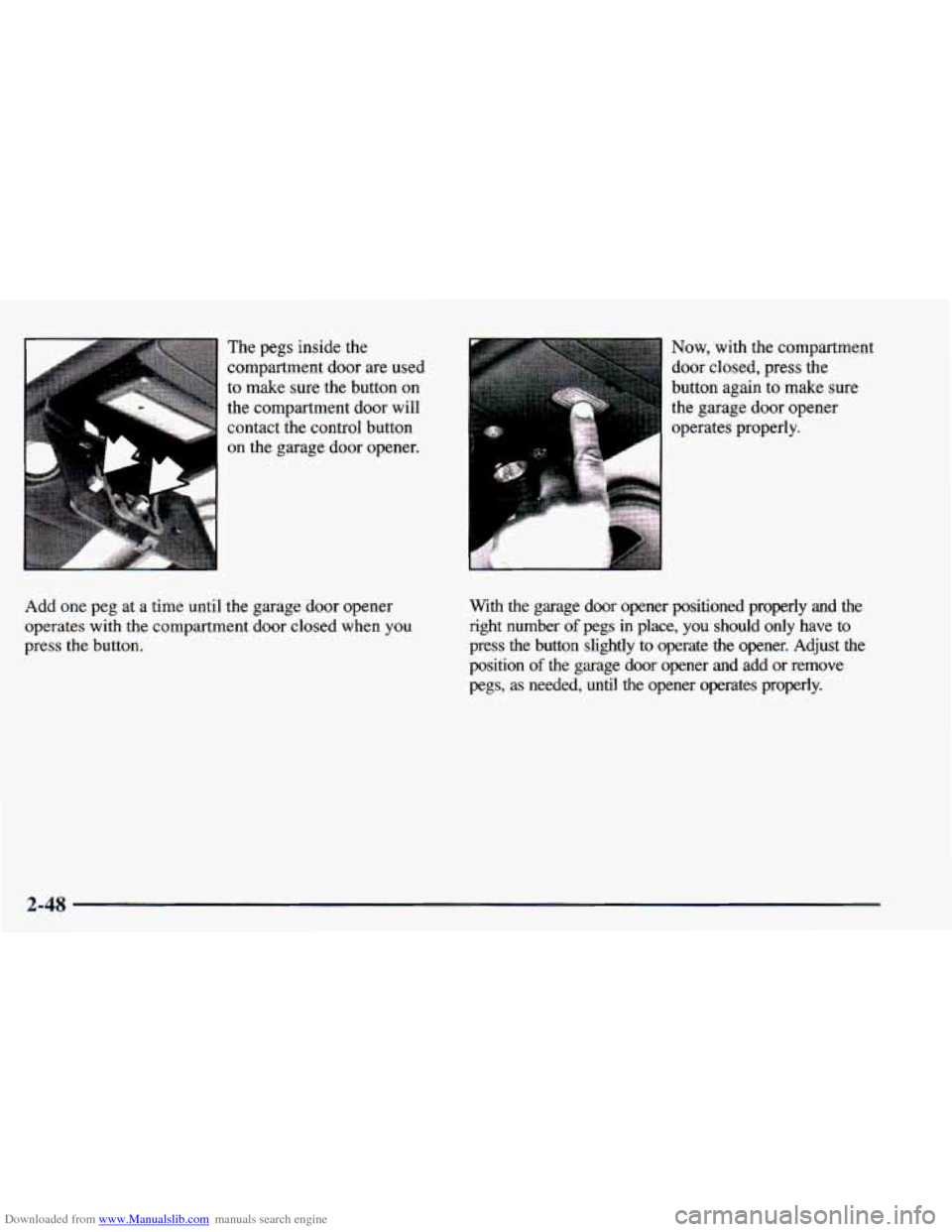
Downloaded from www.Manualslib.com manuals search engine The pegs inside the
compartment door are used
to make sure the button
on
the compartment door will
contact the control button
on the garage door opener.
Add one peg at a time until the garage door opener
operates with the compartment door closed when you
press the button. Now, with the compartment
door closed,
press the
button again to make sure
the garage door opener
operates properly.
With the garage door opener positioned properly and the right number
of pegs in place, you should only have to
press the button slightly to operate the opener. Adjust the
position
of the garage door opener and add or remove
pegs, as needed, until the opener operates properly.
2-48
Page 128 of 416

Downloaded from www.Manualslib.com manuals search engine Convenience Net (If Equipped) The convenience net is anchored to the endgate door.
Attach the upper
loops to the retainers on either side of
the endgate opening (the label should be in the upper
passenger side corner, visible from the rear
of vehicle).
Attach the lower hooks to the rear cargo tie downs on
the floor.
I Roll-Up Cargo Cover (If Equipped)
If you have the optional cargo cover, you can use it to
cover items in the cargo area of your vehicle.
Grasp the handle and unroll the cover. Latch the posts
into the sockets
on the inside trim panel on the
passenger’s side of the vehicle to secure it.
IOU may have a convenience net in the rear of your
vehicle
to help keep small items, like gloves and light
clothing in place during sharp turns or quick stops
and starts.
The net is not designed
to retain these items during
off-road use. The net
is not for larger, heavier items.
An improperly stored cargo cover could be
thrown about the vehicle during a collision or
sudden maneuver.
You or others could be
injured.
If you remove the cover, always store it
outside of the vehicle. When you put it back,
always be sure that it is securely reattached.
2-54