1998 CHEVROLET ASTRO radio
[x] Cancel search: radioPage 163 of 414

Downloaded from www.Manualslib.com manuals search engine AM-FM Stereo with Cassette Tape Player
(If Equipped)
Playing the Radio
VOLUME:
This knob turns the system on and off and
controls the volume. To increase volume and turn the
radio
on, turn the knob to the right. Turn it to the left to
decrease volume.
RECALL: Display the time with the ignition off by
pressing this knob. When the radio
is playing, press this
knob to recall the station frequency.
Finding a Station
AM-FM: Press the lower knob to switch between AM,
FM I and FM2.
TUNE: Turn the lower knob to tune in radio stations.
SEEK: Press the right arrow to tune to the next higher
station and the left arrow to tune
to the next lower
station and stay there.
PUSHBUTTONS: The four numbered pushbuttons let
you return
to your favorite stations. You can set up to
21 stations (seven AM, seven FM 1 and seven FM2). Just:
1. Turn the radio on.
2. Press AM-FM to select the band.
3. Tune in the desired station.
4. Press SET. (SET will appear on the display.)
5. Press and hold one of the four pushbuttons within
five seconds. Whenever you press that numbered
button,
the station you set will return.
6. Repeat the steps for each pushbutton.
3-11
Page 165 of 414
Downloaded from www.Manualslib.com manuals search engine Playing a Cassette Tape
Your tape player is built to work best with tapes that are
30 to 45 minutes long on each side. Tapes longer than
that are
so thin they may not work well in this player.
Once
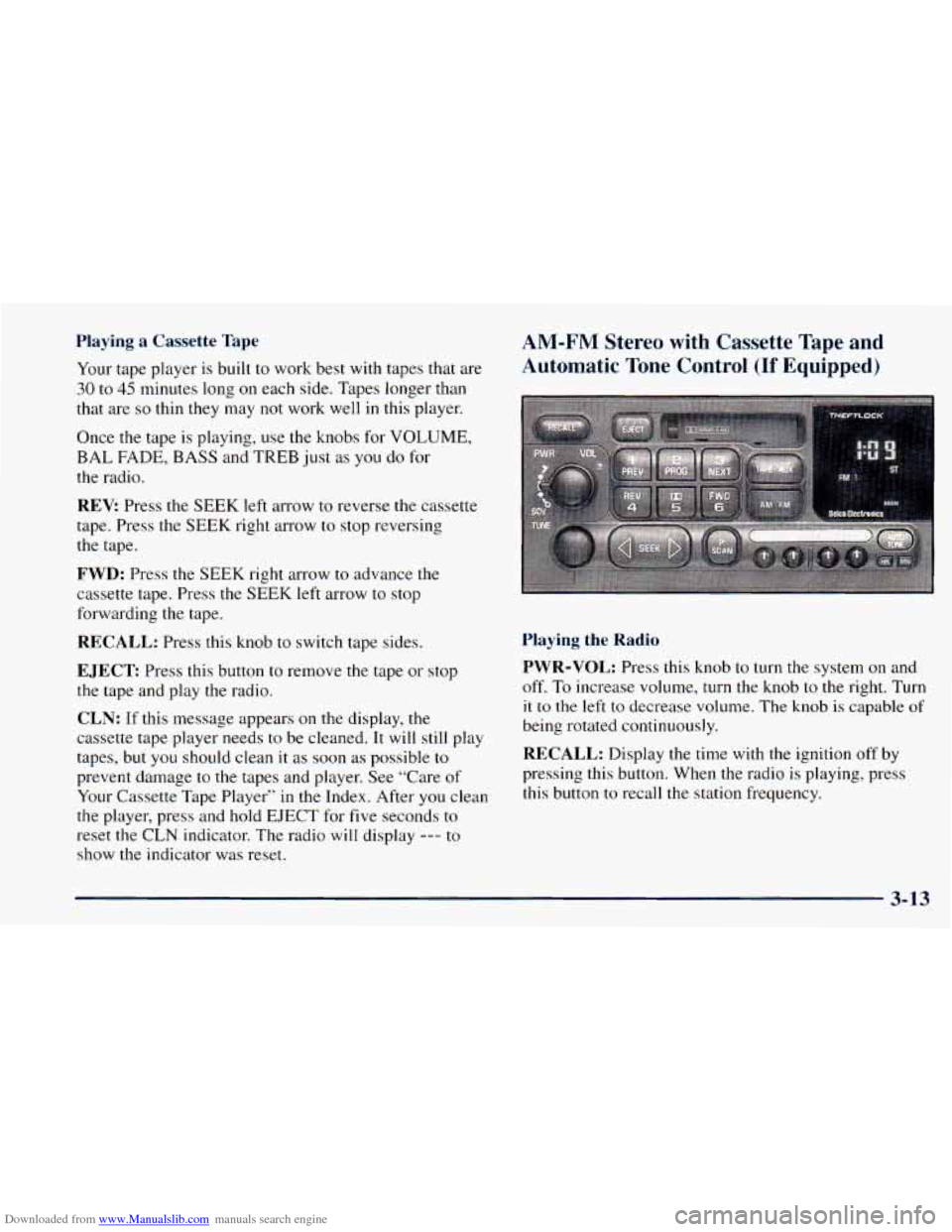
the tape is playing, use the knobs for VOLUME,
BAL FADE, BASS and TREB just as you do for
the radio.
REV Press the SEEK left arrow to reverse the cassette
tape. Press the SEEK right arrow to stop reversing
the tape.
FWD: Press the SEEK right arrow to advance the
cassette tape. Press the
SEEK left arrow to stop
forwarding the tape.
RECALL: Press this knob to switch tape sides.
EJECT Press this button to remove the tape or stop
the tape and play
the radio.
CLN: If this message appears on the display, the
cassette tape player needs
to be cleaned. It will still play
tapes, but you should clean it as soon as possible
to
prevent damage to the tapes and player. See “Care of
Your Cassette Tape Player”
in the Index. After you clean
the player, press and hold
EJECT for five seconds to
reset the CLN indicator. The radio will display
--- to
show the indicator was reset.
AM-FM Stereo with Cassette Tape and
Automatic Tone Control
(If Equipped)
Playing the Radio
PWR-VOL:
Press this knob to turn the system on and
off. To increase volume, turn the knob to the right. Turn
it to the left to decrease volume. The knob is capable of
being rotated continuously.
RECALL: Display the time with the ignition off by
pressing this button. When the radio is playing, press
this button
to recall the station frequency.
3-13
Page 166 of 414
Downloaded from www.Manualslib.com manuals search engine SCV: Your system has a feature called
Speed-Compensated-Volume (SCV). With SCV,
your audio system adjusts automatically
to make up for
road and wind noise as you drive. Set
the volume at the
desired level. Move the control ring behind the upper
knob to the right to adjust the SCV. Then, as you drive,
SCV automatically increases the volume, as necessary,
to overcome noise
at any particular speed. The volume
level should always sound the same
to you as you drive.
If
you don’t want to use SCV, turn the control all the
way down. Each notch
on the control ring allows for
more volume compensation at faster vehicle speeds.
Finding a Station
AM-FM: Press this button to switch between AM, FMl
and FM2, The display will show your selection.
TUNE: Press this knob lightly so it extends. Turn it to
choose radio stations. Push the knob back into its stored
position when you’re not using it.
SEEK: Press the right arrow to tune to the next
higher station and the left arrow to tune to the
next
lower station and stay there. The sound will mute
while seeking.
SCAN: Press and hold SEEK for two seconds until
SCAN appears on the display. SCAN allows you to
listen to stations for a few seconds, The receiver will
continue to scan and momentarily stop at each station
until
you press the button again. The sound will mute
while scanning.
PUSHBUTTONS: The six numbered pushbuttons let
you return
to your favorite stations. You can set up to
18 stations (six AM, six FM1 and six FM2). Just:
1.
2.
3.
4.
5.
6.
Turn the radio on.
Press AM-FM to select the band.
Tune in the desired station. Press AUTO
TONE to select the setting you prefer.
Press and hold one of the six pushbuttons. The sound
will mute. When it returns, release the button.
Whenever you press
that numbered button, the
station
you set will return and the tone you selected
will be automatically selected
fc- .hat button.
Repeat the steps for each pushbutton.
3-14
Page 167 of 414
Downloaded from www.Manualslib.com manuals search engine P. SCAN: The preset scan button lets you scan through
your favorite stations stored on your pushbuttons. Select
either the AM,
FMl or FM2 mode and then press P.
SCAN. It will scan through each station stored on your
pushbuttons and stop for a few seconds before continuing
to scan through all of the pushbuttons. Press P. SCAN
again or one of the pushbuttons to stop scanning to listen
to a specific preset station. P. SCAN will light up
on the
display while in this mode. If one of the stations stored on
a pushbutton is too weak for the location you are in, the
radio display will show the channel number (Pl-P6) for
several seconds before advancing
to the next preset station.
Setting the Tone
BASS:
Press lightly on this knob to release it from its
stored position. Turn the knob to the right
to increase bass
and to the left to decrease bass. When the BASS control is
rotated,
the AUTO TONE display will go blank.
TREB: Press lightly on this knob to release it from its
stored position. Turn the knob
to the right to increase
treble and to the left to decrease treble. When the TREB
control is rotated, the AUTO TONE display will go
blank. If a station is weak or noisy,
you may want to
decrease the treble.
Push these knobs back into their stored positions when
you’re
not using them.
AUTO TONE: Press this button to select among the
six preset equalization settings and tailor the sound
to
the music or voice being heard. Each time you press the
button, the selection will switch to one of the preset
settings of CLASSIC, NEWS, ROCK, POP, CW
(CountryWestern) or JAZZ. To return to the manual
mode, press and release
this button until the AUTO
TONE display goes blank. This will return the
tone
adjustment to the BASS and TREB controls. If a
BASS or TREB control is rotated,
the AUTO TONE
display will go blank. Use PUSHBUTTONS to program
AUTO TONE.
Adjusting the Speakers
BAL:
Press lightly on this knob to release it from its
stored position. Turn the control to the right to adjust
sound to the right speakers and
to the left to adjust
sound to the
left speakers. The middle position balances
the sound between the speakers.
FADE: Press lightly on this knob to release it from its
stored position. Turn the control
to the right to adjust the
sound to the front speakers and to the left for the rear
speakers. The middle position balances the sound
between the speakers.
Push these knobs back into their stored positions when
you’re not using them.
3-15
Page 168 of 414
Downloaded from www.Manualslib.com manuals search engine Playing a Cassette Tape
Your tape player is built to work best with tapes that are
30 to 45 minutes long on each side. Tapes longer than
that are
so thin they may not work well in this player.
To load a cassette tape with the ignition off, press
EJECT or RECALL. Then, insert
the cassette tape.
If
the ignition is on but the radio
begin playing.
Once the tape is playing, use the is off, the tape will
VOL, AUTO
TONE,
BAL, FADE, BASS and TREB controls just as
you do
for the radio. The tape symbol and
a direction arrow will
be on the display whenever a tape is being played.
Anytime a tape is inserted, the top side is selected for
play first.
The player automatically senses
if the cassette tape is
metal or Cr02 and adjusts for best playback sound.
For metal tapes,
the double-D symbol will appear on
the display.
PREV (1): Press the PREV button or the SEEK left
arrow
to search for the previous selection. A minimum
three-second blank gap is required for the player to stop
at
the beginning of the selection. The tape direction
arrow will blink during the SEEK operation.
PROG (2): Press this button to switch from one side
of the tape to the other.
NEXT (3): Press the NEXT button or the SEEK right
arrow to search for
the next selection. A minimum
three-second blank gap is required for the player to stop
at the beginning of the selection. The tape direction
arrow will blink during the SEEK operation. The sound
will mute while searching for the
next selection.
REV (4): Press this button to rapidly reverse the tape to
the beginning
of the cassette or until you press REV
again. The radio
will play the last selected station while
reversing the tape. The tape direction arrow will blink
during the reverse operation.
00 (5): Press this button to reduce cassette tape noise.
The double-D symbol will appear on the display while
the player
is in this mode.
Dolby Noise Reduction is manufactured under a license
from Dolby Laboratories Licensing Corporation. Dolby
and the double-D symbol are trademarks of Dolby
Laboratories Licensing Corporation.
FWD (6): Press this button to rapidly forward the tape
to the end of the cassette or until you press FWD again.
The radio
will play the last selected station while
forwarding the tape. The tape direction arrow will blink
during the forward operation.
AM-FM: Press this button to switch from a tape to
the radio.
3-16
Page 169 of 414
Downloaded from www.Manualslib.com manuals search engine TAPE AUX: Press this button to return to the tape
player when playing the radio. The lighted arrow
will
appear and show the direction of play when a tape is in
the active mode.
EJECT Press this button to remove the tape.
The radio will now play. EJECT can be used with either
the ignition or radio off. To load a cassette tape
with
the ignition or radio off, press EJECT before loading
the cassette.
CLN: If this message appears on the display, the
cassette tape player needs to be cleaned.
It will still play
tapes, but you should clean it as
soon as possible to
prevent damage to the tapes and player. See “Care of
Your Cassette Tape Player” in the Index. After you clean
the player, press and hold EJECT for five seconds to
reset
the CLN indicator. The radio will display --- to
show the indicator was reset.
CD Adapter Kits
It is possible to use a CD adapter kit with your cassette
tape player after activating
the bypass feature on your
tape player.
To activate the bypass feature, use the following steps:
1. Turn the ignition to RUN or ACC.
2. Turn the radio off.
3. Press and hold the TAPE AUX button for five
seconds. The tape symbol on
the display will flash
for two seconds, indicating the feature is active.
4. Insert the adapter while the tape symbol is flashing.
It will power up the radio and begin playing.
This override routine will remain active until EJECT
is pressed.
3-17
Page 170 of 414
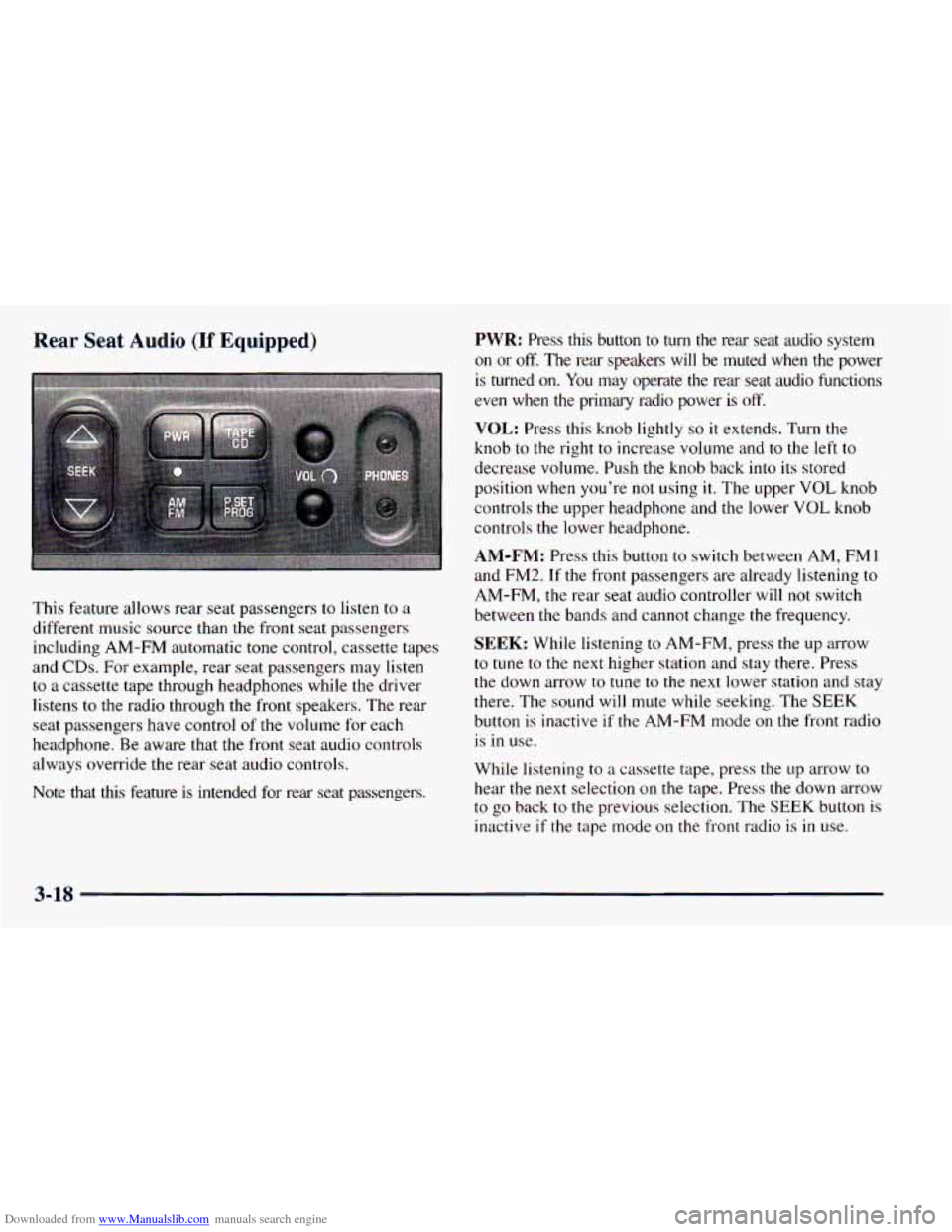
Downloaded from www.Manualslib.com manuals search engine Rear Seat Audio (If Equipped)
This feature allows rear seat passengers to listen to a
different music source than the front seat passengers
including AM-FM automatic tone control, cassette tapes
and
CDs. For example, rear seat passengers may listen
to a cassette tape through headphones while the driver
listens to the radio through the front speakers. The rear
seat passengers have control
of the volume for each
headphone. Be aware that the front seat audio controls
always override the rear seat audio controls.
Note that
this feature is intended for rear seat passengers.
PWR: Press this button to turn the rear seat audio system
on or off, The rear speakers will be muted when the power
is turned on. You may operate
the rear seat audio functions
even when the primary radio power is
off.
VOL: Press this knob lightly so it extends. Turn the
knob to the right to increase volume and to the left to
decrease volume. Push the knob back into its stored
position when you’re not using it. The upper
VOL knob
controls
the upper headphone and the lower VOL knob
controls the lower headphone.
AM-FM: Press this button to switch between AM, FM1
and
FM2. If the front passengers are already listening to
AM-FM, the rear seat audio controller will not switch
between
the bands and cannot change the frequency.
SEEK: While listening to AM-FM, press the up arrow
to tune to the next higher station and stay there. Press
the down arrow to tune
to the next lower station and stay
there. The sound will mute while seeking. The SEEK
button is inactive if the AM-FM mode
on the front radio .. is in use.
While listening to
a cassette tape, press the up arrow to
hear the next selection
on the tape. Press the down arrow
to go back
to the previous selection. The SEEK button is
inactive
if the tape mode on the front radio is in use.
3-18
Page 171 of 414

Downloaded from www.Manualslib.com manuals search engine While listening to a CD, press the up arrow to hear the
next selection
on the CD. Press the down arrow to go
back
to the start of the current selection (if more than
eight seconds have played). The
SEEK button is inactive
if the CD mode
on the front radio is in use.
SCAN: Press and hold SEEK until the radio goes into
SCAN mode. SCAN allows
you to listen to stations for
a few seconds. The receiver will continue to scan and
momentarily stop at each station until
you press SEEK
again. The SCAN function is inactive if the AM-FM
mode on the front radio is
in use.
P.SET PROG: The front passengers must be listening to
something different for each of these functions to work:
Press this button to seek through the preset radio
stations set on your primary radio pushbuttons.
When a cassette tape is playing, press this button to
go to the other side of the tape.
TAPE CD: With a cassette tape/CD in the player and
the radio playing, press this button to play a cassette
tape/CD. Press AM-FM to return
to the radio when a
cassette tape/CD
is playing. The inactive tape or CD will
remain safely inside the radio for future listening.
AM-FM Stereo with Compact Disc Player
and Automatic
Tone Control (If Equipped)
Playing the Radio
PWR-VOL:
Press this knob to turn the system on and
off. To increase volume, turn this knob to
the right. Turn
it to the left to decrease volume. The knob is capable of
rotating continuously.
RECALL: Display the time with the ignition off by
pressing this button. When the radio is playing, press
this button to recall
the station frequency.
3-19