1998 BMW CONVERTIBLE lock
[x] Cancel search: lockPage 77 of 179
76
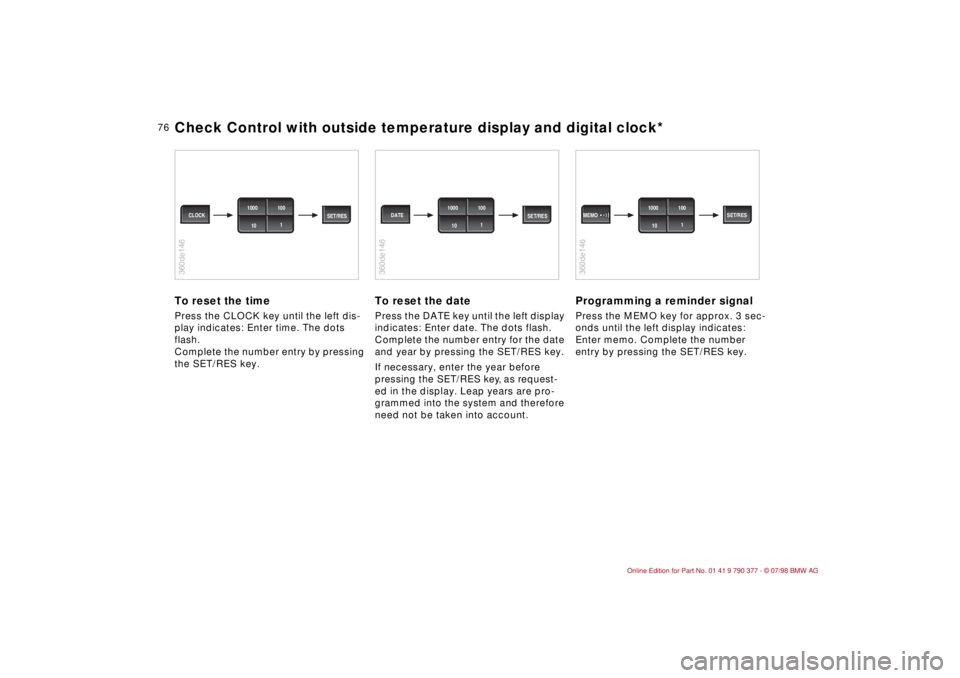
To reset the timePress the CLOCK key until the left dis-
play indicates: Enter time.
The dots
flash.
Complete the number entry by pressing
the SET/RES key.
To reset the datePress the DATE key until the left display
indicates: Enter date.
The dots flash.
Complete the number entry for the date
and year by pressing the SET/RES key.
If necessary, enter the year before
pressing the SET/RES key, as request-
ed in the display. Leap years are pro-
grammed into the system and therefore
need not be taken into account.
Programming a reminder signalPress the MEMO key for approx. 3 sec-
onds until the left display indicates:
Enter memo. Complete the number
entry by pressing the SET/RES key.
360de146
SET/RES CLOCK1000 100
1
10
360de146
SET/RES DATE1000 100
1
10
360de146
1000 100
1
10 MEMO SET/RES
Check Control with outside temperature display and digital clock*
Page 78 of 179
77
At a glanceControls Car careRepairsTechnicalDataIndex
Allows you to select display data for
safe and economical driving.
If your car is equipped with the Check
Control option, texts with information
and warnings are used to alert the
driver to system malfunctions. In addi-
tion, an indicator lamp is provided in the
instrument cluster. For details and
operating instructions, refer to
pages 71 and 72.
With the digital clock you can
ddisplay the time and date,
dpre-program a reminder signal
(memo), e.g., to remind you of news
broadcasts.
Refer to page 74 for information and
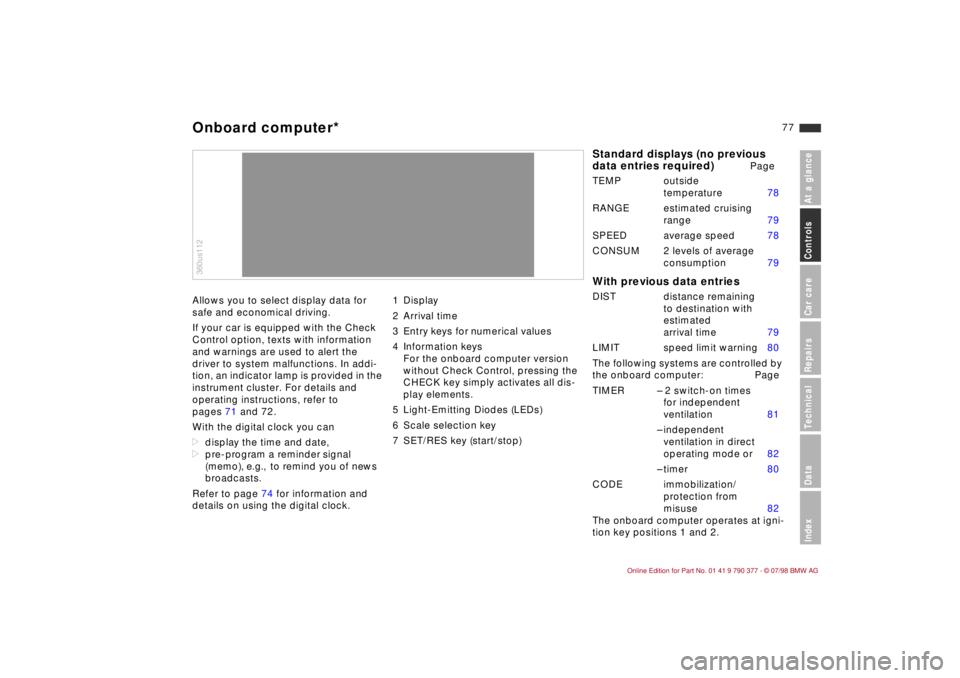
details on using the digital clock.1 Display
2 Arrival time
3 Entry keys for numerical values
4 Information keys
For the onboard computer version
without Check Control, pressing the
CHECK key simply activates all dis-
play elements.
5 Light-Emitting Diodes (LEDs)
6 Scale selection key
7 SET/RES key (start/stop)360us112Onboard computer*
Standard displays (no previous
data entries required)
Page
TEMP outside
temperature 78
RANGE estimated cruising
range 79
SPEED average speed 78
CONSUM 2 levels of average
consumption 79
With previous data entriesDIST distance remaining
to destination with
estimated
arrival time 79
LIMIT speed limit warning 80
The following systems are controlled by
the onboard computer: Page
TIMER Ð 2 switch-on times
for independent
ventilation 81
Ð independent
ventilation in direct
operating mode or 82
Ð timer 80
CODE immobilization/
protection from
misuse 82
The onboard computer operates at igni-
tion key positions 1 and 2.
Page 82 of 179

81
At a glanceControls Car careRepairsTechnicalDataIndex
To stop:
When the time is displayed:
dPress the SET/RES key.
If other information is displayed:
dKey sequence as in illustration.
Take intermediate time:
dPress the TIMER key.
The LED flashes, the intermediate time
is displayed and the timer continues to
run.
Display time again:
dPress the TIMER key again.b
The timer stops with the ignition
key in position 0 and runs again in posi-
tion 1.c
Independent ventilation
*
To enter activation times
You can select two starting times for
independent ventilation. After 30 min-
utes the ventilation shuts off again auto-
matically.
Refer to page 87 for important informa-
tion on using the independent ventila-
tion system.
When you press the TIMER key, the
current status of the ventilation appears
in the display.Enter a switch-on time:
Before you can enter data, the ignition
key must be at position 1 and the digital
clock must be visible in the display.
Repeat key sequence as in the illustra-
tion. (Press the TIMER key twice).
Enter the second switch-on time:
Repeat key sequence as in illustration.
Correct the entered time:
Repeat the key sequence as shown in
the illustration, but enter a different
time.
After you enter the time, an asterisk
*
appears in the display and the LED
lights up, so that you can ascertain that
a switch-on time has been selected.
During ventilation the LED blinks. It
goes off when you turn the switch off.
Request a previously selected time
(LED lights up):
dFor the first switch-on time, press the
TIMER key twice.
dFor the second switch-on time, press
the TIMER key three times.
360us311
Onboard computer*
Page 83 of 179
82
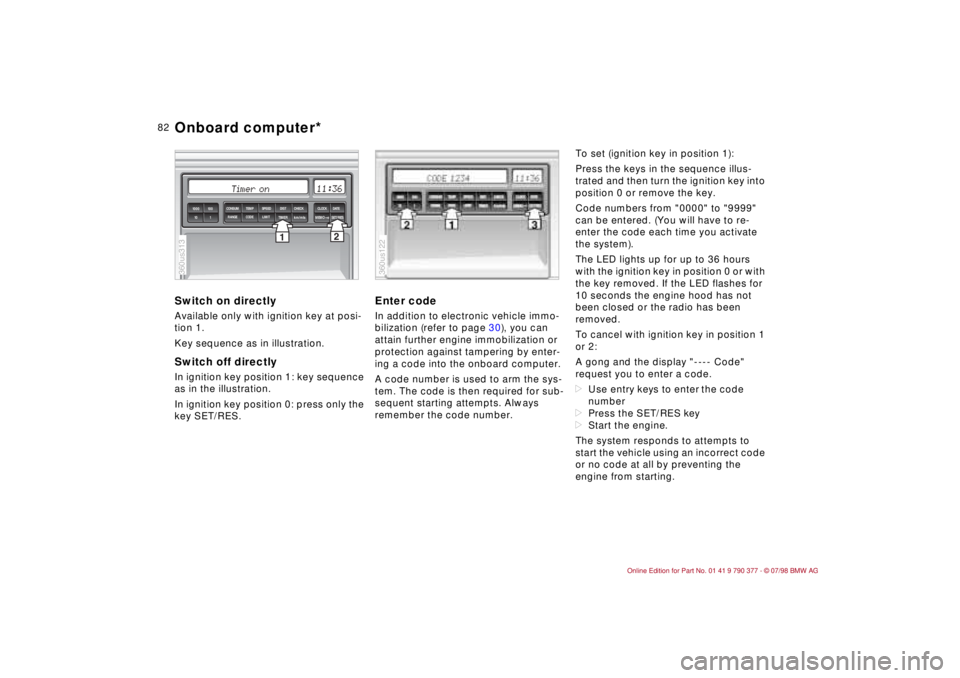
Switch on directlyAvailable only with ignition key at posi-
tion 1.
Key sequence as in illustration.Switch off directlyIn ignition key position 1: key sequence
as in the illustration.
In ignition key position 0: press only the
key SET/RES.
Enter codeIn addition to electronic vehicle immo-
bilization (refer to page 30), you can
attain further engine immobilization or
protection against tampering by enter-
ing a code into the onboard computer.
A code number is used to arm the sys-
tem. The code is then required for sub-
sequent starting attempts. Always
remember the code number.To set (ignition key in position 1):
Press the keys in the sequence illus-
trated and then turn the ignition key into
position 0 or remove the key.
Code numbers from "0000" to "9999"
can be entered. (You will have to re-
enter the code each time you activate
the system).
The LED lights up for up to 36 hours
with the ignition key in position 0 or with
the key removed. If the LED flashes for
10 seconds the engine hood has not
been closed or the radio has been
removed.
To cancel with ignition key in position 1
or 2:
A gong and the display "---- Code"
request you to enter a code.
dUse entry keys to enter the code
number
dPress the SET/RES key
dStart the engine.
The system responds to attempts to
start the vehicle using an incorrect code
or no code at all by preventing the
engine from starting.
2
1TIMER
km/mls
MEMOSET/RES 1000 100
10 1
SPEED CONSUM TEMP DIST CHECK CLOCK
DATE
LIMIT RANGE CODE
360us313
360us122
Onboard computer*
Page 87 of 179
86
Foglamps
*
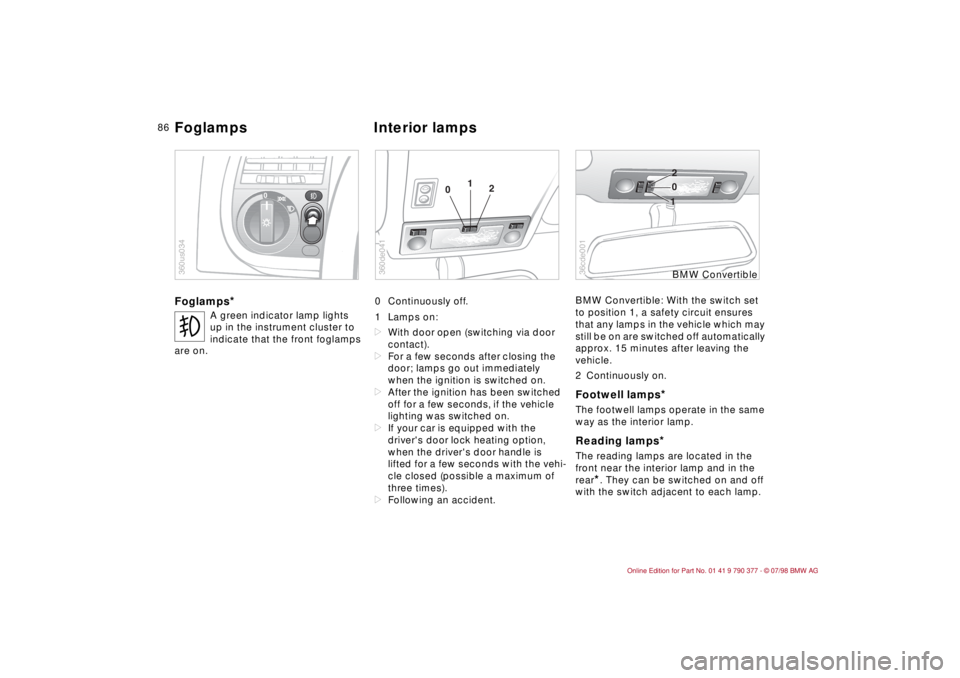
0 Continuously off.
1 Lamps on:
dWith door open (switching via door
contact).
dFor a few seconds after closing the
door; lamps go out immediately
when the ignition is switched on.
dAfter the ignition has been switched
off for a few seconds, if the vehicle
lighting was switched on.
dIf your car is equipped with the
driver's door lock heating option,
when the driver's door handle is
lifted for a few seconds with the vehi-
cle closed (possible a maximum of
three times).
dFollowing an accident.BMW Convertible: With the switch set
to position 1, a safety circuit ensures
that any lamps in the vehicle which may
still be on are switched off automatically
approx. 15 minutes after leaving the
vehicle.
2 Continuously on.
Footwell lamps
*
The footwell lamps operate in the same
way as the interior lamp.Reading lamps
*
The reading lamps are located in the
front near the interior lamp and in the
rear
*. They can be switched on and off
with the switch adjacent to each lamp.
t
A green indicator lamp lights
up in the instrument cluster to
indicate that the front foglamps
are on.
0
360us034
01
2
360de041
10 2
36cde001
BMW Convertible
Foglamps Interior lamps
Page 92 of 179

91
At a glanceControls Car careRepairsTechnicalDataIndex
To defrost windshield and door
windows
Air conditioner Circulated air mode/Automatic
recirculated air control (AUC)
*
Press the button repeatedly to run
through the following control sequence:
dIndicator lamps off: outside air flow
operational.
dLeft-hand indicator lamp on Ð AUC
mode: the system detects pollutants
in the outside air and responds by
deactivating the outside air flow as
required. The system then recircu-
lates the air currently within the vehi-
cle.
dRight-hand indicator lamp on: the
flow of outside air into the vehicle is
permanently blocked. The system
then recirculates the air currently
within the vehicle.a
If the windshields fog over in circu-
lated air mode, switch off the circulated
air mode/Automatic recirculated air
control and increase the air supply. if
necessary.c
Rear window defrosterBMW Convertible: Heated rear-window
blower.
The rear-window blower is always
switched off with the convertible top
down.
When the hardtop
* is in place, press
the rear-window heating button.
Temperature
This program is designed for
rapid removal of ice and con-
densation from the windshield and side
windows.
The air conditioner cools and
dehumidifies incoming air
before reheating it to the selected tem-
perature.
Depending on the weather, the wind-
shield may fog over briefly when the
engine is started.
Switching off the air conditioner at out-
side temperatures below approx. 41 5F
(56) will prevent the windows from
fogging up.
Frequently switching the air condi-
tioner on and off may also promote the
formation of condensation on the win-
dow surfaces.
b
Condensation forms in the air
conditioner system during operation,
which then exits under the vehicle. It is
not unusual for a small puddle to form
there.c
You can respond to unpleas-
ant odors in the outside air
by temporarily excluding the outside air.
The system then recirculates the air
currently within the vehicle.
A
The indicator lamp comes
on to confirm that the rear
defroster is operating.
The defroster switches off automatically
after approx. 15 minutes.
On both the driver's and the
passenger's side you can
adjust the specific temperature. The fig-
ures in the display provide a general
indication of interior temperature. We
recommend 70 5F (226) as a standard
setting for comfortable travel, both with
and without the air conditioner. When
you start the vehicle, the system
ensures that the selected temperature
is achieved as quickly as possible and
maintained at a constant level by the
control.
Automatic climate control
Page 93 of 179
92
Air supply
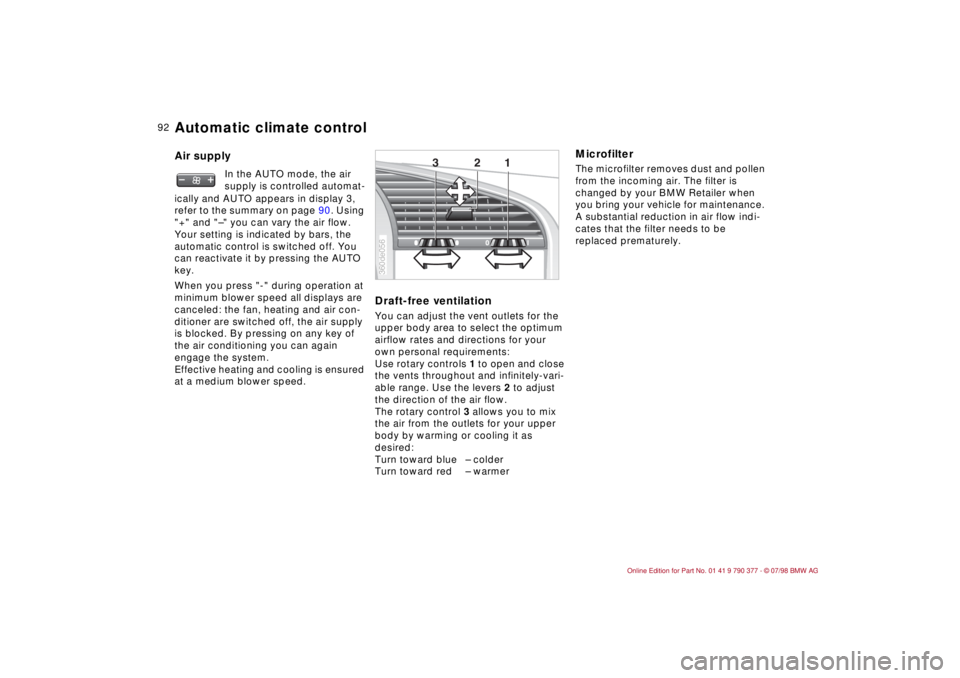
Draft-free ventilation
You can adjust the vent outlets for the
upper body area to select the optimum
airflow rates and directions for your
own personal requirements:
Use rotary controls 1 to open and close
the vents throughout and infinitely-vari-
able range. Use the levers 2 to adjust
the direction of the air flow.
The rotary control 3 allows you to mix
the air from the outlets for your upper
body by warming or cooling it as
desired:
Turn toward blue Ð colder
Turn toward red Ð warmer
MicrofilterThe microfilter removes dust and pollen
from the incoming air. The filter is
changed by your BMW Retailer when
you bring your vehicle for maintenance.
A substantial reduction in air flow indi-
cates that the filter needs to be
replaced prematurely. In the AUTO mode, the air
supply is controlled automat-
ically and AUTO appears in display 3,
refer to the summary on page 90. Using
"+" and "Ð" you can vary the air flow.
Your setting is indicated by bars, the
automatic control is switched off. You
can reactivate it by pressing the AUTO
key.
When you press "-" during operation at
minimum blower speed all displays are
canceled: the fan, heating and air con-
ditioner are switched off, the air supply
is blocked. By pressing on any key of
the air conditioning you can again
engage the system.
Effective heating and cooling is ensured
at a medium blower speed.
1 2 3
360de056
Automatic climate control
Page 94 of 179

93
At a glanceControlsCar careRepairsTechnicalDataIndex
BMW Hi-Fi System (Harman/
Kardon)1On
2Off
In the "On" position, the listener is given
the impression of a considerably larger
passenger compartment with an
improved stereo effect in all seats.
This function should be switched off in
the case of poor radio reception due to
the frequent changes between stereo
and mono which result.
BMW Convertible:
You do not have to operate the con-
trols. The system detects whether the
top is open or closed and regulates the
sound automatically.
To openPress the button and fold down the
door.
The glove compartment lamp switches
on from ignition key position 1.To closeFold up door.To engage locksOnly possible with a master key. a
To reduce the risk of injury, always
close the glove compartment immedi-
ately after use.c
Rechargeable flashlightThe connection for the rechargeable
flashlight is located on the left side of
the glove compartment.
The flashlight features overcharging
protection, so it can be left in its holder
continuously.
However, it must be removed when the
battery is disconnected or removed.a
Ensure that the flashlight is off be-
fore inserting it in its holder.c
HIFI
1
2
360de057
360de058
BMW Hi-Fi System*Glove compartment