Page 71 of 211
70n
Rear window defroster Cruise controlTo activatePress the button: The rear window de-
froster continues high-output operation
for as long as the indicator lamp re-
mains on (rapid thaw).
After the indicator lamp goes out, the
defroster continues operating at re-
duced power for a limited period before
deactivating automatically.To deactivateIf the indicator lamp is on, press the
button.380de622
You can store and automatically main-
tain any desired vehicle speed above
approx. 20 mph (30 km/h).To activate the system In ignition key positions 1 and 2:
Press button 4, the indicator lamp in the
instrument cluster comes on. You can
now use the cruise control.To store and maintain speed
or to acceleratePress button 1 briefly:
The system records and maintains the
current vehicle speed. Every time you
tap the button, the speed increases by
0.6 mph (1 km/h).390de058
Press and hold button 1:
The vehicle accelerates without pres-
sure on the accelerator pedal. When
you release the button, the system
records and maintains the current
speed.
If, on a downhill gradient, the en-
gine braking effect is not suffi-
cient, the controlled speed can be ex-
ceeded. Speed may not be maintained
on uphill grades if the engine output is
insufficient.< To deceleratePress button 2 briefly:
When the cruise control is active,
vehicle speed is reduced by approx.
0.6 mph (approx. 1 km/h) every time
you briefly press the button.
Press and hold button 2:
With the cruise control active, the sys-
tem automatically reduces the throttle
opening to slow the vehicle. When you
release the button, the system records
and maintains the current speed.
Page 72 of 211
71n
RepairsIndexOverview Controls Car care Technology Data
Cruise controlTo cancel the cruise controlWhen the system is activated, press
and hold button 4. The indicator lamp
stays on. You can use the cruise control
again as desired.
In addition, cruise control is canceled
automatically:
>When you apply pressure to the
brake pedal
>If the automatic transmission selector
lever is moved from "D" to "N"
>If you exceed or fall below the pro-
grammed speed for an extended pe-
riod (by depressing the accelerator,
for example).To resume the stored settingPress button 3:
The vehicle accelerates to and main-
tains the last speed stored. When you
turn the ignition key to position 0, the
stored speed is deleted from the sys-
tem's memory and the system is deacti-
vated.
To deactivate the systemWhen the cruise control has been can-
celed, press button 4 again. The indica-
tor lamp goes off and the memorized
speed is canceled.Do not use cruise control on twist-
ing roads, when high traffic den-
sity prevents driving at a constant
speed, when the road surface is slick
(snow, rain, ice), or when the road sur-
face is loose (rocks or gravel, sand).<
Page 73 of 211
72n
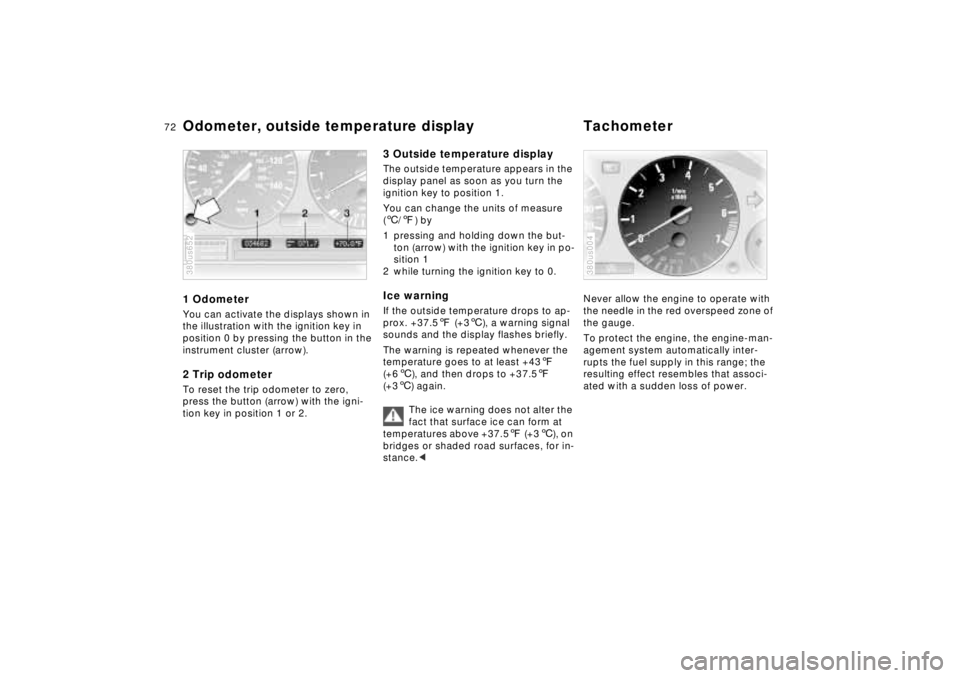
Odometer, outside temperature display Tachometer1 OdometerYou can activate the displays shown in
the illustration with the ignition key in
position 0 by pressing the button in the
instrument cluster (arrow).2 Trip odometerTo reset the trip odometer to zero,
press the button (arrow) with the igni-
tion key in position 1 or 2.380us652
3 Outside temperature displayThe outside temperature appears in the
display panel as soon as you turn the
ignition key to position 1.
You can change the units of measure
(6/7) by
1 pressing and holding down the but-
ton (arrow) with the ignition key in po-
sition 1
2 while turning the ignition key to 0.Ice warningIf the outside temperature drops to ap-
prox. +37.57 (+36), a warning signal
sounds and the display flashes briefly.
The warning is repeated whenever the
temperature goes to at least +437
(+66), and then drops to +37.57
(+36) again.
The ice warning does not alter the
fact that surface ice can form at
temperatures above +37.57 (+36), on
bridges or shaded road surfaces, for in-
stance.<
Never allow the engine to operate with
the needle in the red overspeed zone of
the gauge.
To protect the engine, the engine-man-
agement system automatically inter-
rupts the fuel supply in this range; the
resulting effect resembles that associ-
ated with a sudden loss of power.380us004
Page 74 of 211
73n
RepairsIndexOverview Controls Car care Technology Data
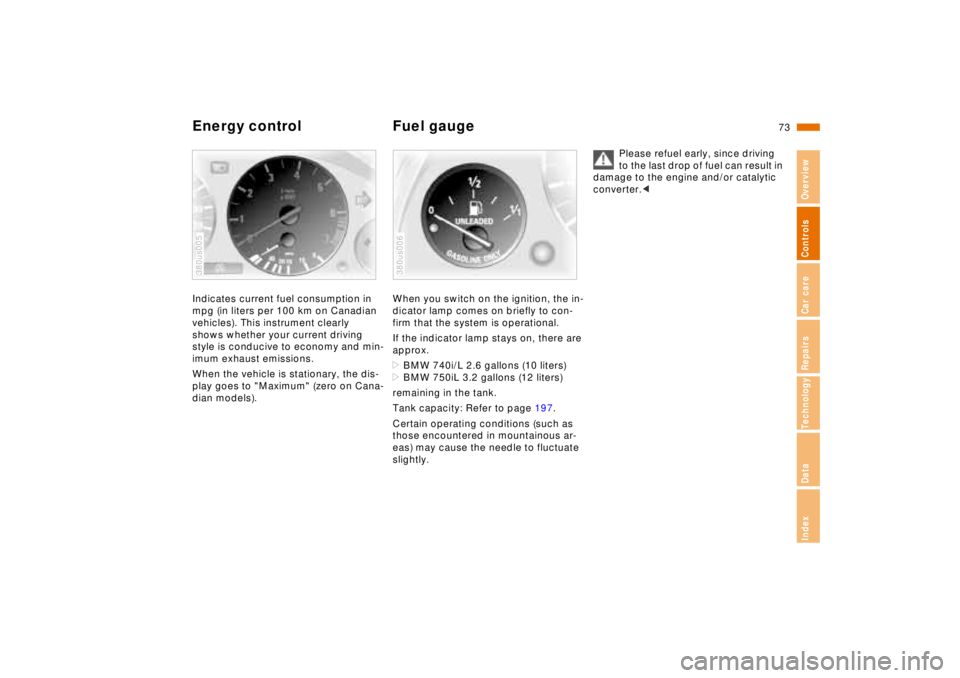
Energy control Fuel gaugeIndicates current fuel consumption in
mpg (in liters per 100 km on Canadian
vehicles). This instrument clearly
shows whether your current driving
style is conducive to economy and min-
imum exhaust emissions.
When the vehicle is stationary, the dis-
play goes to "Maximum" (zero on Cana-
dian models).380us005
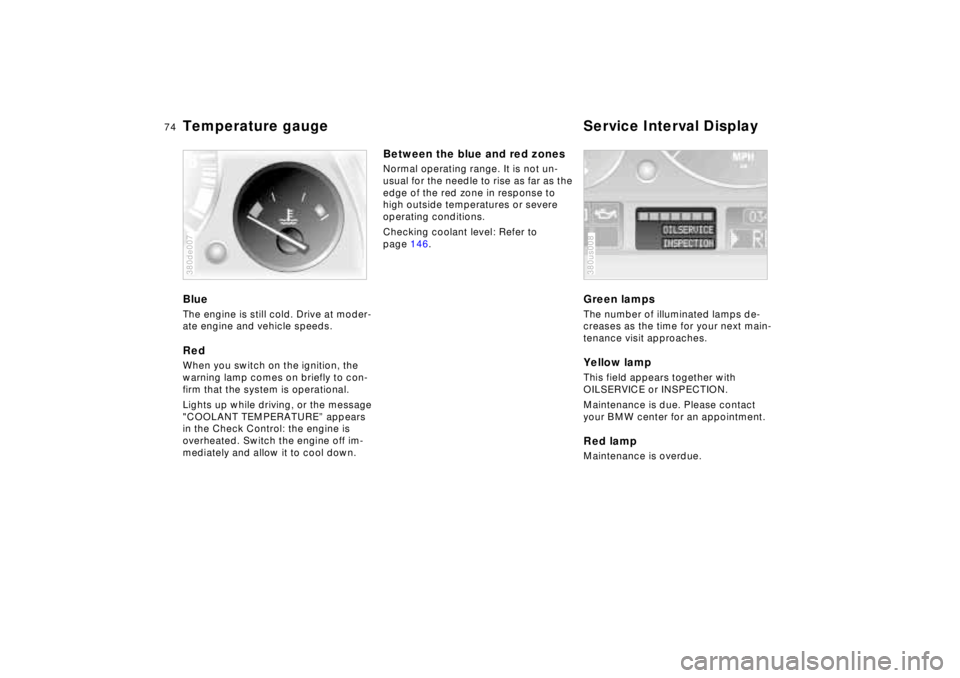
When you switch on the ignition, the in-
dicator lamp comes on briefly to con-
firm that the system is operational.
If the indicator lamp stays on, there are
approx.
>BMW 740i/L 2.6 gallons (10 liters)
>BMW 750iL 3.2 gallons (12 liters)
remaining in the tank.
Tank capacity: Refer to page 197.
Certain operating conditions (such as
those encountered in mountainous ar-
eas) may cause the needle to fluctuate
slightly.380us006
Please refuel early, since driving
to the last drop of fuel can result in
damage to the engine and/or catalytic
converter.<
Page 75 of 211
74n
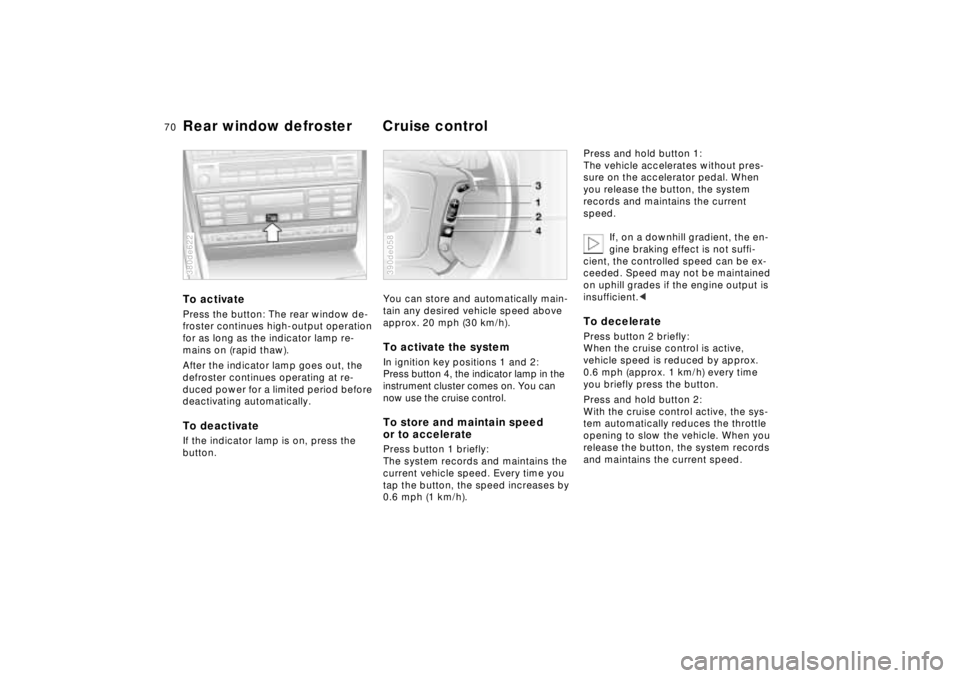
Temperature gauge Service Interval DisplayBlueThe engine is still cold. Drive at moder-
ate engine and vehicle speeds.RedWhen you switch on the ignition, the
warning lamp comes on briefly to con-
firm that the system is operational.
Lights up while driving, or the message
"COOLANT TEMPERATURE” appears
in the Check Control: the engine is
overheated. Switch the engine off im-
mediately and allow it to cool down.380de007
Between the blue and red zonesNormal operating range. It is not un-
usual for the needle to rise as far as the
edge of the red zone in response to
high outside temperatures or severe
operating conditions.
Checking coolant level: Refer to
page 146.
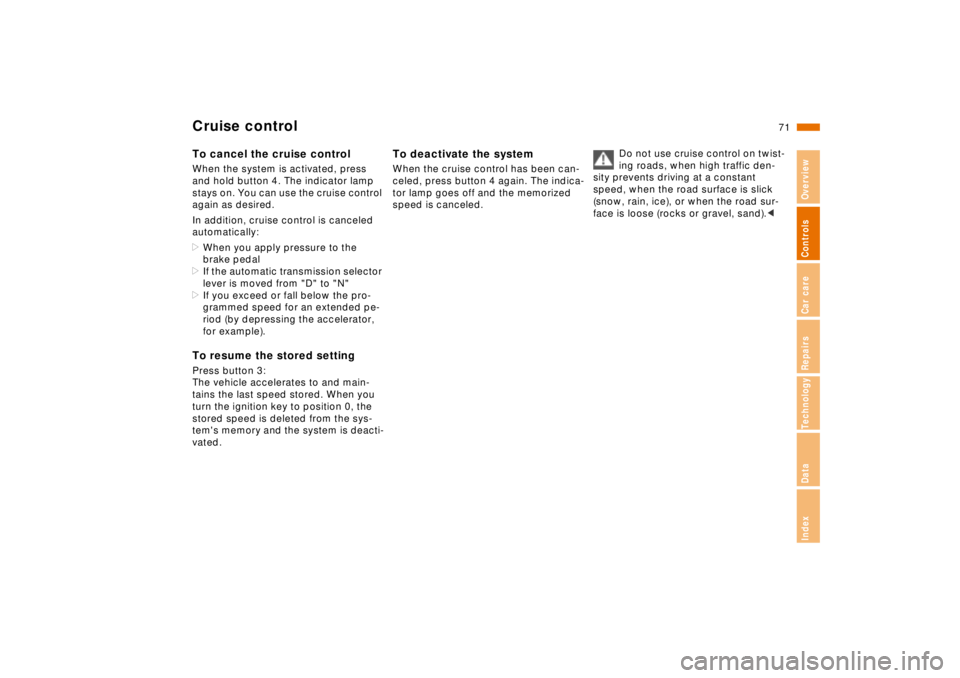
Green lampsThe number of illuminated lamps de-
creases as the time for your next main-
tenance visit approaches.Yellow lampThis field appears together with
OILSERVICE or INSPECTION.
Maintenance is due. Please contact
your BMW center for an appointment.Red lampMaintenance is overdue.380us008
Page 77 of 211

76n
Check ControlPriority 2
These alerts for problems are reported
for 20 seconds when the ignition key is
in position 2. The status reports remain
after the message disappears. You can
view the message again by pressing the
CHECK button.
>TRUNK LID OPEN
This message is given only when ini-
tially starting off.
>DOOR OPEN
This is displayed after a minimum
vehicle speed is exceeded.
>FASTEN SEAT BELTS
*
In addition, the indicator lamp with
the safety belt symbol appears and
an acoustic signal is heard.
>WASHER FLUID LOW
The washer fluid is too low. Top up
the fluid at the earliest opportunity.
Refer to page 142.
>CHECK ENGINE OIL
Add engine oil as soon as possible.
Refer to page 143.
>OUTSIDE TEMPERATURE 247
(–5.06)
This display is only an example. The
current reading appears at an outside
temperature of 37.57 (+36) and
below. Refer also to page 72.>TIRE PRESSURE SET
*
The RDC has imported the current in-
flation pressure in the tires as the tar-
get values which the system will
monitor.
Refer to page 94.
>CHECK TIRE PRESSURE
*
Check and correct the tire inflation
pressure to specifications at the earli-
est opportunity (next stop for fuel).
Refer to page 94.
>TIRE CHECK INACTIVE
*
A temporary interference of the RDC
or a system fault. Refer to page 95
>BRAKE LAMP CIRCUIT
A bulb has failed or the circuit has a
malfunction. Refer to pages 163, 176
or consult an authorized BMW center.
>CHECK LOWBEAMS
CHECK SIDE LAMPS
CHECK REAR LAMPS
CHECK FRONT FOGLAMPS
CHECK LICPLATE LAMP
CHECK TRAILER LIGHTS
CHECK HIGHBEAMS
CHECK BACKUP LAMPS
Defective bulb or circuit. Refer to
pages 163, 176 or consult an autho-
rized BMW center.
>TRANS. FAILSAFE PROG
Please consult the nearest authorized
BMW center. Refer to pages 64, 67.>CHECK BRAKE LININGS
Have the brake pads inspected by
your BMW center. Refer to page 126.
>REMOTE KEY BATTERY
Change the battery. Refer to
page 168.
>CHECK COOLANT LEVEL
The coolant is too low. Top up at the
next opportunity. Refer to page 146.
>ENGINE FAILSAFE PROG
Fault in the Electronic Engine Power
Control EML. When braking, higher
brake application pressure may be
necessary and brake pedal travel may
be significantly longer.
Please have the system inspected by
your authorized BMW center.
Page 78 of 211
77n
RepairsIndexOverview Controls Car care Technology Data
Check ControlDisplays after completion of tripAll of the malfunctions registered during
the trip appear consecutively when the
ignition key is turned to position 0.
One of the following displays may ap-
pear:
>LIGHTS ON
>KEY IN IGNITION LOCK
>CHECK ENGINE OIL LEV
Add engine oil at the next opportunity
(next stop for fuel). Refer to page 14 3.
This message appears when you open
the driver's door after parking the vehi-
cle. A supplementary gong is also
heard.
Even if the ignition key has been re-
moved and the display has gone off,
you can still retrieve these messages
with CHECK button (1) for approx. three
minutes after completion of your trip. If
there are multiple messages, continue
to press the CHECK button.
To monitor the Check ControlWith the ignition key in position 2, press
CHECK button (1):
CHECK CONTROL OK appears in the
display.
In this case, there are no faults in the
systems which are monitored.
Page 80 of 211
79n
RepairsIndexOverview Controls Car care Technology Data
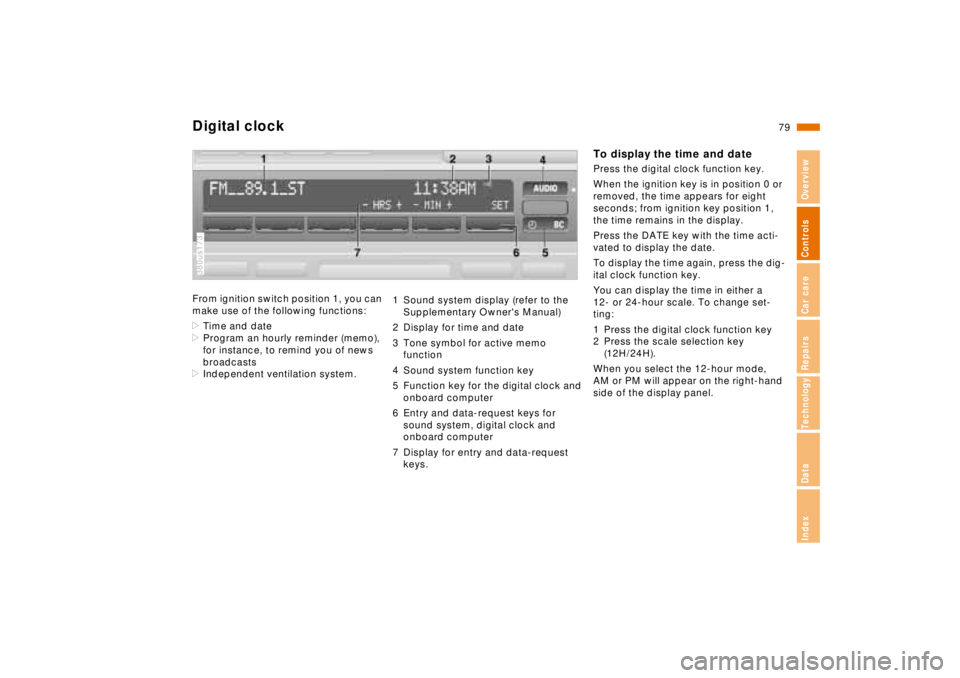
Digital clockFrom ignition switch position 1, you can
make use of the following functions:
>Time and date
>Program an hourly reminder (memo),
for instance, to remind you of news
broadcasts
>Independent ventilation system.380us173
1 Sound system display (refer to the
Supplementary Owner's Manual)
2 Display for time and date
3 Tone symbol for active memo
function
4 Sound system function key
5 Function key for the digital clock and
onboard computer
6 Entry and data-request keys for
sound system, digital clock and
onboard computer
7 Display for entry and data-request
keys.
To display the time and datePress the digital clock function key.
When the ignition key is in position 0 or
removed, the time appears for eight
seconds; from ignition key position 1,
the time remains in the display.
Press the DATE key with the time acti-
vated to display the date.
To display the time again, press the dig-
ital clock function key.
You can display the time in either a
12- or 24-hour scale. To change set-
ting:
1 Press the digital clock function key
2 Press the scale selection key
(12H/24H).
When you select the 12-hour mode,
AM or PM will appear on the right-hand
side of the display panel.