1998 BMW 740I brake
[x] Cancel search: brakePage 60 of 211
59n
RepairsIndexOverview Controls Car care Technology Data
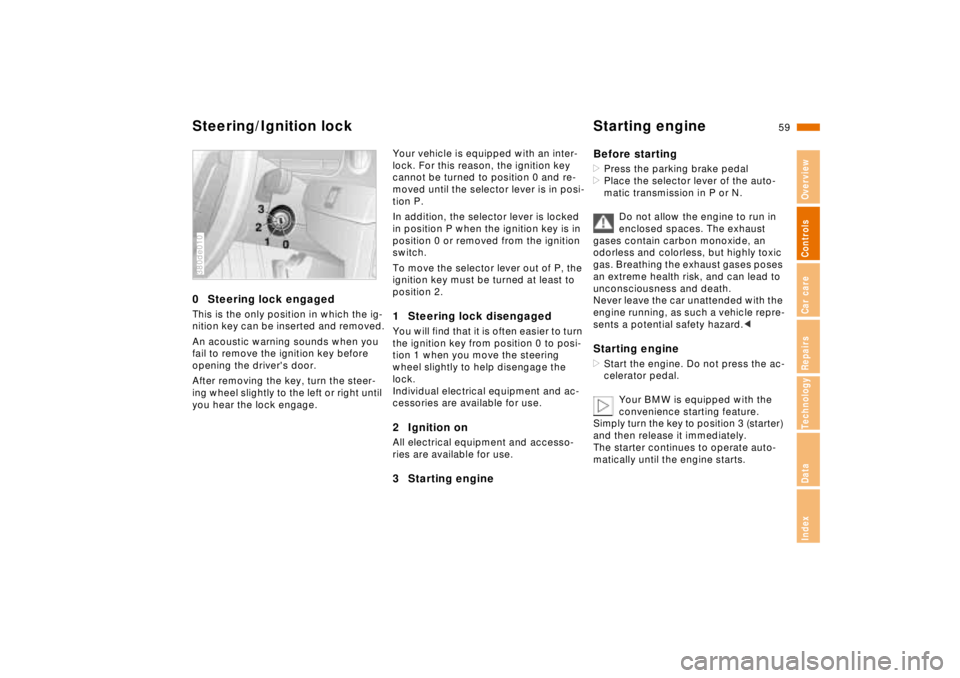
Steering/Ignition lock Starting engine0 Steering lock engagedThis is the only position in which the ig-
nition key can be inserted and removed.
An acoustic warning sounds when you
fail to remove the ignition key before
opening the driver's door.
After removing the key, turn the steer-
ing wheel slightly to the left or right until
you hear the lock engage.380de010
Your vehicle is equipped with an inter-
lock. For this reason, the ignition key
cannot be turned to position 0 and re-
moved until the selector lever is in posi-
tion P.
In addition, the selector lever is locked
in position P when the ignition key is in
position 0 or removed from the ignition
switch.
To move the selector lever out of P, the
ignition key must be turned at least to
position 2.1 Steering lock disengagedYou will find that it is often easier to turn
the ignition key from position 0 to posi-
tion 1 when you move the steering
wheel slightly to help disengage the
lock.
Individual electrical equipment and ac-
cessories are available for use.2 Ignition onAll electrical equipment and accesso-
ries are available for use.3 Starting engineBefore starting
>Press the parking brake pedal
>Place the selector lever of the auto-
matic transmission in P or N.
Do not allow the engine to run in
enclosed spaces. The exhaust
gases contain carbon monoxide, an
odorless and colorless, but highly toxic
gas. Breathing the exhaust gases poses
an extreme health risk, and can lead to
unconsciousness and death.
Never leave the car unattended with the
engine running, as such a vehicle repre-
sents a potential safety hazard.< Starting engine>Start the engine. Do not press the ac-
celerator pedal.
Your BMW is equipped with the
convenience starting feature.
Simply turn the key to position 3 (starter)
and then release it immediately.
The starter continues to operate auto-
matically until the engine starts.
Page 62 of 211
61n
RepairsIndexOverview Controls Car care Technology Data
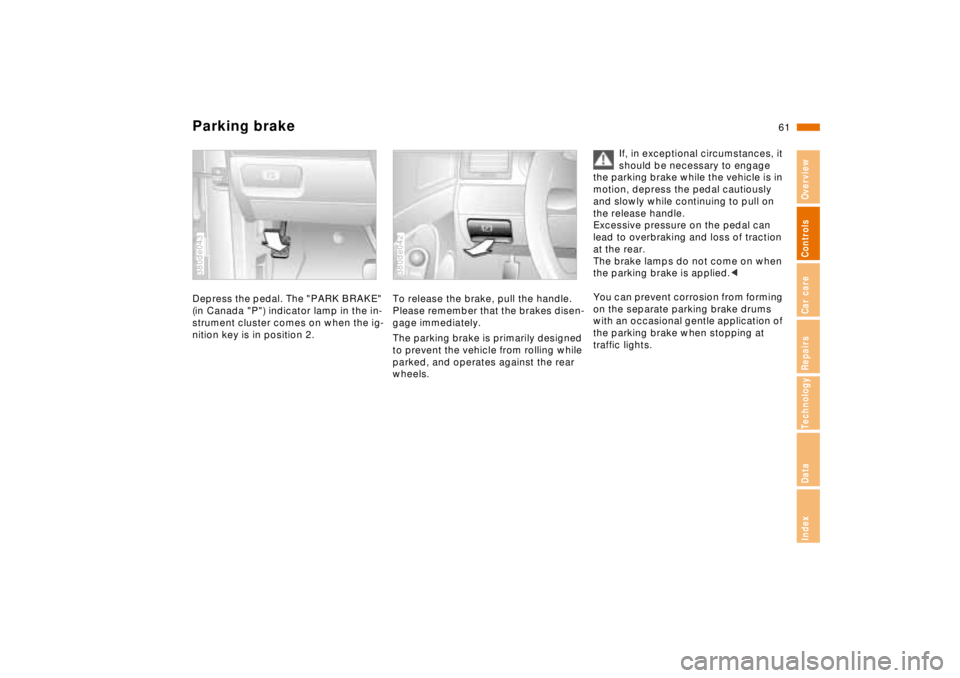
Parking brakeDepress the pedal. The "PARK BRAKE"
(in Canada "P") indicator lamp in the in-
strument cluster comes on when the ig-
nition key is in position 2.380de043
To release the brake, pull the handle.
Please remember that the brakes disen-
gage immediately.
The parking brake is primarily designed
to prevent the vehicle from rolling while
parked, and operates against the rear
wheels.380de042
If, in exceptional circumstances, it
should be necessary to engage
the parking brake while the vehicle is in
motion, depress the pedal cautiously
and slowly while continuing to pull on
the release handle.
Excessive pressure on the pedal can
lead to overbraking and loss of traction
at the rear.
The brake lamps do not come on when
the parking brake is applied.<
You can prevent corrosion from forming
on the separate parking brake drums
with an occasional gentle application of
the parking brake when stopping at
traffic lights.
Page 63 of 211
62n
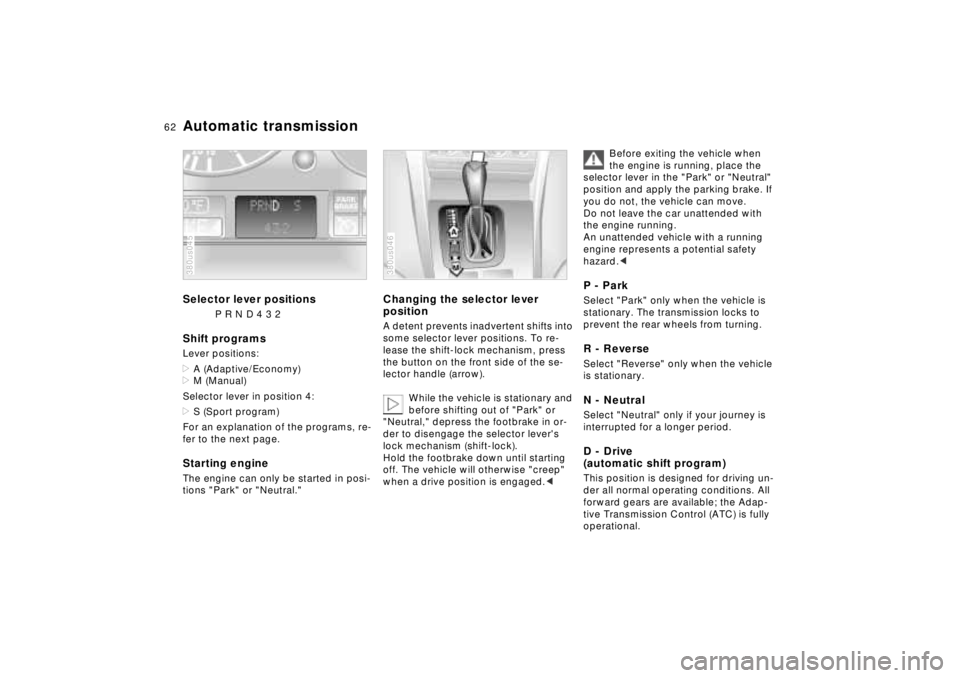
Automatic transmissionSelector lever positions
P R N D 4 3 2
Shift programsLever positions:
>A (Adaptive/Economy)
>M (Manual)
Selector lever in position 4:
>S (Sport program)
For an explanation of the programs, re-
fer to the next page.Starting engineThe engine can only be started in posi-
tions "Park" or "Neutral."380us045
Changing the selector lever
positionA detent prevents inadvertent shifts into
some selector lever positions. To re-
lease the shift-lock mechanism, press
the button on the front side of the se-
lector handle (arrow).
While the vehicle is stationary and
before shifting out of "Park" or
"Neutral," depress the footbrake in or-
der to disengage the selector lever's
lock mechanism (shift-lock).
Hold the footbrake down until starting
off. The vehicle will otherwise "creep"
when a drive position is engaged.< 380us046
Before exiting the vehicle when
the engine is running, place the
selector lever in the "Park" or "Neutral"
position and apply the parking brake. If
you do not, the vehicle can move.
Do not leave the car unattended with
the engine running.
An unattended vehicle with a running
engine represents a potential safety
hazard.<
P - ParkSelect "Park" only when the vehicle is
stationary. The transmission locks to
prevent the rear wheels from turning.R - ReverseSelect "Reverse" only when the vehicle
is stationary.N - NeutralSelect "Neutral" only if your journey is
interrupted for a longer period.D - Drive
(automatic shift program)This position is designed for driving un-
der all normal operating conditions. All
forward gears are available; the Adap-
tive Transmission Control (ATC) is fully
operational.
Page 66 of 211
65n
RepairsIndexOverview Controls Car care Technology Data
Automatic transmission with Steptronic
*
You may drive your vehicle as with a
typical automatic transmission, but you
may also shift manually.
When you move the selector lever to
the left from position "D" and into the
M/S shift level, the performance-ori-
ented shift programs of the automatic
transmission are activate. As soon as
you move the selector lever in the "+" or
"–" direction, Steptronic changes the
gear and the manual mode is active. If
you wish to utilize automatic shifting
once again, move the selector lever to
the right and into the D position.
The automatic transmission of your
BMW is equipped with an Adaptive
Transmission Control (ATC). This sys-
tem reacts with precision to your indi-
vidual driving style and the current driv-
ing conditions. Different shift programs
are utilized to achieve this.
For details concerning ATC, please re-
fer to the chapter describing "Advanced
technology" on page 184.
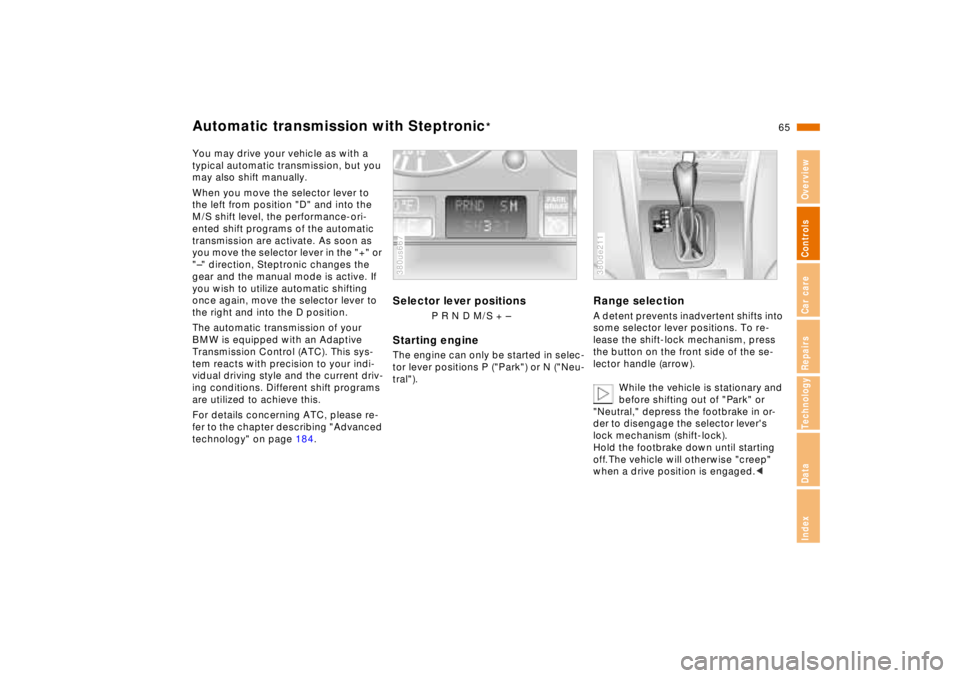
Selector lever positions
P R N D M/S + –
Starting engineThe engine can only be started in selec-
tor lever positions P ("Park") or N ("Neu-
tral").380us667
Range selectionA detent prevents inadvertent shifts into
some selector lever positions. To re-
lease the shift-lock mechanism, press
the button on the front side of the se-
lector handle (arrow).
While the vehicle is stationary and
before shifting out of "Park" or
"Neutral," depress the footbrake in or-
der to disengage the selector lever's
lock mechanism (shift-lock).
Hold the footbrake down until starting
off. The vehicle will otherwise "creep"
when a drive position is engaged.< 380de211
Page 67 of 211
66n
Automatic transmission with Steptronic
*
Before exiting the vehicle when
the engine is running, place the
selector lever in the "Park" or "Neutral"
position and apply the parking brake. If
you do not, the vehicle can move.
Do not leave the car unattended with
the engine running. An unattended ve-
hicle with a running engine represents a
potential safety hazard.<
P - ParkSelect "Park" only when the vehicle is
stationary. The transmission locks to
prevent the rear wheels from turning.R - ReverseSelect "Reverse" only when the vehicle
is stationary.N - NeutralSelect "Neutral" only if your journey is
interrupted for a longer period.D - Drive
(automatic shift program)This position is designed for driving un-
der all normal operating conditions. All
forward gears are available; the Adap-
tive Transmission Control (ATC) is fully
operational."Kickdown" (automatic downshift)In the "Kickdown" mode, you achieve
maximum performance.
Press the accelerator pedal past the in-
creased resistance point at the full-
throttle position.
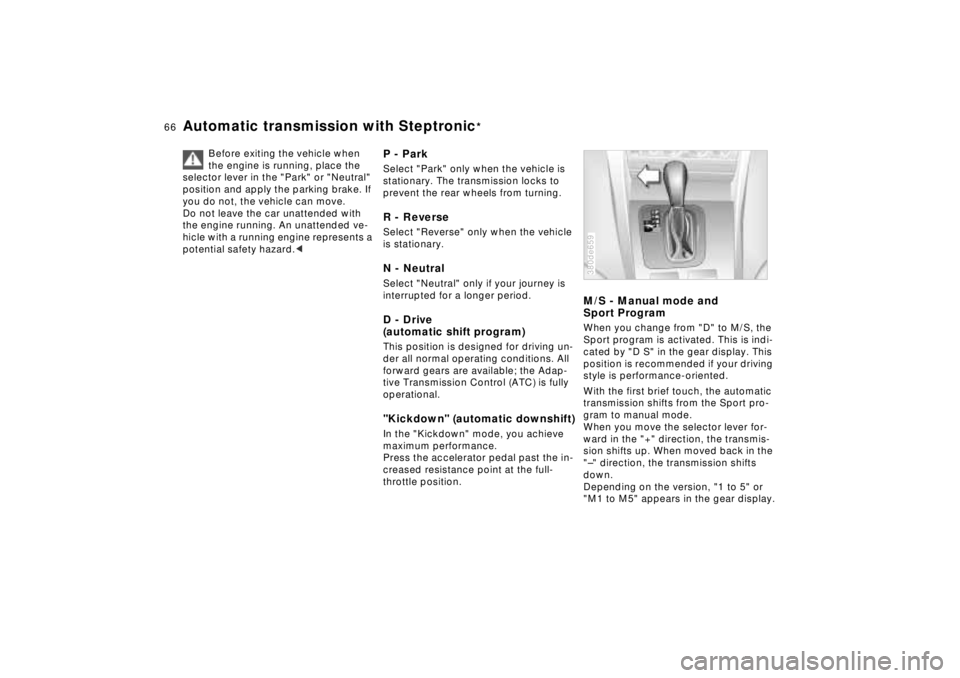
M/S - Manual mode and
Sport ProgramWhen you change from "D" to M/S, the
Sport program is activated. This is indi-
cated by "D S" in the gear display. This
position is recommended if your driving
style is performance-oriented.
With the first brief touch, the automatic
transmission shifts from the Sport pro-
gram to manual mode.
When you move the selector lever for-
ward in the "+" direction, the transmis-
sion shifts up. When moved back in the
"–" direction, the transmission shifts
down.
Depending on the version, "1 to 5" or
"M1 to M5" appears in the gear display.380de659
Page 72 of 211

71n
RepairsIndexOverview Controls Car care Technology Data
Cruise controlTo cancel the cruise controlWhen the system is activated, press
and hold button 4. The indicator lamp
stays on. You can use the cruise control
again as desired.
In addition, cruise control is canceled
automatically:
>When you apply pressure to the
brake pedal
>If the automatic transmission selector
lever is moved from "D" to "N"
>If you exceed or fall below the pro-
grammed speed for an extended pe-
riod (by depressing the accelerator,
for example).To resume the stored settingPress button 3:
The vehicle accelerates to and main-
tains the last speed stored. When you
turn the ignition key to position 0, the
stored speed is deleted from the sys-
tem's memory and the system is deacti-
vated.
To deactivate the systemWhen the cruise control has been can-
celed, press button 4 again. The indica-
tor lamp goes off and the memorized
speed is canceled.Do not use cruise control on twist-
ing roads, when high traffic den-
sity prevents driving at a constant
speed, when the road surface is slick
(snow, rain, ice), or when the road sur-
face is loose (rocks or gravel, sand).<
Page 76 of 211
75n
RepairsIndexOverview Controls Car care Technology Data
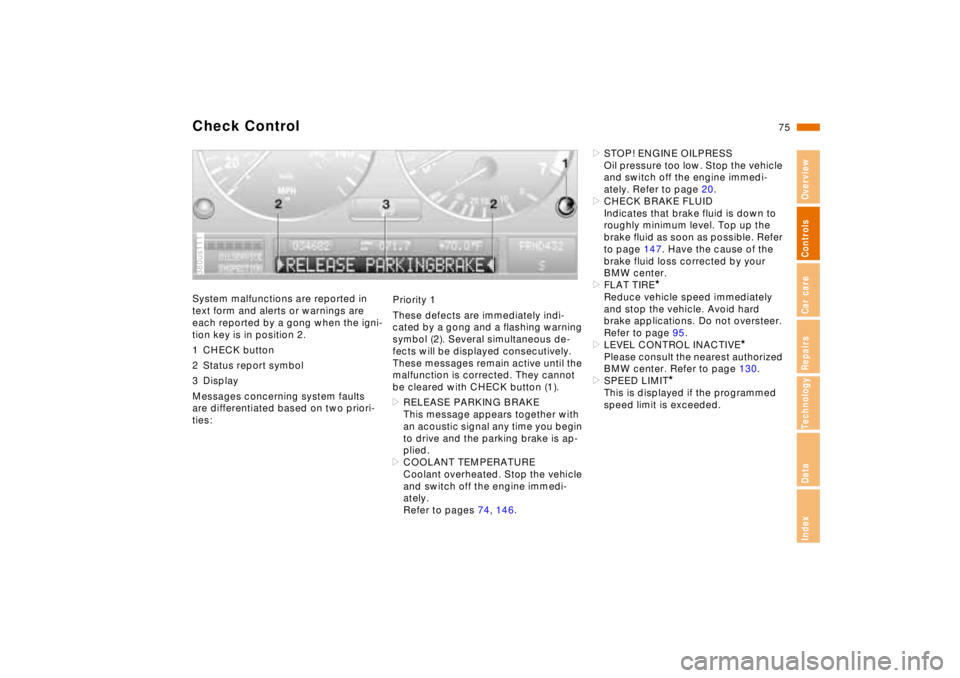
Check ControlSystem malfunctions are reported in
text form and alerts or warnings are
each reported by a gong when the igni-
tion key is in position 2.
1 CHECK button
2 Status report symbol
3 Display
Messages concerning system faults
are differentiated based on two priori-
ties:380us111
Priority 1
These defects are immediately indi-
cated by a gong and a flashing warning
symbol (2). Several simultaneous de-
fects will be displayed consecutively.
These messages remain active until the
malfunction is corrected. They cannot
be cleared with CHECK button (1).
>RELEASE PARKING BRAKE
This message appears together with
an acoustic signal any time you begin
to drive and the parking brake is ap-
plied.
>COOLANT TEMPERATURE
Coolant overheated. Stop the vehicle
and switch off the engine immedi-
ately.
Refer to pages 74, 146.>STOP! ENGINE OILPRESS
Oil pressure too low. Stop the vehicle
and switch off the engine immedi-
ately. Refer to page 20.
>CHECK BRAKE FLUID
Indicates that brake fluid is down to
roughly minimum level. Top up the
brake fluid as soon as possible. Refer
to page 147. Have the cause of the
brake fluid loss corrected by your
BMW center.
>FLAT TIRE
*
Reduce vehicle speed immediately
and stop the vehicle. Avoid hard
brake applications. Do not oversteer.
Refer to page 95.
>LEVEL CONTROL INACTIVE
*
Please consult the nearest authorized
BMW center. Refer to page 130.
>SPEED LIMIT
*
This is displayed if the programmed
speed limit is exceeded.
Page 77 of 211

76n
Check ControlPriority 2
These alerts for problems are reported
for 20 seconds when the ignition key is
in position 2. The status reports remain
after the message disappears. You can
view the message again by pressing the
CHECK button.
>TRUNK LID OPEN
This message is given only when ini-
tially starting off.
>DOOR OPEN
This is displayed after a minimum
vehicle speed is exceeded.
>FASTEN SEAT BELTS
*
In addition, the indicator lamp with
the safety belt symbol appears and
an acoustic signal is heard.
>WASHER FLUID LOW
The washer fluid is too low. Top up
the fluid at the earliest opportunity.
Refer to page 142.
>CHECK ENGINE OIL
Add engine oil as soon as possible.
Refer to page 143.
>OUTSIDE TEMPERATURE 247
(–5.06)
This display is only an example. The
current reading appears at an outside
temperature of 37.57 (+36) and
below. Refer also to page 72.>TIRE PRESSURE SET
*
The RDC has imported the current in-
flation pressure in the tires as the tar-
get values which the system will
monitor.
Refer to page 94.
>CHECK TIRE PRESSURE
*
Check and correct the tire inflation
pressure to specifications at the earli-
est opportunity (next stop for fuel).
Refer to page 94.
>TIRE CHECK INACTIVE
*
A temporary interference of the RDC
or a system fault. Refer to page 95
>BRAKE LAMP CIRCUIT
A bulb has failed or the circuit has a
malfunction. Refer to pages 163, 176
or consult an authorized BMW center.
>CHECK LOWBEAMS
CHECK SIDE LAMPS
CHECK REAR LAMPS
CHECK FRONT FOGLAMPS
CHECK LICPLATE LAMP
CHECK TRAILER LIGHTS
CHECK HIGHBEAMS
CHECK BACKUP LAMPS
Defective bulb or circuit. Refer to
pages 163, 176 or consult an autho-
rized BMW center.
>TRANS. FAILSAFE PROG
Please consult the nearest authorized
BMW center. Refer to pages 64, 67.>CHECK BRAKE LININGS
Have the brake pads inspected by
your BMW center. Refer to page 126.
>REMOTE KEY BATTERY
Change the battery. Refer to
page 168.
>CHECK COOLANT LEVEL
The coolant is too low. Top up at the
next opportunity. Refer to page 146.
>ENGINE FAILSAFE PROG
Fault in the Electronic Engine Power
Control EML. When braking, higher
brake application pressure may be
necessary and brake pedal travel may
be significantly longer.
Please have the system inspected by
your authorized BMW center.