Page 90 of 215

89
1 2 3 4 5 6 (Preset buttons)
These buttons are useed to preset and
tune in radio stations.
To preset a station to a button: Tune in the
desired station (see TUNEº). Push and
hold down the button until you hear a
beep-this will set the station to the button.
The button number will appear on the dis-
play.
To tune in to a preset station: Push the
button for the station you want. The button
number and station frequency will appear
on the display.
These systems can store one AM and one
FM station for each button. The preset
station memeory will be canceled out if
the power source is interrupted (battery
disconnected or fuse blown).
AM V FM
Push AM V FMº to switch between the AM
and FM brands. AMº or FMº will appear
on the display.
If the audio system is off, you can turn on
the radio by pushing AM V FMº.BAL (Balance)
This knob lets you adjust the balance be-
tween the right and left speakers.
PushBAL/FADEº so that it pops out of its
retracted position. Turn the knob to adjust
the balance. Push the knob back into its
retracted position.
BASS
This knob lets you adjust the bass level.
Push BASS/TREBº so that it pops out of
its retracted position. Turn the knob to ad-
just the bass. Push the knob back into its
retracted position.
FADE
This knob lets you adjust the balance be-
tween the front and rear speakers.
Push BAL/FADEº so that it pops out of its
retracted position. Pull out the knob. Turn
the knob to adjust the front/rear balance.
Push the knob back into its retracted posi-
tion.
PWR V VOL (Power V Volume)
Push PWR V VOLº to turn the audio sys-
tem on and off. Turn the PWR V VOLº
knob to adjust the volume.SCAN
When you push SCANº, the radio finds
the next station up the station band, plays
it for 5 seconds, and then scans again. To
select a station, push SCANº a second
time.
ST (Stereo reception) display
Your radio automatically changes to re-
ception when a stereo broadcast is re-
ceived. STº appears on the display. If the
signal becomes weak, the radio reduces
the amount of channel separation to pre-
vent the weak signal from creating noise.
If the signal becomes extremely weak, the
radio switches from stereo to mono recep-
tion.
TREB (Treble)
This knob lets you adjust treble level.
Push BASS/TREBº so that it pops out of
its retracted position. Pull out the knob.
Turn the knob to adjust the treble. Push
the knob back into its retracted position.
ProCarManuals.com
Page 94 of 215

93
1 2 3 4 5 6 (Press buttons)
These buttons are used to preset and
tune in radio stations.
To preset a station to a button: Tune in the
desired station (see TUNEº). Push and
hold down the button until you hear a
beep-this will set the station to the button.
The button number will appear on the dis-
play.
To tune in to a preset station: Push the
button for the station you want. The button
number and station frequency will appear
on the display.
Type 2-1ÐThese systems can store one
AM and one FM station for each button.
The preset station memory will be can-
celed out if thepower sourceis interrupted
(battery disconnected or fuse blown).
Type 2-2ÐThese systems can stor one
AM and two FM stations for each button.
(The display will show AMº, FM1º, or
FM2º when you push AMVFMº.) To can-
cel out the preset station memory, push
1º, 2º, and 3º at the same time and hold
them in until you hear a beep.(Eject Button)
Push this button to eject a cassette.
After you turn the ignition to LOCKº, you
will be able to eject a cassette but you will
not be able to reinsert it.
AM V FM
Push AMVFMº to switch between the AM
and FM bands.
Type 2-1 ÐAMº or FMº will appear on
the display.
Type 2-2ÐAMº, FM1º, or FM2º will ap-
pear on the display.
If the audio system is off, you can turn on
the radio by pushing AMVFMº. Also, push
AMVFMº to switch form cassette opera-
tion to radio operation.
APS (Automatic program selection)
Type 2-2 only
The automatic program selection (APS)
feature allows you to program your cas-
sette player to skip forwark or backward to
locate the song you want to hear. You can
skip up to nine tracks at a time.
Push APSº. APSº and 1º will appear on
the display.Next, push APSº until the number on the
display reaches the number of tracks you
want to skip. If you push APSº ten times,
the APS feature will be turned off.
�If you choose the number 1º, the play-
er will rewind to the beginning of the
current track.
�When counting the number of tracks
you want to rewind, remember to cout
the current track as well. For example,
if you want to rewind to a song that is
two before the song you are listening
to, push APSº until 3º appears on the
display
Finally, push REWº or FFº to choose the
direction you want to skip. The player will
rewind or fast forward the selected num-
ber of tracks and play.
Pull out PWR/VOL/BALº. Turn the knob
to adjust the balance. Push the knob back
into its normal position.
The APS number you select can be higher
than the number of tracks remaining on
the current cassettte side. After the begin-
ning or end of the tape is reached, the
player will automatically reverse sides
and rewind or fast forward the additional
number of tracks.
ProCarManuals.com
Page 122 of 215
122
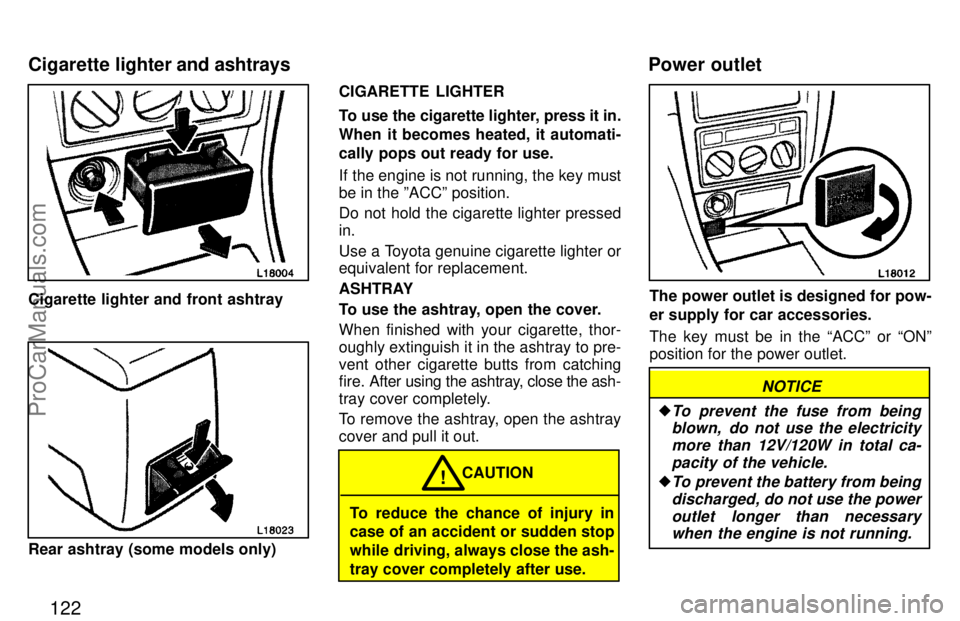
Cigarette lighter and front ashtray
Rear ashtray (some models only)CIGARETTE LIGHTER
To use the cigarette lighter, press it in.
When it becomes heated, it automati-
cally pops out ready for use.
If the engine is not running, the key must
be in the ºACCº position.
Do not hold the cigarette lighter pressed
in.
Use a Toyota genuine cigarette lighter or
equivalent for replacement.
ASHTRAY
To use the ashtray, open the cover.
When finished with your cigarette, thor-
oughly extinguish it in the ashtray to pre-
vent other cigarette butts from catching
fire. After using the ashtray, close the ash-
tray cover completely.
To remove the ashtray, open the ashtray
cover and pull it out.
To reduce the chance of injury in
case of an accident or sudden stop
while driving, always close the ash-
tray cover completely after use.CAUTION
!
The power outlet is designed for pow-
er supply for car accessories.
The key must be in the ACCº or ONº
position for the power outlet.
NOTICE
�To prevent the fuse from being
blown, do not use the electricity
more than 12V/120W in total ca-
pacity of the vehicle.
�To prevent the battery from being
discharged, do not use the power
outlet longer than necessary
when the engine is not running.
Cigarette lighter and ashtraysPower outlet
ProCarManuals.com
Page 177 of 215
Part 7
179
DO-IT-YOURSELF
MAINTENANCEÐ
Chapter 7-1
Introduction
�Engine compartment overview
�Fuse locations
�Do-it-yourself service
precautions
�Parts and tools
ProCarManuals.com
Page 178 of 215
180
1. Power steering fluid reservoir
2. Engine coolant reservoir
3. Engine oil filler cap
4. Engine oil level dipstick
5. Brake fluid reservoir
6. Fuse blocks
7. Battery
8. Engine cooling fans
9. Windshield washer fluid tank
Engine compartment overview
�5S-FE engine
ProCarManuals.com
Page 179 of 215
181
1. Power steering fluid reservoir
2. Engine coolant reservoir
3. Engine oil level dipstick
4. Engine oil filler cap
5. Brake fluid reservoir
6. Fuse blocks
7. Battery
8. Electric cooling fans
9. Windshield washer fluid tank �1MZ-FE engine
ProCarManuals.com
Page 180 of 215
182
Canada only
Fuse locations
ProCarManuals.com
Page 183 of 215
185
Checking power steering fluid
Parts (if level is low):
�Automatic transmission fluid DEX-
RON
[-II or III
Tools:
�Rag or paper towel
�Funnel (only for adding fluid)
Checking battery condition
Non-maintenance batteriesÐ
Tools:
�Warm water
�Baking soda
�Grease
�Conventional wrench (for terminal
clamp bolts)
Maintenance type batteriesÐ
Parts (if level is low):
�Distilled water
Tools:
�Warm water
�Baking soda
�Grease
�Conventional wrench (for terminal
clamp bolts)
�Coin (for vent plugs)
�Funnel (only for adding distilled water)Checking and replacing fuses
Parts (if replacement is necessary):
�Genuine Toyota fuse or equivalent
with same amperage rating as original
Adding washer fluid
Parts:
�Water
�Washer fluid containing antifreeze (for
winter use)
Tools:
�Funnel
Replacing light bulbs
Parts:
�Bulb with same number and wattage
rating as original (See charts in Re-
placing light bulbsº in Chapter 7-3.)
Tools:
�Screwdriver
�Flat-bladed screwdriver
ProCarManuals.com