Page 100 of 215

99
Compact Disc Player
Push either side of the track button until
the number of the track you want to listen
to appears on the display. If you want to
return the beginning of thecurrent track,
push the down side of the button one time,
quickly.
(Reverse/Fast forward buttons)
Cassette Player
Push the fast forward button to fast for-
ward a cassette tape. FFº will appear on
the display. Push the reverse button to re-
wind a tape. REWº will appear on the dis-
play.
To stop the tape while it is fast forwarding,
push on the up side of the track down/up
button or TAPEº; to stop the tape while it
is rewinding, push on the down side of the
track down/up button or TAPE.º
If a tape side rewinds completely, the cas-
sette player will stop and then play that
same side. If a tape fast forwards com-
pletely, the cassette player will play the
other side of the tape, using the auto-re-
verse feature.Compact Disc Player
If you want to fast forward or reverse
through a compact disc track, push and
hold in the fast forward or reverse button.
When you release the button, the com-
panct disc player will resume playing.
AMVFM
Push AMVFMº to switch between the AM
and FM bands. AMº, FM1º, or FM2º will
appear on the display. These systems al-
low you to set twelve FM stations, two for
each button.
If the audio system is off, you can turn on
the radio by pushing AMVFMº. Also, push
AMVFMº to switch from cassette or com-
pact disc operation to radio operation.
BAL (Balance)
This knob lets you adjust the balance be-
tween the right and left speakers.
Push MID/BALº so that it pops out of its
retracted position. Pull out the knob. Turn
the knob to adjust the balance. Push the
knob back into its retracted position.
BASS
This knob lets you adjust the bass level.
Push BASSº so that it pops out of its re-
tracted position. Turn the knob to adjust
the bass. Push the knob back into its re-
tracted position.CD (Compact Disc)
Push CDº to switch from radio or cas-
sette operation. If the audio system is off,
you can turn on the compact disc player
by pushing CDº. In both cases, a disc
must already be loaded in the player.
When the audio is set into compact disc
operation, the display shows the track
number currently being played. Pushing
CDº changes the display to show the
length of the current program being
played so far. By pushing the button once
again, the display retruns to that of track
number.
ProCarManuals.com
Page 104 of 215

103
TREB (Treble)
This knob lets you adjust the treble level.
Push BASS/TREBº so that it pops out of
its retracted position. Pull out the knob.
Turn the knob to adjust the treble. Push
the knob back into its retracted position.
TUNE
Tuning
Your Toyota has an electronic tuning radio
(ETR). Push and release the ~º (up) or vº
(down) side of TUNEº to step up or down
the station band. (If you hear a beep, you
held the button too long and the radio will
go into the seek mode.)
Seeking
In the seek mode, the radio finds and
plays the next station up or down the sta-
tion band.
To seek a station, push and hold the ~º or
vº side of TUNEº until you hear a beep.
Do this again to find another station.The anti-theft system prevents the audio
system from working after it has been dis-
connected. To activate the system, you
must set a three-digit security code. After
the system is set, SECº will appear in the
display each time the ignition is turned
form LOCKº or ACCº or ONº. Also, the
anti-theft light flashes every few seconds
while the ignition key is in the LOCKº
position.
You will need to know your security code
to reactivate your radio after electrical ser-
vice is performed on your vehicle.
Choose a security code that is easy to re-
member and keep a copy of it (not in your
Toyota).
NOTICE
If you pushed any wrong buttons on
the anti-theft system, the following
messages will appear on the display.
�ErrºÐYou have pushed wrong
buttons.
�1-9ºÐIndicates the number of er-
rors you have made. You may make
up to nine errors, but no more!
�HELPºÐThe number of error you
can make was exceeded. The audio
sytem is completely inoperable.
Contact you Toyota dealer.
ÐAnti-theft system
(Type 2-2 and 3 only)
ProCarManuals.com
Page 106 of 215
105
4. The three-digit code should be on the
display.
Push and hold in SCANº until the display
goes dark. (At first, SECº will appear on
the display.)If you pushed any wrong buttons,
Errº and the number of errors you
have made will appear ont eh display
before SECº does. Go back to step 2
and try again. If the display returns to
Ð while you are entering the code,
go back to step 3.
To make sure the security code has been
accepted, turn the ignition to LOCKº and
then back to ACC.º SECº should appear
on the display.
Choose a security code that is easy to re-
member and keep a copy of it (not in your
Toyota).Changing the security code
1. Turn off the audio system.
Turn the ignition key to ACCº.
Simultaneously push and hold in 1º, 6º,
and PWR/VOLº until SECº appears in
the display.
ProCarManuals.com
Page 108 of 215
107
6. The new three-digit code should be on
the display.
Push and hold in SCANº until the display
goes dark. (At first, SECº will appear on
the display.)If you pushed any wrong buttons,
Errº and the number of errors you
have made will appear on the display
before SECº does. Go back to step 2
and try again. If the display returns to
Ð while you are entering the code,
go back to step 3.
To make sure the security code has been
accepted, turn the ignition to LOCKº and
then back to ACCº. SECº should appear
on the display.NOTICE
A tenth error will activate the
anti-theft system and HELPº will
appear on the display. The audio
system will be completely inoper-
able. At this time, the anti-theft light
also comes on. If this occurs,
contact your Toyota dealer.Cleaning the security code.
1. Turn off the audio system.
Turn the ignition key to ACCº.
Simultaneously push and hold in 1º, 6º,
and PWR/VOLº until SECº appears on
the display.
ProCarManuals.com
Page 110 of 215

109
If you pushed any wrong buttons,
Errº and the number of errors you
have made will appear on the display
before SECº does. Go back to step 2
and try again. If the display returns to
Ð while you are entering the code,
go back to step 3.
NOTICE
A tenth error will activate the
anti-theft system and HELPº will
appear on the display. The audio
system will be completely inoper-
able. At this time, the anti-theft light
also comes on. If this occurs,
contact your Toyota dealer.
Reactivating a disabled audio system
1. Turn the ignition switch to ACCº.
2. While you are holding in the ~º side of
TUNEº, push 1º.
The dispay will read ---º.
On some models, �º and �º will also
turn on.3. Input the existing three-digit code.
You have 10 seconds to enter each digit.
For example, 209º:
To set the first digit: Push 1º until the digit
you want appears on the display.
To set the second digit: Push 2º until the
digint you want appears on the display.
To set the third digit: Push 3º until the di-
gint you want appears on the display.
ProCarManuals.com
Page 111 of 215
11 0
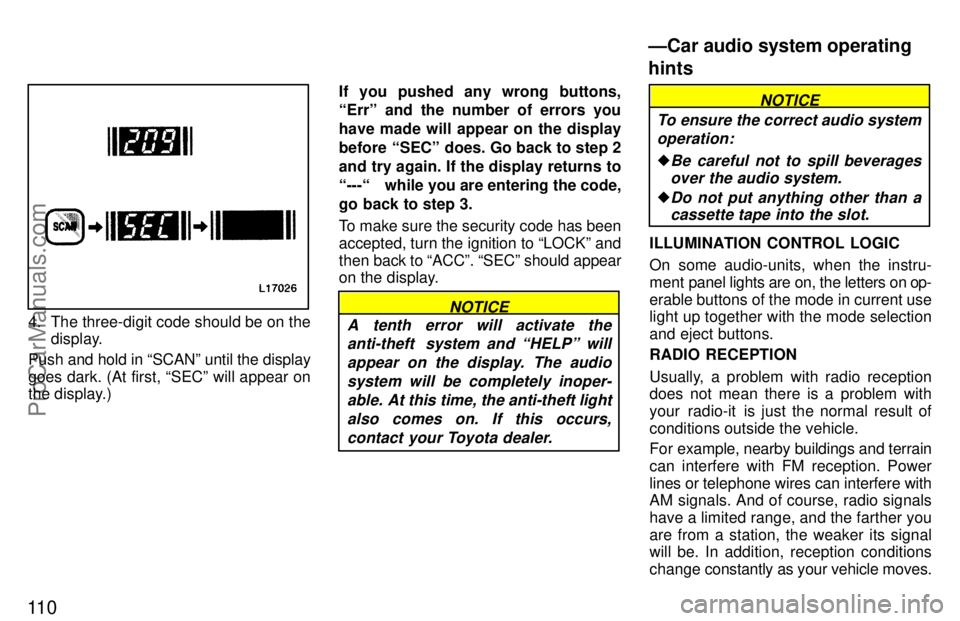
4. The three-digit code should be on the
display.
Push and hold in SCANº until the display
goes dark. (At first, SECº will appear on
the display.)If you pushed any wrong buttons,
Errº and the number of errors you
have made will appear on the display
before SECº does. Go back to step 2
and try again. If the display returns to
--- while you are entering the code,
go back to step 3.
To make sure the security code has been
accepted, turn the ignition to LOCKº and
then back to ACCº. SECº should appear
on the display.NOTICE
A tenth error will activate the
anti-theft system and HELPº will
appear on the display. The audio
system will be completely inoper-
able. At this time, the anti-theft light
also comes on. If this occurs,
contact your Toyota dealer.
NOTICE
To ensure the correct audio system
operation:
�Be careful not to spill beverages
over the audio system.
�Do not put anything other than a
cassette tape into the slot.
ILLUMINATION CONTROL LOGIC
On some audio-units, when the instru-
ment panel lights are on, the letters on op-
erable buttons of the mode in current use
light up together with the mode selection
and eject buttons.
RADIO RECEPTION
Usually, a problem with radio reception
does not mean there is a problem with
your radio-it is just the normal result of
conditions outside the vehicle.
For example, nearby buildings and terrain
can interfere with FM reception. Power
lines or telephone wires can interfere with
AM signals. And of course, radio signals
have a limited range, and the farther you
are from a station, the weaker its signal
will be. In addition, reception conditions
change constantly as your vehicle moves.
ÐCar audio system operating
hints
ProCarManuals.com