1997 TOYOTA 4RUNNER ECO mode
[x] Cancel search: ECO modePage 20 of 223
24
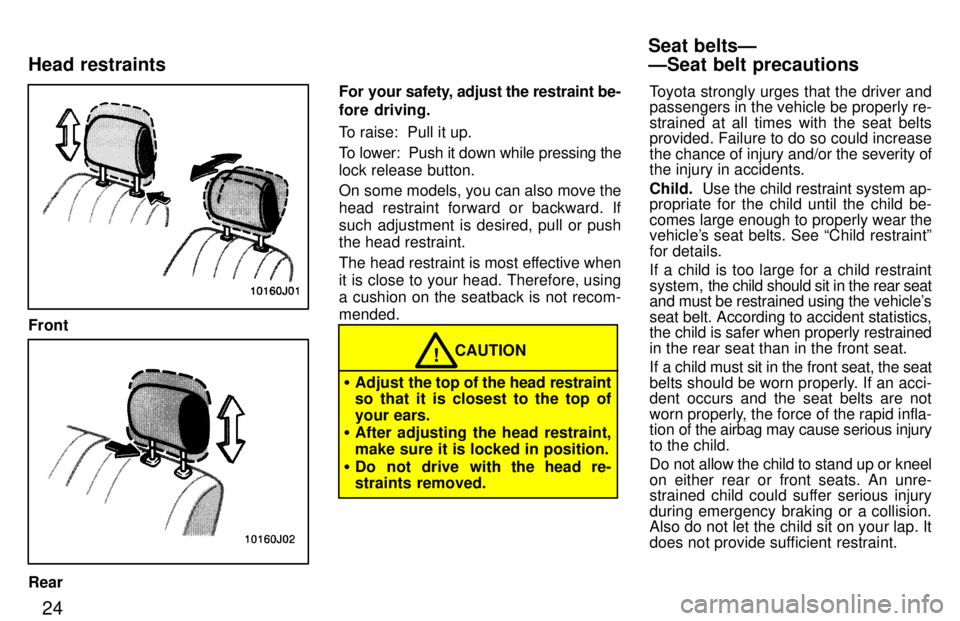
Front
RearFor your s
afety, adjust the restraint be-
fore driving.
To raise: Pull it up.
To lower: Push it down while pressing the lock release button.
On some models, you can also move the
head restraint forward or backward. If
such adjustment is desired, pull or push the head restraint.
The head restraint is most effective when
it is close to your head. Therefore, using a cushion on the seatback is not recom- mended.
CAUTION!
Adjust the top of the head restraint
so that it is closest to the top of
your ears.
After adjusting the head restraint,
make sure it is locked in position.
Do not drive with the head re-
straints removed. Toyota strongly urges that the driver and passengers in the vehicle be properly re- strained at all times with the seat belts
provided. Failure to do so could increase
the chance of injury and/or the severity of the injury in accidents. Child.
Use the child restraint system ap-
propriate for the child until the child be-
comes large enough to properly wear the
vehicle's seat belts. See Child restraintº
for details.
If a child is too large for a child restraint
system, the child should sit in the rear seat
and must be restrained using the vehicle's
seat belt. According to accident statistics, the child is safer when properly restrained
in the rear seat than in the front seat.
If a child must sit in the front seat, the seat
belts should be worn properly. If an acci- dent occurs and the seat belts are not
worn properly, the force of the rapid infla-
tion of the airbag may cause serious injury
to the child.
Do not allow the child to stand up or kneel
on either rear or front seats. An unre-
strained child could suffer serious injury
during emergency braking or a collision.
Also do not let the child sit on your lap. It
does not provide sufficient restraint.
Seat beltsÐ ÐSeat belt precautions
Head restraints
Page 72 of 223

75
(g) Rocking your vehicle if stuck
If you rock your vehicle to make it
out when it becomes stuck in snow,
mud, sand, etc., first check that there are no objects or people
around the vehicle. During
operation, the vehicle may suddenly move forward or
backward as it becomes unstuck,
causing injury or damage to nearby
people or objects.
CAUTION
!
NOTICE
If you rock your vehicle, observe the following precautions to prevent
damage to the transmission andother parts.
Do not depress the acceleratorpedal while shifting the selectorlever or before the transmission is
completely shifted to forward or
reverse gear.
Do not race the engine and avoidspinning the wheels.
If your vehicle remains stuck afterrocking the vehicle several times,
consider other ways such as tow-ing.
(h) Driving in pwrº (power) mode
In the PWRº mode, the transmission is shifted up and down at a higher vehicle
speed than in the NORMº (Normal) mode and a more powerful acceleration is
achieved. To set the PWRº mode, push
in the driving pattern selector button. The
PWRº mode indicator light comes on.
For ordinary driving, Toyota recommends
using the NORMº mode to improve fuel
economy.
(i) If you cannot shift the selector lever out of Pº position
If you cannot shift the selector lever from Pº position even though the brake pedal
is depressed, use the shift lock override
button. For instructions, see If you can- not shift automatic transmission selectorleverº in Part 4.
Page 76 of 223
79
While the vehicle is moving, never
attempt to move the selector lever
into Pº position under any
circumstances. Serious mechanical
damage and loss of vehicle control may result.CAUTION
!
(f) Good driving practice If the transmission is repeatedly up-
shifted and downshifted between third
gear and overdrive when climbing a
gentle slope, the overdrive switch
should be turned off. Be sure to turn the switch on immediately afterward.
When towing a trailer, in order to main-
tain engine braking efficiency, do notuse overdrive.
Always keep your foot on the brake
pedal while stopped with the engine
running. This prevents the vehicle
from creeping. CAUTION
!
NOTICE
Do not hold the vehicle on an upgrade with the accelerator pedal.
It can cause the transmission tooverheat. Always use the brake pedal or parking brake.
(g) Rocking your vehicle in stuck
If you rock your vehicle to make it
out when it becomes stuck in snow,
mud, sand, etc., first check that there are no objects or people
around the vehicle. During
operation, the vehicle may suddenly move forward or
backward as it becomes unstuck,
causing injury or damage to nearby
people or objects. CAUTION
!
NOTICE
If you rock your vehicle, observe the following precautions to prevent
damage to the transmission andother parts.
Do not depress the acceleratorpedal while shifting the selector
lever or before the transmission is
completely shifted to forward or reverse gear.
Do not race the engine and avoid
spinning the wheels.
If your vehicle remains stuck afterrocking the vehicle several times,consider other ways such as tow-ing.
(h) Driving in POWERº mode In the POWERº mode, the transmission
is shifted up and down at a higher vehicle
speed than in the NORMALº mode and a
more powerful acceleration is achieved.
To set the POWERº mode, push in the
driving pattern selector button. The
POWERº mode indicator light comes on.
For ordinary driving, Toyota recommends
using the NORMALº mode to improve
fuel economy.
Page 78 of 223

81
Maximum allowable speeds
To get on a highway or to pass slower traf- fic, maximum acceleration may be neces-
sary.
Make sure you observe the following
maximum allowable speeds in each gear:
Two-wheel drive models gear km/h (mph)
1 48 (29)
2 90 (55)
3 139 (86)
4 165 (102)
Four-wheel drive models
3RZ-FE engine gear km/h (mph) H2º and H4º L4º
1 45 (28) 17 (11)
2 84 (52) 32 (20)
3 130 (81) 50 (31)
4 165 (102) 64 (39)
5VZ-FE engine
gear km/h (mph) H2º and H4º L4º
1 48 (29) 18 (11)
2 89 (55) 34 (21)
3 127 (79) 49 (31)
4 165 (102) 64 (39)
NOTICE
Do not downshift if you are going faster than the maximum allowable
speed for the next lower gear.
Good driving practice If it is difficult to shift into reverse, put
the transmission in neutral, release
the clutch pedal momentarily, and then
try again.
When towing a trailer, in order to main-
tain engine braking efficiency, do not
use the fifth gear.
Be careful when downshifting on a
slippery surface. Abrupt shifting
could cause the vehicle to spin or skid. CAUTION
!
NOTICE
Make sure the vehicle is completely stopped before shifting into
reverse.
Use the front drive control lever to se-
lect the following transfer modes. H2º (high speed position, two-wheel
drive): Lever at H2º
Use this for normal driving on dry hardsur- faced roads. This position gives greater
economy, quietest ride and least wear.
H4º (high speed position, four-wheel drive): Lever at H4º
Use this for normal driving on wet, icy or
snow-covered roads. This position pro-
vides greater traction than two-wheel drive.
Four-wheel drive systemÐ (a) Front drive control (lever type)
Page 79 of 223

82Nº (neutral position):
Lever at Nº
No power is delivered to the wheels. The vehicle must be stopped.
L4º (low speed position, four-wheel
drive): Lever at L4º
Use the for maximum power and traction.
Use L4º for climbing or descending steep
hills, off-road driving, and hard pulling in
sand, mud or deep snow.
The four-wheel drive indicator light
comes on when the H4º, Nº or L4º mode is selected. See (c) Shifting procedure (lever type)º
for further instructions.
Use the front drive control lever and
4WDº button to select the following transfer modes. H2º (high speed position, two-wheel
drive): Lever at Hº, 4WDº button left out
Use this for normal driving on dry hardsur- faced roads. This position gives greater
economy, quietest ride and least wear.
H4º (high speed position, four-wheel
drive): Lever at Hº, 4WDº button pushed
in.
Use this for normal driving on wet, icy or
snow-covered roads. This position pro-
vides greater traction than two-wheel drive. Nº (neutral position):
Lever at Nº
No power is delivered to the wheels. Thevehicle must be stopped.
L4º (low speed position, four-wheel
drive): Lever at L4º
Use this for maximum power and traction. Use L4º for climbing or descending steep
hills, off-road driving, and hard pulling in
sand, mud or deep snow.
The four-wheel drive indicator light
comes on when the H4º, Nº or L4º mode
is selected.
See (c) Shifting procedure (lever/button
type)º for further instructions.
(a) Front drive control (lever/button type)
Page 99 of 223

102There must be at
least 3 seconds of blank
space between tracks in order for the APS
feature to work correctly. In addition, the
APS feature may not work well with some
spoken word, live, or cl assical recordings.
BAL (Balance)
This knob lets you adjust the balance be- tween the right and left speakers. BASS This knob lets you adjust the bass level. Push BASS/TREBº so that it pops out of
its retracted position. Turn the knob to ad-
just the bass. Push the knob back into its
retracted position. Dolby )
NR*
Type 2-1 only If you are listening to a tape that was re-
corded with Dolby )
Noise Reduction,
push the button marked with the
double-D symbol. The double-D symbol
will appear on the display. Push the button
again to turn off Dolby )
NR.
The Dolby NR mode reduces tape noise
by about 10 dB. For best sound reproduc-tion, play your tapes with this button on or
off according to the mode used for record-
ing the tape. *
: Dolby noise reduction manufactured under license from Dolby
Laboratories Licensing Corporation. DOLBYº and the
double-D symbol are trademark of Dolby Laboratories Licens- ing Corporation.
Dolby )
B VC*
Type 2-2 only If you are listening to a tape that was re- corded with Dolby )
B or C Noise Reduc-
tion, push the button marked with the
double-D symbol until the appropriatesymbol appears on the display. To turn off
Dolby, push the button until the symbol
disappears from the display.
The Dolby B NR mode reduces tape noise by about 10 dB. The Dolby C NR mode re- duces tape noise by another 10 dB, or
about 20 dB total. For best sound repro-
duction, select the same NR mode that was used to record the tape. *: Dolby noise reduction manufactured under license from Dolby
Laboratories Licensing Corporation. DOLBYº and the
double-D symbol are trademark of Dolby Laboratories Licens- ing Corporation.
FADE
Move the FADEº knob around PWR/
VOLº to adjust the front/rear balance. MTL (Metal) display
Type 2-2 only
If a metal or chrome equivalent cassette
tape is
put in the cassette player, the play-
er will automatically adapt to it and MTLº
will appear on the display. PROG (Program)
Push PROGº to select the other side of
a cassette tape. The display indicates
which side is currently selected ( ~º indi-
cates top side, !º indicates bottom side).
Auto-reverse featureÐAfter the cassette
player reaches the end of a tape side, itautomatically reverses and begins to play
the other side. This is true whether the
cassette was playing or fast forwarding.
PWR/VOL (Power/Volume) Push PWR/VOLº to turn the audio sys-
tem on and off. T urn the PWR/VOLº knob
to adjust the volume. Pull out and then turn PWR/VOLº to ad- just the balance between the right and left
speakers. Move FADEº around PWR/
VOLº to adjust the front/rear balance.
Page 101 of 223

104ST (Stereo reception) display
Your radio automatically changes to ste- reo reception when a stereo broadcast is
received. STº appears on the display. If the signal becomes weak, the radio re-
duces the amount of channel separation to prevent the weak signal from creating
noise. If the signal becomes extremely weak, the radio switches from stereo to mono reception.
TAPE
Push TAPEº to switch from radio opera-
tion to cassette operation. If the audio
system is off,
you can turn on the cassette
player by pushing TAPEº. In both cases,a cassette must already be loaded in the
player.
TREB (Treble)
This knob lets you adjust the treble level. Push BASS/TREBº so that it pops out of
its retracted position. Pull out the knob.
Turn the knob to adjust the treble. Pushthe knob back into its retracted position. TUNE
Tuning
Your Toyota has an electronic tuning radio (ETR). Push and release the
~º (up) or !º
(down) side of TUNEº to step up or down
the station band. If you hear a beep, you
held the button too long and the radio will
go into the seek mode. Seeking
In the seed mode, the radio finds and plays the next station up or down the sta- tion band.
To seek a station, push and hold the ~º or
! º side of TUNEº until you hear a beep.
Do this again to find another station.
Page 105 of 223

108CD (Compact Disc)
Push CDº to switch from radio or cas-
sette
operation to compact disc operation.
If the audio system is off, you can turn on
the compact disc player by pushing CDº.
In both cases, a disc must already be
loaded in the player.
When the audio is set into compact disc
operation, the display shows the track
number currently being played. Pushing CDº changes the display to show the
length of the current program being
played so far. By pushing the button once
again, the display returns to that of track
number. Dolby )
B VC*
If you are listening to a tape that was re- corded with Dolby )
B or C Noise Reduc-
tion, push the button marked with the
double-D symbol until the appropriatesymbol appears on the display. To turn off
Dolby, push the button until the symbol
disappears fro mt he display. The Dolby B NR mode reduces tape noise by about 10 dB. The Dolby C NR mode re- duces tape noise by another 10 dB, or
about 20 dB total. For best sound repro-
duction, select the same NR mode that was used to record the tape.
*: Dolby noise reduction manufactured under license from Dolby
Laboratories Licensing Corporation. DOLBYº and the
double-D symbol are trademark of Dolby Laboratories Licens- ing Corporation.
Five EQ settings