1997 TOYOTA 4RUNNER ECO mode
[x] Cancel search: ECO modePage 108 of 223

111
Push
SKIPº. SKIPº will appear on the dis-
play. The cassette player will keep track of
how much blank space it plays. Any time it has played about 10 seconds of blank
tape, it will automatically fast forward to
the next track and begin to play.
Push the button a second time to turn off the skip feature. ST (Stereo reception) display
Your radio automatically changes to ste- reo reception when a stereo broadcast is
received. STº appears on the display. Ifthe signal becomes weak, the radio re-
duces the amount of channel separation to prevent the weak signal from creating
noise. If the signal becomes extremely weak, the radio switches from stereo to mono reception.
TAPE
Push T APEº to switch from radio or com-
pact disc operation to cassette operation.
If the audio system is off, you can turn on
the cassette player by pushing TAPEº. In both cases, a cassette must already be
loaded in the player. TREB (Treble)
This knob lets you adjust the treble level.
Push TREB/FADEº so that it pops out of
its retracted position. Turn the
knob to ad-
just the treble. Push the knob back into its
retracted position. TUNE
Tuning
Your Toyota has an electronic tuning radio
(ETR). Push and release the ~º (up) or
! º (down) side of TUNEº to set up or
down the station band. (If you hear a
beep, you held the button too long and the
radio willgo into the seek mode.) Seeking
In the seek mode, the radio finds and plays the next station up or down the sta- tion band.
To seek a station, push and hold the ~º or
vº side of TUNEº until you hear a beep. Do this again to find another station. The anti-theft system prevents the audio
system f
rom working after it has been dis-
connected. To activate the system, you
must set a three-digit security code. After the system is set, SECº will appear in the
display each time the ignition is turned
form LOCKº to ACCº or ONº. Also, the
anti-theft light flashes every few seconds
while the ignition key is in the LOCKºposition.
You will need to know your security code
to reactivate your radio after electrical ser-vice is performed on your vehicle.
Choose a security code that is easy to re-
member and keep a copy of it (not in your
Toyota).
NOTICE
If you pushed any wrong buttons on the anti-theft system, the following
messages will appear on thedisplay.
ErrºÐYou have pushed wrongbuttons.
ÐAnti-theft system
(Type 2-2 and 3 only)
Page 111 of 223

11 4
Changing the security code
1. Turn off the audio system.
Turn the ignition key to ACCº.Simultaneously push and hold in 1º, 6º,
and PWR/VOLº until SECº appears in
the display.2. While you are holding in the ~º side of
TUNEº push 1º.
The display will read к. On some models, º and º will also
turn on.3. Input the existing three-digit code.
You have 10 seconds to enter each digit. For example, 209º:
To set the first digit: Push 1º until the digit
you want appears on the display.
To set the second digit: Push 2º until the
digit you want appears on the display.
To set the third digit: Push 3º until the digit
you want appears on the display.
Page 113 of 223

11 6
Cleaning the security code
1. Turn off the audio system.
Turn the ignition key to ACCº.Simultaneously push and hold in 1º, 6º,
and PWR/VOLº until SECº appears on
the display.2. While you are holding in the ~º side of
TUNEº, push 1º.
The display will read к. On some models, º and º will also
turn on.3. Input the existing three-digit code.
You have 10 seconds to enter eahc digit. For example, 209º:
To set the first digit: Push 1º until the digit
you want appears on the display.
To set the second digit: Push 2º until the
digit you want appears on the display.
To set the third digit: Push 3º until the digit
you want appears on the display.
Page 114 of 223

11 7
4. The three-digit code should be on thedisplay.
Push SCANº. The display will read Ð.
5. Wait for 10 seconds until the security system is deactivated and the display goes dark. If you pushed any wrong buttons, Errº and the number of errors you have made will appear on the display
before SECº does. Go back to step 2and try again. If the display returns to
Ð while you are entering the code,
go back to step 3.
NOTICE
A tenth error will activate the anti-theft system and HELPº will
appear on the display. The audiosystem will be completely inoperable. At this time, theanti-theft light also comes on. If this
occurs, contact your Toyota dealer.
Reactivating a disabled audio system
1. Turn the ignition switch to ACCº.
2. While you are holding in the ~º side of
TUNEº, push 1º.
The display will read ---º.
On some models, º and º will also
turn on.
Page 116 of 223

11 9
NOTICE
To ensure the correct audio system operation:
Be careful not to spill beveragesover the audio system.
Do not put anything other than acassette tape or Compact Disc
into the slot.
ILLUMINATION CONTROL LOGIC
On some audio-units, when the instru-
ment panel lights are on, the letters on op-
erable buttons of the mode in current use
light up together with the mode selectionand eject buttons. RADIO RECEPTION
Usually, a problem with radio reception
does not mean there is a problem with
your radioÐit is just the normal result of
conditions outside the vehicle.
For example, nearby buildings and terrain
can interfere with FM reception. Power
lines or telephone wires can interfere with
AM signals. And of course, radio signals
have a limited range, and the farther you are from a station, the weaker its signal
will be. In addition, reception conditions
change constantly as your vehicle moves. Here are some common reception prob-lems
that probably do not indicate a prob-
lem with your radio: FM
Fading and driving stationsÐGenerally,
the effective range of FM is about 40 km
(25 miles). Once outside this range, you
may notice fading and drifting, which in- crease with the distance from the radio
transmitter. They are often accompanied by distortion.
Multi-pathÐFM signals are reflective,
making it possible for two signals to reach
your antenna at the same time. If this hap-
pens, the signals will cancel each other
out, causing a momentary flutter or loss of
reception.
Static and flutteringÐThese occur when
signals are blocked by buildings, trees, or other large objects. Increasing the bass
level may reduce static and fluttering.
Station swappingÐIf the FM signal you are listening to is interrupted or weak-
ened, and there is another strong station
nearby on the FM band, your radio may
tune in the second station until the original
signal can be picked up again. AM FadingÐAM broadcasts are reflected by the upper atmosphere-especially atnight. These reflected signals can inter-
fere with those received directly from the radio station, causing the radio station tosound alternately strong and weak.
Station interferenceÐWhen a reflected
signal and a signal received directly from a radio station are very nearly the same
frequency, they can interfere with each
other,
making it difficult to hear the broad-
cast.
StaticÐAM is easily affected by external sources of electrical noise, such as high
tension power lines, lightening, or electri-cal motors. This results in static.
CARING FOR YOUR CASSETTE PLAY-
ER AND TAPES
For high performance from your cassette
player and tapes:
Clean the tape head and other parts regu-
larly. A dirty tape head or tape path can de-
crease sound quality and tangle your
cassette tapes. The easiest way to
clean them is by using a cleaning tape.
(A wet type is recommended.)
ÐCar audio system operating hints
Page 127 of 223
130
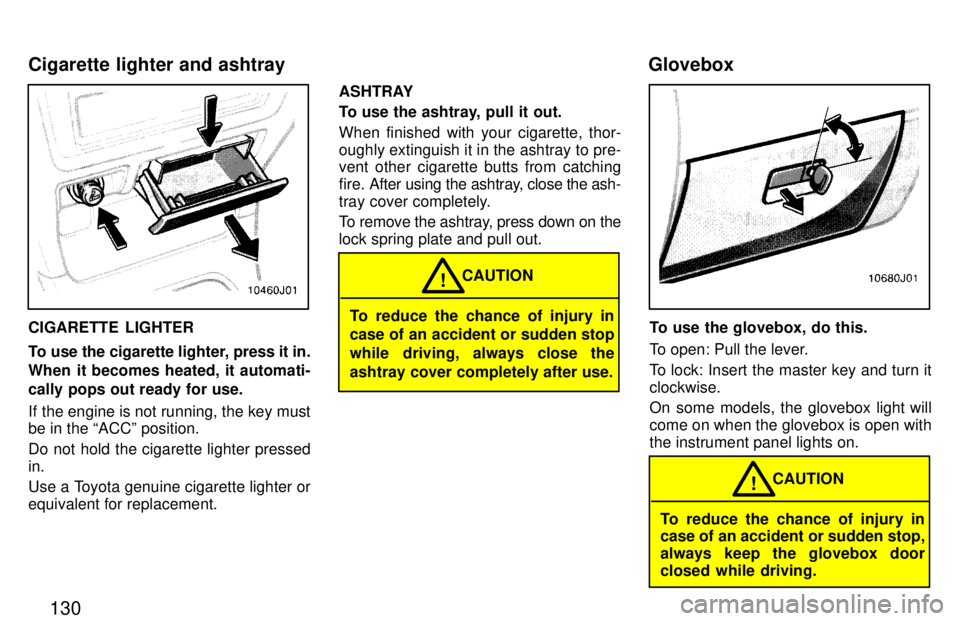
CIGARETTE LIGHTER
To use the cigarette lighter, press it in.
When it becomes heated, it automati-
cally pops out ready for use.
If the engine is not running, the key must be in the ACCº position.
Do not hold the cigarette lighter pressed in.
Use a Toyota genuine cigarette lighter or equivalent for replacement.ASHTRAY
To use the ashtray, pull it out. When finished with your cigarette, thor-
oughly extinguish it in the ashtray to pre-
vent other cigarette butts from catching
fire. After using the
ashtray, close the ash-
tray cover completely.
To remove the ashtray, press down on the lock spring plate and pull out.To reduce the chance of injury in
case of an accident or sudden stop
while driving, always close theashtray cover completely after use. CAUTION
!
To use the glovebox, do this.
To open: Pull the lever.
To lock: Insert the master key and turn it clockwise.
On some models, the glovebox light will come on when the glovebox is open withthe instrument panel lights on.
To reduce the chance of injury in
case of an accident or sudden stop,
always keep the glovebox door
closed while driving.
CAUTION
!
Cigarette lighter and ashtray
Glovebox
Page 133 of 223
136
CAUTION!
When driving off-road or in rugged
terrain, do not drive at excessive
speeds, jump the vehicle, or strike
objects, etc. This may cause loss of
control or vehicle rollover. You are
also risking expensive damage to
your vehicle's suspension and chassis. Drive gently and avoid high speeds.
Your vehicle does not need an elaborate
break-in. But following a few simple tips
for the first 1600 km (1000 miles) can add
to the future economy and long life of your vehicle:
Do not drive over 88 km/h (55 mph).
Run the engine at moderate speed be- tween 2000 and 4000 rpm.
Avoid full-throttle starts.
Try to avoid hard stops during the first
300 km (200 miles).
Do not drive slowly with the manual
transmission in a high gear.
Do not drive for a long time at any
single speed, either fast or slow.
Do not tow a trailer during the first 800
km (500 miles) FUEL TYPE
Your new vehicle must use only un-
leaded gasoline.
To help prevent gas station mixups, your
Toyota has a new smaller fuel tank opening.
The special nozzle on pumps with unleaded
fuel will fit it, but the larger standard nozzle
on pumps with leaded gas will not.
Do not use leaded gasoline. Use of
leaded gasoline will cause the
three-way catalytic converter tolose its effectiveness and the emis- sion control system to function im-properly. Also, this can increase maintenance costs.
NOTICE
OCTANE NUMBER
Select Research Octane Number 91 (Oc-
tane Rating 87) or higer.
Use of unleaded fuel with an octane num- ber or rating lower than stated above will
cause persistant heavy knocking. If se-
vere, this will lead to engine damage.
Break-in period Fuel
Page 138 of 223
141
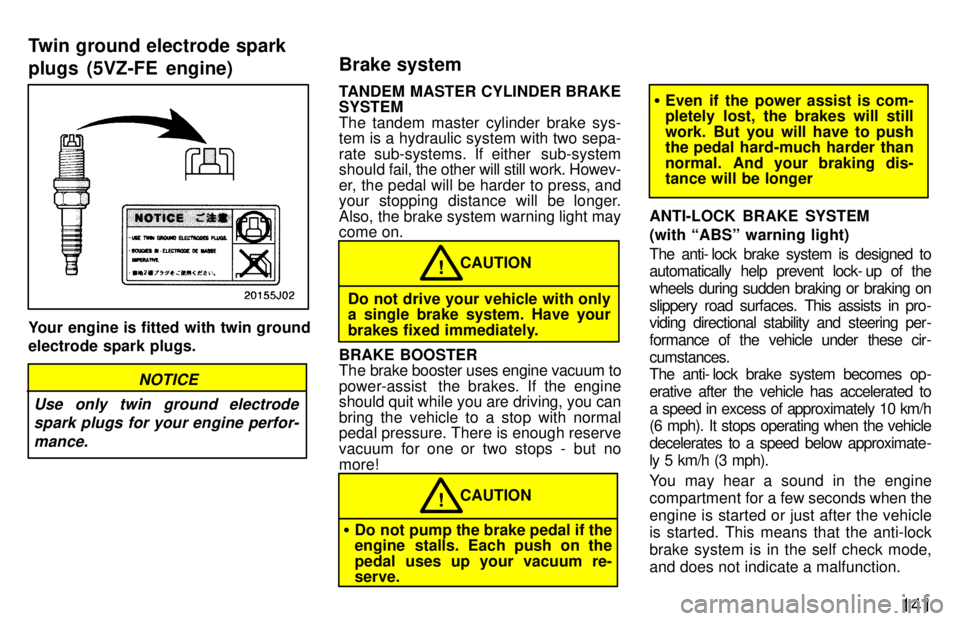
Your engine is fitted with twin ground electrode spark plugs.
NOTICE
Use only twin ground electrode spark plugs for your engine perfor-
mance.
TANDEM MASTER CYLINDER BRAKE SYSTEM
The tandem master cylinder brake sys-
tem is a hydraulic system with two sepa-
rate sub-systems. If either sub-system
should fa il, the other will still work. Howev-
er, the pedal will be harder to press, and
your stopping distance will be longer.
Also, the brake system warning light may come on.
CAUTION!
Do not drive your vehicle with only a single brake system. Have your
brakes fixed immediately.
BRAKE BOOSTER
The brake booster uses engine vacuum to
power-assist the brakes. If the engine
should quit while you are driving, you can
bring the vehicle to a stop with normal
pedal pressure. There is enough reserve
vacuum for one or two stops - but nomore!
CAUTION!
Do not pump the brake pedal if the
engine stalls. Each push on the
pedal uses up your vacuum re- serve.
Even if the power assist is com-
pletely lost, the brakes will still
work. But you will have to push
the pedal hard-much harder than
normal. And your braking dis- tance will be longer
ANTI-LOCK BRAKE SYSTEM (with ABSº warning light)
The anti- lock brake system is designed to
automatically help prevent lock- up of the
wheels during sudden braking or braking on
slippery road surfaces. This assists in pro-
viding directional stability and steering per -
formance of the vehicle under these cir -
cumstances.
The anti- lock brake system becomes op-
erative after the vehicle has accelerated to
a speed in excess of approximately 10 km/h
(6 mph). It stops operating when the vehicle
decelerates to a speed below approximate-
ly 5 km/h (3 mph).
You may hear a sound in the engine
compartment for a few seconds when the
engine is started or just after the vehicle is started. This means that the anti-lock
brake system is in the self check mode,
and does not indicate a malfunction.
Twin ground electrode spark plugs (5VZ-FE engine)
Brake system