1997 PONTIAC GRAND AM power steering
[x] Cancel search: power steeringPage 69 of 371
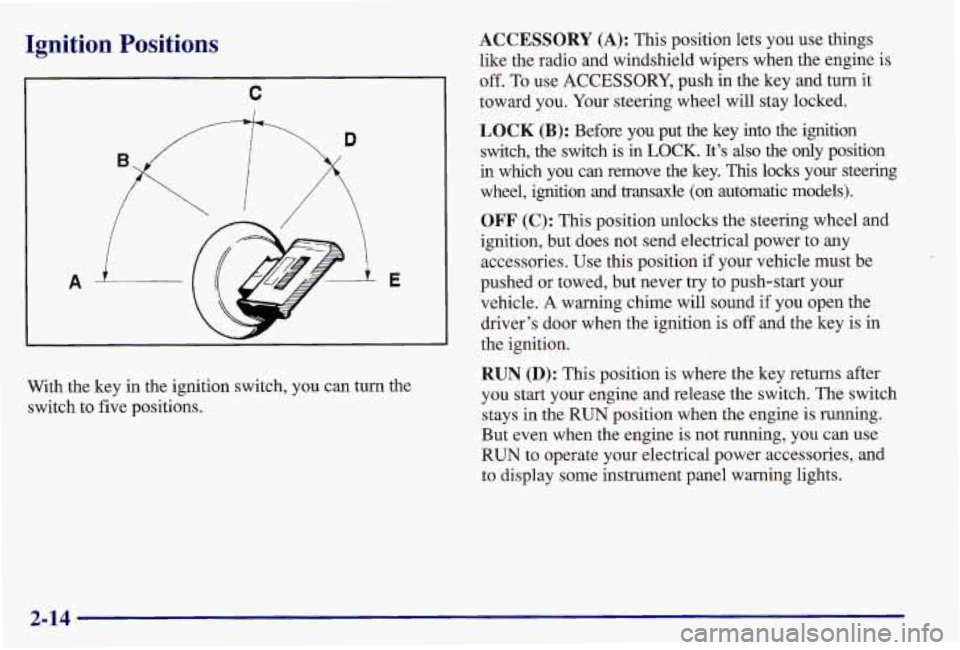
Ignition Positions
A-
C
i
With the key in the ignition switch, you can turn the
switch to five positions.
ACCESSORY (A): This position lets you use things
like the radio and windshield wipers when the engine is
off. To use
ACCESSORY, push in the key and turn it
toward you. Your steering wheel will stay locked.
LOCK (B): Before you put the key into the ignition
switch, the switch is
in LOCK. It’s also the only position
in which you can remove the key. This locks your steering
wheel, ignition and transaxle (on automatic models).
OFF (C): This position unlocks the steering wheel and
ignition, but does not send electrical power to any
accessories. Use this position if your vehicle must be
pushed or towed, but never try to push-start your
vehicle.
A warning chime will sound if you open the
driver’s door when the ignition is off and the key is in
the ignition.
RUN (D): This position is where the key returns after
you start your engine and release the switch. The switch
stays in the
RUN position when the engine is running.
But even when the engine is not running, you can use
RUN to operate your electrical power accessories, and
to display some instrument panel warning lights.
2-14
Page 89 of 371
Windows
On a vehicle with manual windows, use the window
crank located on the inside of each door to open and
close each window.
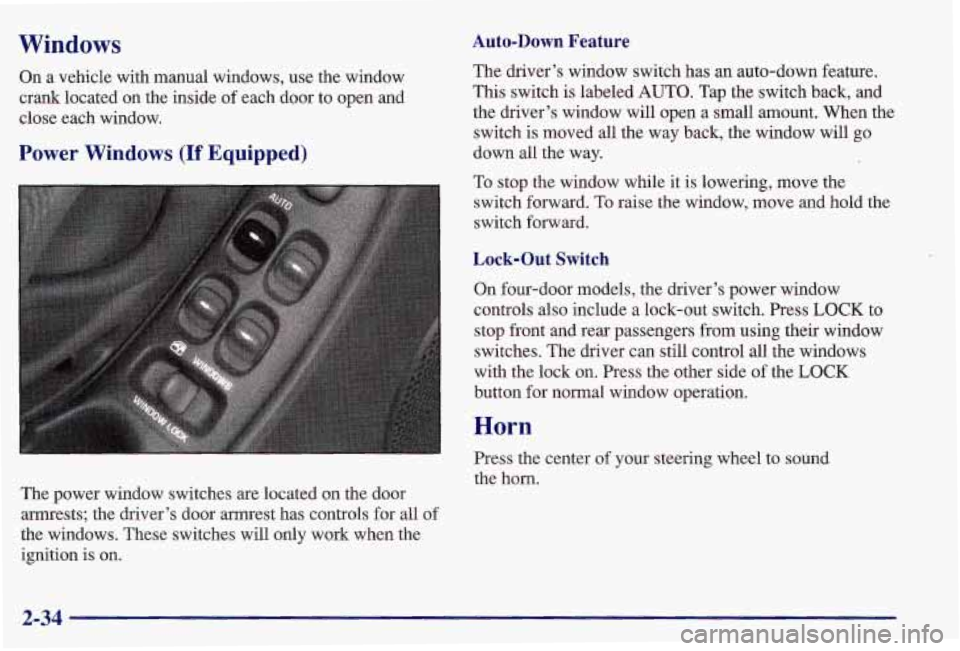
Power Windows (If Equipped)
The power window switches are located on the door
armrests; the driver’s door armrest has controls for all
of
the windows. These switches will only work when the
ignition is on.
Auto-Down Feature
The driver’s window switch has an auto-down feature.
This switch is labeled AUTO. Tap the switch back, and
the driver’s window will open a small amount. When the switch is moved all the way back, the window will go
down all the way.
To stop the window while it
is lowering, move the
switch forward.
To raise the window, move and hold the
switch forward.
Lock-Out Switch
On four-door models, the driver’s power window
controls also include a lock-out switch. Press
LOCK to
stop front and rear passengers
from using their window
switches. The driver can still control all the windows
with the lock
on. Press the other side of the LOCK
button for normal window operation.
Horn
Press the center of your steering wheel to sound
the horn.
2-34
Page 107 of 371
NOTICE:
Don’t hold a cigarette lighter in with your hand
while it is heating, If you do, it won’t be able to
back away from the heating element when it’s ready. That can make it overheat, damaging the
lighter and the heating element.
To clean the center console ashtray, remove the ashtray
and empty it. The ashtray can be placed
in the rear
cupholder for the rear passengers to use. The ashtray can
also be placed inside the center console for storage.
When the ashtray
is removed, you can also use this tray
as a cupholder. The ashtray can be stored in the center
console storage area when not in use.
NOTICE:
Don’t put papers and other things that burn into
your ashtrays. If
you do, cigarettes or other
smoking materials could set them
on fire,
causing damage.
Sun Visors
To block out glare, you can swing down the visors. You
can also swing them to the side.
Your vehicle may also have a plastic extension which
pulls out of the main visor to increase protection
from glare.
Visor Vanity Mirror
Open the cover to expose the vanity mirror.
Accessory Power Outlet
If you have an accessory power outlet, you can plug in
an additional electrical accessory. The outlet is located
on the instrument panel to the right of the steering
wheel. Be sure to follow the proper installation
instructions that are included with any electrical
equipment you install. The accessory power outlet is
protected by a fuse and has a maximum current level.
Litter Bag Hook
There is a litter bag hook located on the front passenger
side
of the center console storage area.
2-52
Page 110 of 371

Your instrument panel is designed to let you know at a glance how your vehicle is running. You’ll know how fast
you’re going, how much fuel you’re using, and many other things you’ll need to drive safely and economically.
The main components
of your instrument panel are:
A. Fuse Panel
B. Vent
C. Turn SignalMultifunction Lever
D. Supplemental Restraint System (SRS)
E. Hazard Warning Flashers Switch
E Instrument Cluster
G. Windshield WipersNasher Stalk
H. Audio System
I. Side Window Defogger Vent
J. Glove Box
K. Climate Control System L. Gear Shift Lever
M. Cupholder/Ashtray
(If Equipped)
N. Enhanced Traction System (ETS) Switch
0. Accessory Power Outleaighter (If Equipped)
(If Equipped)
P. Ignition Switch
Q. Tilt Steering Wheel Lever (If Equipped)
R. Fog Lamp Switch
S. Instrument Panel Intensity Controlhterior
Lamps Switch
T. Hood Release Handle
2-55
Page 148 of 371
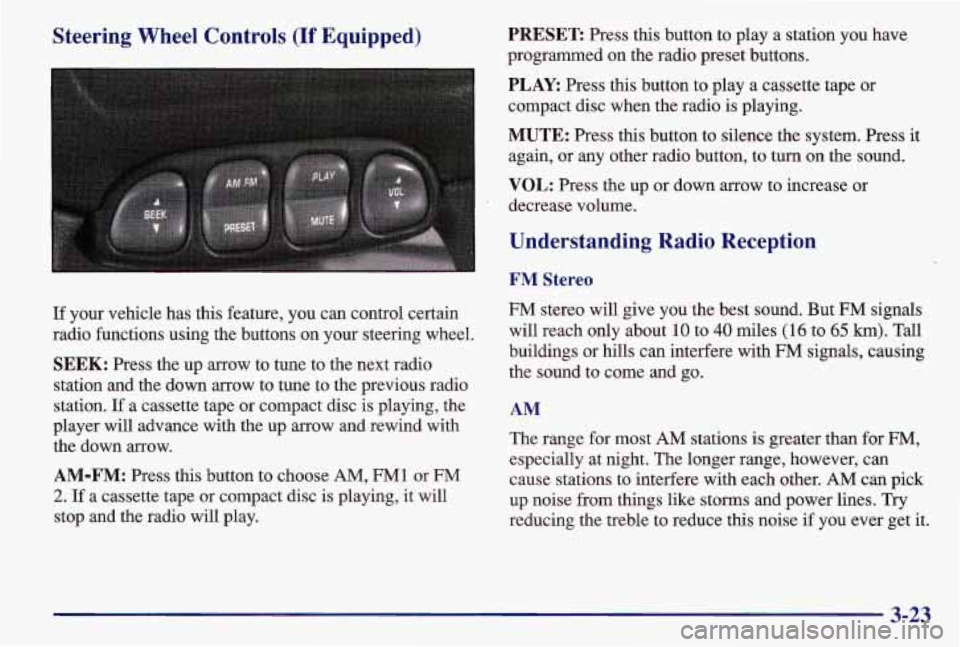
Steering Wheel Controls (If Equipped)
If your vehicle has this feature, you can control certain
radio functions using the buttons on your steering wheel.
SEEK: Press the up arrow to tune to the next radio
station and the down arrow to tune to the previous radio
station.
If a cassette tape or compact disc is playing, the
player will advance with the up arrow and rewind with
the down arrow.
AM-FM: Press this button to choose AM, FM1 or FM
2. If a cassette tape or compact disc is playing, it will
stop and the radio will play.
PRESET Press this button to play a station you have
programmed on the radio preset buttons.
PLAY: Press this button to play a cassette tape or
compact disc when the radio is playing.
MUTE: Press this button to silence the system. Press it
again, or any other radio button, to turn
on the sound.
VOL: Press the up or down arrow to increase or
decrease volume.
Understanding Radio Reception
FM Stereo
FM stereo will give you the best sound. But FM signals
will reach only about
10 to 40 miles (16 to 65 km). Tall
buildings or hills can interfere with FM signals, causing
the sound to come and go.
AM
The range for most AM stations is greater than for FM,
especially at night. The longer range, however, can
cause stations to interfere with each other.
AM can pick
up noise from things like storms and power lines. Try
reducing the treble to reduce this noise if you ever get it.
3-23
Page 162 of 371
Braking in Emergencies
With anti-lock, you can steer and brake at the same
time. In many emergencies, steering can help you more
than even the very best braking.
Steering
Power Steering
If you lose power steering assist because the engine
stops or the system is not functioning, you can steer but
it will take much more effort.
Variable Effort Steering (If Equipped)
This steering system provides lighter steering effort for
parking and at low vehicle speeds. Steering effort will
increase at higher speeds for improved road feel.
Steering Tips
Driving on Curves
It’s important to take curves at a reasonable speed.
A lot of the “driver lost control” accidents mentioned on
the news happen on curves. Here’s why:
Experienced driver or beginner, each of us is subject to
the same laws
of physics when driving on curves. The
traction of the tires against the road surface makes it possible for the vehicle to change its path
when you turn
the front wheels. If there’s no traction, inertia will keep
the vehicle going in the same direction. If you’ve ever
tried to steer a vehicle on wet ice, you’ll understand this.
The traction you can get
in a curve depends on the
condition of your tires and the road surface, the angle at
which the curve is banked, and your speed. While you’re
in a curve, speed is the one factor you can control.
Suppose you’re steering through a sharp curve.
Then you suddenly accelerate.
Both control
systems
-- steering and acceleration -- have to do their .-
work where the tires meet the road. Adding the sudden
acceleration can demand too much of those places. You
can lose control. Refer to “Enhanced Traction System”
in the Index.
What should you do
if this ever happens? Ease up on the
accelerator pedal, steer the vehicle the way you want it
to
go, and slow down.
Speed limit signs near curves warn that you should
adjust your speed. Of course, the posted speeds are
based on good weather and road conditions. Under less
favorable conditions you’ll want to go slower.
If you need to reduce your speed as you approach a
curve, do it before you enter the curve, while your front
wheels are straight ahead.
4-11
Page 228 of 371

Section 6 Service and Appearance Care
Here you will find information about the care of your Pontiac. This section begins with service and fuel information,
and then it shows how to check important fluid and lubricant levels. There is also technical information about your
vehicle, and a part devoted to its appearance care.
6-2
6-3
6-4
6-5
6-8
6- 12
6-18
6- 19
6-2 1
6-23
6-24
6-28
6-28
6-28
6-29
6-30
6-34 Service
Fuel
Fuels in Foreign Countries
Filling Your Tank
Checking Things Under the Hood
Engine Oil
Air Cleaner
Automatic Transaxle Fluid
Manual Transaxle Fluid
Hydraulic Clutch
Engine Coolant
Surge Tank Pressure Cap
Thermostat
Power Steering Fluid
Windshield Washer Fluid
Brakes
Battery Bulb
Replacement
Halogen Bulbs
Appearance Care
Cleaning the Inside of Your Pontiac
Cleaning the Outside of Your Pontiac
Aluminum Wheels
(If Equipped)
Cleaning Tires
Sheet Metal Damage
Finish Damage
Appearance Care Materials Chart
Vehicle Identification Number (VIN)
Electrical System
Replacement Bulbs
Capacities and Specifications
Air Conditioning Refrigerants
Normal Maintenance Replacement Parts
Dimensions
6-35
6-35
6-49
6-50
6-54 6-55
6-55
6-55
6-56
6-57
6-5
8
6-5 8
6-63
6-64
6-65
6-65
6-65
6-1
Page 237 of 371

2.4L (CODE T) Engine
When you open the hood, you’ll see:
A. Engine Coolant Surge Tank
B. Engine Oil Fill Cap
C. Engine Oil Dipstick
D. Automatic Transaxle Dipstick
(If Equipped) E.
Power Steering Fluid Reservoir
E Brake Fluid Reservoir
G. Windshield Washer Fluid
Reservoir
H. Hydraulic Clutch Fluid
Reservoir
(If Equipped)
I. Air Cleaner
J. Battery
6-10