1997 OLDSMOBILE BRAVADA engine
[x] Cancel search: enginePage 114 of 358

A reading in the low pressure zone may be caused by a
dangerously low oil level or other problems causing low
oil pressure.
Don’t keep driving if the oil pressure is low. If
you do, your engine can become so hot that it
catches fire. You or others could be burned.
Check your
oil as soon as possible and have yo1
vehicle serviced.
NOTICE:
Damage to your engine from neglected oil
problems can be costly and is not covered by
your warranty.
Daytime Running Lamps Indicator Light
:::(-J 0.0
Check Gages Light
CHECK
GAGES
You may have t.his light on
the instrument panel.
It goes on whenever the
DRL are on, the ignition is
on, the headlamp switch is
off and the parking brake
is released.
The
CHECK GAGES light
will come on briefly when
you are starting the engine.
If the light comes on and
stays on while
you are
driving, check your coolant
temperature and engine oil
pressure gages to see
if they
are
in the warning zones.
2-60
ProCarManuals.com
Page 115 of 358
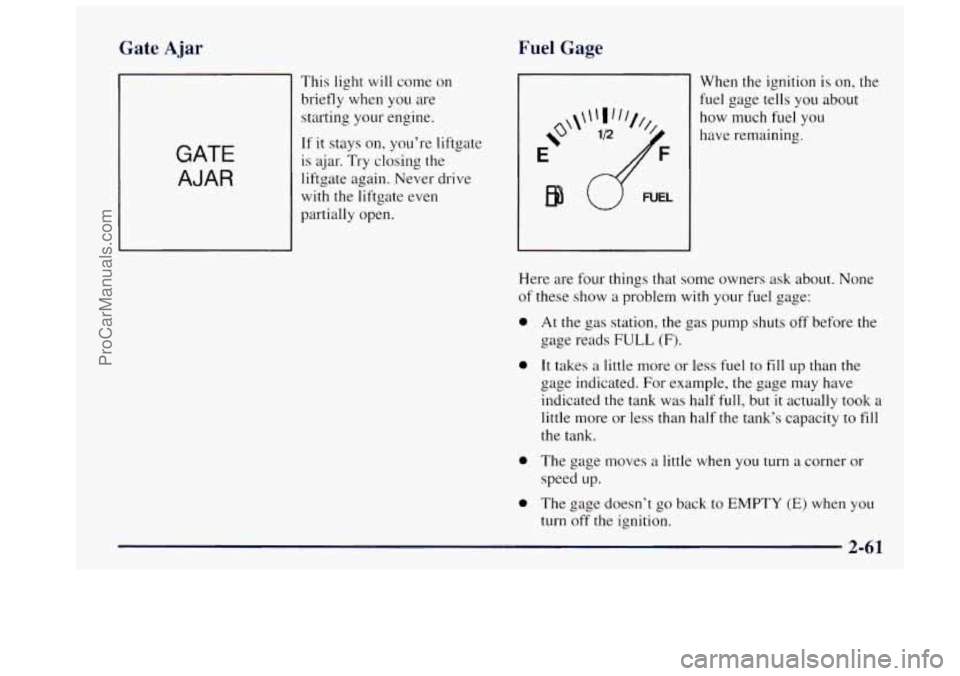
Fuel Gage
Gate Ajar
GATE
AJAR
This light will come on
briefly when you are
starting your engine.
If it stays on, you’re liftgate
is ajar.
Try closing the
liftgate again. Never drive
with the liftgate even
partially open.
i?‘
E
EB
When the ignition is on, the
fuel gage tells
you about
how much fuel you
have remaining.
Here are four things that some owners ask about. None
of these
show a problem with your fuel gage:
0
0
0
0
At the gas station, the gas pump shuts off before the
gage reads
FULL (F).
It takes a little more or less fuel to fill up than the
gage indicated. For example, the gage may have
indicated the tank was half full, but it actually took a
little more or less than half the tank’s capacity to fill
the tank.
The gage moves
a little when you turn a corner or
speed up.
The gage doesn’t
go back to EMPTY (E) when you
turn off the ignition.
ProCarManuals.com
Page 119 of 358

e
+# HEATER: This setting directs warmed air through
the heater floor outlets and windshield defroster outlets.
we
+# BLEND: Airtlow is divided equally between the
heater floor outlet and the windshield defroster outlets.
%? DEFROST This setting directs most air through
the windshield defroster outlets and some through the
heater outlets.
Air Conditioning
On hot days, open the windows long enough to let hot
inside air escape. This reduces the time
it takes for your
vehicle to cool down. Then keep your windows closed
for the air conditioner to work its best.
For quick cool-down on very hot days, use
MAX A/C
with the temperature knob turned counterclockwise.
This setting should be used to keep odors and/or dust
from entering the vehicle. For normal cooling on hot
days, use A/C with the temperature knob turned
counterclockwise.
On cool but sunny days, use BI-LEVEL A/C to deliver
warm air to the floor and cooler air to the instrument
panel outlets.
When the air conditioner is on,
you may sometimes
notice slight changes
in your vehicle‘s engine speed and
power. This is normal because the system is designed to
cycle the compressor on and off to keep the
desired temperature.
Heating
The heater works best if you keep your windows closed
while using
it. On cold days, use HEATER with the
temperature knob turned clockwise.
BLEND is useful in
cool weather when you have fog or ice on the
windshield or side windows.
If you use the optional engine coolant heater before
starting your engine, your heating system will produce
warmer
air faster to heat the passenger compartment in
cold weather. See “Engine Coolant Heater” in the Tndex.
3-3
ProCarManuals.com
Page 122 of 358

Audio Systems
Your Delco@ audio system has been designed to operate
easily and give years of listening pleasure. You will get
the most enjoyment out of it if you acquaint yourself
with it first. Find out what your Delco system can do
and how to operate all its controls, to be sure you’re
getting the most out
of the advanced engineering that
went
into it.
Setting the Clock for AM-FM Stereo with
Cassette Tape Player
Press SET. Within five seconds, press and hold SEEK
until the correct minute appears on the display. Press and
hold SCAN until the correct hour appears on
the display.
Setting the Clock for AM-FM Stereo
with Compact Disc Player and Automatic
Tone Control
Press and hold HR until the correct hour appears on the
display. Press and hold MIN until the correct minute
appears on the display. To display the clock with the
ignition off, press RECALL and the time will be
displayed for
a few seconds. There is an initial
two-second delay before the clock goes into the
time-set mode.
AM-FM Stereo with Cassette Tape Plaver
and Equalizer
Playing the Radio
PWR-VOL: This knob turns the system on and off and
controls the volume. To increase volume, turn the knob
clockwise. Turn it counterclockwise to decrease volume.
RCL: Display the time with the ignition off by pressing
this knob. When the radio is playing, press this knob to
recall station frequency.
AM-ST Press this button to tune an AM station that
broadcasts in stereo. Your
STEREO light will come on
when you’re receiving AM stereo. If you press
AM-ST
and there is no more noise, it means the station is weak.
You’ll hear the station better if you do not use AM-ST.
Press the button again to turn
off stereo.
ProCarManuals.com
Page 131 of 358

To unlock a secured radio, see “Unlocking the
Theft-Deterrent Feature After a Power
Loss” earlier in
this section.
Understanding Radio Reception
FM Stereo
FM stereo will give you the best sound. But FM signals
will reach only about 10 to 40 miles ( 16 to 65 km). Tall
buildings or hills can interfere
with FM signals, causing
the sound to come and
go.
AM
The range for most AM stations is greater than for FM,
especially at night. The longer range, however, can
cause stations to interfere with each other.
AM can pick
up noise from things like storms and power lines. Try
reducing the treble
to reduce this noise if you ever get it.
Tips About Your Audio System
Hearing damage from loud noise is almost undetectable
until it is too late. Your hearing can adapt to higher
volumes of sound. Sound that seems normal
can be loud
and harmf~ll to your hearing. Take precautions by
adjusting the volume control on your radio to
a safe
sound level before your hearing adapts to
it.
To help avoid hearing loss or damage:
Adjust the volume control to the lowest setting.
Increase volume slowly until you hear comfortably
and clearly.
NOTICE:
Before you add any sound equipment to your
vehicle
-- like a tape player, CB radio, mobile
telephone or two-way radio
-- be sure you can add
what you want. If you can, it’s very important to
do it properly. Added sound equipment may
interfere with the operation of your vehicle’s
engine, Delco radio or other systems, and even
damage them. Your vehicle’s systems may interf‘ere
with the operation
of sound equipment that has
been added improperly.
So, before adding sound equipment, check with
your retailer and be sure to check Federal rules
covering mobile radio and telephone units.
3-15
ProCarManuals.com
Page 139 of 358

Avoid needless heavy braking. Some people drive in
spurts -- heavy acceleration followed by heavy
braking
-- rather than keeping pace with traffic. This is a
mistake.
Your brakes may not have time to cool between
hard stops. Your brakes will wear
out much faster if you
do a lot of heavy braking. If you keep pace with the
traffic and allow realistic following distances, you will
eliminate a lot of unnecessary braking. That means
better braking and longer brake life.
If your engine ever stops while you’re driving, brake
normally but don’t pump your brakes. If you do, the
pedal may get harder to push down.
If your engine
stops, you will still have some power brake assist. But
you will use
it when you brake. Once the power assist is
used up,
it may take longer to stop and the brake pedal
will be harder to push.
Anti-Lock Brakes (ABS)
Your vehicle has anti-lock brakes (ABS). ABS is an
advanced electronic braking system that
will help
prevent a braking skid.
When you start your engine and begin to drive away,
your anti-lock brake system will check itself. You
may
hear a momentary motor or clicking noise while this test
is going on. This
is normal.
If there’s a problem with the
anti-lock brake system, this
warning light will stay on.
System Warning Light” in
the Index.
ANTI - LOCK See “Anti-Lock Brake
ProCarManuals.com
Page 141 of 358
Remember: Anti-lock doesn’t change the time you need
to get your foot
up to the brake pedal or always decrease
stopping distance.
If you get too close to the vehicle in
front of you, you won’t have time to apply your brakes
if that vehicle suddenly slows or stops. Always leave
enough room up ahead to stop, even though you have
anti-lock brakes.
Using Anti-Lock
Don’t pump the brakes. Just hold the brake pedal down
and let anti-lock work for you.
You may feel the brakes
vibrate, or you may notice some noise, but this is normal.
Braking in Emergencies
With anti-lock, you can steer and brake at the same
time.
In many emergencies, steering can help you more
than even the very best braking.
Steering
Power Steering
If you lose power steering assist because the engine
stops or the system is
not functioning, you can steer but
it will take much more effort.
Steering Tips
Driving on Curves
It’s important to take curves at a reasonable speed.
A lot of the “driver lost control” accidents mentioned on
the news happen on curves. Here’s why:
Experienced driver or beginner, each
of us is subject to
the same laws of physics when driving
on curves. The
traction
of the tires against the road surface makes it
possible for the vehicle to change its path when you turn
the front wheels.
If there’s no traction, inertia will keep
the vehicle going in the same direction.
If you’ve ever
tried to steer a vehicle on wet ice,
you’ll understand this.
ProCarManuals.com
Page 146 of 358

Loss of Control
Let’s review what driving experts say about what
happens when
the three control systems (brakes, steering
and acceleration) don’t have enough friction where the
tires meet the road to do what the driver has asked.
In any emergency, don’t give up. Keep trying to steer and
constantly seek an escape route or area of less danger.
Skidding
In a skid, a driver can lose control of the vehicle.
Defensive drivers avoid most skids by taking reasonable
care suited
to existing conditions, and by not “overdriving”
those conditions. But skids are always possible.
The three types of skids correspond to your
Oldsmobile’s three control systems. In the braking skid,
your wheels aren’t rolling.
In the steering or cornering
skid, too much speed or steering in a curve causes tires
to slip and lose cornering force. And
in the acceleration
skid, too much throttle causes the driving wheels
to spin.
A cornering skid and an acceleration skid are best
handled by easing your foot off the accelerator pedal.
If your vehicle starts to slide, ease your foot off the
accelerator pedal and quickly steer the way you want the
vehicle to go. If you start steering quickly enough, your
vehicle may straighten out. Always be ready for
a
second skid if it occurs.
Of course, traction
is reduced when water, snow, ice,
gravel or other material is on the road. For safety, you’ll
want
to slow down and adjust your driving to these
conditions.
It is important to slow down on slippery
surfaces because stopping distance will be longer and
vehicle control more limited.
While driving on a surface with reduced traction, try
your best to avoid sudden steering, acceleration or
braking (including engine braking by shifting to a lower
gear).
Any sudden changes could cause the tires to slide.
You may not realize
the surface is slippery until your
vehicle is skidding. Learn to recognize warning
clues
-- such as enough water, ice or packed snow on
the road to make a “mirrored surface” -- and slow
down
when you have any doubt.
Remember:
Any anti-lock brake system (ABS) helps
avoid only the braking skid.
4-14
ProCarManuals.com