Page 128 of 404

Anti-Lock Brake System Warning Light
LOCK
ANT‘- (e)
With the anti-lock brake
system, this light will come
on when you start your
engine and may stay on for
several seconds.
That’s normal.
Traction Control System Warning Light
TRACTION
OFF
This warning light should
come on briefly as you start
the engine. If the warning
light doesn’t come on then,
have it fixed
so it will be
ready to warn you
if there’s
a problem.
If the light stays on, turn the ignition to OFF. Or, if the
light comes on when you’re driving, stop as soon as
possible
and turn the ignition off. Then start the engine
again to reset the system.
If the light still stays on, or
comes on again while you’re driving, your Aurora needs
service.
If the regular brake system warning light isn’t
on, you still have brakes, but you don’t have anti-lock
brakes.
If the regular brake system warning light is also
on, you don’t have anti-lock brakes and there’s a
problem with your regular brakes. See “Brake System
Warning Light” earlier
in this section.
The anti-lock brake system warning light should
COITIC?
on briefly when you turn the ignition key to RUN. If the
light doesn’t come on then, have it fixed
so it will be
ready to warn you
if there is a problem.
If it stays on, or comes on when you’re driving, there
may be a problem with your traction control system
and
your vehicle may need service. When this warning light
is on, the system will not limit wheel spin. Adjust your
driving accordingly.
2-72
Page 129 of 404

The traction control system warning light may come on
for the following reasons:
0
0
0 If you turn the system off by pressing the
TRACTION
CONTROL button located on the
center console, the warning light will come on
and
stay on. To turn the system back on, press the button
again. The warning light should
go off. (See
“Traction Control System” in the Index for
more information.)
If there’s a brake system problem that is specifically
related to traction control, the traction control system
will turn
off and the warning light will come on. If
your brakes begin
to overheat, the traction control
system will turn
off and the warning light will come
on until your brakes cool down.
If the traction control system is affected by an
engine-related problem, the system will turn
off and
the warning light will come
on.
If the traction control system warning light comes on
and stays on for an extended period
of time when the
system is turned on, your vehicle needs service.
Traction Control System Active Light
TRACTION
ACTIVE
When your traction control
system is limiting wheel
spin, this light will come on.
Slippery road conditions
may exist
if the traction
control system active light
comes on,
so adjust your
driving accordingly.
The light will stay on for a few seconds after the traction
control system stops limiting wheel spin.
2-73
Page 136 of 404
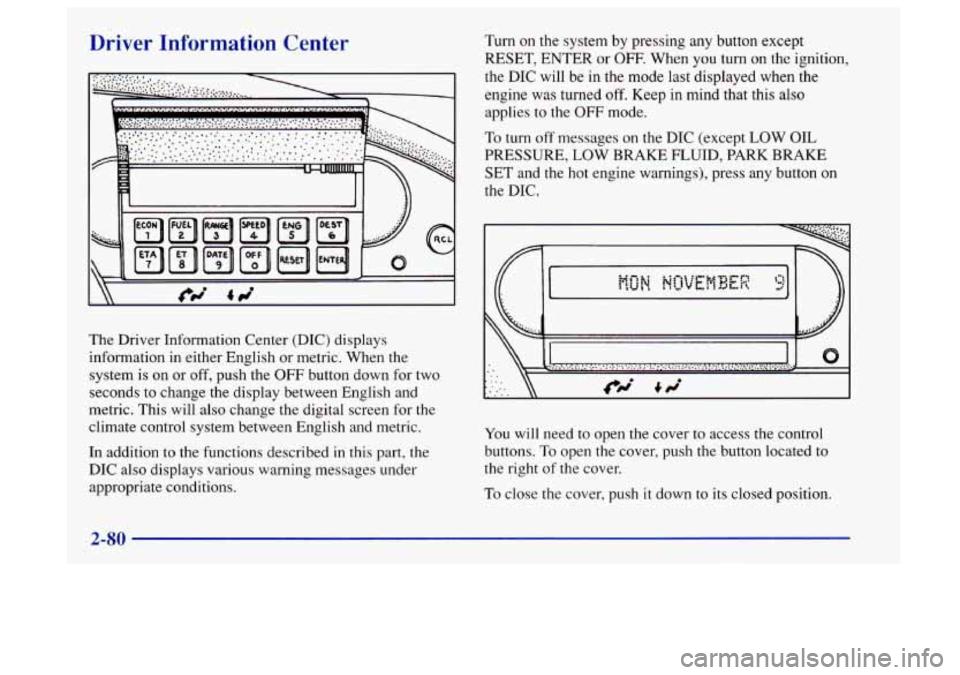
Driver Information Center
The Driver Information Center (DIC) displays
information in either English or metric. When the
system
is on or off, push the OFF button down for two
seconds to change the display between English and
metric. This will also change the digital screen for the
climate control system between English and metric.
In addition to the functions described in this part, the
DIC also displays various warning messages under
appropriate conditions.
Turn on the system by pressing any button except
RESET, ENTER or
OFF- When you turn on the ignition,
the DIC will be in the mode
last displayed when the
engine was turned
off. Keep in mind that this also
applies to the
OFF mode.
To turn off messages on the DIC (except LOW OIL
PRESSURE,
LOW BRAKE FLUID, PARK BRAKE
SET and the hot engine warnings), press any button on
the DIC.
0
You will need to open the cover to access the control
buttons.
To open the cover, push the button located to
the right of the cover.
To close the cover, push it down to its closed position.
2-80
Page 178 of 404
Defensive Driving
The best advice anyone can give about driving is:
Drive defensively.
Please start with a very important safety device in your
Aurora: Buckle up. (See “Safety Belts” in the Index.)
Defensive driving really means “be ready for anything.”
On city streets, rural roads or freeways, it means
“always expect the unexpected.”
Assume that pedestrians or other drivers are going
to be
careless and make mistakes. Anticipate what they might
do. Be ready for their mistakes.
Rear-end collisions are about the most preventable of
accidents. Yet they are common. Allow enough
following distance. It’s the best defensive driving
maneuver, in both city and rural driving. You never
know when the vehicle in front of you is going to brake
or turn suddenly.
4-2
Page 182 of 404

Control of a Vehicle Braking
You
have three systems that make your vehicle go where
you want it to go. They are the brakes, the steering and
the accelerator. All three systems have to do their work
at the places where the tires meet the road. Braking action involves perception
time and
reaction time.
First, you have to decide to push on the brake pedal.
That’s
perception time. Then you have to bring up your
foot and do it. That’s
reaction time.
Average reaction time is about 3/4 of a second. But
that’s only an average. It might be less with one driver
and as long as two or three seconds or more with
another. Age, physical condition, alertness, coordination
and eyesight all play a part.
So do alcohol, drugs and
frustration. But even in
3/4 of a second, a vehicle
moving at
60 mph (100 km/h) travels 66 feet (20 m).
That could be a lot of distance in an emergency,
so
keeping enough space between your vehicle and others
is important.
And, of course, actual stopping distances vary greatly
with the surface of the road (whether it’s pavement or
gravel); the condition of the road (wet,
dry, icy); tire
tread; the condition of your brakes; the weight of the
vehicle and the amount of brake force applied.
Sometimes, as when you’re driving on snow or ice, it’s
easy to ask more of those control systems than the tires
and road can provide. That means you can lose control
of your vehicle.
4-6
c
Page 183 of 404

Avoid needless heavy braking. Some people drive in
spurts
-- heavy acceleration followed by heavy
braking
-- rather than keeping pace with traffic. This is a
mistake. Your brakes may not have time to cool between
hard stops. Your brakes will wear out much faster
if you
do
a lot of heavy braking. If you keep pace with the
traffic and allow realistic following distances, you will
eliminate a lot of unnecessary braking. That means
better braking and longer brake life.
If your engine ever stops while you’re driving, brake
normally but don’t pump your brakes. If you do, the
pedal may get harder to push down. If your engine
stops, you will still have some power brake assist. But
you will use it when you brake. Once the power assist is
used up, it may take longer to stop and the brake pedal
will be harder to push.
Anti-Lock Brakes
Your vehicle has anti-lock brakes (ABS). ABS is an
advanced electronic braking system that will help
prevent a braking skid.
When you start your engine and begin to drive away,
your anti-lock brake system will check itself. You may
hear a momentary motor or clicking noise while this test
is going on, and you may even notice that your brake
pedal moves a little. This is normal.
LOCK
ANT‘- (@)
If there’s a problem with the
anti-lock brake system, this
warning light will stay on.
See “Anti-Lock Brake
System Warning Light” in
the Index.
4-7
Page 184 of 404
Here’s how anti-lock works. Let’s say the road is wet.
You’re driving safely. Suddenly an animal jumps out in
front
of you.
You slam on the brakes. Here’s what happens with
ABS
A computer senses that wheels are slowing down. If one
of the wheels is about to stop rolling, the computer will
separately work
the brakes at each front wheel and at the
rear wheels. The anti-lock system can change the brake pressure
faster
than any driver could. The computer is
programmed to make the most
of available tire and
road conditions.
You can steer around the obstacle while braking hard.
As you brake, your computer keeps receiving updates on
wheel speed and controls braking pressure accordingly.
4-8
Page 185 of 404

Remember: Anti-lock doesn’t change the time you need
to get your foot up to the brake pedal or always decrease
stopping distance. If you get too close to the vehicle in
front
of you, you won’t have time to apply your brakes
if that vehicle suddenly slows or stops. Always leave
enough room up ahead to stop, even though you have
anti-lock brakes.
Using Anti-Lock
Don’t pump the brakes. Just hold the brake pedal down
and let anti-lock work for you. You may hear a motor or
clicking noise during a hard stop, but this is normal.
Traction Control System
Your vehicle has a traction control system that limits
wheel spin. This is especially useful in slippery road
conditions. The system operates only if it senses that one
or both of the front wheels are spinning or beginning to
lose traction. When this happens, the system works the
front brakes and reduces engine power to limit
wheel spin.
TRACTION ACTIVE
This light will come on
when your traction control
system is limiting wheel
spin. See “Traction Control
System Active Light” in
the Index.
You may feel or hear the system working, but this
is normal.
If your vehicle is in cruise control when the traction
control system begins to limit wheel spin, the cruise
control will automatically disengage. When road
conditions allow you to safely use it again, you may
re-engage the cruise control. (See “Cruise Control”
in
the Index.)
4-9

