1997 NISSAN SENTRA Ignition switch
[x] Cancel search: Ignition switchPage 44 of 194

This Supplemental Restraint System sec-
tion contains important information concern-
ing the driver and passenger supplemental
air bags. The Supplemental Restraint Sys-
tem Air Bag can help reduce impact force to
the driver and to the front passenger in
certain frontal collisions. The supplemental
air bags are designed tosupplementthe
crash protection provided by the driver and
front passenger seat belts and arenot a
substitutefor them. The seat belts should
always be correctly worn and the driver and
front passenger seated a suitable distance
from the steering wheel and instrument
panel. (See ``Seat belts'' for instructions and
precautions on seat belt usage.)
NOTE:
For Canada, some vehicles are not equipped
with a Supplemental Air Bag System.
Your vehicle may not have a Driver and
Passenger-side Supplemental Air Bag.
If your vehicle is not equipped with a
Supplemental Air Bag System,it will not
havethe following equipment:
cSupplemental Air Bag Warning Light
(see ``Supplemental air bag warning
light'' later in this section).cDriver Supplemental Air Bag (see
``Meters and gauges'' in the ``Instru-
ments and controls'' section).
cPassenger-side Supplemental Air Bag
(see ``Meters and gauges'' in the ``Instru-
ments and controls'' section).
cSupplemental Restraint System Warn-
ing Labels (see ``Warning labels'' later in
this section).
Every person who drives or rides in this vehicle
should use a seat belt at all times. Children
should be in appropriate child restraints (see
``Seat belts'' and ``Child restraints for infants
and small children'' later in this section).
The supplemental air bags operate only
when the ignition switch is in the ON or
START position.
SUPPLEMENTAL RESTRAINT
SYSTEM (supplemental air bag
system) (if so equipped)
2-16
ZX
Page 48 of 194
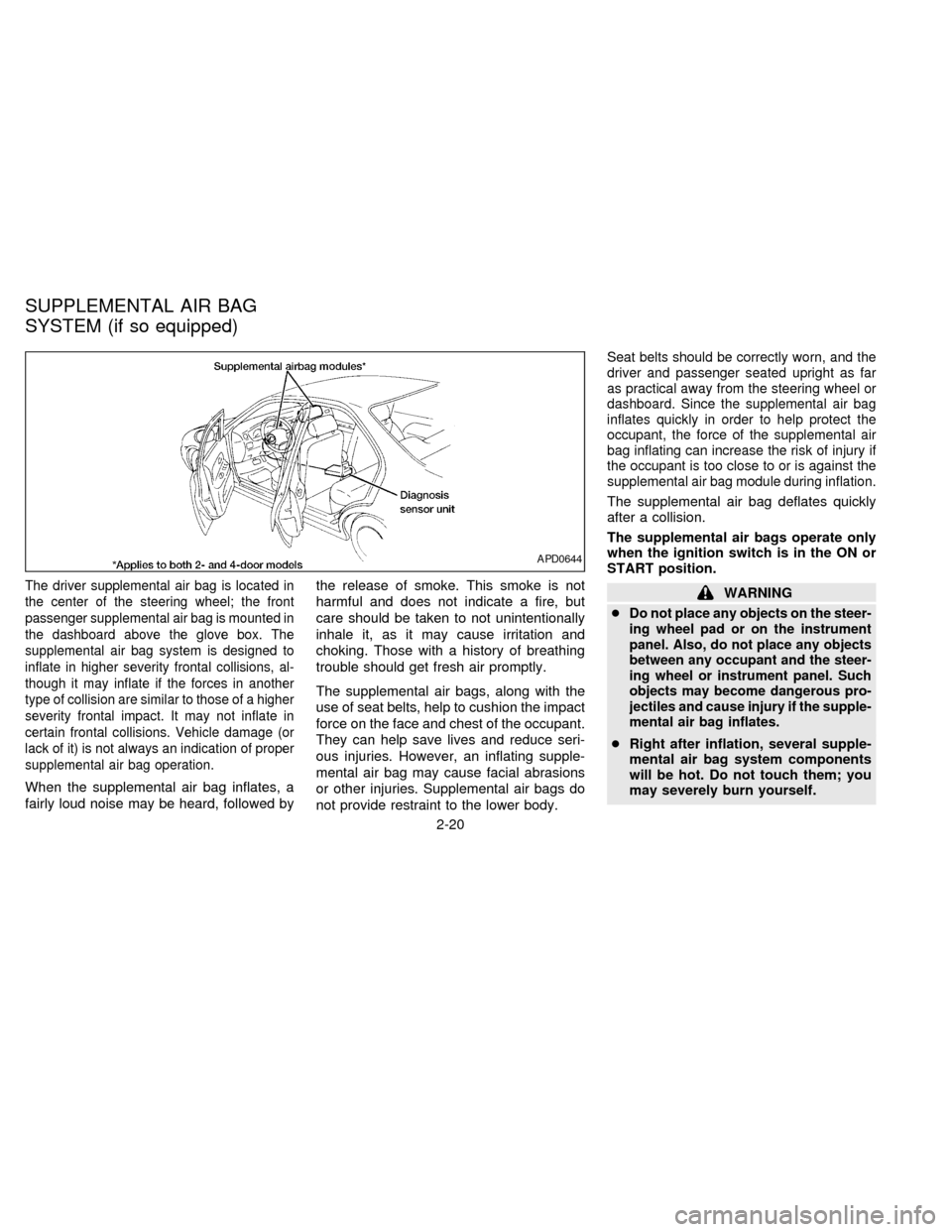
The driver supplemental air bag is located in
the center of the steering wheel; the front
passenger supplemental air bag is mounted in
the dashboard above the glove box. The
supplemental air bag system is designed to
inflate in higher severity frontal collisions, al-
though it may inflate if the forces in another
type of collision are similar to those of a higher
severity frontal impact. It may not inflate in
certain frontal collisions. Vehicle damage (or
lack of it) is not always an indication of proper
supplemental air bag operation.
When the supplemental air bag inflates, a
fairly loud noise may be heard, followed bythe release of smoke. This smoke is not
harmful and does not indicate a fire, but
care should be taken to not unintentionally
inhale it, as it may cause irritation and
choking. Those with a history of breathing
trouble should get fresh air promptly.
The supplemental air bags, along with the
use of seat belts, help to cushion the impact
force on the face and chest of the occupant.
They can help save lives and reduce seri-
ous injuries. However, an inflating supple-
mental air bag may cause facial abrasions
or other injuries. Supplemental air bags do
not provide restraint to the lower body.
Seat belts should be correctly worn, and the
driver and passenger seated upright as far
as practical away from the steering wheel or
dashboard. Since the supplemental air bag
inflates quickly in order to help protect the
occupant, the force of the supplemental air
bag inflating can increase the risk of injury if
the occupant is too close to or is against the
supplemental air bag module during inflation.
The supplemental air bag deflates quickly
after a collision.
The supplemental air bags operate only
when the ignition switch is in the ON or
START position.
WARNING
c
Do not place any objects on the steer-
ing wheel pad or on the instrument
panel. Also, do not place any objects
between any occupant and the steer-
ing wheel or instrument panel. Such
objects may become dangerous pro-
jectiles and cause injury if the supple-
mental air bag inflates.
cRight after inflation, several supple-
mental air bag system components
will be hot. Do not touch them; you
may severely burn yourself.
APD0644
SUPPLEMENTAL AIR BAG
SYSTEM (if so equipped)
2-20
ZX
Page 66 of 194
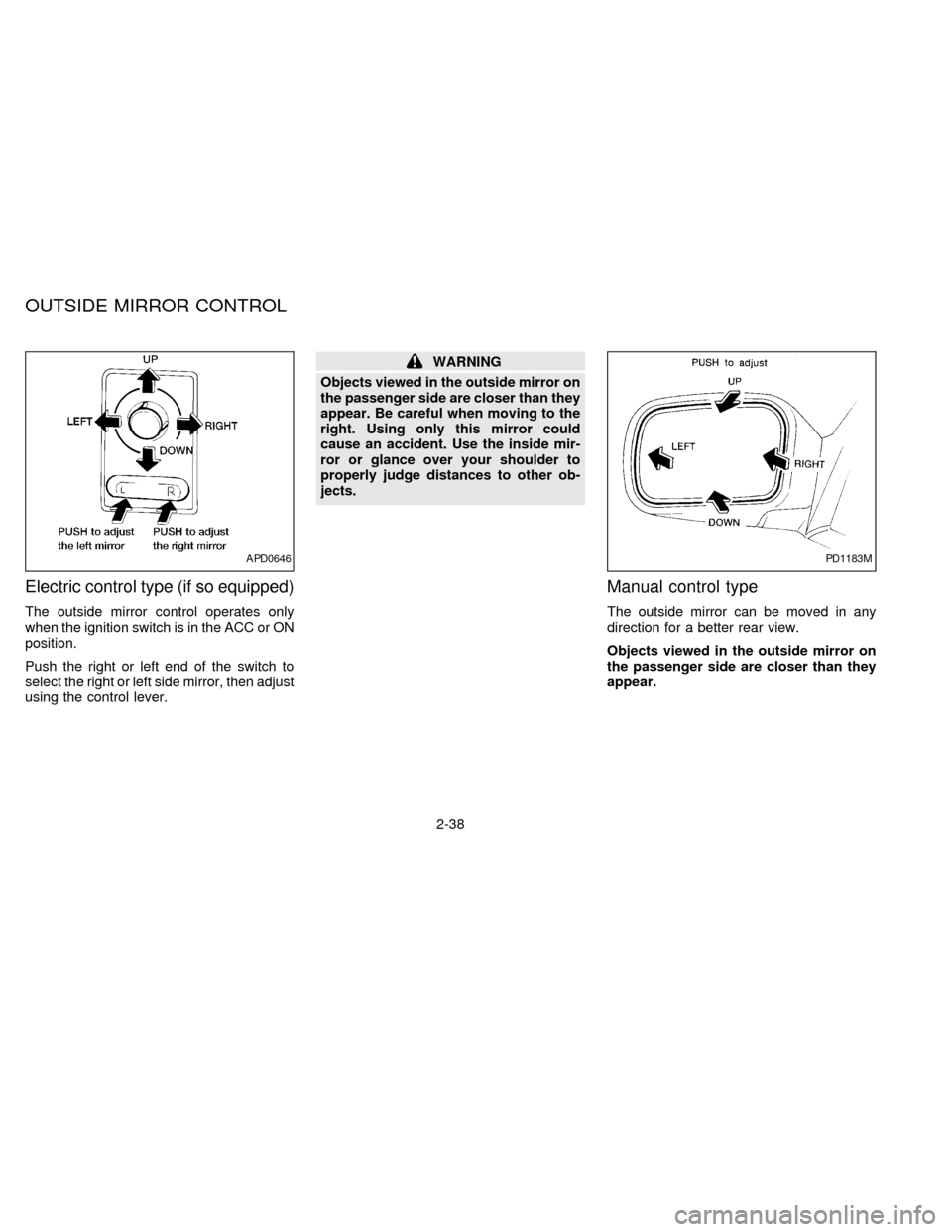
Electric control type (if so equipped)
The outside mirror control operates only
when the ignition switch is in the ACC or ON
position.
Push the right or left end of the switch to
select the right or left side mirror, then adjust
using the control lever.
WARNING
Objects viewed in the outside mirror on
the passenger side are closer than they
appear. Be careful when moving to the
right. Using only this mirror could
cause an accident. Use the inside mir-
ror or glance over your shoulder to
properly judge distances to other ob-
jects.
Manual control type
The outside mirror can be moved in any
direction for a better rear view.
Objects viewed in the outside mirror on
the passenger side are closer than they
appear.
APD0646PD1183M
OUTSIDE MIRROR CONTROL
2-38
ZX
Page 85 of 194

4Starting and driving
Precautions when starting and driving ...................4-2
Exhaust gas (carbon monoxide) ............................4-2
Three way catalyst .................................................4-2
Avoiding collision and rollover................................4-3
Drinking alcohol/drugs and driving .........................4-3
Ignition switch .........................................................4-4
Manual transmission ..............................................4-4
Automatic transmission ..........................................4-4
Before starting the engine ......................................4-5
Driving with automatic transmission
(if so equipped) ......................................................4-6
Driving with manual transmission ..........................4-9Starting the engine ...............................................4-11
Parking brake operation .......................................4-11
Cruise control (if so equipped) .............................4-12
Break-in schedule ................................................4-14
Increasing fuel economy ......................................4-14
Parking/parking on hills ........................................4-15
Power steering system .........................................4-16
Brake system........................................................4-17
Anti-lock brake system (ABS)
(if so equipped) ....................................................4-17
Cold weather driving ............................................4-19
ZX
Page 88 of 194

MANUAL TRANSMISSION
The ignition switch includes an anti-theft
steering lock device.
The key can only be removed when the
ignition switch is in the LOCK position.
On manual transmission models, to turn
the ignition key to LOCK from ACC or ON,
turn the key to OFF and press in the key
release button, then turn the key to LOCK.
In order for the steering wheel to be locked,
it must be straight up (logo on wheel will be
up). If the wheel is left upside down, it is not
locked.To lock the steering wheel, remove the
key. To unlock the steering wheel, insert
the key and turn it gently while rotating
the steering wheel slightly right and left.
WARNING
Never remove the key while driving. If
the key is removed, the steering wheel
will lock. This may cause the driver to
lose control of the vehicle and could
result in serious vehicle damage or
personal injury.
AUTOMATIC TRANSMISSION
On automatic transmission models the igni-
tion lock is designed so the key cannot be
turned to LOCK and removed until the shift
lever is moved to the P (Park) position.
When removing the key from the ignition,
make sure the shift lever is in the P (Park)
position.
When the key cannot be turned to the LOCK
position, proceed as follows to remove the
key:
ASD0610ASD0023
IGNITION SWITCH
4-4
ZX
Page 89 of 194
1) Move the shift lever into the P (Park)
position.
2) Turn the ignition key slightly in the ON
direction.
3) Turn the key toward the LOCK position.
4) Remove the key.
If the key is removed from the ignition
switch, the shift lever cannot be moved from
P (Park).The shift lever can be moved if
the ignition switch is in the ACC posi-
tion. The shift lever can also be moved if
the ignition switch is in the ON position
and the foot brake pedal is depressed.
There is an OFF position in between LOCK
and ACC, although it does not show on the
key cylinder. When the ignition is in OFF the
steering wheel is not locked.
In order for the steering wheel to be locked,
it must be turned about 1/8 of a turn coun-
terclockwise from the straight up position,
and the key must be removed from the
ignition.
To lock the steering wheel, remove the
key. To unlock the steering wheel, insert
the key and turn it gently while rotating
the steering wheel slightly right and left.WARNING
Never remove the key while driving. If
the key is removed, the steering wheel
will lock. This may cause the driver to
lose control of the vehicle and could
result in serious vehicle damage or
personal injury.
Key positions
LOCK: Normal parking position (0)
OFF: (Manual transmission model) (1)
The engine can be turned off without locking
the steering wheel.
ACC: (Accessories) (2)
This position activates electrical accesso-
ries such as the radio when the engine is
not running.
ON: Normal operating position (3)
This position turns on the ignition system
and the electrical accessories.
START: (4)
This position activates the starter motor,
which starts the engine.cMake sure the area around the vehicle is
clear.
cMaintenance items listed here should be
checked periodically, e.g., each time you
check engine oil.
cCheck that all windows and lights are
clean.
cVisually inspect tires for their appearance
and condition. Also check tires for proper
inflation.
cLock all doors.
cPosition seat and adjust head restraints.
cAdjust inside and outside mirrors.
cFasten seat belts and ask all passengers
to do likewise.
cCheck the operation of warning lights
when key is turned to the ON (3) position.
BEFORE STARTING THE
ENGINE
4-5
ZX
Page 90 of 194
The automatic transmission in your vehicle
is electronically controlled by the A/T control
unit to produce maximum power and
smooth operation.
The recommended operating procedures for
this transmission are shown on the following
pages. Follow these procedures for maximum
vehicle performance and driving enjoyment.
Starting the vehicle
cAfter starting the engine, fully depress
the foot brake pedal before shifting the
shift lever to the D, R, 2 or 1 position. Be
sure the vehicle is fully stopped before
attempting to shift the shift lever.
cKeep the foot brake pedal depressed and
shift into a driving gear.
c
Release the foot brake, then gradually
start the vehicle in motion.
The automatic transmission is designed
so the foot brake pedal MUST be de-
pressed before shifting from P to any drive
position while the ignition switch is ON.
The shift lever cannot be moved out of P
and into any of the other gear positions if
the ignition key is turned to LOCK or if
the key is removed.When the battery charge is low, the shift
lever can be moved if the ignition switch
is in the ACC position.
WARNING
cDo not depress the accelerator pedal
while shifting from P or N to R, D, 2
or 1. Always depress the brake pedal
until shifting is completed. Failure to
do so could cause you to lose con-
trol and have an accident.
cCold engine idle speed is high, so
use caution when shifting into a for-
ward or reverse gear before the en-
gine has warmed up.
cNever shift to P or R while the ve-
hicle is moving. This could cause an
accident.
cOn slippery roads, do not downshift.
This may cause a loss of control.
CAUTION
When stopping the vehicle on an uphill
grade, do not hold the vehicle by de-
pressing the accelerator pedal. The foot
brake should be used for this purpose.
DRIVING WITH AUTOMATIC
TRANSMISSION
(if so equipped)
4-6
ZX
Page 91 of 194

Shifting with automatic transmission
Push the button to shift into P, R or from D
to 2. All other positions can be selected
without pushing the button.
P (Park):
Use this selector position when the vehicle
is parked or when starting the engine. Al-
ways be sure the vehicle is at a complete
stop. For maximum safety, depress the
brake pedal, then push in the shift lever
button and move the lever to the P position.
Apply the parking brake. When parking on a
hill, apply the parking brake first, then shift
the lever into the P position.
Shifting from P (Park)
If the ignition switch is in the ON position
and the foot brake pedal is depressed, but
the shift lever still cannot be moved out of P
(Park), follow these instructions:
1. Shut the engine off and remove the key.
2. Apply the parking brake.
3. Reinsert the key and turn it clockwise to
the ACC position.
4.
Depress the brake pedal, move the shift
lever to N (Neutral) and start the engine.
5. Check stop lights operation.
WARNING
If the shift lever cannot be moved from
the P (Park) position while the engine is
running and the brake pedal is de-
pressed, the stop lights may not work.
Malfunctioning stop lights could cause
an accident injuring yourself and others.
These instructions for starting the vehicle in
N (Neutral) should only be used until service
can be obtained. Never drive the vehicle if
the stop lights are not operating properly.
R (Reverse):
Use this position to back up. Always be sure
the vehicle is completely stopped. With the
brake pedal depressed, push in the shift
lever button and move the lever to the R
position.
N (Neutral):
Neither forward nor reverse gear is en-
gaged. The engine can be started in this
position. You may shift to N and restart a
stalled engine while the vehicle is moving.
D (Drive):
Use this position for all normal forward
driving.
ASD0612
4-7
ZX