1997 NISSAN ALTIMA light
[x] Cancel search: lightPage 71 of 203
cDo not use the recirculation mode for
long periods as it may cause the inte-
rior air to become stale and the win-
dows to fog up.
cPositioning of the heating or air con-
ditioning controls should not be
done while driving, in order that full
attention may be given to the driving
operation.
CONTROLS
Fan control dial
This dial turns the fan on and off, and
controls fan speed.
Air flow control buttons
These buttons allow you to select the air
flow outlets.
Ð Air flows from center and side
ventilators.
Ð Air flows from center and side
ventilators and foot outlets.
Ð Air flows mainly from foot outlets.
Ð Air flows from defroster outlets
and foot outlets.
Ð Air flows mainly from defroster
outlets.
Temperature control lever
This lever allows you to adjust the tempera-
ture of the outlet air.
Air recirculation button
Off position:
Outside air is drawn into the passenger
compartment and distributed through the
selected outlet.
Use the off position for normal heater or air
conditioner operation.
On position (Indicator light on):
Interior air is recirculated inside the vehicle.
Push the air recirculation button to the ON
position when driving on a dusty road, to
avoid traffic fumes, and for maximum cool-
ing when using the air conditioner.
Air conditioner button
(If so equipped)
This button is provided only on vehicles
equipped with an air conditioner.
Start the engine, move the fan control dial tothe desired (1 to 4) position and push the
A/C button to turn on the air conditioner.
The indicator light comes on when the air
conditioner is on. To stop the air condi-
tioner, push the switch again.
The air conditioner cooling function op-
erates only when the engine is running.
HEATER OPERATION
Heating
This mode is used to direct heated air from
the foot outlets. Some air also flows from
the defroster outlets.
1. Push the air recirculation button to the off
position for normal heating.
2. Push the
button in.
3. Move the fan control dial to the desired
position.
4. Move the temperature control lever to the
desired position between the middle and
the HOT position.
Ventilation
This mode directs outside air to the side and
center ventilators.
3-3
ZX
Page 73 of 203

Cooling
This mode is used to cool and dehumidify.
1. Push the air recirculation button to the off
position.
2. Push the
button in.
3. Move the fan control dial to the desired
position.
4. Push on the air conditioner button. The
indicator light comes on.
5. Move the temperature control lever to the
desired position.
cFor quick cooling when the outside tem-
perature is high, push the air recirculation
button to the on position. Be sure to
return the air recirculation button to the
off position for normal cooling.
Dehumidified heating
This mode is used to heat and dehumidify.
1. Push the air recirculation button to the off
position.
2. Push the
button in.
3. Move the fan control dial to the desired
position.4. Push on the air conditioner button. The
indicator light comes on.
5. Move the temperature control lever to the
desired position.
Dehumidified defogging
This mode defogs the windows and dehu-
midifies.
1. Push the
button in.
2. Move the fan control dial to the desired
position.
3. Push the air conditioner button. The indi-
cator light comes on.
4. Move the temperature control lever to the
desired position.
When the
button is pushed, the air
conditioner automatically turns on to de-
fog the windshield, and the air recircula-
tion mode automatically turns off.
Outside air is drawn into the passenger
compartment to improve the defogging per-
formance.
Operating tips
cKeep the windows and sun roof closed
while the air conditioner is in operation.cAfter parking in the sun, drive for two or
three minutes with the windows open to
vent hot air from the passenger compart-
ment. Then, close the windows. This
allows the air conditioner to cool the
interior more quickly.
cThe air conditioner system should be
operated for about ten minutes at
least once a month. This helps pre-
vent damage to the system due to lack
of lubrication.
cIf the coolant temperature gauge ex-
ceeds the H (hot) position, turn the air
conditioner off. See ``If your vehicle over-
heats'' in the ``In case of emergency''
section for additional information.
AIR FLOW CHARTS
The charts on the following pages show the
switch and lever positions forMAXIMUM
and QUICKheating, cooling, or defrosting.
3-5
ZX
Page 77 of 203

1. Push the ECON switch on. ECON ap-
pears in the display.
2. Push the temperature set button
or
to set the desired temperature.
cThe temperature of the passenger com-
partment is maintained as selected by
the temperature set button. Air flow dis-
tribution and fan speed are also con-
trolled automatically in an effort to reach
the desired termperature.
cDo not select a temperature setting lower
than the outside air temperature. Due to
the absence of air conditioner operation,
the selected interior temperature may not
be reached.
cECON mode is not recommended if the
windows are fogging up. If the windows
begin to fog up while using the ECON
mode, use the procedures outlined in
``Dehumidified defogging''.
Dehumidified defogging
1. Push theswitch on. The indicator
light comes on.
2. Push the temperature set button
orto set the desired temperature.cTo quickly remove ice or fog from the
outside of the windows, push the manual
fan control switch and set to the maxi-
mum position
.
cAs soon as possible after the windshield
is clean, push the AUTO switch to return
to the auto mode.
cWhen the
switch is pushed, the air
conditioner automatically turns on at out-
side temperatures above 35ÉF (2ÉC) to
defog the windshield, and the air recircu-
lation mode automatically turns off.
Outside air is drawn into the passenger
compartment to improve the defogging
performance.
Manual fan speed control
Push the fan control switches to manually
control the fan speed. Each fan speed is
indicated by the shading of a fan blade on
the display. For example,
indicates
that the fan is operating at low speed and
indicates that the fan is operating at
medium-high speed.
cPush the AUTO switch to return to auto-
matic control of the fan speed.
Air recirculation switch
Push the air recirculation switch to recircu-
late interior air inside the vehicle. The indi-
cator light comes on.
Push it again to draw outside air into the
passenger compartment. The indicator
goes out.
cThe air recirculation mode cannot be
activated when the
mode has
been selected.
Manual air flow control
Pushing the manual air flow control switch
selects the air outlet.
Ð Air flows from center and side
ventilators.
Ð Air flows from center and side
ventilators and foot outlets.
Ð Air flows mainly from foot outlets.
Ð Air flows from defroster outlets
and foot outlets.
Ð Air flows mainly from defroster
outlets.
3-9
ZX
Page 83 of 203
indicating tape side illuminates in the dis-
play window.
CAUTION
Do not force the cassette tape into the
tape door.
This could cause player damage.
The cassette tape automatically changes
directions to play the other side when the
first side is complete. At this time, the arrow
in the display window changes direction.
cTo maintain good quality sound, NIS-
SAN recommends using cassette
tapes of 60 minutes or shorter in
length.
cCassette tapes should be removed
from the player when not in use. Store
cassettes in their protective cases
and away from direct sunlight, heat,
moisture and magnetic sources.
cDirect sunlight can cause the cassette
to become deformed. The use of de-
formed cassettes may cause the cas-
sette to jam in the player.
cDo not use cassettes with labels
which are peeling and loose. If used,the label could jam in the player.
cIf a cassette has loose tape, insert a
pencil through one of the cassette
hubs and rewind the tape firmly
around the hubs. Loose tape may
cause tape jamming and wavering
sound quality.
cOver a period of time, the playback
head, capstan and pinch roller may
collect a tape coating residue as the
tape passes over the head. This resi-
due accumulation can cause weak or
wavering sound, and should be re-
moved periodically with a head clean-
ing tape. If the residue is not removed
periodically, the player may need to
be disassembled for cleaning.
Fast forwarding or rewinding the
tape
Push either the FF (fast forward) or REW
(rewind) button for the desired direction.
The
orsymbol illuminates in the
display.
To stop the FF or REW function, press the
PLAY/STOP button.
Automatic Program Search (APS)
fast forwarding or APS rewinding
the tape
Push either the APS FF or APS REW button
while the cassette tape is playing. The tape
runs quickly, stops, then plays the next
selection. The indicator light flashes on and
off while searching for the selection. The
orsymbol illuminates in the
display.
This system searches at the blank intervals
between selections. If there is a blank inter-
val within one selection or there is no inter-
val between selections, the system may not
stop in the desired or expected location.
Changing the direction of tape play
Push the PROG (program) select button.
The
orsymbol illuminates in the
display to indicate side of program play.
Playing and stopping the cassette
tape
Push the PLAY/STOP button while the cas-
sette tape is playing to stop the tape. Push
the button again to play the tape.
3-15
ZX
Page 84 of 203

Dolby NR (noise reduction)
Push theDOLBY NR button for
Dolby NR encoded tapes to reduce high
frequency tape noise. The indicator light
comes on.
Dolby NR is manufactured under license
from Dolby Laboratories Licensing Corpora-
tion. DOLBY NR and the double-D symbol
are trademarks of Dolby Laboratories Li-
censing Corporation.
If in the clock priority mode when the
button is pressed,and
TAPE illuminate in the display window for
about ten seconds. The clock mode then
returns to the display window.
Metal or chrome tape usage
The cassette player is automatically set to
high performance play when playing a metal
or chrome cassette tape.
Ejecting the cassette tape
Push the EJECT button. The cassette tape
automatically comes out.
3-16
ZX
Page 87 of 203
continues in the SEEK mode at the lowest
broadcasting station. If using the
button, once the lowest broadcasting
station is reached, the radio continues in the
SEEK mode at the highest broadcasting
station. Pushing the button again continues
the SEEK function.
SCAN tuning
Push the SEEK/SCAN tuning button
orfor more than 1.5 seconds. SCAN tun-
ing begins from low to high frequencies or
high to low frequencies, depending on
which button is pressed. SCAN tuning stops
at each broadcasting station for five sec-
onds. Pushing the button again during this
five second period stops SCAN tuning and
the radio remains tuned to that station.
Station memory operations
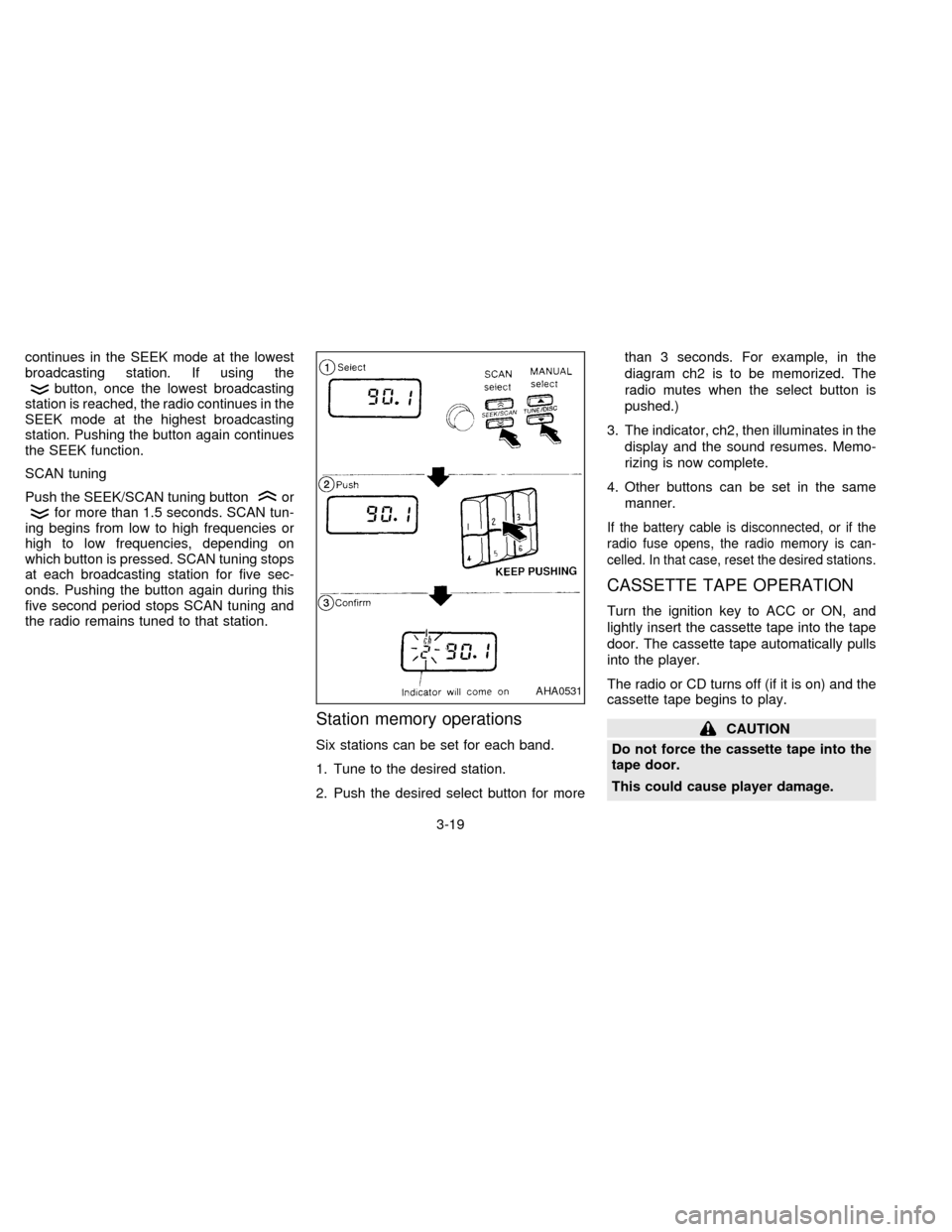
Six stations can be set for each band.
1. Tune to the desired station.
2. Push the desired select button for morethan 3 seconds. For example, in the
diagram ch2 is to be memorized. The
radio mutes when the select button is
pushed.)
3. The indicator, ch2, then illuminates in the
display and the sound resumes. Memo-
rizing is now complete.
4. Other buttons can be set in the same
manner.
If the battery cable is disconnected, or if the
radio fuse opens, the radio memory is can-
celled. In that case, reset the desired stations.
CASSETTE TAPE OPERATION
Turn the ignition key to ACC or ON, and
lightly insert the cassette tape into the tape
door. The cassette tape automatically pulls
into the player.
The radio or CD turns off (if it is on) and the
cassette tape begins to play.
CAUTION
Do not force the cassette tape into the
tape door.
This could cause player damage.
AHA0531
3-19
ZX
Page 88 of 203
If the system is turned off by pushing thePOWERbutton with the cassette tape still in
the player, the tape resumes playing when
the POWER button is pushed once again.
TAPE button
When this button is pushed with the system
turned off and a tape loaded, the system
comes on and the tape plays.
When this button is pushed with either the
radio or compact disc turned on and the
tape loaded, the compact disc or the radio
automatically turns off and the tape plays.
While the tape is playing, pushing the TAPE
button stops tape play. Pushing the button
again resumes tape play.
FF (fast forward) and REW (rewind)
buttons
Push the FF (fast forward) button to fast
forward the tape. Push the REW (rewind)
button to rewind the tape. Either the
orindicator light comes on when
the FF or REW function is started. To stop
the FF or REW function, press the TAPE
button.
Automatic Program Search (APS)
FF and APS REW buttons
When the APS FF button is pushed while
the tape is being played, the next selection
starts to play from the beginning. Push the
APS FF button several times to skip several
selections. The tape advances the number
of selections the button is pushed (up to 9
selections).
When the APS REW button is pushed, the
selection being played starts over from the
beginning. Push several times to fast rewind
several selections. The tape rewinds the
number of selections the button is pushed.
Either the
orindicator light
comes on when the APS FF or APS REW
function is started.
This system searches for the blank intervals
between selections. If there is a blank inter-
val within one selection or there is no inter-
val between selections, the system may not
stop in the desired or expected location.
PROG (program) button
Push the PROG (program) button to change
the tape side while the tape is being played.The cassette tape automatically changes
directions to play the other side when the
first side is complete.
Dolby NR (noise reduction)
button
Push theDOLBY NR button for
Dolby NR encoded tapes to reduce high
frequency tape noise. The indicator light
comes on.
Dolby NR is manufactured under license
from Dolby Laboratories Licensing Corpora-
tion. DOLBY NR and the double-D symbol
are trademarks of Dolby Laboratories Li-
censing Corporation.
TAPE EJECT button
Push this button to eject an inserted tape.
When the tape ejects while playing, the
system turns off.
Precautions on cassette player op-
eration
cTo maintain good quality sound,
NISSAN recommends using cassette
tapes of 60 minutes or shorter in
length.
3-20
ZX
Page 89 of 203
cCassette tapes should be removed
from the player when not in use. Store
cassettes in their protective cases
and away from direct sunlight, heat,
moisture or magnetic sources.
cDirect sunlight can cause the cassette
to become deformed. The use of de-
formed cassettes may cause the cas-
sette to jam in the player.
cDo not use cassettes that have peel-
ing or loose labels. If used, the label
could jam in the player.
cIf a cassette has loose tape, insert a
pencil through one of the cassette
hubs and rewind the tape firmly.
Loose tape may cause jamming and
wavering sound quality.
cOver a period of time, the playback
head, capstan and pinch roller may
gather a tape coating residue as the
tape passes over the head. This resi-
due accumulation can cause a weak
or wavering sound and should be re-
moved periodically with a head clean-
ing tape. If the residue is not removed
periodically, the player may need to
be disassembled for cleaning.COMPACT DISC (CD) PLAYER
OPERATION
Turn the ignition key to the ACC or ON
position and insert the compact disc into the
slot with the label side facing up. The com-
pact disc is automatically pulled into the slot
and starts to play.
If the radio or cassette tape is already
operating, it automatically turns off and the
compact disc begins to play.
CAUTION
Do not force the compact disc into the
slot. This could damage the player.
If the system is turned off while the compact
disc is playing, pushing the POWER button
starts the compact disc.
CD button
When this button is pushed with the system
off and the compact disc loaded, the system
turns on and the compact disc starts to play.
When this button is pushed with the com-
pact disc loaded and the tape or the radio
playing, the tape or radio automatically
turns off and the compact disc starts to play.When this button is pushed while the com-
pact disc is playing, the compact disc stops
playing.
FF (fast forward), REW (rewind)
button
When the FF (fast forward) or REW (rewind)
button is pushed while the compact disc is
playing, the compact disc plays at an in-
creased speed while fast forwarding or re-
winding. When the button is released, the
compact disc returns to normal play speed.
Automatic Program Search (APS)
FF, APS REW button
When the APS FF button is pushed while
the compact disc is playing, the selection
following the present one starts to play from
its beginning. Push several times to skip
several selections. The compact disc ad-
vances the number of times the button is
pushed. (When the last selection on the
compact disc is skipped, the first selection is
played.)
When the APS REW button is pushed, the
selection being played returns to its begin-
ning. Push several times to skip back several
3-21
ZX