Page 829 of 4133
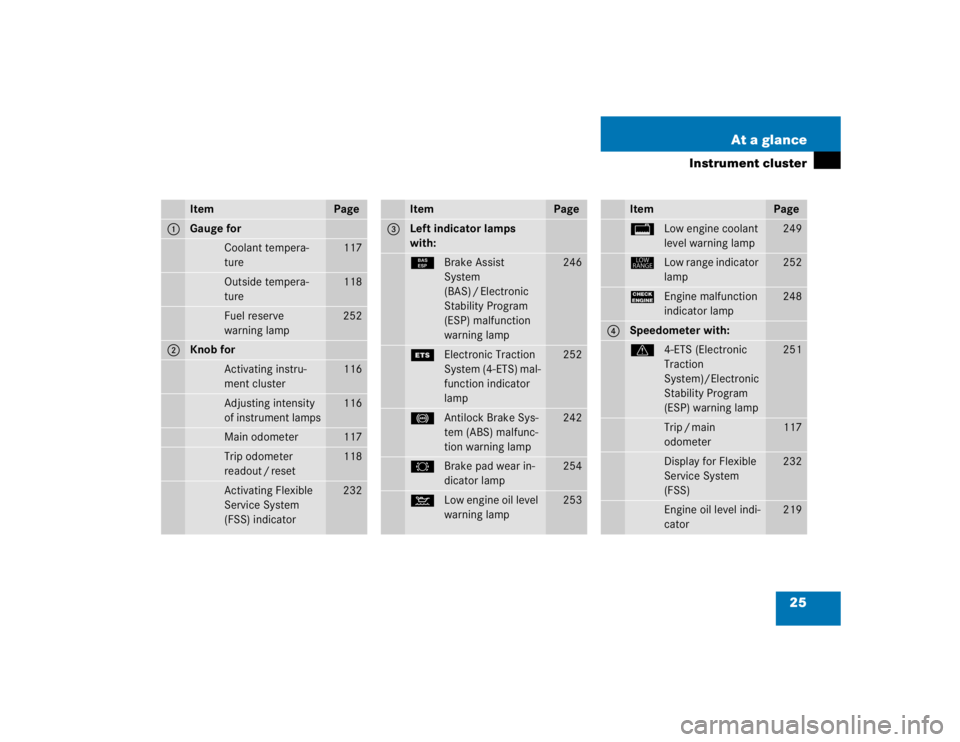
25 At a glance
Instrument cluster
Item
Page
1
Gauge for
Coolant tempera-
ture
117
Outside tempera-
ture
118
Fuel reserve
warning lamp
252
2
Knob for
Activating instru-
ment cluster
116
Adjusting intensity
of instrument lamps
116
Main odometer
117
Trip odometer
readout / reset
118
Activating Flexible
Service System
(FSS) indicator
232
Item
Page
3
Left indicator lamps
with:¿Brake Assist
System
(BAS) / Electronic
Stability Program
(ESP) malfunction
warning lamp
246
{Electronic Traction
System (4-ETS) mal-
function indicator
lamp
252
-Antilock Brake Sys-
tem (ABS) malfunc-
tion warning lamp
242
2Brake pad wear in-
dicator lamp
254
:Low engine oil level
warning lamp
253
Item
Page
/Low engine coolant
level warning lamp
249
êLow range indicator
lamp
252
?Engine malfunction
indicator lamp
248
4
Speedometer with:v4-ETS (Electronic
Traction
System)/Electronic
Stability Program
(ESP) warning lamp
251
Trip / main
odometer
117
Display for Flexible
Service System
(FSS)
232
Engine oil level indi-
cator
219
Page 921 of 4133
117 Controls in detail
Instrument cluster
Coolant temperature gauge
Under normal driving conditions, the cool-
ant temperature may rise to 248°F
(120°C). The coolant temperature may
climb to the red marking:�
at high outside temperatures
�
during stop-and-go city traffic
�
when driving on hilly terrain
The engine should not be operated with
the coolant temperature in the red zone.
Doing so may cause serious engine dam-
age which is not covered by the
Mercedes-Benz Limited Warranty.
Display in the speedometer
Changing display�
Press the left knob1 in the instru-
ment cluster (
�page 116).
The display changes between main
odometer and trip odometer.
�
Press the left knob1 twice.
The next scheduled service is displayed
(�page 232).
Warning!
G
Driving when your engine is badly overheat-
ed can cause some fluids which may have
leaked into the engine compartment to
catch fire. You could be seriously burned.
Steam from an overheated engine can cause
serious burns and can occur just by opening
the engine hood. Stay away from the engine
if you see or hear steam coming from it.
Turn off the engine, get out of the vehicle
and do not stand near the vehicle until the
engine has cooled down.
Page 922 of 4133
118 Controls in detailInstrument clusterResetting trip odometer�
Press the left knob1 (
�page 116) re-
peatedly until you see the trip odome-
ter display.
�
Press and hold the left knob1 until
the trip odometer is reset.
Tachometer
To help protect the engine, the fuel supply
is interrupted if the engine is operated
above its specified limit.
Outside temperature indicator
The outside temperature is displayed in
the instrument cluster (
�page 24).
When moving the vehicle into colder ambi-
ent temperatures (e.g. when leaving your
garage), you will notice a delay before the
lower temperature is displayed.
A delay also occurs when ambient temper-
atures rise. This prevents inaccurate tem-
perature indications caused by heat
radiated from the engine during idling or
slow driving.
Setting the clock
Hour�
Pull out the right knob2 in the instru-
ment cluster (
�page 116) and turn it
counterclockwise.
Minutes
�
Pull out the right knob2 in the instru-
ment cluster (
�page 116) and turn it
clockwise.
Warning!
G
The outside temperature indicator is not de-
signed to serve as an ice-warning device and
is therefore unsuitable for that purpose.
Indicated temperatures just above the freez-
ing point do not guarantee that the road sur-
face is free of ice. The road may still be icy,
especially in wooded areas or on bridges.
iTo set the clock by a single hour or a
few minutes, turn knob2 just a few
degrees in the direction indicated for
hours or minutes.
Page 1134 of 4133

330 IndexManual seat
Adjusting 35
Adjusting backrest tilt 36
Adjusting head restraint height 36
Adjusting head restraint tilt 37, 39
Seat fore and aft adjustment 35
Seat height 36
MB Tex upholstery
Cleaning 239
MCS
Modular Control System 313
Mechanical key 261
Memory function 105, 313
Memory function* 106
Recalling positions from
memory 106
Mirror
Inside rear view mirror 40Mirrors
Activating exterior mirror parking
position 127
Adjusting 40
Automatic antiglare for rear view
mirror 126
Exterior rear view mirror 40
Storing exterior rear view mirror park-
ing position 106
MON 215
MON (Motor Octane Number) 313
Monitoring reach
Parktronic* 154
Multifunction display 313
N
Night security illumination 109
Deactivation temporarily 109
Setting time 109O
Occupant safety 58
Children and airbags 60
Children in the vehicle 67
Fastening the seat belt 42
Infant and child restraint systems 68
LATCH child seat mounts 72
Seat belts 42, 62
Odometer display 117
Odometer, main 25
Off-road driving
Checklist 201, 206
Crossing obstacles 204
Driving instructions off-road
driving 200
Driving through water 203
Returning 205
Rules 201
Special driving features 201
Steep terrain 202
Page 1138 of 4133

334 IndexRemote door unlock
With Tele Aid* 179
Remote Vehicle Diagnostics 314
Removing
Vehicle battery 279
Wheel 276
Wiper blades 273
Removing spare wheel 259
Replacing
Backup lamp bulbs 270
Brake lamp bulbs 270
Bulbs 266
Front lamp bulbs 268
Front turn signal bulbs 268
Fuses 287
High beam bulbs 269
High mounted brake lamp 271
License plate lamp bulbs 271
Low beam bulbs 268
Rear fog lamp bulbs 270
Rear lamp bulbs 267, 270
Rear parking lamp bulbs 270
Rear side marker lamp bulbs 270
Rear standing lamp bulbs 270
Rear turn signal bulbs 270
Wiper blades 273Replacing front fog lamp bulb 270
Reporting
Safety defects 19
Resetting
Service indicator (FSS) 233
Trip odometer 118
Residual heat utilization 140, 314
Residual ventilation 140
REST (Residual engine heat
utilization) 314
Restraint system 314
Restraint system see Infant and child re-
straint systems 68, 71
Returning from off-road driving 205
Rims 295
Roadside assistance 12
Tele Aid* 175RON 215
RON (Research Octane Number) 314
Roof rack 163
Rotating wheels 228
Rubber parts
Cleaning 239
S
Safety
Occupant 58
Safety belts see Seat belts 42
Safety defects
Reporting 19
Safety systems
Driving 76
Saving current speed 151
Seat belt force limiter 67
Seat belt height adjustment 45
Page 1143 of 4133

339 Index
Traction 308, 315
Trailer
Attaching 208
Loading 208
Towing 209
Trailer hitches 207
Trailer towing 206
Attaching a trailer 208
Checking weights 208
Electrical connections 207
Hitches 207
Loading 208
Weights and ratings 207
Trailer weights and ratings 207
Transfer case 315
Transmission control – LOW RANGE
mode 125
Switching off 125
Switching on 125
Transmission selector lever 264
Unlocking manually 264
Tread depth (tires) 230
Treadwear 308Trip computer* 29, 186
Average fuel consumption 189
Compass 187
Country 190
Distance remaining 189
Language 190
Selecting functions 186
Setting date 186
Stop watch 189
Switching on 186
Trip odometer
Resetting 118
Trip odometer display 117
Trunk see Cargo compartment 89
Turn signal lamps
Replacing bulbs 266, 267, 269
Turn signals 49
Additional in mirrors 266
Cleaning lenses 236
Front bulbs 266
Indicator lamps 25
Rear bulbs 267, 270
Turning off
Engine 54U
Unlocking 32, 88
Centrally from inside 94
Driver’s door in an emergency 261
Driver’s door, fuel filler flap 89
Fuel filler flap 214
In an emergency 261
Transmission selector lever
manually 264
Vehicle in an emergency 179
With the remote control 32
Upgrade signals
Tele Aid* 178
Uphill driving
Cruise control 151
Upholstery
Cleaning 239
Upshifting 120
Page 2066 of 4133

GF54.30-P-2004A
Control buttons, location/task
24.10.96
MODEL
129, 140 as of 1.6.96,
163, 170
The instrument cluster has two control buttons which are on the left
or right next to the speedometer.
The
right control button
is used to adjust the time (refer to Owner's
Manual).
-----------------------------------------------------------------------------------------
The
left control button
is used
D
to regulate the instrument illumination
D
to activate the display illumination
D
to reset the trip odometer display
D
to operate the maintenance display (model 170 only bis 05.97)
D
to operate the Active Service System ASSYST (as of 06.97)
-----------------------------------------------------------------------------------------
n
Purpose/function of terminal 58d, instrument
display illumination
Engines 112, 113, 611 (engines with oil
sensor)
GF54.30-P-3008A
n
Electronic clock
GF54.30-P-3011A
n
Active Service System (ASSYST)
GF00.20-P-0003-01A
Operating instructions, resetting
Model 210 as of 01.03.97 with engines M111,
OM 602, OM 604, OM 605 and
OM 606
As of 06/97 models 129, 140, 170, 202 except
engines 112, 113, 611
(valid for engines with oil level switch)
GF00.20-P-0003-01B
Copyright DaimlerChrysler AG 05.06.2006 CD-Ausgabe G/10/04 . This WIS print-out will not be recorde
d by Modification services.
Page 1
Page 2105 of 4133
GF54.30-P-2002A
Display instruments, location / task / function
24.10.96
MODEL
129, 140 as of 1.6.96,
163, 168, 170,
202 as of 1.8.96,
208 up to 31.7.99,
210 as of 1.6.96 up to 30.6.99
Display
Type of data transmission
D
Outside temperature indicator (A1p4)
D
Fuel level gauge (A1p2)
D
Engine oil pressure gauge (A1p3), only
model 129 and model 140
D
Low windshield washer fluid level
indicator lamp (A1e13), model 163 as of
01.09.01
Direct lines
GF54.30-P-3004A
D
Total mileage odometer (A1h4)
D
Electronic speedometer (A1p8)
D
Tachometer (A1p5)
D
Coolant temperature gauge (A1p1)
D
Active service system (ASSYST)
D
Gear indicator (A1p12), only model 168
CAN data lines
GF54.30-P-3005A
D
Electronic clock
Internal
GF54.30-P-3011A
Copyright DaimlerChrysler AG 04.06.2006 CD-Ausgabe G/10/04 . This WIS print-out will not be recorde
d by Modification services.
Page 1