Page 168 of 321

1663. Make sure that the gearshift is in P (Park) and
the parking brake is set before you turn the
key.
Before you start your vehicle, you should test the
warning lights on the instrument panel to make
sure that they work. Refer to theInstrumentation
chapter.Starting Your EngineTo start your engine:
1. Follow the steps underPreparing to Start Your
Vehicleat the beginning of this section.
2. Turn the ignition key to the ON position.
3. DO NOT depress the accelerator pedal when
starting your engine. DO NOT use the
accelerator while the vehicle is parked.4. Turn the key to the START position (cranking)
until the engine starts. Allow the key to return
to the ON position after the engine has started.
If you have difficulty in turning the key, rotate
the steering wheel slightly because it may be
binding.
For a cold engine:
q
At temperatures10ÊF(-12ÊC) andbelow:If
the engine does not start infifteen (15)
secondson the first try, turn the key to OFF,
wait approximately ten (10) seconds so you do
not flood the engine, then try again.
q
At temperaturesabove10ÊF(-12ÊC):If the
engine does not start infive (5) secondson
the first try, turn the key to OFF, wait
approximately ten (10) seconds so you do not
flood the engine, then try again.
File:08fntoc.ex
Update:Mon Jun 17 14:19:30 1996
Page 169 of 321

167
For a warm engine:
q
Do not hold the key in the START position for
more thanfive (5) secondsat a time. If the
engine does not start within five (5) seconds on
the first try, turn the key to the OFF position.
Wait a few seconds after the starter stops, then
try again.
Whenever you start your vehicle, release the key
as soon as the engine starts. Excessive cranking
could damage the starter.
After you start the engine, let it idle for a few
seconds. Keep your foot on the brake pedal and
put the gearshift lever in gear. Release the parking
brake. Slowly release the brake pedal and drive
away in the normal manner.
NOTE:Your vehicle has an interlock that
prevents you from shifting out of P (Park) unless
your foot is on the brake pedal.If the engine does not start after two attempts:
1. Turn the ignition key to the OFF position.
2. Press the accelerator all the way to the floor
and hold it.
3. Turn the ignition key to the START position.
4. Release the ignition key when the engine starts.
5. Release the accelerator gradually as the engine
speeds up.
If the engine still does not start, the fuel pump
shut-off switch may have been activated. For
directions on how to reset the switch seeFuel
Pump Shut-Off Switchin the index.
File:08fntoc.ex
Update:Mon Jun 17 14:19:30 1996
Page 173 of 321

171
DrivingBrakesApplying the BrakesYour vehicle has anti-lock disc brakes on all four
wheels. They adjust automatically as the brake pads
wear down.
When you press down hard on the brake pedal, the
wheels will not lock and slide. The Anti-lock Brake
System (ABS) automatically starts releasing and
reapplying the front brakes independently and the
rear brakes together whenever your wheels start to
lock. When this happens, you will feel the brake
pedal pulsate. This is an indication that the ABS is
working correctly and is normal.
Each time you turn the ignition key to the ON
position, the anti-lock brake system will function
through one test cycle. When this happens, the
ANTI-LOCK light will come on for up to fiveseconds and a clunk may be felt in the pedal. If the
light stays on longer than five seconds, shut off the
engine and restart. If it remains on, it means the
anti-lock brake system is disabled and should be
serviced immediately to restore the benefits of the
anti-lock feature. Normal braking is not affected
unless the brake warning light is also lit.
The Anti-lock Brake System has self-check
capabilities. As described above, the system turns on
the ANTI-LOCK light each time you start your
engine. After the engine is started and the
ANTI-LOCK light turns off, the system performs
another test the first time the vehicle reaches 14
m.p.h. (22 km/h). The system turns on the ABS
pump motor for approximately 1/2 second. At this
time, a mechanical noise may be heard. This is a
normal part of the self-check feature. If a
malfunction is found during this check the
ANTI-LOCK light will come on.
File:09fngfc.ex
Update:Fri Sep 6 08:48:49 1996
Page 174 of 321

172Do not drive with your foot resting on the brake
pedal; you will wear out the linings and increase
your vehicle's stopping distance. Brake rotor damage
may also eventually occur.
NOTE:If you are driving down a long or steep hill,
shift to a lower gear and do not apply your brakes
continuously. If you apply your brakes continuously,
they may overheat and become less effective.
Occasional brake squeal during light to moderate
stops does not affect the function of the brake
system and is normal. However, if the squeal
becomes louder or more frequent, have your brakes
inspected by your dealer or a qualified service
technician.
Ford Motor Company has not found any
detrimental effects of popular mobile radio
transmitting equipment installed on vehicles with
the anti-lock brake system, if the equipment is
installed according to the manufacturer's
instructions. However, if mobile radio transmittingequipment is installed in your vehicle and, if either
the anti-lock brake system cycles or the ANTI-LOCK
light comes on at any time other than right after
you turn the key to the ON position or during a
sudden stop, have your mobile radio dealer inspect
the installation.
Parking BrakeThe parking brake should be used whenever
you park your vehicle.
The parking brake is suspended just below the
lower left corner of the instrument panel.
To set the parking brake:
1. Move the gearshifter to P (Park).
2. Push the parking brake pedal down firmly and
fully with your left foot.
The Brake System Light in the warning lights will
glow once the parking brake is set.
File:09fngfc.ex
Update:Fri Sep 6 08:48:49 1996
Page 211 of 321
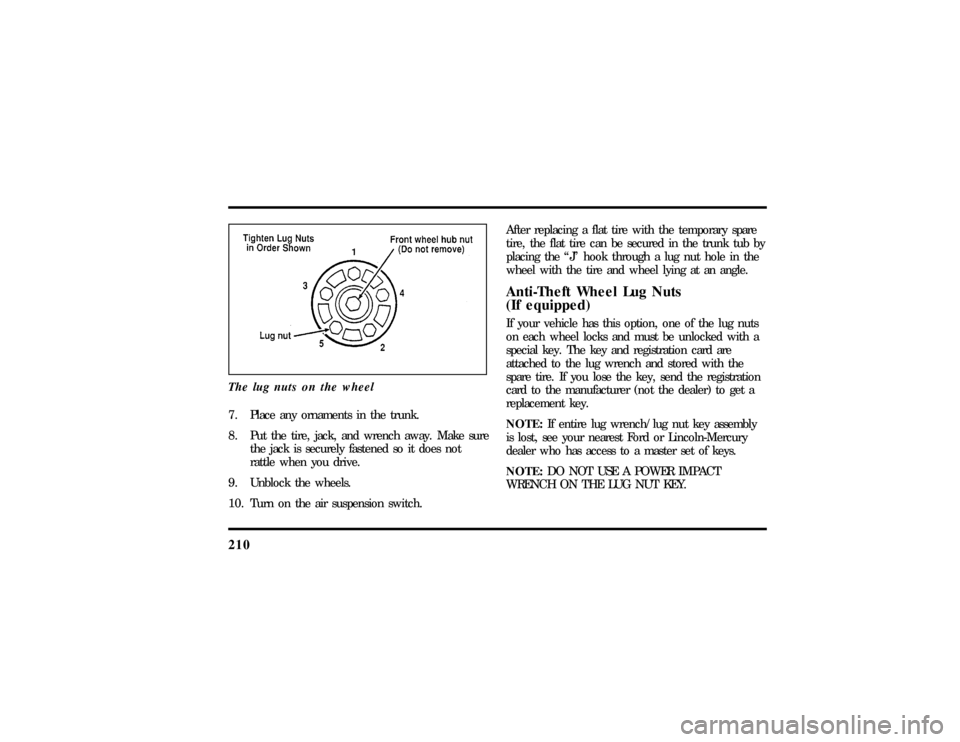
210The lug nuts on the wheel7. Place any ornaments in the trunk.
8. Put the tire, jack, and wrench away. Make sure
the jack is securely fastened so it does not
rattle when you drive.
9. Unblock the wheels.
10. Turn on the air suspension switch.After replacing a flat tire with the temporary spare
tire, the flat tire can be secured in the trunk tub by
placing the ªJº hook through a lug nut hole in the
wheel with the tire and wheel lying at an angle.
Anti-Theft Wheel Lug Nuts
(If equipped)If your vehicle has this option, one of the lug nuts
on each wheel locks and must be unlocked with a
special key. The key and registration card are
attached to the lug wrench and stored with the
spare tire. If you lose the key, send the registration
card to the manufacturer (not the dealer) to get a
replacement key.
NOTE:If entire lug wrench/lug nut key assembly
is lost, see your nearest Ford or Lincoln-Mercury
dealer who has access to a master set of keys.
NOTE:DO NOT USE A POWER IMPACT
WRENCH ON THE LUG NUT KEY.
File:10fnerc.ex
Update:Fri Sep 6 08:49:57 1996
Page 266 of 321
265
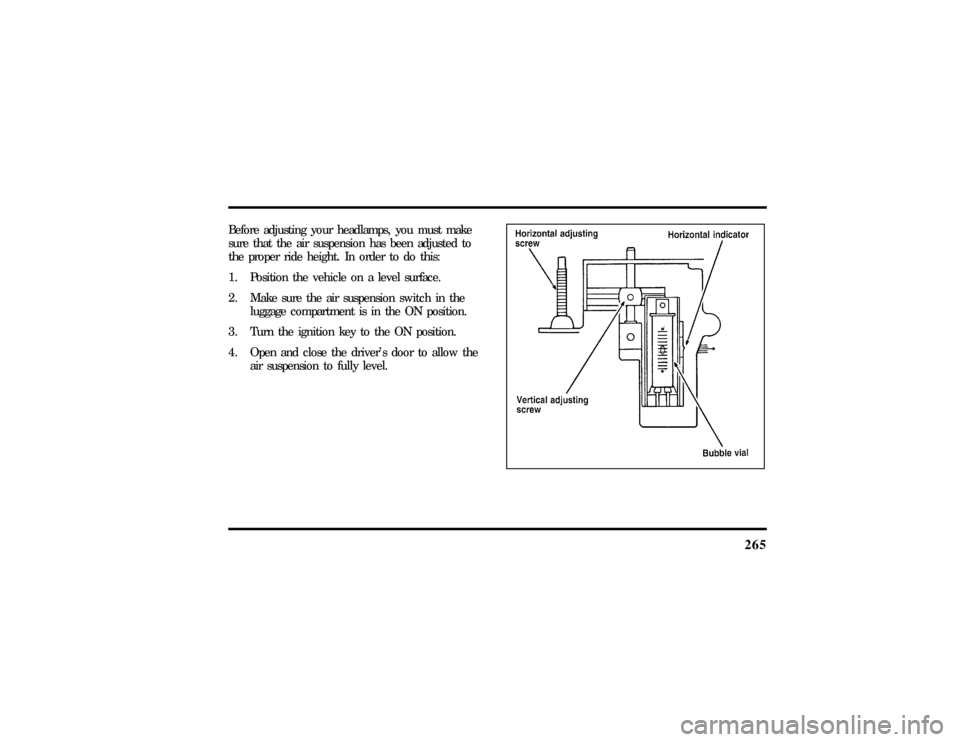
Before adjusting your headlamps, you must make
sure that the air suspension has been adjusted to
the proper ride height. In order to do this:
1. Position the vehicle on a level surface.
2. Make sure the air suspension switch in the
luggage compartment is in the ON position.
3. Turn the ignition key to the ON position.
4. Open and close the driver's door to allow the
air suspension to fully level.
File:11fnmcc.ex
Update:Fri Sep 6 08:51:16 1996
Page 304 of 321

306Index
A
ABS warning light (see Anti-lock
brake system)............ 11
Accessory position on the ignition.... 62
Accident damage............ 220
Air bag supplemental restraint system . . . 143
and child safety seats......... 149
description..........143, 145
driver air bag.........143, 145
indicator light............ 15
operation.............. 145
passenger air bag........... 145
service and information labels..... 145
tone generator............ 147
Air cleaner filter
location............... 224
specifications............ 271
Air conditioning, electronic automatic
temperature control system...... 45Air suspension
air leveling disabled warning,
message center........... 20
description............. 175
Alarm, activating remote personal..... 124
Aluminum wheels........... 250
Antenna, radio (see Electronic
sound system).......... 25,31
Antifreeze (see Engine coolant)...... 231
Anti-lock brake system (ABS)
description............. 171
noise................ 171
see also Brake............ 171
warning light............ 11
Anti-theft lug nuts and key........ 210
Anti-theft system
arming the system.......... 127
description..........126, 127
File:fnixc.ex
Update:Tue Sep 17 08:28:54 1996
Page 307 of 321

309
Child safety restraints.......... 148
child safety belts........... 162
child safety seats........... 149
Child safety seats............ 149
and air bags............. 149
attaching with tether straps...... 160
automatic locking mode
(retractor)..........140, 149
in front seat............. 149
in rear outboard seat......... 149
in rear seat............. 149
tether anchorage hardware...... 161
Chime
headlamps on............ 15
key in ignition............ 63
safety belt.............. 10
Circuit breakers, see also fuses...... 192
Cleaning your vehicle.......... 268
chrome and aluminum parts...... 268
exterior............... 269
exterior lamps............ 269
fabric................ 270headlamps.............. 269
instrument panel......... 7,269
interior............... 269
interior lamps............ 269
mirrors............. 93,111
plastic parts............. 269
polishing.............. 268
rustproofing............. 268
safety belts............. 269
tail lamps.............. 269
upholstery and interior trim...... 269
washing............... 268
waxing............... 268
wheels............... 270
Climate control system
air conditioning........... 45
electronic automatic temperature
control.............. 45
heating............... 45
Clock................. 60
File:fnixc.ex
Update:Tue Sep 17 08:28:54 1996