Page 24 of 321

20These features are controlled by the message center
(M/C) control buttons located to the right of the
instrument cluster.System CheckPressing the SYSTEM CHECK button causes the
M/C to cycle through a status of each of the
systems being monitored. For each of the monitored
systems, the M/C will indicate either an OK
message or a warning message for three seconds.
The sequence of the system check report is as
follows:q
Washer Fluid Level
q
Ride Control
q
Oil Level
q
Engine Coolant Level
q
Voltage Level
q
Engine Temperature
q
Doors Closed (Driver and Right Side)
q
Trunk Closed
q
Exterior Lamps (Head, Front Turn, Brake and
Tail)
q
Distance to Empty
q
Fuel Level
q
Traction Control (if equipped)
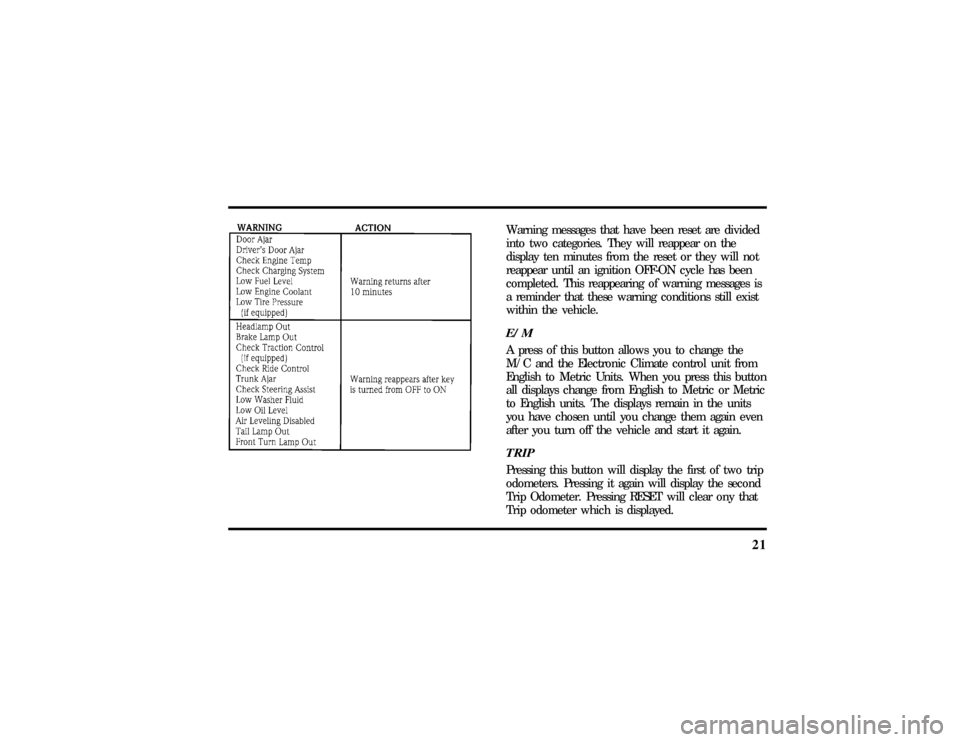
System WarningsSystem warnings alert you to possible problems or
malfunctions in your vehicle's operating systems.
There are up to 18 warning messages which can be
displayed by the M/C to show the status of the
monitored systems. The M/C will display the last
selected feature if there are no more warning
messages. This allows you to use the full
functionality of the M/C after you acknowledge the
warning by pressing the RESET button and clearing
the warning message.
File:03fnisc.ex
Update:Mon Jun 17 14:14:40 1996
Page 25 of 321
21
Warning messages that have been reset are divided
into two categories. They will reappear on the
display ten minutes from the reset or they will not
reappear until an ignition OFF-ON cycle has been
completed. This reappearing of warning messages is
a reminder that these warning conditions still exist
within the vehicle.E/MA press of this button allows you to change the
M/C and the Electronic Climate control unit from
English to Metric Units. When you press this button
all displays change from English to Metric or Metric
to English units. The displays remain in the units
you have chosen until you change them again even
after you turn off the vehicle and start it again.TRIPPressing this button will display the first of two trip
odometers. Pressing it again will display the second
Trip Odometer. Pressing RESET will clear ony that
Trip odometer which is displayed.
File:03fnisc.ex
Update:Mon Jun 17 14:14:40 1996
Page 26 of 321

22DTE/ECONPressing this button a first time will display
approximately how many miles you can drive before
you run out of fuel, or in other words the Distance
To Empty (DTE). To ensure accuracy, turn the
ignition OFF when you fill the tank.
Pressing this button a second time will allow you to
display your Average Fuel Economy in miles/gallon
or liters/100 kilometers. Your M/C computes this
figure using the distance traveled and rate of fuel
used information. If you want to reset this feature,
press the RESET button while the Average Fuel
Economy feature is displayed.
NOTE:DTE (Distance to Empty) is calculated using
a ªRunning Average Fuel Economyº initialized by
the factory. This value is not the same as the
Average Fuel Economy Display. The Running
Average Economy is based on more than 500 miles
(800 km) of driving history. Also the factory default
for Running Average Economy is reinitialized if the
battery is disconnected.If the FUEL LEVEL ERROR message is displayed
this means that there is a problem with the fuel
indication system and you should contact your
dealer for service as soon as possible.
RESETA press of the RESET button will allow you to reset
the current feature displayed. Warnings, Average
Fuel Economy, and Trip odometers are the only
features which respond to the RESET button.
Distance to Empty (DTE), RIDE/STEER and MENU
are unaffected by pressing the RESET switch.DISPLAYPressing this button will cause the message center
display to turn off. Pressing it again will cause the
display to come on again. Warnings override an off
display and must be reset in order for the display to
be off again.
File:03fnisc.ex
Update:Mon Jun 17 14:14:40 1996
Page 45 of 321
41
WARNING
Thelase rbea muse din thecompact
Page 60 of 321
56
Afterapproximatel y10 minutes ,th e defroste rwill
WARNING
Th eDaytim eRunnin gLigh t(DRL)
Page 67 of 321
63
WARNING
Alwaysse tth eparkin gbrak efull yand
WARNING
Do no tleav echildren ,unreliabl eadults,
Page 69 of 321

65
Turn SignalsMove the lever up to signal a right turn. Move it
down to signal a left turn. The corresponding
indicator light in the instrument cluster will flash.
If the turn signal stays on after you turn, move the
lever back to the center (off) position. A warning
chime will sound after approximately one-half mile
(one kilometer) of driving if you do not return the
lever to off.
For lane changes, move the lever far enough to
signal but not to latch. The lever will return to the
off position when you release it.
NOTE:The flash rate of the turn signal will speed
up considerably if the Lighting Control Module
detects a left or right turn lamp bulb (front or rear)
is burned out.
High BeamsTo turn on the high beams, turn the headlamp
control switch to the headlamp ON position (or
activate the autolamp feature) and push the turn
signal lever away from you until it latches. When
the high beams are ON, the high beam indicator
light on the instrument cluster comes on.
To turn off the high beams, pull the lever toward
you until it latches. The high beam indicator light
turns off.Flashing the LightsTo flash the headlamps, pull the lever toward you
for a moment and then release it. The headlamps
will flash whether the headlamp knob is in the on
or off position.
File:05fncfc.ex
Update:Fri Sep 6 14:53:57 1996
Page 71 of 321
67
WARNING
Alwayswar mup thewindshiel dwith