Page 74 of 321
70
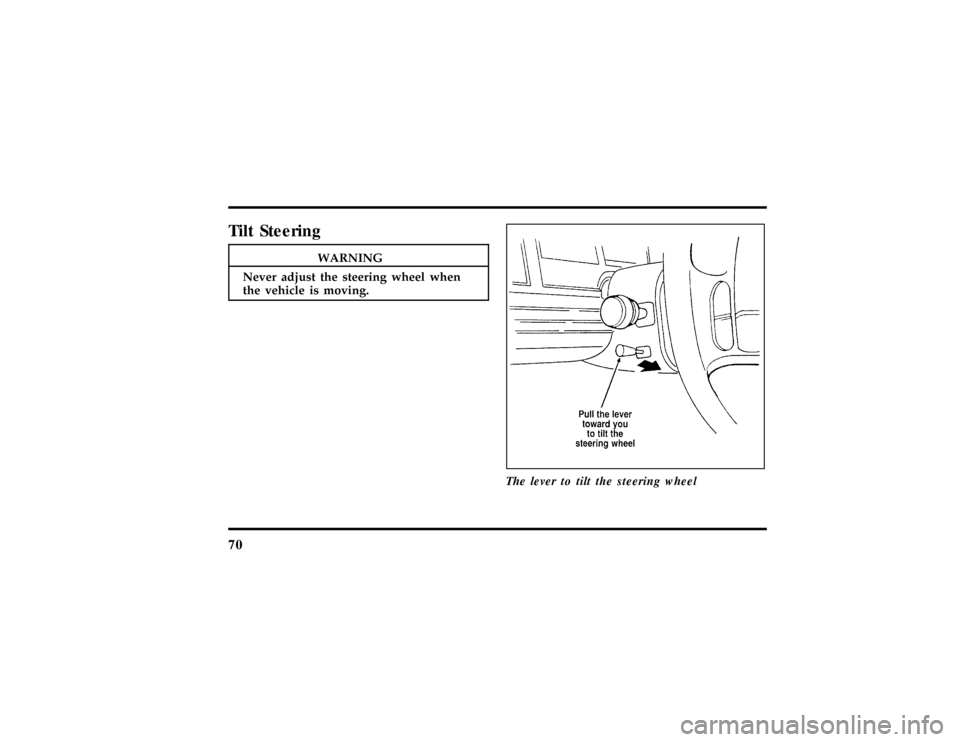
TiltSteering
WARNING
Neve radjus tth esteerin gwhee lwhen
File:05fncfc.ex
Page 75 of 321

71
To change the position of the steering wheel, pull
the release lever on the column toward you. Tip
the steering wheel to the desired position. Release
the lever to lock the steering wheel in place.Speed ControlThe speed of the vehicle cannot be automatically
controlled until the vehicle speed is at or above 30
mph (48 km/h).
Use of radio transmitting equipment that is not
Federal Communications Commission (FCC) or in
Canada the Canadian Radio and
Telecommunications Commission (CRTC) approved
may cause the speed control to malfunction.Therefore, use only properly installed FCC (CRTC in
Canada) approved radio transmitting equipment in
your vehicle.
NOTE:Since your vehicle has an Automatic
Overdrive Transaxle, you may want to drive in D
(Drive) when driving in hilly terrain, at higher
altitudes, or when pulling a trailer. This will
improve speed control performance.
NOTE:Do not shift to N (Neutral) when using the
speed control. This will cause the engine to
overspeed.
File:05fncfc.ex
Update:Fri Sep 6 14:53:57 1996
Page 76 of 321
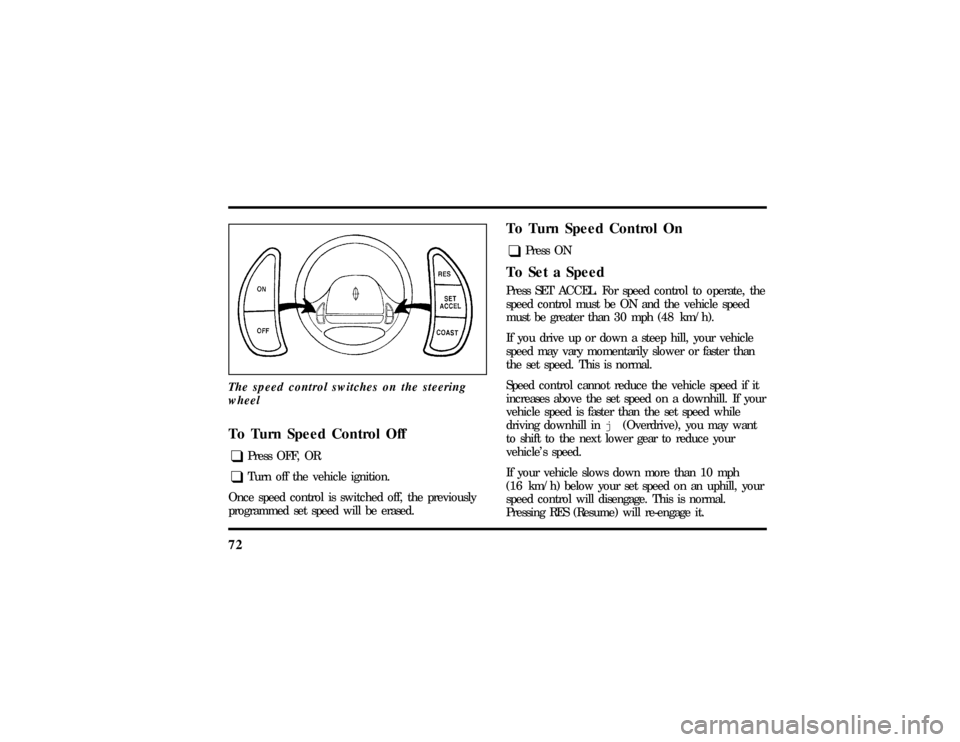
72The speed control switches on the steering
wheelTo Turn Speed Control Offq
Press OFF, OR
q
Turn off the vehicle ignition.
Once speed control is switched off, the previously
programmed set speed will be erased.
To Turn Speed Control Onq
Press ON
To Set a SpeedPress SET ACCEL. For speed control to operate, the
speed control must be ON and the vehicle speed
must be greater than 30 mph (48 km/h).
If you drive up or down a steep hill, your vehicle
speed may vary momentarily slower or faster than
the set speed. This is normal.
Speed control cannot reduce the vehicle speed if it
increases above the set speed on a downhill. If your
vehicle speed is faster than the set speed while
driving downhill inj(Overdrive), you may want
to shift to the next lower gear to reduce your
vehicle's speed.
If your vehicle slows down more than 10 mph
(16 km/h) below your set speed on an uphill, your
speed control will disengage. This is normal.
Pressing RES (Resume) will re-engage it.
File:05fncfc.ex
Update:Fri Sep 6 14:53:57 1996
Page 110 of 321

106To lock out all window switches except the master
controls, press the window lock switch once. To
restore control to the individual windows, press the
switch again.
There is also an Express Down feature on the
driver's power window. This feature can be
activated through the menu functions of your
Message Center.
To operate, briefly press the driver's window switch
to the down position. The window will then open
automatically. To stop automatic operation, briefly
press the switch again to either the up or down
position. More than a quick press of the switch
provides conventional power window operation.
Closing of the power window is conventional
operation only.
Memory Profile System
(If equipped)The Personality Memory Feature customizes your
Continental for up to two (2) drivers. The following
features are automatically recalled when unlocking
the doors using the remote entry transmitter,
keyless entry keypad, or by pressing the Memory 1
or Memory 2 switches on the driver's door:q
All driver's seat positions except power lumbar
and head restraint.
q
Both left and right outside mirror settings.
q
Radio station presets including the last selected
station and band and all preset preferences on
FM1, FM2, and AM.
q
Instrument panel dimming setting.
q
Autolamp delay time-out setting.
q
Ride/Steering menu setting.
q
Feature Menu settings
File:05fncfc.ex
Update:Fri Sep 6 14:53:57 1996
Page 111 of 321

107
The Ride/Steering menu is located in the Message
Center. The RIDE display allows you to adjust the
suspension feel to FIRM, NORMAL, or PLUSH.
Pressing the Ride/Steering menu switch again brings
the STEERING display. This allows you to adjust
steering effort to LOW, NORMAL, or HIGH.
For more information on ride/steering options, see
Road Calibrated Suspensionlater in this chapter.
Personality Memory also allows you to customize
settings from the Feature menu located in the
Message Center. The Feature menu contains five (5)
features that you can enable or disable. The features
are listed in the order they appear in the Feature
menu.
q
EXPRESS WINDOW - for one tap down
operation of the driver's window.
q
AUTO DOOR LOCKS - automatically locks all
doors when the driver shifts out of PARK, all
doors are closed, and the vehicle speed is at
least three mph (five km/h).
q
HORN CHIRP - sounds an audible ªchirpº
when you press the LOCK button on the
remote entry transmitter to verify that the doors
have been locked and the vehicle's anti-theft
system has been armed (if equipped).
q
SEAT ACCESS - moves the driver's seat back
two (2) inches or to the end of the seat track
when the vehicle is turned off and the ignition
key is removed. Upon the driver entering the
vehicle and closing the door, the seat will move
forward to its previous position.
File:05fncfc.ex
Update:Fri Sep 6 14:53:57 1996
Page 168 of 321

1663. Make sure that the gearshift is in P (Park) and
the parking brake is set before you turn the
key.
Before you start your vehicle, you should test the
warning lights on the instrument panel to make
sure that they work. Refer to theInstrumentation
chapter.Starting Your EngineTo start your engine:
1. Follow the steps underPreparing to Start Your
Vehicleat the beginning of this section.
2. Turn the ignition key to the ON position.
3. DO NOT depress the accelerator pedal when
starting your engine. DO NOT use the
accelerator while the vehicle is parked.4. Turn the key to the START position (cranking)
until the engine starts. Allow the key to return
to the ON position after the engine has started.
If you have difficulty in turning the key, rotate
the steering wheel slightly because it may be
binding.
For a cold engine:
q
At temperatures10ÊF(-12ÊC) andbelow:If
the engine does not start infifteen (15)
secondson the first try, turn the key to OFF,
wait approximately ten (10) seconds so you do
not flood the engine, then try again.
q
At temperaturesabove10ÊF(-12ÊC):If the
engine does not start infive (5) secondson
the first try, turn the key to OFF, wait
approximately ten (10) seconds so you do not
flood the engine, then try again.
File:08fntoc.ex
Update:Mon Jun 17 14:19:30 1996
Page 177 of 321

175
During the Traction Control
TM
function, which most
often occurs during low speed acceleration on
slippery surfaces, a noise may be heard coming from
the engine compartment. This is normal and may
last for a few seconds during the acceleration of the
vehicle.
In general, this system improves your vehicle's
stability and acceleration performance when road
conditions warrant. Traction Control
TM
is fully
effective at all vehicle speeds.
If the Traction Control
TM
system is cycled
excessively, the brake portion of the system will
shut down to prevent the front brakes from
overheating. A limited Traction Control
TM
function
using engine torque will still control wheels from
spinning. A cooling down period is required to
prevent damage to the brakes. This time periodvaries and depends on brake usage during the
cooling down period. Anti-Lock braking is not
affected and will function normally during the cool
down period.
After the cool down period, the full Traction
Control
TM
function is restored.
Rear Air Suspension Adaptive
Ride Control SystemYour vehicle has an air suspension system with
automatic rear load leveling and automatic ride
control. This system keeps the rear of your vehicle
at a constant level by adding air or releasing air
from the springs. Ride and handling is enhanced by
firming shock absorber performance during certain
road conditions, steering maneuvers, braking, and
accelerations and is returned to the driver selected
ride calibration when driver or road surface induced
motion changes are completed.
File:09fngfc.ex
Update:Fri Sep 6 08:48:49 1996
Page 178 of 321
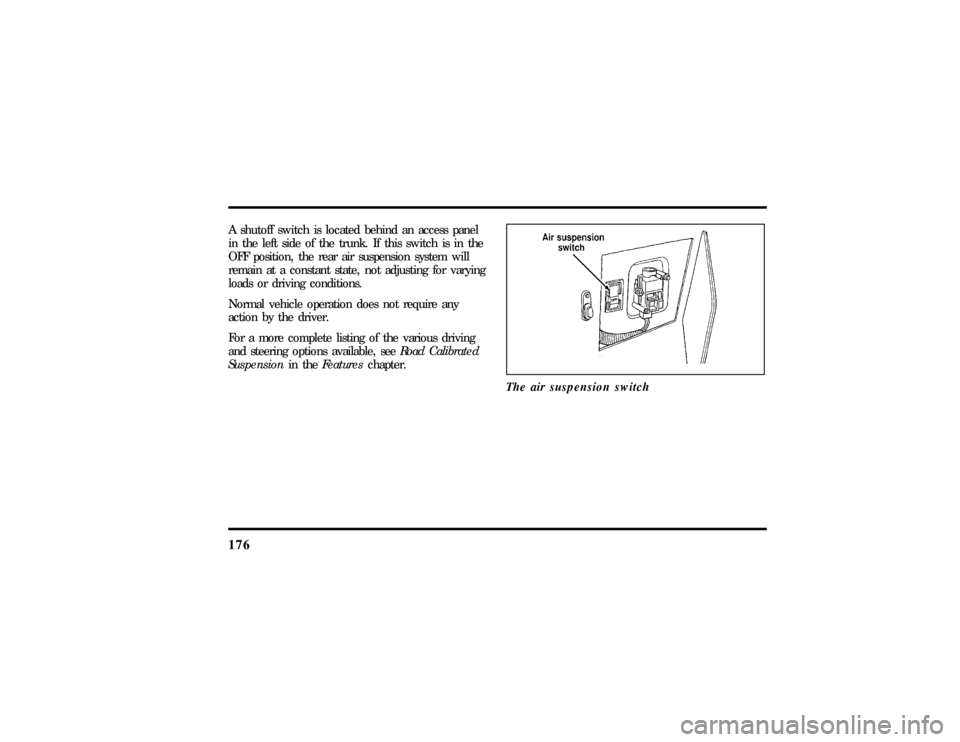
176A shutoff switch is located behind an access panel
in the left side of the trunk. If this switch is in the
OFF position, the rear air suspension system will
remain at a constant state, not adjusting for varying
loads or driving conditions.
Normal vehicle operation does not require any
action by the driver.
For a more complete listing of the various driving
and steering options available, seeRoad Calibrated
Suspensionin theFeatureschapter.
The air suspension switch
File:09fngfc.ex
Update:Fri Sep 6 08:48:49 1996