Page 149 of 219
JUMP STARTING
1. Start the booster vehicle and
run the engine at moderately
increased speed.
2. Start the engine of the vehicle
with the discharged battery.
3. Once the engine has been
started, run both vehicles for a
further three minutes before
disconnecting the leads.
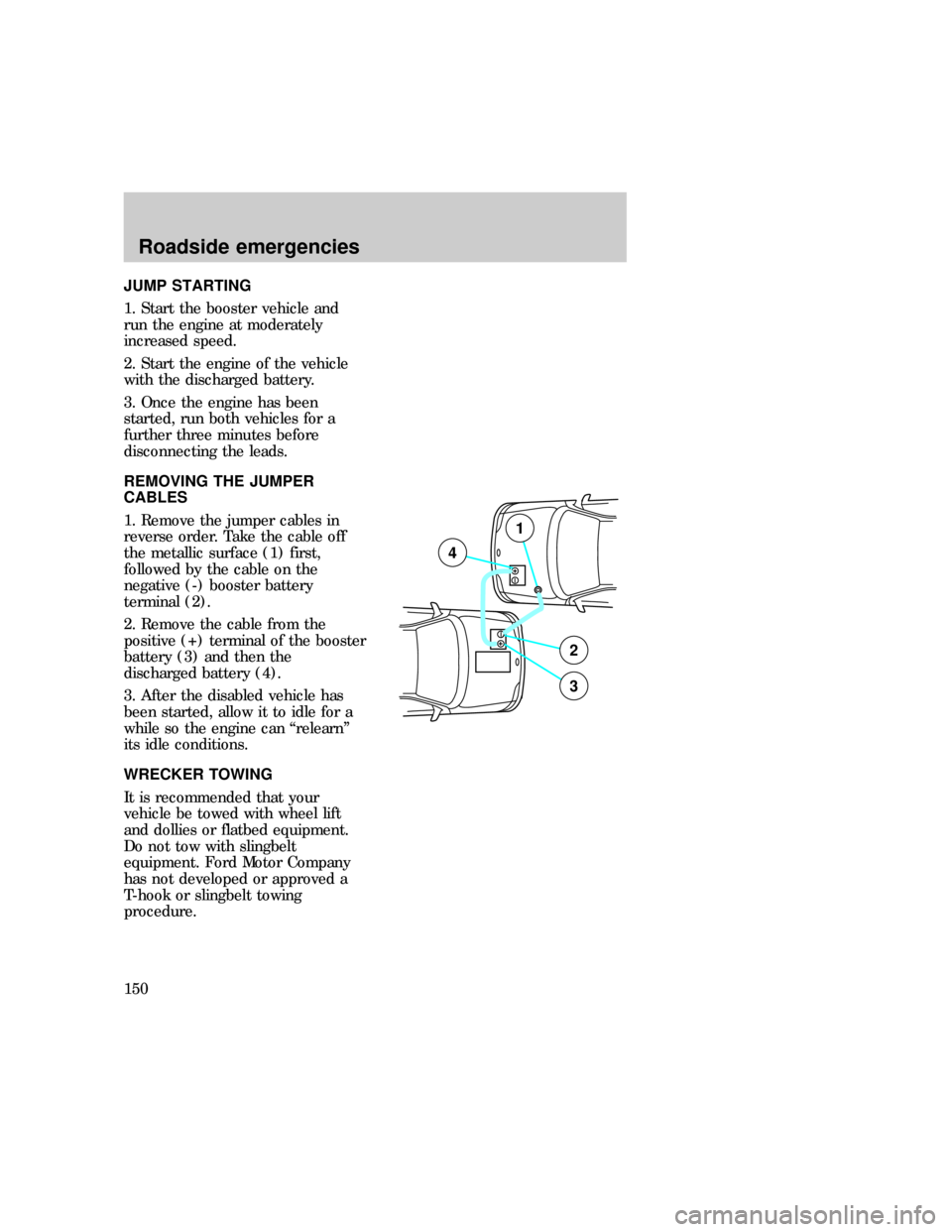
REMOVING THE JUMPER
CABLES
1. Remove the jumper cables in
reverse order. Take the cable off
the metallic surface (1) first,
followed by the cable on the
negative (-) booster battery
terminal (2).
2. Remove the cable from the
positive (+) terminal of the booster
battery (3) and then the
discharged battery (4).
3. After the disabled vehicle has
been started, allow it to idle for a
while so the engine can ªrelearnº
its idle conditions.
WRECKER TOWING
It is recommended that your
vehicle be towed with wheel lift
and dollies or flatbed equipment.
Do not tow with slingbelt
equipment. Ford Motor Company
has not developed or approved a
T-hook or slingbelt towing
procedure.
+–
+–
2
3
4
1
com_removing_cables.01
f12_wrecker
Roadside emergencies
150
Page 186 of 219

When replacing full size
tires, never mix radial,
bias-belted, or bias-type tires.
Use only the tire sizes that are
listed on the tire pressure decal.
Make sure that all tires are the
same size, speed rating, and
load-carrying capacity. Use only
the tire combinations
recommended on the decal. If
you do not follow these
precautions, your vehicle may
not drive properly and safely.
Make sure that all
replacement tires are of
the same size, type, load-carrying
capacity and tread design (e.g.,
ªAll Terrainº, etc.), as originally
offered by Ford.
Do not replace your tires
with ªhigh performanceª
tires or larger size tires.
Failure to follow these
precautions may adversely
affect the handling of the vehicle
and make it easier to lose control
and roll over.
Identifying tire types
Refer to the Safety Compliance
Certification Label to determine
the specific size tire and wheel
Ford Motor Company recommends
for use on this vehicle.
f12_iden_tire_types
f12_snow_tires
Maintenance and care
187
Page 210 of 219
Cleaning the instrument panel
Clean instrument panel with a
damp cloth, then dry with a dry
cloth.
Any cleaner or polish that
increases the gloss of the upper
portion of the instrument panel
should be avoided. The dull finish
in this area is to help protect the
driver from undesirable windshield
reflection.
Cleaning the interior fabric
Remove dust and loose dirt with a
whisk broom or a vacuum cleaner.
Remove fresh spots immediately.
Follow the directions that come
with the cleaner.
Cleaning leather seats (if
equipped)
For routine cleaning, wipe the
surface with a soft, damp cloth.
For more thorough cleaning, wipe
the surface with a leather and
vinyl cleaner or a mild soap.
com_int_fabric_cleaning.01
com_leather_seats_cleaning.01
f12_cleaning_safety_belts
Maintenance and care
211
Page 211 of 219
Cleaning and maintaining the
safety belts
Clean the safety belts with a mild
soap solution recommended for
cleaning upholstery or carpets. Do
not bleach or dye the belts,
because these actions may weaken
the belt webbing.
Check your safety belt system
periodically to make sure that it
works properly and is not
damaged. If the webbing shows
any wear, nicks or cuts, have it
examined by a qualified technician
to determine if replacement is
necessary. Always have your safety
belt system checked after a
collision by a qualified technician.
Refer toSafety belt maintenance
in theSeating and safety
restraintschapter for more
information.
Maintenance and care
212