1997 CADILLAC DEVILLE steering wheel
[x] Cancel search: steering wheelPage 85 of 386

Downloaded from www.Manualslib.com manuals search engine New Vehicle “Break-In” Ignition Positions
NOTICE:
Your modern Cadillac doesn’t need an elaborate
“break-in.” But it will perform better in the long
run if you follow these guidelines:
0
0
0
Don’t drive at any one speed -- fast or
slow
-- for the first 500 miles (805 km).
Don’t make full-throttle starts.
Avoid making hard stops for the first
200 miles (322 km) or so. During this time
your new brake linings aren’t yet broken
in. Hard stops with new linings can mean
premature wear and earlier replacement.
Follow this breaking-in guideline every
time you get new brake linings.
Don’t
tow a trailer during break-in.
See “Towing
a Trailer” in the Index for
more information.
NOTICE:
If your key seems stuck in LOCK and you can’t
turn it, be sure you are using the correct key;
if so, is it all the way in? If it is, then turn the
steering wheel left and right while you turn the
key hard. But turn the key only with your hand.
Using a tool to force
it could break the key or the
ignition switch. If none of this works, then your
vehicle needs service.
2-20
Page 86 of 386

Downloaded from www.Manualslib.com manuals search engine C
With the ignition key in the ignition switch, you can turn
the switch to five different positions:
ACCESSORY (A): This position lets you use things
like the radio and the windshield wipers when the
engine is off.
To get into ACCESSORY, push in the key
and turn it toward you. The steering wheel will remain
locked, just as it was before you inserted the key.
LOCK (B): Before you put the key in, the ignition will
be in the LOCK position. This
is the only position in
which you can remove the key. This position locks the
ignition, steering wheel and transaxle. It’s a
theft-deterrent feature.
OFF (C): This position lets you turn off the engine but
still turn the steering wheel. It doesn’t lock the steering
wheel like
LOCK. Use OFF if you must have your
vehicle in motion while the engine is off (for example, if
your vehicle is being pushed).
RUN (D): This is the position for driving.
START (E): This starts the engine.
Retained Accessory Power (RAP)
The following accessories on your Cadillac may be used
for up to
10 minutes after the ignition key is turned from
RUN to
OFF:
Radio
Power Windows
0 Astroroof
Power to these accessories stops after
10 minutes or
if any door is opened.
If you want power for another
10 minutes, turn the ignition key to RUN and then back
to
OFF.
Page 90 of 386
Downloaded from www.Manualslib.com manuals search engine Automatic Transaxle Operation
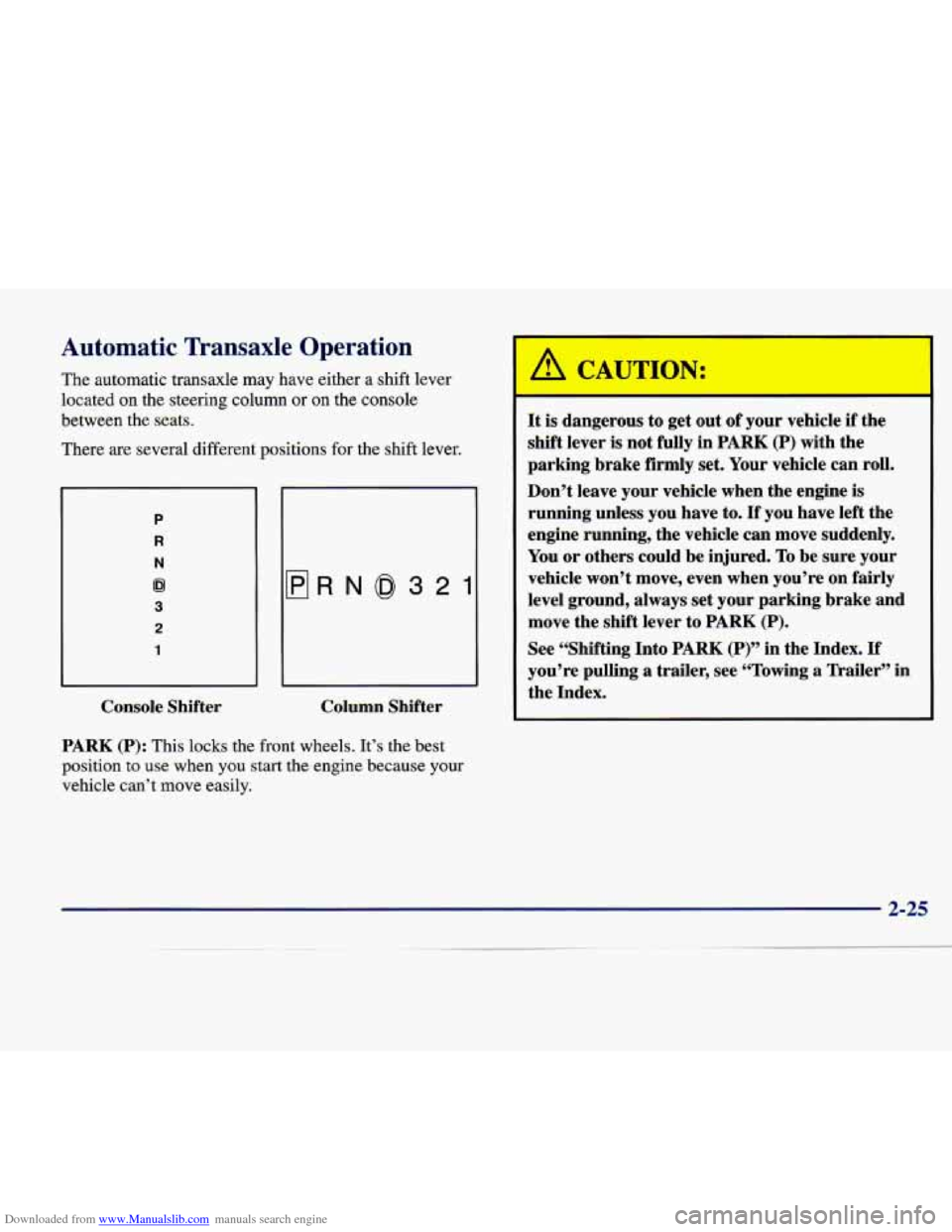
The automatic transaxle may have either a shift lever
located on the steering column or
on the console
between the seats.
There are several different positions for the shift lever.
P
R
N
62
3
2
1
flRN0321
Console Shifter Column Shifter
PARK (P): This
locks the front wheels. It’s the best
position
to use when you start the engine because your
vehicle can’t move easily.
It is dangerous to get out of your vehicle if the
shift lever
is not fully in PARK (P) with the
parking brake firmly set. Your vehicle can roll.
Don’t leave your vehicle when the engine is
running unless you have to.
If you have left the
engine running, the vehicle can move suddenly.
You or others could be injured.
To be sure your
vehicle won’t move, even when you’re on fairly
level ground, always set your parking brake and
move the shift lever to
PARK (P).
See “Shifting Into PARK (P)” in the Index. If
you’re pulling a trailer, see “Towing a Trailer” in
the Index.
Page 101 of 386

Downloaded from www.Manualslib.com manuals search engine Express-Down Window
This feature is present on the driver’s power window.
Pressing the control rearward into the second position then
releasing it
will lower the window completely. If you want
to stop the window as it
is lowering, press the control
forward. Press the control forward to raise the window.
Note that the first position
on the control operates the
driver’s power window in the non-express mode.
Rear Window Lockout
Pressing the button down will disable the rear
passenger window controls.
This is a useful feature if
you have children
as
passengers. Press the button
again to allow your
passengers to reuse their
window controls.
Horn
The horn can be sounded by pressing on the center of
the steering wheel pad.
Tilt Wheel
Tilt steering allows you to adjust the steering wheel
before you drive. Raising the steering wheel to the
highest level gives your legs more room when you enter
and exit the vehicle.
Hold the steering wheel and pull the lever toward
you to
tilt the wheel. Adjust the steering wheel to a comfortable
position and then release the lever to
lock the wheel
in place.
Page 128 of 386

Downloaded from www.Manualslib.com manuals search engine Illuminated Rear Seat Visor Vanity
Mirror (DeVille d’Elegance and DeVille
Concours Only)
Turn the sunshade down and lift the cover to see the
mirror. Move the slide switch up or down to brighten or
dim the lamp.
Cellular Telephone (Option)
Your vehicle has been prewired for dealer installation of
a Cadillac dual-mode (analog/digital) cellular telephone.
A fixed mobile or a portable hand-held system are
available. Either system has steering wheel telephone
controls and information output through the DIC.
Voice activation and hands-free operation are standard
features. For more information, contact your Cadillac
dealer.
A user’s guide is provided with the telephone.
OnStar System (Option)
This system may be ordered if you have the optional
fixed cellular telephone. The following services are
available
24 hours a day:
0 Roadside Service with Location
0 Emergency Services Button
0
0
0
0
Remote Door Unlock
Theft DetectiodNotification and Stolen-Vehicle
Tracking
Automatic Notification of Front
Air Bag Deployment
Concierge/Customer Convenience Services
For more information, contact your Cadillac dealer.
Assist Handles
A folding handle above each door can be used when
getting out of your vehicle.
Umbrella Holder
(DeVille d’Elegance
Only)
The driver’s front seat cushion comes equipped with an
umbrella holder. Gently slide the umbrella into the slot
located under the front portion
of the driver’s seat cushion.
Floor Mats
Your Cadillac is equipped with rubber-backed front and
rear floor mats. Keep them clean by vacuuming and
using a spot cleaner,
if necessary. Do not machine wash.
2-63
Page 134 of 386

Downloaded from www.Manualslib.com manuals search engine The instrument panel is designed to let you know at a glance how your Cadillac is running. You’ll know how fast
you’re going, how much fuel you’re using and many of the other things you’ll need to know to drive safely and
economically. The main components of the instrument panel are:
A. Air Outlets
B. Turn SignaVMultifunction Lever
C. Driver Information Center Control Buttons
D. Driver’s Side Air Bag
E. Cluster
E Steering Column Shift Lever
G. Electronic Climate Controls
H. Radio
I. Passenger’s Side Air Bag
J. Lamp Controls
K. HVAC Steering Wheel Controls (or Cellular
L. Hood Release
M. Horn
N. Audio Steering Wheel Controls
0. Ashtray and Cigarette Lighter
P. Glove Box
Telephone Controls,
If Equipped)
Page 164 of 386

Downloaded from www.Manualslib.com manuals search engine /.*--
Section 3 Comfort Controls and Audio System-
In this section, you’ll find out how to operate the comfort control and audio systems offered with your Cadillac. Be
sure to read about the particular systems supplied with your vehicle.
3-2 3-2
3-6
3-6
3-10
3-1 1
3-1 1
3-13
3-13
3- 14
3- 14
3- 14
3-15 Comfort
Controls
Digital Cluster Climate Control Panel
(If Equipped)
Electronic Solar Sensor
Analog Cluster Climate Control Panel
(If Equipped)
Air Conditioning
Heating Ventilation System
Defogging and Defrosting
Rear Window Defogger
HVAC Steering Wheel Controls
Climate Control Personalization
(If Equipped)
Audio Systems Setting the Clock 3-15
3-18
3 -22
3 -26
3-29
3-29 3-30
3-30
3-30 3-3 1
3-32
3-32 AM-FM
Stereo with Cassette Tape Player and
Optional Compact Disc Player
Active Audio AM-FM Stereo with Cassette
Tape and Compact Disc Player (If Equipped)
Active Audio AM-FM Stereo with Cassette
Tape and Compact Disc Player with Digital
Signal Processing (If Equipped)
Trunk Mounted CD Changer (If Equipped)
Radio Personalization (If Equipped)
Theft-Deterrent Feature Audio Steering Wheel Controls
Understanding Radio Reception
Tips About Your Audio System
Care of Your Cassette Tape Player
Care of Your Compact Discs
Power Antenna Mast Care
3-1
Page 177 of 386

Downloaded from www.Manualslib.com manuals search engine HVAC Steering Wheel Controls
Some heating and cooling
controls can be adjusted at
the steering wheel. Other touch controls operate some
audio controls. See “Audio
Steering Wheel Controls”
later in this section.
% FAN SPEED: Press the up arrow lever to increase
the fan speed and the down arrow lever to decrease
fan speed.
TEMP: Press the up arrow lever to increase the
temperature and the down arrow lever to decrease
temperature.
Climate Control Personalization
(If Equipped)
With this feature, your vehicle will recall the latest
climate control settings as adjusted the last time your
vehicle was operated. This feature allows two different
drivers to store and recall their own climate control settings. The settings recalled by the climate control
system are determined by which RKE transmitter
(“l”
or “2”) was used to enter the vehicle. The number on the
back of the RKE transmitter corresponds to driver
1 or
to driver
2. After the unlock button is pressed on the
RISE transmitter or the ignition key is placed in the
ignition (the ignition must be turned to LOCK), the climate control settings will automatically adjust to
where they were last set. The settings can also be
changed by briefly pressing the memory seat buttons
1
or 2 located on the driver’s door.
Audio Systems
Your Cadillac audio system has been designed to operate
easily and give years of listening pleasure. You will get
the most enjoyment out of it if you acquaint yourself
with it first. Find out what your audio system can do
and how to operate all its controls, to be sure you’re
getting the most out of the advanced engineering that
went into it.
3-14