1997 BUICK REGAL audio
[x] Cancel search: audioPage 5 of 422

The 1997 Buick Regal Owner’s Manual
1-1
2- 1
3- 1
4- 1
5- 1
6- 1
7- 1
8- 1
9- 1
Seats and Restraint Systems
This section tells you how to use your seats and safety belts properly. It also explains the “air bag” system.
Features and Controls
This section explains how to start and operate your Buick.
Comfort Controls and Audio Systems
This section tells you how to adjust the ventilation and comfort controls and how to operate your audio system.
Your Driving and the Road
Here you’ll find helpful information and tips about the road and how to drive under different conditions.
Problems on the Road
This section tells what to do if you have a problem while driving, such as a flat tire or overheated engine, etc.
Service and Appearance Care
Here the manual tells you how to keep your Buick running properly and looking good.
Maintenance Schedule
This section tells you when to perform vehicle maintenance and what fluids and lubricants to use.
Customer Assistance Information
This section tells you how to contact Buick for assistance and how to get service and owner publications.
It also gives you information on “Reporting Safety Defects’’ on page
8-8.
Index
Here’s an alphabetical listing of almost every subject in this manual. You can use it to quickly find
something you want
to read.
i
-
ProCarManuals.com
Page 122 of 422

Rearview Mirror Reading Lamps
(If Equipped)
Use the switch next to each lamp to turn them on
and off.
Dome Lamp
The dome lamp will come on when you open the doors.
Battery Rundown Protection
Your vehicle has a feature to help prevent you from
draining the battery in case you accidentally leave
the interior courtesy lamps, reading/map lamps, visor
vanity lamps, trunk lamp, underhood lamp or glove box
lamps on. If you leave any
of these lamps on, they will
automatically turn off after
20 minutes, if the ignition is
in the OFF position. The lamps won’t come back on
again until you:
Turn the ignition on,
0 Turn the lamp switch off, then on; or
Open a door.
Note that if your vehicle has less than
15 miles (25 km)
on the odometer, the battery saver will turn off the lamps
after only three minutes.
Retained Accessory Power
With retained accessory power, your power windows,
audio system and sunroof will continue
to work up to
10 minutes after the ignition key is turned to the OFF
position and none of the doors is opened.
2-46
ProCarManuals.com
Page 130 of 422
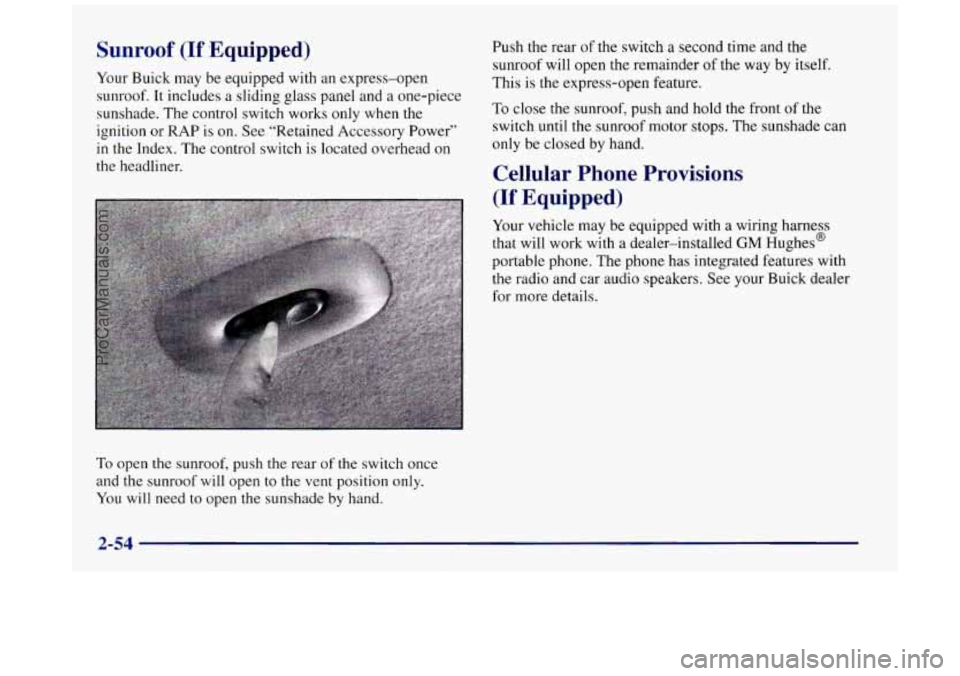
Sunroof (If Equipped)
Your Buick may be equipped with an express-open
sunroof. It includes a sliding glass panel and a one-piece
sunshade. The control switch works only when
the
ignition or RAP is on. See “Retained Accessory Power”
in the Index. The control switch is located overhead on
the headliner.
To open the sunroof, push the rear of the switch once
and the sunroof will open to the vent position only.
You will need to open the sunshade by hand. Push the rear
of the
switch a second time and the
sunroof will open the remainder
of the way by itself.
This is the express-open feature.
To close the sunroof, push and hold the front of the
switch until the sunroof motor
stops. The sunshade can
only be closed by hand.
Cellular Phone Provisions
(If Equipped)
Your vehicle may be equipped with a wiring harness
that will work with a dealer-installed
GM Hughes@
portable phone. The phone has integrated features with
the radio and car audio speakers. See your Buick dealer
for more details.
2-54
ProCarManuals.com
Page 131 of 422
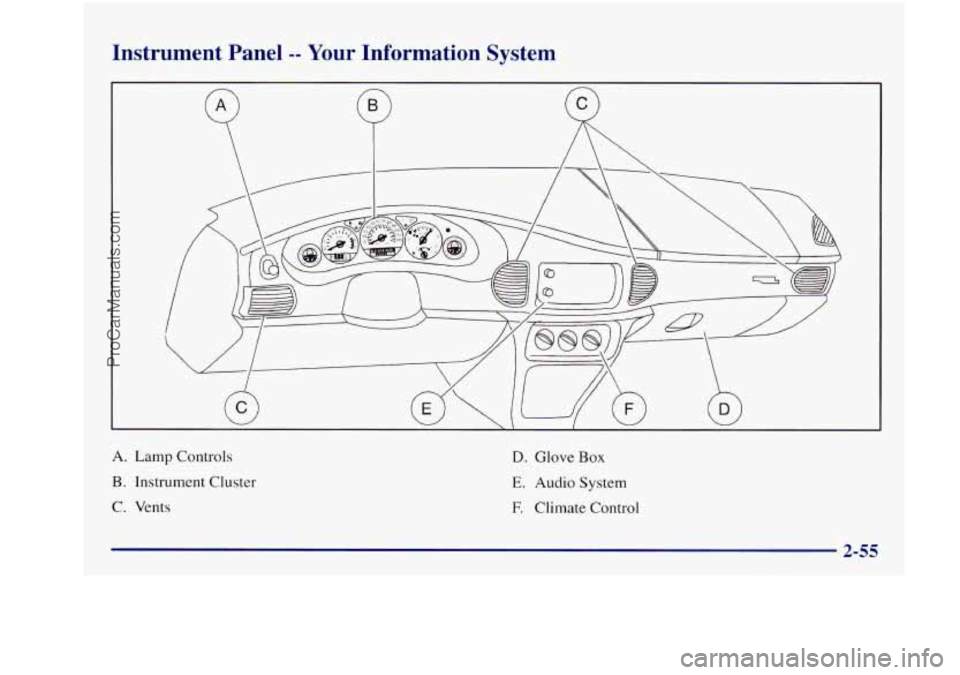
Instrument Panel -- Your Information System
A. Lamp Controls
B. Instrument Cluster
C. Vents
D. Glove Box
E. Audio System
F. Climate Control
ProCarManuals.com
Page 157 of 422
Section 3 Comfort Controls and Audio Systems
In this section, you’ll find out how to operate the comfort control and audio systems offered with your Buick. Be sure
to read about the particular systems supplied with your vehicle.
3-2
3-2
3 -4
3-7
3-10
3-1
1
3-12
3-12
3-13
3-
15
3-18 Comfort Controls
Manual Single Zone Climate Control
Dual ComforTemp Climate Control
Dual Automatic ComforTemp Climate Control
Ventilation System
Rear Window Defogger
Audio Systems
Setting
the Clock
AM-FM Stereo
AM-FM Stereo with Cassette Tape Player
AM-FM Stereo with Cassette Tape Player and
Automatic Tone Control 3-22
3-26
3-3
1
3-33
3-34
3-34
3-35
3-36
3-36
3-37 AM-FM
Stereo with Compact Disc Player and
Automatic Tone Control AM-FM Stereo with Cassette Tape and
Compact Disc Player with Automatic
Tone Control
Theft-Deterrent Feature
Audio Steering Wheel Controls
Understanding Radio Reception
Tips About Your Audio System
Care of Your Cassette Tape Player
Care of Your Compact Discs
Fixed Mast Antenna
Backglass Antenna
ProCarManuals.com
Page 168 of 422
Do not attach anything like a temporary vehicle license
or decal across the defogger grid.
[NOTICE:
Don’t use a razor blade or anything else sharp on
the inside
of the rear window. If you do, you
could cut or damage the warming grid, and the
repairs wouldn’t be covered
by your warranty.
Audio Systems
Your Delco@ audio system has been designed to operate
~ easily and give years of listening pleasure. You will get
~ the most enjoyment out of it if you acquaint yourself
with it first. Find out what your Delco system can do
and how to operate all its controls,
to be sure you’re
getting the most out
of the advanced engineering that
went into it.
Setting the Clock
Press and hold HRS until the correct hour appears. Press
and hold
MIN until the correct minute appears.
You may set the clock with the ignition off if you press
RECALL first and follow the same procedure
described above.
3-12
ProCarManuals.com
Page 181 of 422
E20: It is dirty, scratched or wet.
E20: There’s too much moisture in the air. (Wait
about an hour and try again.)
If any error occurs repeatedly or if an error can’t be
corrected, please contact your dealer. If your radio
displays an error number, write it down and provide it to
your dealer when reporting the problem.
PREV (1): Press this button to go to the start of the
current track if more than eight seconds have played.
If
you hold the button or press it more than once, the
player will continue moving back through the disc. The
sound will mute while seeking.
NEXT (2): Press this button to go to the next track. If
you hold the button or press it more than once, the
player will continue moving forward through
the disc.
The sound will mute while seeking.
The
SEEK down and up arrows will also find the
previous and
next selections on the disc.
44 (3): Press and hold this button to quickly reverse
within a track. You will hear sound.
.. (4): Press and hold this button to quickly advance
within a track.
You will hear sound.
RAND (6): Press this button to hear the tracks in
random, rather than sequential, order. Press RAND
again to turn off random play.
RECALL: Press this button to see which track is
playing. Press it again within five seconds
to see how
long
it has been playing. To change what is normally
shown
on the display (track or elapsed time), press the
button until
you see the display you want, then hold the
button until the display flashes.
AM-FM: Press this button to play the radio when a disc
is in the player.
SOURCE: Press this button to change to the disc
function when the radio is on. When a disc is inserted,
the disc will play until you press AM-FM. Then the disc
will stop playing and the radio will play. Press
SOURCE
again to play a disc again. CD PLAY will show on
the display.
EJECT: Press this button to remove the disc. The radio
will play.
If you turn
off the ignition or radio with a disc in the
player, it will stay in the player. When
you turn on the
ignition or system, the disc will start playing where
it
stopped, if it was the last-selected audio source. If you
leave a compact disc
in the player while listening to the
radio, it may become warm.
3-25
-.
_.
ProCarManuals.com
Page 187 of 422
AM-FM: Press this button to play the radio when a disc
is
in the player.
SOURCE: Press this button to change to the disc
function when
the radio is on. When a disc is inserted,
the disc will play until you press AM-FM. Then the
disc will stop playing and the radio will play. Press
SOURCE again to play a disc again. CD PLAY will
show on the display.
EJECT Press this button to remove the disc. The radio
will play.
If you turn off the ignition or radio with a disc in the
player,
it will stay in the player. When you turn on the
ignition or system, the disc will start playing where it
stopped, if it was the last-selected audio source.
Also, as a protection feature, if
a CD is ejected and left
in the player, it will be pulled back in the player with the
ignition
on or off. If you leave a compact disc in the
player while listening to
the radio, it may become warm.
Theft-Deterrent Feature
THEFTLOCK” is designed to discourage theft of your
radio.
It works by using a secret code to disable all radio
functions whenever battery power
is removed.
If THEFTLOCK is active, the THEFTLOCK indicator
will flash when the ignition
is off.
The THEFTLOCK feature for the radio may
be used or
ignored. If ignored, the system plays normally and the
radio is not protected by the feature. If THEFTLOCK
is
activated, your radio will not operate if stolen.
When THEFTLOCK is activated,
the radio will display
LOC to indicate a locked condition anytime battery
power
is removed. If your battery loses power for any
reason, you must unlock the radio with the secret code
before
it will operate.
Activating the Theft-Deterrent Feature
The instructions which follow, explain how to enter your
secret code to activate the THEFTLOCK system.
It is
recommended that you read through
all nine steps
before starting the procedure.
ProCarManuals.com