Page 162 of 420
Audio Systems
Your Delco audio system has been designed to operate
easily and give years of listening pleasure. You will get the
most enjoyment out of it if you acquaint yourself with it
first. Find out what your Delco system can do and how to
operate all its controls, to be sure you’re getting the mos\
t
out
of the advanced engineering that went into it.
Setting the Clock
Press and hold HRS until the correct hour appears. Press
and hold
MIN until the correct minute appears.
You may set the clock with the ignition
off if you
press
RECALL first and follow the same procedure
described above.
Personal Choice Radio Controls
(If Equipped)
This feature allows two different drivers to store and recall
their
own radio settings for AM and FM presets, last tuned
station, volume, tone and audio source (radio, cassette or
CD). The Personal Choice settings recalled by the audio
system
are determined by the transmitter used to enter the
vehicle. After the
UNLOCK button of a remote keyless
entry transmitter is pressed and the ignition is in
RUN, the
radio will adjust to the last settings of the identified drive\
r. The settings can also
be changed by briefly pressing one of
the MEMORY seat switches located on the diver’s door
panel. When adjustments are made, the new settings are automatically saved for the driver.
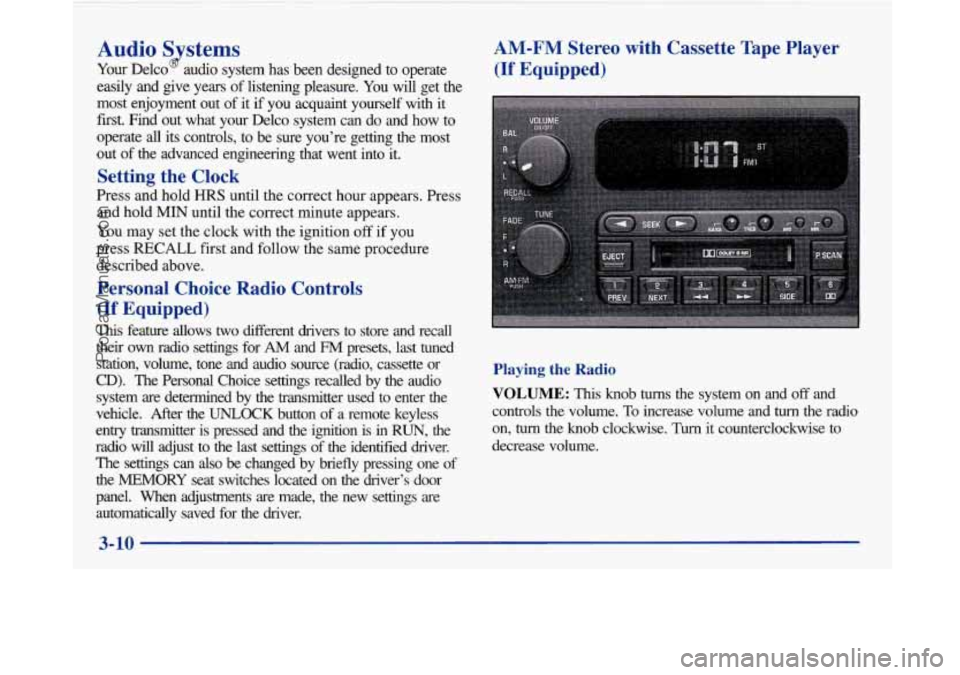
AM-FM Stereo with Cassette Tape Player
(If Equipped)
Playing the Radio
VOLUME: This knob turns the system on and off and
controls the volume.
To increase volume and turn the radio
on,
turn the knob clockwise. Turn it counterclockwise to
decrease volume.
3-10
-
ProCarManuals.com
Page 163 of 420

RECALL: Press the upper knob briefly to recall the
station being played or to display the clock. To change
what is normally shown on the display (station or time),
press the knob until you see the display you want, then
hold the knob until the display flashes. If you press the
knob when the ignition is
off, the clock will show for a
few seconds.
Finding a Station
AM-FM: Press the lower knob to switch between AM,
FMl and FM2. The display shows your selection.
TUNE: Turn the lower knob to choose radio stations.
SEEK: Press the right or left arrow to go to the next
higher or lower station and stay there. The sound will
mute while seeking.
SCAN: Press one of the SEEK arrows for two seconds,
and SCAN will appear on the display. Use SCAN to
listen to stations for a few seconds. The radio will go to
a station, stop for a few seconds, then go on to the next
station. Press one of the
SEEK arrows again to stop
scanning. The sound will mute while scanning.
PUSHBUTTONS: The six numbered pushbuttons let
you return to your favorite stations. You can set up to
18 stations (six AM, six FM1 and six FM2). Just:
1. Turn the radio on.
2. Press AM-FM to select the band.
3. Tune in the desired station.
4. Press and hold one of the six numbered buttons. The
sound will mute. When it returns, release the button.
Whenever you press that numbered button, the
station you set will return.
5. Repeat the steps for each pushbutton.
P SCAN: Press this button to listen to each of your
preset stations for a few seconds. The radio will go to
the first preset station, stop for a few seconds, then go
on to the next preset station. Press
P SCAN again to stop
scanning. The radio will not stop at a preset
if the station
is weak.
ProCarManuals.com
Page 174 of 420
!
RECALL: Press this button briefly to recall the station
being played or to display the clock. To change what
is
normally shown on the display (station or time), press
the RECALL button until you
see the display you want,
then hold the RECALL button until the display flashes.
If you press the button when the ignition is off, the clock
will show for
a few seconds.
Finding a Station
AM-FM:
Press this button to switch between AM, FM1
and FM2. The display shows your selection.
TUNE: Press the up or down arrow to choose
radio stations.
SEEK: Press the up or down arrow to go to the next
higher or lower station and stay there. The sound will
mute while seeking.
SCAN: Press one of the SEEK arrows for two seconds
and SCAN will appear
on the display. Use SCAN to
listen to stations for a few seconds. The radio will go to
a station, stop for a few seconds, then go on to the next
station. Press one of the
SEEK arrows again to stop
scanning. The sound will mute while scanning.
PUSHBUTTONS: The six numbered pushbuttons let
you return to your favorite stations. You can set up to
18 stations (six AM, six FMl and six FM2). Just:
1. Turn the radio on.
2. Press AM-FM to select the band.
3. Tune in the desired station.
4. Press TONE to select the setting you prefer.
5. Press and hold one of the six numbered buttons. The
sound will mute. When it returns, release the button.
Whenever you press that numbered button, the
station you set will return and the tone you selected
will be automatically selected for that button.
6. Repeat the steps for each pushbutton.
P SCAN: Press this button to listen to each of your
preset stations for a few seconds. The radio will
go to
the first preset station, stop for a few seconds, then go
on to the next preset station. Press
P SCAN again to
stop scanning.
If a preset station has weak reception,
the radio will not stop at the preset station.
3-22
ProCarManuals.com