Page 64 of 203
Part 1
Ignition switch with steering
lock57
OPERATION OF
INSTRUMENTS AND
CONTROLSÐ
Chapter 1-6
Ignition switch,
Transmission
and Parking brake
�Ignition swi tch with steering lock
� Automatic transmission
� Manual transmission
� Parking brake
� Cruise control
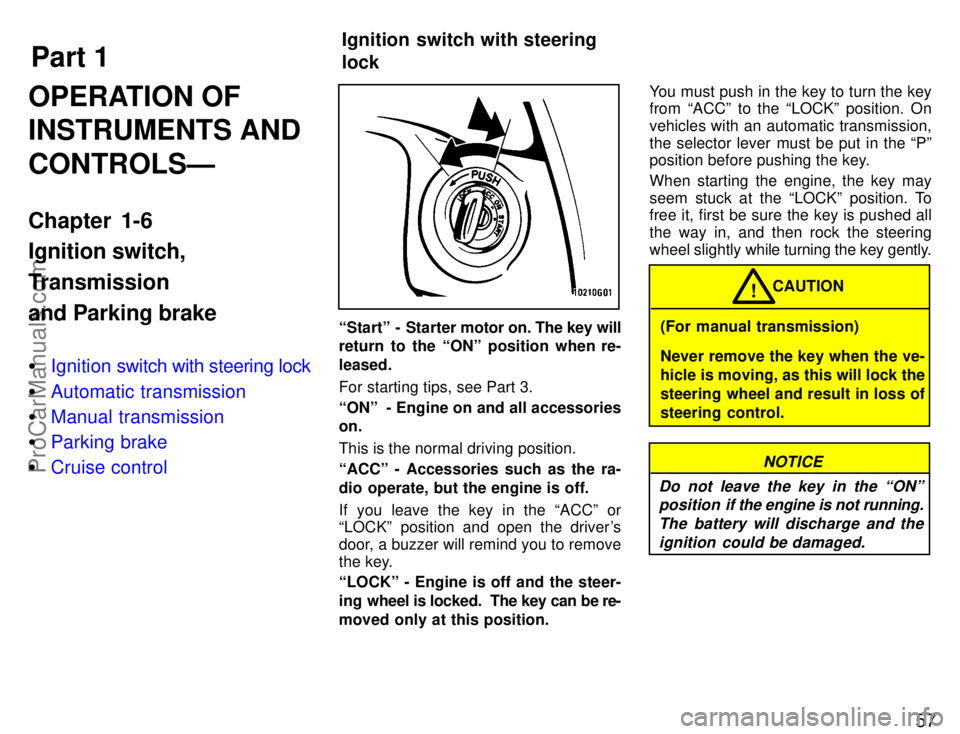
Startº - Starter motor on. The key will
return to the ONº position when re-
leased.
For starting tips, see Part 3.
ONº - Engine on and all accessories
on.
This is the normal driving position.
ACCº - Accessories such as the ra-
dio operate, but the engine is off.
If you leave the key in the ACCº or
LOCKº position and open the driver's
door, a buzzer will remind you to remove
the key.
LOCKº - Engine is off and the steer-
ing wheel is locked. The key can be re-
moved only at this position. You must push in the key to turn the key
from ACCº to the LOCKº position. On
vehicles with an automatic transmission,
the selector lever must be put in the Pº
position before pushing the key.
When starting the engine, the key may
seem stuck at the LOCKº position. To
free it, first be sure the key is pushed all
the way in, and then rock the steering
wheel slightly
while turning the key gently.(For manual transmission)
Never remove the key when the ve-
hicle is moving, as this will lock the
steering wheel and result in loss of
steering control. CAUTION
!
NOTICE
Do not leave the key in the ONº position if the engine is not running.
The battery will discharge and theignition could be damaged.
ProCarManuals.com
Page 73 of 203

66
This section describes some of the basic
features on Toyota audio systems. Some
information may not pertain to your sys-
tem.
Your audio system works when the igni-
tion key is in the ACCº or ONº position.
TURNING THE SYSTEM ON AND OFF
Push PWR/VOLº to turn the audio sys-
tem on and off.
Push AMVFMº or TAPEº or CDº to turn
on that function without pushing PWR/
VOLº.
You can turn on the cassette player or
compact disc player by inserting a cas-
sette tape or a compact disc.
You can turn off the cassette player or
compact disc player by ejecting the cas-
sette tape or compact disc. If the audio
system was previously off, then the entire
audio system will be turned off when you
eject the cassette tape or disc. If another
function was previously playing, it will
come on again.
SWITCHING BETWEEN FUNCTIONS
Push AM VFMº , TAPEº or CDº if the sys-
tem is already on but you want to switch
from one function to another. TONE AND BALANCE
For details about your system's tone and
balance controls, see the description of
your own system.
Tone
How good an audio program sounds to
you is largely determined by the mix of the
treble, midrange, and bass levels. In fact,
different kinds of music and vocal pro-
grams usually sound better with different
mixes of treble, mid-range, and bass.
Balance
A good balance of the left and right stereo
channels and of the front and rear sound
levels is also important.
Keep in mind that if you are listening to a
stereo recording or broadcast, changing
the right/left balance will increase the
vol-
ume of one group of sounds while de-
creasing the volume of another. YOUR RADIO ANTENNA
To lower a manual antenna, carefully
push
it down.
To lower a power antenna, turn off the au-
dio system by pushing PWR/VOLº, or
turn the ignition key to LOCKº.
On some models, the power antenna au-
tomatically retracts when the radio mode
is switched off to turn on the cassette tape
player or compact disc player.
NOTICE
To prevent damage to the antenna, make sure it is retracted before
driving your Toyota through anautomatic car wash.
YOUR CASSETTE PLAYER
When you insert a cassette, the exposed
tape should be to the right.
NOTICE
Do not oil any part of the player and do not insert anything other than
cassette tapes into the slot, or thetape player may be damaged.
-Using your audio system:
some basics
ProCarManuals.com
Page 90 of 203

83
The anti-theft system prevents the audio
system from working after it has been dis-
connected. To activate the system, you
must set a three-digit security code. After
the system is set, SECº will appear in the
display each time the ignition is turned
from LOCKº to ACCº or ONº. Also, the
anti-theft light flashes every few seconds
while the ignition key is in the LOCKº
position.
You will need to know your security code
to reactivate your radio after electrical ser-
vice is performed on your vehicle.
Choose a security code that is easy to re-
member and keep a copy of it (not in your
Toyota).
NOTICE
If you pushed any wrong buttons on the anti-theft system, the following
messages will appear on thedisplay.
�ErrºÐYou have pushed wrongbuttons.
�1-9ºÐIndicates the number oferrors you have made. You maymake up to nine errors, but nomore!
�HELPºÐThe number of errors
you can make was exceeded. Theaudio sytem is completely inoper-
able. Contact you Toyota dealer.
Setting a security code for the first
time.
1. Turn off the audio system.
Turn ignition key to ACCº.
Simultaneously push and hold in 1º, 6º,
and PWR/VOLº until SECº appears on
the display.2. While you are holding in the ~º side of
TUNEº, push 1º.
The display will read - - -.
On some modes, � º and �º will also
turn on.
ÐAnti-theft system
(Type 2-2 and 3 only)
ProCarManuals.com
Page 92 of 203
85
Changing the security code
1. Turn off the audio system.
Turn the ignition key to ACCº.
Simultaneously push and hold in 1º, 6º,
and PWR/VOLº until SECº appears in
the display.2. While you are holding in the ~º side of
TUNEº push 1º.
The display will read - - -º.
On some models, �º and �º will also
turn on.3. Input the existing three-digit code.
You have 10 seconds to enter each digit.
For example, 209º:
To set the first digit: Push 1º until the digit
you want appears on the display.
To set the second digit: Push 2º until the
digit you want appears on the display.
To set the third digit: Push 3º until the digit
you want appears on the display.
ProCarManuals.com
Page 94 of 203
87
Clearing the security code.
1. Turn off the audio system.
Turn the ignition key to ACCº.
Simultaneously push and hold in 1º, 6º,
and PWR/VOLº until SECº appears on
the display.2. While you are holding in the ~º side of
TUNEº, push 1º.
The display will read - - -.
On some models, �º and � º will also
turn on.3. Input the existing three-digit code.
You have 10 seconds to enter each digit.
For example, 209º:
To set the first digit: Push 1º until the digit
you want appears on the display.
To set the second digit: Push 2º until the
digit you want appears on the display.
To set the third digit: Push 3º until the digit
you want appears on the display.
ProCarManuals.com
Page 106 of 203
Part 1Clock99
OPERATION OF
INSTRUMENTS
AND CONTROLSÐ
Chapter 1-8
Other equipment
�Clock
� Cigarette lighter and ashtray
� Glovebox
� Cup holder
� Luggage cover
� Floor mat
The digital clock indicates the time.
The key must be in the ``ACCº or ``ON''
position.
To reset the hour: Push the Hº button.
To reset the minutes: Push the Mº button.
If quick adjustment to a full hour is de-
sired, push the :00º button.
For example, if the :00º button is de-
pressed when the time is between
1:01Ð1:29, the time will change to 1:00.
If the time is between 1:30Ð1:59, the time
will change to 2:00. Once the electrical power source has
been disconnected from the clock, the
time is automatically set to 1:00 (one
o'clock).
When the instrument panel lights are
turned on, the brightness of the time indi-
cation will be reduced.
ProCarManuals.com
Page 107 of 203

100
CIGARETTE LIGHTER
To use the cigarette lighter, press it in.
When it becomes heated, it automati-
cally pops out ready for use.
If the engine is not running, the key must
be in the ºACCº position.
Do not hold the cigarette lighter pressed
in.
Use a Toyota genuine cigarette lighter or
equivalent for replacement.ASHTRAY
To use the ashtray, open the cover.
When finished with your cigarette, thor-
oughly extinguish it in the ashtray to pre-
vent other cigarette butts from catching
fire. After using the ashtray, close the ash-
tray cover completely.
To remove the ashtray, open the ashtray
cover and pull it out.To use the glovebox, do this.
To open: Pull the lever.
With the instrument panel lights on, the
glovebox light will come on when the glo-
vebox is open.
To lock: Insert the master key and turn it
clockwise.
To reduce the chance of injury in
case of an accident or sudden stop,
always keep the glovebox door
closed while driving.
CAUTION
!
Cigarette lighter and ashtray Glovebox
ProCarManuals.com
Page 116 of 203

109
Type A
Type BABSº warning light
This light comes on when the ignition key
is turned to the ONº position. After about
3 seconds, the light will go off.
If either of the following conditions occurs,
this indicates a malfunction somewhere in
the parts monitored by the warning light
system. Contact your Toyota dealer as
soon as possible to service the vehicle.
�
The light does not come on as de-
scribed above, or remains on.
� The light comes on while driving.
Even if the anti-lock brake system should
fail, the brake system will still operate con-
ventionally. Have your vehicle checked by
your Toyota dealer as soon as possible.
DRUM-IN-DISC TYPE PARKING
BRAKE SYSTEM
(with 5S-FE engine)
Your vehicle has a drum-in-disc type
parking brake system. This type brake
system needs bedding-down of the brake
shoes periodically or whenever the park-
ing brake shoes and/or drums are re-
placed.
Have your Toyota dealer perform the bed-
ding-down.
The brake pad wear limit indicators on
your disc brakes give a warning noise
when the brake pads are worn to
where replacement is required.
If you hear a squealing or scraping noise
while driving, have the brake pads
checked and replaced by your Toyota
dealer as soon as possible. Expensive ro-
tor damage can result if the pads are not
replaced when necessary.
Brake pad wear limit
indicators
ProCarManuals.com