1996 NISSAN SENTRA warning light
[x] Cancel search: warning lightPage 22 of 191

MANUAL WINDOW OPERATION
(If so equipped)
The side windows can be opened or closed
by turning the hand crank on each door. To
open the window, turn the crank counter-
clockwise. To close the window, turn the
crank clockwise.The power windows operate only when the
ignition key is in the ON position.
To open the window, lightly tap the driver
side button until the desired position is
reached. To close the window, lift the switch
upward. The driver side control panel is
equipped with switches to open or close all
the windows.
Locking passengers' windows
When the window lock button is depressed,
only the driver side window can be opened
or closed. Push it again to cancel the win-
dow lock function.The passenger side switch opens or closes
only the corresponding window. To open
the window, push the switch downward. To
close the window, lift the switch upward.
WARNING
cMake sure that all passengers have
their hands, etc. inside the vehicle
before closing the windows.
cDo not leave children unattended in-
side the vehicle. They could unknow-
ingly activate switches.
AIC0630AIC0612AIC0613
POWER WINDOWS
(If so equipped)
1-15
ZX
Page 24 of 191
To tilt the sun roof down, push the switch
toward DOWN/OPEN. Continuing to push
the DOWN/OPEN switch opens the sun
roof.
Sun shade
Open and close the sun shade by sliding it
forward or backward.
WARNING
cBe extremely careful not to have any
part of your body in the sun roof
opening while it is closing.
cDo not stand up or extend any por-
tion of your body out of the opening
while driving.
cRemove water drops, snow, ice or
sand from the sun roof before
opening.
cDo not place any heavy object on the
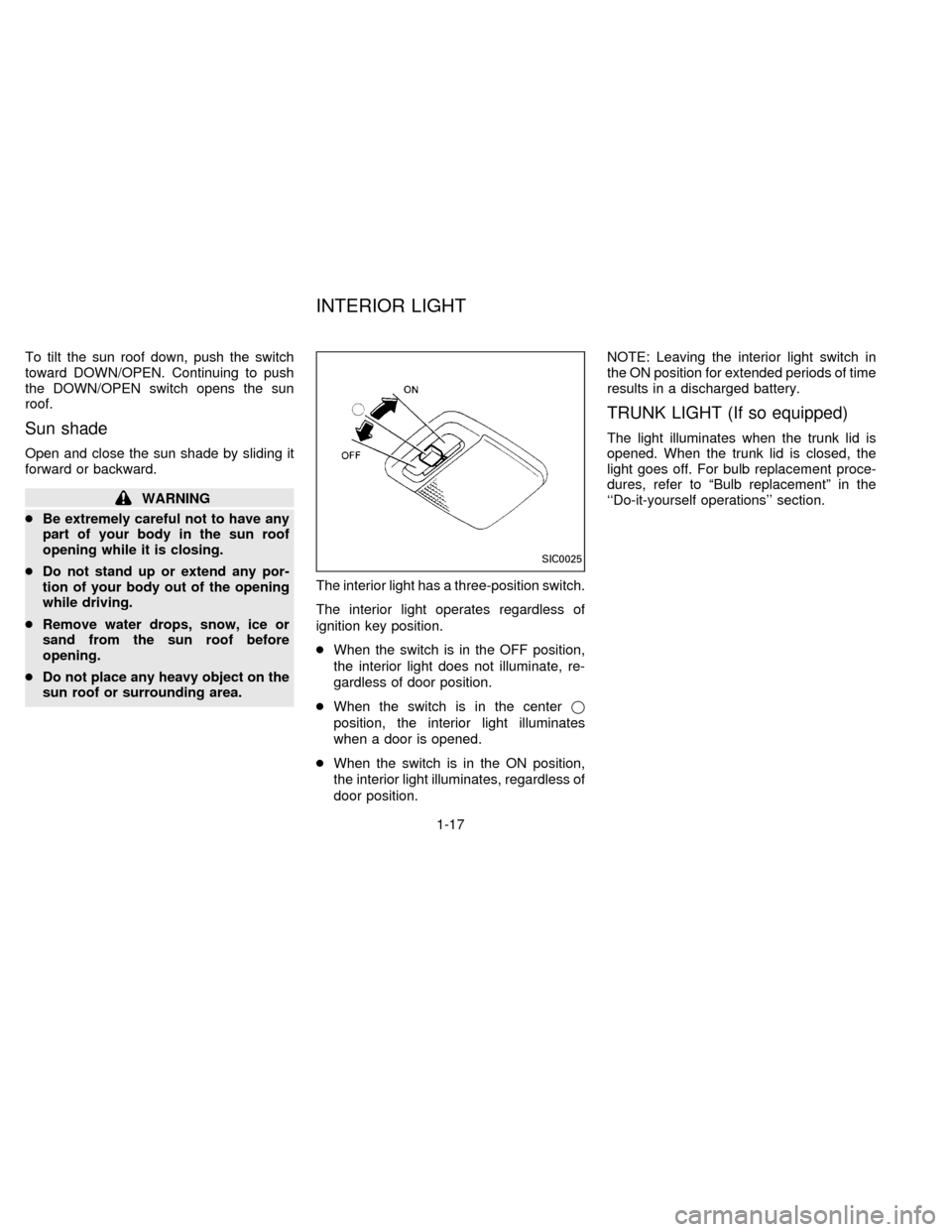
sun roof or surrounding area.The interior light has a three-position switch.
The interior light operates regardless of
ignition key position.
cWhen the switch is in the OFF position,
the interior light does not illuminate, re-
gardless of door position.
cWhen the switch is in the centerj
position, the interior light illuminates
when a door is opened.
cWhen the switch is in the ON position,
the interior light illuminates, regardless of
door position.NOTE: Leaving the interior light switch in
the ON position for extended periods of time
results in a discharged battery.
TRUNK LIGHT (If so equipped)
The light illuminates when the trunk lid is
opened. When the trunk lid is closed, the
light goes off. For bulb replacement proce-
dures, refer to ªBulb replacementº in the
``Do-it-yourself operations'' section.
SIC0025
INTERIOR LIGHT
1-17
ZX
Page 26 of 191

2 Pre-driving checks and adjustments
Key ....................................................................... 2-2
Door locks ............................................................ 2-2
Multi-remote control system (If so equipped) ...... 2-4
Child safety rear door lock ................................... 2-7
Hood release ........................................................ 2-8
Glove box ............................................................. 2-9
Trunk lid lock operation ........................................ 2-9
Fuel filler lid lock operation ................................ 2-11
Front Seats ......................................................... 2-13
Supplemental restraint system
(Air bag system) (If so equipped) ...................... 2-15
Warning labels (If so equipped) ......................... 2-20
Air bag warning light (If so equipped) ................ 2-20
Seat belts ........................................................... 2-22
Child restraints for infants and small children.... 2-28
Tilting steering wheel ......................................... 2-34
Outside mirror control......................................... 2-34
Inside mirror ....................................................... 2-35
Vanity mirror (If so equipped) ............................ 2-35
ZX
Page 30 of 191

Unlocking doors
1. Push thebutton on the multi-remote
controller. Only the driver side door un-
locks.
2. Push the
button on the multi-remotecontroller again within 5 seconds. The
passenger doors unlock.
3. The interior light stays on for 30 seconds.
The interior light can be turned off without
waiting for 30 seconds by inserting the keyinto the ignition or by locking the doors with
the multi-remote controller.
Using the panic alarm
If you are near your vehicle and feel threat-
ened, you may activate the alarm to call
attention as follows:
1. Push the
button on the remote con-
troller forlonger than 1.5 seconds.
2. The theft warning alarm and headlights
stay on for 30 seconds.
3. The alarm stops when any of the key
functions are used. For example, when
the
or thebutton is pushed, or the
button is pushed for longer than 1.5
seconds on the multi-remote controller,
the panic alarm function is cancelled.
APD0616
2-5
ZX
Page 40 of 191
REAR SEAT
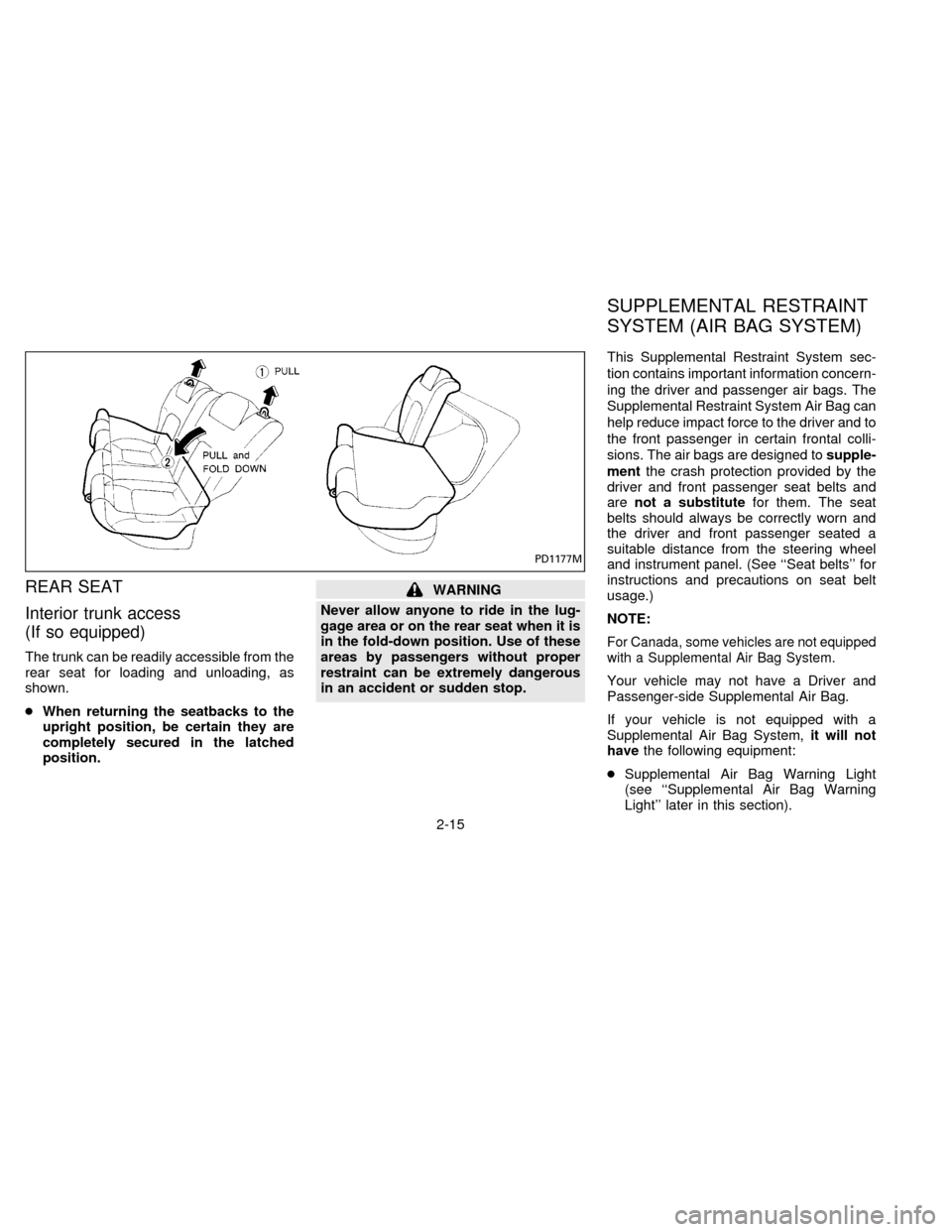
Interior trunk access
(If so equipped)
The trunk can be readily accessible from the
rear seat for loading and unloading, as
shown.
cWhen returning the seatbacks to the
upright position, be certain they are
completely secured in the latched
position.
WARNING
Never allow anyone to ride in the lug-
gage area or on the rear seat when it is
in the fold-down position. Use of these
areas by passengers without proper
restraint can be extremely dangerous
in an accident or sudden stop.This Supplemental Restraint System sec-
tion contains important information concern-
ing the driver and passenger air bags. The
Supplemental Restraint System Air Bag can
help reduce impact force to the driver and to
the front passenger in certain frontal colli-
sions. The air bags are designed tosupple-
mentthe crash protection provided by the
driver and front passenger seat belts and
arenot a substitutefor them. The seat
belts should always be correctly worn and
the driver and front passenger seated a
suitable distance from the steering wheel
and instrument panel. (See ``Seat belts'' for
instructions and precautions on seat belt
usage.)
NOTE:
For Canada, some vehicles are not equipped
with a Supplemental Air Bag System.
Your vehicle may not have a Driver and
Passenger-side Supplemental Air Bag.
If your vehicle is not equipped with a
Supplemental Air Bag System,it will not
havethe following equipment:
cSupplemental Air Bag Warning Light
(see ``Supplemental Air Bag Warning
Light'' later in this section).
PD1177M
SUPPLEMENTAL RESTRAINT
SYSTEM (AIR BAG SYSTEM)
2-15
ZX
Page 45 of 191

Warning labels about the supplemental air
bag system are placed in the vehicle as
shown in the illustration.
The supplemental air bag light, displaying
AIR BAG in the instrument panel, monitors
the circuits of the air bag. The circuits
monitored by the air bag light are the diag-
nosis sensor unit, air bag modules and all
related wiring.
APD0609
APD0610
WARNING LABELS
(If so equipped)AIR BAG WARNING LIGHT
(If so equipped)
2-20
ZX
Page 46 of 191
When the ignition key is in the ON or START
position, the supplemental air bag warning
light illuminates for about 7 seconds and
then turns off. This means the system is
operational.
If any of the following conditions occur, the
supplemental air bag needs servicing:
1. The supplemental air bag light does not
come on and remain on for 7 seconds
and then go off as described above.
2. The supplemental air bag light flashes
intermittently or remains on.
3. The supplemental air bag light does not
come on at all.
Under these conditions, the Supplemental
Restraint System Air Bag does not operate
properly. It must be checked and repaired.
Take your vehicle to the nearest authorized
NISSAN dealer.
Repair and replacement procedure
The supplemental air bag system is de-
signed to inflate on a one-time-only basis.
As a reminder, unless it is damaged, the
supplemental air bag light remains illumi-
nated after inflation has occurred. Repair
and replacement of the supplemental airbag system should be done only by an
authorized NISSAN dealer.
To ensure long-term functioning, the
system must be inspected 10 years after
the date of manufacture as noted on the
certification label located on the driver
side front pillar.
When maintenance work is required on the
vehicle, the supplemental air bag system
and related parts should be pointed out to
the person conducting the maintenance.
The ignition key must always be in the
LOCK position when working under the
hood or inside the vehicle.
WARNING
cOnce the supplemental air bag in-
flates, the supplemental air bag mod-
ule will not function again and must
be replaced. The supplemental air
bag module cannot be repaired.
cAfter a supplemental air bag inflates,
the front instrument panel assembly
should be replaced by your NISSAN
dealer if damaged.cThe supplemental air bag system
should be inspected by an authorized
NISSAN dealer if there is any damage
to the front end portion of the vehicle
or if the air bag has inflated.
cWhen selling your vehicle, we re-
quest that you inform the buyer about
the supplemental air bag system and
guide the buyer to the appropriate
sections in this Owner's Manual.
cIf you need to dispose of the supple-
mental air bag or scrap the vehicle,
contact an authorized NISSAN dealer.
Correct supplemental air bag dis-
posal procedures are set forth in the
appropriate NISSAN Service Manual.
Incorrect disposal procedures could
cause personal injury.
2-21
ZX
Page 65 of 191
WARNING
Do not use the recirculation mode (if so
equipped) for long periods of time. It
may cause the interior air to become
stale and the windows to fog up.
Air conditioner button
This button is provided only on those ve-
hicles equipped with air conditioning.
Start the engine, move the fan control dial to
the desired (1 to 4) position, and push the
air conditioner button to turn on the air
conditioner. The indicator light comes on
when the air conditioner is on. To turn off the
air conditioner, push the button again.
The air conditioner cooling function op-
erates only when the engine is running.
WARNING
Positioning of the heating or air condi-
tioning controls should not be done
while driving, in order that full attention
may be given to the driving operation.
HEATER OPERATION
Heating
This mode is used to direct hot air mainly
from the floor outlets. A small amount of air
also flows from the defrost vents.
1. Push the air recirculation button (if so
equipped) to the OFF position for normal
heating.
2. Move the air control dial to the
po-
sition.
3. Move the fan control dial to the desired
position.
4. Move the temperature control dial to the
desired position between the middle and
the hot position.
Ventilation
This mode directs outside air from the side
and center vents.
1. Push the air recirculation button (if so
equipped) to the OFF position.
2. Move the air control dial to the
po-
sition.3. Move the fan control dial to the desired
position.
4. Move the temperature control dial to the
desired position.
Defrosting or defogging
This mode is used to defrost/defog the
windows.
1. Push the air recirculation button (if so
equipped) to the OFF position.
2. Move the air control dial to the
po-
sition.
3. Move the fan control dial to the desired
position.
4. Move the temperature control dial to the
desired position between the middle and
the hot position.
cIf it is difficult to defog the windshield
glass, turn the air conditioner on (if so
equipped). This helps dehumidify the air.
Outside air is drawn into the passenger
compartment to improve the defogging per-
formance.
3-4
ZX