1996 NISSAN ALTIMA CD player
[x] Cancel search: CD playerPage 58 of 183

3 Heater, air conditioner and audio system
Ventilators............................................................. 3-2
Heater and air conditioner (manual) .................... 3-2
Air flow charts....................................................... 3-6
Heater and air conditioner (automatic)
(If so equipped) .................................................... 3-8
Radio .................................................................. 3-10
Clock-radio ......................................................... 3-10
AM-FM radio with cassette player ..................... 3-11
AM-FM radio with cassette player and
compact disc player ........................................... 3-16
Antenna .............................................................. 3-21
CB radio or car phone........................................ 3-22
ZX
Page 67 of 183

The sensor on the instrument panel helps
maintain a constant temperature; do not put
anything on or around this sensor.
Servicing air conditioning
The air conditioning system in your NISSAN
vehicle is charged with a new refrigerant
designed with the environment in mind.
This new refrigerant will not harm the
earth's ozone layer.
Special charging equipment and lubricant is
required when servicing your NISSAN air
conditioner. Using improper refrigerants or
lubricants will cause severe damage to your
air conditioning system. See ``Air condition-
ing system refrigerant and lubricant recom-
mendations'' in the ``Technical and con-
sumer information'' section of this manual.
Your NISSAN dealer will be able to service
your environmentally conscious air condi-
tioning system.To turn the radio on, turn the ignition key to
``ACC'' or ``ON''. If you listen to the radio with
the engine not running, turn the key to the
``ACC'' position.
Radio reception is affected by station signal
strength, distance from radio transmitter,
buildings, bridges, mountains and other ex-
ternal influences. Intermittent changes in
reception quality normally are caused by
these external influences.
CLOCK-RADIO (If so equipped)
On vehicles equipped with an AM-FM radio
and cassette player, a clock is integrated
into the audio system. For further details,
refer to Clock Operation later in this section.AHA0501
RADIO
3-10
ZX
Page 68 of 183

AM-FM RADIO WITH CASSETTE
PLAYER
Radio operation
Push the ON-OFF/VOL knob to turn the
radio on. Push the ON-OFF/VOL knob once
more to turn the radio off.
Turn the knob to adjust the volume.
Inserting a cassette tape into the cassette
player while the radio is on will turn the radio
off and turn the cassette player on.
Pushing the ON-OFF/VOL knob while the
cassette tape is playing will turn off the
cassette player.
Clock Operation
By pressing the ªCLOCKº button, you can
alternate the clock and the radio/cassette
tape options in the display.
Clock Set
Depressing the ``CLOCK'' and the ``''
buttons together will set hours. Depressing
the ``CLOCK'' and ``
'' buttons together
will set minutes.
AHA0524
3-11
ZX
Page 70 of 183

than 2 seconds. For example, in the
diagram ch2 is to be memorized. The
radio mutes when the select button is
pushed.
3. The indicator ``ch2'' will then come on
and the sound will resume. Memorizing is
now complete.
4. Other select buttons can be set in the
same manner.
If the battery cable is disconnected, or if the
fuse blows, the radio memory will be can-
celled. In that case, reset the desired sta-
tions.
Adjusting tone quality and speaker
balance
To adjust BASS, TREB (treble), FADER,
and BAL (balance) the control knobs must
be released from their stowed positions.
Pushing the knobs once moves them to the
released position.
In the released position, the knobs control
tone quality. Turn the control knobs to adjust
BASS and TREB to the most pleasing level.
From the released position, the knobs must
be pulled out in order to control FADER and
BAL. FADER adjusts the sound level be-tween the front and rear speakers, and BAL
adjusts the sound level between the right
and left speakers.
Once sound quality is set to the desired
levels, return the control knobs to the
stowed position by pushing them in com-
pletely and releasing.
Cassette tape operation
Turn the ignition key to ``ACC'' or ``ON'', then
carefully insert the cassette tape into the
tape door.
The cassette tape will automatically pull into
the player. The word ªTAPEº and an arrow
AHA0522
3-13
ZX
Page 71 of 183

indicating tape side will illuminate in the
display window.
Do not force the cassette tape into the
tape door.
Pressing strongly could cause player
damage.
The cassette tape will automatically change
directions to play the other side when the
first side is completed. At this time, the
arrow in the display window will change
direction.
cTo maintain good quality sound, NIS-
SAN recommends that you use cas-
sette tapes of 60 minutes or shorter in
length.
cCassette tapes should be removed
from the player when not in use. Store
cassettes in their protective cases
and away from direct sunlight, heat,
moisture and magnetic sources.
cDirect sunlight can cause the cassette
to become deformed. The use of de-
formed cassettes may cause the cas-
sette to jam in the player.
cDo not use cassettes that have labels
which are peeling and loose. If used,the label could jam in the player.
cIf a cassette has loose tape, insert a
pencil through one of the cassette
hubs and rewind the tape firmly
around the hubs. Loose tape may
cause tape jamming and wavering
sound quality.
cOver a period of time, the playback
head, capstan and pinch roller may
collect a tape coating residue as the
tape passes over the head. This resi-
due accumulation can cause weak or
wavering sound, and should be re-
moved periodically with a head clean-
ing tape. If the residue is not removed
periodically, the player may need to
be disassembled for cleaning.
Fast forwarding or rewinding the
tape
Push either the FF (fast forward) or REW
(rewind) button for the desired direction.
The
orsymbol will illuminate in
the display.
To stop the FF or REW function, press the
``PLAY/STOP'' button.
Automatic Program Search (APS)
fast forwarding or APS rewinding
the tape
Push either the APS FF or APS REW button
while the cassette tape is playing. The tape
will run quickly, and stop and play at the
next program. The indicator light flashes on
and off while searching the program. The
orsymbol will illuminate in
the display.
This system searches for the blank intervals
between selections. If there is a blank inter-
val within one program or there is no interval
between programs, the system may not
stop in the desired or expected location.
Changing the direction of tape play
Push the PROG (program) select button.
The
orsymbol will illuminate in
the display to indicate side of program play.
Playing and stopping the cassette
tape
Push the PLAY/STOP button while the cas-
sette tape is playing to stop the tape. Push
the button again to play the tape.
3-14
ZX
Page 72 of 183

Dolby NR (noise reduction)
Push the``DOLBY NR'' button for
Dolby NR encoded tapes to reduce high
frequency tape noise. The indicator will
come on.
Dolby NR is manufactured under license
from Dolby Laboratories Licensing Corpora-
tion. ``DOLBY NR'' and the double-D symbol
are trademarks of Dolby Laboratories Li-
censing Corporation.
If in the clock priority mode when the
button is pressed,and
ªTAPEº will illuminate in the display window
for about ten seconds. The clock mode will
then return to the display window.
Metal or chrome tape usage
The cassette player will be automatically set
to high performance play when playing a
metal or chrome cassette tape.
Ejecting the cassette tape
Push the eject button.
The cassette tape will automatically come
out.
3-15
ZX
Page 73 of 183
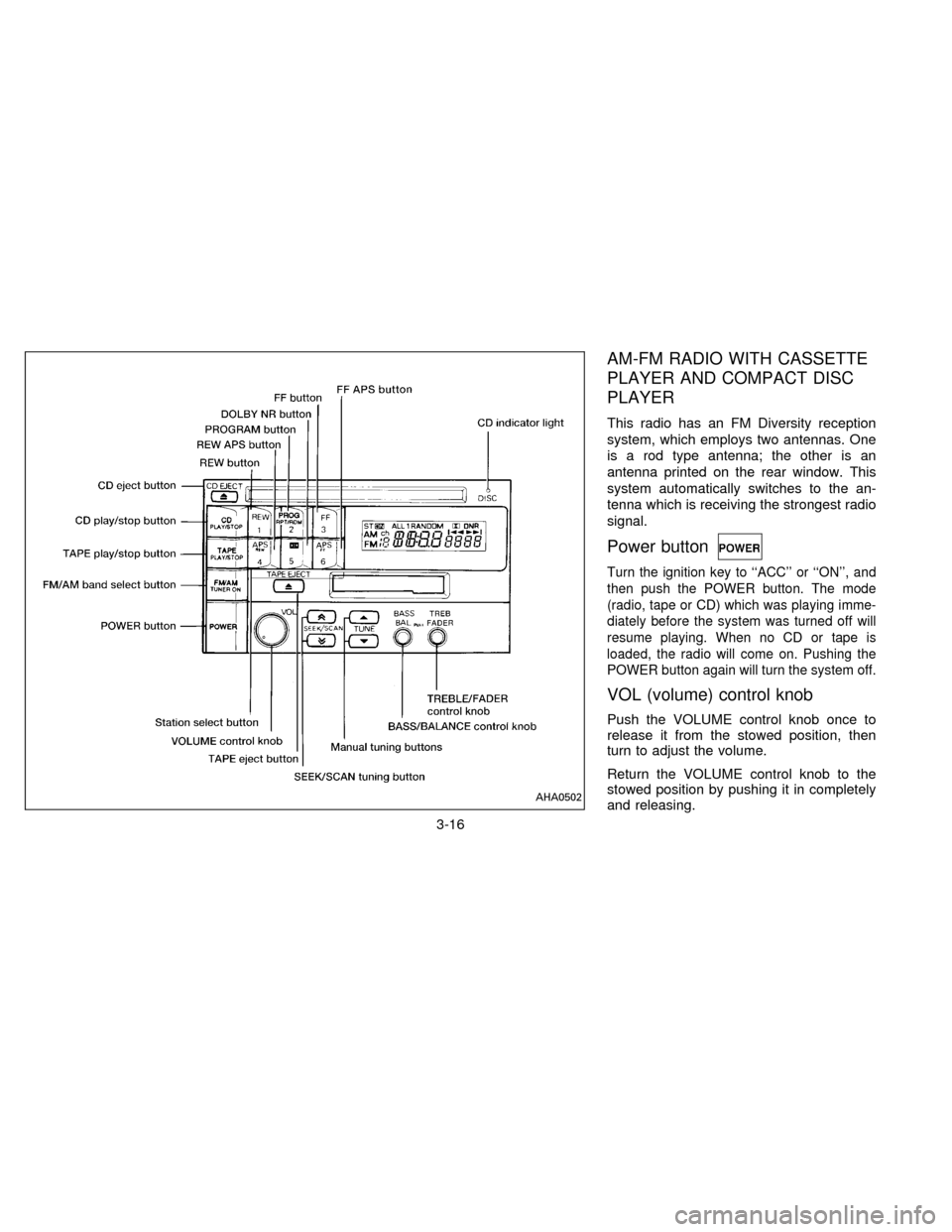
AM-FM RADIO WITH CASSETTE
PLAYER AND COMPACT DISC
PLAYER
This radio has an FM Diversity reception
system, which employs two antennas. One
is a rod type antenna; the other is an
antenna printed on the rear window. This
system automatically switches to the an-
tenna which is receiving the strongest radio
signal.
Power button
Turn the ignition key to ``ACC'' or ``ON'', and
then push the POWER button. The mode
(radio, tape or CD) which was playing imme-
diately before the system was turned off will
resume playing. When no CD or tape is
loaded, the radio will come on. Pushing the
POWER button again will turn the system off.
VOL (volume) control knob
Push the VOLUME control knob once to
release it from the stowed position, then
turn to adjust the volume.
Return the VOLUME control knob to the
stowed position by pushing it in completely
and releasing.
AHA0502
3-16
ZX
Page 75 of 183

next broadcasting station. Once the highest
broadcasting station is reached, the radio
will continue in the ªSEEKº mode at the
lowest broadcasting station. If using the
``
'' button, once the lowest broadcast-
ing station is reached, the radio will continue
in the ``SEEK'' mode at the highest broad-
casting station. Pushing the button again
will continue the ªSEEKº function.
SCAN tuning
Push the SEEK/SCAN tuning button ``
''
or ``'' for more than 1.5 seconds. SCAN
tuning begins from low to high frequencies
or high to low frequencies, depending on
which button is pressed. SCAN tuning stops
at each broadcasting station for five sec-
onds. Pushing the button again during this
five second period will stop SCAN tuning
and the radio will remain tuned to that
station.
Station memory operations
Six stations can be set for each band.
1. Tune to the desired station.
2. Push the desired select button for morethan 3 seconds. (For example, in the
diagram ch2 is to be memorized. The
radio stops playing momentarily when
the select button is pushed.)
3. The indicator ``ch2'' will then illuminate in
the display and the sound will resume.
Memorizing is now complete.
4. Other buttons can be set in the same
manner.
If the battery cable is disconnected, or if the
radio fuse blows, the radio memory will be
cancelled. In that case, reset the desired
stations.
Cassette tape operation
Turn the ignition key to ``ACC'' or ``ON'', and
then lightly insert the cassette tape into the
tape door. The cassette tape will be auto-
matically pulled into the player.
The radio or CD will turn off (if it is on) and
the cassette tape will begin to play.
Do not force the cassette tape into the
tape door.
Pressing strongly could cause player
damage.
If the system is turned off by pushing the
AHA0503
3-18
ZX