Page 157 of 240
Air Cleaner
The air cleaner element should becleaned or replaced according to the
time and distance recommendationsin the maintenance schedule. Cleaning (Severe Conditions)
Clean the air cleaner element by
blowing compressed air through it in the opposite direction to normal air
flow. If you do not have access to compressed air (such as a servicestation), ask your Honda dealer to do
this service.
Follow the replacement procedure
for removal and reinstallation.
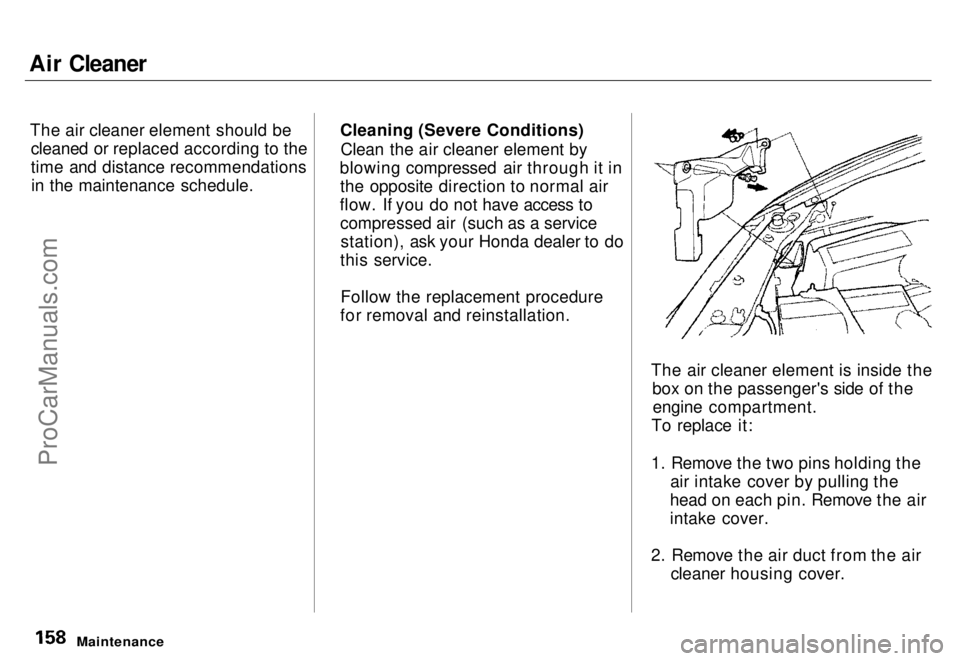
The air cleaner element is inside thebox on the passenger's side of theengine compartment.
To replace it:
1. Remove the two pins holding the air intake cover by pulling the
head on each pin. Remove the air
intake cover.
2. Remove the air duct from the air cleaner housing cover.
MaintenanceProCarManuals.comMain Menu s t Table of Contents
Page 158 of 240
Air Cleaner
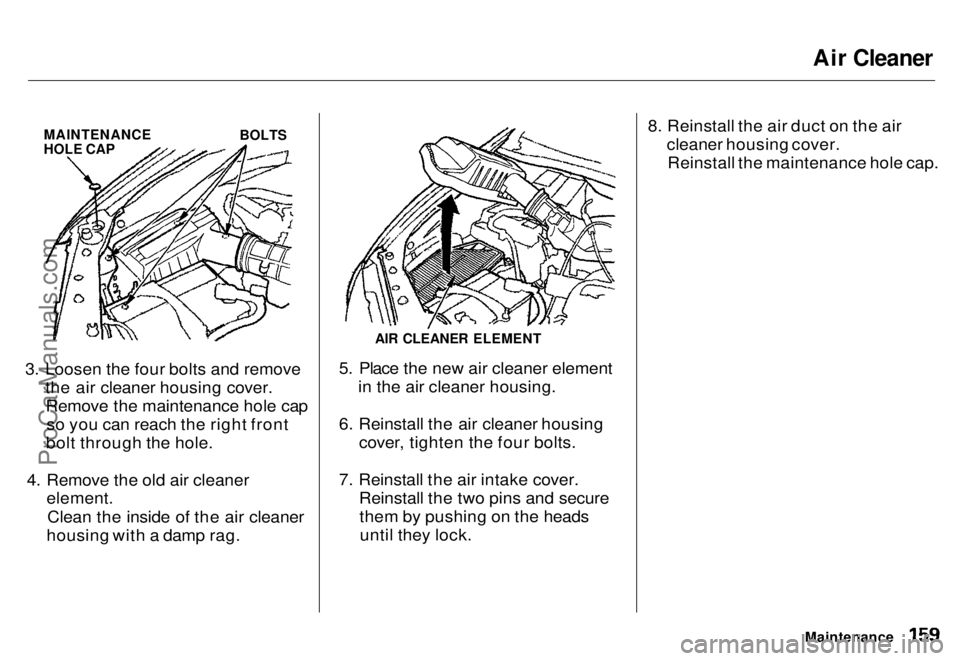
MAINTENANCE
HOLE CAP
BOLTS
3. Loosen the four bolts and remove the air cleaner housing cover.Remove the maintenance hole cap so you can reach the right front
bolt through the hole.
4. Remove the old air cleaner element.
Clean the inside of the air cleaner
housing with a damp rag.
AIR CLEANER ELEMENT
5. Place the new air cleaner element in the air cleaner housing.
6. Reinstall the air cleaner housing cover, tighten the four bolts.
7. Reinstall the air intake cover. Reinstall the two pins and securethem by pushing on the headsuntil they lock. 8. Reinstall the air duct on the air
cleaner housing cover.Reinstall the maintenance hole cap.
MaintenanceProCarManuals.comMain Menu s t Table of Contents
Page 159 of 240
Spark Plugs
The spark plugs in your car need to be replaced every 2 years or 48,000
km (30,000 miles), whichever comes
first.
Replacement
SPARK PLUG CAP
1. Clean up any dirt and oil around the spark plug caps.
2. Remove the spark plug cap by pulling it straight out.
3. Remove the spark plug with a 16 mm (5/8 inch) spark plug socket. 4. Put the new spark plug into the
socket, then thread it into the hole
Screw it in by hand so you do not
crossthread it
MaintenanceProCarManuals.comMain Menu s t Table of Contents
Page 160 of 240
Spark Plugs
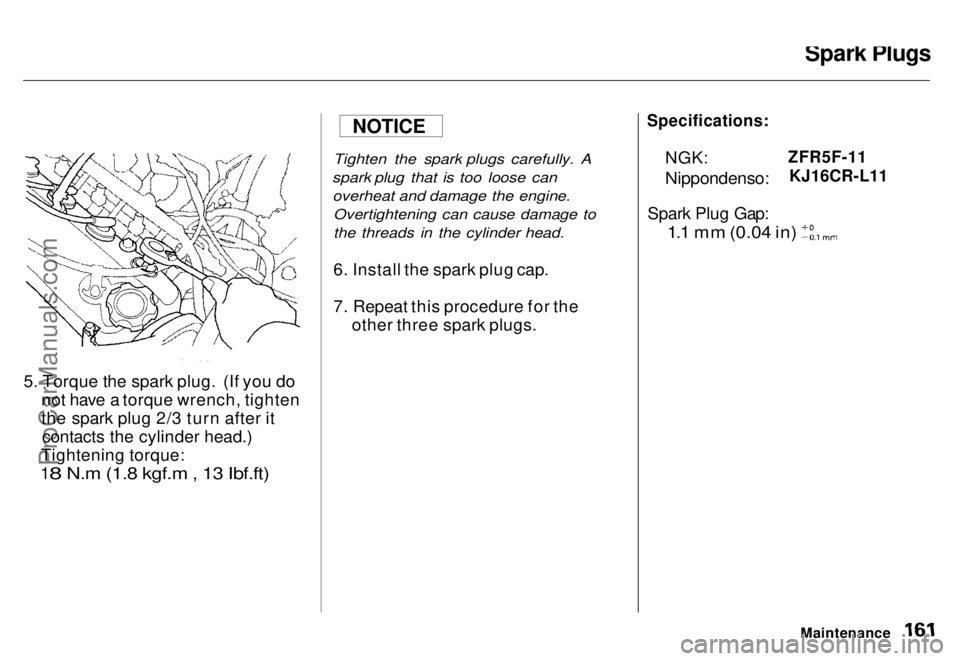
5. Torque the spark plug. (If you do not have a torque wrench, tighten
the spark plug 2/3 turn after itcontacts the cylinder head.)
Tightening torque:
18 N.m (1.8 kgf.m , 13 Ibf.ft)
Tighten the spark plugs carefully. A
spark plug that is too loose can overheat and damage the engine. Overtightening can cause damage to
the threads in the cylinder head.
6. Install the spark plug cap.
7. Repeat this procedure for the other three spark plugs.
Specifications:
NGK:
Nippondenso:
Spark Plug Gap:
ZFR5F-11
KJ16CR-L11
1.1 mm (0.04 in)
Maintenance
NOTICE
ProCarManuals.comMain Menu s t Table of Contents
Page 161 of 240
Battery
Check the condition of your car's
battery monthly. You should check for proper electrolyte level andcorrosion on the terminals. Emergency Procedures
Eyes — Flush with water from a cup
or other container for at least fifteen
minutes. (Water under pressure can damage the eye.) Immediately call a
physician or 911.
Skin — Remove contaminated
clothing. Flush the skin with large quantities of water. Call a physician
immediately.
Swallowing — Drink water or milk.Call your local Poison Control Center
or a physician immediately.
Maintenance
The battery contains sulfuric
acid (electrolyte) which is highly
corrosive and poisonous.
Getting electrolyte in your eyes
or on your skin can cause
serious burns.
Wear protective clothing andeye protection when workingnear the battery.ProCarManuals.comMain Menu s t Table of Contents
Page 162 of 240
Battery
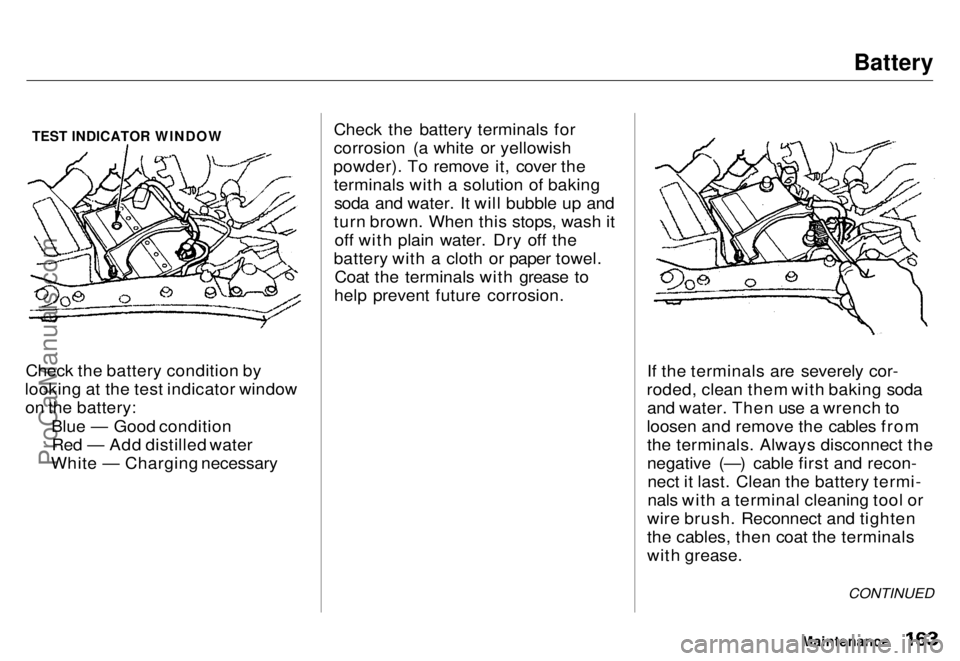
TEST INDICATOR WINDOW
Check the battery condition by
looking at the test indicator window on the battery:
Blue — Good conditionRed — Add distilled water
White — Charging necessary Check the battery terminals for
corrosion (a white or yellowish
powder). To remove it, cover the terminals with a solution of bakingsoda and water. It will bubble up and
turn brown. When this stops, wash it off with plain water. Dry off the
battery with a cloth or paper towel. Coat the terminals with grease to
help prevent future corrosion.
If the terminals are severely cor-
roded, clean them with baking soda and water. Then use a wrench to
loosen and remove the cables from the terminals. Always disconnect the
negative (—) cable first and recon-nect it last. Clean the battery termi-
nals with a terminal cleaning tool or
wire brush. Reconnect and tighten
the cables, then coat the terminals
with grease.
Maintenance
CONTINUEDProCarManuals.comMain Menu s t Table of Contents
Page 163 of 240
Battery
If you need to connect the battery to
a charger, disconnect both cables to
prevent damage to the car's electri-
cal system.
On the U.S. EX model
If your car's battery is disconnected
or goes dead, the audio system will disable itself. The next time you turn
on the radio you will see "Code" in
the frequency display. Use the
Preset buttons to enter the five-digit
code (see page 106). Charging the battery with the cables
connected can seriously damage your
car's electronic controls. Detach the
battery cables before connecting the
battery to a charger.
Maintenance
The battery gives off explosive
hydrogen gas during normal
operation.
A spark or flame can cause the battery to explode with enough
force to kill or seriously hurt you.
Wear protective clothing and a
face shield, or have a skilled mechanic do the battery
maintenance.
NOTICEProCarManuals.comMain Menu s t Table of Contents
Page 164 of 240
Windshield Wipers
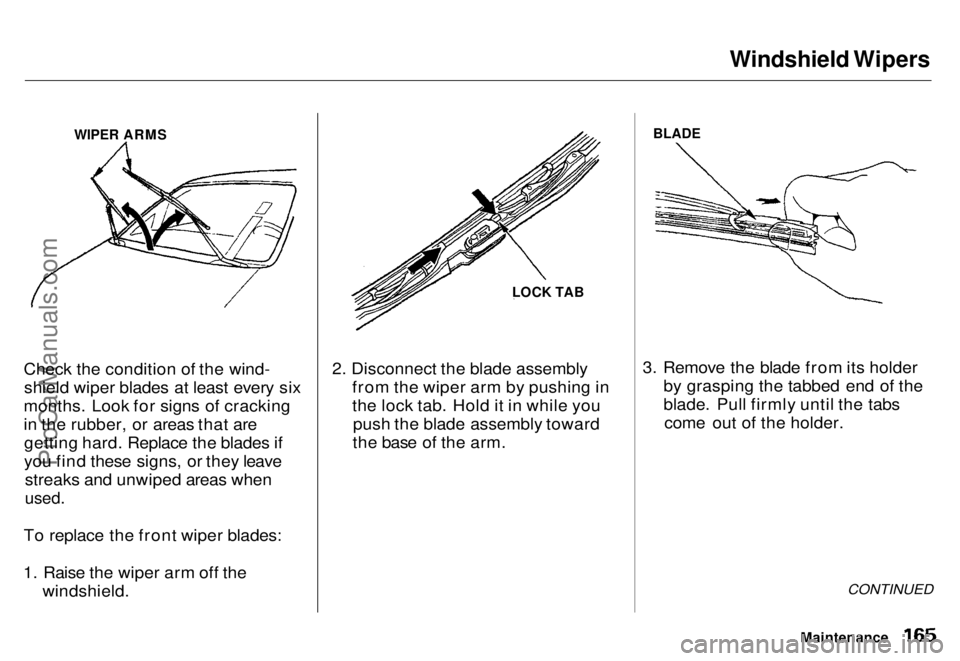
WIPER ARMS
Check the condition of the wind- shield wiper blades at least every six
months. Look for signs of cracking
in the rubber, or areas that are getting hard. Replace the blades if
you find these signs, or they leave streaks and unwiped areas when
used.
To replace the front wiper blades:
1. Raise the wiper arm off the windshield. 2. Disconnect the blade assembly
from the wiper arm by pushing in
the lock tab. Hold it in while youpush the blade assembly toward
the base of the arm.
BLADE
3. Remove the blade from its holder by grasping the tabbed end of the
blade. Pull firmly until the tabscome out of the holder.
CONTINUED
Maintenance
LOCK TABProCarManuals.comMain Menu s t Table of Contents