1996 GMC SIERRA ECU
[x] Cancel search: ECUPage 65 of 404
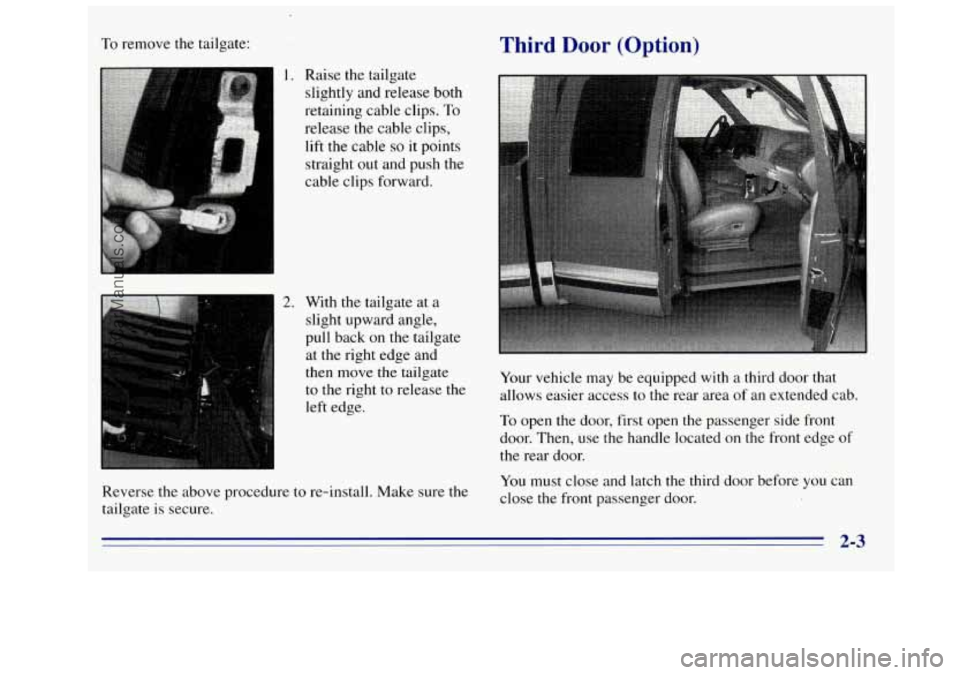
To remove the tailgate:
1. Raise the tailgate
slightly and release both
retaining cable clips.
To
release the cable clips,
lift the cable
so it points
straight
out and push the
cable clips forward.
2. With the tailgate at a
slight upward angle,
pull back on the tailgate
at the right edge and
then move the tailgate
to the right to release the
left edge.
Reverse the above procedure
to re-install. Make sure the
tailgate is secure.
Third Door (Option)
Your vehicle may be equipped with a third door that
allows easier access
to the rear area of an extended cab.
To open the door, first open the passenger side front
door. Then, use
the handle located on the front edge of
the rear door.
You must close and latch the third door before you can
close the front passenger
door.
2-3
ProCarManuals.com
Page 146 of 404
If the disc comes back out and ERR appears on the
display, it could be that:
The disc is upside down.
It is dirty, scratched or wet.
There’s too much moisture in the air. (Wait about an
hour and try again.)
You are driving on a very rough road.
Please contact your dealer
if any error recurs or cannot
be corrected.
TAPE AUX: With a disc loaded in the player and the
radio playing, press this button once to play the compact
disc.
To return to playing the radio, press AM-FM. If
both a cassette tape and CD are loaded, press TAPE
AUX to switch between the tape and compact disc.
SEEK: Press the left arrow while playing a CD to go
back to the start of the current track. It will go back to
the current track if more than eight seconds have played.
Press
the left arrow again to go to previous tracks. Press
the right arrow
to go to the next higher track on the disc.
PREV (1): Press this button to go back to the start of the
current track if more than eight seconds have played.
Press PREV again to
go to the previous track on the disc.
PROG (2): This button is active only when you have
the 12-disc changer.
NEXT (3): Press this button to advance to the next track
on the disc.
REV (4): Press and hold this button to quickly reverse
within a track (song). As the CD reverses, elapsed time
will be displayed
to help you find the correct passage.
FWD (6): Press and hold this button to quickly advance
within a track (song). As the CD advances, elapsed time
will be displayed to help you find the correct passage.
RANDOM: Press P.SCAN to enter the random play
mode. RANDOM
will appear on the display. While in
this mode, the tracks on the discs will be played in
random order. If you press SEEK, PREV or NEXT
while
in the random mode, the PREV or NEXT track
will be scanned randomly. Press P.SCAN again
to turn
off RANDOM and return to normal operation.
EJECT: Press this button on the remote player to eject
a compact disc.
RECALL: Press this button to see what track is
currently playing. Press RECALL again within
five
seconds to see how long the track has been playing.
When
a new track starts to play, the track number will
also appear. Press RECALL
a third time and the time of
day will be displayed.
3-16
ProCarManuals.com
Page 151 of 404

Theft-Deterrent Feature
THEFTLOCK" is designed to discourage theft of your
radio.
It works by using a secret code to disable all radio
functions whenever battery power
is removed.
The
THEFTLOCK feature for the radio may be used or
ignored.
If ignored, the system plays normally and the
radio is not protected by the feature. If THEFTLOCK is
activated, your radio
will not operate if stolen.
When
THEFTLOCK is activated, the radio will display
LOC to indicate a locked condition anytime battery
power
is removed. If your battery loses power for any
reason, you must unlock the radio with the secret code
before
it will operate.
Activating the Theft-Deterrent Feature
The instructions which follow, explain how to enter your
secret code
to activate the THEFTLOCK system. It is
recommended that
you read through all nine steps
before starting the procedure.
NOTE: If you allow more than 15 seconds to elapse
between any steps, the radio automatically reverts to
time and you must start the procedure over at Step
4.
1. Write down any three or four-digit number from
000 to 1999 and keep it in a safe place separate from
the vehicle.
2.
3,
4.
5.
6.
7.
8.
9.
Turn the ignition to the ACCESSORY or
RUN position.
Turn the radio
off.
Press the 1 and 4 buttons together. Hold them down
until
--- shows on the display. Next you will use the
secret code number which
you have written down.
Press
MN and 000 will appear on the display.
Press
MN again to make the last two digits agree
with your code.
Press
HR to make the first one or two digits agree
with your code.
Press
AM-FM after you have confirmed that the
code matches the secret code
you have written down.
The display
will show REP to let you know that you
need to repeat Steps 5 through 7 to confirm your
secret code.
Press
AM-FM and this time the display will show
SEC to let you know that
your radio is secure. The
indicator by the volume control
will begin flashing
when the ignition
is turned off.
ProCarManuals.com
Page 152 of 404

Unlocking the Theft-Deterrent Feature After
a Power
Loss
Enter your secret code as follows; pause no more than
15 seconds between steps:
1. LOC appears when the ignition is on.
2. Press MN and 000 will appear on the display.
3. Press MN again to make the last two digits agree
4. Press HR to make the first one or two digits agree
with your code.
with your code.
5. Press AM-FM after you have confirmed that the
code matches the secret code you have written down.
The display will show
SEC, indicating the radio is
now operable and secure.
If you enter
the wrong code eight times, INOP will
appear on the display.
You will have to wait an hour
with the ignition on before you can try again. When
you try again, you will only have three chances to enter
the correct code before
INOP appears.
If
you lose or forget your code, contact your dealer.
Disabling the Theft-Deterrent Feature
Enter your secret code as follows; pause no more than
15 seconds between steps:
1. Turn the ignition to the ACCESSORY or RUN position.
2. Turn the radio off.
3. Press the 1 and 4 buttons together. Hold them down
4. Press MN and 000 will appear on the display.
until
SEC shows on the display.
5. Press MN again to make the last two digits
agree
6. Press HR to make the first one or two digits agree
7. Press AM-FM after you have confirmed that the
with
your code.
with your code.
code matches the secret code you have written down.
The display will show
---, indicating that the radio is
no longer secured.
If the code entered is incorrect,
SEC will appear on the
display. The radio will remain secured
until the correct
code is entered.
When battery power is disconnected from a secured
radio,
the radio won’t turn on and LOC will appear on
the display.
To unlOck
a secured radio, see “Unlocking the
Theft-Deterrent Feature After
a Power Loss” earlier
in this section.
3-22
ProCarManuals.com
Page 168 of 404
Before You Go Off-Roading
There are some things to do before you go out. For
example,
be sure to have all necessary maintenance and
service work done. Check
to make sure all underbody
shields (if
so equipped) are properly attached. Be sure
you read all the information about your four-wheel-drive
vehicle in
this manual. Is there enough fuel? Is the spare
tire fully inflated? Are
the fluid levels up where they
should be? What are the local laws that apply
to
off-roading where you’ll be driving? If you don’t know,
you should check with law enforcement people in the
area. Will you be on someone’s private land? If so, be
sure to get the necessary permission.
Loading Your Vehicle for Off-Road Driving
There are some important things to remember about
how
to load your vehicle.
The heaviest things should be on the load floor and
forward
of your rear axle. Put heavier items as far
forward
as you can.
Be sure the load is secured properly, so driving on
the off-road terrain doesn’t toss things around.
4 CAUTION: ‘ ’
0
0
e
Cargo on the load floor piled higher than
the seatbacks can be thrown forward
during a sudden stop.
You or your
passengers could be injured. Keep cargo
below the top of the seatbacks.
Unsecured cargo
on the load floor can
be tossed about when driving over rough
terrain.
You or your passengers can
be struck by flying objects. Secure the
cargo properly. Heavy
loads on the roof raise the vehicle’s
center of gravity, making it more likely to
roll over.
You can be seriously or fatally
injured if the vehicle rolls over. Put heavy
loads inside the cargo area, not on the roof.
Keep cargo in the cargo
area as far forward
and low as possible.
You’ll find other important information
in this manual.
See “Vehicle Loading,” “Luggage Carrier” and “Tires”
in the Index.
4-14
ProCarManuals.com
Page 192 of 404
Winter Driving
Here are some tips for winter driving:
0 Have your vehicle in good shape for winter.
0 You may want to put winter emergency supplies in
your vehicle. 1nclude.an ice
scraper, a small brush
or broom, a supply
of windshield washer fluid, a rag, some winter outer
clothing, a small shovel, a flashlight, a red cloth and a
,
couple of reflective warning triangles. And, if you will
be driving under severe conditions, include
a small bag
of sand, a piece of old carpet or a couple of burlap bags
to help provide traction. Be sure you properly secure
these items in your vehicle.
Driving on Snow or Ice
Most of the time, those places where your tires meet the
road probably have good traction.
However,
if there is snow or ice between your tires
and the road,
you can have a very slippery situation.
You’ll have a lot less traction or “grip” and will need
to be very careful.
4-3s
ProCarManuals.com
Page 196 of 404

Loading Your Vehicle
n ", ,. , I --- SEE OWNER'S MANUAL FOR ADDITIONAL INFORMATION I U
The Certificatiomire label is found on the rear edge of
the driver's door or in the Incomplete Vehicle Document
in the cab.
The label shows the size of your original tires and the
inflation pressures needed to obtain the gross weight
capacity
of your vehicle. This is called the GVWR
(Gross Vehicle Weight Rating).
The GVWR includes the
weight of the vehicle, all occupants, fuel and cargo.
The Certificationmire label also tells
you the maximum
weights for the front and rear axles, called Gross
Axle
Weight Rating (GAWR). To find out the actual loads on your
front and rear axles,
you need to go to a weigh
station and weigh your vehicle. Your dealer can help
you with this. Be sure to spread out your load equally on
both sides of the centerline.
Never exceed the GVWR for your vehicle, or the
GAWR for either the front or rear axle.
And,
if you do have a heavy load, you should spread
it
out.
I
In the case of a sudden stop or collision, things
carried in the bed
of your truck could shift
forward and come into the passenger area,
injuring you and others.
If you put things in the
bed
of your truck, you should make sure they are
properly secured.
Using heavier suspension components to get added
durability might not change your weight ratings. Ask
your dealer to help you load your vehicle the right way.
4-42
ProCarManuals.com
Page 197 of 404

Do not load your vehicle any heavier than the
GVWR, or either the maximum front or rear
GAWR. If you do, parts on your vehicle can break,
or it can change the
way your vehicle handles.
These could cause you to lose control. Also,
overloading can shorten the life of your vehicle.
NOTICE:
Your warranty dose not cover parts or
components that fail because
of overloading.
If you put things inside your vehicle -- like suitcases,
tools, packages, or anything else
-- they go as fat as the
vehicle goes. If you have to stop or turn quickly, or if
there is a crash, they’ll keep going.
CriUTdN:
r
Things you put inside your vehicle can strike
and injure people in
a sudden stop or turn, or
in
a crash.
0 Put things in the cargo area of your vehicle.
Try to spread the weight evenly.
Never stack heavier things, like suitcases,
inside the vehicle
so that some of them are
above the tops
of the seats.
0 Don’t leave an unsecured child restraint in
your vehicle.
When you carry something inside the
vehicle, secure it whenever you can.
0 Don’t leave a seat folded down unless you
need to.
There’s also important loading information for off-road
driving
in this manual. See ”Loading Your Vehicle” in
the Index.
ProCarManuals.com