Page 109 of 444
109
Instrument Panel Controls
[IP00250( X)12/95]
33-1/2 pica
art:0090198-B
Instrument Panel & Controls
File:06unipx.ex
Update:Thu Feb 29 09:05:45 1996
Page 110 of 444
![FORD EXPLORER 1996 2.G Owners Manual 110
[IP00400( X)03/95]
The main controls for the climate control system, lights, message
center, lamps, clocks and radio are on the instrument panel.
%*
[IP00475(ALL)09/95]
NOTE: Any cleaner or polish](/manual-img/11/4952/w960_4952-109.png "FORD EXPLORER 1996 2.G Owners Manual 110
[IP00400( X)03/95]
The main controls for the climate control system, lights, message
center, lamps, clocks and radio are on the instrument panel.
%*
[IP00475(ALL)09/95]
NOTE: Any cleaner or polish")
110
[IP00400( X)03/95]
The main controls for the climate control system, lights, message
center, lamps, clocks and radio are on the instrument panel.
%*
[IP00475(ALL)09/95]
NOTE: Any cleaner or polish that increases the gloss (shine)
of the upper part of the instrument panel should be
avoided. The dull finish in this area is to help protect
the driver from undesirable windshield reflection.
%*
[IP00500(ALL)06/95]
The Climate Control Systems
*
[IP00601(ALL)12/91]
Your vehicle is equipped with a control assembly designed to
handle either a combination A/C-Heater System or a
Heater-Only System.
%*
[IP00801(ALL)10/93]
Instrument Panel Registers
*
[IP00901(ALL)02/95]
There are four registers in the instrument panel. Each of these
registers contains a louver assembly which can be manually
adjusted to direct airflow up, down, left and right. An
illustration of the register locations follows.
[IP01201(ALL)04/94]
7-1/2 pica art:0020099-D
Instrument panel registers
[IP01400(ALL)12/91]
Air Conditioning (A/C) Controls (Manual Air
Conditioning)
*
[IP01450(ALL)02/95]
The control for your air conditioning and heater system is
located at the center of the instrument panel below the radio
and will operate only when the ignition key is turned to the
ON position. Your air conditioner and heater will heat and/or
cool your vehicle interior depending on the function position
File:06unipx.ex
Update:Thu Feb 29 09:05:45 1996
Page 111 of 444
Instrument Panel Controls
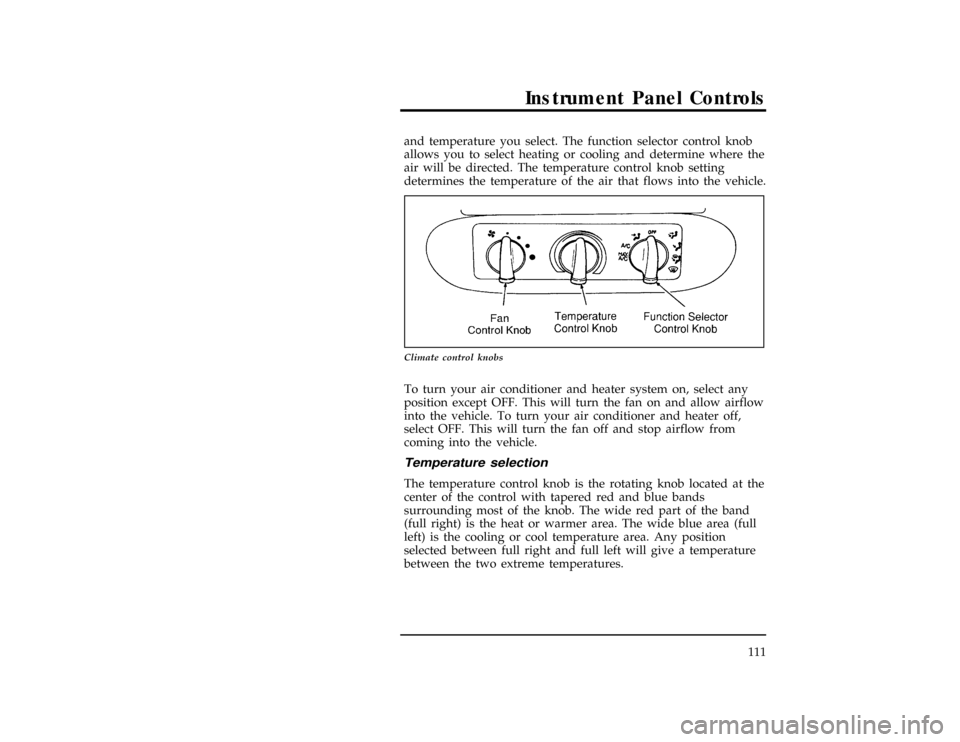
111 and temperature you select. The function selector control knob
allows you to select heating or cooling and determine where the
air will be directed. The temperature control knob setting
determines the temperature of the air that flows into the vehicle.
[IP01500(ALL)03/95]
10-1/2 pica
art:0020589-G
Climate control knobs
*
[IP01550(ALL)03/95]
To turn your air conditioner and heater system on, select any
position except OFF. This will turn the fan on and allow airflow
into the vehicle. To turn your air conditioner and heater off,
select OFF. This will turn the fan off and stop airflow from
coming into the vehicle.
*
[IP01600(ALL)03/95]
Temperature selection
[IP01650(ALL)03/95]
The temperature control knob is the rotating knob located at the
center of the control with tapered red and blue bands
surrounding most of the knob. The wide red part of the band
(full right) is the heat or warmer area. The wide blue area (full
left) is the cooling or cool temperature area. Any position
selected between full right and full left will give a temperature
between the two extreme temperatures.
File:06unipx.ex
Update:Thu Feb 29 09:05:45 1996
Page 112 of 444
![FORD EXPLORER 1996 2.G Owners Manual 112
*
[IP01700(ALL)03/95]
HFan speed adjustment
[IP01750(ALL)03/95]
The
H(left) knob on the control is the fan control knob which
controls the volume of air flow. Rotate the
Hknob to the right
to incr](/manual-img/11/4952/w960_4952-111.png "FORD EXPLORER 1996 2.G Owners Manual 112
*
[IP01700(ALL)03/95]
HFan speed adjustment
[IP01750(ALL)03/95]
The
H(left) knob on the control is the fan control knob which
controls the volume of air flow. Rotate the
Hknob to the right
to incr")
112
*
[IP01700(ALL)03/95]
HFan speed adjustment
[IP01750(ALL)03/95]
The
H(left) knob on the control is the fan control knob which
controls the volume of air flow. Rotate the
Hknob to the right
to increase fan speed and increase the amount of air entering
the vehicle. Four fan speed positions are available and are
indicated by dots beside the
Hcontrol knob. The largest dot is
high speed position.
*
[IP01800(ALL)08/94]
Airflow selections
[IP01850(ALL)08/95]
Q(Panel)
[IP01900(ALL)03/95]
UseQto bring outside air through the instrument panel
registers. You can heat the air in this position by rotating the
temperature knob into the red area. The air CANNOT be cooled
below the outside temperature regardless of the temperature
knob setting. Select A/C or MAX A/C to get cool air through
the instrument panel registers.
*
[IP01950(ALL)08/95]
A/C
[IP02000(ALL)06/94]
Select A/C to get refrigerated outside air through the
instrument panel registers. The A/C position is used for cooling
except when it is extremely hot or fast cooling of the vehicle is
needed. Then, select MAX A/C for fast cooling and return to
A/C when you are comfortable.
*
[IP02050(ALL)08/95]
MAX A/C
[IP02100(ALL)05/95]
The MAX A/C position produces cool air more rapidly to
provide faster cooling of your vehicle. This is possible because
cooler air is drawn from inside the passenger area and
refrigerated again instead of using warmer outside air. Using
inside air will also make the fan sound louder and is normal
when using MAX A/C. The air flow will be from the
instrument panel registers.
File:06unipx.ex
Update:Thu Feb 29 09:05:45 1996
Page 113 of 444
![FORD EXPLORER 1996 2.G Owners Manual Instrument Panel Controls
113
[IP02150(ALL)08/95]
S(Panel and Floor)
[IP02200(ALL)03/95]
SelectSto direct airflow to the floor and through the
instrument panel registers at the same time. This selecti](/manual-img/11/4952/w960_4952-112.png "FORD EXPLORER 1996 2.G Owners Manual Instrument Panel Controls
113
[IP02150(ALL)08/95]
S(Panel and Floor)
[IP02200(ALL)03/95]
SelectSto direct airflow to the floor and through the
instrument panel registers at the same time. This selecti")
Instrument Panel Controls
113
[IP02150(ALL)08/95]
S(Panel and Floor)
[IP02200(ALL)03/95]
SelectSto direct airflow to the floor and through the
instrument panel registers at the same time. This selection can
be used to either heat or cool your vehicle. The air conditioner
will operate to cool the air if the outside temperature is about
50ÊF (10ÊC) orwarmer.
*
[IP02250(ALL)08/95]
R(Floor)
[IP02300(ALL)03/95]
SelectRto direct air to the floor. The air cannot be cooled in
theRposition but can be heated by rotating the temperature
knob into the red area.
[IP02350(ALL)08/95]
P(Floor and Defrost)
[IP02400(ALL)03/95]
SelectPto direct air to the floor and windshield defrosters at
the same time. If the outside temperature is about50ÊF (10ÊC)
or warmer, the air will also be dehumidified to remove
moisture. This feature will help prevent fogging in humid
weather. The air can be cooled or heated.
%*
[IP02450(ALL)08/95]
V(Defrost)
[IP02500(ALL)03/95]
SelectVto obtain maximum airflow to the windshield. Rotate
the temperature knob into the red area for the air temperature
required to defrost. When the outside temperature is about50ÊF
(10ÊC) or warmer, the airwill be dehumidified to remove
moisture. Rotate the
Hknob to increase the airflow.
File:06unipx.ex
Update:Thu Feb 29 09:05:45 1996
Page 114 of 444
![FORD EXPLORER 1996 2.G Owners Manual 114
*
[IP02550(ALL)04/95]
Operating tips
*
[IP02600(ALL)02/95]
The following tips will help you to get the most satisfaction
from your air conditioning and heater system.
[IP02650(ALL)03/95]
n
In humi](/manual-img/11/4952/w960_4952-113.png "FORD EXPLORER 1996 2.G Owners Manual 114
*
[IP02550(ALL)04/95]
Operating tips
*
[IP02600(ALL)02/95]
The following tips will help you to get the most satisfaction
from your air conditioning and heater system.
[IP02650(ALL)03/95]
n
In humi")
114
*
[IP02550(ALL)04/95]
Operating tips
*
[IP02600(ALL)02/95]
The following tips will help you to get the most satisfaction
from your air conditioning and heater system.
[IP02650(ALL)03/95]
n
In humid weather, selectVbefore starting your engine.
This will help to prevent windshield fogging. After a few
minutes of operation, you may select another function.
[IP02700(ALL)03/95]
n
To prevent humidity buildup inside your vehicle, always
drive with the air conditioner or heater system turned on.
*
[IP02750(ALL)03/95]
n
Do not put objects under the front seats that interfere with
the flow of air to the back seat area.
[IP02800(ALL)03/95]
n
Remove any snow, ice, or leaves from the air intake area of
your air conditioner and heater system that could block the
air intake. The intake area is located at the bottom of the
windshield.
[IP04500( X)03/95]
Electronic Automatic Temperature Control
(If equipped)
[IP04600( X)03/95]
The control for your Electronic Automatic Temperature Control
(EATC) is located at the center of the instrument panel below
the radio and will operate only when the ignition key is turned
on to the ON position.
[IP04700( X)03/95]
The EATC feature will maintain the temperature you select and
automatically control the airflow for your comfort. It also allows
you to override the automatic operation with manual override
buttons.
File:06unipx.ex
Update:Thu Feb 29 09:05:45 1996
Page 115 of 444
Instrument Panel Controls
115
[IP04800( X)03/95]
17-1/2 pica
art:0090132-A
Electronic automatic temperature control system
*
[IP04850( X)02/95]
To turn your EATC on, push the AUTOMATIC button or any
of the six override buttons along the bottom of the control.
[IP04900( X)03/95]
To turn your EATC off, press the OFF button. When the system
is off, the display window will be blank (dark) when the
ignition is on. The display will also be blank (dark) when the
ignition is off.
*
[IP05000( X)01/95]
If you select AUTOMATIC, the system will automatically
determine fan speed and airflow location. If an override button
is selected, your selection determines airflow location only. Fan
speed remains automatic unless you override it by rotating the
vertical thumbwheel located at the extreme right of the control
panel.
File:06unipx.ex
Update:Thu Feb 29 09:05:45 1996
Page 117 of 444
Instrument Panel Controls
117
[IP05400( X)03/95]
10-1/2 pica
art:0090125-A*
[IP05500( X)01/95]
Automatic operation
*
[IP05600( X)02/95]
Push the AUTOMATIC button and select the desired
temperature. The selected temperature and AUTO will be shown
in the display window. The EATC will automatically heat or
cool to achieve the set temperature. Under normal conditions,
your EATC will need no additional attention.
[IP05700( X)03/95]
10-1/2 pica
art:0090126-AFile:06unipx.ex
Update:Thu Feb 29 09:05:45 1996
![FORD EXPLORER 1996 2.G Owners Manual 109
Instrument Panel Controls
[IP00250( X)12/95]
33-1/2 pica
art:0090198-B
Instrument Panel & Controls
File:06unipx.ex
Update:Thu Feb 29 09:05:45 1996](/manual-img/11/4952/w960_4952-108.png "FORD EXPLORER 1996 2.G Owners Manual 109
Instrument Panel Controls
[IP00250( X)12/95]
33-1/2 pica
art:0090198-B
Instrument Panel & Controls
File:06unipx.ex
Update:Thu Feb 29 09:05:45 1996")
![FORD EXPLORER 1996 2.G Owners Manual Instrument Panel Controls
115
[IP04800( X)03/95]
17-1/2 pica
art:0090132-A
Electronic automatic temperature control system
*
[IP04850( X)02/95]
To turn your EATC on, push the AUTOMATIC button or any
o](/manual-img/11/4952/w960_4952-114.png "FORD EXPLORER 1996 2.G Owners Manual Instrument Panel Controls
115
[IP04800( X)03/95]
17-1/2 pica
art:0090132-A
Electronic automatic temperature control system
*
[IP04850( X)02/95]
To turn your EATC on, push the AUTOMATIC button or any
o")
![FORD EXPLORER 1996 2.G Owners Manual Instrument Panel Controls
117
[IP05400( X)03/95]
10-1/2 pica
art:0090125-A*
[IP05500( X)01/95]
Automatic operation
*
[IP05600( X)02/95]
Push the AUTOMATIC button and select the desired
temperature. Th](/manual-img/11/4952/w960_4952-116.png "FORD EXPLORER 1996 2.G Owners Manual Instrument Panel Controls
117
[IP05400( X)03/95]
10-1/2 pica
art:0090125-A*
[IP05500( X)01/95]
Automatic operation
*
[IP05600( X)02/95]
Push the AUTOMATIC button and select the desired
temperature. Th")