1996 FORD AEROSTAR ECO mode
[x] Cancel search: ECO modePage 147 of 353
![FORD AEROSTAR 1996 1.G Owners Manual 166 [AS04175(ALL)08/95]
To stop the scan mode on the presently
sampled station press the ªSCAN/TUNEº
button again.
[AS04200(ALL)08/95]
q
Setting the Station Memory Preset buttons
[AS04225(ALL)08/95]](/manual-img/11/4751/w960_4751-146.png "FORD AEROSTAR 1996 1.G Owners Manual 166 [AS04175(ALL)08/95]
To stop the scan mode on the presently
sampled station press the ªSCAN/TUNEº
button again.
[AS04200(ALL)08/95]
q
Setting the Station Memory Preset buttons
[AS04225(ALL)08/95]")
166 [AS04175(ALL)08/95]
To stop the scan mode on the presently
sampled station press the ªSCAN/TUNEº
button again.
[AS04200(ALL)08/95]
q
Setting the Station Memory Preset buttons
[AS04225(ALL)08/95]
Your radio is equipped with 5 station
memory buttons. These buttons can be used
to select up to 5 preset AM stations and 10
FM stations (5 in FM1 and 5 in FM2).
[AS04250(ALL)08/95]
Follow the easy steps below to set these buttons
to the desired frequencies:
[AS04275(ALL)08/95]
1. Select a band, then select a frequency.
[AS04300(ALL)08/95]
2. Press one of the memory buttons and hold
the button until the sound returns. That
station is now held in memory on that
button.
[AS04325(ALL)08/95]
3. Follow the two steps above for each station
memory preset button you want to set.
[AS04350(ALL)08/95]
NOTE: If the vehicle's battery is disconnected,
the station memory preset buttons (if
programmed in auto mode) will need
to be reset.
*
[AS04375(ALL)08/95]
q
Using the Automatic Memory Load feature
*
[AS04400(ALL)08/95]
You can activate theAuto Memory Load
feature by pressing and holding the ªAUTO
PRESETº buttonfor approximately three
seconds. Auto Memory Load sets all memory
buttons in AM, FM1 and FM2 sequentially by
seeking out the first five strong stations for
the respective band and storing them in
memory buttons 1-5. (FM2 will store the
second set of strong stations from the FM
band.)
File:09cpasa.ex
Update:Tue Aug 29 17:42:51 1995
Page 151 of 353
![FORD AEROSTAR 1996 1.G Owners Manual 170
*
[AS05075(ALL)08/95]
q
Using the ªSEEKº function with your cassette
tape player
*
[AS05100(ALL)08/95]
While in the tape mode, push the right (
a)
side of the ªSEEKº button to seek forward to](/manual-img/11/4751/w960_4751-150.png "FORD AEROSTAR 1996 1.G Owners Manual 170
*
[AS05075(ALL)08/95]
q
Using the ªSEEKº function with your cassette
tape player
*
[AS05100(ALL)08/95]
While in the tape mode, push the right (
a)
side of the ªSEEKº button to seek forward to")
170
*
[AS05075(ALL)08/95]
q
Using the ªSEEKº function with your cassette
tape player
*
[AS05100(ALL)08/95]
While in the tape mode, push the right (
a)
side of the ªSEEKº button to seek forward to
the next selection on the tape. Push the left
(
b) side to seek the previous tape selection.
*
[AS05125(ALL)08/95]
NOTE: If you want to restart a currently
playing tape selection, press the left
(
b) side of the ªSEEKº button after
approximately three seconds into the
current selection.
*
[AS05150(ALL)08/95]
Whirling sprockets in the display (
l
) indicate
the direction of tape travel.
*
[AS05175(ALL)08/95]
q
Using the ªSCANº function with your
cassette tape player
*
[AS05200(ALL)08/95]
Press the ªSCAN/TUNEº button to enter the
scan mode (display indicates ªSCNº).
Pushing the right (
a) side of the ªSEEKº
button will begin the forward scan mode on
the tape currently playing, stopping on each
tape selection for approximately an
eight-second sampling.
*
[AS05225(ALL)08/95]
Pushing the left (
b) side of the ªSEEKº
button will begin the reverse scan mode,
stopping on each previous tape selection for
approximately an eight-second sampling.
While scanning, the display indicates whirling
sprockets plus an ªSº (m).
*
[AS05250(ALL)08/95]
To stop the scan mode on the presently
sampled tape selection press the
ªSCAN/TUNEº button again.
*
[AS05275(ALL)08/95]
q
How to change the side of the tape being
played
*
[AS05300(ALL)08/95]
The alternate track of the tape can be selected
anytime by pressing the ªPLAY/PROGº
button.
File:09cpasa.ex
Update:Tue Aug 29 17:42:51 1995
Page 152 of 353
![FORD AEROSTAR 1996 1.G Owners Manual 171
*
[AS05325(ALL)08/95]
How to eject the tape
*
[AS05350(ALL)08/95]
To stop the tape and eject the cassette, press the
ªEJCTº button. The radio will resume playing if
the radio power is on. The ta](/manual-img/11/4751/w960_4751-151.png "FORD AEROSTAR 1996 1.G Owners Manual 171
*
[AS05325(ALL)08/95]
How to eject the tape
*
[AS05350(ALL)08/95]
To stop the tape and eject the cassette, press the
ªEJCTº button. The radio will resume playing if
the radio power is on. The ta")
171
*
[AS05325(ALL)08/95]
How to eject the tape
*
[AS05350(ALL)08/95]
To stop the tape and eject the cassette, press the
ªEJCTº button. The radio will resume playing if
the radio power is on. The tape cartridge can be
ejected with radio power (and/or ignition) on or
off.
*
[AS05375(ALL)08/95]
How to store the tape
*
[AS05400(ALL)08/95]
Press the ªAM/FMº button to stop the tape
player and resume radio play. The cassette will
be stored in the tape player and the
Xsymbol
in the display will be lit until you push the
ªPLAY PROGº button to resume tape play. Fast
forward and fast rewind can be used while the
tape is in storage mode without interrupting
radio play.
*
[AS05425(ALL)08/95]
Using the DolbyHB noise reduction feature
*
[AS05450(ALL)08/95]
NOTE: Noise reduction system manufactured
under license from Dolby Labs
Licensing Corporation. ªDolbyº and
double-D symbol are trademarks of
Dolby Laboratories Licensing
Corporation.
*
[AS05475(ALL)08/95]
Push thekbutton to activate. When on, the
ksymbol above the button will be lit.
%*
[AS05500(ALL)08/95]
Clock Operation
*
[AS05525(ALL)08/95]
How to view the clock mode
*
[AS05550(ALL)08/95]
Press the ªCLOCKº button to alternate the
frequency and time in the display. In the clock
mode, pressing any radio function will
automatically display the radio frequency for
approximately ten seconds before changing back
to the clock mode.
File:09cpasa.ex
Update:Tue Aug 29 17:42:51 1995
Page 154 of 353
![FORD AEROSTAR 1996 1.G Owners Manual 173
*
[AS05825(ALL)08/95]
Tips on Caring for the Cassette Player and
Tapes
*
[AS05850(ALL)08/95]
In order to keep your cassette tape player
performing the way it was meant to, read and
follow these si](/manual-img/11/4751/w960_4751-153.png "FORD AEROSTAR 1996 1.G Owners Manual 173
*
[AS05825(ALL)08/95]
Tips on Caring for the Cassette Player and
Tapes
*
[AS05850(ALL)08/95]
In order to keep your cassette tape player
performing the way it was meant to, read and
follow these si")
173
*
[AS05825(ALL)08/95]
Tips on Caring for the Cassette Player and
Tapes
*
[AS05850(ALL)08/95]
In order to keep your cassette tape player
performing the way it was meant to, read and
follow these simple precautions:
*
[AS05875(ALL)08/95]
q
Using a Ford Cassette Cleaning Cartridge to
clean the tape player head after 10-12 hours
of play will help maintain the best playback
sound and proper tape operation.
*
[AS05900(ALL)08/95]
q
Only cassettes that are 90 minutes long or
less should be used. Tapes longer than 90
minutes are thinner and subject to breakage
or may jam the tape player mechanism.
*
[AS05925(ALL)08/95]
q
Protect cassettes from exposure to direct
sunlight, high humidity and extreme heat or
cold. If they are exposed to extreme
conditions, allow them to reach a moderate
temperature before playing.
*
[AS05950(ALL)08/95]
q
If a tape is loose inside the cassette, tighten it
before playing by putting your finger or a
pencil into one of the holes and turning the
hub until the tape is tight.
*
[AS05975(ALL)08/95]
q
Loose labels on cassette tapes can become
lodged in the mechanism. Remove any loose
label material before inserting cassette.
*
[AS06000(ALL)08/95]
q
Do not leave a tape in the cassette tape
player. High heat in the vehicle can cause the
cassette to warp.
File:09cpasa.ex
Update:Tue Aug 29 17:42:51 1995
Page 158 of 353
![FORD AEROSTAR 1996 1.G Owners Manual 177
*
[AS06825(ALL)08/95]
q
Using the ªAMSº function to manually tune
your radio (Stereo Cassette Radio)
[AS06850(ALL)08/95]
You can change the frequency up or down
one increment at a time by first](/manual-img/11/4751/w960_4751-157.png "FORD AEROSTAR 1996 1.G Owners Manual 177
*
[AS06825(ALL)08/95]
q
Using the ªAMSº function to manually tune
your radio (Stereo Cassette Radio)
[AS06850(ALL)08/95]
You can change the frequency up or down
one increment at a time by first")
177
*
[AS06825(ALL)08/95]
q
Using the ªAMSº function to manually tune
your radio (Stereo Cassette Radio)
[AS06850(ALL)08/95]
You can change the frequency up or down
one increment at a time by first pressing the
ªAMSº button (display shows ªTUNEº) then
within approximately five seconds pressing
and releasing either the right (
a) or left (
b)
side of the ªSEEKº button. To change
frequencies quickly, press andhold down
either the right or left side of the ªSEEKº
button.
*
[AS06875(ALL)08/95]
q
Using the ªSEEKº function
[AS06900(ALL)08/95]
Press the right (
a) side of the ªSEEKº
button to select the next listenable station up
the frequency band. Press the left (
b) side of
the button to select the next listenable station
down the frequency band. By holding the
button down, listenable stations can be
passed over to reach the desired station.
*
[AS07000(ALL)08/95]
q
Using the ªSCANº function (Stereo Cassette
Radio)
*
[AS07025(ALL)08/95]
Press the ªSCANº button to enter the scan
mode. The radio will begin scanning up the
frequency band, stopping on each listenable
station for approximately a five-second
sampling. This continues until you press the
ªSCANº button a second time.
%*
[AS07050(ALL)08/95]
Using the Controls of Your Cassette Tape
Player
*
[AS07075(ALL)08/95]
How to insert a tape
*
[AS07100(ALL)08/95]
Insert a cassette (with the open edge to the
right) firmly into the tape door opening, making
sure the cassette is completely in and ªseated.º
*
[AS07125(ALL)08/95]
NOTE: A cassette tape can be loaded with the
ignition on whether or not the radio
power is on.
File:09cpasa.ex
Update:Tue Aug 29 17:42:51 1995
Page 159 of 353
![FORD AEROSTAR 1996 1.G Owners Manual 178
*
[AS07150(ALL)08/95]
How to locate a desired track on the tape
*
[AS07175(ALL)08/95]
q
Using the Automatic Music Search (ªAMSº)
[AS07200(ALL)08/95]
Press and hold the ªAMSº button (ªAMSº
wi](/manual-img/11/4751/w960_4751-158.png "FORD AEROSTAR 1996 1.G Owners Manual 178
*
[AS07150(ALL)08/95]
How to locate a desired track on the tape
*
[AS07175(ALL)08/95]
q
Using the Automatic Music Search (ªAMSº)
[AS07200(ALL)08/95]
Press and hold the ªAMSº button (ªAMSº
wi")
178
*
[AS07150(ALL)08/95]
How to locate a desired track on the tape
*
[AS07175(ALL)08/95]
q
Using the Automatic Music Search (ªAMSº)
[AS07200(ALL)08/95]
Press and hold the ªAMSº button (ªAMSº
will appear in the display). Then, push the
left (
h) button to rewind to the beginning
of the current selection or press the right
(
g) button to fast forward to the beginning
of the next selection.
*
[AS07225(ALL)08/95]
q
How to change the side of the tape being
played
[AS07250(ALL)08/95]
The alternate track (other side) of the tape
can be selected at any time by pushing both
fast-wind buttons (
hand
g) at the
same time.
*
[AS07275(ALL)08/95]
How to eject the tape
*
[AS07300(ALL)08/95]
To stop the tape and eject the cassette, press the
ªEJECTº button. The radio will resume playing.
*
[AS07325(ALL)08/95]
Using the DolbyHB noise reduction feature
*
[AS07350(ALL)08/95]
Push thek/memory preset #3 button to
activate. Push again to deactivate.
*
[AS07375(ALL)08/95]
NOTE: Noise reduction system manufactured
under license from Dolby Labs
Licensing Corporation. ªDolbyº and
double-D symbol are trademarks of
Dolby Laboratories Licensing
Corporation.
*
[AS07400(ALL)08/95]
How to view the clock mode
*
[AS07425(ALL)08/95]
Press the ªCLOCKº button to alternate the
frequency and time in the display. In the clock
mode, pressing any radio function will
automatically display the radio frequency for
approximatedly ten seconds before changing
back to the clock mode.
File:09cpasa.ex
Update:Tue Aug 29 17:42:51 1995
Page 160 of 353
![FORD AEROSTAR 1996 1.G Owners Manual 179
*
[AS07450(ALL)08/95]
How to set the clock
*
[AS07475(ALL)08/95]
1. Turn the radio on.
*
[AS07500(ALL)08/95]
2. Press and hold in the ªCLOCKº button,
press the ªSEEKº button left (
b) to advan](/manual-img/11/4751/w960_4751-159.png "FORD AEROSTAR 1996 1.G Owners Manual 179
*
[AS07450(ALL)08/95]
How to set the clock
*
[AS07475(ALL)08/95]
1. Turn the radio on.
*
[AS07500(ALL)08/95]
2. Press and hold in the ªCLOCKº button,
press the ªSEEKº button left (
b) to advan")
179
*
[AS07450(ALL)08/95]
How to set the clock
*
[AS07475(ALL)08/95]
1. Turn the radio on.
*
[AS07500(ALL)08/95]
2. Press and hold in the ªCLOCKº button,
press the ªSEEKº button left (
b) to advance
the hours and right (
a) to advance the
minutes.
*
[AS07525(ALL)08/95]
NOTE: The clock displays 12-hour time with
no AM/PM indications.
*
[AS07550(ALL)08/95]
Tips on Caring for the Cassette Player and
Tapes
*
[AS07575(ALL)08/95]
In order to keep your cassette tape player
performing the way it was meant to, read and
follow these simple precautions:
*
[AS07600(ALL)08/95]
q
Using a Ford Cassette Cleaning Cartridge to
clean the tape player head after 10-12 hours
of play will help maintain the best playback
sound and proper tape operation.
*
[AS07625(ALL)08/95]
q
Only cassettes that are 90 minutes long or
less should be used. Tapes longer than 90
minutes are thinner and subject to breakage
or may jam the tape player mechanism.
*
[AS07650(ALL)08/95]
q
Protect cassettes from exposure to direct
sunlight, high humidity and extreme heat or
cold. If they are exposed to extreme
conditions, allow them to reach a moderate
temperature before playing.
*
[AS07675(ALL)08/95]
q
If a tape is loose inside the cassette, tighten it
before playing by putting your finger or a
pencil into one of the holes and turning the
hub until the tape is tight.
*
[AS07700(ALL)08/95]
q
Loose labels on cassette tapes can become
lodged in the mechanism. Remove any loose
label material before inserting a cassette.
*
[AS07725(ALL)08/95]
q
Do not leave a tape in the cassette tape
player when not in use. High heat in the
vehicle can cause the cassette to warp.
File:09cpasa.ex
Update:Tue Aug 29 17:42:51 1995
Page 170 of 353
189
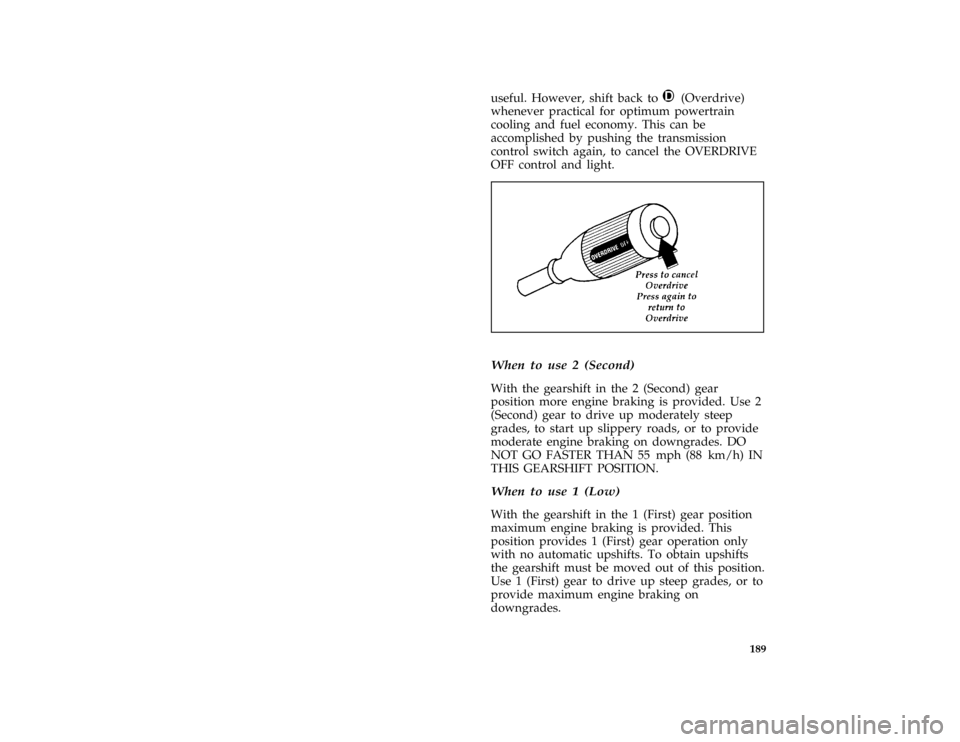
useful. However, shift back toj(Overdrive)
whenever practical for optimum powertrain
cooling and fuel economy. This can be
accomplished by pushing the transmission
control switch again, to cancel the OVERDRIVE
OFF control and light.
[DR06850(ALL)06/95]
one third page art:0095028-A*
[DR07100(ALL)01/95]
When to use 2 (Second)
[DR07200(ALL)06/92]
With the gearshift in the 2 (Second) gear
position more engine braking is provided. Use 2
(Second) gear to drive up moderately steep
grades, to start up slippery roads, or to provide
moderate engine braking on downgrades. DO
NOT GO FASTER THAN 55 mph (88 km/h) IN
THIS GEARSHIFT POSITION.
*
[DR07400(ALL)01/95]
When to use 1 (Low)
[DR07500(ALL)06/92]
With the gearshift in the 1 (First) gear position
maximum engine braking is provided. This
position provides 1 (First) gear operation only
with no automatic upshifts. To obtain upshifts
the gearshift must be moved out of this position.
Use 1 (First) gear to drive up steep grades, or to
provide maximum engine braking on
downgrades.
File:10cpdra.ex
Update:Tue Aug 29 17:45:28 1995