1996 CHRYSLER VOYAGER tire type
[x] Cancel search: tire typePage 172 of 1938
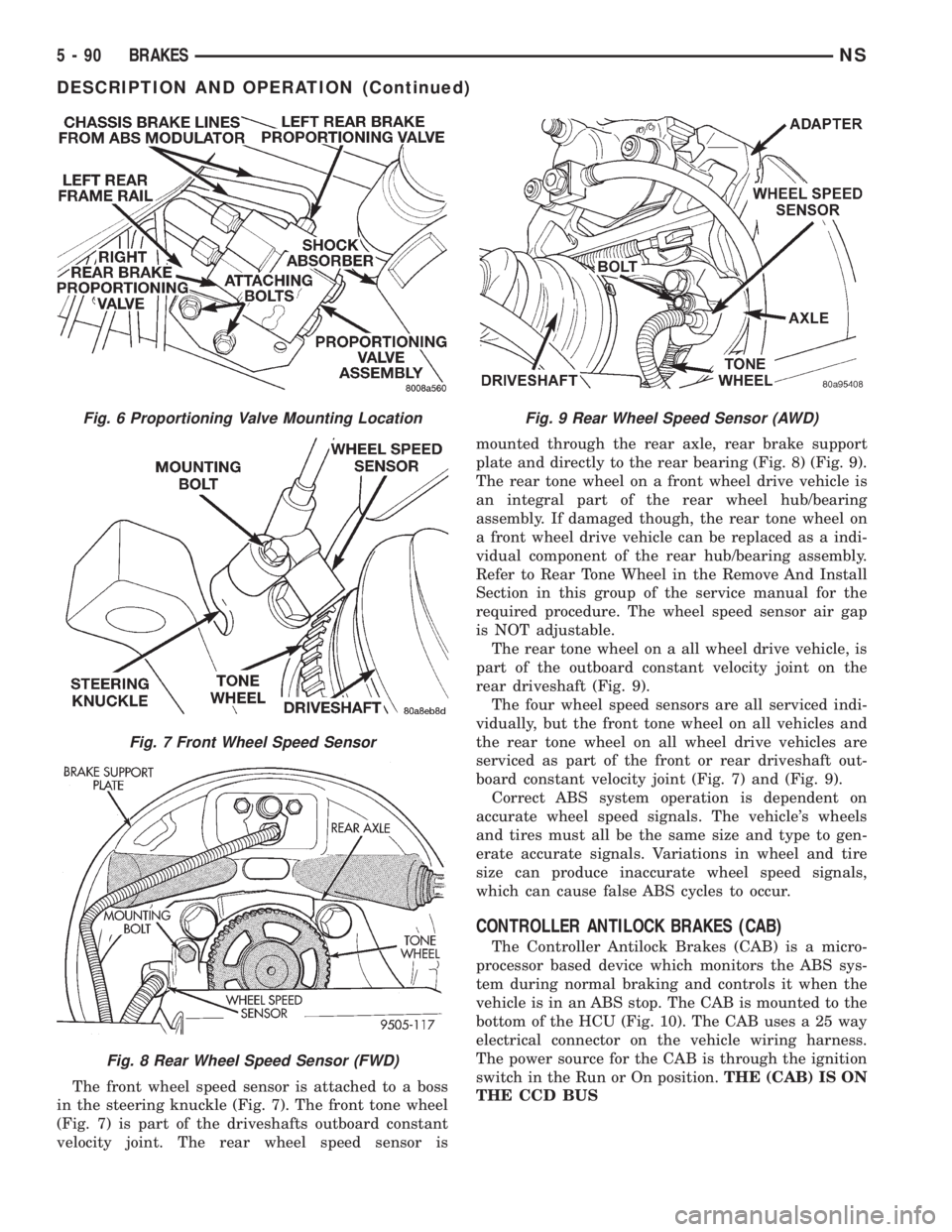
The front wheel speed sensor is attached to a boss
in the steering knuckle (Fig. 7). The front tone wheel
(Fig. 7) is part of the driveshafts outboard constant
velocity joint. The rear wheel speed sensor ismounted through the rear axle, rear brake support
plate and directly to the rear bearing (Fig. 8) (Fig. 9).
The rear tone wheel on a front wheel drive vehicle is
an integral part of the rear wheel hub/bearing
assembly. If damaged though, the rear tone wheel on
a front wheel drive vehicle can be replaced as a indi-
vidual component of the rear hub/bearing assembly.
Refer to Rear Tone Wheel in the Remove And Install
Section in this group of the service manual for the
required procedure. The wheel speed sensor air gap
is NOT adjustable.
The rear tone wheel on a all wheel drive vehicle, is
part of the outboard constant velocity joint on the
rear driveshaft (Fig. 9).
The four wheel speed sensors are all serviced indi-
vidually, but the front tone wheel on all vehicles and
the rear tone wheel on all wheel drive vehicles are
serviced as part of the front or rear driveshaft out-
board constant velocity joint (Fig. 7) and (Fig. 9).
Correct ABS system operation is dependent on
accurate wheel speed signals. The vehicle's wheels
and tires must all be the same size and type to gen-
erate accurate signals. Variations in wheel and tire
size can produce inaccurate wheel speed signals,
which can cause false ABS cycles to occur.
CONTROLLER ANTILOCK BRAKES (CAB)
The Controller Antilock Brakes (CAB) is a micro-
processor based device which monitors the ABS sys-
tem during normal braking and controls it when the
vehicle is in an ABS stop. The CAB is mounted to the
bottom of the HCU (Fig. 10). The CAB uses a 25 way
electrical connector on the vehicle wiring harness.
The power source for the CAB is through the ignition
switch in the Run or On position.THE (CAB) IS ON
THE CCD BUS
Fig. 6 Proportioning Valve Mounting Location
Fig. 7 Front Wheel Speed Sensor
Fig. 8 Rear Wheel Speed Sensor (FWD)
Fig. 9 Rear Wheel Speed Sensor (AWD)
5 - 90 BRAKESNS
DESCRIPTION AND OPERATION (Continued)
Page 182 of 1938

If the brake system is to be bled using pressurized
bleeding equipment, refer to Bleeding Brake System
in the Service Adjustments section at the beginning
of this group for proper equipment usage and proce-
dures.
(1) Assemble and install all brake system compo-
nents on the vehicle making sure all hydraulic fluid
lines are installed and properly torqued.
(2) Connect the DRB Diagnostics Tester to the
diagnostics connector. The Teves Mark 20 ABS diag-
nostic connector is located under the instrument
panel to the left of the steering column cover.
(3) Using the DRB, check to make sure the CAB
does not have any fault codes stored. If it does,
remove them using the DRB.
WARNING: WHEN BLEEDING THE BRAKE SYS-
TEM WEAR SAFETY GLASSES. A CLEAR BLEED
TUBE MUST BE ATTACHED TO THE BLEEDER
SCREWS AND SUBMERGED IN A CLEAR CON-
TAINER FILLED PART WAY WITH CLEAN BRAKE
FLUID. DIRECT THE FLOW OF BRAKE FLUID AWAY
FROM THE PAINTED SURFACES OF THE VEHICLE.
BRAKE FLUID AT HIGH PRESSURE MAY COME
OUT OF THE BLEEDER SCREWS WHEN OPENED.
(4) Bleed the base brake system using the stan-
dard pressure or manual bleeding procedure as out-
lined in the Service Adjustments section of this
service manual.
(5) Using the DRB, go to the9Bleed ABS9routine.
Apply the brake pedal firmly and initiate the9Bleed
ABS9cycle one time. Release the brake pedal.
(6) Bleed the base brake system again, as in step
Step 4 above.
(7) Repeat steps Step 5 and Step 6 above until
brake fluid flows clear and is free of any air bubbles.
Check brake fluid level in reservoir periodically to
prevent reservoir from running low on brake fluid.
(8) Test drive the vehicle to be sure brakes are
operating correctly and that brake pedal is solid.
REMOVAL AND INSTALLATION
ABS GENERAL SERVICE PRECAUTIONS
CAUTION: Review this entire section prior to per-
forming any mechanical work on a vehicle equipped
with the ITT Tevis Mark 20 ABS brake system. This
section contains information on precautions per-
taining to potential component damage, vehicle
damage and personal injury which could result
when servicing an ABS equipped vehicle.
CAUTION: Only the recommended jacking or hoist-
ing positions for this vehicle are to be used when-ever it is necessary to lift a vehicle. Failure to raise
a vehicle from the recommended locations could
result in lifting a vehicle by the hydraulic control
unit mounting bracket. Lifting a vehicle by the
hydraulic control unit mounting bracket will result
in damage to the mounting bracket and the hydrau-
lic control unit.
CAUTION: Certain components of the ABS System
are not intended to be serviced individually.
Attempting to remove or disconnect certain system
components may result in improper system opera-
tion. Only those components with approved
removal and installation procedures in this manual
should be serviced.
CAUTION: Brake fluid will damage painted sur-
faces. If brake fluid is spilled on any painted sur-
faces, wash off with water immediately.
CAUTION: When performing any service procedure
on a vehicle equipped with ABS do not apply a 12
volt power source to the ground circuit of the pump
motor in the CAB. Doing this will damage the pump
motor and will require replacement of the HCU.
The following are general cautions which should be
observed when servicing the ABS system and/or
other vehicle systems. Failure to observe these pre-
cautions may result in ABS System component dam-
age.
If welding work is to be performed on the vehicle,
using an electric arc welder, the CAB connector
should be disconnected during the welding operation.
The CAB 25 way connector connector should never
be connected or disconnected with the ignition switch
in the ON position.
Many components of the ABS System are not ser-
viceable and must be replaced as an assembly. Do not
disassemble any component which is not designed to
be serviced.
HYDRAULIC CONTROL UNIT
REMOVE
(1) Disconnect the negative (ground) cable from
the battery and isolate cable.
(2) Using a brake pedal depressor, move and lock
the brake pedal to a position past the first inch of
pedal travel.This will prevent brake fluid from
draining out of the master cylinder when the
brake tubes are removed from the HCU.
(3) Raise vehicle. Vehicle is to be raised and sup-
ported on jackstands or on a frame contact type
5 - 100 BRAKESNS
SERVICE PROCEDURES (Continued)
Page 187 of 1938

CAUTION: Because of the flexible section in the
primary and secondary brake tubes, and the brake
tubes between the HCU and the proportioning
valve, the brake tubes must be held in proper ori-
entation when tightened and torqued. These tubes
must not contact each other or other vehicle com-
ponents when installed.
CAUTION: When installing the chassis brake tubes
on the HCU valve block, they must be located cor-
rectly in the valve block to ensure proper ABS oper-
ation. Refer to (Fig. 27) for the correct chassis
brake tube locations.
NOTE: The chassis brake tube attachment loca-
tions to the HCU, are marked on the bottom of the
HCU mounting bracket.
(6) Install the 6 chassis brake tubes into their cor-
rect port locations on the HCU valve block as shown
in (Fig. 27). Tighten the tube nuts to a torque of 17
N´m (145 in. lbs.).
NOTE: Before installing the 25 way connector in
the CAB be sure the seal is properly installed in the
connector.
(7) Install the 25 way connector on the CAB using
the following procedure. Position the 25 way connec-
tor in the socket of the CAB and carefully push it
down as far as possible. When connector is fully
seated by hand into the CAB socket, push in the con-
nector lock (Fig. 26). This will pull the connector into
the socket of the CAB and lock it in the installed
position.
(8) Install the routing clips (Fig. 33) on the brake
tubes.(9) Lower vehicle.
(10) Connect negative cable back on negative post
of the battery.
(11) Bleed the base brakes and the ABS brakes
hydraulic system. Refer to the Bleeding ABS System
in this section of the manual for the proper bleeding
procedure.
(12) Road test vehicle to ensure proper operation
of the base and ABS brake systems.
WHEEL SPEED SENSOR (FRONT)
REMOVE
(1) Raise vehicle on jack stands or centered on a
frame contact type hoist. See Hoisting in the Lubri-
cation and Maintenance section of this service man-
ual, for the required lifting procedure to be used for
this vehicle.
(2) Remove the tire and wheel assembly from the
vehicle.
(3) Remove the 2 screws (Fig. 34) attaching front
channel bracket and grommet retainer to the outer
frame rail.
CAUTION: When disconnecting the wheel speed
sensor from vehicle wiring harness, be careful not
to damage pins on connector
(4) Pull speed sensor cable grommet and connector
through the hole in the strut tower (Fig. 35). Discon-
nect speed sensor cable from vehicle wiring harness
(Fig. 35).
(5) Remove the wheel speed sensor head to steer-
ing knuckle attaching bolt (Fig. 36).
(6) Remove sensor head from steering knuckle. If
the sensor has seized, due to corrosion,DO NOT
USE PLIERS ON SENSOR HEAD.Use a hammer
and a punch and tap edge of sensor ear, rocking the
sensor side to side until free.
Fig. 33 Brake Tube Routing Clips
Fig. 34 Front Speed Sensor Cable Channel Bracket
NSBRAKES 5 - 105
REMOVAL AND INSTALLATION (Continued)
Page 188 of 1938

(7) Remove the wheel speed sensor cable grommets
from the retaining bracket (Fig. 37).(8) Remove front wheel speed sensor assembly
from the vehicle.
INSTALL
CAUTION: Proper installation of wheel speed sen-
sor cables is critical to continued system operation.
Be sure that cables are installed in retainers. Fail-
ure to install cables in retainers as shown in this
section may result in contact with moving parts
and/or over extension of cables, resulting in an
open circuit.
(1) Connect the front wheel speed sensor cable to
the vehicle wiring harness connector (Fig. 35). Be
sure speed sensor cable connector is fully seated and
locked into vehicle wiring harness connector, then
insert cable and grommet into hole in strut tower
(Fig. 35).
CAUTION: When installing channel bracket, do not
pinch the speed sensor cable under the channel
bracket.
(2) Install the channel bracket and grommet
retainer on the frame rail (Fig. 34).
(3) Install the 2 bolts (Fig. 34) attaching the chan-
nel bracket to frame. Tighten the 2 attaching bolts to
a torque of 11 N´m (95 in. lbs.).
(4) Insert speed sensor cable grommets into inter-
mediate bracket on strut (Fig. 37). Route cable from
strut to steering knuckle on the rearward side of the
stabilizer bar link.
(5) Install the wheel speed sensor to steering
knuckle attaching bolt (Fig. 36). Tighten the speed
sensor attaching bolt to a torque of 12 N´m (105 in.
lbs.)
(6) Check the air gap between the face of the
wheel speed sensor and the top surface of the tone-
wheel. Air gap must be less then the maximum
allowable tolerance of 1.2 mm (.047 in.).
(7) Install the wheel and tire assembly on vehicle.
(8) Road test vehicle to ensure proper operation of
the base and ABS brake systems.
WHEEL SPEED SENSOR (REAR FWD)
REMOVE
(1) Raise vehicle on jack stands or centered on a
frame contact type hoist. See Hoisting in the Lubri-
cation and Maintenance section of this manual, for
the required lifting procedure to be used for this
vehicle.
(2) Remove the tire and wheel assembly from the
vehicle.
Fig. 35 Speed Sensor Cable To Vehicle Wiring
Harness
Fig. 36 Front Wheel Speed Sensor Attaching Bolt
Fig. 37 Front Wheel Speed Sensor Cable Routing
5 - 106 BRAKESNS
REMOVAL AND INSTALLATION (Continued)
Page 190 of 1938

INSTALL
CAUTION: Proper installation of wheel speed sen-
sor cables is critical to continued system operation.
Be sure that cables are installed in retainers. Fail-
ure to install cables in retainers as shown in this
section may result in contact with moving parts
and/or over extension of cables, resulting in an
open circuit.
(1) Install wheel speed sensor head. Note, the plas-
tic anti rotation pin must be fully seated prior to
installing the attaching bolt.
CAUTION: Prior to installing the speed sensor
head attaching bolt, the plastic anti-rotation pin
must be fully seated into the bearing flange.
(2) Install the wheel speed sensor head to bearing
flange attaching bolt (Fig. 42). Tighten the attaching
bolt to a torque 12 N´m (105 in. lbs.)
(3) Check the air gap between the face of the
wheel speed sensor and the top surface of the tone-
wheel. Air gap must be less then the maximum
allowable tolerance of 1.2 mm (.047 in.).
(4) Install the 2 routing brackets attaching the
speed sensor cable and brake tube to the rear axle
(Fig. 41).The rear wheel speed sensor cable
should be routed under the rear brake tube
(Fig. 41).
CAUTION: When installing rear wheel speed sen-
sor cable in the routing clips on rear brake flex
hose, be sure not to damage the routing clips.
Routing clips are molded onto the hose and will
require replacement of the brake flex hose if dam-
aged during installation of the wheel speed sensor
cable.(5) Install speed sensor cable into routing clips on
rear brake flex hose (Fig. 41).
(6) If installing a right rear speed sensor cable,
install the speed sensor cable grommet on the axle
brake flex hose bracket (Fig. 40).
CAUTION: The wheel speed sensor cable connec-
tors for the left and right rear wheel speed sensors
are keyed differently. Therefore, when connecting a
wheel speed sensor cable to the vehicle wiring har-
ness, do not force the connectors together. If the
connectors are forced together, damage to the con-
nectors will occur.
(7) Plug speed sensor cable connector into vehicle
wiring harness (Fig. 38).Be sure speed sensor
cable connector is fully seated and locked into
vehicle wiring harness connector.
(8) Install the speed sensor cable grommet into the
body, being sure the grommet is fully seated into the
body hole.
(9) Install the tire and wheel assembly on vehicle.
(10) Road test vehicle to ensure proper operation
of the base and ABS braking systems.
WHEEL SPEED SENSOR (REAR AWD)
REMOVE
(1) Raise vehicle on jack stands or centered on a
frame contact type hoist. See Hoisting in the Lubri-
cation and Maintenance section of this manual, for
the required lifting procedure to be used for this
vehicle.
(2) Remove the tire and wheel assembly from the
vehicle.
CAUTION: When unplugging speed sensor cable
from vehicle wiring harness be careful not to dam-
age pins on the electrical connectors. Also inspect
connectors for any signs of previous damage.
(3) Remove grommet from floor pan of vehicle and
unplug speed sensor cable connector from vehicle
wiring harness (Fig. 43).
CAUTION: When removing rear wheel speed sen-
sor cable from routing clips on rear brake flex hose,
be sure not to damage the routing clips. Routing
clips are molded onto the hose and will require
replacement of the brake flex hose if damaged dur-
ing removal of the speed sensor cable.
Fig. 42 Rear Wheel Speed Sensor Attaching Bolt
5 - 108 BRAKESNS
REMOVAL AND INSTALLATION (Continued)
Page 192 of 1938
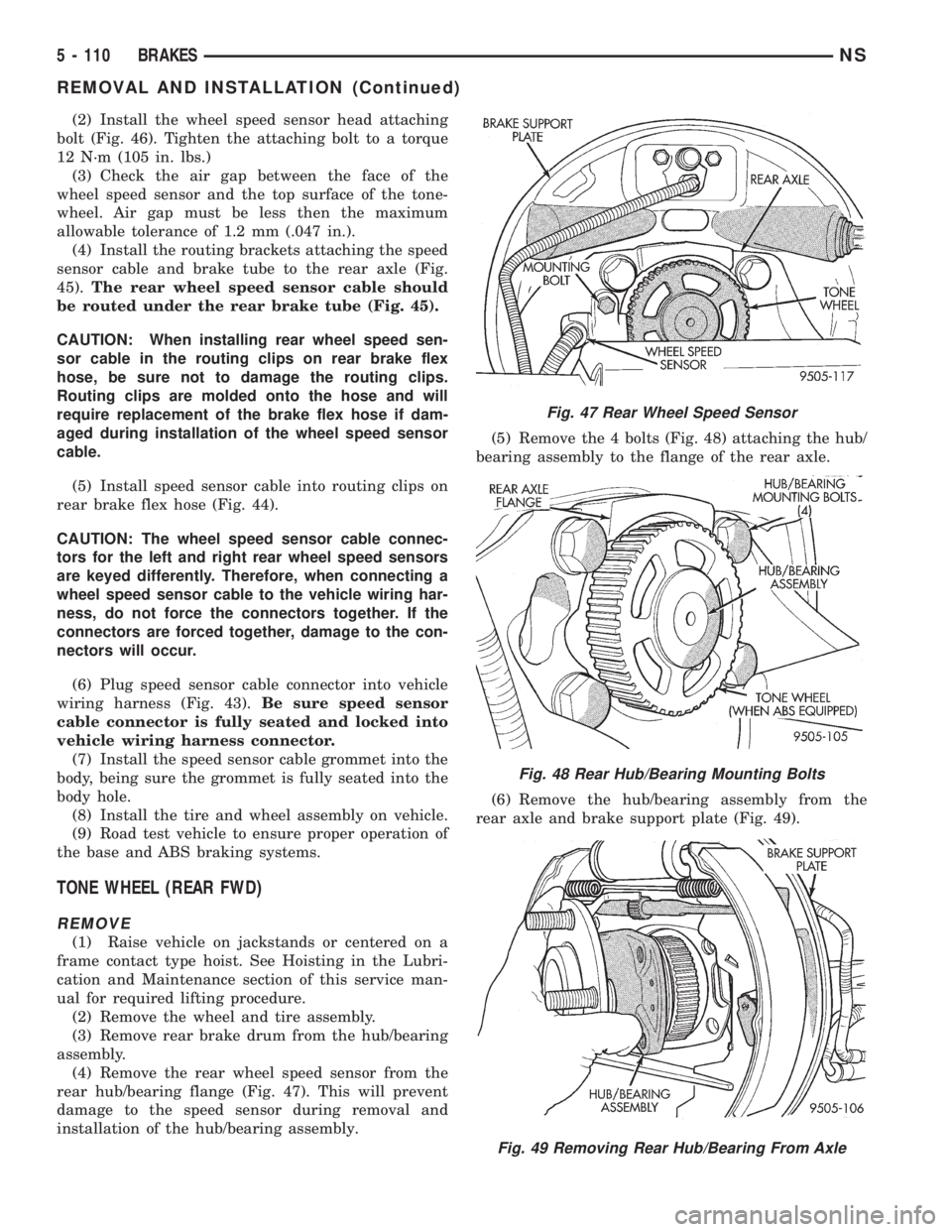
(2) Install the wheel speed sensor head attaching
bolt (Fig. 46). Tighten the attaching bolt to a torque
12 N´m (105 in. lbs.)
(3) Check the air gap between the face of the
wheel speed sensor and the top surface of the tone-
wheel. Air gap must be less then the maximum
allowable tolerance of 1.2 mm (.047 in.).
(4) Install the routing brackets attaching the speed
sensor cable and brake tube to the rear axle (Fig.
45).The rear wheel speed sensor cable should
be routed under the rear brake tube (Fig. 45).
CAUTION: When installing rear wheel speed sen-
sor cable in the routing clips on rear brake flex
hose, be sure not to damage the routing clips.
Routing clips are molded onto the hose and will
require replacement of the brake flex hose if dam-
aged during installation of the wheel speed sensor
cable.
(5) Install speed sensor cable into routing clips on
rear brake flex hose (Fig. 44).
CAUTION: The wheel speed sensor cable connec-
tors for the left and right rear wheel speed sensors
are keyed differently. Therefore, when connecting a
wheel speed sensor cable to the vehicle wiring har-
ness, do not force the connectors together. If the
connectors are forced together, damage to the con-
nectors will occur.
(6) Plug speed sensor cable connector into vehicle
wiring harness (Fig. 43).Be sure speed sensor
cable connector is fully seated and locked into
vehicle wiring harness connector.
(7) Install the speed sensor cable grommet into the
body, being sure the grommet is fully seated into the
body hole.
(8) Install the tire and wheel assembly on vehicle.
(9) Road test vehicle to ensure proper operation of
the base and ABS braking systems.
TONE WHEEL (REAR FWD)
REMOVE
(1) Raise vehicle on jackstands or centered on a
frame contact type hoist. See Hoisting in the Lubri-
cation and Maintenance section of this service man-
ual for required lifting procedure.
(2) Remove the wheel and tire assembly.
(3) Remove rear brake drum from the hub/bearing
assembly.
(4) Remove the rear wheel speed sensor from the
rear hub/bearing flange (Fig. 47). This will prevent
damage to the speed sensor during removal and
installation of the hub/bearing assembly.(5) Remove the 4 bolts (Fig. 48) attaching the hub/
bearing assembly to the flange of the rear axle.
(6) Remove the hub/bearing assembly from the
rear axle and brake support plate (Fig. 49).
Fig. 47 Rear Wheel Speed Sensor
Fig. 48 Rear Hub/Bearing Mounting Bolts
Fig. 49 Removing Rear Hub/Bearing From Axle
5 - 110 BRAKESNS
REMOVAL AND INSTALLATION (Continued)
Page 288 of 1938
GENERATOR
The generator is belt-driven by the engine. It is
serviced only as a complete assembly. If the genera-
tor fails for any reason, the entire assembly must be
replaced.
As the energized rotor begins to rotate within the
generator, the spinning magnetic field induces a cur-
rent into the windings of the stator coil. Once the
generator begins producing sufficient current, it also
provides the current needed to energize the rotor.
The Y type stator winding connections deliver the
induced AC current to 3 positive and 3 negative
diodes for rectification. From the diodes, rectified DC
current is delivered to the vehicle electrical system
through the generator, battery, and ground terminals.
Noise emitting from the generator may be caused
by:
²Worn, loose or defective bearings
²Loose or defective drive pulley
²Incorrect, worn, damaged or misadjusted drive
belt
²Loose mounting bolts
²Misaligned drive pulley
²Defective stator or diode
BATTERY TEMPERATURE SENSOR
The temperature sensor, in the PCM, is used to
determine the battery temperature. This temperature
data, along with data from monitored line voltage, is
used by the PCM to vary the battery charging rate.
System voltage will be higher at colder temperatures
and is gradually reduced at warmer temperatures.
ELECTRONIC VOLTAGE REGULATOR
The Electronic Voltage Regulator (EVR) is not a
separate component. It is actually a voltage regulat-
ing circuit located within the Powertrain Control
Module (PCM). The EVR is not serviced separately. If
replacement is necessary, the PCM must be replaced.
Operation:The amount of DC current produced
by the generator is controlled by EVR circuitry con-
tained within the PCM. This circuitry is connected in
series with the generators second rotor field terminal
and its ground.
Voltage is regulated by cycling the ground path to
control the strength of the rotor magnetic field. The
EVR circuitry monitors system line voltage and bat-
tery temperature (refer to Battery Temperature Sen-
sor for more information). It then compensates and
regulates generator current output accordingly. Also
refer to Charging System Operation for additional
information.
DIAGNOSIS AND TESTING
CHARGING SYSTEM
When the ignition switch is turned to the ON posi-
tion, battery potential will register on the voltmeter.
During engine cranking a lower voltage will appear
on the meter. With the engine running, a voltage
reading higher than the first reading (ignition in ON)
should register.
The following are possible symptoms of a charging
system fault:
²The voltmeter does not operate properly
²An undercharged or overcharged battery condi-
tion occurs.
Remember that an undercharged battery is often
caused by:
²Accessories being left on with the engine not
running
²A faulty or improperly adjusted switch that
allows a lamp to stay on. See Ignition-Off Draw Test
in Group 8A, Battery for more information.
The following procedures may be used to correct a
problem diagnosed as a charging system fault.
INSPECTION
(1) Inspect condition of battery cable terminals,
battery posts, connections at engine block, starter
solenoid and relay. They should be clean and tight.
Repair as required.
(2) Inspect all fuses in the fuseblock module and
Power Distribution Center (PDC) for tightness in
receptacles. They should be properly installed and
tight. Repair or replace as required.
(3) Inspect the electrolyte level in the battery.
Replace battery if electrolyte level is low.
(4) Inspect generator mounting bolts for tightness.
Replace or tighten bolts if required. Refer to the Gen-
erator Removal/Installation section of this group for
torque specifications.
(5) Inspect generator drive belt condition and ten-
sion. Tighten or replace belt as required. Refer to
Belt Tension Specifications in Group 7, Cooling Sys-
tem.
(6) Inspect automatic belt tensioner (if equipped).
Refer to Group 7, Cooling System for information.
(7) Inspect connections at generator field, battery
output, and ground terminals. Also check ground con-
nection at engine. They should all be clean and tight.
Repair as required.
8C - 2 CHARGING SYSTEMNS
DESCRIPTION AND OPERATION (Continued)
Page 574 of 1938

kit 6680. Pull on the wire to remove the terminal
from the connector (Fig. 14) (Fig. 15).
(5) Reset the terminal locking tang, if it has one.
(6) Insert the removed wire in the same cavity on
the repair connector.
(7) Repeat steps four through six for each wire in
the connector, being sure that all wires are inserted
into the proper cavities. For additional connector pin-
out identification, refer to the wiring diagrams.
(8) Insert the connector locking wedge into the
repaired connector, if required.
(9)
Connect connector to its mating half/component.
(10) Connect battery and test all affected systems.
CONNECTOR AND TERMINAL REPLACEMENT
(1) Disconnect battery.
(2) Disconnect the connector (that is to be
repaired) from its mating half/component.
(3) Cut off the existing wire connector directly
behind the insulator. Remove six inches of tape from
the harness.
(4) Stagger cut all wires on the harness side at
1/2 inch intervals (Fig. 16).(5) Remove 1 inch of insulation from each wire on
the harness side.
(6) Stagger cut the matching wires on the repair
connector assembly in the opposite order as was done
on the harness side of the repair. Allow extra length
for soldered connections. Check that the overall
length is the same as the original (Fig. 16).
(7) Remove 1 inch of insulation from each wire.
(8) Place a piece of heat shrink tubing over one
side of the wire. Be sure the tubing will be long
enough to cover and seal the entire repair area.
(9) Spread the strands of the wire apart on each
part of the exposed wires.
(10) Push the two ends of wire together until the
strands of wire are close to the insulation.
(11) Twist the wires together.
(12) Solder the connection together using rosin
core type solder only.Do not use acid core solder.
(13) Center the heat shrink tubing over the joint
and heat using a heat gun. Heat the joint until the
tubing is tightly sealed and sealant comes out of both
ends of the tubing
(14) Repeat steps 8 through 13 for each wire.
(15) Re-tape the wire harness starting 1-1/2 inches
behind the connector and 2 inches past the repair.
(16) Re-connect the repaired connector.
(17) Connect the battery, and test all affected sys-
tems.
TERMINAL/CONNECTOR REPAIR- AUGAT
CONNECTORS
(1) Disconnect battery.
(2) Disconnect the connector from its mating half/
component.
(3) Push down on the yellow connector locking tab
to release the terminals (Fig. 17).
(4) Using special tool 6932, push the terminal to
remove it from the connector (Fig. 18).
Fig. 14 Terminal Removal
Fig. 15 Terminal Removal Using Special Tool
Fig. 16 Stagger Cutting Wires
8W - 01 - 12 8W-01 GENERAL INFORMATIONNS/GS
SERVICE PROCEDURES (Continued)