1996 CHEVROLET TAHOE AUX
[x] Cancel search: AUXPage 3 of 403

Downloaded from www.Manualslib.com manuals search engine GENERAL MOTORS, GM, the GM Emblem,
CHEVROLET, the CHEVROLET Emblem, the name
TAHOE and the name SUBURBAN are registered
trademarks ofGenera1 Motors Corporation.
This manual includes the latest information at the time it
was printed. We reserve the right to make changes
in the
product after that time without further notice. For
vehicles first sold in Canada, substitute the name
“General .Motors of Canada Limited” for Chevrolet
Division whenever it appears in this manual.
Please keep this manual in your vehicle,
so it will be
there if you ever need it when you’re on the road. If
you
sell the vehicle, please leave this manual in it so the new
owner can use it.
Litho in U.S.A.
C9609
€3 First Edition
WE SUPPORT VOLUNTARY TECHNICIAN
CERTIFICATION THROUGH
National Institute for
AUTOMOTIVE
SERVICE
EXCELLENCE
We support voluntary
technician certification.
For Canadian Owners Who Prefer a
French Language Manual:
Aux proprigtaires canadiens: Vous pouvez vous
procurer
un exemplaire de ce guide en franGais chez
votre’concessionaire ou au:
DGN Marketing Services Ltd. 1500 Bonhill Rd.
Mississauga, Ontario L5T IC7
@Copyright General Motors Corporation 1995
All Rights Reserved
ii
Page 148 of 403
Downloaded from www.Manualslib.com manuals search engine 00 (5): Press this button to reduce cassette tape noise.
The double-D symbol will appear on the display while
the player is in this mode.
Dolby Noise Reduction is manufactured under a license
from Dolby Laboratories Licensing Corporation. Dolby
and the double-D symbol are trademarks of Dolby
Laboratories Licensing Corporation.
FWD (6): Press this button to rapidly forward the tape
to the end of the cassette reel or
until you press FWD
again. The radio will play the last selected station while
forwarding the tape, The tape direction arrow will blink
during
FWD operation.
AM-FM: Press this button to switch from a tape
to the radio.
TAPE’ AUX: Press this button to return to the tape
player. The lighted arrow will appear and show the
direction of play when a tape is in the active mode.
EJECT Press this button to remove the tape. The radio
will now play. EJECT can be used with either the ignition
or radio off.
To load a cassette tape with the ignition or
radio
off, press EJECT before loading the cassette.
CLN: This message may appear on the display. If it
does, your cassette tape player needs to be cleaned. It
will still play tapes, but
you should clean it as soon as
possible
to prevent damage to your tapes and player.
See “Care of Your Cassette Tape Player”
in the Index.
After you clean the player, press and hold EJECT for
five seconds to reset the CLN indicator. The radio will
display
--- to show the indicator was reset.
CD Adapter Kits
Although this is not a recommended practice, it is
possible
to use a CD adapter kit with your cassette
tape player.
The adapter kit cassette should begin playing like a
regular audio cassette tape once inserted. If the cassette
immediately ejects, turn the radio off, turn the ignition on
and press and hold the TAPE
AUX button until the tape
icon flashes
on the display. Insert the adapter cassette
again. It will power up the radio and begin playing.
This override routine will remain active
until the EJECT
button is pressed.
3-17
Page 150 of 403
Downloaded from www.Manualslib.com manuals search engine TAPE AUX: With a disc loaded in the player and the
radio playing, press this button once to play the compact
disc. To return to playing the radio, press AM-FM. If
both a cassette tape and CD are loaded, press TAPE
AUX to switch between the tape and.compact disc.
SEEK: Press the left arrow while playing a CD to go
back to the start of the current track. It will go back to
the current track if more than eight seconds have played.
Press the left arrow again to go to previous tracks. Press
the right .arrow to go to the next higher track on the disc.
PREV (1): Press this button to go back to the start of the
current track if more
than eight seconds have played. Press
PREV again
to go to the previous track on the disc.
PROG (2): This button is active only when you have
the 12-disc changer.
NEXT (3): Press this button to advance to the next track
on
the disc.
REV (4): Press and hold this button to quickly reverse
within a track (song). As the CD reverses, elapsed time
will be displayed
to help you find the correct passage.
FWD (6): Press and hold this button to quickly advance
within a track (song). As the CD advances, elapsed time
will be displayed to help you find the correct passage.
RANDOM: Press P.SCAN to enter the random play
mode. RANDOM will appear
on the display. While in
this mode, the tracks
on the discs will be played in
random order. If
you press SEEK, PREV or NEXT
while in the random mode, the PREV or NEXT track
will be scanned randomly. Press P.SCAN again to turn
off RANDOM and return to normal operation.
E JECE Press this button on the remote player to eject a
compact disc.
RECALL: Press this button to see what track is
currently playing. Press RECALL again within five
seconds to see how long the track has been playing.
When a new track starts to play, the track number will
also appear. Press RECALL a third time and the time
of
day will be displayed.
3-19
Page 154 of 403
Downloaded from www.Manualslib.com manuals search engine RECALL: Press this button to see what track is playing.
Press it again within five seconds to see how long the
CD has been playing that track. Elapsed time is
displayed in minutes and tenths of a second. The track
number will also appear when a new track begins to
play. Press RECALL again to return to the time display.
PREV (1): Press PREV or the SEEK left arrow to
search for the previous selection. If you hold this button
or press it more than once, the disc will advance further.
Sound is muted in this mode.
RDM (2): Press this button to play the tracks on the disc
in random (instead of
1, 2, 3. . .) order. While in the
RDM mode, RANDOM appears on the display. Press
RDM again to return to normal play.
NEXT (3): Press NEXT or the SEEK right arrow to
search for the next selection.
If you hold this button or
press it more than once, the disc will advance further.
The next track number will appear on the display. Sound
is muted in this mode.
REV (4): Press and hold REV to return rapidly to a
favorite passage. You will hear the disc selection play at
high speed while you press the REV button. This allows
you to listen and find out when the disc is at the desired
selection. Release REV
to resume playing.
FWD (6): Press and hold this button to advance rapidly
within a track. You will hear the disc selection play at
high speed while you press the FWD button. This allows
you to listen and find out when the disc is at the desired
selection. Release FWD to resume playing.
AM-FM: While in the CD mode, press this button to
stop playing the CD and play the radio. The CD symbol
will still display but the word CD will
be replaced with
either
AM, FMl or FM2. (If the radio is turned off, the
disc stays in the player and will resume playing at the
point where
it stopped.)
CD AUX: To switch between the player and the radio
when a disc is playing, press the AM-FM button.
To
return to the player, press CD AUX. When a disc is
playing, the letters CD and the CD symbol will appear
on the display. (If the radio is turned off, the disc stays
in the player and will resume playing at the point where
it stopped.)
EJECT: Press this button to eject the disc from the
player and play the radio. When the same or a new disc
is inserted, the disc will start playing on track one. If a
compact disc is left sitting in the opening for more than
a few seconds, the player will pull the CD back in. The
radio will continue playing. When the ignition
is off,
press this button to load a CD.
3-23
Page 158 of 403
Downloaded from www.Manualslib.com manuals search engine Care of Your Cassette Tape Player
A tape player that is not cleaned regularly can cause
reduced sound quality, ruined cassettes or a damaged
mechanism. Cassette tapes should be stored in their
cases away from contaminants, direct sunlight and
extreme heat. If they aren’t, they may not operate
properly 9r may cause failure of the tape player.
Your tape player should be cleaned regularly after every
50 hours of use. Your radio may display CLN to indicate
that you have used your tape player for
50 hours without
resetting the
tape clean timer. If you notice a reduction in
sound quality, try a known good cassette to see if the tape
or the tape player is at fault. If this other cassette has n\
o
improvement in sound quality, clean the tape player.
Cleaning.may be done with a scrubbing action,
non-abrasive cleaning cassette with pads which scrub
the tape head as the hubs
of the cleaner cassette turn.
It is normal for the cassette
to eject while cleaning
because your unit is equipped with a cut tape feature.
To temporarily override this feature (for one insertion),
turn the radio
off and press and hold TAPE AUX until
the tape symbol flashes on the display, then insert the
cassette again. Insert the cassette at least three times to
ensure thorough cleaning.
A scrubbing action cleaning
cassette is available through your
GM dealer.
You may
also choose a non-scrubbing action, wet-type
cleaner which uses a cassette with a fabric belt to clean
the tape head. This type of cleaning cassette will not
eject. It may not clean as thoroughly as the scrubbing
type cleaner.
Cassettes are subject to wear and the sound quality may
degrade over time. Always make sure that
the cassette
tape is in good condition before you have your tape
player serviced.
3-27
Page 218 of 403
Downloaded from www.Manualslib.com manuals search engine 2. Turn off the ignition on both vehicles. Turn off all
lamps that aren’t needed, and radios. This will avoid
sparks and help save both batteries. And it could
save your radio!
NOTICE: I
If you leave your radio on, it could be badly
damaged. The repairs wouldn’t be covered by
your warranty.
3. Open the hoods and locate the batteries’. Find
the positive
(+) and negative (-) terminals on
each battery.
A CAUTION:
If your vehicle has air conditioning, the auxiliary
electric fan under the hood can start up even
when the engine is not running and can injure
you. Keep hands, clothing and tools away from
any underhood electric fan.
~
A CAUTION:
-
Using a match near a battery can cause battery
gas to explode. People have been hurt doing this,
and some have been blinded. Use a flashlight if
you need more light.
Be sure the batteries have enough water. You
don’t need to add water to the Delco Freedom@
battery (or batteries) installed in every new
GM
vehicle. But if a battery has filler caps, be sure
the right amount of fluid is there.
If it is low, add
water to take care of that first.
If you don’t,
explosive
gas could be present.
Battery fluid contains acid that can burn
you.
Don’t get it on you. If you accidentally get it in
your eyes or on your skin, flush the place with
water and get medical help immediately.
5-3
Page 226 of 403
Downloaded from www.Manualslib.com manuals search engine Cooling System -- Gasoline Engines
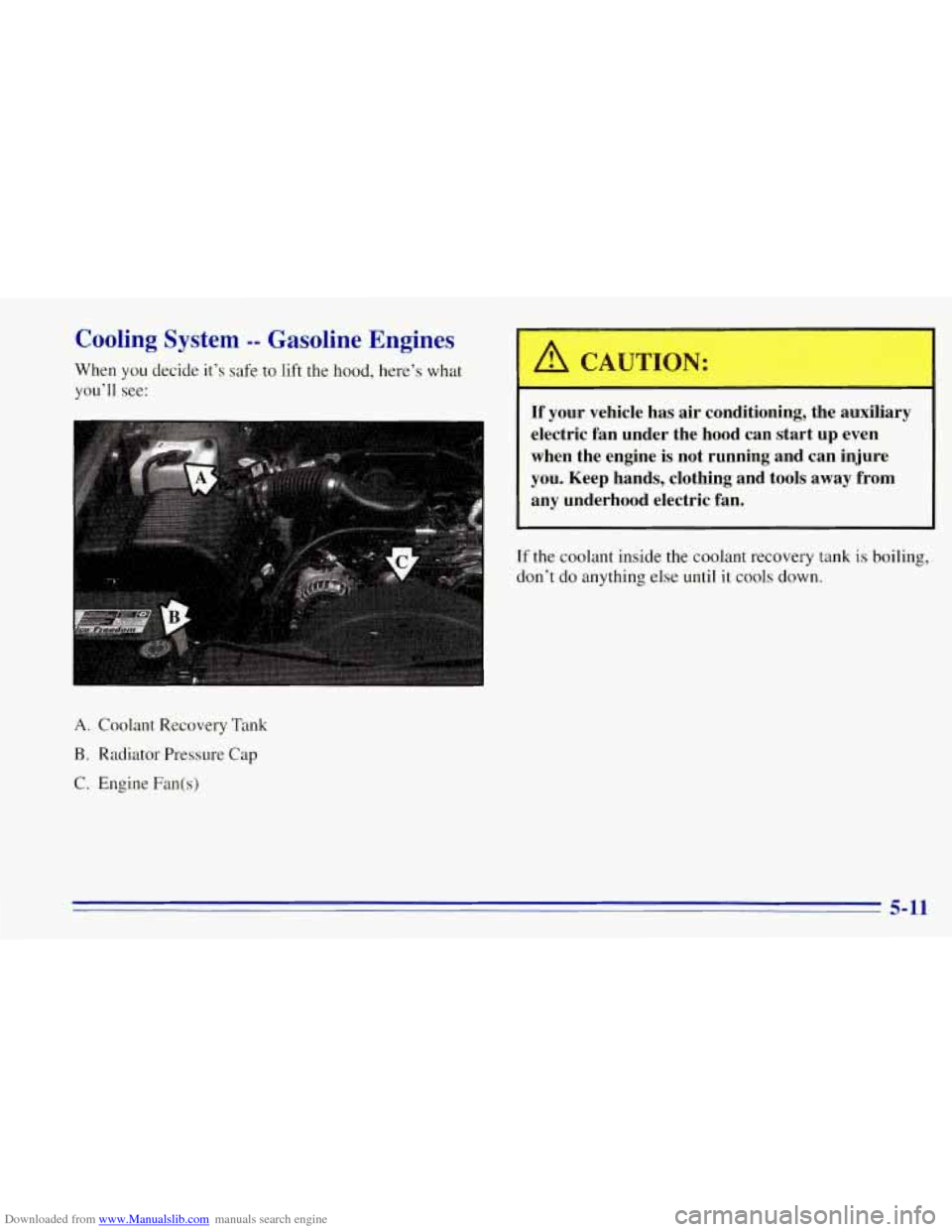
When you decide it’s safe to lift the hood, here’s what
you’ll see:
A. Coolant Recovery Tank
B. Radiator Pressure Cap
C. Engine Fan(s)
A CAUTION: I
If your vehicle has air conditioning, the auxiliary
electric fan under the hood can start up even
when the engine
is not running and can injure
you. Keep hands, clothing and tools away from
any underhood electric fan.
If the coolant inside the coolant recovery tank is boiling,
don’t do anything else until it cools down.
5-11
Page 259 of 403
Downloaded from www.Manualslib.com manuals search engine Be careful not to spill gasoline. Clean gasoline from
painted surfaces as soon as possible. See “Cleaning the
Outside of Your Vehicle” in
the Index.
When you put the cap back on, turn it to the right until
you hear at least three clicks. Make sure you fully install
the cap. The diagnostic system can determine if the fuel
cap
has been left off or improperly installed. This would
allow fuel to evaporate into the atmosphere. See
“Malfunction Indicator Lamp” in the Index.
NOTICE:
If you need a new cap, be sure to get the right
type. Your dealer can get one for you.
If you get
the wrong type, it may not
fit or have proper
venting, and your fuel tank and emissions system
might be damaged.
Checking Things Under the Hood
A CAUTION:
If your vehicle has air conditioning, the auxiliary
engine fan under the hood can start up and
injure you even when the engine is not running.
Keep hands, clothing and tools
away from any
underhood electric fan.,
A CAUTION: 1
Things that burn can get on hot engine parts and
start a fire. These include liquids like gasoline or
diesel fuel,
oil, coolant, brake fluid, windshield
washer and other fluids, and plastic or rubber.
You
or others could be burned. Be careful not to drop
or spill things that
will burn onto a hot engine.
6-6