1996 CHEVROLET SUBURBAN reset
[x] Cancel search: resetPage 109 of 486
For a single wiping cycle, turn the band to MIST. Hold it there until the
wipers start, then let go. The wipers will stop after one cycle. If you want
more cycles, hold the band
on MIST longer.
You can set the wiper speed for a long or short delay between wipes. This
can be very useful in light rain or snow. Turn the band to choose the delay
time. The closer
to LOW, the shorter the delay.
For steady wiping at low speed,
turn the band to the LOW position. For high
speed wiping, turn the band further, to
HIGH. To stop the wipers, move the
band to the off symbol.
Remember that damaged wiper blades may prevent
you from seeing well
enough to drive safely.
To avoid damage, be sure to clear ice and snow from
the wiper blades before using them.
If they are frozen to the windshield,
carefully loosen or thaw them.
If your blades do become damaged, get new
blades
or blade inserts.
Heavy snow or ice can overload your wipers. The windshield wiper motor is
protected from overload by a circuit breaker and
a fuse. If the motor
overheats due to heavy snow, etc.,
the wiper will stop until the motor cools.
Although the circuit is protected from electrical overload, overload due
to
heavy snow, etc. may cause wiper linkage damage. Always clear ice and
heavy snow from the windshield before using your windshield wipers.
Windshield Washer
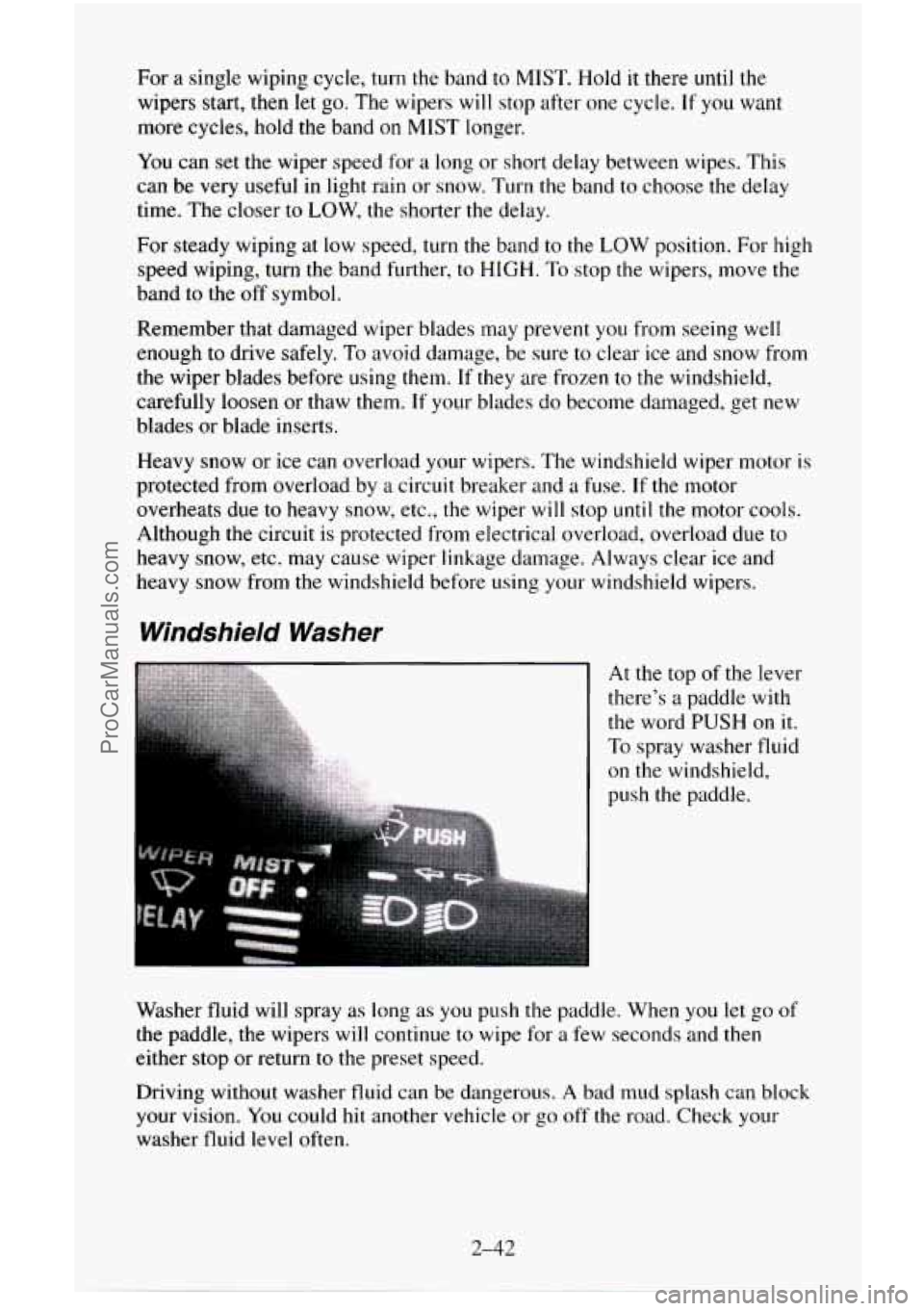
At the top of the lever
there’s a paddle with
the word PUSH on it.
To spray washer fluid
on the windshield,
push the paddle.
Washer fluid will spray as long as
you push the paddle. When you let go of
the paddle, the wipers will continue to wipe for a few seconds and then
either stop or return to the preset speed.
Driving without washer fluid can be dangerous.
A bad mud splash can block
your vision. You
could hit another vehicle or go off the road. Check your
washer fluid level often.
2-42
ProCarManuals.com
Page 112 of 486
To Resume a Set Speed
Suppose you set your Cruise Control at a desired speed and then you apply
the brake.
This, of course, shuts off the Cruise Control. But you don’t need
to reset it.
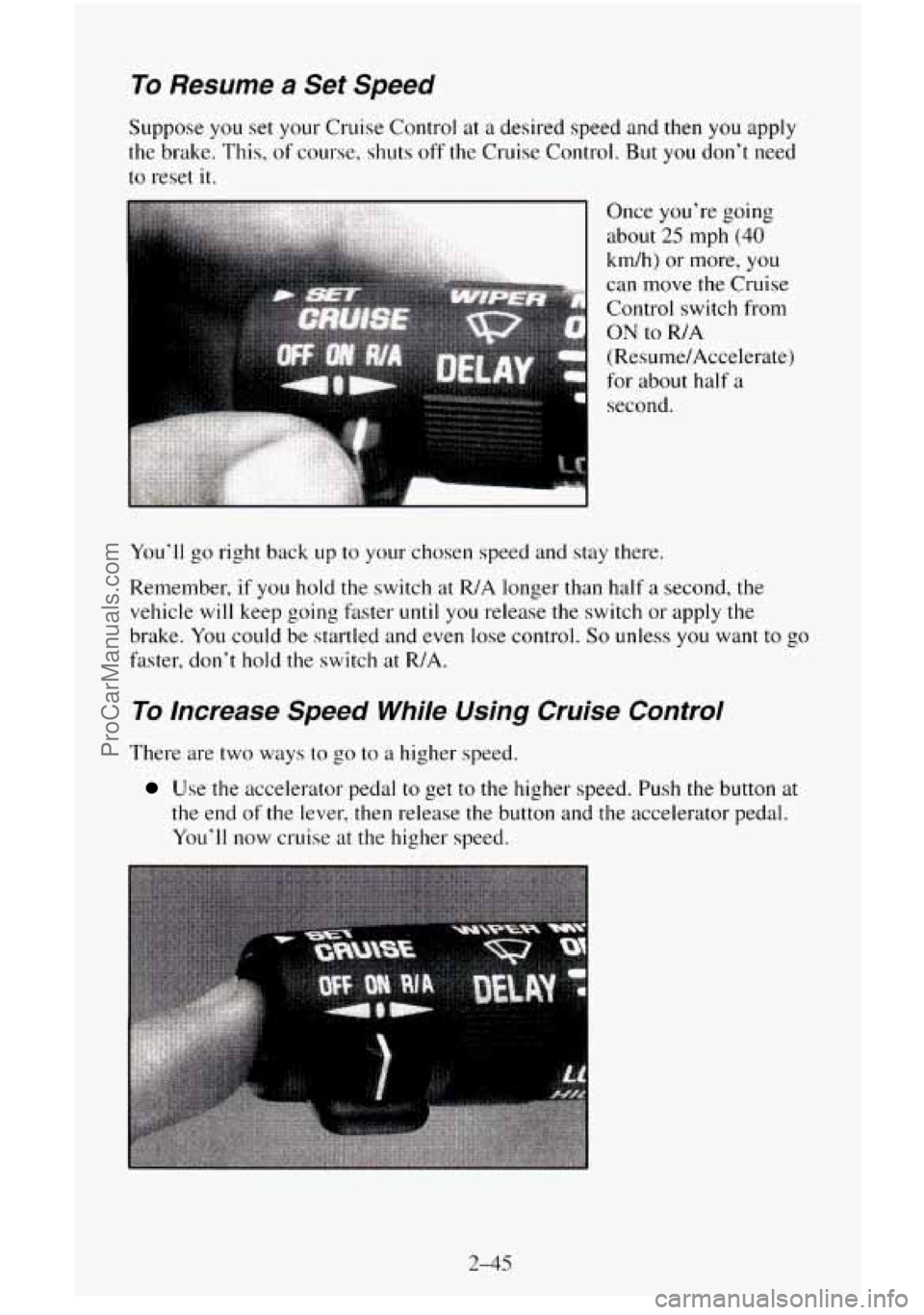
Once you’re going
about
25 mph (40
km/h) or more, you
can move the Cruise
Control switch from
ON to R/A
(Resume/Accelerate)
for about half
a
1 second.
You’ll go right back up to your chosen speed and stay there.
Remember,
if you hold the switch at R/A longer than half a second, the
vehicle will keep going
fater until you release the switch or apply the
brake. You could be startled and even lose control.
So unless you want to go
faster, don’t hold the switch at R/A.
To Increase Speed While Using Cruise Control
There are two ways to go to a higher speed.
Use the accelerator pedal to get to the higher speed, Push the button at
the end of the lever, then release the button and the accelerator pedal.
You’ll now cruise at the higher speed.
2-45
ProCarManuals.com
Page 135 of 486
Speedometer and Odometer
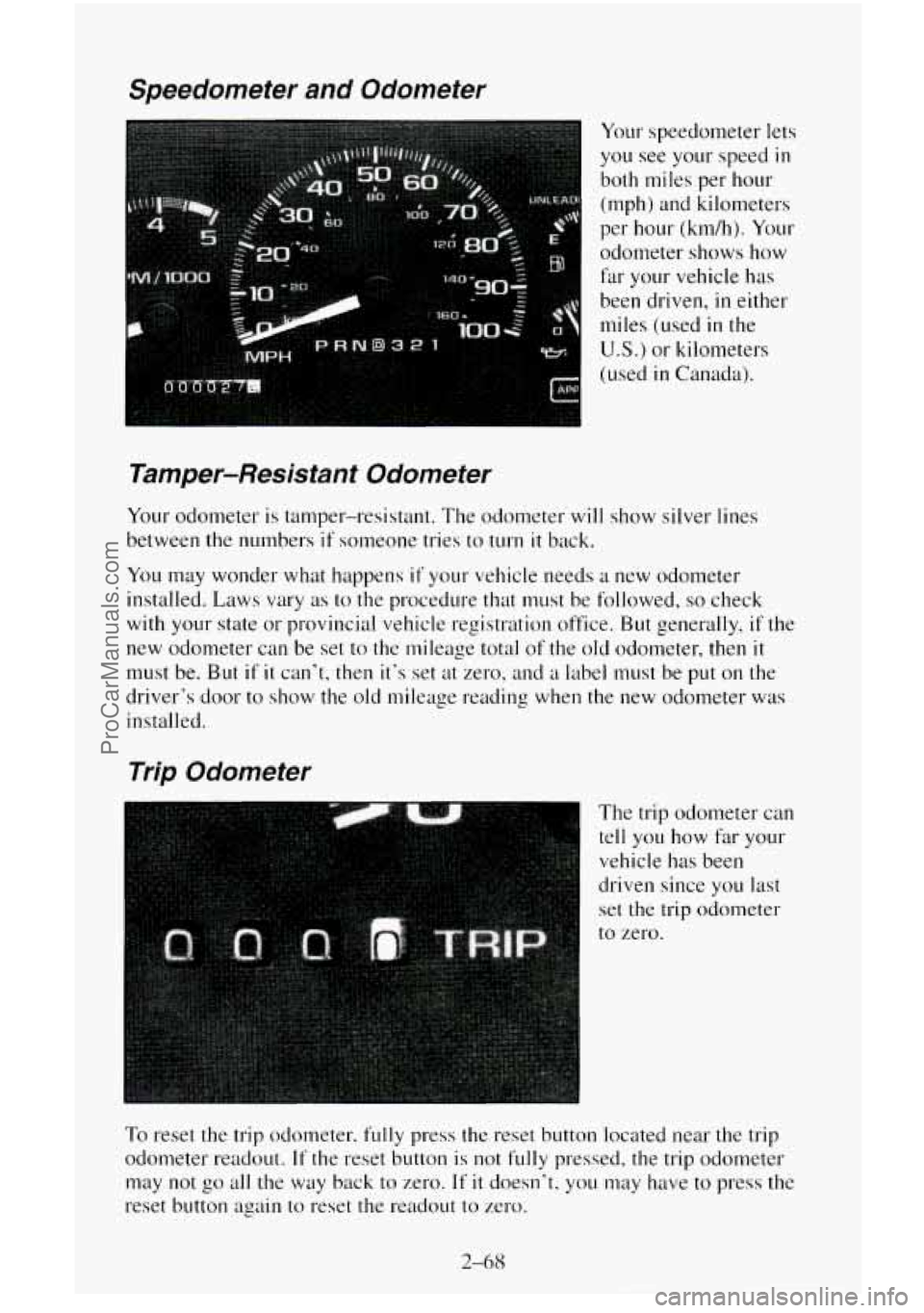
Your speedometer lets
you see your speed in
both miles per hour
(mph) and kilometers
per hour (km/h). Your
odometer shows how
far your vehicle has
been driven,
in either
miles (used
in the
U.S.) or kilometers
(used
in Canada).
Tamper-Resistant Odometer
Your odometer is tamper-resistant. The odometer will show silver lines
between the numbers
if someone tries to turn it back.
YOLI may wonder what happens if your vehicle needs a new odometer
installed. Laws vary as to the procedure that must be followed,
so check
with your state or provincial vehicle registration office, But generally,
if the
new odometer can be set to the mileage total of the old odometer, then
it
must be. But if it can’t, then it’s set at zero. and a label must be put on the
driver‘s door to show the old mileage reading when the new odometer was
installed.
Trip Odometer
The trip odometer can
tell you how far your
vehicle has been
driven since
you last
set the trip odometer
to zero.
To reset the trip odometer, fully press the reset button located near the trip
odometer readout.
If the reset button is not fully pressed, the trip odometer
may not go all the way back to zero. If it doesn’t. you may have to press the
reset button again to reset the readout
to zero.
2-68
ProCarManuals.com
Page 166 of 486
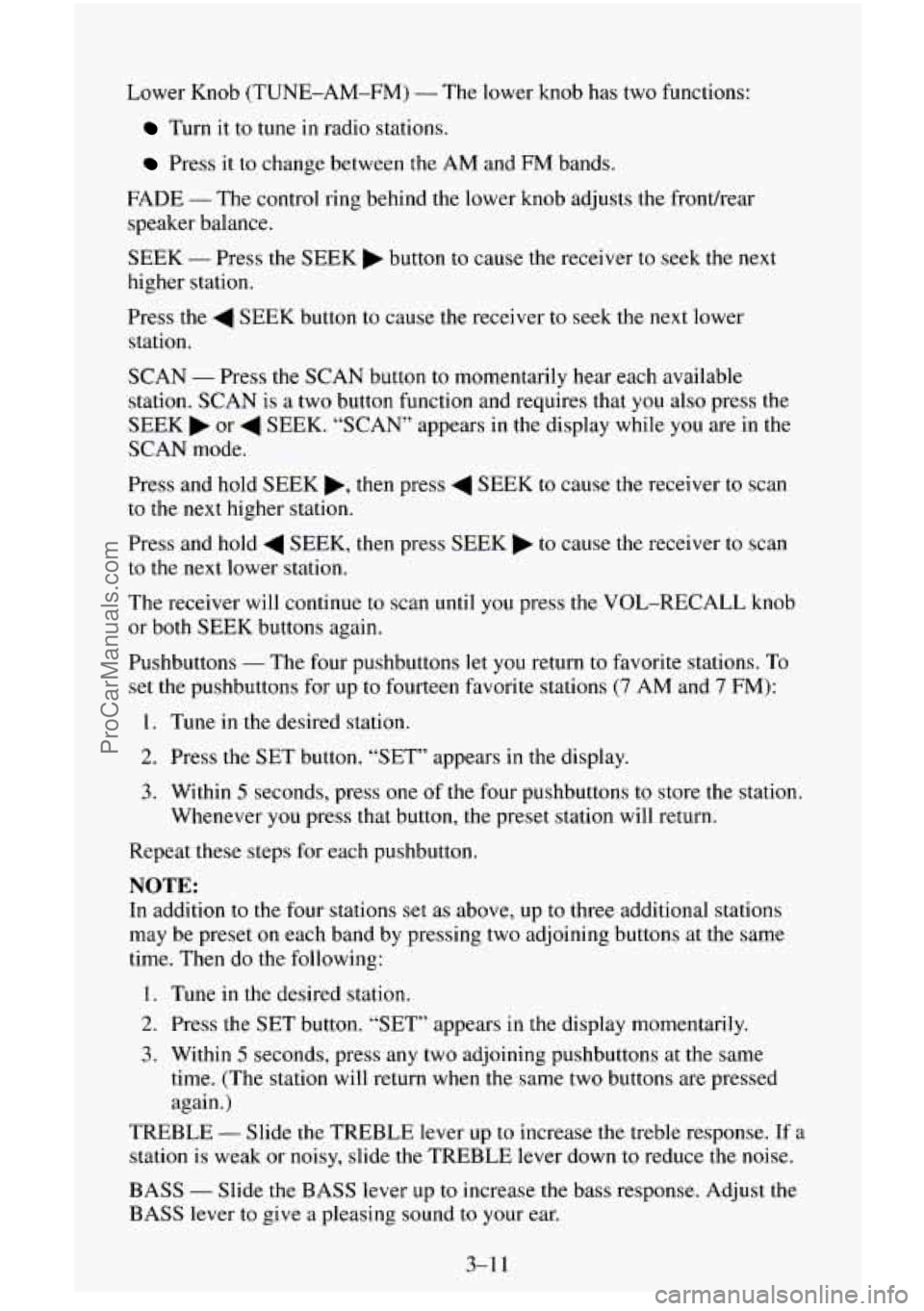
Lower Knob (TUNE-AM-FM) - The lower knob has two functions:
Turn it to tune in radio stations.
Press it to change between the AM and FM bands.
FADE
- The control ring behind the lower knob adjusts the front/rear
speaker balance.
SEEK
- Press the SEEK b button to cause the receiver to seek the next
higher station.
Press the
4 SEEK button to cause the receiver to seek the next lower
station.
SCAN
- Press the SCAN button to momentarily hear each available
station.
SCAN is a two button function and requires that you also press the
SEEK
b or 4 SEEK. “SCAN” appears in the display while you are in the
SCAN mode.
Press and hold
SEEK b, then press 4 SEEK to cause the receiver to scan
to the next higher station.
Press and hold
4 SEEK, then press SEEK to cause the receiver to scan
to the next lower station.
The receiver
will continue to scan until you press the VOL-RECALL knob
or
both SEEK buttons again.
Pushbuttons
- The four pushbuttons let you return to favorite stations. To
set the pushbuttons for up to fourteen favorite stations (7 AM and 7 FM):
1. Tune in the desired station.
2. Press the SET button. “SET” appears in the display.
3. Within 5 seconds, press one of the four pushbuttons to store the station.
Whenever you press that button, the preset station will return.
Repeat these steps
for each pushbutton.
NOTE:
In addition to the four stations set as above, up to three additional stations
may be preset on each band by pressing two adjoining buttons at the same
time. Then do the following:
1. Tune in the desired station.
2. Press the SET button. “SET” appears in the display momentarily.
3. Within 5 seconds, press any two adjoining pushbuttons at the same
time. (The station
will return when the same two buttons are pressed
again.)
TREBLE
- Slide the TREBLE lever up to increase the treble response. If a
station is weak or noisy, slide the TREBLE lever down to reduce the noise.
BASS - Slide the BASS lever up to increase the bass response. Adjust the
BASS lever to give a pleasing sound to your ear.
3-1 1
ProCarManuals.com
Page 168 of 486
P. SCAN (Preset Scan) - Press both SEEK buttons to scan each preset
pushbutton station. The receiver will continue to scan and momentarily stop
at each station until you press either SEEK button or the VOL-RECALL
knob. “PSCAN” appears in the display while you are in the
P. SCAN mode.
Pushbuttons
- The four pushbuttons let you return to favorite stations. To
set the pushbuttons for up to twenty-one favorite stations
(7 AM, 7 FM 1
and 7 FM2):
1. Tune in the desired station.
2. Press the SET button. “SET” appears
in the display.
3. Within 5 seconds, press one of the four pushbuttons to store the station.
Whenever
you press that button, the preset station will return.
Repeat these steps for each pushbutton.
NOTE:
In addition to the four stations set as above, up to three additional stations
may be preset on each band by pressing two adjoining buttons at the same
time. Then do the following:
1. Tune in the desired station.
2. Press the SET button. “SET” appears in the display momentarily.
3. Within 5 seconds, press any two adjoining pushbuttons at the same
time. (The station will return when the same two buttons are pressed
again.)
TREBLE
- Slide the TREBLE lever up to increase the treble response. If a
station is weak or noisy, slide the TREBLE lever down to reduce the noise.
BASS
- Slide the BASS lever up to increase the bass response. Adjust the
BASS lever to give a pleasing sound to your ear.
To Play A Cassette
Your tape player is built to work best with tapes that are 30 to 45 minutes
long on each side. Tapes longer than that are
so thin they may not work well
in this player.
Once the tape is playing, use the controls for volume, balance, fade, treble
and bass just as you do for the radio. A lighted arrow will also appear and
show the direction
of play when a tape is in the player.
FORWARD
- To rapidly advance the tape, press 4 SEEK or SEEK in
the direction that the amber arrow points and the tape will rapidly go
forward until you press the same SEEK button lightly.
REVERSE
- To rapidly reverse the tape, press 4 SEEK or SEEK in
the opposite direction that the amber arrow points and the tape will rapidly
reverse until you press the same
SEEK button lightly.
3-13
ProCarManuals.com
Page 170 of 486
RCL (Recall) - Press this button to change between the clock and the radio
station frequency displayed when the radio is on. Also, press this button to
display the time when the ignition is off.
TUNE - Press lightly on the TUNE button to release it from its stored
position. Rotate
the knob clockwise to increase frequency and
counterclockwise to decrease radio frequency. When done, press
the knob
again to return
it to its stored position.
Pushbuttons
- The six pushbuttons let you return to favorite stations. To
set the pushbuttons for up to
18 favorite stations (6 AM, 6 FM1 and 6 FM2):
1. Tune in the desired station.
2. Press AUTO TONE to select the best setting for the type of station
chosen.
3. Press and hold one of the pushbuttons until sound returns
(approximately two seconds). Whenever you press
that button, me
preset station will return.
Repeat these steps for each pushbutton.
SEEK
- Press SEEK to cause the receiver to seek the next higher
station.
Press
4 SEEK to cause the receiver to seek the next lower station.
SCAN
- Press and hold the center of the SEEK button to momentarily hear
each available station. Release the button when SCAN appears
in the
display. The receiver will continue to scan and momentarily stop at each
station
until you press the center of the SEEK button again.
P. SCAN (Preset Scan)
- Press this button to scan each preset pushbutton
station. The receiver will continue to scan and momentarily stop at each
station
until you press either P. SCAN again or one of the six pushbuttons.
The AUTO SCAN setting for
that preset button will also return. The
pushbutton number (PI-P6)
will appear momentarily just before frequency
is displayed.
AUTO TONE
- Press this button to select between five preset equalization
settings and tailor the sound to
the music or voice being heard. Each time
you press the button, the selection
will switch to one of the preset settings of
CLASSIC, NEWS, ROCK, POP, or
JAZZ. The display will show which
mode the receiver is in. To return to the manual mode, press and release
AUTO TONE until
MAN (manual) appears in the display. This will return
the tone adjustment to the TREB and BASS controls. Also, any time a
TREB or BASS control is rotated, tone is automatically set back to MAN
(manual).
3-15
ProCarManuals.com
Page 175 of 486
Upper Knob (PWR-VOL) - The upper knob has these two functions:
Push it to switch the system on and off.
Turn it to control the volume.
SCV (Speed Compensated Volume) - Move the control ring behind the
upper knob clockwise
to adjust the Speed Compensated Volume feature. As
you drive, this feature increases the volume to overcome noise at any
particular speed. Each clockwise position
on the control ring allows more
compensation and at
a faster rate.
AM/FM - Press this button to switch between AM, FMl and FM2. The
display will
show what mode the receiver is in.
RCL (Recall) - Press this button to change between the clock and the radio
station frequency displayed when the radio is
on. Also, press this button to
display the time when the ignition is off.
TUNE
- Press lightly on the TUNE button to release it from its stored
position. Rotate the knob clockwise
to increase frequency and
counterclockwise
to decrease radio frequency. When done, press the knob
again to return it to its stored position.
Pushbuttons
- The six pushbuttons let you return to favorite stations. To
set the pushbuttons for up
to 18 favorite stations (6 AM, 6 FM1 and 6 FM2):
1. Tune in the desired station.
2. Press AUTO TONE to select the best setting for the type of station
chosen.
3. Press and hold one of the pushbuttons until sound returns
(approximately two seconds). Whenever
you press that button, the
preset station will return.
Repeat these steps for each pushbutton.
SEEK - Press SEEK to cause the receiver to seek the next higher
station.
Press
4 SEEK to cause the receiver to seek the next lower station.
SCAN - Press and hold the center of the SEEK button to momentarily hear
each available station. Release the button when SCAN appears in the
display. The receiver will
continue to scan and momentarily stop at each
station until you press the center of the
SEEK button again.
P. SCAN (Preset Scan) - Press this button to scan each preset pushbutton
station. The receiver will continue to scan and momentarily stop at each
station until you press either P.
SCAN again or one of the six pushbuttons.
The AUTO
SCAN setting for that preset button will also return. The
pushbutton number (Pl-P6) will appear momentarily just before frequency
is displayed.
3-20
ProCarManuals.com
Page 176 of 486
AUTO TONE -Press this button to select between five preset equalization
settings and tailor the sound to the music or voice being heard. Each time
you press the button, the selection will switch to one of the preset settings of
CLASSIC, NEWS, ROCK, POP, or JAZZ. The display will show which
mode the receiver is in.
To return to the manual mode, press and release
AUTO TONE until
MAN (manual) appears in the display. This will return
the tone adjustment to the
TREB and BASS controls. Also, any time a
TREB or BASS control is rotated, tone
is automatically set back to MAN
(manual).
FADE
- Press lightly on the FADE knob to release it from its stored
position and pull it out
to the fully extended position. Rotate the knob
clockwise to adjust sound to the front speakers and counterclockwise to
adjust sound to the rear speakers. Push the knob back
in to the stored
position when done.
BAL
- Press lightly on the BAL knob to release it from its stored position
and pull
it out to the fully extended position. Rotate the knob clockwise to
adjust sound to the right speakers and counterclockwise to adjust sound to
the left speakers. Push the knob back in
to the stored position when done.
BASS
- Press lightly on the BASS knob to release it from its stored
position and pull it out to the
fully extended position. Rotate the knob
clockwise to increase the bass response and counterclockwise to decrease
bass response. Any time the BASS control is rotated, tone is automatically
set back to MAN (manual). Push the knob back
in to the stored position
when done.
TREBLE
- Press lightly on the TREB knob to release it from its stored
position and pull it out to the fully extended position. Rotate the knob
clockwise to increase the treble response and counterclockwise to decrease
treble response. Any time the TREB control is rotated, tone is automatically
set back to MAN (manual). Push the knob back
in to the stored position
when
done.
To Play A Compact Disc
NOTICE:
DO NOT use mini-discs that are called singles. They won’t eject.
USE FULL-SIZE COMPACT DISCS.
Press the PWR knob to turn the player on. Inserting a disc partway with the
power
off and ignition on will also turn the player on. Insert a disc into the
slot, label side up. The player will pull
it in. Wait a few seconds and the disc
should play. When a disc is
in the player, a CD symbol will appear in the
display. When a disc is playing, the letters CD will appear next to the CD
symbol.
3-21
ProCarManuals.com