1996 CADILLAC ELDORADO MPG
[x] Cancel search: MPGPage 121 of 354
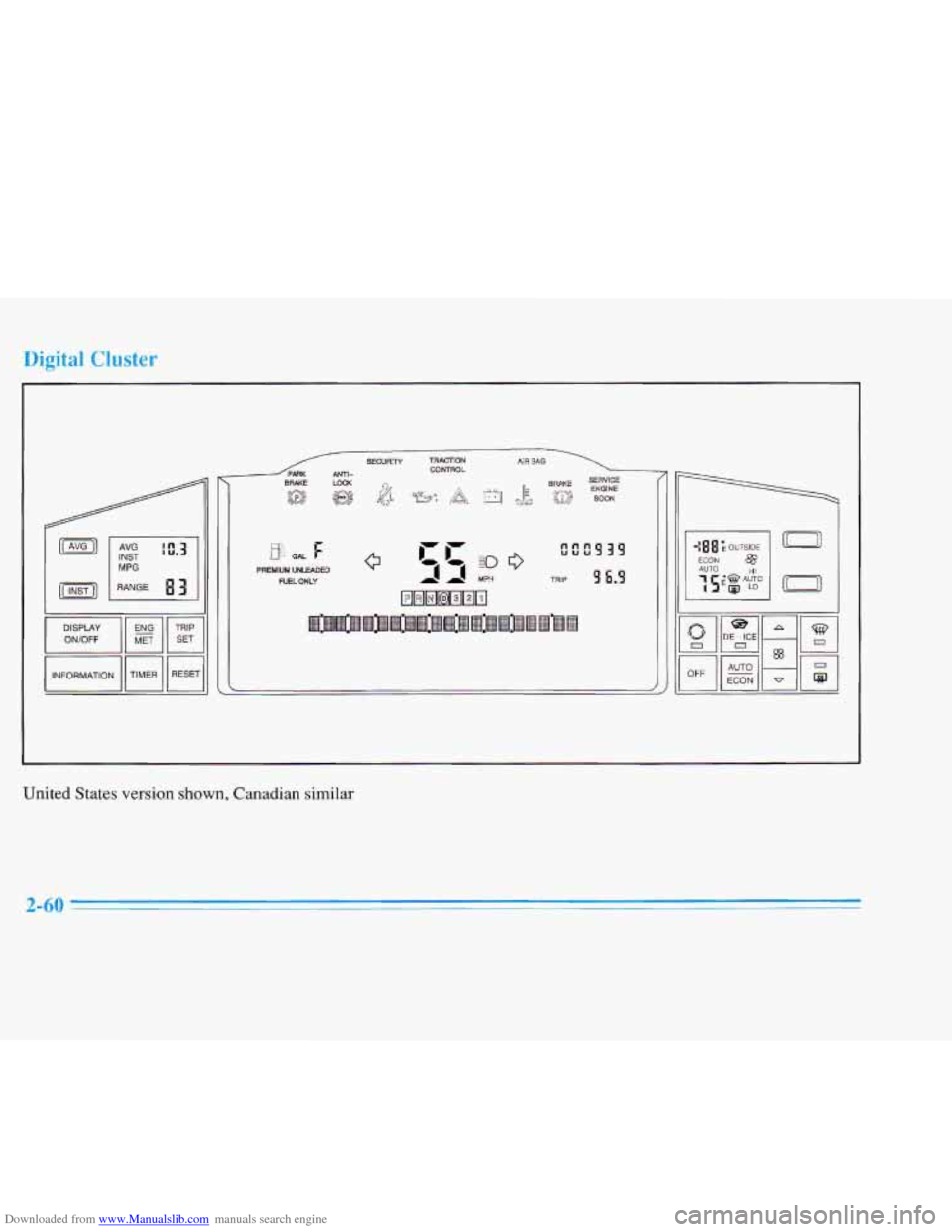
Downloaded from www.Manualslib.com manuals search engine Digital Cluster
I I MPG PREMIUM UNLEADED NELWLY
United States version shown, Canadian
similar
2-60
Page 135 of 354

Downloaded from www.Manualslib.com manuals search engine Fuel Data Panel
. ,..^ . I/ ,; .. . . , . . . .., . . . .
The fuel data panel tells you all you need to know about
the fuel economy and how far you can travel with the
fuel remaining.
Press the AVG button to display the average
mile-per-gallon (AVG MPG). You can also display
it in
metric units by pressing the ENG MET button.
When AVG MPG
is selected, the total distance is
divided by the total fuel used. When the
INST button (Instantaneous Fuel Economy) is
selected, you will see what the fuel economy
is at that
instant. The computer takes
a new reading twice every
second. It will show economy up to
70 miles-per-gallon
(or
2 L per 100 km).
To reset the average fuel economy, press the
INFORMATION button until the AVG
MPG is
displayed on the
DIC. Press and hold the RESET button
until both the fuel data center and DIC display reads 0.0.
The RANGE display shows how far the computer thinks
you can travel with the fuel that is in the tank. The
computer does not know what driving conditions will be
like for the rest
of your trip, so the range is estimated
based on
the recent fuel economy. Therefore, the range
reading may change
as your driving habits change.
Going from city to highway driving
may increase the
range reading.
If the range display shows
LO, you should stop for fuel
as soon as possible. Your computer needs enough data
for the RANGE reading to work.
2-74
Page 137 of 354

Downloaded from www.Manualslib.com manuals search engine INFORMATION: Pressing this button repeatedly will
display the AVG MPG, FUEL
USED, AVG MPH, OIL
LIFE LEFT, ENGINE RPM, BATTERY VOLTS and
COOLANT TEMP.
TIMER: This feature is like a stopwatch, in that you
can clock the time it takes to get from one point to
another.
To operate, press the TIMER button until TIMER
0O:OO:OO is displayed on the DIC. Each of the fields for
the hours, minutes and seconds are two numeric digits.
Once TIMER OFF
0O:OO:OO is displayed, press the
TIMER button to start
the timing feature. Press the
TIMER button again
to stop it. If you will be starting
and stopping your Cadillac, during
a trip for instance,
the TIMER feature will automatically start timing where
it left off when you last stopped. To reset it, press and
hold the RESET button until the display reads TIMER
0O:OO:OO. Press the INFORMATION button to exit from
the TIMER function.
RESET Pressing this button will reset the MPG AVG,
FUEL USED, AVG MPH and OIL LIFE LEFT. Pressing
RESET when
a non-resettable display appears will
cause
a “recall” mode to occur. When this happens, all
DIC warning messages that have been displayed since
the ignition key was turned to RUN will redisplay.
If no
messages were displayed, a MONITORED SYSTEMS
OK message will appear.
MPG AVG (Average Fuel Economy) Reset: Press the
INFORMATION button to display the MPG AVG, then
press and hold the RESET button until
0.0 MPG AVG
is displayed.
Fuel Used Reset: Press the INFORMATION button
to display the
FUEL USED on the DIC, then press
and hold
the RESET button until FUEL USED 0.0
is displayed.
AVG MPH (Average Speed) Reset: Press the
INFORMATION button to display the AVG MPH, then
press and hold the RESET button until
0.0 AVG MPH
is displayed.
Oil Life Left Reset: Press the INFORMATION button
to display the OIL LIFE LEFT, then press and hold the
RESET button
until 100% OIL LIFE LEFT is displayed.
A n/
Page 138 of 354

Downloaded from www.Manualslib.com manuals search engine nalog Control Buttons
INFO RESET Pressing this button will reset the MPG
AVG, FUEL USED, AVG MPH, TIMER, OIL LIFE
LEFT and ENGLISHMTRIC RESET. Pressing INFO
RESET when a non-resettable display appears will
cause a “recall” mode to occur. When this happens, all
DIC warning messages that have been displayed since
the ignition key was turned to RUN will redisplay. If no
messages were displayed, a MONITORED SYSTEMS
OK message will appear.
MPG AVG (Average Fuel Economy) Reset: Press the
INFO button to display the MPG AVG, then press and
hold the INFO RESET button until
0.0 MPG AVG
is displayed.
Fuel Used Reset: Press the INFO button to display the
FUEL USED on the DIC, then press and hold the INFO
RESET button until FUEL USED
0.0 is displayed.
AVG MPH (Average Speed) Reset: Press the INFO
button to display the AVG MPH, then press and hold the
INFO RESET button until
0.0 AVG MPH is displayed.
Timer: This feature is like a stopwatch, in that you can
clock the time it takes to get from one point to another.
To operate, press the INFO button to display TIMER.
Each of the fields for the hours, minutes and seconds are
two numeric digits.
Once TIMER OFF
0O:OO:OO is displayed, press the
INFO RESET button to start the timing feature. Press
the INFO RESET button again to stop it. If you will be
starting and stopping your Cadillac, during a trip for
instance, the TIMER feature will automatically start
timing where it left
off when you last stopped. To reset
it, press and hold the INFO RESET button until the
display reads TIMER
0O:OO:OO. Press the INFO button
to exit from the TIMER function.
Page 139 of 354
Downloaded from www.Manualslib.com manuals search engine Oil Life Left Reset: Press the INFO button to display
the
OIL LIFE LEFT, then press and hold the INFO
RESET button until 100% OIL LIFE LEFT is displayed.
English/Metric Reset: Press the INFO button to display
ENGLISH/METRIC RESET, then press the
INFO
RESET button to select. The display will change from
English (miles) to metric (kilometers).
TRIP RESET By using this button you can tell how far
you've gone since you last set the
TRIP RESET back to
zero.
To reset, press, and hold the button until zeros
appear.
If your vehicle is domestic, the trip odometer
will return
to zero after 999.9 miles (1 609 km). If your
vehicle
is Canadian, the trip odometer will return to zero
after
1 999.9 km (1,242.miles).
INFO: Pressing this button repeatedly will display the
RANGE, MPG AVG, MPG
INST, FUEL USED, AVG
and
ENGLISH/METRIC RESET.
" MPH, TIMER, OIL LIFE LEFT, BATTERY VOLTS
FUEL DOOR: Press this button to open the fuel door.
TRUNK: Press this button to open the trunk.
Driver Information Center Messages
These messages will appear if there is a problem sensed
in one of your vehicle's systems. Vehicles that are first ,,
sold in Canada will'have a number after each message.
This number helps to identify ,the message which is only
displayed in English.
.
Ak OFF FOR ENGINE PROTECTION - 16: This
message displays when the engine coolant becomes
hotter than the normal operating temperature. To avoid
added strain on a hot engine, the air conditioning
compressor is automatically turned
oft so that air
conditioned air is not delivered.
If the coolant
temperature returns to normal, you must seIect AC to
return to a' normal A/C compressor operation.
If this
message continues to appear, have the system repaired
as soon as possible to avoid compressor damage.
APPLY BRAKE TO SHIFT - 46: This message
will appear if your vehicle is
in PARK (P) for about
15 seconds and the brake is not pressed in. Remove the
message by holding the
OFF and the blue (cooler)
button on
the Electronic Climate Control panel for about
five seconds. Hold the same two buttons again to
redisplay the message.