1995 PONTIAC GRAND-AM display
[x] Cancel search: displayPage 67 of 354

LOCK (B): This is the only only position in which you
can remove the key. This locks your steering wheel,
ignition and transaxle (on automatic models).
OFF (C): This unlocks the steering wheel, ignition, and
transaxle (on automatic models), but does not send
electrical power to any accessories. Use this position
if
your vehicle must be pushed or towed, but never try to
push-start your vehicle.
A warning chime will sound if
you open the driver’s door when the ignition is
off and
the key is in the ignition.
RUN (D): This is an “on” position to which the switch
returns after you start your engine and release the
switch. The switch stays in the RUN position when the
engine
is running. But even when the engine is not
running, you can use RUN to operate your electrical
power accessories, and to display some instrument panel
warning lights.
START (E): Use this for starting the engine. When the
engine starts, release the key. The ignition switch will
return to RUN for normal driving.
Note that even if the engine is not running, the positions
ACCESSORY and RUN are ON positions that allow
you to operate your electrical accessories, such as the
radio.
Key Release Button (Manual Transaxle)
The key cannot be removed from the ignition unless the
key release button is used.
To remove the key turn the key to the OFF position.
Press the key release button while turning the key from
OFF to LOCK. Keeping your finger on the button, pull
the key straight out.
2-12
ProCarManuals.com
Page 98 of 354

Instrument Panel Intensity Control
You can brighten or dim your instrument cluster lamps
by rotating the instrument panel intensity control switch.
Rotate the switch all the way to the right to turn on the
interior courtesy lamps. Rotate the switch to the left to
turn off the instrument cluster lamps and displays.
Fog Lamps
The switch for your fog lamps is next to the instrument
panel intensity control.
Push the top of the switch
to turn the fog lamps on.
When using fog lamps, the parking lamps or low beam
headlamps must be on.
Fog lamps will go off whenever the high beam
headlamps come on. When the high beams go off, the
fog lamps will come on again.
Daytime Running Lamps (Canada Only)
Daytime Running Lamps (DRL) can make it easier for
others to see the front
of your vehicle during the day.
DRL can be helpful in many different driving
conditions, but they can be especially helpful in the
short periods after dawn and before sunset. Several
countries, including Canada, require
DRL.
A light sensor on top of the instrument panel makes the
DRL work,
so be sure it isn’t covered. The DRL system
will make your high beam headlamps come on at
reduced brightness when:
The ignition is on,
0 The headlamp switch is off, and
0 The parking brake is released (manual transaxle).
The shift lever is not in PARK (P) or NEUTRAL (N)
(automatic transaxle).
2-43
ProCarManuals.com
Page 128 of 354
Audio Systems
The following pages describe the audio systems
available for your Pontiac, and how to get the best
performance
from them. Please read about the system in
your vehicle.
Setting the Clock
Radios with SEEK up and down arrow buttons:
1. With the ignition on and radio on or off, press SET.
The SET indicator will appear on the digital display
for five seconds.
2. Within five seconds, press the SEEK up arrow
button until the correct minute appears on the
display.
3. Press the SEEK down arrow button until the correct
hour appears on the display.
Radios with SEEK left and right arrow buttons
(CD Player):
1. With the ignition on and the radio on or off, press
SET. The
SET indicator will appear on the digital
display
for five seconds.
2. Within five seconds, press the SEEK right arrow
button until the correct minute appears on the
display.
3. Press and hold the SEEK left arrow button until the
correct hour appears on the display.
i- .. . .
. .,.. , ' ..
3-5
ProCarManuals.com
Page 129 of 354
AM/FM Stereo Radio
I’
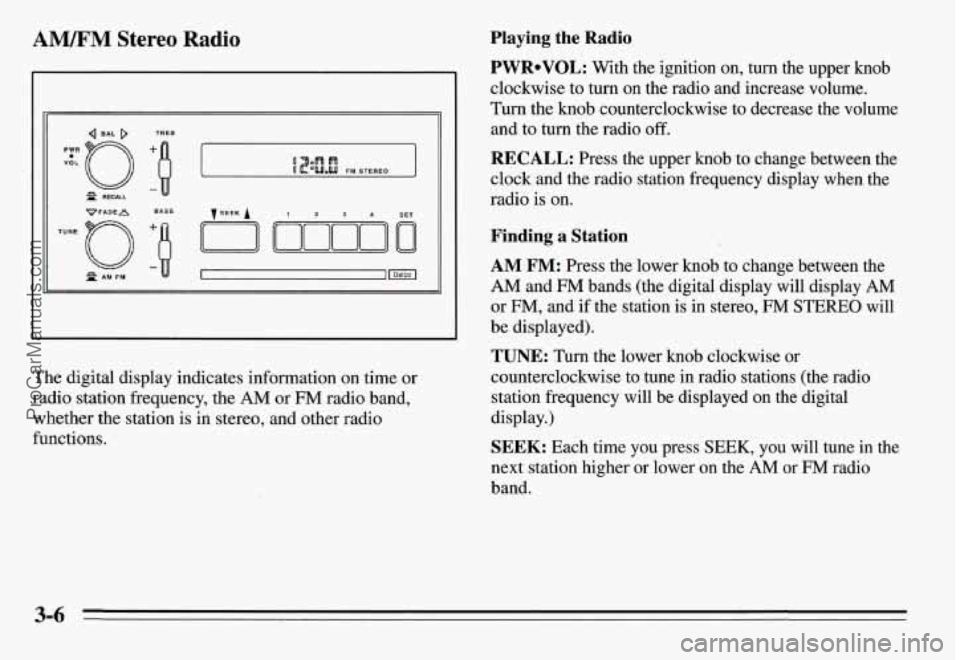
The digital display indicates information on time or
radio station frequency, the
AM or FM radio band,
whether the station is in stereo, and other radio
functions.
Playing the Radio
PWRoVOL: With the ignition on, turn the upper knob
clockwise to turn
on the radio and increase volume.
Turn the knob counterclockwise to decrease the volume
and to turn the radio off.
RECALL: Press the upper knob to change between the
clock and the radio station frequency display when the
radio is on.
Finding a Station
AM FM: Press the lower knob to change between the
AM and FM bands (the digital display will display AM
or FM, and if the station is in stereo, FM STEREO will
be displayed).
TUNE: Turn the lower knob clockwise or
counterclockwise to tune
in radio stations (the radio
station frequency will be displayed on the digital
display.)
SEEK: Each time you press SEEK, you will tune in the
next station higher or lower on the
AM or FM radio
band.
3-6
ProCarManuals.com
Page 130 of 354

Presets: The four numbered pushbuttons can be used to
preset up to 14 radio stations (seven AM and seven €34).
1. Tune in the desired station.
2. Press SET. The word SET will appear on the digital
3. While SET is displayed, press one of the four
display for five seconds.
pushbuttons. Whenever you press this button again,
the preset station will be tuned in.
4. Repeat steps 1-3 for each of four AM and four FM
Up to three additional stations on each band may be
preset
by “pairing” pushbuttons:
stations.
1. Tune in the desired station.
2. Press SET, and within five seconds press any two
adjacent pushbuttons at the
same time. Whenever
you press these two buttons again, the preset station
will be tuned in.
Setting the Tone
BASS: Slide this lever up to increase bass or down to
decrease it.
TREB: Slide this lever up to increase treble or down to
decrease it. If a station is weak or noisy, reduce the
treble.
Adjusting the Speakers
BAL: The control ring behind the upper knob adjusts
the lefthight speaker balance.
FADE: The control ring behind the lower knob adjusts
the fronthear speaker balance.
ProCarManuals.com
Page 131 of 354

AM/FM Stereo Radio with Cassette Tape
Player (Option)
VoL-OBAL TREBLE I
TUNE -0 FADE
LO
~PROG-RCL
R PAM-FM
B
BASS
The digital display indicates information on time or
radio station frequency, the
AM or FM radio band,
whether the station is in stereo, and other radio
functions.
Playing the Radio
VOL-BAL: With the ignition on, turn the upper knob
clockwise to turn the radio on and to increase volume.
Turn the knob counterclockwise to decrease volume and
to turn the radio off.
PROG-RCL: Press the upper knob to change between
the clock and the radio station frequency display when
the radio is on. Press the knob to hear the other side of a
tape while a cassette is playing.
Finding a Station
AM FM: Press the lower knob to change between the
AM and FM bands (the digital display will display AM
or FM, and if the station is in stereo, STEREO will be
displayed).
TUNE: Turn the lower knob clockwise or
counterclockwise to tune in radio stations (the radio station frequency will be displayed on the digital
display).
SEEK: Each time you press SEEK, you will tune in the
next station higher or lower on the
AM or FM radio
band.
ProCarManuals.com
Page 132 of 354

PES&: The four pushbuttons below the digital display
can be used to preset up to
14 radio stations (seven AM
and seven EM).
1.
2.
3.
4.
Tune in the desired station.
Press
SET. The word SET will appear on the digital
display for five seconds.
While SET is displayed, press one of the four
pushbuttons. Whenever you press this button again,
the preset station
will be tuned in.
Repeat steps 1-3 for each of four AM and four FM
stations.
Up to three additional stations on each band may be
preset by “pairing” pushbuttons:
1.
2.
Tune in the desired station.
Press SET, and within five seconds press any two
adjacent pushbuttons at the same time. Whenever
you press these two buttons again, the preset station
will be tuned
in.
Setting the Tone
BASS: Slide this lever up to increase bass or down to
decrease it.
TREBLE: Slide this lever up to increase treble or down
to decrease it. If a station is weak or noisy, reduce the
treble.
Adjusting the Speakers
BAL: The control ring behind the upper knob adjusts
the lefvright speaker balance.
FADE: The control ring behind the lower knob adjusts
the frondrear speaker balance.
3-9
ProCarManuals.com
Page 133 of 354
Playing a Cassette Tape
With the power on, insert a tape into the cassette door.
Do not use tapes that are longer than 45 minutes on each
side.
When the left indicator arrow is lit, selections listed on
the top side of the cassette are playing. When the right
indicator mow is lit, selections listed on the bottom side
of the cassette are playing. Press the upper control knob
to change sides of a cassette while it is playing. The tape
player automatically begins playing the other side when
it reaches the end of a tape.
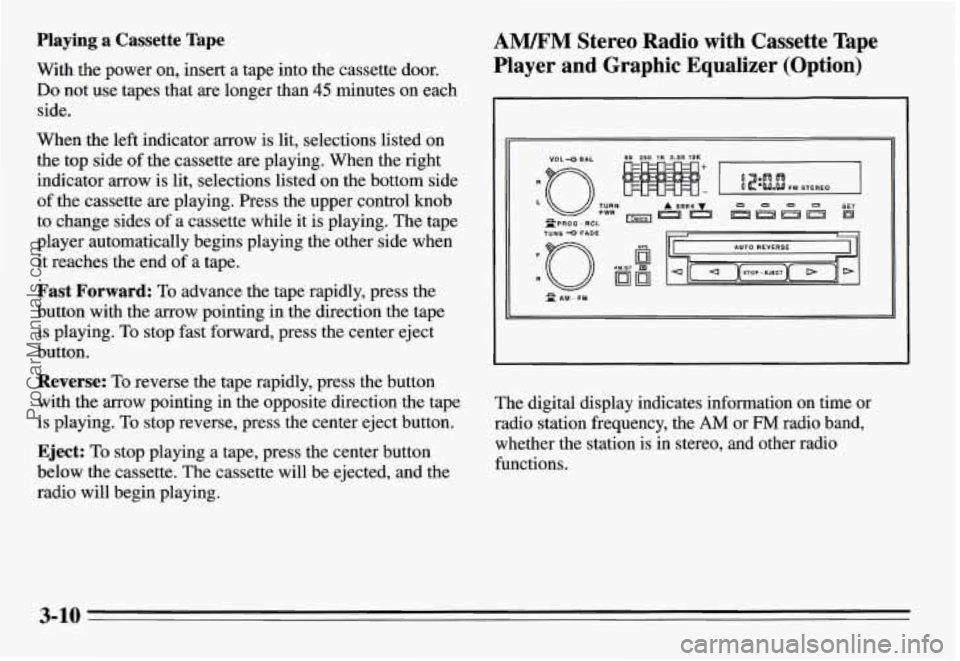
Fast Forward: To advance the tape rapidly, press the
button with the arrow pointing in the direction the tape
is playing.
To stop fast forward, press the center eject
button.
Reverse: To reverse the tape rapidly, press the button
with the arrow pointing
in the opposite direction the tape
is playing.
To stop reverse, press the center eject button.
Eject: To stop playing a tape, press the center button
below the cassette. The cassette
will be ejected, and the
radio will begin playing.
AWM Stereo Radio with Cassette Tape
Player and Graphic Equalizer (Option)
TUNE 0 FADE
n
The digital display indicates information on time or
radio station frequency, the
AM or FM radio band,
whether the station is
in stereo, and other radio
functions.
3-10
ProCarManuals.com