Page 100 of 372

HomeLink TM Universal Transmitter
(Option)
This transmitter allows you to consolidate the functions of
up to three individual hand-held transmitters. It will operate
garage doors and gates, or with the accessory package,
other devices controlled by radio frequency such as
home/office lighting systems and security systems.
The transmitter will learn and transmit the frequencies
of most current transmitters and is powered by your
vehicle’s battery and charging system. This device complies with
Part 15 of the FCC Rules.
Operation
is subject to the following two conditions:
(1) This device may not cause harmful interference, and
(2) This device must accept any interference received,
including interference that may cause undesired operation.
Programming the Transmitter
Do not use the HomeLink” Transmitter with any
L earage door opener that does not have the “stop and
reverse” safety feature. This includes any garage door
opener model manufxtured before April
1, 1982.
Be SLW~ that people Lrnd objects are clear of the garage
door you cue progrcunu~ir’rg!
Your vehicle’s engine should be turned off while
programming your transmitter. Follow these steps
to
program up to three channels:
1. If you have previously programmed a HomeLink
channel, proceed to Step
2. Otherwise, hold down
the two outside buttons on the HomeLink
Transmitter
until the red light begins to flash rapidly
(approximately
20 seconds). Then release the
buttons. This procedure initializes the memory and
erases any previous settings for all three channels.
2. Hold the end of your hand-held transmitter against
the bottom surface
of the HomeLink Transmitter so
that you can still see the red light.
2-48
ProCarManuals.com
Page 111 of 372

The Aurora instrument panel is designed to let you
know at a glance how your vehicle is running. You’ll
know how fast you’re going, how much fuel you’re
using, and many other things you’ll need
to drive safely
and economically.
The main components
of your instrument panel are:
1.
2.
3.
4.
5.
6.
7.
8.
9.
10.
11.
Power Mirrors Control Switch
Fog Lamp Switch
Turn SignalMultifunction Lever
Instrument ClusterIGages
Hazard Warning Flashers Switch
Horn
Windshield Wiper/Washer Control
Driver Information Center
Climate Controls
Audio System
Glove
Box (Trunk Security Override Switch inside) 12.
Passenger Side Air Bag
13. Accessory Power Outlet
14. Gearshift Lever
15. Selectable Shift
16. Traction Control Button
17. Ashtray and Lighter
18. Fuel Door Release Switch
19. Trunk Release Switch
20. Steering Wheel Touch Controls for Audio System
21. Ignition Switch
22. Driver Side Air Bag
23.
Tilt Steering Wheel Lever
24. Steering Wheel Touch Controls for Climate Control
System
25. Twilight Sentinel Control
26. Instrument Panel Intensity Control
ProCarManuals.com
Page 158 of 372

To Enable the Theftlock@ Feature
The instructions which follow explain how to enter your
secret code to activate the Theftlock@ system. It
is
recommended that you read through all nine steps
before starting the procedure.
1. Write down any three- or four-digit number from
000 to 1999 and keep it in a safe place separate from
the
vehicle.
2. Turn the ignition to the ACCESSORY or RUN
position.
3. Press the PWR/VOL button to turn the radio off.
NOTE:
If you allow more than 15 seconds to elapse
between any steps,
the radio automatically reverts to
time and you must start the procedure over at step 4.
4. Press the 1 and 4 buttons together. Hold them down
until “---” shows on the display. Next you will use
the secret code number which you have written
down.
5. Press the MN button and “000” will appear on the
display.
6. Press MN again to make the last two digits agree
7. Press the HR button to make the first one or two
with
your code.
digits agree with your code.
8. After you have confirmed that the code matches the
one you wrote down, press AM/FM. The display will
show “rEP” to indicate that you need to repeat steps
5-7 to confirm your secret code.
9. Press AMEM and this time the display will show
Any time Theftlock@
is activated and the battery power
is removed, the radio
will display “LOC.”
“SEC” indicating that your radio is secure.
To Unlock Theftlock@ After a Power Loss
Enter your secret code as follows; pause no more than
15 seconds between steps:
1. “LO”’ will appear when the ignition is on.
2. Press the MN button and “000” will appear on the
display.
3. Press MN again to make the last two digits agree
with your code.
ProCarManuals.com
Page 159 of 372

4. Press the HR button to make the first one or two
digits agree with your code.
5. After you have confirmed that the code in the display
matches the secret code
you have written down,
press AM/FM. “SEC” will appear
in the display,
indicating that the radio is now operable and secure.
If the code entered to unlock Theftlock@ is incorrect, the
radio will remain locked. After eight unsuccessful
attempts to unlock
the radio, the display will show
“InOP” (inoperative). At this point you will need
to
keep the ignition on for one hour before you may
attempt to enter another code. After three unsuccessful
attempts to unlock the radio,
the display will show
“InOP” (inoperative) again.
If you forget your code or cannot unlock the radio,
contact your retailer for assistance.
To Disable Theftlock@
Enter your secret code as follows; pause no more than
15 seconds between steps:
1.
2.
3.
4.
5.
4.
7.
Turn the ignition to the ACCESSORY or RUN
position.
Press the PWR/VOL button to
turn the radio off.
Press the
1 and 4 buttons together. Hold them down
until “SEC” shows in the display.
Press the MN button and
“000” will appear on the
display.
Press MN again to make the last two digits agree
with your code.
Press the
HR button to make the first one or two
digits agree with your code.
After you have confirmed that the code in the display
matches the secret code you have written down,
press AMEM. The display will show
“---”
indicating that the radio is no longer secured.
If the code entered is incorrect, “SEC” will appear in the
display. The radio
will remain secured until the correct
code is entered.
3-27
ProCarManuals.com
Page 188 of 372
Driving on Snow or Ice
Most of the time, those places where your tires meet the
road probably have
good traction.
Include an ice scraper,
a small brush or broom, a supply
of windshield washer fluid, a rag, some winter outer
clothing,
a small shovel, a flashlight, a red cloth, and a
couple of reflective warning triangles. And, if you will
be driving under severe conditions, include a small bag
of sand, a piece of old carpet or a couple of burlap bags
to help provide traction. Be sure you properly secure
these items
in your vehicle. However,
if there is snow
or ice between your tires and the
road, you can have a very slippery situation. You’ll have
a
lot less traction or ”grip” and will need to be very careful.
4-24
ProCarManuals.com
Page 198 of 372

Driving with a Trailer
Towing a trailer requires a certain amount of experience.
Before setting out for the open road,
you'll want to get
to know your rig. Acquaint yourself with the feel of
handling and braking with the added weight
of the
trailer. And always keep
in mind that the vehicle you are
driving is now a good deal longer and not nearly as
responsive as your vehicle is by itself.
Before
you start, check the trailer hitch and platform
(and attachments), safety chains, electrical connector,
lights, tires and mirror adjustment.
If the trailer has
electric brakes, start your vehicle and trailer moving and
then apply the trailer brake controller by Imnd to be sure
the brakes are working. This lets you check your
electrical connection at the same time.
During your
trip, check occasionally to be sure that the
load is secure, and that the lights and any trailer brakes
are still working.
Following Distance
Stay at least twice as far behind the vehicle ahead as you
would when driving your vehicle without a trailer. This
can help you avoid situations that require heavy braking
and sudden turns.
Passing
You'll need more passing distance up ahead when
you're towing a trailer. And, because you're a good deal
longer, you'll need to go much farther beyond the
passed vehicle before
you can return to your lane.
Backing Up
Hold the bottom of the steering wheel with one hand.
Then, to move the trailer to the left, just move that hand
to the left. To move the trailer to the right, move yo~~r
hand to the right. Always back
up slowly and, if
possible. have someone guide you.
4-34
ProCarManuals.com
Page 236 of 372
To take off the cap, turn it slowly to the left
(counterclockwise).
While refueling, hang the cap inside the fuel door. Twist
it clockwise to secure it,
if necessary. Be
careful not to spill gasoline. Clean gasoline from
painted surfaces as soon
as possible. See “Cleaning the
Outside
of Your Aurora” in the Index.
When you put the cap back on, turn it to the right until
you hear at least three clicks.
I I
I NOTICE: I
If you need a new cap, be sure to get the right
type. Your retailer can get one for you. If you get
the wrong type, it may not fit or have proper
venting, and your fuel tank and emissions system
might be damaged.
6-6
ProCarManuals.com
Page 257 of 372
Contact your retailer to learn how to prepare your
vehicle
for longer storage periods.
Halogen Bulbs
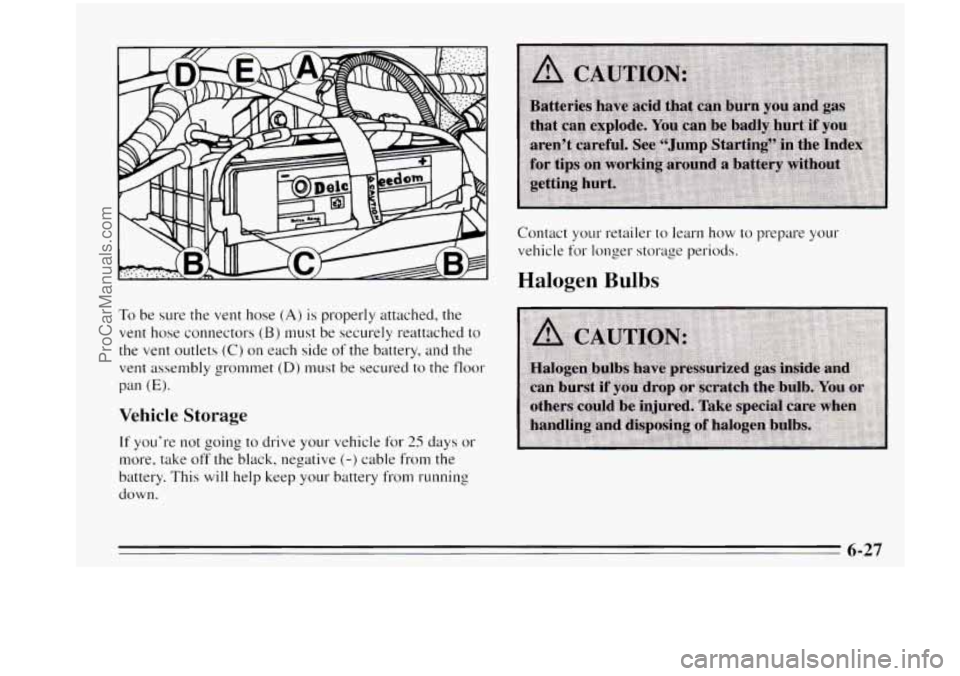
To be sure the vent hose (A) is properly attached, the
vent hose connectors (B) must be securely reattached to
the vent outlets (C) on each side of the battery, and the
vent assembly grommet
(D) must be secured to the floor
pan
(E).
Vehicle Storage
If you're not going to drive your vehicle for 25 days or
more, take off the black, negative (-) cable from the
battery. This will help keep your battery from running
down.
6-27
ProCarManuals.com