Page 603 of 738
Downloaded from www.Manualslib.com manuals search engine CHASSIS ELECTRICAL - Lighting SystemHIGH MOUNTED STOP LIGHT
REMOVAL AND INSTALLATION
Z 16FO229Z 16FO229
‘\ \/4
116FcJ23100002393 00002393
Removal steps
1. Liftgate lower trim(Refer to GROUP 52A - Trims.)2. Rear spoiler(Refer to GROUP 51 - Aero Parts.)3. High mounted stop light
1. Light unitg. ;S;ke’ assembly
Removal steps
1. Liftgate lower trim(Refer to GROUP 52A - Trims.)2. High mounted stop light cover3. ;;z;keyounted stop light lens and
4. Gasket
&I REMOVAL SERVICE POINT
4A, HIGH-MOUNTED STOP LIGHT REMOVAL
(Vehicles with fixed rear spoiler)
Remove the air spoiler center stay mounting screws beforeremoving the high-mounted stop
light.
Page 605 of 738
Downloaded from www.Manualslib.com manuals search engine CHASSIS ELECTRICAL - Lighting System54-109
POP-UP SWITCH* AND FOG LIGHT SWITCH
i
LREMOVAL AND INSTALLATION
bZ16FO220
b
Removal steps
1. Knee protector5. Pop-up switch* and fog light switch
(pR,;$)to GROUP 52A - Instrument6. Rear window defogger switch
+A,2. Colur& cover, lowerNOTE
+A,3. Column cover, upperl : Up to 1993 models
4. Meter bezel
Front ofvehicle
219FO123
lbA035600002395
REMOVAL SERVICE POINTS
dAbCOLUMN COVER, LOWER / COLUMN COVER,
UPPER REMOVAL
After the screws have been removed, remove the covers,while making sure not to break the grippers.
INSPECTION
Operate the switch to check for continuity between terminals.
Switch positionTerminal No.
15891034
Pop-upUP
switch
:;;1kq:p93 DOWN
Foglight ONswitch
OFF
NOTE
Refer to P.54-203. Check the rear window defogger switch.TSB Revision
Page 608 of 738
Downloaded from www.Manualslib.com manuals search engine 54-112CHASSIS ELECTRICAL - Column SwitchCOLUMN SWITCH
REMOVAL AND INSTALLATION
1
Removal steps
1. Air bag module (Refer to GROUP525Air Bag Module and ClockSpring.)+A, .A+ 2. Steering wheel3. Knee protector
4Bb
$F$i;)to GROUP 52A - Instrument
4. Column cover, lower
4B,5. Column cover, upper6. Lap cooler duct and foot shower duct7. Column switch, right (For lightingswitch, dimmer/passing switch andturn signal switch)8. Column switch, right (For wiper andwasher switch)
REMOVAL SERVICE POINTS
(A,STEERING WHEEL REMOVAL
Remove the steering wheel by the special tool.
Caution
Do not hammer on the steering wheel. Doing so may
damage the collapsible column mechanism.
1 TSB Revision
Page 609 of 738
Downloaded from www.Manualslib.com manuals search engine L
L
CHASSIS ELECTRICAL - Column Switch54-113
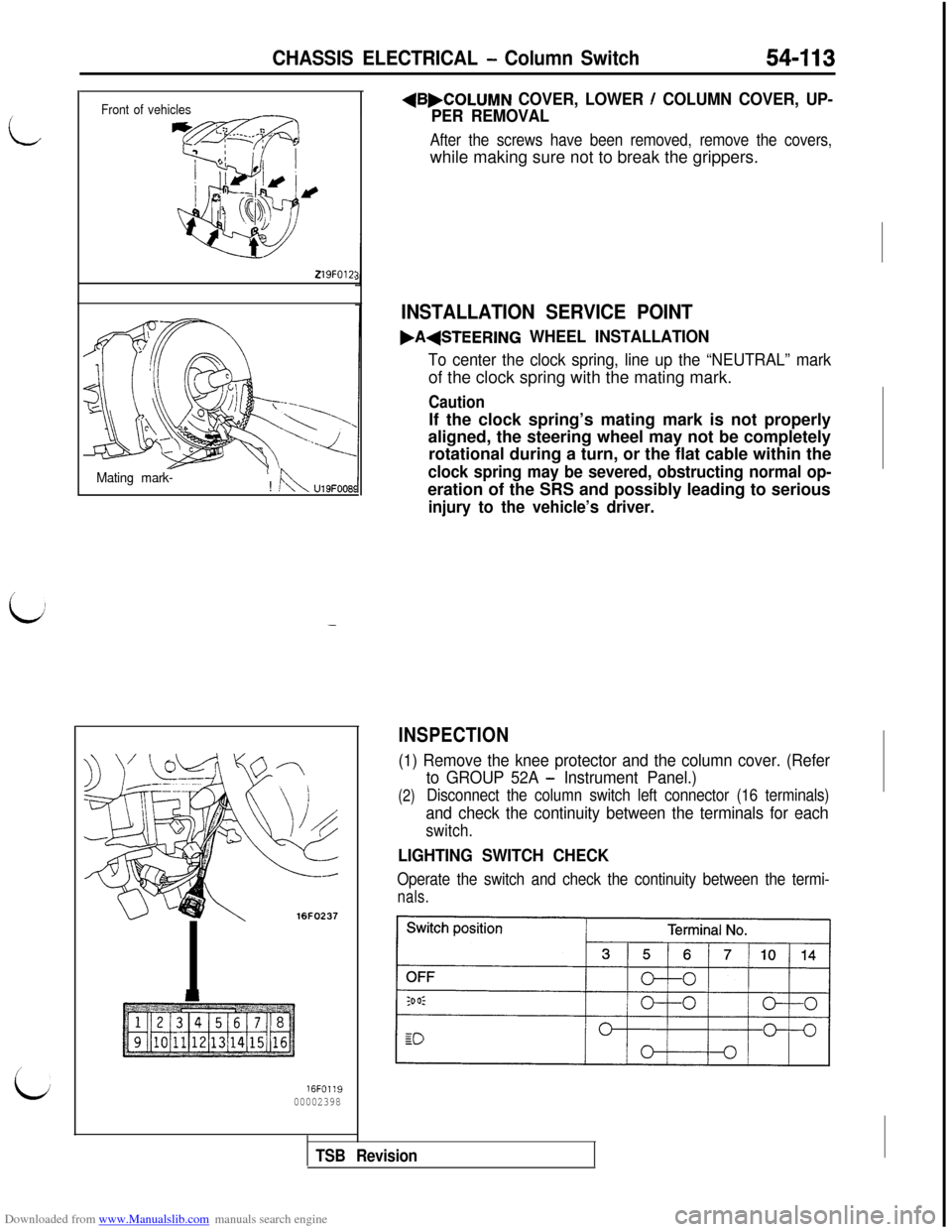
Front of vehicles
219FOlZ:
Mating mark-! !kU19FOOE
-
16FO237
16FO1:900002398
+B,COLUMN COVER, LOWER / COLUMN COVER, UP-
PER REMOVAL
After the screws have been removed, remove the covers,while making sure not to break the grippers.
INSTALLATION SERVICE POINT
.A(STEERING WHEEL INSTALLATION
To center the clock spring, line up the “NEUTRAL” markof the clock spring with the mating mark.
CautionIf the clock spring’s mating mark is not properly
aligned, the steering wheel may not be completely
rotational during a turn, or the flat cable within the
clock spring may be severed, obstructing normal op-eration of the SRS and possibly leading to serious
injury to the vehicle’s driver.
INSPECTION
(1) Remove the knee protector and the column cover. (Refer
(2)
to GROUP 52A - Instrument Panel.)
Disconnect the column switch left connector (16 terminals)
and check the continuity between the terminals for each
switch.
LIGHTING SWITCH CHECK
Operate the switch and check the continuity between the termi-
nals.
TSB Revision
Page 614 of 738
Downloaded from www.Manualslib.com manuals search engine 54-I 18CHASSIS ELECTRICAL - HornHORN SWITCH
REMOVAL AND INSTALLATION(UP TO 1993 MODELS)
~
Y16FO207Removal steps
1. Air bag module (Refer to GROUP 528
(FROM 1994 MODELS)
- Air Bag Module and Clock Spring.)2. Horn contact switch3. Horn contact plate and wire4. Horn switchThe
horn switch is not supplied
If it is faulty, replace the steeringby itself.wheel assembly.i-.
-L 16FOO61200002400
RELAY
INSPECTION
HORN RELAY CHECK
Connect battery to terminal 1 and check continuity between
terminals with terminal 3 grounded.
~1
THEFT-ALARM HORN RELAY CHECK
Connect battery to terminal 2 and check continuity between
terminals with terminal 4 grounded.TSB Revision
Page 619 of 738
Downloaded from www.Manualslib.com manuals search engine LCHASSIS ELECTRICAL
- Cigarette Lighter
CIGARETTE LIGHTER
REMOVAL AND INSTALLATION54-I 23
i,
216FO274
Removal steps
1. Console side cover (RH)2. Plug3. Fixing ring4. Socket case
5. Plate6. Socket7. ProtectorINSPECTION
l Take out the plug, and check for a worn edge on the
element spot connection, and for shreds of tobacco or
other material on the element.
lUsing an ohmmeter, check the continuity of the element.
TSB Revision
Page 682 of 738
Downloaded from www.Manualslib.com manuals search engine 54-186
CHASSIS ELECTRICAL - Radio and Tape Player
RADIO REMOTE-CONTROL
REMOVAL AND INSTALLATION
CAUTION: SRSBefore removal of air bag module, refer to GROUP 52B -Service Precautions and Air Bag Module and Clock Spring.
When removing and installing the remote control switch,
don’t allow any impact or shock to the air bag module.cup to 1993 models>
2.5 Nm1.8 ft.lbs.
Removai steps
1. Air bag module (Refer to GROUP
528 -Air Bag Module and Clock Spring.)
2. Radio remote control switchRADIO AND TAPE PLAYER
REMOVAL AND INSTALLATION2 4
Vehicle without
Z16FO49100002403
Removal steps
1. Radio panel2. Radio and tape player
3. CD player4. Radio bracket5. Front console assembly (Refer to GRbUP
52A - Console Box.)
1 TSB Revision
Page 683 of 738
Downloaded from www.Manualslib.com manuals search engine CHASSIS ELECTRICAL - Radio and Tape Plaver54-I 87
SPEAKER
L/REMOVAL AND INSTALLATION~
,/$‘I./$I/’ j/$/” 1
4./’I:” .,I’/,,$’ ,A’I ._.?,*:. . .;I_I‘7..
,, .-Y_.,: ,’
16FOO9700002404
Door speaker removal steps1. Door trim (Refer to GROUP 42
- DoorTrim and Waterproof Film.)
2. Speaker garnish
3. Speaker
4. Speaker cover
Rear speaker removal steps
1. Quarter trim (Refer to GROUP 52A -Trims.)
2. Speaker garnish
3. Speaker4. Speaker box
TSB Revision


