1995 JEEP CHEROKEE belt
[x] Cancel search: beltPage 265 of 2198
BELT SERVICEÐEXCEPT RIGHT HAND DRIVE
The following procedures are for models equipped
with conventional left hand drive. Also refer to Belt
ServiceÐWith Right Hand Drive.
REPLACEMENT/ADJUSTMENT
Belt tension is adjusted at the power steering
pump (or idler pulley if not equipped with power
steering). To adjust belt tension or to replace belt:
SERPENTINE DRIVE BELT DIAGNOSIS (CONT.)
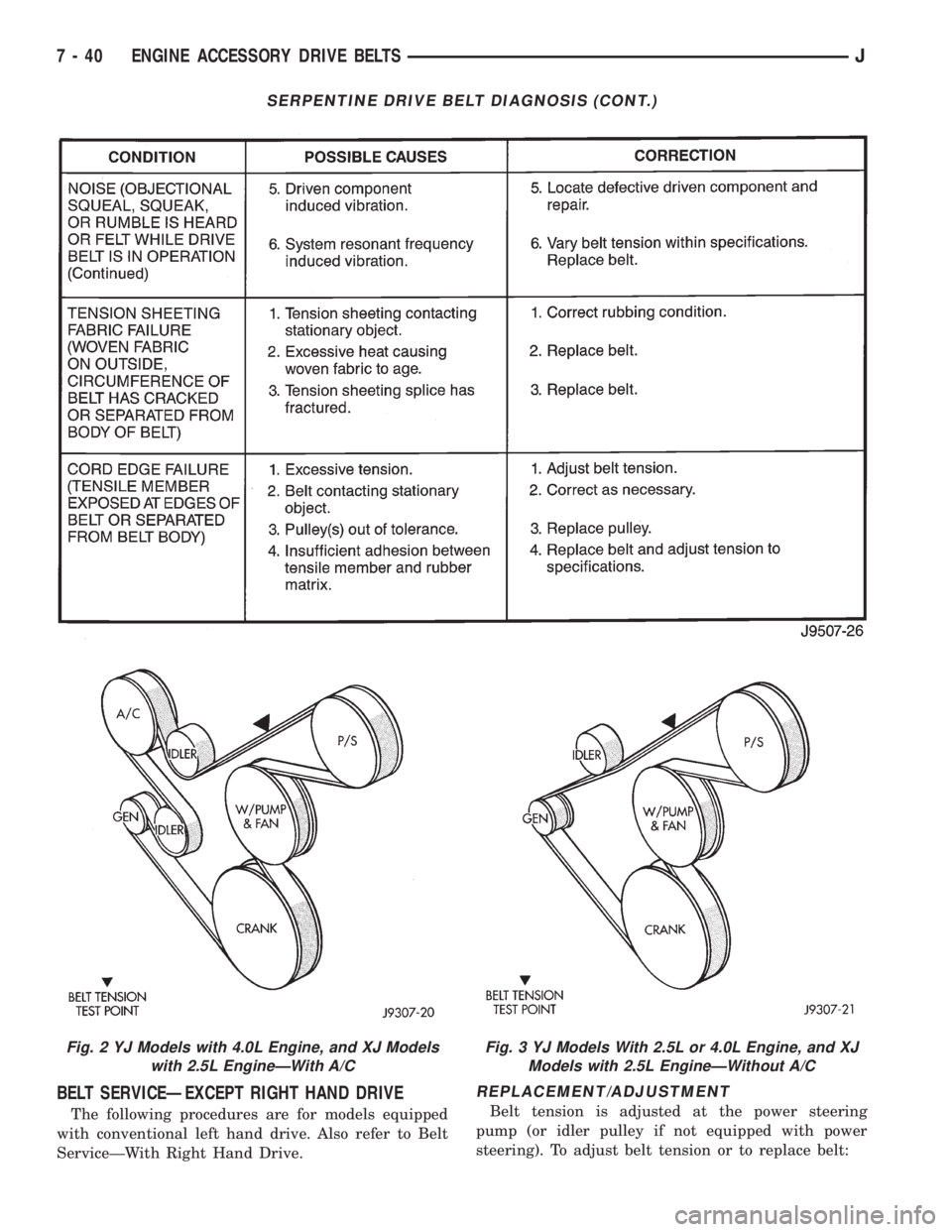
Fig. 2 YJ Models with 4.0L Engine, and XJ Models
with 2.5L EngineÐWith A/CFig. 3 YJ Models With 2.5L or 4.0L Engine, and XJ
Models with 2.5L EngineÐWithout A/C
7 - 40 ENGINE ACCESSORY DRIVE BELTSJ
Page 266 of 2198
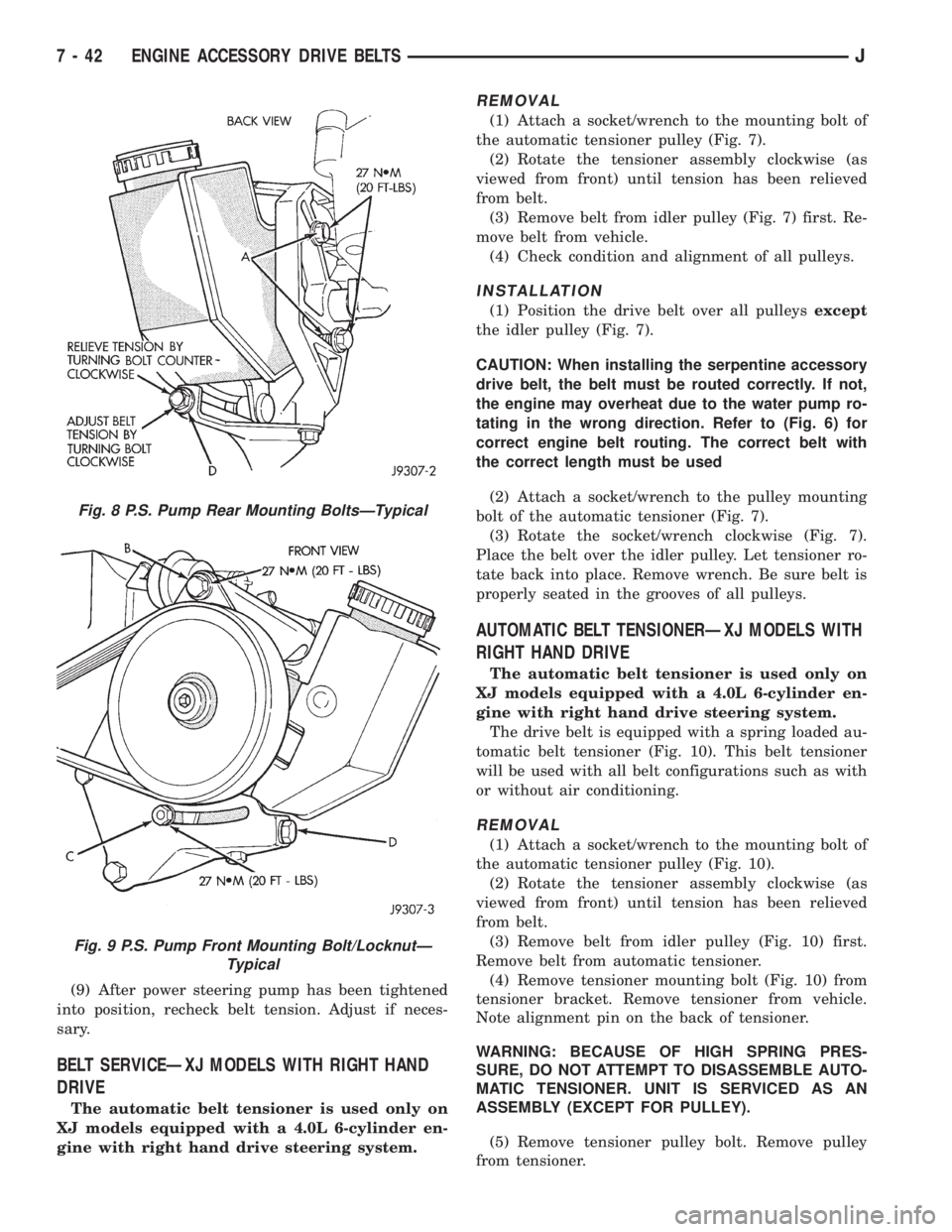
(1) Loosen two rear power steering pump mounting
bolts A (Fig. 8).
(2) Loosen upper pump pivot bolt B and lower lock
nut C (Fig. 9).
(3) Loosen pump adjusting bolt D (Fig. 8).
(4) If belt is to be adjusted, refer to Drive Belt Ten-
sion specifications at the end of this group for correct
tension and proceed to step 7.
If belt is to be replaced, remove belt.
(5) Check condition of all pulleys.
CAUTION: When installing the serpentine accessory
drive belt, the belt MUST be routed correctly. If not,
the engine may overheat due to the water pump ro-
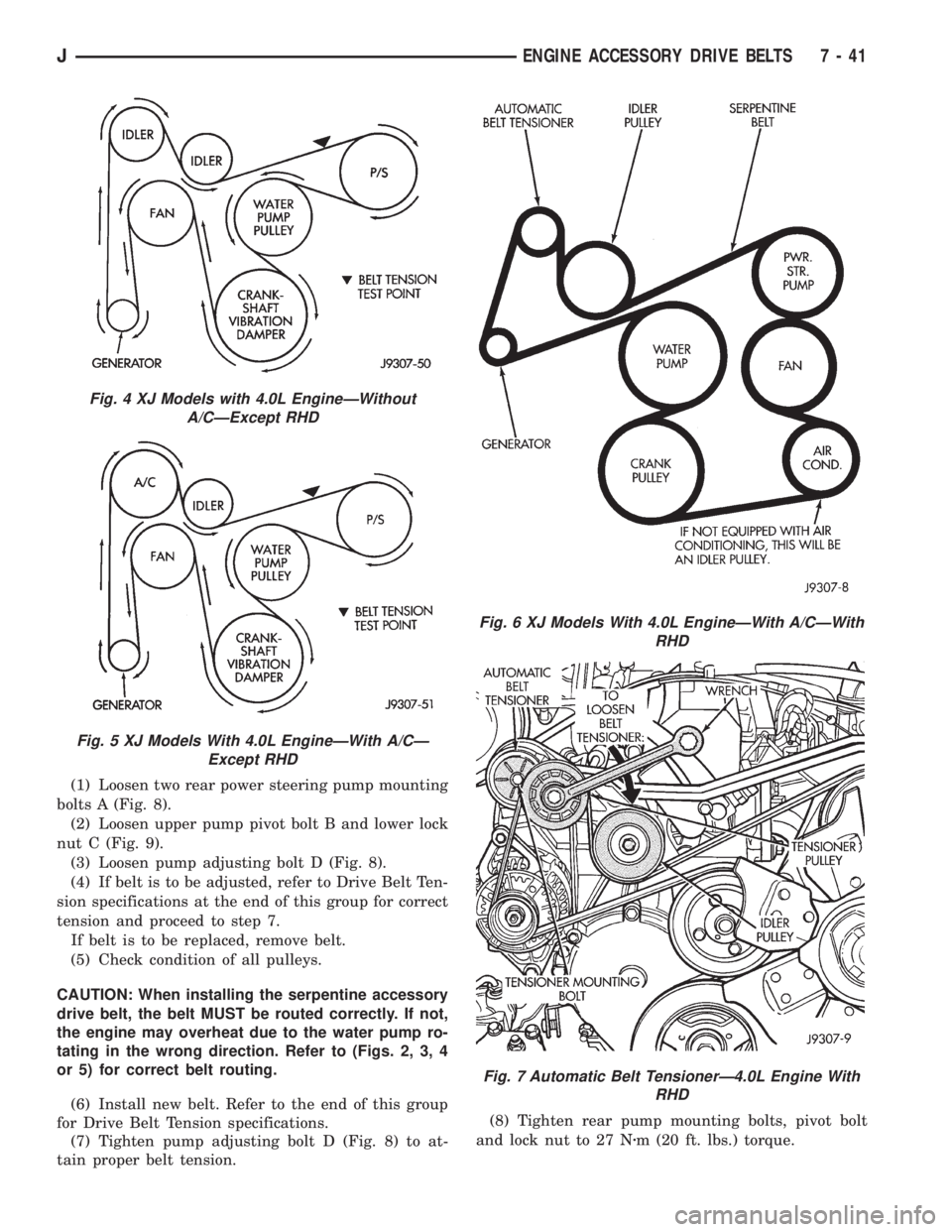
tating in the wrong direction. Refer to (Figs. 2, 3, 4
or 5) for correct belt routing.
(6) Install new belt. Refer to the end of this group
for Drive Belt Tension specifications.
(7) Tighten pump adjusting bolt D (Fig. 8) to at-
tain proper belt tension.(8) Tighten rear pump mounting bolts, pivot bolt
and lock nut to 27 Nzm (20 ft. lbs.) torque.
Fig. 4 XJ Models with 4.0L EngineÐWithout
A/CÐExcept RHD
Fig. 5 XJ Models With 4.0L EngineÐWith A/CÐ
Except RHD
Fig. 6 XJ Models With 4.0L EngineÐWith A/CÐWith
RHD
Fig. 7 Automatic Belt TensionerÐ4.0L Engine With
RHD
JENGINE ACCESSORY DRIVE BELTS 7 - 41
Page 267 of 2198
(9) After power steering pump has been tightened
into position, recheck belt tension. Adjust if neces-
sary.
BELT SERVICEÐXJ MODELS WITH RIGHT HAND
DRIVE
The automatic belt tensioner is used only on
XJ models equipped with a 4.0L 6-cylinder en-
gine with right hand drive steering system.
REMOVAL
(1) Attach a socket/wrench to the mounting bolt of
the automatic tensioner pulley (Fig. 7).
(2) Rotate the tensioner assembly clockwise (as
viewed from front) until tension has been relieved
from belt.
(3) Remove belt from idler pulley (Fig. 7) first. Re-
move belt from vehicle.
(4) Check condition and alignment of all pulleys.
INSTALLATION
(1) Position the drive belt over all pulleysexcept
the idler pulley (Fig. 7).
CAUTION: When installing the serpentine accessory
drive belt, the belt must be routed correctly. If not,
the engine may overheat due to the water pump ro-
tating in the wrong direction. Refer to (Fig. 6) for
correct engine belt routing. The correct belt with
the correct length must be used
(2) Attach a socket/wrench to the pulley mounting
bolt of the automatic tensioner (Fig. 7).
(3) Rotate the socket/wrench clockwise (Fig. 7).
Place the belt over the idler pulley. Let tensioner ro-
tate back into place. Remove wrench. Be sure belt is
properly seated in the grooves of all pulleys.
AUTOMATIC BELT TENSIONERÐXJ MODELS WITH
RIGHT HAND DRIVE
The automatic belt tensioner is used only on
XJ models equipped with a 4.0L 6-cylinder en-
gine with right hand drive steering system.
The drive belt is equipped with a spring loaded au-
tomatic belt tensioner (Fig. 10). This belt tensioner
will be used with all belt configurations such as with
or without air conditioning.
REMOVAL
(1) Attach a socket/wrench to the mounting bolt of
the automatic tensioner pulley (Fig. 10).
(2) Rotate the tensioner assembly clockwise (as
viewed from front) until tension has been relieved
from belt.
(3) Remove belt from idler pulley (Fig. 10) first.
Remove belt from automatic tensioner.
(4) Remove tensioner mounting bolt (Fig. 10) from
tensioner bracket. Remove tensioner from vehicle.
Note alignment pin on the back of tensioner.
WARNING: BECAUSE OF HIGH SPRING PRES-
SURE, DO NOT ATTEMPT TO DISASSEMBLE AUTO-
MATIC TENSIONER. UNIT IS SERVICED AS AN
ASSEMBLY (EXCEPT FOR PULLEY).
(5) Remove tensioner pulley bolt. Remove pulley
from tensioner.
Fig. 8 P.S. Pump Rear Mounting BoltsÐTypical
Fig. 9 P.S. Pump Front Mounting Bolt/LocknutÐ
Typical
7 - 42 ENGINE ACCESSORY DRIVE BELTSJ
Page 268 of 2198
INSTALLATION
(1) Install pulley and pulley bolt to tensioner.
Tighten bolt to 90 Nzm (65 ft. lbs.) torque.
(2) Install tensioner assembly to mounting bracket.
An alignment pin is located on the back of tensioner.
Align this pin to the slotted hole in the mounting
bracket. Install mounting bolt and tighten to 41 Nzm
(30 ft. lbs.) torque. If automatic tensioner bracket-to-
generator mounting bracket bolts were removed,
tighten to 27 Nzm (20 ft. lbs.) torque.
(3) Position the drive belt over all pulleysexcept
the idler pulley (Fig. 10).
CAUTION: When installing the serpentine accessory
drive belt, the belt must be routed correctly. If not,
the engine may overheat due to the water pump ro-
tating in the wrong direction. Refer to (Fig. 6) for
correct engine belt routing. The correct belt with
the correct length must be used
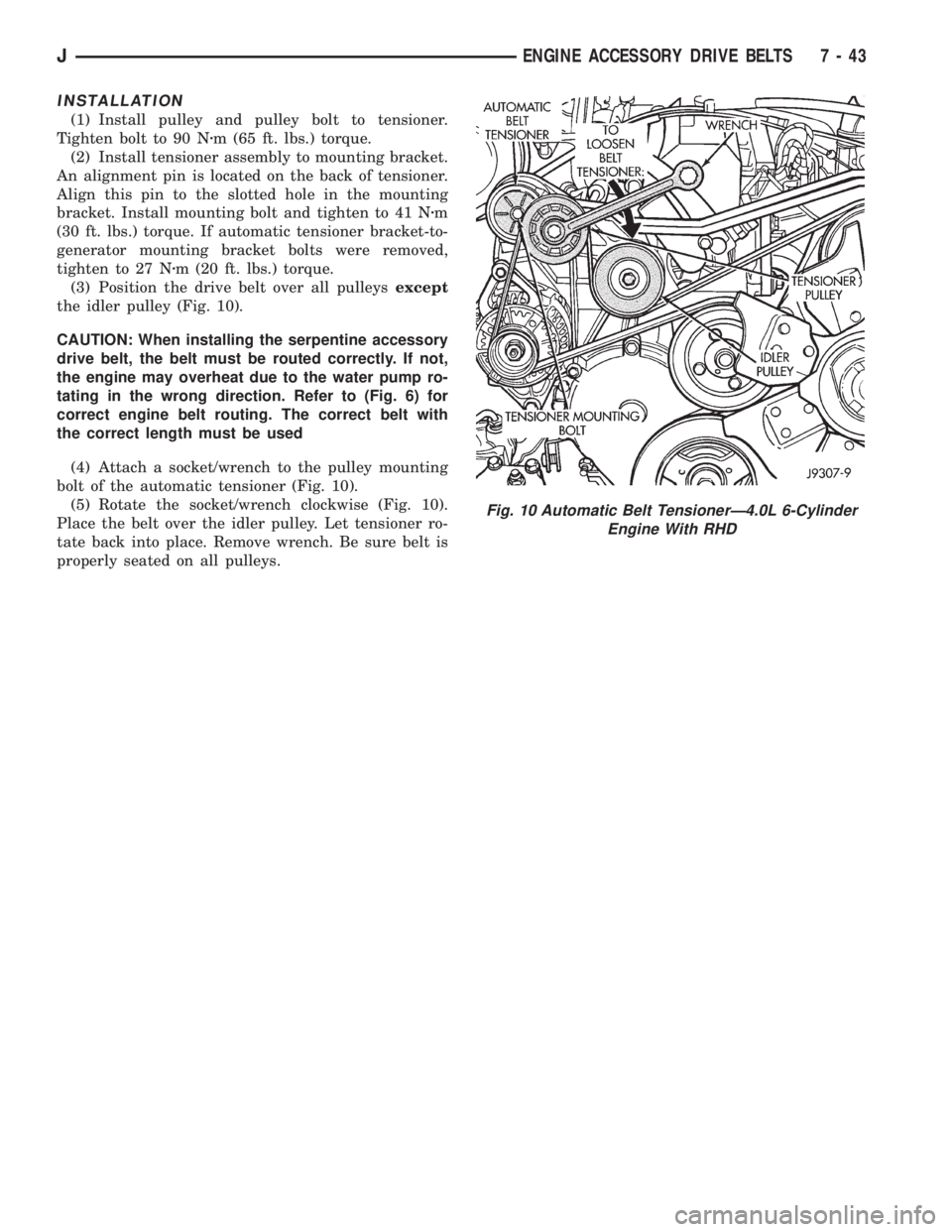
(4) Attach a socket/wrench to the pulley mounting
bolt of the automatic tensioner (Fig. 10).
(5) Rotate the socket/wrench clockwise (Fig. 10).
Place the belt over the idler pulley. Let tensioner ro-
tate back into place. Remove wrench. Be sure belt is
properly seated on all pulleys.
Fig. 10 Automatic Belt TensionerÐ4.0L 6-Cylinder
Engine With RHD
JENGINE ACCESSORY DRIVE BELTS 7 - 43
Page 270 of 2198
SPECIFICATIONS
GENERAL INFORMATION
The following specifications are published from the
latest information available at the time of publica-
tion.If anything differs between the specifica-
tions found on the Vehicle Emission Control
Information (VECI) label and the following
specifications, use specifications on VECI label.
The VECI label is located in the engine compart-
ment.
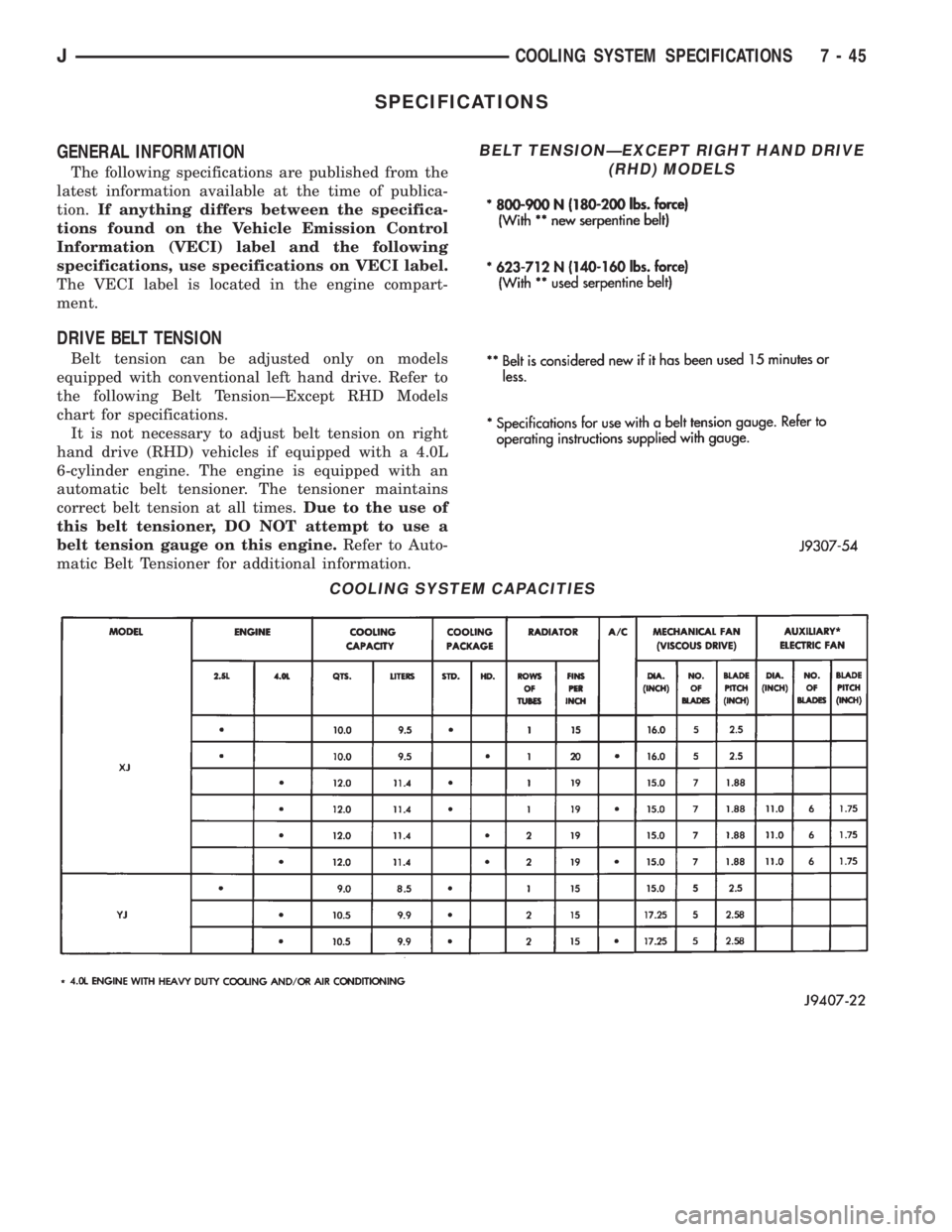
DRIVE BELT TENSION
Belt tension can be adjusted only on models
equipped with conventional left hand drive. Refer to
the following Belt TensionÐExcept RHD Models
chart for specifications.
It is not necessary to adjust belt tension on right
hand drive (RHD) vehicles if equipped with a 4.0L
6-cylinder engine. The engine is equipped with an
automatic belt tensioner. The tensioner maintains
correct belt tension at all times.Due to the use of
this belt tensioner, DO NOT attempt to use a
belt tension gauge on this engine.Refer to Auto-
matic Belt Tensioner for additional information.
COOLING SYSTEM CAPACITIES
BELT TENSIONÐEXCEPT RIGHT HAND DRIVE
(RHD) MODELS
JCOOLING SYSTEM SPECIFICATIONS 7 - 45
Page 274 of 2198
charged. However, even with these vents, hydrogen
gas can collect in or around the battery. If hydrogen
gas is exposed to flame or sparks, it can ignite.
If the electrolyte level is low, the battery could arc
internally and explode. If the battery is equipped
with removable cell caps, add distilled water when-
ever the electrolyte level is below the top of the
plates. If the battery cell caps cannot be removed, the
battery must be replaced when the electrolyte level is
low.
WARNING: DO NOT ATTEMPT TO ASSIST BOOST,
CHARGE, OR TEST BATTERY WHEN ELECTRO-
LYTE LEVEL IS BELOW THE TOP OF THE PLATES.
PERSONAL INJURY MAY OCCUR.
BATTERY RATINGS
Currently, there are 2 commonly accepted methods
for rating and comparing battery performance. These
ratings are called Cold Cranking Amperage (CCA),
and Reserve Capacity (RC). Be certain that a replace-
ment battery has CCA and RC ratings that equal or
exceed the original equipment specification for the
vehicle being serviced. See Battery Classifications
and Ratings charts in Specifications at the back of
this group.
COLD CRANKING AMPERAGE
The Cold Cranking Amperage (CCA) rating speci-
fies how much current (in amperes) the battery can
deliver for 30 seconds at -17.7ÉC (0ÉF). Terminal volt-
age must not fall below 7.2 volts during or after the
30 second discharge. The CCA required is generally
higher as engine displacement increases, depending
also upon the starter current draw requirements.
RESERVE CAPACITY
The Reserve Capacity (RC) rating specifies the
time (in minutes) it takes for battery terminal volt-
age to fall below 10.2 volts at a discharge rate of 25
amps. RC is determined with the battery fully-
charged at 26.7ÉC (80ÉF). This rating estimates how
long the battery might last after a charging system
failure, under minimum electrical load.
DIAGNOSIS
The battery must be completely charged and the
top, posts, and terminal clamps should be properly
cleaned before diagnostic procedures are performed.
Refer to Group 8B - Battery/Starter/Generator Ser-
vice for more information.
The condition of a battery is determined by two cri-
teria:
(1)State-Of-ChargeThis can be determined by
viewing the built-in test indicator, by checking spe-
cific gravity of the electrolyte (hydrometer test), or by
checking battery voltage (open circuit voltage test).(2)Cranking CapacityThis can be determined
by performing a battery load test, which measures
the ability of the battery to supply high-amperage
current.
If the battery has a built-in test indicator, use this
test first. If it has no test indicator, but has remov-
able cell caps, perform the hydrometer test first. If
cell caps are not removable, or a hydrometer is not
available, perform the open circuit voltage test first.
The battery must be charged before proceeding
with a load test if:
²the built-in test indicator has a black or dark color
visible
²the temperature corrected specific gravity is less
than 1.235
²the open circuit voltage is less than 12.4 volts.
A battery that will not accept a charge is faulty
and further testing is not required. A battery that is
fully-charged, but does not pass the load test is
faulty and must be replaced.
Completely discharged batteries may take
several hours to accept a charge. See Charging
Completely Discharged Battery.
A battery is fully-charged when:
²all cells are gassing freely during charging
²a green color is visible in the sight glass of the
built-in test indicator
²three corrected specific gravity tests, taken at
1-hour intervals, indicate no increase in specific grav-
ity
²open circuit voltage is 12.4 volts or greater.
ABNORMAL BATTERY DISCHARGING
Any of the following conditions can result in abnor-
mal battery discharging:
(1) Corroded battery posts and terminals.
(2) Loose or worn generator drive belt.
(3) Electrical loads that exceed the output of the
charging system, possibly due to equipment installed
after manufacture or repeated short trip use.
(4) Slow driving speeds (heavy traffic conditions) or
prolonged idling with high-amperage draw systems
in use.
(5) Faulty circuit or component causing excessive
ignition-off draw. See Ignition-Off Draw in this group
for diagnosis.
(6) Faulty charging system.
(7) Faulty or incorrect battery.
BUILT-IN TEST INDICATOR
A test indicator (hydrometer) built into the top of
the battery case, provides visual information for bat-
tery testing (Fig. 1). It is important when using the
test indicator that the battery be level and have a
clean sight glass to see correct indications. Additional
light may be required to view indicator.
JBATTERY/STARTING/CHARGING SYSTEMS DIAGNOSTICS 8A - 3
Page 288 of 2198
CHARGING SYSTEM
GENERAL INFORMATION
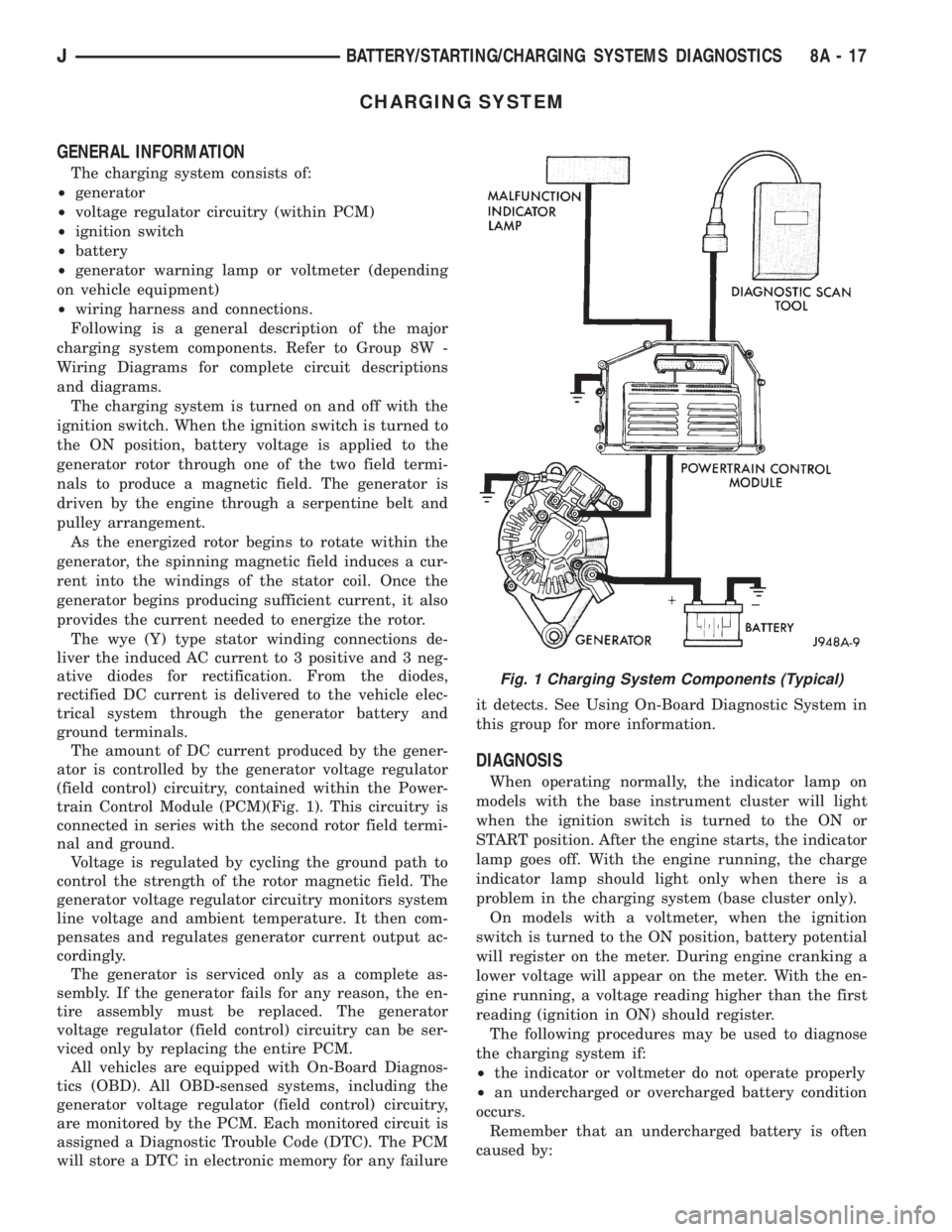
The charging system consists of:
²generator
²voltage regulator circuitry (within PCM)
²ignition switch
²battery
²generator warning lamp or voltmeter (depending
on vehicle equipment)
²wiring harness and connections.
Following is a general description of the major
charging system components. Refer to Group 8W -
Wiring Diagrams for complete circuit descriptions
and diagrams.
The charging system is turned on and off with the
ignition switch. When the ignition switch is turned to
the ON position, battery voltage is applied to the
generator rotor through one of the two field termi-
nals to produce a magnetic field. The generator is
driven by the engine through a serpentine belt and
pulley arrangement.
As the energized rotor begins to rotate within the
generator, the spinning magnetic field induces a cur-
rent into the windings of the stator coil. Once the
generator begins producing sufficient current, it also
provides the current needed to energize the rotor.
The wye (Y) type stator winding connections de-
liver the induced AC current to 3 positive and 3 neg-
ative diodes for rectification. From the diodes,
rectified DC current is delivered to the vehicle elec-
trical system through the generator battery and
ground terminals.
The amount of DC current produced by the gener-
ator is controlled by the generator voltage regulator
(field control) circuitry, contained within the Power-
train Control Module (PCM)(Fig. 1). This circuitry is
connected in series with the second rotor field termi-
nal and ground.
Voltage is regulated by cycling the ground path to
control the strength of the rotor magnetic field. The
generator voltage regulator circuitry monitors system
line voltage and ambient temperature. It then com-
pensates and regulates generator current output ac-
cordingly.
The generator is serviced only as a complete as-
sembly. If the generator fails for any reason, the en-
tire assembly must be replaced. The generator
voltage regulator (field control) circuitry can be ser-
viced only by replacing the entire PCM.
All vehicles are equipped with On-Board Diagnos-
tics (OBD). All OBD-sensed systems, including the
generator voltage regulator (field control) circuitry,
are monitored by the PCM. Each monitored circuit is
assigned a Diagnostic Trouble Code (DTC). The PCM
will store a DTC in electronic memory for any failureit detects. See Using On-Board Diagnostic System in
this group for more information.
DIAGNOSIS
When operating normally, the indicator lamp on
models with the base instrument cluster will light
when the ignition switch is turned to the ON or
START position. After the engine starts, the indicator
lamp goes off. With the engine running, the charge
indicator lamp should light only when there is a
problem in the charging system (base cluster only).
On models with a voltmeter, when the ignition
switch is turned to the ON position, battery potential
will register on the meter. During engine cranking a
lower voltage will appear on the meter. With the en-
gine running, a voltage reading higher than the first
reading (ignition in ON) should register.
The following procedures may be used to diagnose
the charging system if:
²the indicator or voltmeter do not operate properly
²an undercharged or overcharged battery condition
occurs.
Remember that an undercharged battery is often
caused by:
Fig. 1 Charging System Components (Typical)
JBATTERY/STARTING/CHARGING SYSTEMS DIAGNOSTICS 8A - 17
Page 289 of 2198
²accessories being left on with the engine not run-
ning
²a faulty or improperly adjusted switch that allows
a lamp to stay on (see Ignition-Off Draw, in this
group).
INSPECTION
(1) Inspect condition of battery cable terminals,
battery posts, connections at engine block, starter so-
lenoid and relay. They should be clean and tight. Re-
pair as required.
(2) Inspect all fuses in the fuseblock module and
Power Distribution Center (PDC) for tightness in re-
ceptacles. They should be properly installed and
tight. Repair or replace as required.
(3) Inspect the electrolyte level in the battery. If
cell caps are removable, add water if required. If cell
caps are not removable, replace battery if electrolyte
level is low.
(4) Inspect generator mounting bolts for tightness.
Replace or tighten bolts, if required. Refer to Group
8B - Battery/Starter/Generator Service for torque
specifications.
(5) Inspect generator drive belt condition and ten-
sion. Tighten or replace belt as required. Refer to
Belt Tension Specifications in Group 7 - Cooling Sys-
tem.
(6) Inspect connections at generator field, battery
output, and ground terminals. Also check ground con-
nection at engine. They should all be clean and tight.
Repair as required.
OUTPUT WIRE RESISTANCE TEST
This test will show the amount of voltage drop
across the generator output wire, from the generator
battery terminal to the battery positive post.
PREPARATION
(1) Before starting test make sure vehicle has a
fully-charged battery. See Battery in this group for
more information.
(2) Turn ignition switch to OFF.
(3) Disconnect negative cable from battery.
(4) Disconnect generator output wire from genera-
tor battery output terminal.
(5) Connect a 0-150 ampere scale DC ammeter
(Fig. 2). Install in series between generator battery
output terminal and disconnected generator output
wire. Connect positive lead to generator battery out-
put terminal and negative lead to disconnected gen-
erator output wire.
(6) Connect positive lead of a test voltmeter (range
0-18 volts minimum) to disconnected generator out-
put wire. Connect negative lead of test voltmeter to
battery positive cable at positive post.
(7) Connect one end of a jumper wire to ground
and with other end probe green K20 field wire at
back of generator (Fig. 2). This will generate a DTC.CAUTION: Do not connect green/orange A142 field
wire to ground. Refer to Group 8W - Wiring Dia-
grams for more information.
(8) Connect an engine tachometer, then connect
battery negative cable to battery.
(9) Connect a variable carbon pile rheostat be-
tween battery terminals. Be sure carbon pile is in
OPEN or OFF position before connecting leads. See
Load Test in this group for instructions.
TEST
(1) Start engine. Immediately after starting, re-
duce engine speed to idle.
(2) Adjust engine speed and carbon pile to main-
tain 20 amperes flowing in circuit. Observe voltmeter
reading. Voltmeter reading should not exceed 0.5
volts.
RESULTS
If a higher voltage drop is indicated, inspect, clean
and tighten all connections. This includes any con-
nection between generator battery output terminal
and battery positive post. A voltage drop test may be
performed at each connection to locate the connection
with excessive resistance. If resistance tests satisfac-
torily, reduce engine speed, turn OFF carbon pile and
turn OFF ignition switch.
(1) Disconnect negative cable from battery.
(2) Remove test ammeter, voltmeter, carbon pile,
and tachometer.
(3) Remove jumper wire.
(4) Connect generator output wire to generator
battery output terminal. Tighten nut to 8.561.5 Nzm
(75615 in. lbs.).
(5) Connect negative cable to battery.
(6) Use DRB scan tool to erase DTC.
CURRENT OUTPUT TEST
The generator current output test determines
whether generator can deliver its rated current out-
put.
PREPARATION
(1) Before starting test make sure vehicle has a
fully-charged battery. See Battery in this group for
more information.
(2) Disconnect negative cable from battery.
(3) Disconnect generator output wire at the gener-
ator battery output terminal.
(4) Connect a 0-150 ampere scale DC ammeter
(Fig. 3). Install in series between generator battery
output terminal and disconnected generator output
wire. Connect positive lead to generator battery out-
put terminal and negative lead to disconnected gen-
erator output wire.
8A - 18 BATTERY/STARTING/CHARGING SYSTEMS DIAGNOSTICSJ