1995 CHEVROLET S10 set clock
[x] Cancel search: set clockPage 115 of 354
Downloaded from www.Manualslib.com manuals search engine The lower knob changes the heater function and determines which outlets
the air will flow through (instrument panel, defroster, heater, etc.).
OFF - This setting turns off all heating functions. Some outside air will
still come out of the heater outlet whenever the vehicle is moving forward.
VENT - Airflow is through the instrument panel vents. Set the upper knob
to the temperature desired. This setting is useful for mild outside
temperatures, when little heating or cooling is desired.
BI-LEV - Outside air comes in through the heater floor vents and the
instrument panel vents. This setting is useful
in cool weather with bright
sunlight.
HEAT
- Heated air comes out through the heater floor vents and
windshield defroster vents. This setting is useful for cold weather.
BLEND - Airflow is divided equally between the heater floor vent and the
windshield defroster vents. This setting is useful
in cool weather when you
have fog
or ice on the windshield or side windows.
DEF - This setting directs most air through the windshield defroster vents
and some through the heater vents. This setting
is useful when you have fog
or ice on the windshield.
Heater/Air Conditioning Controls
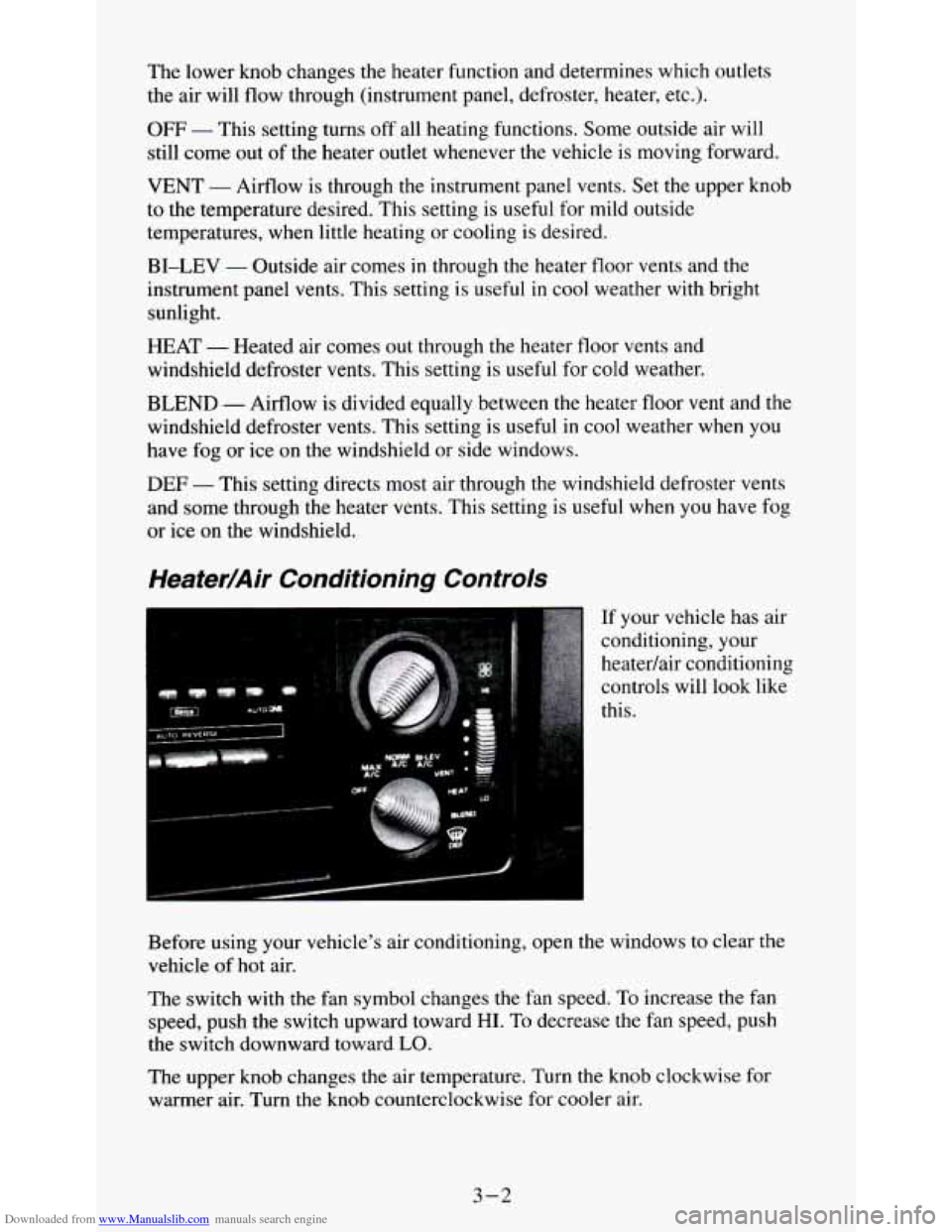
If your vehicle has air
conditioning, your
heatedair conditioning
controls will look like
this.
Before using your vehicle's air conditioning, open the windows to clear the
vehicle of
hot air.
The switch with the fan symbol changes the fan speed. To increase the fan
speed, push the switch upward toward
HI. To decrease the fan speed, push
the switch downward toward
LO.
The upper knob changes the air temperature. Turn the knob clockwise for
warmer air. Turn the knob counterclockwise for cooler air.
3-2
Page 118 of 354
Downloaded from www.Manualslib.com manuals search engine You can move the vents to direct the flow of air, or close the vents
altogether. When you close
a vent, it will increase the flow of air coming out
of any
vents that are open.
Audio Systems
Your Delco@ audio system has been designed to operate easily and give
years of listening pleasure. But you will get the most enjoyment out of it
if
you acquaint yourself with it first. Find out what your Delco@system can do
and how to operate all its controls, to be sure you’re getting the most out of
the advanced engineering that went into it.
Setting the Clock (Audio Systems without a Compact
Disc)
To set the clock:
1. Press the SET button.
2. Within 5 seconds, push and hold SEEK until the correct minute appears
3. Press and hold SCAN until the correct hour appears on the display.
on
the display.
To display the clock with the ignition off, push the upper knob. The time
will be displayed for a few seconds.
Setting the Clock (Audio Systems with a Compact
Disc)
To set the clock:
1. Press the SET button. The radio may be on or off.
2. Within 5 seconds, press and hold either SEEK or 4 SEEK until the
3. Press and hold SCAN until the correct hour appears on the display.
correct
minute appears on the display.
3-5
Page 121 of 354

Downloaded from www.Manualslib.com manuals search engine Upper Knob (PWR-VOL-PROG-RCL) - The upper knob has these five
functions:
0 Turn it to turn the system on and off.
0 Turn it to control the volume.
Press it to display the time when the ignition is off.
Press it to change between the clock and the radio station frequency
0 Press it to change sides of a tape when a cassette is playing.
displayed
when the radio
is on.
BAL (Balance) - The control ring behind the upper knob adjusts the
lefdright speaker balance.
Lower Knob (TUNE-AM-FM)
- The lower knob has two functions:
Turn it to tune in radio stations.
Press it to change between the AM and FM bands.
FADE - The control ring behind the lower knob adjusts the frondrear
speaker balance.
SEEK - Press the SEEK button to cause the receiver to SEEK the next
higher station and stop.
SCAN - Press the SCAN button to hear each station for a few seconds.
Push it again when
you reach the station you want to listen to and the radio
will stop scanning.
“SCAN’ appears in the display.
Pushbuttons
- The four pushbuttons let you return to favorite stations. To
set the pushbuttons for up to fourteen favorite stations
(7 AM and 7 FM):
1. Tune in the desired station.
2. Press the SET button. “SET” appears in the display momentarily.
3. Within 5 seconds, press one of the four pushbuttons to store the station.
Whenever you press that button, the preset station will return.
NOTE:
In addition to the four stations set as above, up to three additional stations
may be preset on each band by pressing two adjoining pushbuttons at the
same time. Then do the following:
1. Tune in the desired station.
2. Push the SET button. “SET” appears in the display momentarily.
3. Within 5 seconds, press any two adjoining pushbuttons at the same
time. (The station will return when the same two buttons are pressed
again.)
3-8
Page 123 of 354
Downloaded from www.Manualslib.com manuals search engine How to Operate Your ETW AM-FM Stereo Audio
Cassette System with Equalizer
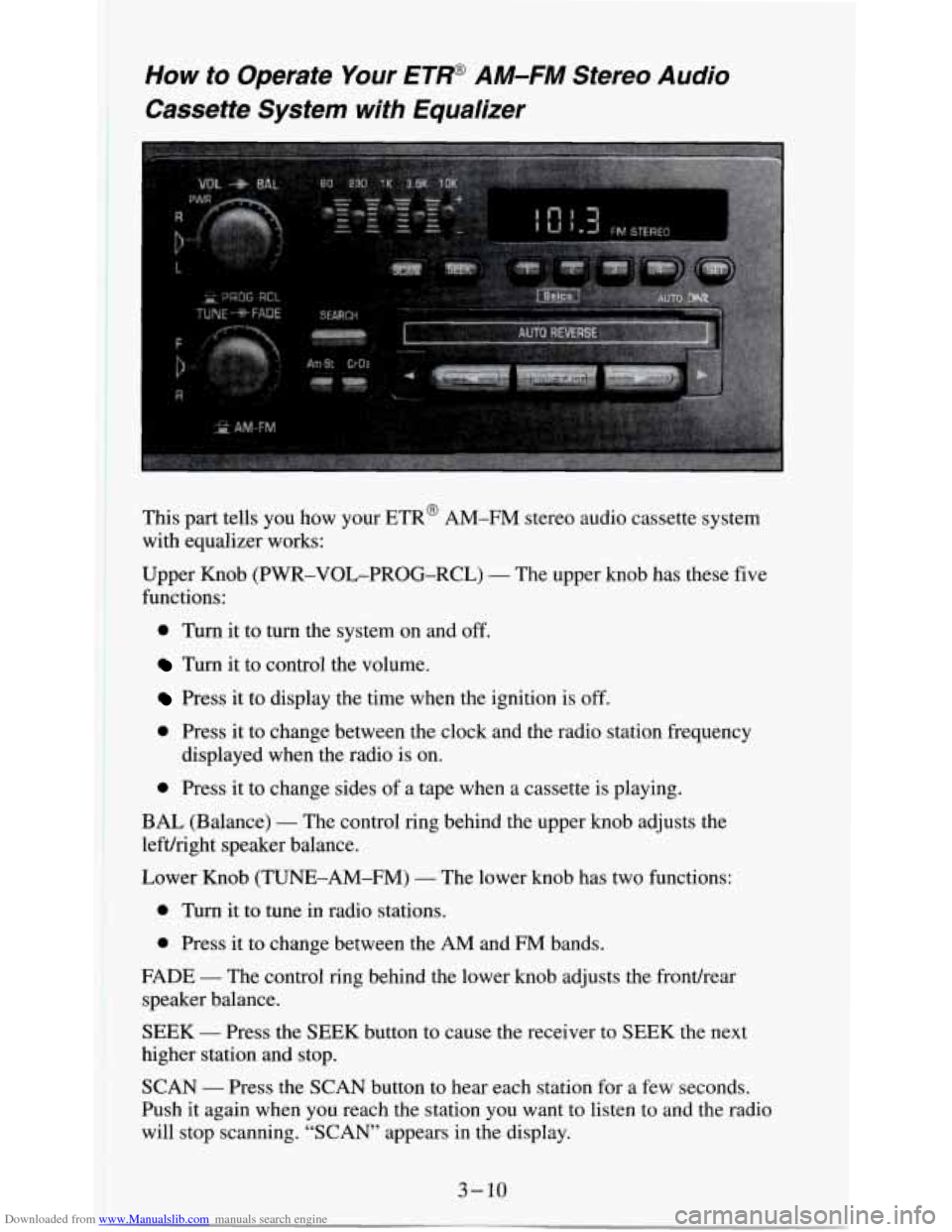
This part tells you how your ETR@ AM-FM stereo audio cassette system
with equalizer works:
Upper Knob (PWR-VOL-PROG-RCL)
- The upper knob has these five
functions:
0 Turn it to turn the system on and off.
Turn it to control the volume.
Press it to display the time when the ignition is off.
0 Press it to change between the clock and the radio station frequency
0 Press it to change sides of a tape when a cassette is playing.
displayed
when the radio is on.
BAL (Balance)
- The control ring behind the upper knob adjusts the
lefuright speaker balance.
Lower Knob (TUNE-AM-FM)
- The lower knob has two functions:
0 Turn it to tune in radio stations.
0 Press it to change between the AM and FM bands.
FADE
- The control ring behind the lower knob adjusts the fronthear
speaker balance.
SEEK
- Press the SEEK button to cause the receiver to SEEK the next
higher station and stop.
SCAN
- Press the SCAN button to hear each station for a few seconds.
Push it again when you reach the station you want to listen to and the radio
will stop scanning. “SCAN” appears in the display.
Page 127 of 354

Downloaded from www.Manualslib.com manuals search engine Pushbuttons - The five pushbuttons let you return to favorite stations.
They are also used when you play a disc. (See
“To Play A Compact Disc”.)
To
set the pushbuttons for up to ten favorite stations (5 AM and 5 FM):
1. Tune in the desired station.
2. Push the SET button. “SET” is displayed briefly.
3. Within 5 seconds, push one of the five pushbuttons to store the station.
Whenever
you press that button, the preset station will return. Repeat
the steps for each of the
5 AM and 5 FM stations.
MUTE
- Press the MUTE button and all sound from the radio or CD
player stops. By pressing the button again sound will begin again.
RCL - Press the RCL button to change between the clock and the radio
station frequency displayed when the radio
is on. RCL may be pressed when
the ignition is off to see
the time.
BASS
- Press the BASS A to increase the bass tones and v BASS to
decrease bass tones. Press the center of the control for a preset BASS
position.
The bass level will be displayed briefly when using this control.
TREBLE
- Press the TREB A to increase the treble tones and v TREB to
decrease the treble tones. Press the center of the control for a preset TREB
position. The treble level will be displayed briefly when using this control.
To Play A Compact Disc (CD)
NOTICE:
DO NOT use mini-discs that are called singles. They won’t eject\
.
USE FULL-SIZE COMPACT DISCS. If the disc player is very
hot, or if you’re driving on a very rough road,
a disc may come
out or just not play. If you see the word HOT on the displa\
y, the
disc player is too hot to play the disc. Press RCL to make \
the
word HOT
go off the display. When things get back to normal,
the disc should play again. Press PWR to turn the system on.
Insert a disc partway into the slot, label side up. The player will pull it in.
Wait a few seconds and the disc should play.
If
the disc comes back out, check to see if any of the following are true:
0 The disc is upside down.
0 It is dirty, scratched, or wet.
0 Too much moisture is in the air. (If there is, wait about one hour and try
again.)
3- 14
Page 345 of 354
Downloaded from www.Manualslib.com manuals search engine Break.1n. New Vehicle ............................................ 2-9
Bulb Replacement
............................................... 6-30
Composite Headlamps
......................................... 6-32
Halogen Bulb
................................................ 6-31
Replacement Chart ............................................ 6-63
Sealed Beam Headlamps
........................................ 6-30
Center
High Mounted Stop Lamp (CHMSL)
........................ 6-35
Front Park Turn Signal Lamps
................................... 6-33
RearLamps .................................................. 6-34
Capacities and Specification
............ ....................... 6-61
CarbonMonoxide
.......................................... 2-26, 4-34
Care of Your Cassette Tape Player (See “Audio Systems”)
Cassette Tape Player System (See “Audio Systems”)
Catalytic Converter
.............................................. 6-39
CertificatiodTire Label
........................................... 4-36
Changing
a Flat Tire .............................................. 5-19
Chemical Paint Spotting
........................................... 6-55
Cigarette LightedAshtrays
......................................... 2-49
Child
Restraints (See “Safety Belts”)
Center High Mounted Stop Lamp (CHMSL) (See “Lamps“)
Circuit Breakers (See “Fuses and Circuit Breakers”)
Cleaning Fabric Protection
.............................................. 6-50
Finishcare
.................................................. 6-53
Glass ....................................................... 6-52
InsideofVehicle
.............................................. 6-48
Instrumentpanel, Top .......................................... 6-51
Outsideofvehicle
............................................. 6-52
Tires
....................................................... 6-54
VinylorLeather
.............................................. 6-51
Wheels
........................................ ........ 6-53
Special
Problems
.............................................. 6-50
Weatherstrips ................................................. 6-52
Audio System with Compact Disc (CD)
............................. 3-5
Clock, Setting
the
Audio System without
a Compact Disc (CD) ......................... 3-5
Comfort Controls
................................................. 3-1
Compact Disc (CD) System (See “Audio Systems”)
Control
of a Vehicle ........................................... 4-4
Coolant (See “Engine”)
Cooling System Capacity
.......................................... 6-62
Courtesy Transportation
............................................ 8-7
Crankcase Capacity .............................................. 6-62
Cruise Control (Option)
........................................... 2-38
Passing Another Vehicle
........................................ 2-41
To Erase Speed Memory
........................................ 2-42
To Increase Speed
............................................. 2-40
OnHills
..................................................... 2-42
ToGetOutOf
................................................ 2-42
ToReduceSpeed
.............................................. 2-41
ToResume .................................................. 2-40
ToSet ...................................................... 2-39
2