1995 CHEVROLET BLAZER buttons
[x] Cancel search: buttonsPage 112 of 380
Downloaded from www.Manualslib.com manuals search engine Compass Variance
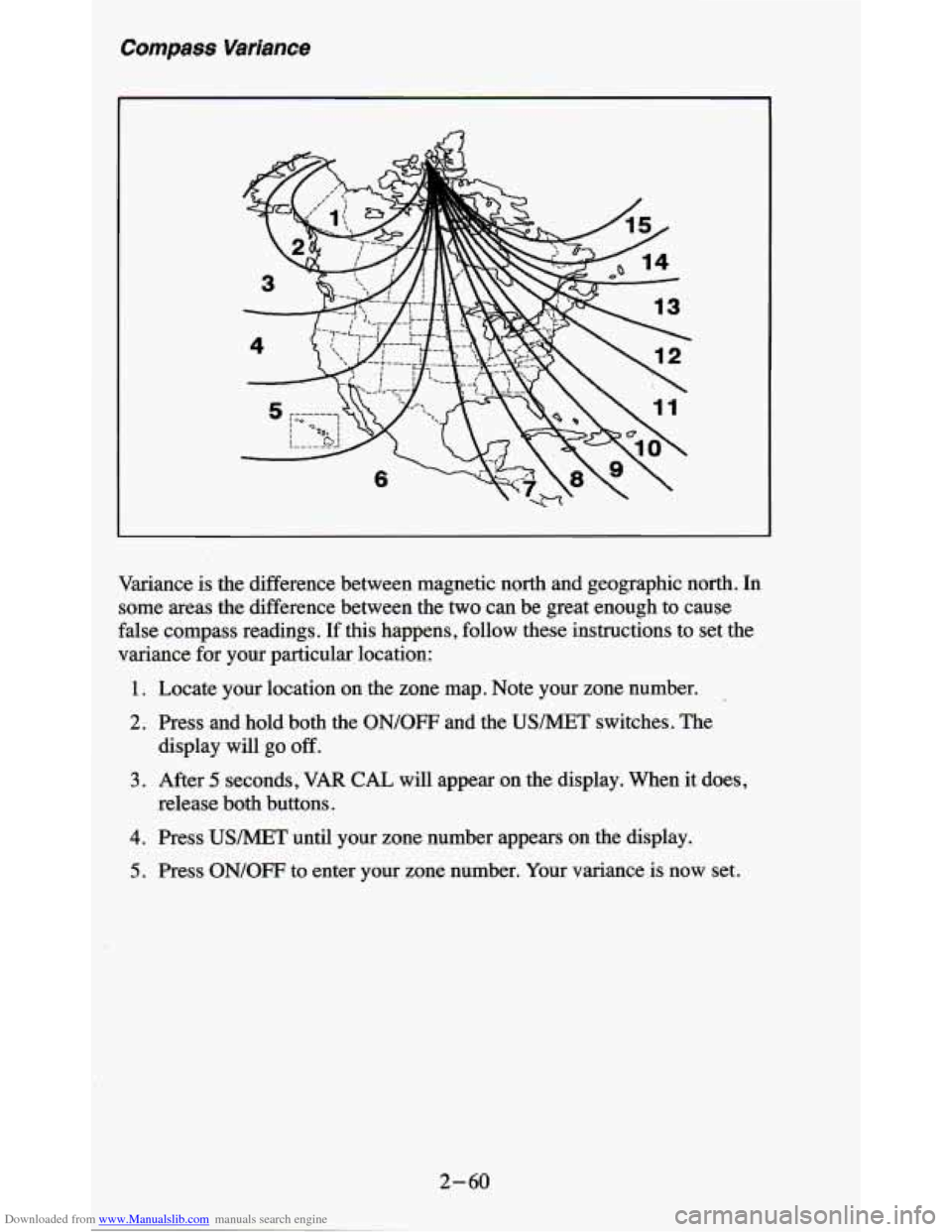
Variance is the difference between magnetic north and geographic north. In
some areas the difference between the two can be great enough to cause
false compass readings.
If this happens, follow these instructions to set the
variance for your particular location:
1. Locate your location on the zone map. Note your zone number.
2. Press and hold both the ON/OFF and the USMET switches. The
display will
go off.
release both buttons.
3. After 5 seconds, VAR CAL will appear on the display. When it does,
4. Press USMET until your zone number appears on the display.
5. Press ON/OFF to enter your zone number. Your variance is now set.
2-60
Page 141 of 380
Downloaded from www.Manualslib.com manuals search engine FADE - i ne control ring behind the lower knob adjusts the fronthear
speaker balance.
SEEK - Press the SEEK button to cause the receiver to SEEK the next
higher station and stop.
SCAN - Press the SCAN button to hear each station for a few seconds.
Push it again when
you reach the station you want to listen to and the radio
will stop scanning.
“SCAN’ appears in the display.
Pushbuttons
- The four pushbuttons let you return to favorite stations. To
set the pushbuttons for up to fourteen favorite stations
(7 AM and 7 FM):
1. Tune in the desired station.
2. Press the SET button. “SET” appears in the display.
3. Within 5 seconds, press one of the four pushbuttons to store the station.
Whenever you press that button, the preset station will return.
Repeat these steps for each pushbutton.
NOTE:
In addition to the four stations set as above, up to three additional stations
may be preset on each band by pressing two adjoining buttons at the same
time. Then do the following:
1. Tune in the desired station.
2. Press the SET button. “SET” appears in the display momentarily.
3. Within 5 seconds, press any two adjoining pushbuttons at the same
time. (The station will return when the same two buttons are pressed
again
.)
TREBLE - Slide the TREBLE lever up to increase the treble response. If a
station is weak or noisy, slide the TREBLE lever down
to reduce the noise.
BASS - Slide the BASS lever up to increase the bass response. Adjust the
BASS lever to give a pleasing sound to your ear.
3-7
Page 143 of 380
Downloaded from www.Manualslib.com manuals search engine Pushbuttons - The four pushbuttons let you return to favorite stations. 10
set the pushbuttons for up to fourteen favorite stations (7 AM and 7 FM):
1. Tune in the desired station.
2. Press the SET button. “SET” appears in the display momentarily.
3. Within 5 seconds, press one of the four pushbuttons to store the station.
Whenever
you press that button, the preset station will return.
NOTE:
In addition to the four stations set as above, up to three additional stations
may be preset on each band by pressing two adjoining pushbuttons at the
same time. Then
do the following:
1. Tune in the desired station.
2. Push the SET button. “SET” appears in the display momentarily.
3. Within 5 seconds, press any two adjoining pushbuttons at the same
time. (The station will return when the same two buttons are presse\
d
again
.>
Repeat these steps for each pair of buttons.
TREBLE
- Slide the TREBLE lever up to increase the treble response. If
the station is weak or noisy, slide the TREBLE lever down to reduce the
noise.
BASS
- Slide the BASS lever up to increase the bass response. Adjust the
BASS lever to give a pleasing sound to your ear.
AUTO DNR
@ - This unit is equipped with an automatic Dynamic Noise
Reduction system. DNR@reduces background hiss on
AM and FM radio
broadcasts, as well as on cassette tapes. DNR@is a registered trademark
of
National Semiconductor Corporation.
To PIay A Cassette
Your tape player is built to work best with tapes that are 30 to 45 minutes
long on each side. Tapes longer than that are
so thin they may not work well
in this player.
Once the tape is playing, use the upper and lower knobs for volume, balance
and fade just as you do for the radio.
A lighted arrow shows which direction
the tape is being played.
FWD - To rapidly advance the tape, press 4 or b in the direction that the
amber arrow points and the tape will rapidly go forward until you press the
STOP-EJECT button lightly.
REV - To rapidly reverse the tape, press 4 or b in the opposite direction
that the amber arrow points and the tape will rapidly reverse
until you press
the STOP-EJECT button lightly.
3-9
Page 145 of 380
Downloaded from www.Manualslib.com manuals search engine Lower Knob (TUNE-AM-FM) - The lower knob has two functions:
0 Turn it to tune in radio stations.
0 Press it to change between the AM and FM bands.
FADE
- The control ring behind the lower knob adjusts the fronthear
speaker balance.
SEEK - Press the SEEK button to cause the receiver to SEEK the next
higher station and stop.
SCAN
- Press the SCAN button to hear each station for a few seconds.
Push it again
when you reach the station you want to listen to and the radio
will stop scanning.
“SCAN” appears in the display.
Pushbuttons
- The four pushbuttons let you return to favorite stations. To
set the pushbuttons for
up to fourteen favorite stations (7 AM and 7 FM):
1. Tune in the desired station.
2. Push the SET button. “SET” appears in the display for about 5 seconds.
3. Within the 5 seconds, push one of the four pushbuttons. Whenever you
press that button, the preset station will return.
NOTE:
In addition to the four stations set as above, up to three additional stations
may be preset on each band by pressing
two adjoining pushbuttons at the
same time. Then do the following:
1. Tune in the desired station.
2. Press the SET button.
3. Within 5 seconds, press any two adjoining pushbuttons at the same time.
(The station will return when the same
two buttons are pressed again.)
Adjust the Tone
- Use the levers in the upper middle left corner to set the
bass, midrange, and treble until you get the sound
you want. The 60 and 250
levers adjust the bass, 1 K is midrange, and 3 .X and 1 OK control the treble.
We suggest you start with the center lever
(1K) in the midpoint position,
then move the others up until
you get the amount of bass and treble you like.
Am-St Button
- The Am-St button is just below the SEARCH button.
Push this when
you tune to an AM station that broadcasts in stereo. Your
STEREO light will come on when you’re receiving AM stereo. If you push
Am-St and there is
no more noise, it means the station is weak. You’ll hear
the station better if you don’t use Am-St. Just push the Am-St button again
to delete stereo.
AUTO DNR@
- This unit is equipped with an automatic Dynamic Noise
Reduction system. DNR%educes background hiss on AM and
FM radio
broadcasts, as well as on cassette tapes. DNR@is a registered trademark of
National Semiconductor Corporation.
3-11
Page 148 of 380
Downloaded from www.Manualslib.com manuals search engine Pushbuttons - The five pushbuttons let you return to favorite stations.
They are also used
when you play a disc. (See “TO Play A Compact Disc”.)
To set the pushbuttons for
up to ten favorite stations (5 AM and 5 FM):
1. Tune in the desired station.
2. Push the SET button. “SET” is displayed briefly.
3. Within 5 seconds, push one of the five pushbuttons to store the station.
Whenever you press that button, the preset station will return. Repeat
the steps for each of the
5 AM and 5 FM stations.
MUTE
- Press the MUTE button and all sound from the radio or CD
player stops. By pressing the button again sound will begin again.
RCL
- Press the RCL button to change between the clock and the radi\
o
station frequency displayed when the radio is on. RCL may be pressed when
the ignition is
off to see the time.
BASS
- Press the BASS A to increase the bass tones and v BASS to
decrease bass tones. Press the center of the control for a preset BASS
position. The bass level will be displayed briefly when using this control.
TREBLE
- Press the TREB A to increase the treble tones and v TREB to
decrease the treble tones. Press the center of the control for a preset TREB
position. The treble level will be displayed briefly when using this control.
To Play A Compact Disc (CD)
NOTICE:
DO NOT use mini4iscs that are called singles. They won’t eject.
USE FULL-SIZE COMPACT DISCS. If the disc player is very
hot, or if you’re driving on a very rough road, a disc may com\
e
out or just not play.
If you see the word HOT on the display, the
disc player
is too hot to play the disc. Press RCL to make the
word HOT
go off the display. When things get back to normal,
the disc should play again. Press
PWR to turn the system on.
Insert a disc partway into the slot, label side up. The player will pull it in.
Wait a few seconds and the disc should play.
If the disc comes back out, check to see if any of the following are true:
The disc is upside down.
It is dirty, scratched, or wet.
Too much moisture is in the air. (If there is, wait about one hour and try
again.)
3- 14
Page 150 of 380
Downloaded from www.Manualslib.com manuals search engine Anti-Theft Feature
Delco LOC II@ is an Anti-Theft feature for the compact disc player. It can
be
used or ignored. If ignored, the system plays normally. If it is used, your
player won’t be usable
if it is ever stolen, because it won’t turn on.
The instructions below tell you how to enter a secret code into the system. If
your car loses battery power for any reason, you must unlock the system
with the secret code before the radio will turn
on.
To Lock The System:
1. Write down any 6 digit number and keep it in a safe place.
2. Turn the ignition to the ACC (Accessory) or RUN position.
3. Press the PWR knob to turn the radio off.
4. Press the 1 and 4 buttons together. Hold them down until “- - - ” shows
on the display.
You are now ready to enter your secret code. Don’t wait more than
15
seconds between steps.
5. Press SET and “000” will appear on the display.
6. Press the SEEK or 4 button to make the first number appear.
7. Press SCAN to make the next two numbers agree with your code.
8. Press BAND and “000” will appear again. Now you are ready to enter
9. Repeat steps 6 and 7 for the last three digits of your code.
the
last three digits of your code.
10. Press BAND and “rEF”’ will appear for 5 seconds and then “000” will
11. Repeat steps 6 through 10. This time “SEC” will appear - indicating
appear.
that the radio is
secure.
To Unlock The System After A Power Loss
When battery power is reapplied to a secured radio, the radio won’t turn on
and
“LOC” will appear,on the display.
Enter your secret code as follows. Pause
no more than 15 seconds between
steps.
1. Turn the ignition on. (Radio off.)
2. Press the SET button. The display will show “000”.
3. Enter the six digits of the code following steps 6-9 above. The display
will show the numbers as entered.
3-16