1994 OLDSMOBILE BRAVADA light
[x] Cancel search: lightPage 50 of 248

Features & Controls
44
Here’s How to Move the Arm:
1. Squeeze the release handle to free the
carrier arm.
2. Swing the carrier arm away from the
tailgate. You may need to give it a
slight tug.
To latch the carrier arm, swing it hard
toward the tailgate. The latch has one
catch,
so push hard on the carrier arm
to make sure it has locked in place. If it
is not securely latched, the carrier will
swing freely.
Glove Box
Use the door key to lock and unlock the
glove box. To open, pinch the latch
release.
New Vehicle “BreakmIn”
NOTICE:
Your modern Oldsmobile doesn’t
need an elaborate “break-in.” But it
will perform better in the long run
if you follow these guidelines:
Keep your speed at 55 mph (88
ltm/h) or less for the first 500
miles (804 ltm) .
Don’t drive at any one speed -
fast or slow - for the first 500
miles (804 ltm) . Don’t make full-
throttle starts.
Avoid malting hard stops for the
first
200 miles (322 lun) or so.
During this time your new brake
linings aren’t yet broken in. Hard
stops with new linings can mean
premature wear and earlier
replacement. Follow this
“breaking-in” guideline every
time you get new brake linings.
ProCarManuals.com
Page 51 of 248

U
Ignition Switch
With the ignition key in the ignition
switch, you can turn the switch to five
positions:
Accessory: An “on7’ position in which
you can operate your electrical power
xcessories. Press in the ignition switch
2s you turn the top of it toward you.
Lock: The only position in which you
:an remove the key. This locks your
steering wheel, ignition and
transmission.
Off: Unlocks the steering wheel,
ignition, and transmission, but does not
send electrical power to any accessories.
Use this position if your vehicle must be
pushed or towed, but never try to push-
start your vehicle. A warning chime will
sound if you open the driver’s door
when the ignition is off and the key is in
the ignition.
Run: An “on” position to which the
switch returns after you start your
engine and release the switch. The
switch stays in the
Run position when
the engine is running. But even when
the engine
is not running, you can use
Run to operate your electrical power
accessories, and to display some
instrument panel warning lights.
Start: Starts the engine. When the
engine starts, release the key. The
ignition switch will return to
Run for
normal driving.
Note that even if the engine is not
running, the positions
Accessory and
Run are “on” positions that allow you
to operate your electrical accessories,
such as the radio.
NOTICE:
If your key seems stuck in Lock
and you can’t turn it, be sure it is
all the way in.
If it is, then turn the
steering wheel left and right while
you turn the key hard. But turn the
key only with your hand. Using a
tool to force it could break the key
or the ignition switch. If none of
this works, then your vehicle needs
service.
Starting Your Engine
Move your shift lever to P (Park) or
N (Neutral). Your engine won’t start in
any other position
- that’s a safety
feature. To restart when you’re already
moving, use
N (Neutral) only.
NOTICE:
Don’t try to shift to P (Park) if your
Oldsmobile is moving. If you do,
you could damage the transmission.
Shift to
P (Park) only when your
vehicle is stopped.
45
ProCarManuals.com
Page 61 of 248

Tilt Steering Wheel
A tilt steering wheel allows you to
adjust the steering wheel before you
drive. You can also raise it to the
highest level to give your legs more
room when you exit and enter the
vehicle.
To tilt the wheel, hold the steering
wheel and pull the lever. Move the
steering wheel
to a comfortable level,
then release the lever to lock the wheel
in place.
Power Windows
Switches on the driver's door control
each of the windows when the ignition
is on. In addition, each passenger door
has a control switch for its own
.- window.
'I- I
4 Turn SignullMukifinction
Lever
The lever on the left side of the steering
column includes your:
Turn Signal and Lane Change
Cruise Control
Headlight High-Low Beam
Windshield Wipers
Windshield Washer
The High-Low Beam feature is
discussed under
Headlights. See the
Index under Headlights.
Indicator
3
55
ProCarManuals.com
Page 62 of 248

Features & Controls
56
Operation of Lights
Although your vehicle’s lighting system (headlights, parking lights, fog lamps,
side marker lights and taillights) meets
all applicable federal lighting
requirements, certain states and
provinces may apply their
own lighting
regulations that may require special
attention before
you operate these lights.
For example, some jurisdictions may
require that you operate your fog lamps
only when your lower beam headlights
are also on, or that headlights be
turned
on whenever you must use your
windshield wipers. In addition, most
jurisdictions prohibit driving solely
with parking lights, especially at dawn
or dusk. It is recommended that you
check with your own state or provincial
highway authority for applicable
lighting regulations.
U
0
rurn Signal and Lane Change
’ndicator
The turn signal has two upward (for
light) and
two downward (for Left)
)ositions. These positions allow you to
ignal a turn or a lane change.
To signal a turn, move the lever all the
yay up or down. When the turn is
inished, the lever will return
lutomatically.
A green arrow on the instrument panel
will flash in the direction of the turn or
lane change.
To signal a lane change, just raise or
lower the lever until the green arrow
starts to flash. Hold it there until
you
complete your lane change. The lever
will return by itself when you release it.
As you signal a turn or a lane change, ij
the arrows don’t flash but just stay on,
signal bulb may be burned out and
other drivers won’t see your turn signal
If your vehicle has the electronic
instrument cluster, the turn signal
arrows will flash at a faster rate
if a
signal bulb is burned out.
If a bulb is burned out, replace it to hell
avoid an accident.
ProCarManuals.com
Page 63 of 248
If the green arrows don’t go on at all
when
you signal a turn, check the fuse
(see the
Index under Fuses G Circuit
Breakers) and for burned-out bulbs.
If you have a trailer towing option with
added wiring for the trailer lights, a
different turn signal flasher is used.
With this flasher installed, the signal
indicator will flash even if a turn signal
bulb is burned out. Check the front and
rear turn signal lights regularly to make
sure they are working.
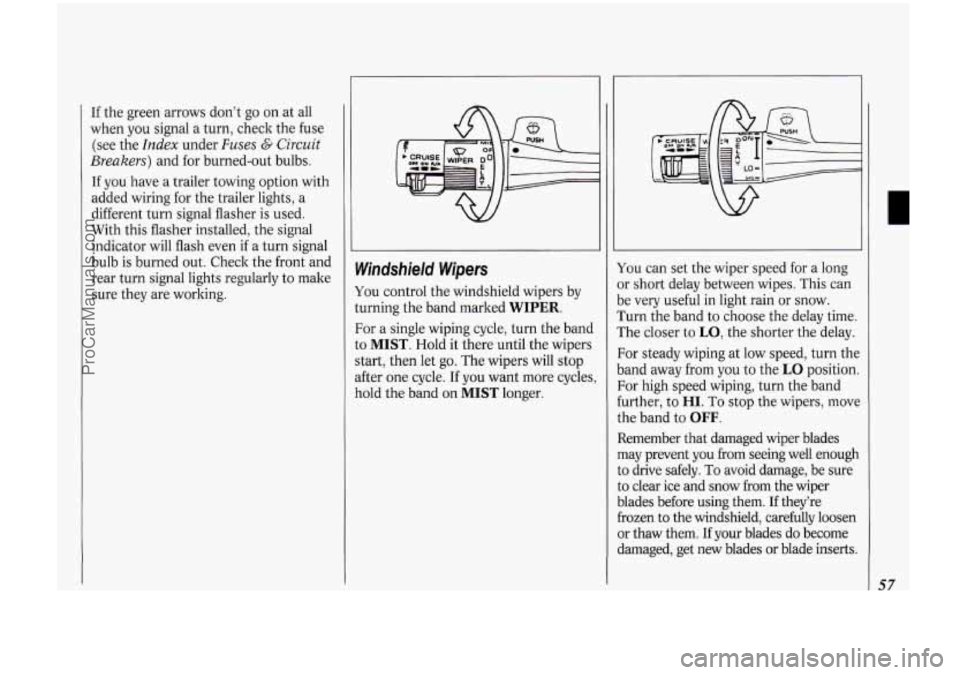
Windshield Wipers
You control the windshield wipers by
turning the band marked WIPER.
For a single wiping cycle, turn the band
to
MIST. Hold it there until the wipers
start, then let go. The wipers will stop
after one cycle. If you want more cycles,
hold the band on
MIST longer. You
can set the wiper speed for a long
or short delay between wipes. This can
be very useful in light rain or snow.
Turn the band to choose the delay time.
The closer to
LO, the shorter the delay.
For steady wiping at low speed, turn the
band away from you
to the LO position.
For high speed wiping, turn the band
further, to
HI. To stop the wipers, move
the band to
OFF.
Remember that damaged wiper blades
may prevent you from seeing well enough
to drive safely.
To avoid damage, be sure
to clear ice and snow from the wiper
blades before using them.
If they’re
frozen
to the windshield, carefully loosen
or thaw them.
If your blades do become
damaged, get new blades or blade inserts.
57
ProCarManuals.com
Page 67 of 248

To Increase Speed While Using
Cruise Control
There are two ways to go to a higher
speed. Here’s the first:
1. Use the accelerator pedal to get to the
2. Push the button at the end of the
higher
speed.
lever, then release the button and the
accelerator pedal. You’ll now cruise
at the higher speed.
Here’s the second way to go to a higher
speed:
Move the cruise switch from ON to
R/A. Hold it there until you get up to
the speed you want, and then release
the switch.
To increase your speed in very small
amounts, move the switch to
R/A for
less than half a second and then
release it. Each time you do this, your
vehicle will go about
1 mph (1.6
ltm/h) faster.
To Reduce Speed While Using
Cruise Control
There are two ways to reduce your
speed while using cruise control:
Push in the button at the end of the
lever until you reach the lower speed
you want, then release it.
To slow down in very small amounts,
push the button for less than half a
second. Each time you do this, you’ll
go
1 mph (1.6 lun/h) slower.
Passing Another Vehicle While
Using Cruise Control
Use the accelerator pedal to increase
your speed. When you take your foot off
the pedal, your vehicle will slow down to
the cruise control speed you set earlier.
Using Cruise Control on Hills
How well your cruise control will work
on hills depends upon your speed, load,
and the steepness of the hills. When
going up steep hills, you may have to
step on the accelerator pedal to maintain
your speed. When going downhill, you
may have to brake or shift to a lower
gear to keep your speed down. Of
course, applying the brake takes you out
of cruise control. Many drivers find this
to be too much trouble and don’t use
cruise control
on steep hills.
To Get Out of Cruise Control
There are two ways to turn off the
cruise control:
Step lightly on the brake pedal; OR
Move the cruise switch to OFF.
To Erase Cruise Speed Memory
When you turn off the cruise control or
the ignition, your cruise control set
speed memory is erased.
61
ProCarManuals.com
Page 68 of 248

Features & Controh
62
Headlights
Push the switch marked pe to turn on:
Parking Lights
Side Marker Lights
Taillights
Instrument Panel Lights
II I II I LIGHTS
Push the -:Q- switch to turn on the
headlights, together with:
Parking Lights
Side Marker Lights
Taillights
Instrument Panel Lights
Pull the switch or press
OFF to turn off
the lights.
Lights on Reminder
If you open the door while leaving the
lights
on, you will hear a warning tone.
Headlight High-Low Beam
To change the headlights from low
beam to high
or high to low, pull the
turn signal lever all the way toward
you.
Then release it.
When the high beams are on,
a blue
light
on the instrument panel also will
be on.
ProCarManuals.com
Page 69 of 248

T
II
instrument Panel intensity
Control
Turn the dial above the headlight
switch to the left to dim your
instrument panel lights. This will also
silence your Lights On Reminder.
Turn the dial to the right to make your
instrument panel lights brighter.
If you
turn the dial all the way to the right
until it cliclts, your interior lights will
come on.
Fog Lights
Use your fog lights for better vision in
foggy or misty conditions. Your parking
lights or low beam headlights must be
on for them to come on.
The fog light switch is on the
instrument panel under the headlight
switch. Press the right side of the switch
to turn the fog lights on, and the left
side of the switch to turn them off. An
indicator light will glow in the right side
of the switch when they are on.
Remember, fog lights alone will not give
off as much light as your headlights.
Never use your fog lights in the dark
without turning on your headlights. The
fog lights will go off whenever your
high beam headlights come on. When
the high beams go
off, the fog lights will
come on again.
L 1
63
ProCarManuals.com