1994 BMW 318i vent
[x] Cancel search: ventPage 429 of 759

612
Switches
and
Electrical
Accessories
GENERAL
.
.
.
.
.
.
.
.
.
...
.
.
.
.
.
...
.
......
.612-1
Headlight
switch,
replacing
..
.
...
.
.
.
.
.
.
.
.
.
612-5
Foglight
switch,
replacing
....
.
.
.
.
.
.
.
.
.
.
.
.
.
612-5
INTERIOR
SWITCHES
.
.
...
.
.
.
.
.
.
.
.....
612-1
Hazard
warning
switch,
replacing
.
.
.
.
.
.
.
.
.
.612-5
Turn
signal
switch
and
wiper
switch,
Powerwindow
switch,
replacing
.
.
.
...
.
.
.
.
.
612-5
replacing
.
.
.
.
.
.
.
...
.
.
.
.....
.
....
.
.
.
.
612-1
Outside
mirrorswitch,
replacing
.
.
.
.
.....
.
.
.612-6
Ignition
Switch
Assembly
.
.
.
.
.
.
.
.
....
.
...
612-3
Ignition
electrical
switch,
replacing
.
...
.
....
612-3
INTERIOR
LIGHTS
.
.
................
.
..
612-6
Ignition
lock
cylinder,
replacing
.
.
.
.
.....
.
..
612-4
Dome
light,
rear
map
lights,
trunk
light,
Headlight
and
Foglight
Switch
Assembly
.
.
.
.
612-5
replacing
bulbs
.
......
.
.
.
.
.
.
.
.
.
.....
.
.612-7
GENERAL
Turn
signal
switch
and
wiper
switch,
replacing
Thissection
covers
replacement
of
interior
switches
and
accessories
.
The
procedures
for
removing
the
turn
signal
stalk
switch
and
the
wiper
system
stalk
switchare
similar
.
When
working
on
electrical
switches,
always
disconnect
the
negative
(-)
cable
from
the
battery
and
insulate
the
cable
end
to
prevent
accidental
re-connection
.
CAUTION-
Prior
to
disconnectiog
the
battery,
read
the
battery
disconnection
cautions
given
at
the
front
of
this
manual
on
page
viii
.
WARNING
-
The
cars
covered
by
this
manual
are
equipped
with
a
Supplemental
Restraint
System
(SRS)
that
auto-'
matically
deploys
one
or
more
airbags
.
Each
airbag
unit
houses
an
explosive
powerful
charge
.
Any
work
involving
the
SRS
system
should
only
be
per-
formed
byan
authorized
BMW
dealer
.
Making
re-
pairs
without
the
proper
knowledge
and
special
test
equipment
may
cause
serious
personal
injury
.
See
721
Airbag
System
(SRS)
3
.
With
front
wheels
pointed
straight
ahead,
remove
steer-
"
Testing
and
replacement
information
for
the
oil
ores-
¡ng
wheel
.
See
320
Steering
and
Wheel
Alignment
.
sure
switch
is
covered
in
119
Lubrication
System
.
NOTE-
"
Wirfng
diagramscan
be
found
in
Electrical
Wiring
Diagrams
.
"
Fuse,
relay
and
electrical
component
locations
can
be
found
in
610
Electrical
Component
Locations
.
"
Replacement
information
for
thetransmission
gear
position/neutral
safety
switch
is
covered
in
250
Gear-
shift
Unkage
.
INTERIOR
SWITCHES
NOTE
-
To
preventmarring
interior
trim,
wrap
the
tips
of
screw-
drivers
and
pliers
with
tape
beforeprying
out
switches
or
electrical
accessories
.
SWITCHES
AND
ELECTRICAL
ACCESSORIES
612-1
1
.
Disconnect
negative
(-)
cable
from
battery
and
cover
terminal
with
insulating
material
.
2
.
Remove
airbag
unit
from
steering
wheel
.
See
721
Air-
bag
System
(SRS)
.
Store
airbag
unit
in
a
safe
placew¡th
pad
facing
up
.
NOTE
-
To
helo
with
reassembly,
mark
steering
wheel
and
col-
umn
before
disassembly
.
4
.
Remove
trim
panel
from
lower
left
side
of
instrument
panel
.
See513
Interior
Trim
.
INTERIOR
SWITCHES
Page 432 of 759
612-4
SWITCHES
AND
ELECTRICAL
ACCESSORIES
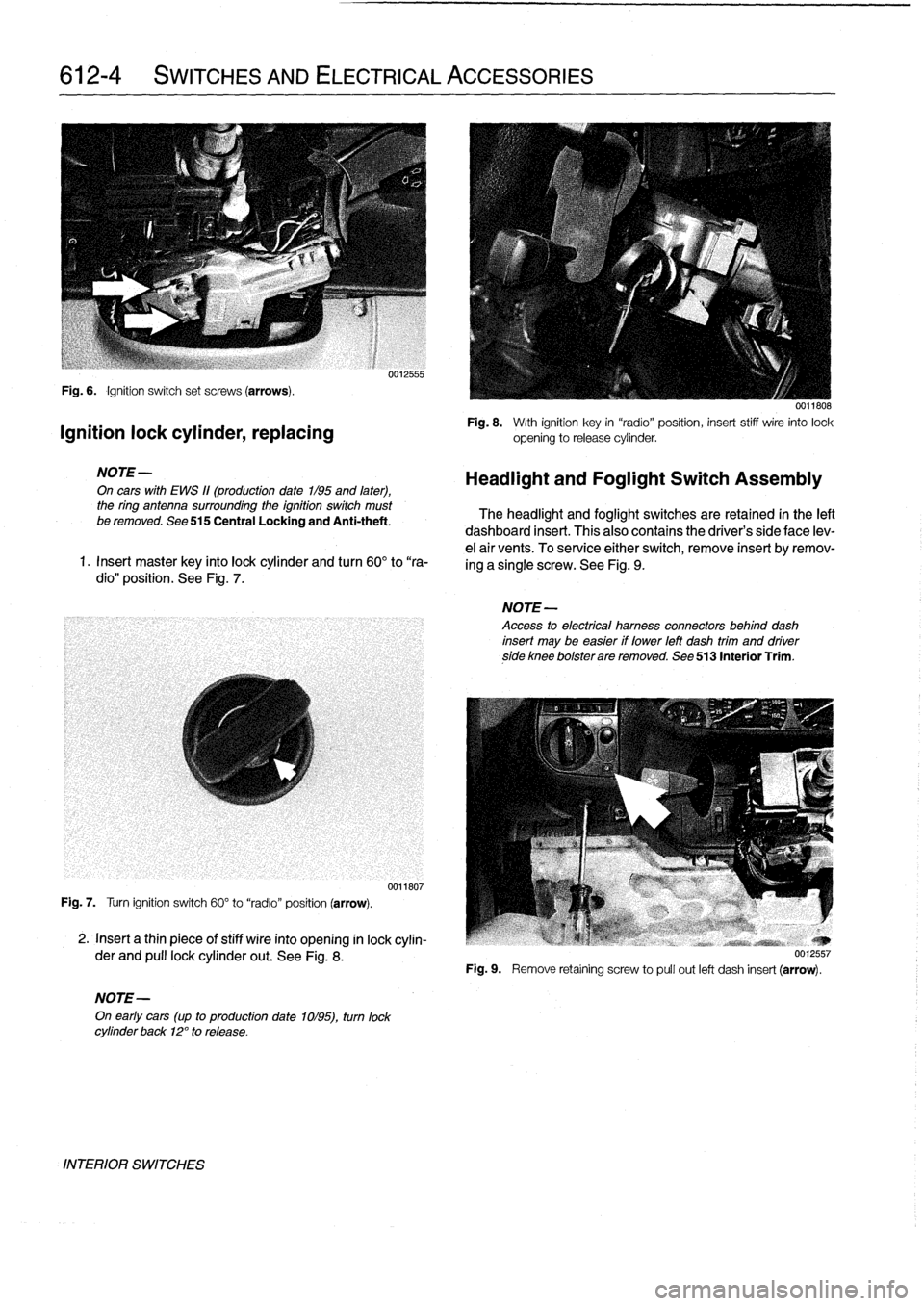
Fig
.
6
.
Ignition
switch
set
screws
(arrows)
.
Ignition
lock
cylinder,
replacing
NOTE-
On
cars
with
EWS
11(production
date
1/95
and
later),
the
ring
antenna
surrounding
the
ignition
switch
must
be
removed
.
See
515
Central
Locking
and
Anti-theft
.
1
.
Insert
master
key
finto
lock
cylinder
and
turn
60°
to
"ra-
dio"
position
.
See
Fig
.
7
.
Fig
.
7
.
Turn
ignition
switch
60°
to
"radio"
position
(arrow)
.
2
.
Insert
a
thin
piece
of
stiff
wire
into
opening
in
lock
cylin-
der
and
pull
lockcylinder
out
.
See
Fig
.
8
.
NOTE-
On
early
cars
(up
to
production
date
1ol95),
turn
lock
cylinder
back
12°
to
release
.
INTERIOR
SWITCHES
0012555
0011807
0011808
Fig
.
8
.
With
ignition
key
in
"radio"position,
insert
stiff
wire
into
lock
opening
to
release
cylinder
.
Headlight
and
Foglight
Switch
Assembly
The
headlight
and
foglight
switches
are
retained
in
the
left
dashboard
insert
.
This
alsocontains
the
driver's
side
face
lev-
e¡
air
vents
.
To
service
either
switch,
remove
insert
byremov-
ing
a
single
screw
.
See
Fig
.
9
.
NOTE-
Access
to
electrical
hamess
connectors
behind
dash
insert
may
be
easier
if
lower
left
dash
trim
and
driverside
knee
bolsterare
removed
.
See
513
Interior
Trim
.
Fig
.
9
.
Remove
retaíning
screw
to
pull
out
left
dash
insert
(arrow)
.
Page 437 of 759

INSTRUMENT
CLUSTER
....
.
.
.
.
.
...
.
..
620-1
Instrument
cluster,
seif-testing
.
.
.......
.
..
620-1
Instrument
cluster,
removing
and
installing
...
620-1
Instrument
cluster
bulbs,
replacing
.
.
.
.
.
.
...
620-2
GENERAL
This
repair
group
covers
removal
and
installation
of
the
in-
strument
cluster
and
the
Multi-information
Display
(MID)
mod-
ule
.
Bulb
replacement
information
for
these
units
is
also
included
here
.
NOTE
-
A
quick
check
of
the
temperature
gauge
and
its
electri-
cal
circuitis
given
in
170
Radiator
and
Cooling
Sys-
tem
.
Use
this
procedure
to
diagnosea
faulty
temperature
gauge
INSTRUMENT
CLUSTER
When
servicing
the
instrument
cluster,
always
disconnect
the
negative
(-)
cable
from
the
battery
and
insulate
the
cable
end
to
prevent
accidental
re-connection
.
Instrument
cluster,
seif-testing
Severa¡
different
versions
of
the
basic
instrument
cluster
havebeen
fitted
in
E36
cars
.
It
is
possibleto
perform
an
instru-
ment
cluster
test
and
display
system
test
information
.
Some
of
the
information
displayed
by
the
instrument
cluster
during
seif-testing
is
used
for
interna¡
BMW
organizationpur-
poses,
suchasmatching
the
correct
instrument
cluster
com-
ponents
during
parts
replacement
.
Other
functions
test
the
various
instrument
modules
.
Self-test
is
also
used
to
recode
the
instrument
cluster
after
removal
.
In
later
production
vehicles
(1996
and
later)
the
test
results
canbe
downioaded,
via
the
diagnostic
plug,
byan
authorized
BMW
dealertechnician
.
1
.
Turn
ignition
to
"radio"position
.
2
.
Press
and
hold
reset
button
on
trip-odometer
untiltrip-
odometer
display
shows
numerical
codes
.
620
Instruments
4
.
Turn
off
ignition
.
Instrument
cluster,
removing
and
installing
INSTRUMENTS
620-1
GENERAL
.....
.
.
.
.
.
.
.
.
.
.........
.
....
620-1
Odometer
coding
plug,
replacing
.....
.
.
.
.
.
.
620-2
Vehicle
speed
sender,
replacing
...
.
.
.
.
.
.
.
.
620-3
MULTI-INFORMATION
DISPLAY
(MID)
.
.
.
620-4
Multi-Information
Display,
removing
and
installing
..
.
....
.
.........
620-4
3
.
With
each
subsequent
press
of
the
button,
a
different
function
is
tested
.
Some
functions
will
activate
need1e
gauges
.
1
.
Disconnect
negative
(-)
cable
from
battery
and
cover
terminal
with
insulating
material
.
CAUTION-
Prior
to
disconnectiog
the
battery,
read
the
battery
disconnection
cautionsgiven
at
the
front
of
this
manual
on
page
vi¡¡
.
2
.
Remove
airbag
unit
from
steering
wheel
.
See
721
Air-
bag
System
(SRS)
.
Store
unit
in
a
safe
place
.
WARNING
-
The
airbag
is
an
explosive
devfce
and
should
be
treated
with
extreme
caution
.
Improper
handling
of
the
airbag
could
cause
serious
injury
or
death
.
Store
the
airbag
with
the
horn
pad
facing
up
.
If
stored
facing
down,
accidental
deployment
couldpropel
it
vfolently
into
the
air,
causing
injury
.
3
.
With
front
wheels
pointed
straight
ahead,
remove
steer-
ing
wheel
.
See
320
Steering
and
Wheel
Alignment
.
4
.
Remove
instrument
cluster
retaining
screws
.
See
Fig
.
1
.
5
.
Place
a
towel
over
steering
column
.
Carefully
tilt
top
of
cluster
out
of
dash
panel
.
Unlock
and
disconnect
har-
ness
connectors
from
back
of
cluster
.
See
Fig
.
2
.
INSTRUMENT
CLUSTER
Page 451 of 759

Fig
.
12
.
Mounting
bolt
for
A/C
refrigerant
line
flange
(arrow)
.
001Suu7
Fig
.
13
.
A/
C
control
module
(A)
behind
center
console
.
Arrows
pointto
electrical
harness
connectors
to
be
disconnected
.
CAUTION
-
Replace
heater
and
AIC
flange
O-rings
and
tight-
en
fasteners
to
specified
torques
.
0012644
HEATING
AND
AIR
CONDITIONING
640-5
Fig
.
14
.
Heating
and
ventilation
ducts
on
left
side
of
heater
box
(arrows)
.
Right
side
ducts
are
similar
.
Fig
.
15
.
Heater
box
retaining
bracket
in
center
console
(arrow)
.
0012645
10
.
Unclip
andremove
heating
and
ventilation
ducts
on
Tightening
Torques
sides
of
heater
box
.
See
Fig
.
14
.
"
A/C
refrigerant
lines
flange
to
bulkhead
..............
.
..
..
.
3
.5
Nm
(31
in-lb)
11
.
Remove
heater
box
retaining
bracket
on
center
tunnel
"
Water
hose
flange
to
bulkhead
and
remove
heater
box
.
See
Fig
.
15
.
(M6
nut)
................
.
...
..
3
.5
Nm
(31
in-lb)
"
Heater
box
retaining
bracket
12
.
Installation
is
reverse
of
removal
.
Evacuate
and
re-
to
tunnel
................
.
..
..
.
4
.5
Nm
(40
in-lb)
charge
A/C
system
using
specialized
equipment
.
Fill
and
bleed
cooling
system
.
See
170
Radiator
and
Cooling
System
.
HEATER
AND
CONTROLS
Page 455 of 759

Sensor
fan
Fig
.
25
.
Digital
display
A/C
control
head
components
.
2
.
Unscrew
left
and
right
screws
retaining
control
head
to
control
module
.
Press
retaining
clips
and
release
front
plate
from
control
head
.
Remove
A/C
control
module
from
control
head
housing
.
Sensor
fan
for
interior
temperature,
repiacing
A
small
electricfan,installed
in
the
A/C
control
head,
draws
cabin
air
past
the
climate
control
temperature
sensor
.
1.
Remove
A/C
control
head
as
described
earlier
.
2
.
Rotary-knob
control
head
:
Disconnect
electrical
con-
nector
from
top
of
control
head
housing
.
Pry
open
plas-
tic
housing
and
remove
sensor
fan
.
See
Fig
.
26
.
0013181
Fig
.
26
.
Sensor
fan
(A)
and
harness
(B)
in
back
of
A/C
control
head
(rotary-knob
control
head
shown)
.
3
.
Digital
display
models
:
Disconnect
electrical
harness
connector
from
control
head
housing
.
Remove
screws
holding
sensor
fan
to
bottom
of
control
moduleand
re-
move
.
Refer
to
Fig
.
25
.
4
.
Installation
is
reverse
of
removal
.
HEATING
AND
AIR
CONDITIONING
640-
9
Heater
and
A/C
Air
Distribution
Motors
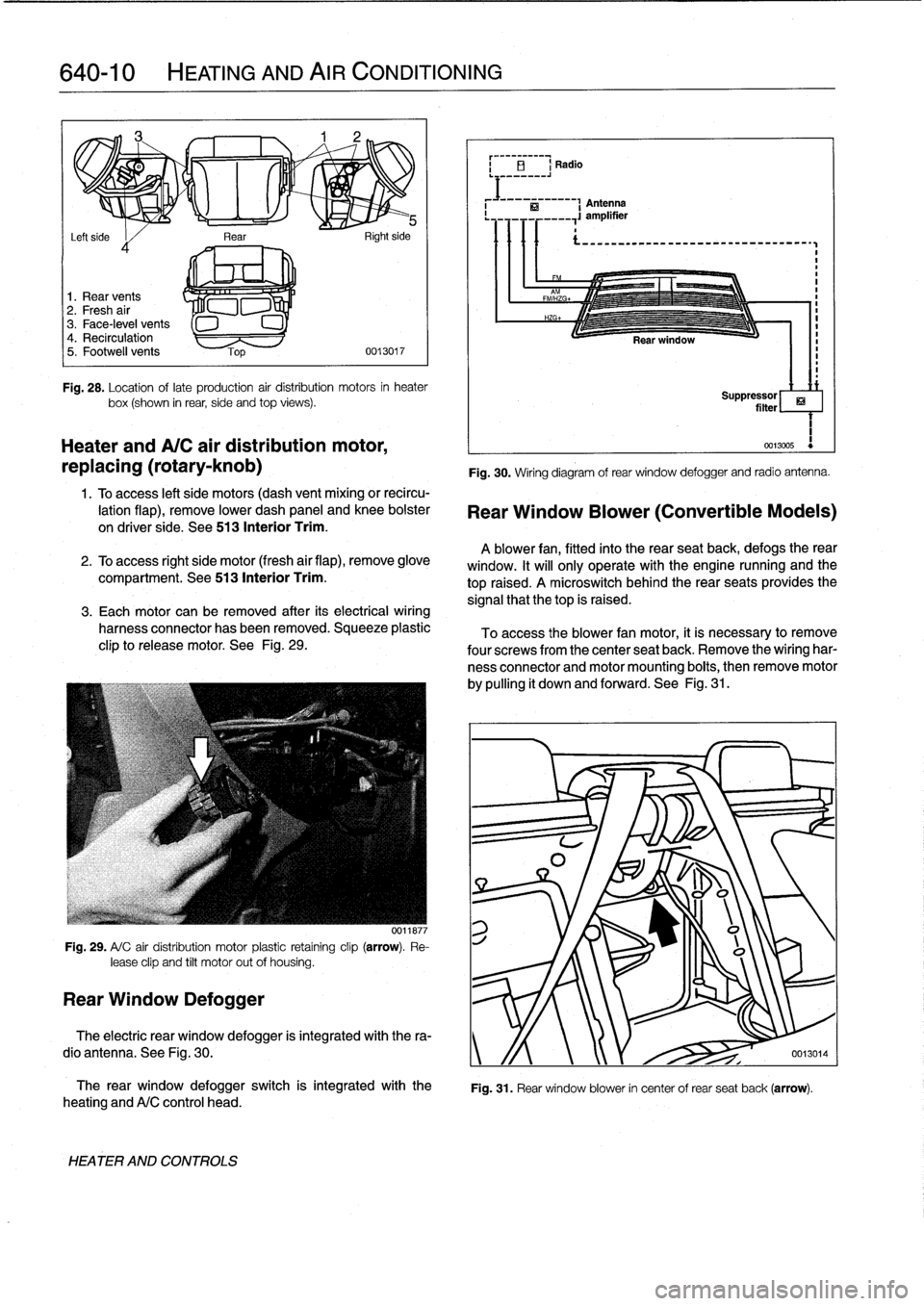
The
recirculation,
fresh
air
and
othervent-duct
flaps
are
controlled
electrically
via
a
series
of
air
distribution
actuating
motors
.
Cars
with
the
rotary-knob
control
head
use
three
elec-
tromechanical
motors,
each
held
in
place
via
a
small
plastic
clip
.
See
Fig
.
27
.
Rightside
of
heater
box
l
Fig
.
27
.
Location
of
early
production
air
distribution
motors
(arrows)
.
Later
systems
(with
the
digital
display
control
head)
use
five
distribution
motors,
four
of
which
are
digítally
controlled
.
See
Fig
.
28
.
HEATER
AND
CONTROLS
Page 456 of 759
640-10
HEATING
AND
AIR
CONDITIONING
i
El
Radio
Antenna
Rear
.
,
si,-
Left
side
I
d
1
.
Rear
vents
2
.
Fresh
air
3
.
Face-level
vents
4
.
Recirculation
5
.
Footwell
vents
0013017
Fig
.
28
.
Location
oflate
production
air
distribution
motors
in
heater
box(shown
in
rear,
side
and
top
views)
.
Heater
andA/C
air
distribution
motor,
replacing
(rotary-knob)
1
.
Toaccess
left
side
motors
(dash
vent
mixing
or
recircu-
lation
flap),
remove
lower
dash
panel
and
knee
bolster
on
driver
side
.
See
513
Interior
Trim
.
2
.
To
access
right
side
motor
(fresh
air
flap),
remove
glove
compartment
.
See513
Interior
Trim
.
3
.
Each
motor
can
be
removed
after
its
electrical
wiring
harness
connector
has
been
removed
.
Squeeze
plastic
clip
to
release
motor
.
See
Fig
.
29
.
Fig
.
29
.
A/
C
air
distribution
motor
plastic
retaíning
clip
(arrow)
.
Re-
lease
clip
and
tilt
motor
out
of
housing
.
Rear
Window
Defogger
0011877
The
rear
window
defogger
switch
is
integrated
with
the
heating
andA/C
control
head
.
HEATER
AND
CONTROLS
Fig
.
30
.
Wiring
diagram
of
rear
window
defogger
and
radio
antenna
.
Rear
Window
Blower
(Convertible
Models)
A
blower
fan,
fitted
into
the
rear
seatback,
defogs
therear
window
.
It
will
only
operate
with
the
engine
nunning
and
the
top
raised
.
A
microswitch
behindthe
rear
seats
provides
the
signal
that
thetop
is
raised
.
To
access
the
blower
fan
motor,
it
is
necessary
to
remove
four
screwsfrom
the
center
seat
back
.
Remove
the
wiring
har-
ness
connector
and
motor
mounting
boits,
then
remove
motor
by
pulling
it
down
and
forward
.
See
Fig
.
31
.
ri
Suppressor
filter
1
0013005
Fig
.
31
.
Rear
window
blower
in
center
of
rear
seat
back
(arrow)
.
The
electric
rear
window
defogger
is
integrated
with
the
ra-
dio
antenna
.
See
Fig
.
30
.
y
/f
0013014
Page 457 of 759

To
access
the
rear
window
blower
relay,
remove
the
glove
compariment
.
See
Fig
.
32
.
Fig
.
32
.
Rear
window
blower
relay
located
in
frontof
glove
compart-
ment
(arrow)
.
AIR
CONDITIONING
Thissection
covers
removal
and
installation
of
air
condition-
ing
refrigerant
components
.
A/C
testing
and
diagnosis,
refrig-
erantdischarge,
evacuatíon
and
recharge
are
not
covered
here
.
The
subassemblies
and
lines
of
the
air
conditionerare
filled
with
either
refrigerant
R12
(1992
cars)
or
R-134a
(1993
and
later
cars)
.
The
major
components
of
the
A/Csystem
are
shown
in
Fig
.
33
.
A/CSystem
Warnings
and
Cautions
WARNING
-
"
Always
be
careful
that
refrigerant
does
not
come
in
contact
with
your
skin
.
Always
wearhand
andeye
protection
(gloves
and
goggles)
when
work-
ing
around
the
AIC
system
.
If
refrigerant
does
come
in
contact
with
your
skin
oreyes
:
-Do
not
rub
skin
oreyes
;
-Immediately
flush
skin
oreyes
withcool
water
for
15
minutes
;
-Rush
to
a
doctor
orhospital
;
-Do
not
attempt
to
treat
yourself
.
"
Work
in
a
wefl
ventilated
area
.
Avoid
breathing
re-
frigerant
vapors
.
Exposure
may
irrítate
eyes,
nose,
and
throat
.
Switch
on
exhaustlventilation
systems
when
working
on
the
refrigerant
system
.
"
Do
not
expose
any
component
of
the
AIC
system
to
high
temperatures
(Above
80°Cl176°F)or
open
flames
.
Excessive
heat
will
cause
a
pres-
sureincrease
whichcould
burst
the
system
.
HEATING
AND
AIR
CONDITIONING
640-
1
1
0013015
WARNING
-
"
Keep
refrigerant
away
from
open
llames
.
Poison-
ous
gas
will
be
produced
if
it
bums
.
Do
not
smoke
near
refrigerant
gases
for
the
same
reason
.
"
The
AICsystem
is
filled
with
refrigerant
gas
which
is
under
pressure
.
Pressurized
refrigerant
in
the
presenceof
oxygen
may
forma
combusti-
ble
mixture
.
Never
introduce
compressed
air
finto
any
refrigerant
container
(full
or
empty),
capped
off
AIC
component,
or
piece
of
service
equip-
ment
.
"
Refrígerant
gases
are
heavier
than
air,
displace
oxygen
and
may
cause
suffocation
in
areas
of
poor
círculation,
for
example
under
a
car
.
Switch
on
exhaustlventilation
systems
when
working
on
the
refrigerant
system
.
"
State
and
local
governments
may
have
additional
requirements
regarding
air
conditioning
servic-
ing
.
Alwayscomply
with
state
and
local
laws
.
"
Electric
welding
near
refrigerant
hoses
causes
R-134a
to
decompose
.
Discharge
system
before
welding
.
CA
UTION
-
-As
of
January
1,
1992,
any
person
who
services
a
motor
vehicle
air
conditioner
must,
by
law,
be
properly
trained
and
certified,
and
use
approved
refrigerant
recycling
equipment
.
Technicians
must
complete
an
EPA-approved
recycling
course
to
be
certified
.
"
It
is
recommended
that
al¡
system
refrigerant
AIC
refrigerant
be
left
to
an
authorized
BMW
dealer
or
other
qualified
AIC
service
facility
.
"
Do
not
top
off
a
partially
charged
refrigerant
sys-
tem
.
Dischargesystem,evacuate
and
then
re-
charge
system
.
"
R-134a
and
R-12
refrigerants
and
refrigerant
oils
and
system
components,
including
hoses
and
sealing
O-rings,
are
NOT
compatible
.
Compo-
nent
damage
andlor
system
contamination
will
result
.
"
The
mixture
of
refrigerant
oil
(PAG
oil)
and
refrig-
erant
R-134a
attacks
some
metals
and
alloys
(for
example,copper)
and
breaks
down
certain
hose
materials
.
Use
only
hoses
and
lines
that
are
iden-
tified
with
a
green
mark
(stripe)
or
the
lettering
R-
134a"
.
"
Immediately
plug
open
connections
on
AIC
com-
ponents
to
prevent
dirt
and
moisture
contamina-
tion
.
"
Do
not
steam
clean
condensers
or
evaporators
.
Use
only
cold
water
or
compressed
air
.
AIR
CONDITIONING
Page 462 of 759

640-16
HEATING
AND
AIR
CONDITIONING
A/C
expansion
valve,
removing
and
installing
Fig
.
45
.
Control
module
carrier
retaining
screws
(arrows)
.
1
.
Following
manufacturers
instructions,
connectanap-
proved
refrigerant
recovery/recycling/recharging
unit
to
A/C
system
and
discharge
system
.
WARNING
-
Do
not
discharge%harge
the
WC
system
without
properequipmentand
training
.
Damage
to
the
vehi-
cle
and
personal
injury
may
result
.
2
.
Remove
glove
compartment
and
glove
compartment
support
frame
.
See513
Interior
Trim
.
3
.
Remove
right
side
footwell
vents
.
4
.
Remove
right
side
control
module
carrier
screws
and
tilt
carrier
down
.
See
Fig
.
46
.
5
.
Remove
expansion
valve
cover
.
See
Fig
.
46
.
Fig
.
46
.
Four
screws
retain
expansion
valve
cover
(arrows)
.
AIR
CONDITIONING
0012666
0012663
6
.
Remove
A/C
refrigerant
line
fiange
bolt(s)
from
expan-
sion
valve
.
Plug
lines
immediately
.
See
Fig
.
47
.
NOTE
-
If
necessary,
remove
air
plenum
grille
fromrear
of
en-
gine
compartment
as
described
earlier
in
Blower
mo-
tor,
removing
and
installing
.
Remove
wiring
hamess
cover
screws
and
then
remove
right
side
plenum
screws
.
Reaching
finto
the
plenum
chamber,
remove
AIC
fine
flange
bolt
to
allow
expansion
valve
room
for
removal
.
Fig
.
47
.
Refrigerant
line
fiange
mounting
boltat
expansion
valve(arrow)
.
7
.
Remove
screws
from
top
of
expansion
valve
and
re-
move
expansion
valve
from
evaporator
.
See
Fig
.
48
.
Fig
.
48
.
Expansion
valve
mountingscrews
(A)
.
0011667