1993 CHEVROLET DYNASTY battery location
[x] Cancel search: battery locationPage 603 of 2438
VEHICLE SPEED CONTROL
CONTENTS
page page
CHECKING FOR FAULT CODE .............. 3
DIAGNOSIS PROCEDURES ................ 2
GENERAL INFORMATION .................. 1
INOPERATIVE SYSTEM ................... 3
POWERTRAIN CONTROL MODULE ELECTRICAL TEST ................................ 5
ROAD TEST ............................ 2
SERVO ELECTRICAL TESTS ............... 4
SERVO UNIT ............................ 9 SERVO VACUUM TEST
................... 9
STOP LAMP VEHICLE SPEED CONTROL SWITCH TEST ......................... 8
VACUUM SUPPLY TEST .................. 9
VEHICLE SPEED CONTROL SWITCH REMOVAL ........................... 10
VEHICLE SPEED CONTROL SWITCH TEST . . . 8
VEHICLE SPEED CONTROL ELECTRICAL TESTS ............................... 3
GENERAL INFORMATION
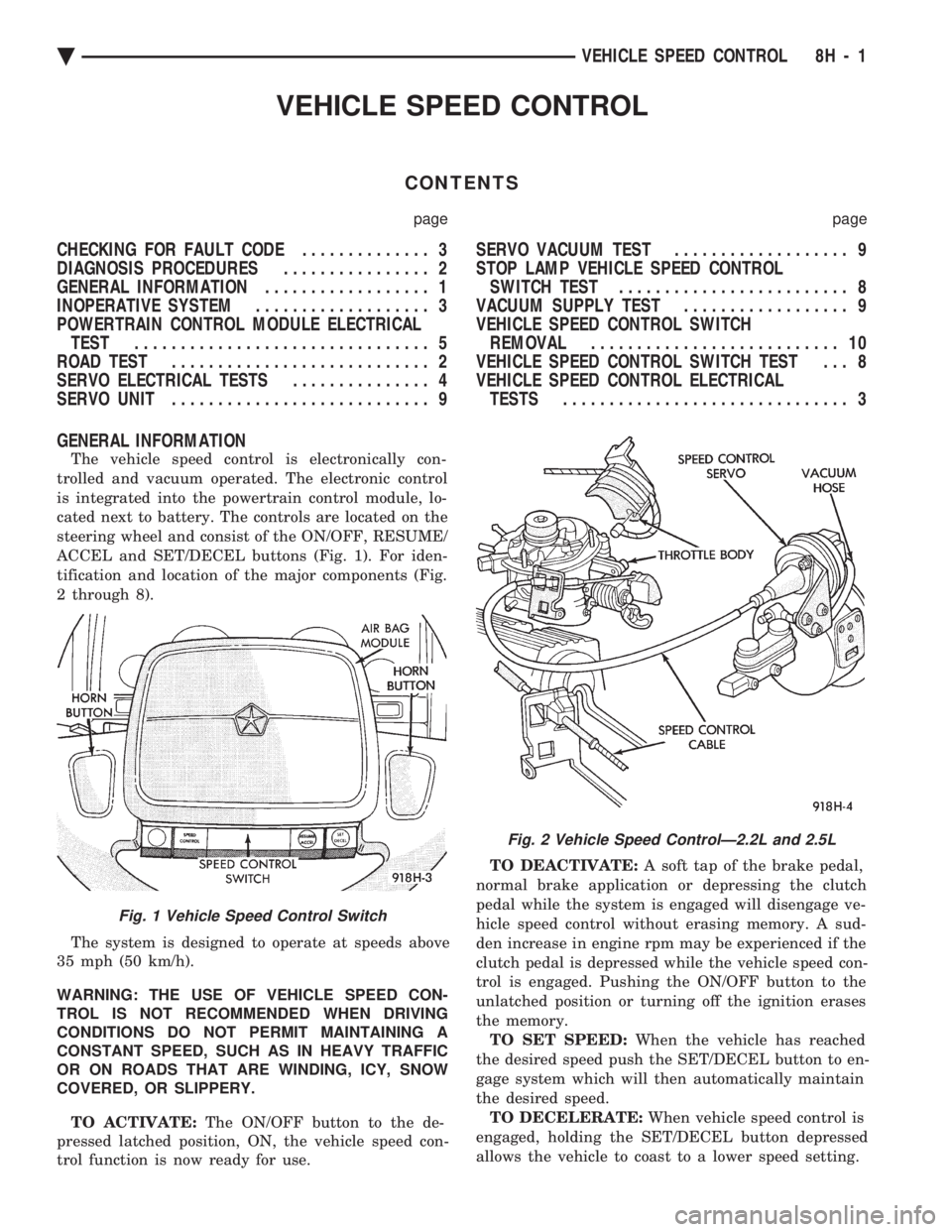
The vehicle speed control is electronically con-
trolled and vacuum operated. The electronic control
is integrated into the powertrain control module, lo-
cated next to battery. The controls are located on the
steering wheel and consist of the ON/OFF, RESUME/
ACCEL and SET/DECEL buttons (Fig. 1). For iden-
tification and location of the major components (Fig.
2 through 8).
The system is designed to operate at speeds above
35 mph (50 km/h).
WARNING: THE USE OF VEHICLE SPEED CON-
TROL IS NOT RECOMMENDED WHEN DRIVING
CONDITIONS DO NOT PERMIT MAINTAINING A
CONSTANT SPEED, SUCH AS IN HEAVY TRAFFIC
OR ON ROADS THAT ARE WINDING, ICY, SNOW
COVERED, OR SLIPPERY.
TO ACTIVATE: The ON/OFF button to the de-
pressed latched position, ON, the vehicle speed con-
trol function is now ready for use. TO DEACTIVATE:
A soft tap of the brake pedal,
normal brake application or depressing the clutch
pedal while the system is engaged will disengage ve-
hicle speed control without erasing memory. A sud-
den increase in engine rpm may be experienced if the
clutch pedal is depressed while the vehicle speed con-
trol is engaged. Pushing the ON/OFF button to the
unlatched position or turning off the ignition erases
the memory. TO SET SPEED: When the vehicle has reached
the desired speed push the SET/DECEL button to en-
gage system which will then automatically maintain
the desired speed. TO DECELERATE: When vehicle speed control is
engaged, holding the SET/DECEL button depressed
allows the vehicle to coast to a lower speed setting.
Fig. 1 Vehicle Speed Control Switch
Fig. 2 Vehicle Speed ControlÐ2.2L and 2.5L
Ä VEHICLE SPEED CONTROL 8H - 1
Page 607 of 2438
(4) Connect a jumper wire between pin 2 of the
four-way servo connector of the main harness and
pin 2 of the vehicle speed control servo (Fig. 12). The
other three pins from the servo should show battery
voltage. If not, replace the servo. (5) Using an ohmmeter, connect one lead to a good
body ground and the other lead touch pin 1 in the
four-way servo connector of the main harness. The
meter should show continuity. If not, repair the
ground circuit as necessary.
POWERTRAIN CONTROL MODULE ELECTRICAL
TEST
WARNING: ON VEHICLES EQUIPPED WITH AIR-
BAG, SEE GROUP 8M, RESTRAINT SYSTEMS FOR
AIRBAG, STEERING WHEEL OR COLUMN RE-
MOVAL PROCEDURES.
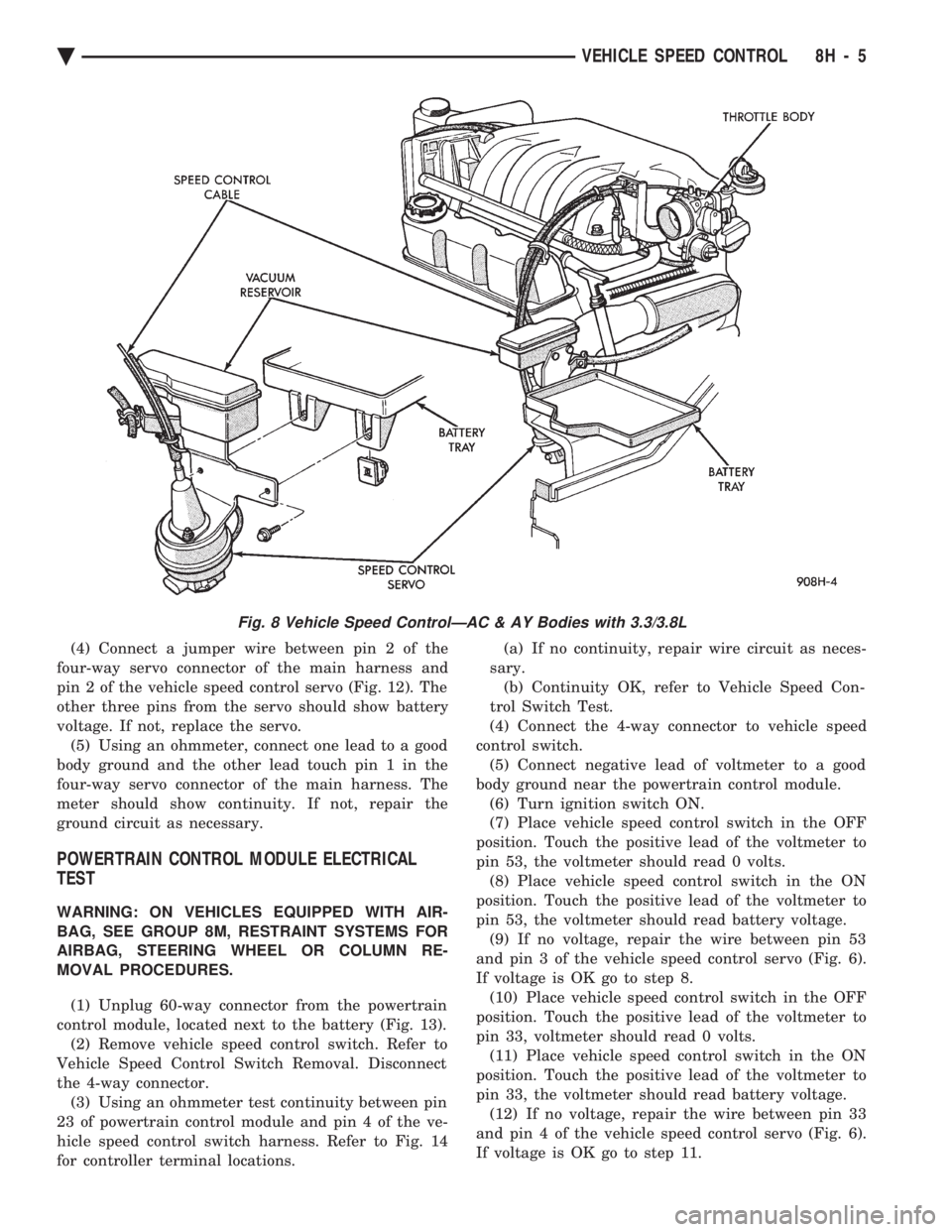
(1) Unplug 60-way connector from the powertrain
control module, located next to the battery (Fig. 13). (2) Remove vehicle speed control switch. Refer to
Vehicle Speed Control Switch Removal. Disconnect
the 4-way connector. (3) Using an ohmmeter test continuity between pin
23 of powertrain control module and pin 4 of the ve-
hicle speed control switch harness. Refer to Fig. 14
for controller terminal locations. (a) If no continuity, repair wire circuit as neces-
sary. (b) Continuity OK, refer to Vehicle Speed Con-
trol Switch Test.
(4) Connect the 4-way connector to vehicle speed
control switch. (5) Connect negative lead of voltmeter to a good
body ground near the powertrain control module. (6) Turn ignition switch ON.
(7) Place vehicle speed control switch in the OFF
position. Touch the positive lead of the voltmeter to
pin 53, the voltmeter should read 0 volts. (8) Place vehicle speed control switch in the ON
position. Touch the positive lead of the voltmeter to
pin 53, the voltmeter should read battery voltage. (9) If no voltage, repair the wire between pin 53
and pin 3 of the vehicle speed control servo (Fig. 6).
If voltage is OK go to step 8. (10) Place vehicle speed control switch in the OFF
position. Touch the positive lead of the voltmeter to
pin 33, voltmeter should read 0 volts. (11) Place vehicle speed control switch in the ON
position. Touch the positive lead of the voltmeter to
pin 33, the voltmeter should read battery voltage. (12) If no voltage, repair the wire between pin 33
and pin 4 of the vehicle speed control servo (Fig. 6).
If voltage is OK go to step 11.
Fig. 8 Vehicle Speed ControlÐAC & AY Bodies with 3.3/3.8L
Ä VEHICLE SPEED CONTROL 8H - 5
Page 643 of 2438
LAMPS
CONTENTS
page page
BULB APPLICATION TABLE ............... 38
CONCEALED HEADLAMPS ................ 27
EXTERIOR LAMP SWITCHES AND HEADLAMP ALIGNMENT ........................... 3
EXTERIOR LAMP SYSTEMS .............. 25
EXTERIOR LAMPSÐAA BODY ............. 7
EXTERIOR LAMPSÐAC BODY ............ 10 EXTERIOR LAMPSÐAG BODY
............ 14
EXTERIOR LAMPSÐAJ BODY ............ 16
EXTERIOR LAMPSÐAP BODY ............ 19
EXTERIOR LAMPSÐAY-BODY ............ 22
GENERAL INFORMATION .................. 1
ILLUMINATED ENTRY SYSTEM ........... 33
GENERAL INFORMATION
Each vehicle is equipped with lamps used for illumi-
nating and indicating purposes. A circuit must have a
good ground to be complete. Circuit ground occurs
when the lamp socket makes contact with the metal
body. On vehicles with plastic lamps, a wire between
the socket and the body makes the grounds. When changing lamp bulbs, check the socket for
corrosion. If corrosion is present, clean contacts with a
wire brush and coat the inside of the socket with
Mopar tMulti-purpose Grease or equivalent.
CAUTION: Do not touch the glass of halogen bulbs
with fingers or any possibly oily surface, reduced
bulb life will result.
BODY IDENTIFICATION
Throughout this Group, references are made to the
vehicle family or body code. To decode the vehicle
identification plates, refer to the Introduction Section
at the front of this manual.
DIAGNOSTIC PROCEDURES
Begin electrical system failure diagnosis by testing
all related fuses and circuit breakers in the fuse block
and engine compartment. When a vehicle experiences problems with the head-
lamp system, verify the condition of the battery con-
nections, charging system, headlamp bulbs, wire con-
nectors, relay, high beam dimmer switch and headlamp
switch. Refer to Wiring Diagrams manual for compo-
nent locations and circuit information.
SYMPTOM
Headlamps are dim when engine is idling of
with ignition turned OFF. Canada cars must
have lamps ON. ACTION
² Clean battery terminal clamps and posts. Refer to
Group 8B, Battery/Starter/Generator Service for
proper procedures.
² Test charging system output. Refer to Group 8A,
Battery/Starting/Charging Systems Diagnostics for
proper testing procedures.
² Test for high resistance in headlamp circuits.
² Defective headlamp bulb.
SYMPTOM
Bulbs burn out frequently.
ACTION
² Test charging system output. Refer to Group 8A,
Battery/Starting/Charging Systems Diagnostics for
proper testing procedures.
² Check for loose or corroded connector terminals or
splices in headlamp circuits. Refer to Wiring Diagrams
manual for component and splice locations.
SYMPTOM
Headlamps are dim with engine running above
idle. Canada cars must have lamps ON.
ACTION
² Test charging system output. Refer to Group 8A,
Battery/Starting/Charging Systems Diagnostics for
proper testing procedures.
² Test for high resistance in headlamp circuits.
² Defective headlamp bulb.
SYMPTOM
Headlamps flash randomly.
ACTION
² Test for poor circuit ground.
² Test for high resistance in headlamp circuits.
Ä LAMPS 8L - 1
Page 661 of 2438
EXTERIOR LAMPSÐAP BODY INDEX
page page
Center High Mounted Stop Lamp (CHMSL)Ð AP/24-44-Body ......................... 21
Center High Mounted Stop Lamp BulbÐ AP/24-44-Body ......................... 21
Fog Lamp Bulb .......................... 21
Fog Lamps ............................. 21
Front Side Marker Lamp or Bulb ............. 20
Headlamp Bulb .......................... 19 Headlamp Diagnosis
...................... 19
Headlamp Housing ....................... 19
License Plate Lamp or Bulb ................ 20
Park and Turn Signal Lamp or Bulb .......... 20
Tail, Stop, Turn Signal, Back-Up and Side Marker Lamp ................................ 20
Tail, Stop, Turn Signal, Back-Up and Side Marker Lamp Bulbs ........................... 20
HEADLAMP DIAGNOSIS
For headlamp diagnosis, refer to the headlamp di-
agnosis chart at the beginning of this group. Refer to
Wiring Diagrams manual for circuit and component
locations.
HEADLAMP BULB
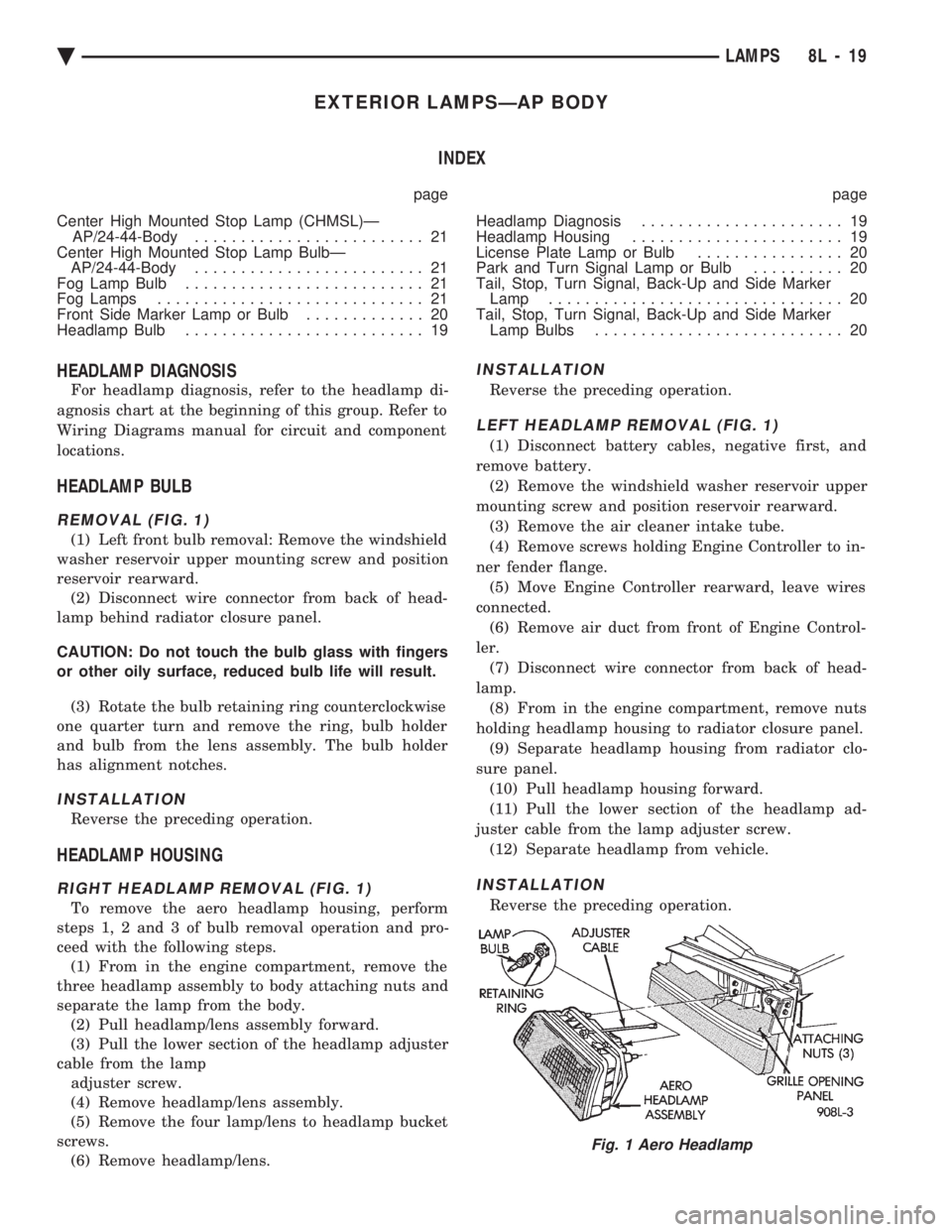
REMOVAL (FIG. 1)
(1) Left front bulb removal: Remove the windshield
washer reservoir upper mounting screw and position
reservoir rearward. (2) Disconnect wire connector from back of head-
lamp behind radiator closure panel.
CAUTION: Do not touch the bulb glass with fingers
or other oily surface, reduced bulb life will result.
(3) Rotate the bulb retaining ring counterclockwise
one quarter turn and remove the ring, bulb holder
and bulb from the lens assembly. The bulb holder
has alignment notches.
INSTALLATION
Reverse the preceding operation.
HEADLAMP HOUSING
RIGHT HEADLAMP REMOVAL (FIG. 1)
To remove the aero headlamp housing, perform
steps 1, 2 and 3 of bulb removal operation and pro-
ceed with the following steps. (1) From in the engine compartment, remove the
three headlamp assembly to body attaching nuts and
separate the lamp from the body. (2) Pull headlamp/lens assembly forward.
(3) Pull the lower section of the headlamp adjuster
cable from the lamp adjuster screw.
(4) Remove headlamp/lens assembly.
(5) Remove the four lamp/lens to headlamp bucket
screws. (6) Remove headlamp/lens.
INSTALLATION
Reverse the preceding operation.
LEFT HEADLAMP REMOVAL (FIG. 1)
(1) Disconnect battery cables, negative first, and
remove battery. (2) Remove the windshield washer reservoir upper
mounting screw and position reservoir rearward. (3) Remove the air cleaner intake tube.
(4) Remove screws holding Engine Controller to in-
ner fender flange. (5) Move Engine Controller rearward, leave wires
connected. (6) Remove air duct from front of Engine Control-
ler. (7) Disconnect wire connector from back of head-
lamp. (8) From in the engine compartment, remove nuts
holding headlamp housing to radiator closure panel. (9) Separate headlamp housing from radiator clo-
sure panel. (10) Pull headlamp housing forward.
(11) Pull the lower section of the headlamp ad-
juster cable from the lamp adjuster screw. (12) Separate headlamp from vehicle.
INSTALLATION
Reverse the preceding operation.
Fig. 1 Aero Headlamp
Ä LAMPS 8L - 19
Page 667 of 2438

EXTERIOR LAMP SYSTEMS INDEX
page page
Daytime Running LampÐCanada Only ........ 25
Headlamp Time Delay System .............. 26
Lamp Outage ModuleÐAA-Body ............. 25 Lamp Outage ModuleÐAll Except AA-Body
..... 25
Lamp Outage System ..................... 25
Removal (Fig. 4) ......................... 25
LAMP OUTAGE SYSTEM
Diagnostics and component relationships for AC,
AG, AJ or AY-Bodies can be found in the Body Di-
agnostic Procedures Manual, Electronic Vehicle In-
formation Center (EVIC) section. For circuit and component locations on AA-body,
refer to the Wiring Diagrams Manual.
LAMP OUTAGE MODULEÐALL EXCEPT AA-BODY
REMOVAL
(1) Remove battery negative cable.
(2) Remove the glove box assembly. Refer to Group
8E, Instrument Panel. (3) Disconnect the wire connector from the lamp
outage module. (4) Remove lamp outage module attaching screw
and remove the module from the vehicle (Figs. 1, 2
or 3).
INSTALLATION
Reverse the preceding operation.
LAMP OUTAGE MODULEÐAA-BODY
REMOVAL (FIG. 1)
(1) Remove battery negative cable
(2) Disconnect the wire connectors from the lamp
outage module. (3) Remove screws or clip holding lamp outage
module to instrument panel above glove compart-
ment (Fig. 1, 2 or 3). (4) Separate lamp outage module from vehicle.
INSTALLATION
Reverse the preceding operation.
DAYTIME RUNNING LAMPÐCANADA ONLY
DIAGNOSIS
For circuit and component locations refer to the
Wiring Diagrams manual.
REMOVAL (FIG. 4)
(1) Remove the left front inner fender shield, if
equipped, and disconnect the wire connector from the
day time running lamp module. (2) Remove daytime running lamp module attach-
ing screws and separate the module from the inner
fender support.INSTALLATION
Reverse the preceding operation.
Fig. 1 Lamp Outage ModuleÐAA-Body
Fig. 2 Lamp Outage ModuleÐAG and AJ-Body
Ä LAMPS 8L - 25
Page 695 of 2438

POWER LOCKS
CONTENTS
page page
CIRCUIT BREAKER TEST .................. 1
DECK LID OPERATION ................... 3
DECK LID PULL-DOWN SYSTEMÐAC and AY BODIES .............................. 3
DOOR LOCK INHIBIT ..................... 6
DOOR LOCK INHIBIT ..................... 1
DOOR LOCK MOTOR REPLACEMENT ........ 3
DOOR LOCK SYSTEM TEST ............... 3
ELECTRIC MOTOR TEST .................. 2 GENERAL INFORMATION
.................. 1
KEYLESS ENTRY SYSTEM ................ 1
LAMP OUTAGE MODULE REPLACEMENT .... 6
POWER DOOR LOCKS .................... 2
POWER PULL DOWN .................... 4
REMOTE KEYLESS ENTRY ................ 5
REMOTE KEYLESS MODULE REPLACEMENT . . 6
SWITCH TEST .......................... 1
WIRING VOLTAGE TEST .................. 1
GENERAL INFORMATION
All doors can be locked or unlocked electrically by
operating the switch on a front door panel or arm
rest. The rear doors can be locked or unlocked by actu-
ation of the front door switch, or can be locked or un-
locked mechanically and independently with their
respective locking knobs. The front doors can be locked or unlocked mechan-
ically with the locking knob regardless of electrical
locking and unlocking actuation with the front door
knobs. The right and left front door on all car lines can be
locked or unlocked mechanically from the outside
with the key or electrically as described above. The
left front can also be unlocked by actuation of the in-
side remote door handle. The right front door on AC,
AG, AJ and AY can be unlocked by actuation of the
inside remote door handle. The deck lid lock consists of a latch with internal
solenoid and push button switch. The solenoid is en-
ergized only when the push button is depressed.
DOOR LOCK INHIBIT
The power door lock inhibit system prevents the
doors from being locked using the power door locks
when either of two conditions occur: (1) The key is in the ignition switch and any of the
doors are open. The ignition switch does not have to
be ON. (2) The key is in the ignition switch and the head-
lamp are on.
KEYLESS ENTRY SYSTEM
The system allows locking and unlocking of vehicle
door(s) and Trunk lid by remote control using a hand
held radio transmitter. The ignition switch must be
OFF before the trunk lid can be unlocked with the
transmitter. The receiver may receive signals from two trans-
mitters. Each transmitter has its own code, and the
code has been stored in memory. If the transmitter is
replaced or a second transmitter is add, the code on
both units have to be placed in memory.
CIRCUIT BREAKER TEST
Find correct circuit breaker on fuse block. Pull out
slightly but be sure that circuit breaker terminals
still contact terminals in fuse block. Connect ground
wire of voltmeter to a good ground. With probe of
voltmeter positive wire, check both terminals of cir-
cuit breaker for 12 volts. If only one terminal checks
at 12 volts, circuit breaker is defective and must be
replaced. If neither terminal shows 12 volts, check
for open or shorted circuit to circuit breaker.
WIRING VOLTAGE TEST
The following wiring test sequence determines
whether or not voltage is continuous through the
body harness to switch. (1) Remove left side switch from trim panel.
(2) Carefully separate multiple terminal block on
wiring harness from switch body. (3) Connect one lead of test light to a ground ter-
minal:
² Black Wire AA and AC Bodies
² Gray wire AG and AJ Bodies
² Touch other test light lead to Red Wire terminal.
² If test light comes on, the wiring circuit between
the battery and switch is functional.
² If test light does not come on, check 30 amp circuit
breaker or for a open circuit.
SWITCH TEST
Remove the switch from its mounting location. Us-
ing an ohmmeter, refer to (Fig. 1) to determine if
continuity is correct in the Lock and Unlock switch
positions. If these results are not obtained, replace
the switch.
Ä POWER LOCKS 8P - 1
Page 720 of 2438
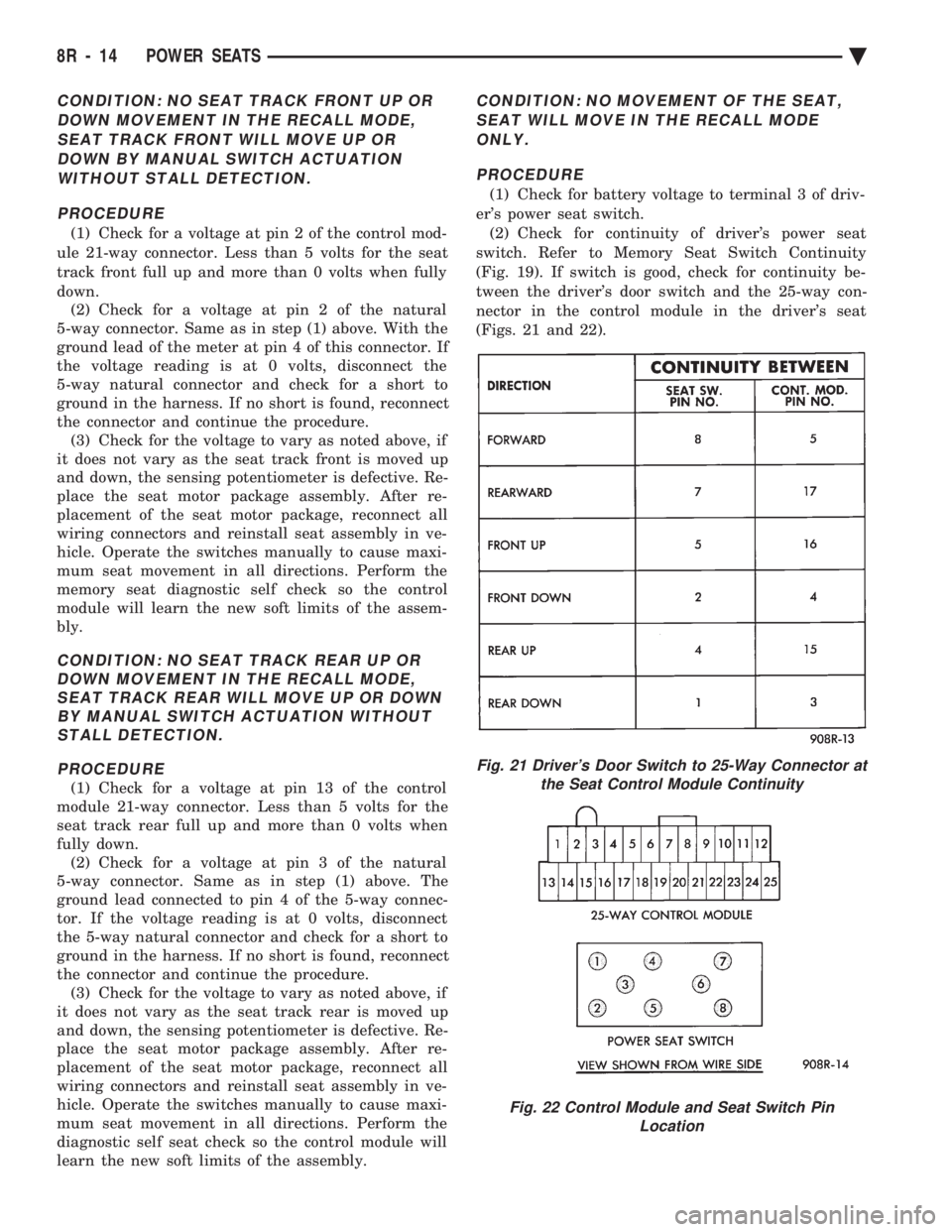
CONDITION: NO SEAT TRACK FRONT UP OR DOWN MOVEMENT IN THE RECALL MODE,SEAT TRACK FRONT WILL MOVE UP ORDOWN BY MANUAL SWITCH ACTUATIONWITHOUT STALL DETECTION.
PROCEDURE
(1) Check for a voltage at pin 2 of the control mod-
ule 21-way connector. Less than 5 volts for the seat
track front full up and more than 0 volts when fully
down. (2) Check for a voltage at pin 2 of the natural
5-way connector. Same as in step (1) above. With the
ground lead of the meter at pin 4 of this connector. If
the voltage reading is at 0 volts, disconnect the
5-way natural connector and check for a short to
ground in the harness. If no short is found, reconnect
the connector and continue the procedure. (3) Check for the voltage to vary as noted above, if
it does not vary as the seat track front is moved up
and down, the sensing potentiometer is defective. Re-
place the seat motor package assembly. After re-
placement of the seat motor package, reconnect all
wiring connectors and reinstall seat assembly in ve-
hicle. Operate the switches manually to cause maxi-
mum seat movement in all directions. Perform the
memory seat diagnostic self check so the control
module will learn the new soft limits of the assem-
bly.
CONDITION: NO SEAT TRACK REAR UP OR DOWN MOVEMENT IN THE RECALL MODE,SEAT TRACK REAR WILL MOVE UP OR DOWNBY MANUAL SWITCH ACTUATION WITHOUTSTALL DETECTION.
PROCEDURE
(1) Check for a voltage at pin 13 of the control
module 21-way connector. Less than 5 volts for the
seat track rear full up and more than 0 volts when
fully down. (2) Check for a voltage at pin 3 of the natural
5-way connector. Same as in step (1) above. The
ground lead connected to pin 4 of the 5-way connec-
tor. If the voltage reading is at 0 volts, disconnect
the 5-way natural connector and check for a short to
ground in the harness. If no short is found, reconnect
the connector and continue the procedure. (3) Check for the voltage to vary as noted above, if
it does not vary as the seat track rear is moved up
and down, the sensing potentiometer is defective. Re-
place the seat motor package assembly. After re-
placement of the seat motor package, reconnect all
wiring connectors and reinstall seat assembly in ve-
hicle. Operate the switches manually to cause maxi-
mum seat movement in all directions. Perform the
diagnostic self seat check so the control module will
learn the new soft limits of the assembly.
CONDITION: NO MOVEMENT OF THE SEAT,
SEAT WILL MOVE IN THE RECALL MODEONLY.
PROCEDURE
(1) Check for battery voltage to terminal 3 of driv-
er's power seat switch. (2) Check for continuity of driver's power seat
switch. Refer to Memory Seat Switch Continuity
(Fig. 19). If switch is good, check for continuity be-
tween the driver's door switch and the 25-way con-
nector in the control module in the driver's seat
(Figs. 21 and 22).
Fig. 21 Driver's Door Switch to 25-Way Connector at the Seat Control Module Continuity
Fig. 22 Control Module and Seat Switch Pin Location
8R - 14 POWER SEATS Ä
Page 727 of 2438
POWER WINDOWS
CONTENTS
page page
BENCH REPAIR OF REGULATOR AND MOTOR CONVENTIONAL REGULATORS .......... 5
GEAR AND PINION REPLACEMENT AND LUBRICATION ....................... 3
GENERAL INFORMATION .................. 1
MOTOR REPLACEMENT ................... 7
MOTOR REPLACEMENT CONVENTIONAL REGULATORS ....................... 3
MOTOR REPLACEMENTÐFLEX DRIVE REGULATORS ......................... 5 POWER WINDOW CABLE HOUSING/MOTOR RE-
PLACEMENTÐAC and AY BODIES ........ 7
QUARTER WINDOW MOTOR REPLACEMENTÐ AJ BODY ............................. 9
QUARTER WINDOW REPLACEMENTÐ AJ BODY ............................. 8
WINDOW LIFT MOTOR TEST .............. 1
WINDOW LIFT SWITCH TEST .............. 1
WIRING VOLTAGE TEST .................. 1
GENERAL INFORMATION
Front and rear door window lift motors are of the
permanent magnet type. A positive and negative bat-
tery connection to either of the two motor terminals
will cause the motor to rotate in one direction. Re-
versing current through these same two connections
will cause the motor to rotate in the opposite direc-
tion. Each individual motor is grounded through the
master switch by a black wire attached to the left
cowl panel. It is necessary that the window be free to slide up
and down in the glass channels or tubes and tracks.
If the window is not free to move up and down, the
window lift motor will not be able to move the glass. To determine if the glass is free is to disconnect the
regulator from the glass lift plate, and slide the win-
dow up and down by hand. For conventional arm-sec-
tor regulators, after the lift plate is detached from
the glass, it will slide off the regulator drive arm.
Flex-drive regulators may be detached the same way
or by removing one screw holding the flex rack to the
lift plate drive arm.
WIRING VOLTAGE TEST
The following wiring test determines whether or
not voltage is continuous through the body harness
to switch. After removing switch for testing purposes, care-
fully separate multiple terminal block on wiring har-
ness from switch body. With ignition switch ON
connect one lead of test light to black (or gray) wire
terminal and touch other test light lead to tan wire
terminal. If the test light comes on, the wiring cir-
cuit between the battery and switch is functional. If
light does not come on, check 30 amp main fuse (cir- cuit breaker) or for a broken wire. For wiring, spe-
cific connector type and location, refer to Group 8W,
Wiring Diagrams.
WINDOW LIFT SWITCH TEST
For switch testing, remove the switch from its
mounting. Using an ohmmeter, refer to Window
Switch Continuity Charts to determine if continuity
is correct. If the results are not obtained, replace the
switch. AC and AY Bodies are equipped with an Auto-
Down feature. This feature allows the operator to
lower the driver's window without having to hold the
switch in the down position. The Auto-Down feature
can be activated by pressing the down switch past
the first detent (Stop). To test the auto-down feature, operate the window
in the normal up and down mode. If the window
works correctly in the normal mode, but not in the
auto-down mode, replace the switch. To test the window switch (other than Auto-Down
mode), install a known good switch.
WINDOW LIFT MOTOR TEST
(1) Connect positive (+) lead from a test battery to
either of the two motor terminals. (2) Connect negative (-) lead from test battery to
remaining motor terminal. (3) The motor should now rotate in one direction to
either move window up or down. (a) If window happens to already be in full UP
position and motor is connected so as to rotate in
UP direction no movement will be observed. (b) Likewise, motor connected to DOWN direc-
tion rotation, no movement will be observed if win-
dow is already in full DOWN position.
Ä POWER WINDOWS 8S - 1