2024 FORD E SERIES steering wheel
[x] Cancel search: steering wheelPage 52 of 303

ADJUSTING THE STEERING
WHEEL
WARNING: Do not adjust thesteering wheel when your vehicle ismoving.
Note: Make sure that you are sitting in thecorrect position. See Sitting in the CorrectPosition (page 76).
1.Unlock the steering column.
2.Adjust the steering wheel to theposition you prefer.
3.Lock the steering column.
CRUISE CONTROL - VEHICLES
WITH: ADAPTIVE CRUISE
CONTROL
See Using Adaptive Cruise Control(page 107).
CRUISE CONTROL - VEHICLES
WITH: CRUISE CONTROL
See What Is Cruise Control (page 106).
48
2024 E-Series (TE4) Canada/United States of America, enUSA, Edition date: 202210, First-PrintingSteering WheelE359744 E191337 E191329
Page 53 of 303

INFORMATION DISPLAY
CONTROL
See Information Displays (page 64).
HORN
49
2024 E-Series (TE4) Canada/United States of America, enUSA, Edition date: 202210, First-PrintingSteering WheelE191336 E270945
Page 74 of 303
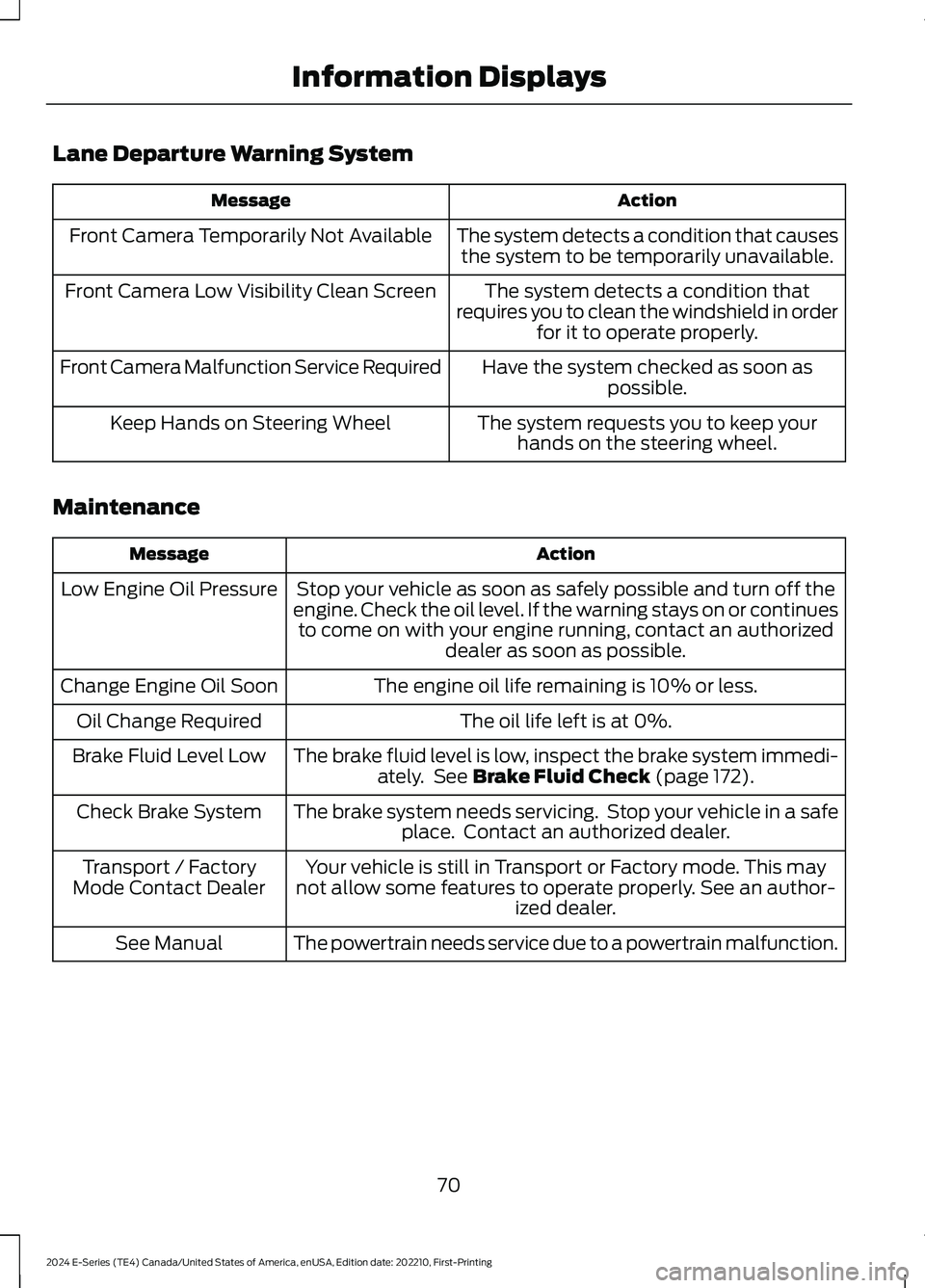
Lane Departure Warning System
ActionMessage
The system detects a condition that causesthe system to be temporarily unavailable.Front Camera Temporarily Not Available
The system detects a condition thatrequires you to clean the windshield in orderfor it to operate properly.
Front Camera Low Visibility Clean Screen
Have the system checked as soon aspossible.Front Camera Malfunction Service Required
The system requests you to keep yourhands on the steering wheel.Keep Hands on Steering Wheel
Maintenance
ActionMessage
Stop your vehicle as soon as safely possible and turn off theengine. Check the oil level. If the warning stays on or continuesto come on with your engine running, contact an authorizeddealer as soon as possible.
Low Engine Oil Pressure
The engine oil life remaining is 10% or less.Change Engine Oil Soon
The oil life left is at 0%.Oil Change Required
The brake fluid level is low, inspect the brake system immedi-ately. See Brake Fluid Check (page 172).Brake Fluid Level Low
The brake system needs servicing. Stop your vehicle in a safeplace. Contact an authorized dealer.Check Brake System
Your vehicle is still in Transport or Factory mode. This maynot allow some features to operate properly. See an author-ized dealer.
Transport / FactoryMode Contact Dealer
The powertrain needs service due to a powertrain malfunction.See Manual
70
2024 E-Series (TE4) Canada/United States of America, enUSA, Edition date: 202210, First-PrintingInformation Displays
Page 80 of 303

SITTING IN THE CORRECT
POSITION
WARNING: Sitting improperly, outof position or with the seatback reclinedtoo far can take weight off the seatcushion and affect the decision of thepassenger sensing system, resulting inserious injury or death in the event of acrash. Always sit upright against yourseat back, with your feet on the floor.
WARNING: Do not recline the seatbackrest too far as this can cause theoccupant to slide under the seatbelt,resulting in personal injury in the eventof a crash.
WARNING: Do not place objectshigher than the top of the seat backrest.Failure to follow this instruction couldresult in personal injury or death in theevent of a sudden stop or crash.
When you use them properly, the seat,head restraint, seatbelt and airbags willprovide optimum protection in the eventof a crash.
We recommend that you follow theseguidelines:
•Sit in an upright position with the baseof your spine as far back as possible.
•Do not recline the seat backrest so thatyour torso is more than 30 degreesfrom the upright position.
•Adjust the head restraint so that thetop of it is level with the top of yourhead and as far forward as possible.Make sure that you remaincomfortable.
•Keep sufficient distance betweenyourself and the steering wheel. Werecommend a minimum of 10 in(25 cm) between your breastbone andthe airbag cover.
•Hold the steering wheel with your armsslightly bent.
•Bend your legs slightly so that you canpress the pedals fully.
•Position the shoulder strap of theseatbelt over the center of yourshoulder and position the lap straptightly across your hips.
Make sure that your driving position iscomfortable and that you can maintain fullcontrol of your vehicle.
HEAD RESTRAINTS
76
2024 E-Series (TE4) Canada/United States of America, enUSA, Edition date: 202210, First-PrintingSeatsE68595 E190815
Page 101 of 303

Progressive Range Selection - PRS
(If Equipped)
Progressive Range Selection gives you theability to lockout gears from the automaticshifting range. This may provide you withan improved driving experience. Forexample, in slippery conditions or whenexperiencing a steep grade.
With the gearshift lever in drive (D), pressthe – button to active PRS. The instrumentcluster indicates the available and selectedgears.
All available gears display with the currentgear indicated. Press the – button again tolock out gears beginning with the highestgear. Example: press the – button twice tolock out 6th and 5th gears. Only theavailable gears display, and thetransmission automatically shifts betweenthe available gears. Press the + button tounlock gears to allow the transmission toshift to higher gears. The transmissionshifts within the gear range you select.
Automatic Transmission AdaptiveLearning
This feature may increase durability andprovide consistent shift feel over the lifeof your vehicle. A new vehicle ortransmission may have firm shifts, softshifts, or both. This is normal and does notaffect function or durability of thetransmission. Over time, the adaptivelearning process fully updates transmissionoperation.
Brake-Shift Interlock
WARNING: Do not drive yourvehicle until you verify that thestoplamps are working.
WARNING: When doing thisprocedure, you need to take thetransmission out of park (P) whichmeans your vehicle can roll freely. Toavoid unwanted vehicle movement,apply the parking brake prior to doingthis procedure. Use wheel chocks ifappropriate.
WARNING: If the parking brake isfully released, but the brake warninglamp remains illuminated, the brakesmay not be working properly. Have yourvehicle checked as soon as possible.
Your vehicle has a brake-shift interlockfeature that prevents the gearshift leverfrom moving from park (P) when theignition is in the 3 (on) position and thebrake pedal is not pressed.
If you cannot move the gearshift lever outof park (P) position with the ignition in the3 (on) position and the brake pedalpressed, a malfunction may have occurred.It is possible that a fuse has blown or yourvehicle’s brake lamps are not operatingproperly. See Fuse Specification Chart(page 150).
If the fuse is not blown and the brakelamps are working properly, the followingprocedure allows you to move the gearshiftlever from park (P):
1.Apply the parking brake. Switch theignition key to 1 (off), then remove thekey.
2.Move the steering column to the fulldown and full rearward position,toward the driver seat.
3.Remove the gearshift lever boot.
97
2024 E-Series (TE4) Canada/United States of America, enUSA, Edition date: 202210, First-PrintingTransmission
Page 103 of 303

GENERAL INFORMATION
Note: Occasional brake noise is normal. Ifa metal-to-metal, continuous grinding orcontinuous squeal sound is present, thebrake linings may be worn-out, have thesystem checked. If the vehicle hascontinuous vibration or shudder in thesteering wheel while braking, have thesystem checked as soon as possible.
Note: Brake dust may accumulate on thewheels, even under normal drivingconditions. Some dust is inevitable as thebrakes wear and does not contribute tobrake noise. See Cleaning the Wheels(page 187).
See Warning Lamps andIndicators (page 61).
Wet brakes result in reduced brakingefficiency. Gently press the brake pedal afew times when driving from a car wash orstanding water to dry the brakes.
Brake Over Accelerator
In the event the accelerator pedalbecomes stuck or entrapped, apply steadyand firm pressure to the brake pedal toslow the vehicle and reduce engine power.If you experience this condition, apply thebrakes and bring your vehicle to a safestop. Move the transmission to park (P),switch the engine off and apply the parkingbrake. Inspect the accelerator pedal forany interference. If none are found and thecondition persists, have the systemchecked.
Anti-lock Brake System
This system helps you maintain steeringcontrol during emergency stops by keepingthe brakes from locking.
If it illuminates when you aredriving, your vehicle requiresservice. Your vehicle continuesto have normal braking without theanti-lock brake system function. Have yourvehicle checked as soon as possible.
It also momentarily illuminates when youswitch the ignition on to confirm the lampis functional. If it does not illuminate whenyou switch the ignition on, or begins toflash at any time, have the systemchecked.
It illuminates when you engagethe parking brake and theignition is on.
If it illuminates when your vehicleis moving, make sure the parkingbrake is disengaged. If theparking brake is disengaged, this indicateslow brake fluid level or a brake systemfault. Have your vehicle checked as soonas possible.
It also momentarily illuminates when youswitch the ignition on to confirm the lampis functional. If it does not illuminate whenyou switch the ignition on, or begins toflash at any time, have the systemchecked.
Hydraulic brake booster system(Hydroboost or Hydromax)
The Hydroboost and Hydromax systemsreceive fluid pressure from the powersteering pump to provide power assistduring braking.
The Hydromax booster receives backuppressure from the reserve system electricpump whenever the fluid in the powersteering system is not flowing. When theengine is off, the pump turns on if you applythe brake pedal, or if you switch the ignitionto the on position.
99
2024 E-Series (TE4) Canada/United States of America, enUSA, Edition date: 202210, First-PrintingBrakesE270480 E67024 E67020 E270480 E67024
Page 107 of 303

PRINCIPLE OF OPERATION
WARNING: Vehicle modificationsinvolving braking system, aftermarketroof racks, suspension, steering system,tire construction and wheel and tire sizemay change the handling characteristicsof your vehicle and may adversely affectthe performance of the electronicstability control system. In addition,installing any stereo loudspeakers mayinterfere with and adversely affect theelectronic stability control system. Installany aftermarket stereo loudspeaker asfar as possible from the front centerconsole, the tunnel, and the front seatsin order to minimize the risk of interferingwith the electronic stability controlsensors. Reducing the effectiveness ofthe electronic stability control systemcould lead to an increased risk of loss ofvehicle control, vehicle rollover, personalinjury and death.
WARNING: Remember that evenadvanced technology cannot defy thelaws of physics. It’s always possible tolose control of a vehicle due toinappropriate driver input for theconditions. Aggressive driving on anyroad condition can cause you to losecontrol of your vehicle increasing the riskof personal injury or property damage.Activation of the electronic stabilitycontrol system is an indication that atleast some of the tires have exceededtheir ability to grip the road; this couldreduce the operator’s ability to controlthe vehicle potentially resulting in a lossof vehicle control, vehicle rollover,personal injury and death. If yourelectronic stability control systemactivates, SLOW DOWN.
The system automatically turns on eachtime you switch the ignition on.
If a fault occurs in either the stabilitycontrol or the traction control system, youmay experience the following conditions:
•The stability and traction control lightilluminates steadily.
•The stability control and tractioncontrol systems do not enhance yourvehicle's ability to maintain traction ofthe wheels.
If a driving condition activates either thestability control or the traction controlsystem you may experience the followingconditions:
•The stability and traction control lightflashes.
•Your vehicle slows down.
•Reduced engine power.
•A vibration in the brake pedal.
•The brake pedal is stiffer than usual.
•If the driving condition is severe andyour foot is not on the brake, the brakepedal may move as the system applieshigher brake force.
The stability control system has severalfeatures built into it to help you maintaincontrol of your vehicle:
Electronic Stability Control
The system enhances your vehicle’s abilityto prevent skids or lateral slides byapplying brakes to one or more of thewheels individually and, if necessary,reducing engine power.
Traction Control
The system enhances your vehicle’s abilityto maintain traction of the wheels bydetecting and controlling wheel spin. SeeUsing Traction Control (page 102).
103
2024 E-Series (TE4) Canada/United States of America, enUSA, Edition date: 202210, First-PrintingStability Control
Page 110 of 303

WHAT IS CRUISE CONTROL
Cruise control lets you maintain a setspeed without keeping your foot on theaccelerator pedal.
Requirements
Use cruise control when the vehicle speedis greater than 20 mph (30 km/h).
SWITCHING CRUISE CONTROL
ON AND OFF
WARNING: Do not use cruisecontrol on winding roads, in heavy trafficor when the road surface is slippery. Thiscould result in loss of vehicle control,serious injury or death.
The cruise controls are on the steeringwheel. See Cruise Control (page 48).
Switching Cruise Control On
Press the button.
Switching Cruise Control Off
Press the button when thesystem is in standby mode.
The system also turns off when you switchthe ignition off.
Note:The set speed erases when youswitch the system off.
SETTING THE CRUISE
CONTROL SPEED
WARNING: When you are goingdownhill, your vehicle speed couldincrease above the set speed. Thesystem does not apply the brakes.
Drive to the speed you prefer.
Press either button to set thecurrent speed.
Take your foot off the accelerator pedal.
Note:The indicator changes color in theinformation display.
Changing the Set Speed
Press and release the button toincrease the set speed in smallincrements.
Press and hold the button to accelerate.Release the button when you reach yourpreferred speed.
Press and release the button todecrease the set speed in smallincrements.
Press and hold the button to decelerate.Release the button when you reach yourpreferred speed.
Note: If you accelerate by pressing theaccelerator pedal, the set speed does notchange. When you release the acceleratorpedal, your vehicle returns to the speed thatyou previously set.
106
2024 E-Series (TE4) Canada/United States of America, enUSA, Edition date: 202210, First-PrintingCruise Control (If Equipped)E265296 E265297 E246884 E246885 E246884 E246885