2024 CHEVROLET TRAX power steering
[x] Cancel search: power steeringPage 177 of 328

Chevrolet TRAX Owner Manual (GMNA-Localizing-U.S./Canada/Mexico-
17041293) - 2024 - CRC - 12/6/22
176 Driving and Operating
Retained Accessory Power (RAP) will remain
active. SeeRetained Accessory Power (RAP)
0 181.
A warning chime will sound when the driver
door is opened and the key is in the
ignition.
If equipped with a locking steering column,
the steering can bind with the front wheels
turned off center, which may prevent key
rotation out of LOCK/OFF. If this happens,
move the steering wheel from right to left
while turning the key to ACC/ACCESSORY.
If this does not work, then the vehicle needs
service.
{Warning
Turning off the vehicle while moving may
cause loss of power assist in the brake
and steering systems and disable the
airbags. While driving, only shut the
vehicle off in an emergency.
In an emergency, if the vehicle cannot be
pulled over and must be turned off while
driving: 1. Push the key all the way in toward the steering column, then turn the key to
ACC/ACCESSORY. 2. Brake using firm and steady pressure. Do
not pump the brakes repeatedly. This
may deplete power assist, requiring
increased brake pedal force.
3. Shift the vehicle to N (Neutral). This can be done while the vehicle is moving.
Continue braking and steer the vehicle to
a safe location.
4. Come to a complete stop. Shift to P (Park) with an automatic transmission,
or Neutral with a manual transmission.
Push the key all the way in toward the
steering column, then turn the ignition
to LOCK/OFF.
5. Set the parking brake. See Electric
Parking Brake 0187.Caution
Use the correct key, make sure it is all
the way in —or pushed all the way in
toward the steering column when turning
off the vehicle —and turn it only with
your hand.
1. (ACC/ACCESSORY) : This position allows
features such as the infotainment system
to operate while the vehicle is off. It also
unlocks the steering column, if equipped
with a locking steering column. Use this position if the vehicle must be pushed or
towed. See Retained Accessory Power
(RAP). From ON/RUN, push the key all
the way in toward the steering column,
then turn the key to ACC/ACCESSORY.
If the key is left in ACC/ACCESSORY with
the engine off, the battery could drain
and the vehicle may not start. A warning
chime will sound when the driver door is
opened and the key is in the ignition.
2. (ON/RUN) : This position can be used to
operate the electrical accessories and to
display some instrument cluster warning
and indicator lights. This position can
also be used for service and diagnostics,
and to verify the proper operation of the
malfunction indicator lamp as may be
required for emission inspection
purposes. The switch stays in this
position when the engine is running. The
transmission is also unlocked in this
position on automatic transmission
vehicles.
3. (START) : This is the position that starts
the engine. When the engine starts,
release the key. The ignition returns to
ON/RUN for driving.
Page 178 of 328
Chevrolet TRAX Owner Manual (GMNA-Localizing-U.S./Canada/Mexico-
17041293) - 2024 - CRC - 12/6/22
Driving and Operating 177
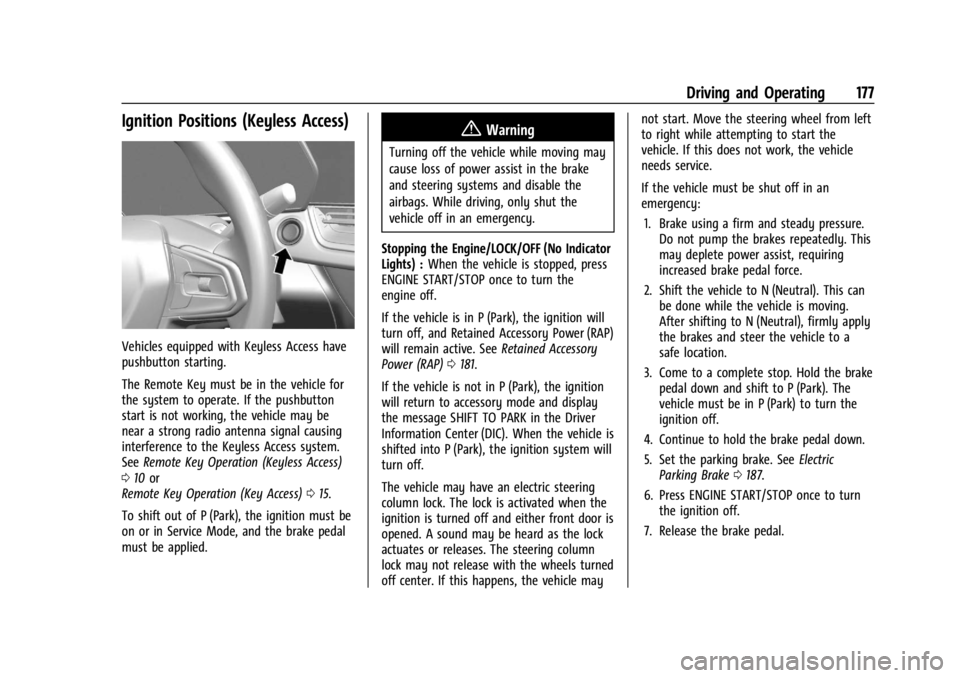
Ignition Positions (Keyless Access)
Vehicles equipped with Keyless Access have
pushbutton starting.
The Remote Key must be in the vehicle for
the system to operate. If the pushbutton
start is not working, the vehicle may be
near a strong radio antenna signal causing
interference to the Keyless Access system.
SeeRemote Key Operation (Keyless Access)
0 10 or
Remote Key Operation (Key Access) 015.
To shift out of P (Park), the ignition must be
on or in Service Mode, and the brake pedal
must be applied.
{Warning
Turning off the vehicle while moving may
cause loss of power assist in the brake
and steering systems and disable the
airbags. While driving, only shut the
vehicle off in an emergency.
Stopping the Engine/LOCK/OFF (No Indicator
Lights) : When the vehicle is stopped, press
ENGINE START/STOP once to turn the
engine off.
If the vehicle is in P (Park), the ignition will
turn off, and Retained Accessory Power (RAP)
will remain active. See Retained Accessory
Power (RAP) 0181.
If the vehicle is not in P (Park), the ignition
will return to accessory mode and display
the message SHIFT TO PARK in the Driver
Information Center (DIC). When the vehicle is
shifted into P (Park), the ignition system will
turn off.
The vehicle may have an electric steering
column lock. The lock is activated when the
ignition is turned off and either front door is
opened. A sound may be heard as the lock
actuates or releases. The steering column
lock may not release with the wheels turned
off center. If this happens, the vehicle may not start. Move the steering wheel from left
to right while attempting to start the
vehicle. If this does not work, the vehicle
needs service.
If the vehicle must be shut off in an
emergency:
1. Brake using a firm and steady pressure. Do not pump the brakes repeatedly. This
may deplete power assist, requiring
increased brake pedal force.
2. Shift the vehicle to N (Neutral). This can be done while the vehicle is moving.
After shifting to N (Neutral), firmly apply
the brakes and steer the vehicle to a
safe location.
3. Come to a complete stop. Hold the brake pedal down and shift to P (Park). The
vehicle must be in P (Park) to turn the
ignition off.
4. Continue to hold the brake pedal down.
5. Set the parking brake. See Electric
Parking Brake 0187.
6. Press ENGINE START/STOP once to turn the ignition off.
7. Release the brake pedal.
Page 188 of 328

Chevrolet TRAX Owner Manual (GMNA-Localizing-U.S./Canada/Mexico-
17041293) - 2024 - CRC - 12/6/22
Driving and Operating 187
Using ABS
Do not pump the brakes. Just hold the brake
pedal down firmly. Hearing or feeling ABS
operate is normal.
Braking in Emergencies
ABS allows steering and braking at the same
time. In many emergencies, steering can
help even more than braking.
Electric Parking Brake
The Electric Parking Brake (EPB) can be
applied when the vehicle is on or off.
If there is not enough electrical power, theEPB cannot be applied or released. To
prevent draining the battery, avoid
unnecessary repeated cycles of the EPB.
The EPB status light displays red and the
Service EPB warning light displays amber.
See
Electric Parking Brake Light 095 and
Service Electric Parking Brake Light 095.
There are also EPB-related Driver Information
Center (DIC) messages.
Before leaving the vehicle, look for the red
EPB status light to ensure that the EPB is
applied.
EPB Apply
To apply the EPB:
1. Be sure the vehicle is at a complete stop.
2. Pull the EPB switch.
The red EPB status light will flash and then
stay on once the EPB is fully applied. If the
red EPB status light flashes continuously, the
EPB is only partially applied or there is a
problem with the EPB. A DIC message will
display. Release the EPB and try to apply it
again. If the light does not come on,
or continues flashing, have the vehicle
serviced. Do not drive the vehicle if the red
EPB status light is flashing. See your dealer. If the amber Service EPB warning light is on,
pull the EPB switch. Continue to hold the
switch until the red EPB status light remains
on. If the amber Service EPB warning light is
on, see your dealer.
If the EPB is applied while the vehicle is
moving, the vehicle will decelerate as long
as the switch is pulled. If the switch is
pulled until the vehicle comes to a stop, the
EPB will remain applied.
The vehicle may automatically apply the EPB
in some situations when the vehicle is not
moving. This is normal, and is done to
periodically check the correct operation of
the EPB system, or as required by other
safety functions that utilize the EPB.
If the EPB fails to apply, block the rear
wheels to prevent vehicle movement.
EPB Release
To release the EPB:
1. Turn the ignition on or to ACC/ACCESSORY.
2. Apply and hold the brake pedal.
3. Press the EPB switch.
The EPB is released when the red EPB status
light turns off.
Page 282 of 328

Chevrolet TRAX Owner Manual (GMNA-Localizing-U.S./Canada/Mexico-
17041293) - 2024 - CRC - 12/6/22
Vehicle Care 281
Steering, Suspension, and Chassis
Components
Visually inspect steering, suspension, and
chassis components for damaged, loose,
or missing parts or signs of wear at least
once a year.
Inspect power steering for proper
attachment, connections, binding, leaks,
cracks, chafing, etc.
Visually check constant velocity joint boots
and axle seals for leaks.
Body Component Lubrication
Lubricate all key lock cylinders, hood hinges,
liftgate hinges, and the steel fuel door
hinges, unless the components are plastic.
Applying silicone grease on weatherstrips
with a clean cloth will make them last
longer, seal better, and not stick or squeak.
Underbody Maintenance
At least twice a year, spring and fall, use
plain water to flush any corrosive materials
from the underbody. Take care to
thoroughly clean any areas where mud and
other debris can collect.Do not directly power wash the transfer
case and/or front/rear axle output seals.
High pressure water can overcome the seals
and contaminate the fluid. Contaminated
fluid will decrease the life of the transfer
case and/or axles and should be replaced.
Sheet Metal Damage
If the vehicle is damaged and requires sheet
metal repair or replacement, make sure the
body repair shop applies anti-corrosion
material to parts repaired or replaced to
restore corrosion protection.
Original manufacturer replacement parts will
provide the corrosion protection while
maintaining the vehicle warranty.
Finish Damage
Quickly repair minor chips and scratches
with touch-up materials available from your
dealer to avoid corrosion. Larger areas of
finish damage can be corrected in your
dealer's body and paint shop.
Chemical Paint Spotting
Airborne pollutants can fall upon and attack
painted vehicle surfaces causing blotchy,
ring-shaped discolorations, and small,irregular dark spots etched into the paint
surface. See
“Finish Care” previously in this
section.
Interior Care
To prevent dirt particle abrasions, regularly
clean the vehicle's interior. Before using
cleaners, read and follow all safety
instructions on the label. While cleaning the
interior, open the doors and windows to get
proper ventilation. Newspapers or dark
garments can transfer color to the vehicle’s
interior.
Caution
Immediately remove cleaners, hand
lotions, sunscreen, and insect repellent
from all interior surfaces or permanent
damage may result.
Caution
Use cleaners specifically designed for the
surfaces being cleaned to prevent
permanent damage to the vehicle. Apply
all cleaners directly to a cleaning cloth.
Do not spray cleaners on any switches or
controls.
Page 291 of 328

Chevrolet TRAX Owner Manual (GMNA-Localizing-U.S./Canada/Mexico-
17041293) - 2024 - CRC - 12/2/22
290 Service and Maintenance
Systems, Fluids, and Visible Leak
Inspection
.Engine oil
.Transmission
.Drive axle
.Transfer case
.Engine cooling system
.Power steering, if equipped
.Fuel system
.Windshield washer fluid
Tire Inspection
.Tire pressure, tread depth, and wear
.Rotation, if applicable
.Alignment check, optional
.Reset tire pressure monitor
.Check tire sealant expiration date,
if equipped
.Check spare tire, if equipped
Brakes
.Check brake system
Visible and Functional Inspections
.Seat belt components
.Exhaust system
.Accelerator pedal
.Passenger compartment air filter,
if equipped
.Engine air filter
.Hoses
.Belts
.Shocks and struts
.Steering components
.Axle boots or driveshaft and u-joints
.Compartment lift struts, if equipped
.Floor mats secured, no interference with
pedals
.Horn
.Ignition lock, if equipped
.Starter switch
.Evaporative control system
Lubricate
.Chassis components
Special Application Services
.Severe Commercial Use Vehicles Only:
Lubricate chassis components every oil
change.
.Have underbody flushing service
performed. See "Underbody Maintenance"
in Exterior Care 0277.
Page 325 of 328

Chevrolet TRAX Owner Manual (GMNA-Localizing-U.S./Canada/Mexico-
17041293) - 2024 - CRC - 12/2/22
324 Index
S
SafetyLocks . . . . . . . . . . . . . . . . . . . . . . . . . . . . . . . . . . . 22
Safety Defects Reporting Canadian Government . . . . . . . . . . . . . . . . . 305
General Motors . . . . . . . . . . . . . . . . . . . . . . . . 306
U.S. Government . . . . . . . . . . . . . . . . . . . . . . . 305
Safety System Check . . . . . . . . . . . . . . . . . . . . . 44
Satellite Radio . . . . . . . . . . . . . . . . . . . . . . . 121, 140
Scheduling Appointments . . . . . . . . . . . . . . . . 301
Sealant Kit, Tire . . . . . . . . . . . . . . . . . . . . . . . . . . 261
Seat Belts . . . . . . . . . . . . . . . . . . . . . . . . . . . . . . . . . 38 Buckle To Drive . . . . . . . . . . . . . . . . . . . . . . . . . 38
Care . . . . . . . . . . . . . . . . . . . . . . . . . . . . . . . . . . . . 44
Extender . . . . . . . . . . . . . . . . . . . . . . . . . . . . . . . . 43
How to Wear Seat Belts Properly . . . . . . . 39
Lap-Shoulder Belt . . . . . . . . . . . . . . . . . . . . . . . 41
Reminders . . . . . . . . . . . . . . . . . . . . . . . . . . . . . . 91
Replacing after a Crash . . . . . . . . . . . . . . . . . 44
Use During Pregnancy . . . . . . . . . . . . . . . . . . 43
Seats Adjustment, Front . . . . . . . . . . . . . . . . . . . . . . 32
Folding Seatback . . . . . . . . . . . . . . . . . . . . . . . . 35
Head Restraints . . . . . . . . . . . . . . . . . . . . . . . . . 30
Heated Front . . . . . . . . . . . . . . . . . . . . . . . . . . . 34
Lumbar Adjustment, Front . . . . . . . . . . . . . . 34
Power Adjustment, Front . . . . . . . . . . . . . . . 32
Rear . . . . . . . . . . . . . . . . . . . . . . . . . . . . . . . . . . . . 36 Seats (cont'd)
Reclining Seatbacks . . . . . . . . . . . . . . . . . . . . . 33
Securing Child Restraints . . . . . . . . . . . . . . 68, 70
Security Light . . . . . . . . . . . . . . . . . . . . . . . . . . . . . . . . . . . . 99
OnStar . . . . . . . . . . . . . . . . . . . . . . . . . . . . . . . . . 309
Vehicle . . . . . . . . . . . . . . . . . . . . . . . . . . . . . . . . . 24
Vehicle Alarm . . . . . . . . . . . . . . . . . . . . . . . . . . . 24
Service . . . . . . . . . . . . . . . . . . . . . . . . . . . . . . . . . . . 163 Accessories and Modifications . . . . . . . . . 216
Climate Control System . . . . . . . . . . . . . . . . 158
Doing Your Own Work . . . . . . . . . . . . . . . . . 216
Electric Parking Brake Light . . . . . . . . . . . . . 95
Maintenance Records . . . . . . . . . . . . . . . . . . 293
Maintenance, General Information . . . . . 286
Parts Identification . . . . . . . . . . . . . . . . . . . . . 294
Scheduling Appointments . . . . . . . . . . . . . . 301
Services Special Application . . . . . . . . . . . . . . . . . . . . . 290
Servicing the Airbag . . . . . . . . . . . . . . . . . . . . . . .53
Settings . . . . . . . . . . . . . . . . . . . . . . . . . . . . . . 128, 150
Shift Lock Control Function Check, Automatic Transmission . . . . . . . . . . . . . . . . . 231
Shifting Into Park . . . . . . . . . . . . . . . . . . . . . . . . . . . . . . . 181
Out of Park . . . . . . . . . . . . . . . . . . . . . . . . . . . . 182
Sidemarker Bulb Replacement . . . . . . . . . . . . . . . . . . . . . . 236 Signals, Turn and Lane-Change . . . . . . . . . . . . 111
Software Updates . . . . . . . . . . . . . . . . . . . . . . . . . 119
Spare Tire
Compact . . . . . . . . . . . . . . . . . . . . . . . . . . . . . . . . 271
Special Application Services . . . . . . . . . . . . . . 290
Specifications and Capacities . . . . . . . . . . . . . 295
Speedometer . . . . . . . . . . . . . . . . . . . . . . . . . . . . . 88
Start Assist, Hill . . . . . . . . . . . . . . . . . . . . . . . . . . 188
Start Vehicle, Remote . . . . . . . . . . . . . . . . . . . . . .18
Starter Switch Check . . . . . . . . . . . . . . . . . . . . . . 231
Starting the Engine . . . . . . . . . . . . . . . . . . . . . . .178
Status Vehicle . . . . . . . . . . . . . . . . . . . . . . . . . . . . . . . . 104
Steering . . . . . . . . . . . . . . . . . . . . . . . . . . . . . . . . . 167 Heated Wheel . . . . . . . . . . . . . . . . . . . . . . . . . . 80
Wheel Adjustment . . . . . . . . . . . . . . . . . . . . . . 80
Wheel Controls . . . . . . . . . . . . . . . . . . . . . . . . . 117
Steering Wheel Controls . . . . . . . . . . . . . . . . . 136
Stop/Start System . . . . . . . . . . . . . . . . . . . . . . . 179
Stoplamps and Back-Up Lamps Bulb Replacement . . . . . . . . . . . . . . . . . . . . . . 236
Storage Center Console . . . . . . . . . . . . . . . . . . . . . . . . . 75
Compartments . . . . . . . . . . . . . . . . . . . . . . . . . . 74
Cupholders . . . . . . . . . . . . . . . . . . . . . . . . . . . . . 75
Glove Box . . . . . . . . . . . . . . . . . . . . . . . . . . . . . . 74
Instrument Panel Areas . . . . . . . . . . . . . . . . . 74
Roof Rack System . . . . . . . . . . . . . . . . . . . . . . . 77